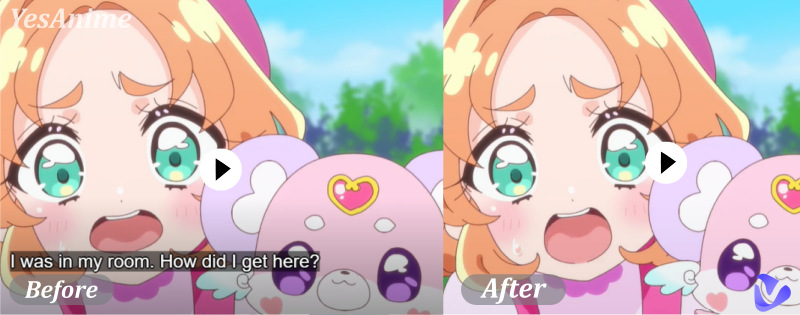
Have you ever recorded the perfect video but only to notice a watermark, logo, or random text ruining the shot? That’s where a video eraser comes in. A video eraser helps you remove unwanted elements like watermarks, logos, text overlays, objects, any unwanted objects, or even people from videos. Whether you want to clean up social media clips or reuse old footage, an AI-powered video eraser is exactly what you need for fast, high-quality results.
- On This Page
-
Video Eraser, AI Versus Non-AI
-
Video Eraser AI for Watermark—Vmake AI Removes Watermark From Videos
-
Text and Logo Video Eraser AI - Vidnoz AI Video Editor
How to Remove Text and Logo from Video on Vidnoz Online Video Editor?
-
Human Video Eraser AI: Remove People From Videos Online Free
-
Erase Text From Video AI: Video Text Removal Online Free
Video Eraser, AI Versus Non-AI
Before choosing the right tool to remove a logo from a video, or the same for text, stamps, stickers, etc., it’s important to understand how different video eraser technologies work. Go straight to the key differences between a traditional video eraser and an AI video eraser.
1. Automation
●A traditional manual video eraser relies on manual masking, cropping, blurring, or covering unwanted elements frame by frame.
●AI video eraser understands motion and background continuity. It can detect logos, text, and objects and remove them automatically.
2. Quality
●Manual edits often result in inconsistencies, visible blur, ghosting, or unnatural patches in the video.
●AI reconstructs the missing background to maintain smooth transitions and preserves the original resolution.
3. Speed
●The frame-by-frame removal is slow and labor-intensive, often taking hours of heavy work.
●In contrast, an AI-powered video eraser works in minutes, not hours.
4. Accessibility
●Traditional video erasers require practice and professional editing skills.
●AI tools have no skill threshold for all levels of users.
This is why video eraser AI solutions are now the preferred choice for creators and marketers.
Video Eraser AI for Watermark—Vmake AI Removes Watermark From Videos
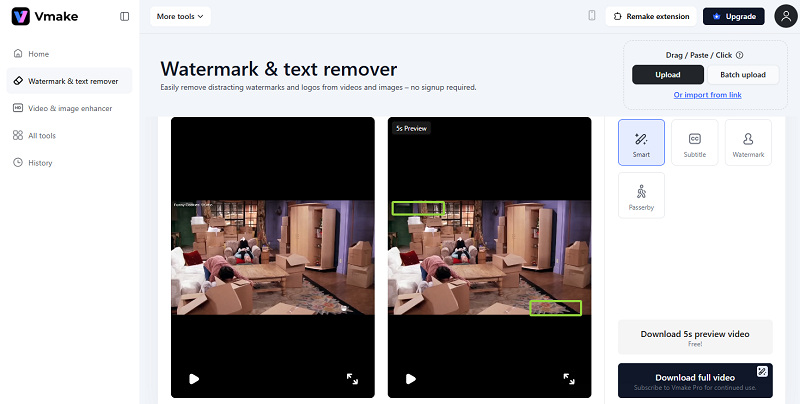
For users focused purely on watermark cleanup, Vmake.ai video eraser is a solid option. It is a specialized video eraser designed to remove watermarks from almost any type of video, including social media clips, product videos, and promotional footage. As an AI video eraser online, it enables batch removal and an instant smart AI option to automatically analyze surrounding pixels and reconstruct the background naturally. Also, it has specific choices for precisely removing subtitles from video, as well as watermarks and passersby.
Unlike simple blur tools, this video eraser remove watermark solution intelligently fills missing areas, maintaining visual consistency.
Key Questions Answered
#1. Remove watermarks from videos for free?
Yes. You can remove watermarks without signing up, and the tool is free to use with some limits, including a free 5-second preview clip download.
#2. How’s the quality of video erasing?
The AI performs well on static and semi-transparent watermarks, keeping motion smooth and edges clean.
#3. How many times can they erase their videos for free per day?
Free users typically get up to 10 times per day.
#4. Any drawbacks like quality loss or frame loss?
There is minor quality loss that may occur on complex moving backgrounds, but frame integrity is generally preserved.
Text and Logo Video Eraser AI - Vidnoz AI Video Editor
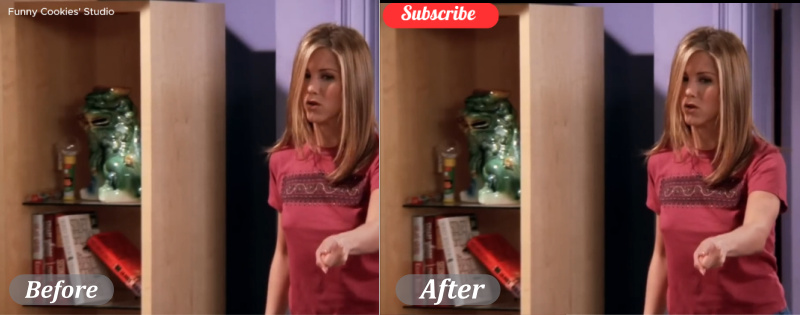
Vidnoz AI Video Editor is a game changer in the competition of eliminating watermarks from videos. As a manual video editor online tool, it opens a new angle for users to have full control over how text, logos, and watermarks are handled. Instead of relying solely on automatic detection, Vidnoz AI video eraser online allows you to actively cover unwanted elements using customizable shapes, stickers, icons, and overlays. This approach is especially useful when dealing with static text, logos, or complex backgrounds where automatic AI removal may struggle.
Even for moving watermarks, Vidnoz’s frame-by-frame preview and timeline control can fix them perfectly, though it’s kind of time-wasting. But for any fast motions or complex background videos that need to maintain professionality and clarity, Vidnoz promises non-destructive edits, without noticeable blur or distortion.
How to Remove Text and Logo from Video on Vidnoz Online Video Editor?
Step 1. Load the Vidnoz Online Video Editor and upload your video.
Step 2. Go to Elements > Stock or Freepik > Search the unwanted stickers, shapes, or icons from the asset.
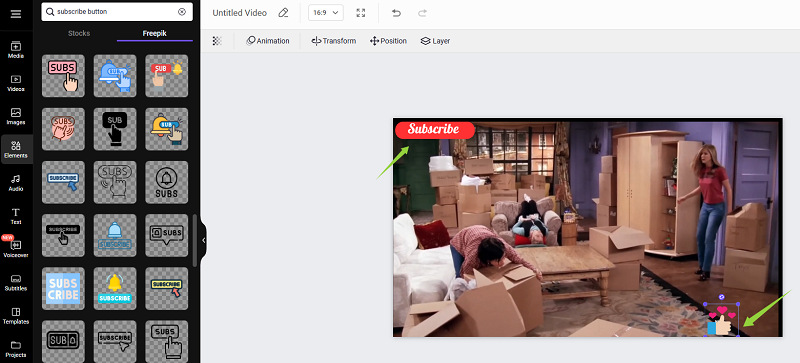
Step 3. You can precisely adjust the position, size, opacity, layer, and duration of each overlay on the timeline, ensuring the covered area stays perfectly aligned throughout the video.
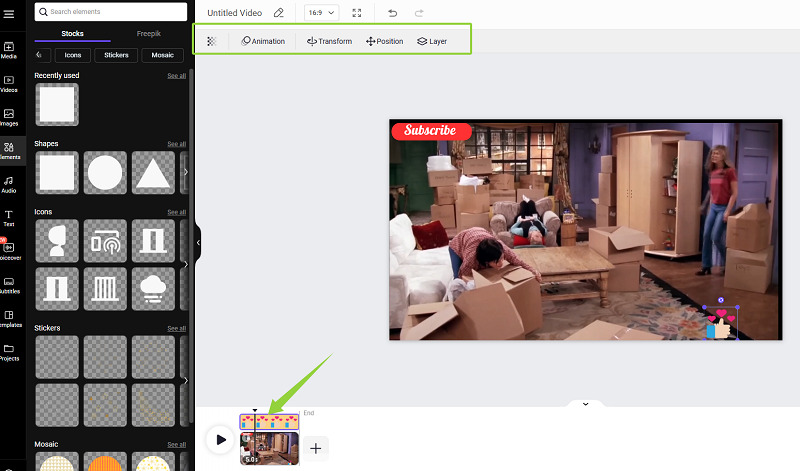
Step 4. Preview the result to ensure the text and logos are fully covered in every frame and export it in HD, MP4 format.
Extra Video Editing Features Users Might Also Like
- Multiple Videos Combined on One Screen
- Add Customized Subtitles in One Click
- Add Animations, Effects, and Transitions to Your Videos for Free
- Add Voiceovers to Your Videos
Human Video Eraser AI: Remove People From Videos Online Free
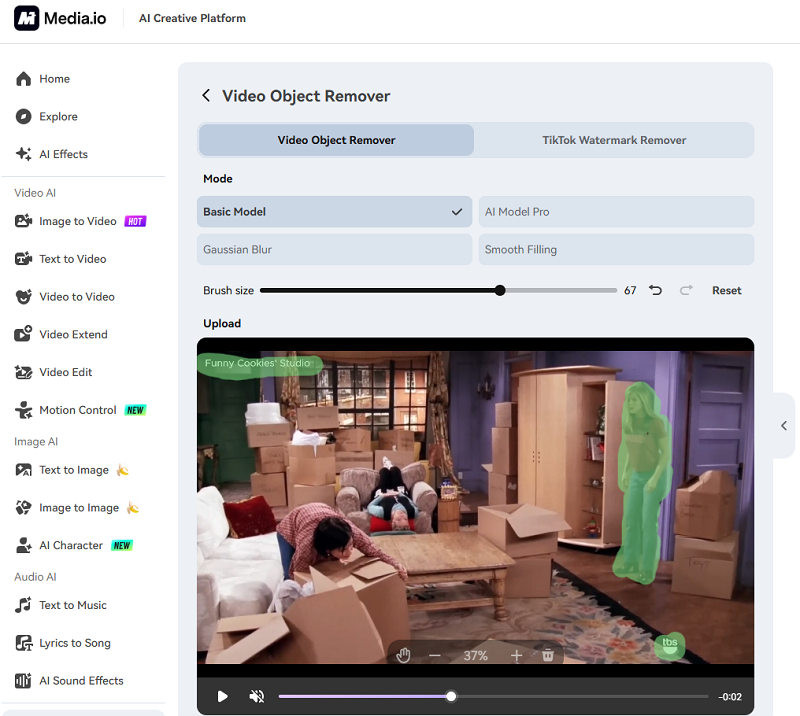
If you need a quick online video eraser that goes beyond just logos or text, Media.io AI video eraser features object and person removal without professional editing skills. With this tool, you can upload your footage, mask the person or object you want removed via an adjustable brush, and let AI automatically track and erase them throughout the entire video. The video object remover works frame-by-frame, intelligently blending the background so the scene looks seamless after removal.
One of the standout features of Media.io is its various removal modes, such as Gaussian blur, smooth filling, prompt-to-removal, and a specialized mode for removing TikTok logos from videos. These options help you tailor how the erased area is reconstructed.
Key Questions Answered:
#1. Remove watermarks from videos for free?
Yes. Media.io offers a 3-day free trial for all sign-in users to remove unwanted parts from any video clearly.
#2. How’s the quality of video erasing?
The video watermark removal quality is generally high for slow-moving backgrounds and static scenes, with the AI preserving original resolution and blending edits smoothly.
#3. How many times can they erase their videos for free per day?
You are likely limited to around 5 videos per month with a free plan.
#4. Any drawbacks like quality loss or frame loss?
It is good for quick edits, but in complex motion scenes or fast camera movement, slight artifacts and frame loss may appear, and editing results aren’t as perfect as professional VFX tools.
Erase Text From Video AI: Video Text Removal Online Free
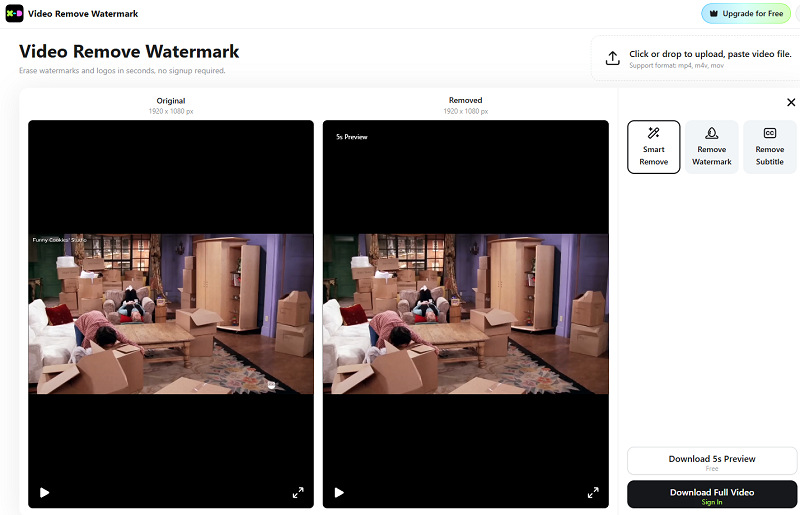
X-Design offers a focused video eraser online tool dedicated to removing text from videos, including captions, titles, subtitles, watermarks, and other on-screen text, even the full-screen text watermarks. As an AI-driven video eraser remove text solution, it detects text layers across frames automatically without manual masking or blurring. Also, it analyzes background textures and reconstructs the area to avoid visible cutouts or ghosting.
The best part of it is its ease of use. You just simply upload your video in MP4, MOV, or M4V format, let the AI detect text, and preview and download the cleaned result.
Key Questions Answered
#1. Remove watermarks from videos for free?
Yes. It allows anonymous users to freely remove certain text-based watermarks without sign in.
#2. How’s the quality of video erasing?
Very good. Its AI preserves clarity and avoids blur, with smooth backgrounds and minimal artifacts.
#3. How many times can they erase their videos for free per day?
X-design has 10 daily free AI video watermark removals for all users.
#4. Any drawbacks like quality loss or frame loss?
Though overall results are preserved well, in fast-cut scenes or complex patterns, some slight blemishes may appear.
Conclusion
To sum up, a modern video eraser powered by AI saves time, preserves quality, and removes distractions effortlessly. Among all options, Vidnoz AI Video Editor stands out for offering a new way to address video watermarks without taking the risks of quality loss and frame loss due to the watermark removal process. Try it today and make your videos clean, professional, and reusable in minutes.

Vidnoz AI - Create Free Engaging AI Video with Talking Avatar
- Easily create professional AI videos with realistic avatars.
- Text-to-speech lip sync voices of different languages.
- 2800+ video templates for multiple scenarios.