360-degree videos are now widely used for product display and immersive scenes. Instead of showing only still photos, creators now use rotating videos to show every angle of an object. This method helps viewers understand products better and builds more trust. With the help of a 360 degree video maker, anyone can turn simple images into rotating videos without editing skills. Today, AI tools make this process easy and quick. Whether you sell products online or create content for social media, a 360 rotation video generator helps you stand out. In this article, you will learn what a 360-degree video is, why it matters, and which tools help you create one in seconds. We will also compare top tools and explain how to make a video for free.

- On This Page
-
Comparison Table of 5 Best 360 Rotation Video Makers for Fast Overview
-
5 Best 360 Degree Video Makers Free & Paid
1. Vidnoz AI: Free 360 Microwave Video Generator
2. Remaker AI: 360 Rotation Video Generator
3. Media AI: 360 Spin Video Generator
4. VideoMaker Me: AI 360 Spin Generator Free
5. Pollo AI: AI 360 Degree Video Maker
-
How to Generate 360 Rotation Videos with Vidnoz AI
Conclusion of 360 Degree Video Maker
Comparison Table of 5 Best 360 Rotation Video Makers for Fast Overview
Before going into details, this table gives a quick look at the top tools. Each 360 degree video maker below supports rotation videos for product display and visual use. Some tools offer free trials, while others focus on paid quality output.
|
AI Products
|
Credits Required
|
Watermark
|
Advantages
|
|
Vidnoz AI
|
0
|
No
|
Free use, fast generation
|
|
Remaker AI
|
18
|
No
|
Smooth 360 rotation output
|
|
Media.io
|
6
|
Yes
|
Simple interface, easy steps
|
|
VideoMaker Me
|
0
|
Yes
|
Free rotation videos, clean output
|
|
Pollo AI
|
10
|
No
|
Multiple rotation styles, stable motion
|
This comparison helps you choose the right 360 degree video maker based on your needs and budget.
5 Best 360 Degree Video Makers Free & Paid
In this part, we review five popular tools that help users create 360 rotation videos easily. Each 360 degree video maker offers different features, pricing options, and output quality to support product display, marketing visuals, and online content needs.
1. Vidnoz AI: Free 360 Microwave Video Generator
Vidnoz AI Video Effects provides an easy way to create 360 rotation videos using its microwave filter. This 360 degree video maker turns a single image into a smooth rotating video, which helps sellers show products clearly from all sides. Ecommerce users often choose Vidnoz AI because it offers free daily trials and does not add watermarks. The tool processes videos quickly and produces clean results without complex steps. Vidnoz AI also offers multiple video effects, allowing users to test different looks before sharing or uploading their videos online.
Key Features:
- Generates full 360 rotation videos from one image using the microwave filter with stable motion.
- Offers free daily trials, making it suitable even for beginners and small businesses.
- Creates videos quickly while keeping image clarity and consistent rotation quality.
- Provides multiple video effects to match different product styles and display needs.
- Works fully online, so users can create videos without installing any software.
This tool also works as a 360 degree video maker online, so users do not need to install any software. Many beginners prefer it because the steps stay simple.
More AI tools you may be interested in developed by Vidnoz AI:
AI Talking Photo >>
AI Image Generator >>
Free AI Video Generator >>

Vidnoz AI - Create Free Engaging AI Video with Talking Avatar
- Easily create professional AI videos with realistic avatars.
- Text-to-speech lip sync voices of different languages.
- 2800+ video templates for multiple scenarios.
2. Remaker AI: 360 Rotation Video Generator
Remaker AI focuses on smooth spin videos. This 360 video creator supports product rotation with clear motion. Users upload an image, select rotation settings, and generate a video in seconds. The tool supports high-quality output and stable rotation. It works well for jewelry, shoes, gadgets, and other small items. Although it uses credits, the results look professional.
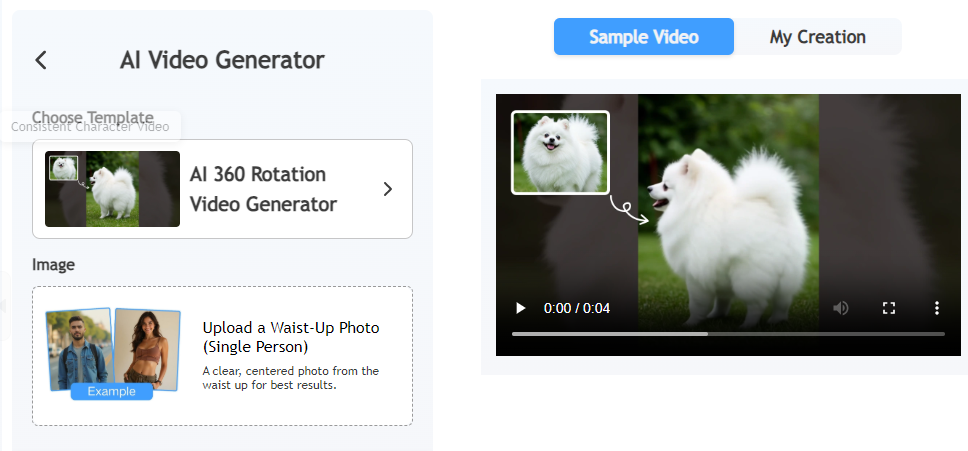
Key features:
- Clean rotation effect
- Supports product display
- Easy control settings
If you want a clean 360° rotation video generator with stable motion, this tool fits well.
3. Media AI: 360 Spin Video Generator
Media AI offers an easy method to turn still images into smooth spin videos. This 360 video creator suits users who prefer a simple setup without extra controls. The interface is clear, and the upload process takes only a few steps. It also works as a 360 photo to video online converter, helping online sellers display products from all sides. Free plans may include a watermark, but the video quality remains clear and usable.
Key features:
- Simple dashboard
- Works online
- Supports photo-to-video conversion
Also Read: AI Music Video Generator Free >>
4. VideoMaker Me: AI 360 Spin Generator Free
VideoMaker provides an online tool that helps users generate 360 spin videos without using credits. This 360 degree video maker online supports product visuals and promotional content. Users can upload an image, apply rotation, and generate a video in a short time. The platform suits beginners and small businesses who want free rotation videos with clean output and no complex setup.
Key features:
- Stable rotation
- Product-focused output
- Online access
This tool also works as a 360 photo to video online converter, helping sellers show products from all angles.
5. Pollo AI: AI 360 Degree Video Maker
Pollo AI allows users to create rotation videos with different motion styles. This 360 degree video maker supports flexible rotation options, making it useful for product displays and creative visuals. Users can upload images, choose rotation settings, and generate videos easily. The tool uses credits, but it delivers stable output and clear motion, which helps improve product presentation on websites and social platforms.
Key features:
- Multiple rotation options
- Clean output
- Easy steps
Pollo AI also supports 360 degree video maker online use, which keeps the process simple.
How to Generate 360 Rotation Videos with Vidnoz AI
Creating a rotation video with Vidnoz AI takes only a few steps. This 360 rotation video generator works well for free users.
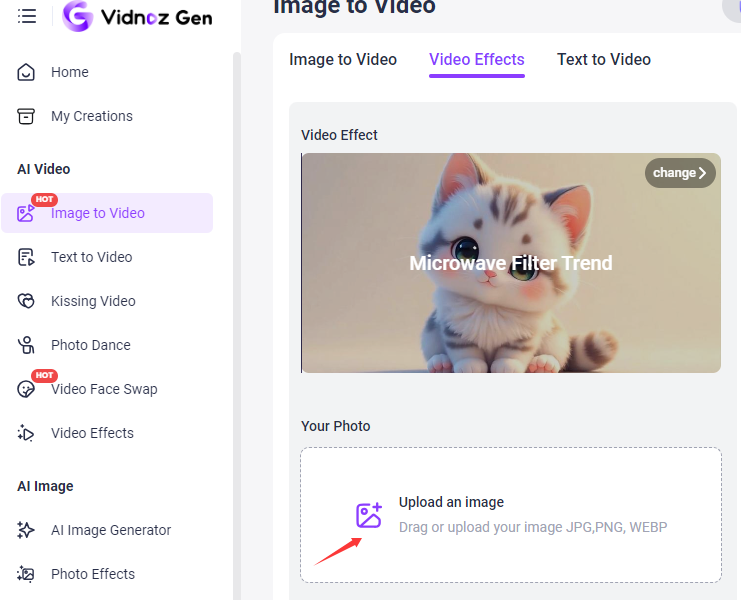
Step 1: Choose Video Effect
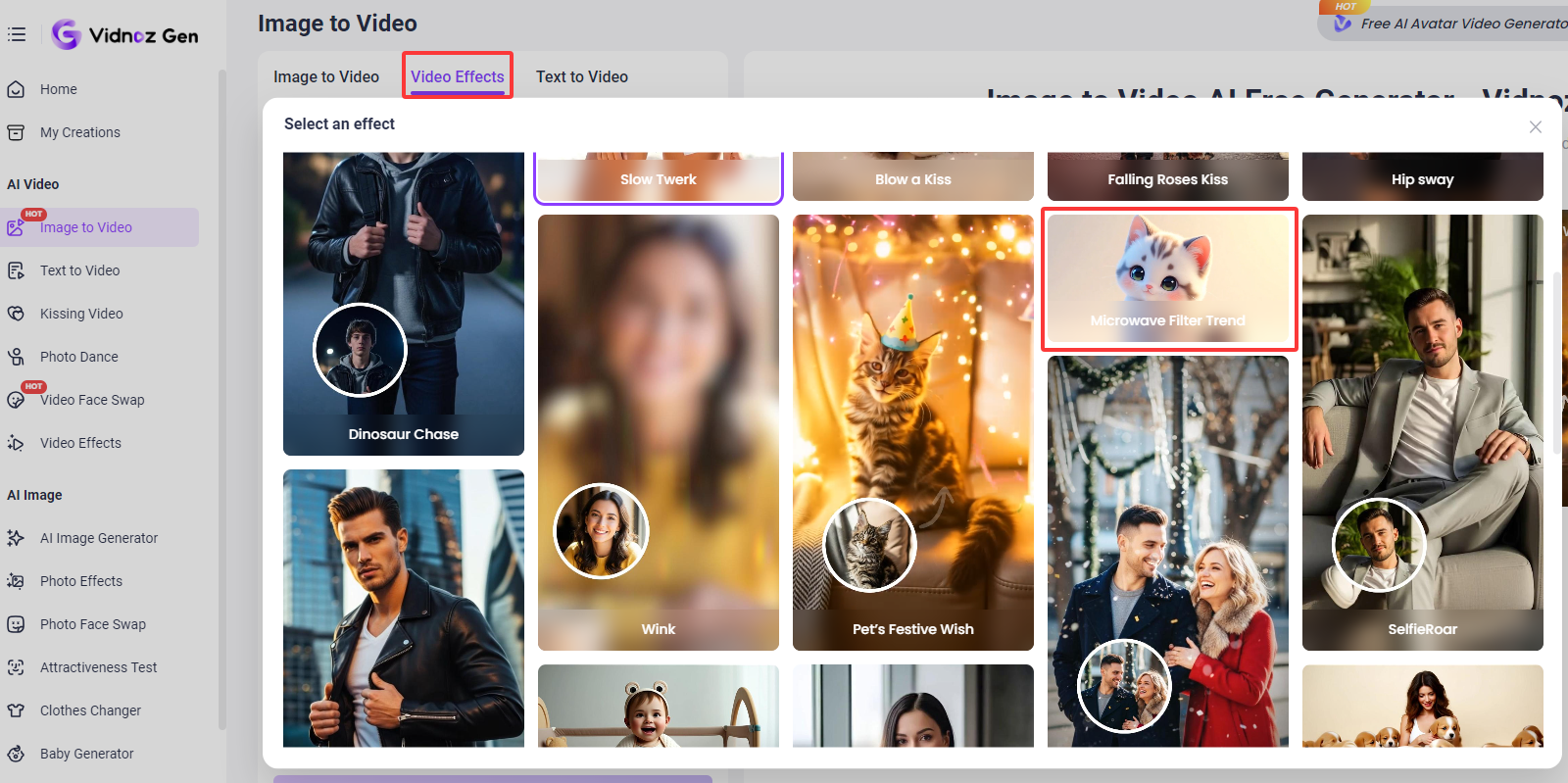
Go to Image to Video AI page > Click “Video Effects” > Choose “Microwave Filter Trend” which supports smooth rotation and visual motion for creating a 360-style video from a single image.
Step 2: Upload Your Photo
Drag and drop your image or upload it directly from your device. The tool supports common formats such as JPG, PNG, and WEBP for easy use.
Step 3: Generate the Video
Click the “Generate Now” button to start the process. The system will create your rotation video automatically within a few seconds. Click the button below to start the journey to make 360 rotation videos offered by the 360 photo to video online converter.
Convert Image to Video AI Online - Free
- Create a video from an image quickly for free.
- Use various AI models to turn photos into videos.
- Download and share the AI-generated video at no cost.
Convert Image to Video
Conclusion of 360 Degree Video Maker
360 rotation video generators help show products clearly and improve user trust. Instead of static images, rotating videos give viewers a full view of the item. With AI tools, creating these videos no longer requires editing skills. A reliable 360 degree video maker makes the process quick and simple. Among all options, Vidnoz AI stands out because it offers free daily use, fast results, and clean output. If you want to create rotation videos without cost, Vidnoz AI is a good place to start. Try it today and turn your images into clear 360 rotation videos.