Ever wondered how cool it would be to make a talking emoji that speaks just like you? Well, this is why I am here to help. In this guide, you are going to discover simple and fun ways to turn your favorite icons into talking emojis that bring conversations to life. You know it can be easy when you follow the right steps, and that’s exactly what we’ll walk you through. Get ready to talk to emojis and experience chatting in a whole new way!
- On This Page
-
What is Talking Emoji? How Does It Work?
-
Quick Trendy Talking Emojis Overview
-
Tools to Make Emojis Talk (Desktop & Mobile)
How to Make Talking Emoji on iPhone
Don’t Have an iPhone? Make Talking Emoji on Android or Desktop!
-
Talk With Emojis Ideas – Let Emojis Speak for You
-
FAQs about Talking Emoji
Q: Can I make my emoji talk?
Q: How to make emoji live on iPhone?
Q: How to get emojis to talk on iPhone?
Q: How to activate audio emoji?
What is Talking Emoji? How Does It Work?
A talking emoji is simply a digital emoji that has been given a voice and personality through animation or sound. Instead of just sending a smiley face, you can actually make it “speak” words, sentences, or even funny expressions. Think of it as taking the emojis you already use every day and turning them into mini characters that express your mood in a more lively way. With a talking emoji, you’re not just sending a symbol, you’re sharing a small animated message that can laugh, cheer, or even sing. This is why so many people are curious about how do you make emojis talk. Whether you’re sending messages to friends or creating social media content that can add emoji to photo, being able to talk with emojis makes conversations more entertaining and expressive.
Behind the scenes, the magic of a talking emoji comes from a mix of tech like text-to-speech (TTS) and lip-sync animation. TTS allows your written words to be converted into natural-sounding speech, so when you type something, the emoji can “say” it out loud. Lip-syncing and facial animation technology then match the emoji’s mouth movements with the audio, making it look like it’s actually speaking. Depending on the platform or app, these can be generated as short looping GIFs or as brief video clips that you can easily share. So when you talk to emoji or make your own emoji, what you’re really doing is combining speech technology with creative animation. The result is a fun and easy way to send messages that feel personal and alive.
Quick Trendy Talking Emojis Overview
When it comes to a talking emoji, some styles are just too funny and popular to ignore. Here are the top trendy funny talking emojis.

Image from pinterest.com
The classic talk emoji face with big lips is always a favorite because it looks silly while speaking.

Image from emojipedia.org
Animal emojis, like a fox, dog, or cat that “talks,” make chats playful and adorable.

Image from tenor.com
Cartoon-style characters let you talk with emojis that feel like mini animated shows.

Image from tenor.com
People also love celebrity-inspired talking emojis that mimic voices or expressions.

Image from ko-fi.com
And of course, the goofy food emojis like a pizza slice that talks, as always, get laughs.
Tools to Make Emojis Talk (Desktop & Mobile)
Creating a talking emoji is easier than you think. On iPhone, Apple’s built-in Animoji and Memoji features let you instantly record a talk emoji with your voice. For Android or desktop, you can use the online AI Bitmoji maker, which animates emojis with speech in just seconds.
How to Make Talking Emoji on iPhone
If you’re an iPhone user, making a talking emoji is super easy thanks to Apple’s built-in Animoji and Memoji. You don’t need to download anything extra, the feature is already waiting inside your Messages app. Here’s how you can bring your emojis to life.
Step 1. Open the Messages app and start a new conversation or choose an existing chat with a friend. This is where your Animoji will be sent once you create it.
Step 2. On the keyboard toolbar, tap the Animoji (monkey face) icon. This opens the section where you can pick from different emojis and characters that Apple provides.
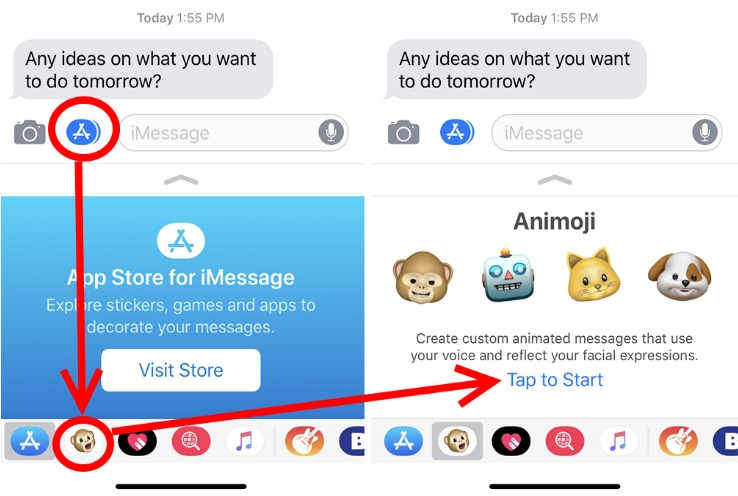
Image from pcmag.com
Step 3. Swipe through and choose the emoji or custom Memoji you’d like to use. You can even design one that looks just like you, which makes your talk emoji even more personal.
Step 4. Hold down the red record button and start speaking. As you talk, the emoji will copy your expressions, mouth movements, and even eye blinks, making it look like the emoji is actually alive.
Step 5. When you’re satisfied with the result, tap send. Your friend will now see your animated talking emoji and hear your voice at the same time, making the chat way more fun.
Don’t Have an iPhone? Make Talking Emoji on Android or Desktop!
No iPhone? Don’t worry as you can still make a talking emoji on Android or desktop using powerful AI tools like Vidnoz AI Talking Photo. This tool has become one of the easiest ways to create animated emojis that can speak. It works directly in your browser, so there’s no need for apps or downloads. Vidnoz lets you talk with emojis by turning static images into short, realistic videos where the emoji lip-syncs with your voice or text. People love it because it’s quick, free to start, and works on almost any device.
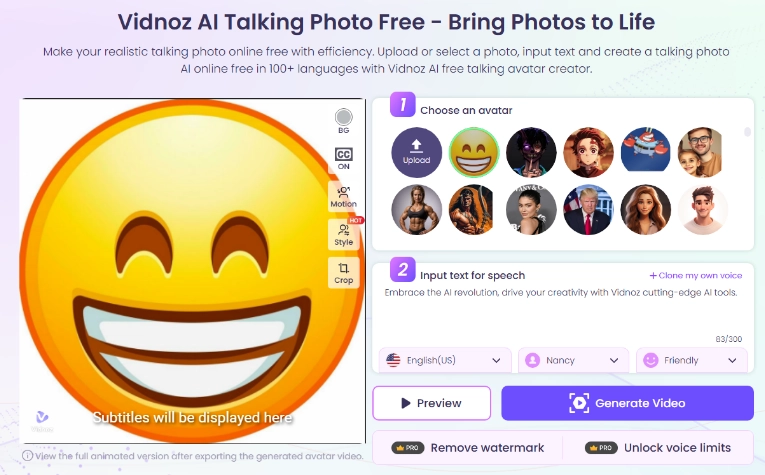
Step 1. Go to the free AI video generator Vidnoz AI Talking Photo website on your desktop or Android device. You’ll see options to get started right away without complicated sign-ups.
Step 2. Upload the emoji image you want to use. This step is where you decide which emoji you want to bring to life as a talk emoji.
Step 3. Type in your text or record your voice directly on the platform. Vidnoz uses advanced AI and lip-sync animation to make the emoji “say” your words naturally.
Step 4. Once your animation is ready, preview it to check how it looks. If you’re satisfied, download the short video or GIF and share it instantly with friends, family, or even on social media.
Talk With Emojis Ideas – Let Emojis Speak for You
Once you’ve created a talking emoji, the real fun begins with how you use it. Instead of just typing plain words, you can talk with emojis to make conversations more playful and expressive.
- Expressing Feelings Quickly: Emojis are a shortcut to emotions. Instead of typing "I’m happy for you," a small symbol can do the job instantly.
- Storytelling with Emojis: You can build small stories or sequences using visual icons, like showing pizza, home, and eating to mean “pizza night at home.”
- Breaking the Ice: Emojis can make conversations feel lighter and more approachable, especially when chatting with new people.
- Adding Humor: A well-placed symbol can turn a serious message into something funny and relatable.
- Replacing Words with Symbols: Instead of saying “I’m going to the beach,” you can simply use icons of the sun, sea, and sand.
- Cultural Connection: Emojis often go beyond language barriers, making them a universal way to connect with people around the world.
- Personal Signature: Some people adopt favorite icons, like a flower or an animal, as part of their unique chat style.
- Emoji Puzzles or Games: Challenge friends by writing phrases, movie titles, or song names using only emojis, making conversations interactive and fun.
FAQs about Talking Emoji
Q: Can I make my emoji talk?
Yes! You can create a talking emoji on iPhone with Animoji/Memoji or use tools like Vidnoz AI on Android and desktop.
Q: How to make emoji live on iPhone?
Open Messages → tap the Animoji icon → pick your emoji → record your voice to create a talk emoji.
Q: How to get emojis to talk on iPhone?
Use Animoji or custom Memoji, then record a message. The emoji will move its mouth and expressions in sync with your words.
Q: How to activate audio emoji?
Some platforms support animated or audio emojis automatically. On iPhone, recording an Animoji already adds your voice, making it an instant talking emoji.

Vidnoz AI - Create Free Engaging AI Video with Talking Avatar
- Easily create professional AI videos with realistic avatars.
- Text-to-speech lip sync voices of different languages.
- 2800+ video templates for multiple scenarios.
The Bottom Line
So, now you know exactly how do you make emojis talk, whether it’s through Apple’s built-in Animoji on iPhone or with online tools like Vidnoz AI Talking Photo for Android and desktop. With these methods, you can easily talk to emoji and bring extra fun to your chats. Remember, emojis already make conversations expressive, but a talking emoji takes it further by letting them speak, joke, and even sing. If you want quick, flexible, and shareable results, Vidnoz is your best option. Start with it today!





![Best AI Music Video Editor for Eye-Catching MV Creation in 30 Secs [Ultimate Guide 2026]](https://www.vidnoz.com/bimg/ai-music-video-editor.webp)