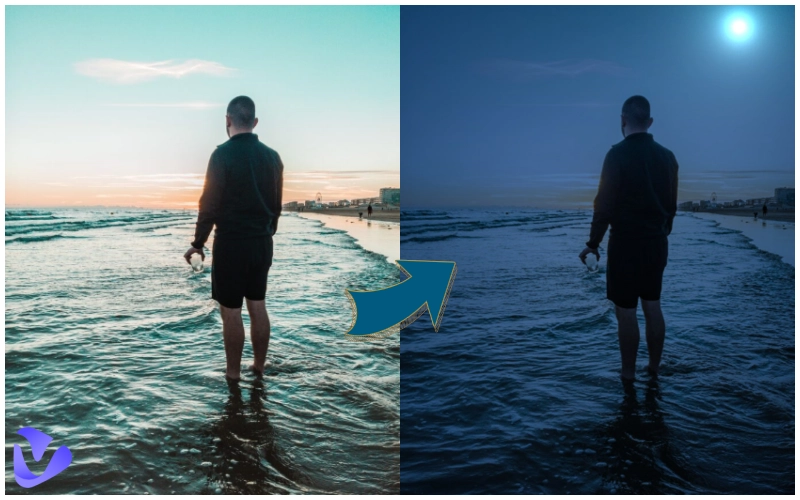
AI filter, a kind of image editing tool, has been popular and applied to many photos online. AI automatically analyzes and alters images after processing details. Night vision filter uses advanced artificial intelligence technology to enhance high-quality images in low-light conditions, some of which can even generate a moon based on your day picture. How does an AI natural night filter work? Which AI image editing tools have a night vision filter? Go on.
- On This Page
-
How Does The AI Night Vision Filter Work
-
Similarities of Day to Night Image Converter AI
-
Best 3 Free Tools with Night Vision Filter
PhotoFunia: Free Night Vision Filter No Sign Up
Pho.to: AI Day to Night Effect
Tuxpi: AI Day to Night Vision Filter
-
Bonus: More Advanced AI Image & Video Tools
AI video generator with templates
How Does The AI Night Vision Filter Work
A good AI night vision filter works very well based on the Generative Adversarial Network (GAN, a kind of machine learning model where two neural networks compete against each other to create new data. The two neural networks are a generator and a discriminator, which makes your AI-generated images more natural and realistic.
The Generator: It generates nighttime photos after learning to add things like dim lighting, shadows, or even moonlight and remove the bright sun and intense highlights at the same time.
The Discriminator: It is trained to distinguish between a real nighttime photo and an AI-generated one.
Training: The generator and the discriminator are trained well after the loop, leading to better results that the generator creates more realistic night vision images while the discriminator tells the difference on a higher level.
Detail Processing: After being trained, AI not only adds filter to your image, but it will also think more and process your image maturely, like turning bright sun into moon, adjusting the color palette, adding realistic shadows, giving reflections from streetlamps or other artificial lights.
Similarities of Day to Night Image Converter AI
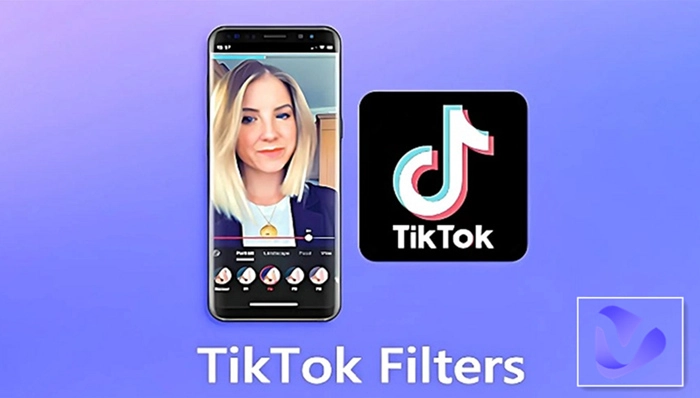
In this article, we’ve tried and are going to introduce 3 tools with night vision filter. They have many similarities that enable you to convert day images to night images with ease. If you have TikTok and Snapchat, you can try night vision filter on those platforms directly.
Online nighttime filter. These tools are online versions, which means you can use it on Windows, Mac, Android, iOS or other devices as long as you have an internet.
Day to night photo editor free unlimited. You can use these tools to turn images to night vision without spending a penny. They are totally free to use, no time limitations. Add night mode filter to unlimited photos.
No login. Login means the site could get your personal info like email. These tools allow you to use the night vision filter without login, keeping your data safe all the time.
Best 3 Free Tools with Night Vision Filter
PhotoFunia: Free Night Vision Filter No Sign Up
PhotoFunia offers a series of filters, night vision, night motion, vintage, old camera, red and blue, and so on. Night vision filter is so easy and simple to use. Upload a photo, crop it, choose “Stripes and Frames”, and then AI generates a night vision image instantly.

Pho.to: AI Day to Night Effect
Day to night effect for images offered by pho.to is really nice. It generates night vision images by adjusting the light, color, and more than that, it even adds a bright moon to your picture, which makes it realistic and natural.

Tuxpi: AI Day to Night Vision Filter
Tuxpi offers a series of photo effects, and one of them is night vision filter. It allows you to turn pictures into realistic night vision snapshots. Besides, it simulates binoculars with added scanlines and a vignette. The process is fast and easy. Just upload your photo, choose scanlines (horizontal, vertical or auto), add a vignette, and the last step is to click the “Save” button to download the generated image on your device.

More AI natural night filter you’d like to have a try includes Lunapic night vision filter, OnlinePhotoTools image night vision filter, and ImageToolsPro online night vision image filter.
A special iPhone app is also recommended for night vision filter for videos, that is Night Vision: Camera Effect. Record a video or upload your prepared video to restyle your video in four modes: night vision, infrared camera, thermal and X-ray.
Bonus: More Advanced AI Image & Video Tools
A dedicated AI tool website Vidnoz offers a lot of AI tools for images, videos, voice, and more. Here, we focus on some free, useful, and popular AI tools for image and video process and generation.
AI video generator with templates
For video creators, AI video generator with templates could save a lot of time, especially for those news video creation when time is the priority. With Vidnoz AI free video generator, You can edit everything and customize your own video templates. Change AI avatar, replace text, choose AI voice, and a complete video can be generated in seconds.

Learn some features of Vidnoz AI online app that allow you to customize everything in a video.
Make your own avatar. Vidnoz AI offers 1000+ AI avatars in various styles and professions. Still, you have the option to make your own avatar, free for Avatar Lite or paid for Avatar Pro. For free Avatar Lite, just record or upload a 10-second video with your mouth closed. More surprisingly, the dialogue AI avatar is available in Vidnoz AI app.
Clone your voice. Unlimited AI voices of popular languages can be applied in your video. Vidnoz AI also gives you the method to clone your voice and apply it in your video. Just record your voice 1-3 minutes or upload your audio file exceeding 1 minute.
Adjust speed, pitch and volume. You can adjust these parameters easily in Vidnoz AI online app to make your video perfect in every aspect.
Experience the overall features of Vidnoz AI free video generator by clicking the button below.
AI Image to Video
AI image to video has been a popular AI tool that is used frequently, especially for bloggers on short video platforms. The image to video AI made by Vidnoz has powerful AI support, which makes your photo move naturally.
Upload your still photo, through Vidnoz's AI processing, you can make the stagnant water flow, make the sun slowly sink, make the cat dance, and even make the cat eat the bamboo.
Convert Image to Video AI Online - Free
- Create a video from an image quickly for free.
- Use various AI models to turn photos into videos.
- Download and share the AI-generated video at no cost.
Convert Image to Video
Below is an example of making a person talk briefly generated by this free image to video tool. Try it now.
Conclusion
Anyway, the night vision filter can be found in many photo editing tools. In this article, we have made a brief introduction of 3 easy-to-use free night vision filter tools no sign up, and given more recommendations. Choose one you like most to have a night vision image instantly. Besides, Vidnoz AI has offered a lot of AI tools for reference. Its free AI video generator and image to video AI are definitely worth trying all the time.






![How to Remove Filter from Video Online | AI Video Filter Remover Online Free [Lossless]](https://www.vidnoz.com/bimg/remove-filter-from-video.webp)
