Virtual avatars are common in today’s digital world; you can see them across social media and gaming for expressing personality. Here, a look alike avatar is a special one as it represents a realistic digital version of yourself—with your facial features, styles, and expressions perfectly captured!
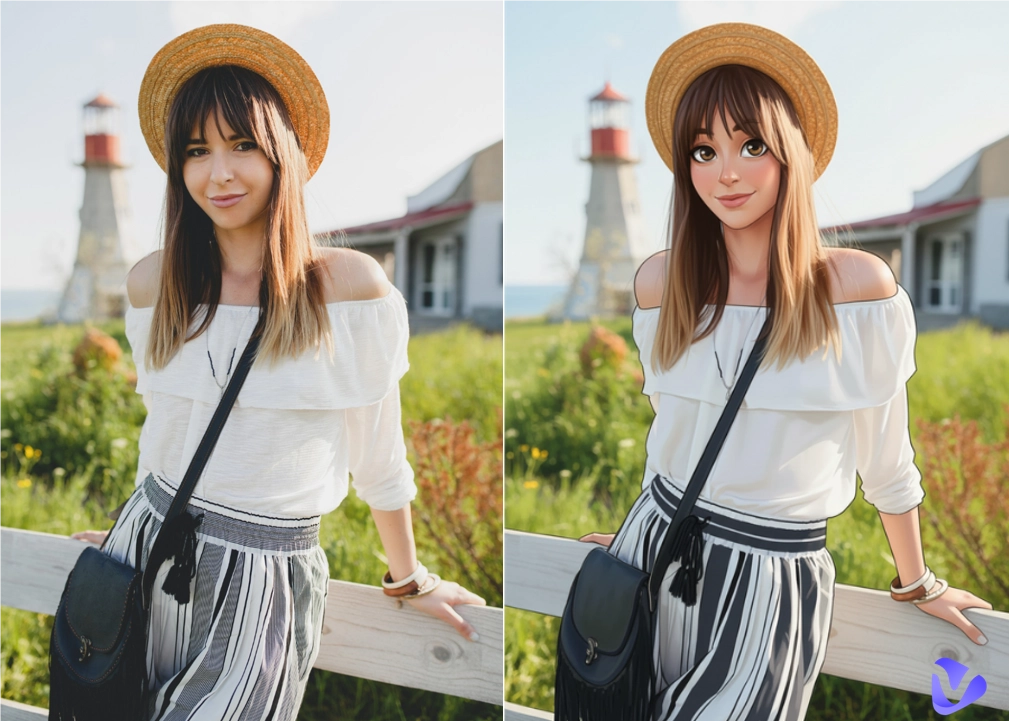
So, how to make an avatar that looks like you? It’s simple because all you need is an AI tool. In this blog, let’s explore the best options available, and you can find an ideal one to create your own look alike avatar easily!
- On This Page
-
Why Create Your Look Alike Avatar
-
How to Make an Avatar That Looks Like You Online Free
1. Vidnoz AI – Make Your Own Avatar Free Online
2. Heygen – Create Your Look Alike Avatar for Videos
3. Synthesia–Customize Your Look Alike Talking Avatar Online
4. Avatar SDK – Create Your Look Alike 3D Avatar from Selfie
-
Comparison Table of the 4 AI Look Alike Avatar Generators
-
Where You Can Use Your Look Alike Avatar
Why Create Your Look Alike Avatar
A look alike avatar is your digital twin, which was created through advanced AI algorithms. Just upload your photo and AI will map your facial features, skin tone, and even expressions to create a realistic or stylized version in seconds. Here are the major benefits:
- Personal identity: It can represent yourself authentically in digital spaces without sharing real photos. Your avatar becomes your online identity that can be used on any platform.
- Privacy protection: It’s important to protect your identity while engaging online. A look alike avatar lets you communicate freely without exposing personal data.
- Fun and creativity: You can freely experiment with various hairstyles, outfits, and accessories to design a unique version of yourself. A look alike cartoon avatar, action figure, or a 3D style image, your call!
- Social media and gaming: A look like avatar is perfect for profile pictures in the metaverse, gaming, VR world, etc. You can definitely have a much more engaging and immersive experience with it.
- Professional branding: You can also use a look like avatar for product demonstration or marketing videos, just to create a consistent and polished branding image.
How to Make an Avatar That Looks Like You Online Free
Now that you understand the advantages, so, how to make an avatar that looks like you online? It’s easy, check out the top 5 options here!
1. Vidnoz AI – Make Your Own Avatar Free Online
Vidnoz is a powerful free AI video generator that stands out for its advanced AI avatar creation capabilities. You can upload a front face photo and convert it into a realistic look alike avatar that mirrors your unique facial features for free. Powered by advanced AI, Vidnoz maintains creativity and realism, and what’s even better? It’s completely free to use.

Vidnoz AI - Create Free Engaging AI Video with Talking Avatar
- Easily create professional AI videos with realistic avatars.
- Text-to-speech lip sync voices of different languages.
- 2800+ video templates for multiple scenarios.
Key Features of Vidnoz AI Avatar Generator:
- Create your look alike avatar free online: The AI platform is free to start without a paywall. Just upload a photo to create your own look alike avatar for free.
- Realistic look like avatar generation: Vidnoz AI’s advanced algorithm excels at sophisticated facial recognition. You can make your own avatar that accurately reflects your face shape, hairstyle, and expressions. The tool guarantees a 100% look like avatar generation without distortion.
- Support talking avatars for various scenes: With Vidnoz AI, you can not only create your own look alike avatar but also animate it with natural AI lip movements and gestures. The talking photo online free tool is the best choice to turn static images into expressive videos that look vividly like you in the real world.
- Multiple avatar ratios to select: Vidnoz AI supports various aspect ratios: square, portrait, and landscape. You can easily make any kind of avatar video for TikTok, YouTube, Instagram, or any business use case.
- Highly secure & data protection: Your privacy is safeguarded. Uploaded photos are used only for avatar creation and automatically deleted afterward. Your personal information remains confidential and secure for sure.
How to create a look alike avatar with Vidnoz AI
With powerful image to video AI capabilities, Vidnoz AI lets you create a look like avatar video that looks vivid and amazing. Here’s how.
Step 1. Navigate to Vindoz AI. Sign in before you create a look alike avatar video.
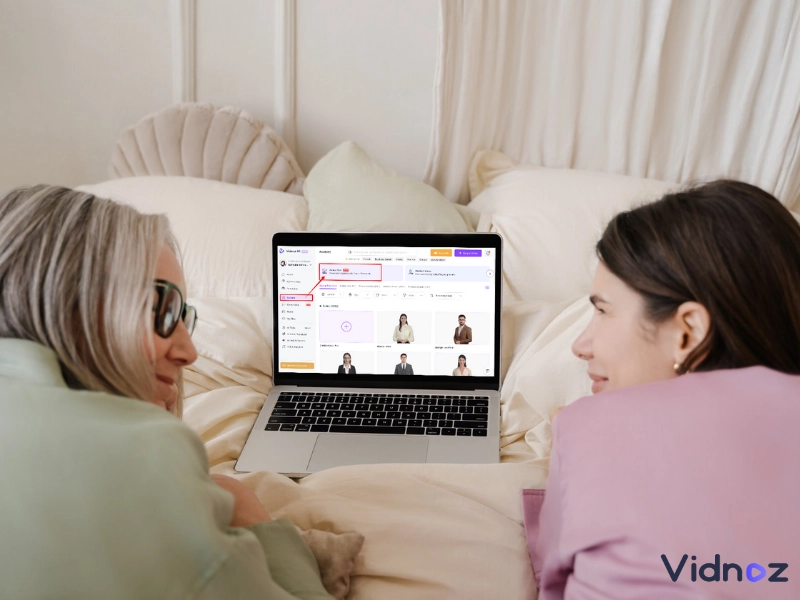
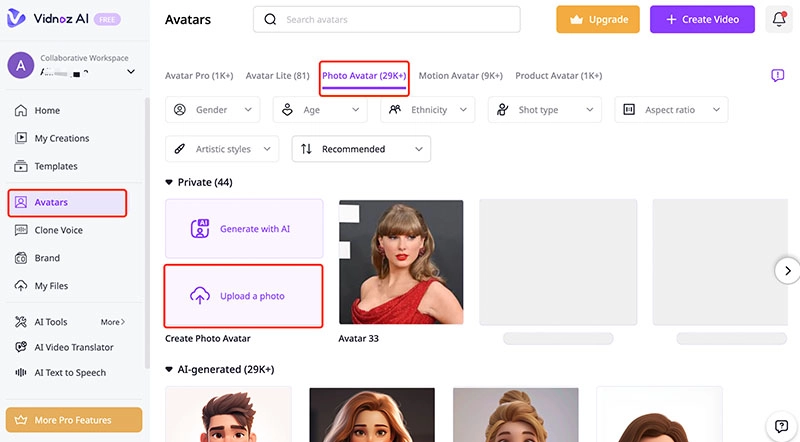
Step 2. Go to the left side menu Avatar and choose the Photo Avatar tab on the right. Click on the Upload a photo to proceed.
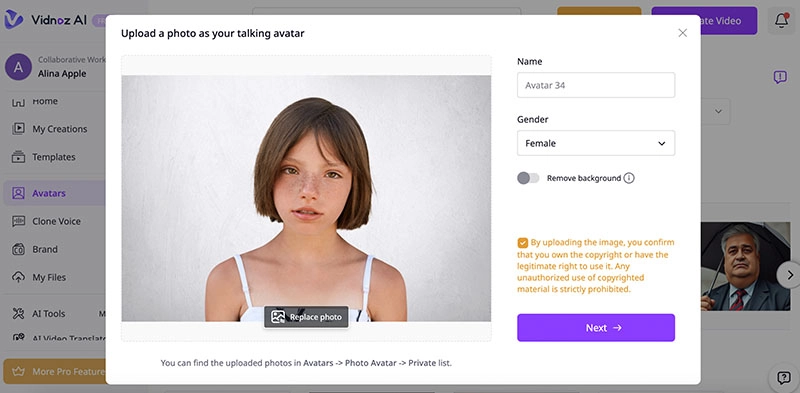
Step 3. Upload your photo you want to create a look like avatar video. Set the name and gender for it.
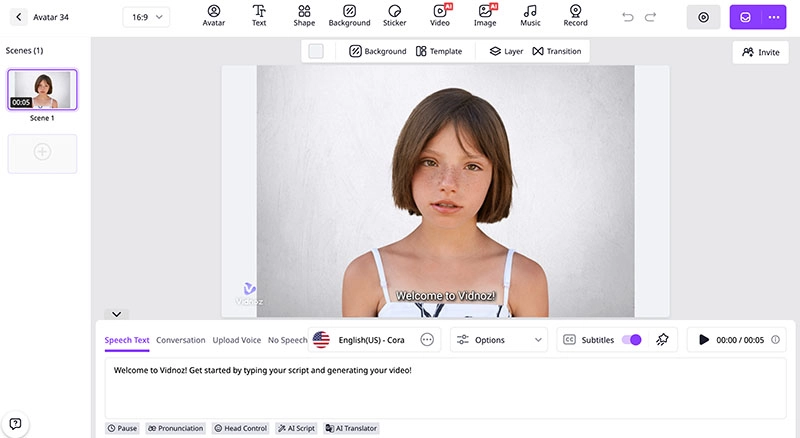
Step 4. Now Vidnoz AI will create an AI avatar based on your photo. You will be redirected to the video editing interface.
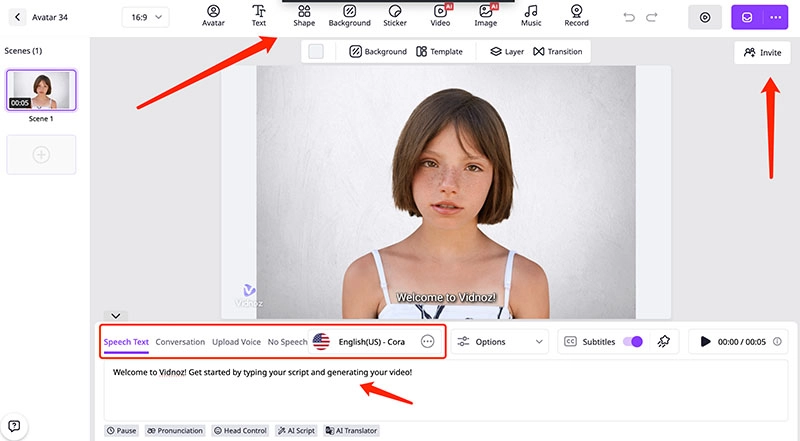
Step 5. Input the text you want the look alike avatar to speak. Adjust language, AI voice, etc.. You can even add music and other elements from the top bar to make the video more dynamic. Click on the top right purple button to create a video.
2. Heygen – Create Your Look Alike Avatar for Videos
How to make a picture talk? Check out HeyGen. The AI avatar generator offers a dedicated tool to create lifelike talking avatars from a single photo. Just upload a photo and you can generate stylized avatars featuring voice sync, facial expressions, and hand gestures with multi-language support!
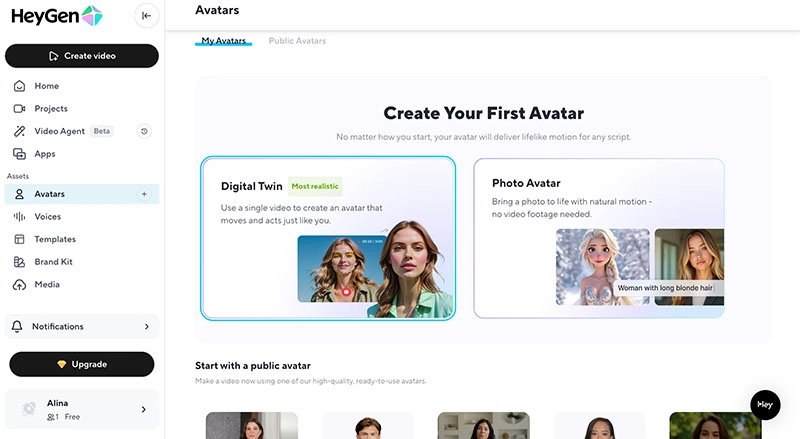
Pricing: Free: 3 videos/mo(720p & watermarked); Creator: $29/mo; Team: $39/seat/mo
Key features
- Voice cloning with perfect AI lip sync and full vocal expression.
- Up to 1280p+ high-resolution HD videos with flexible camera angles.
- Transform a sketch, cartoon, or even an animal into a talking and expressive avatar.
- Natural synchronized hand motions to your voice; add depth and expressiveness to videos.
Pros
- Quick creation from photos and scripts
- Great for creating social content or memes
- Integrate seamlessly with other HeyGen tools
Cons
- Need good input quality for best results
- Minor animation flaws
- Not suitable for complex projects
3. Synthesia–Customize Your Look Alike Talking Avatar Online
Synthesia is a professional AI that specializes in realistic talking avatars for videos. Users are allowed to choose from Personal, Studio, and Avatar Builder options to create a look alike avatar easily. You can just record a short video using your phone or webcam, or request a professional-quality studio avatar from Synthesia!
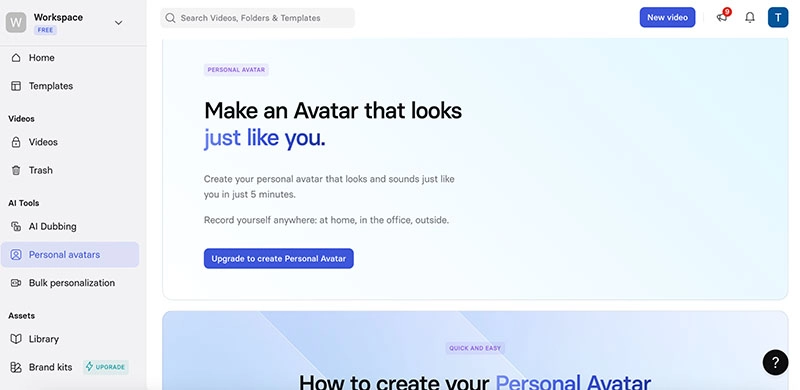
Pricing: Free: 36 mins/year; Starter: $18/mo; Creator: $64/mo; Enterprise: Custom
Key features
- Realistic avatars with emotions, hand gestures, and voice cloning.
- Text to speech avatar feature that supports converting text to 140+ languages.
- Multiple customizable options: backgrounds, clothing colors, logos, and framing.
- Quick processing times: Personal in 1 business day, Avatar Builder in 15-20 minutes.
Pros
- High realism and personalization
- Multilingual support for global audiences
- Easy text-to-video integration
Cons
- Custom avatars are unavailable in the free plan
- Additional costs for Studio Avatars
- Processing time can take up to 10 days
4. Avatar SDK – Create Your Look Alike 3D Avatar from Selfie
Avatar SDK’s Metaperson Creator feature is a powerful 3D builder to transform your photo into a look like avatar. Designed for video conferencing, metaverse applications, games, and digital marketing, Avatar SDK provides professional-grade realism and smooth animation control.
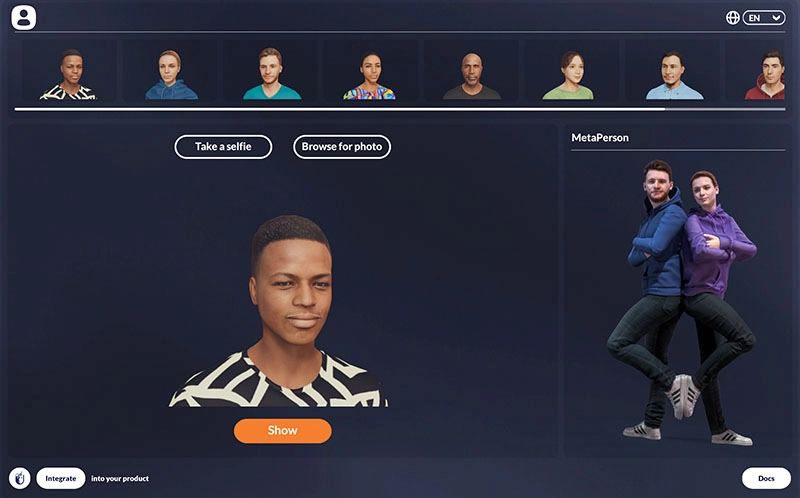
Pricing: Pro $800/mo; Enterprise custom.
Key features
- Instantly generate 3D avatars from a single selfie.
- Support both realistic and look alike cartoon avatar generation.
- Excellent face animator to support a wide range of expressive movements.
- Real-time motion, facial expression tracking, and robust customization options.
- Natural, lifelike visuals without the “uncanny valley” effect.
Pros
- Convenient browser-based creation
- Integrate seamlessly with Unity and Unreal engines
- Stunning accuracy with customization
Cons
- Tend to be developer-focused
- High licensing cost
- Complexity for integration
Comparison Table of the 4 AI Look Alike Avatar Generators
How to create a look alike avatar? Now you know the 4 best look alike maker options! To help you decide which tool suits you best, here’s a quick comparison.
|
Tool
|
User Interface
|
Avatar Authenticity
|
Feature Versatility
|
Pricing
|
|
Vidnoz AI
|
Intuitive, easy navigation
|
Highly realistic facial match
|
Video integration, various ratios, and good privacy
|
Free (2 mins/day); $19.99/mo; Business: $56.99/mo
|
|
HeyGen
|
User-friendly online platform
|
Lifelike with gestures
|
Multilingual, voice cloning, stylized avatars
|
Free: 3 videos/mo; Creator: $29/mo; Team: $39/seat/mo
|
|
Synthesia
|
Simple photo/text conversion
|
Expressive emotions
|
Multilingual, custom avatars, text to speech
|
Free: 36 mins/year; Starter: $18/mo; Creator: $64/mo; Enterprise: Custom
|
|
Avatar SDK
|
Browser-based builder and software available
|
3D realistic and cartoon versions
|
Customizable, great integrations, realistic/look alike cartoon character generation
|
Pro $800/mo; Enterprise custom.
|
Where You Can Use Your Look Alike Avatar
After you create your look alike avatar, what’s next? There are so many places to use it, and they are:
- Social Media: Upload your 3D avatar as a profile picture for social media. For instance, you can create your own look alike doll/animated avatar for Instagram, TikTok, or Facebook.
- Messaging Apps: Use your avatar in Snapchat, WhatsApp, or Discord as profiles, emojis, or reaction icons for a more expressive experience.
- Gaming Platforms: Import your avatar into Roblox, VRChat, or Fortnite to have a more immersive experience with your digital self.
- Professional Use: A look like avatar is perfect for LinkedIn profiles or Zoom meetings. It lets you perfectly maintain a consistent digital presence during presentations or remote work.
- Creative Fun: You can also experiment with look alike dolls or cartoon avatars purely for fun. This is quite common in online art, branding, or playful identity creation.
The Bottom Line
How to make a look alike avatar? It is super easy now with AI tools like Vidnoz, HeyGen, Synthesia, and Avatar SDK. Just upload a photo and you can watch your digital twin come to life. These AI tools even let you create an avatar from scratch or build a cartoon of yourself. Among them, Vidnoz AI stands out for its avatar creator that helps you digitalize your image into videos effortlessly. Try it for free and create your own look alike avatar videos in minutes!
Vidnoz AI - Create Free Engaging AI Video with Talking Avatar
- Easily create professional AI videos with realistic avatars.
- Text-to-speech lip sync voices of different languages.
- 2800+ video templates for multiple scenarios.