Right now, your online visibility counts more than it ever has. Think about it: from video games to virtual hangouts and even how brands present themselves, your digital stand-in lets you truly express yourself and connect. Thanks to video to avatar AI technology, you can now transform your recorded footage into a personalized digital twin that speaks, moves, and represents you across platforms. Ready to make a digital you? We'll check out the best AI video programs that craft your avatar with just a few clicks.
- On This Page
-
What is Video to Avatar Converter
-
What an AI Video to Avatar Converter Can Help
-
Best Free Online AI Video to Avatar Converters to Create Your Own Talking Avatar
-
Alternative Way: How to Create an AI Avatar from a Photo
-
Where You Can Use the Created AI Avatar
What is Video to Avatar Converter
A video to avatar converter is an AI-powered tool that analyzes your recorded video footage and transforms it into a digital avatar that mimics your appearance, expressions, and movements.
Here's how it works: smart computers learn your face. They watch your every move, noticing the smallest hand signals and how your lips move when you speak. When you upload a video, the AI processes each frame to identify key facial landmarks, expressions, and body language. Imagine: it then builds a digital you from all that info, perfectly capturing how you speak and every little thing you do with your hands or face.
This video to avatar AI technology makes it possible to create realistic digital representations without expensive equipment or technical expertise. You get a smooth, lifelike digital version of yourself. This digital self can star in new videos, reading different scripts, all while looking just like you.
What an AI Video to Avatar Converter Can Help
The benefits of using a video avatar creator extend far beyond simple novelty. Now, do you want to be cooler than your friends? This is how.
- Personalization: You get a digital twin that truly represents you. Unlike generic avatars, an AI-generated version captures your unique facial features, expressions, and speaking style, making your content feel authentic and personal.
- Versatility: Once you convert video to avatar, you can use it across multiple platforms and purposes. The same avatar works for gaming streams, business presentations, educational content, and social media posts without recording new footage each time.
- Accessibility: Creating professional video content becomes accessible to everyone. You don't need camera equipment, perfect lighting, or even to be camera-ready every time you want to produce content. Your avatar does the work for you.
- Branding & Creativity: Businesses and content creators can maintain consistent visual branding across all their video content. Think of your avatar as your brand's handshake. It's the first thing people see, making your company memorable and helping it pop out from the crowd of other businesses online.
- Time Efficiency: Record once, use forever. After creating your avatar, you can generate countless videos by simply typing new scripts, saving hours of recording and editing time.
Best Free Online AI Video to Avatar Converters to Create Your Own Talking Avatar
When it comes to transforming your video into a lifelike digital avatar, Vidnoz stands out as a powerful free AI video generator that makes the entire process remarkably simple. Our system makes incredibly lifelike AI avatars. They perfectly copy your natural face movements and body language.
Vidnoz stands out because it crafts avatars that move and speak so realistically, you'd think they were human. Simply upload your recorded video, and the AI analyzes your facial features and movements to create a digital twin that truly represents you. Every day, you get a chance to create your own digital characters on our system, completely free. No need to pay just to explore what you can make.
Create Your AI Talking Avatar - FREE
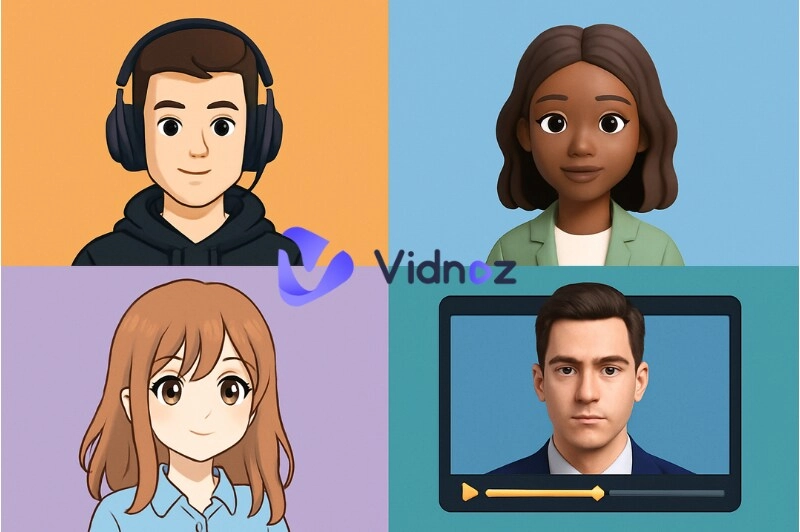
- 1900+ realistic AI avatars of different races
- Vivid lip-syncing AI voices & gestures
- Support 140+ languages with multiple accents
Key Features of Vidnoz AI Video to Avatar Creator:
- Convert video to avatar easily online: The entire process happens in your browser with no software installation required. AI handles the complex processing behind the scenes, delivering a polished avatar ready to use in minutes.
- Daily free trial for avatar video creation: You can experiment with avatar creation and video generation every day without paying upfront. Mess around with your avatar's look and get it just right. You won't pay for any fancy features until you're totally happy with your creation.
- Seamless avatar generation from your video: Our AI makes sure that your avatar captures all of your subtle facial expressions. Even natural head movements and authentic gestures. You get a digital copy that sounds completely natural, not like a machine made it.
- Direct video generation with the generated video avatar: Once your avatar is created, you can immediately start producing videos by simply typing scripts. The AI lip sync technology ensures your avatar's mouth movements perfectly match the spoken words, creating professional-quality content effortlessly.
- Multiple customization options: You'll move past basic avatar setup. Adjust vocal tones, select environmental backdrops, and employ video editing features.
How to Create Your Own Avatar from Video Online Free
Creating your personalized AI video to avatar with Vidnoz is straightforward and takes just a few minutes. This is how we do it:
Step 1. Sign in Vidnoz AI: Visit the Vidnoz website and create your free account or log in if you already have one.
Step 2. Go to Avatar > Avatar Lite > Start Now: Navigate through the menu to access the avatar creation tool. The Avatar Lite option is perfect for quick, high-quality avatar generation.
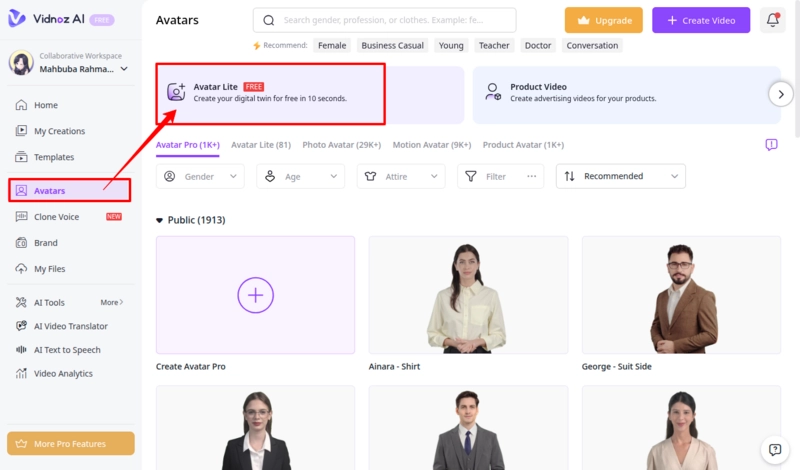
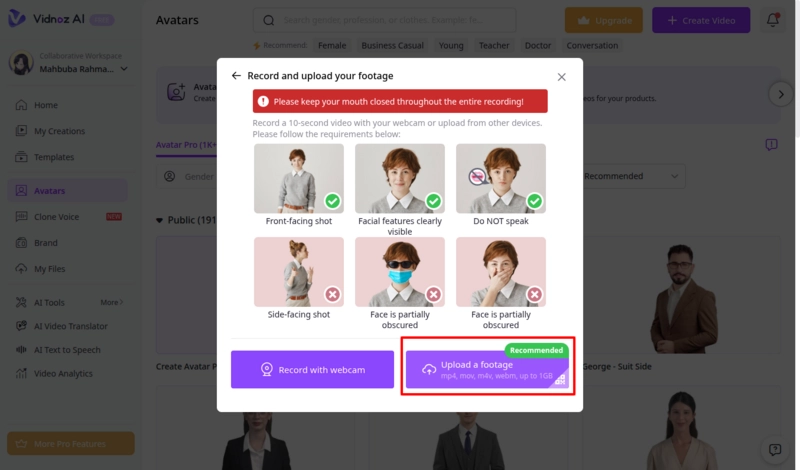
Step 3. Record or upload footage: You can either record yourself directly through the platform or upload a pre-recorded video. Make sure your face is clearly visible and well-lit for the best results. Use the QR code to upload from your phone.
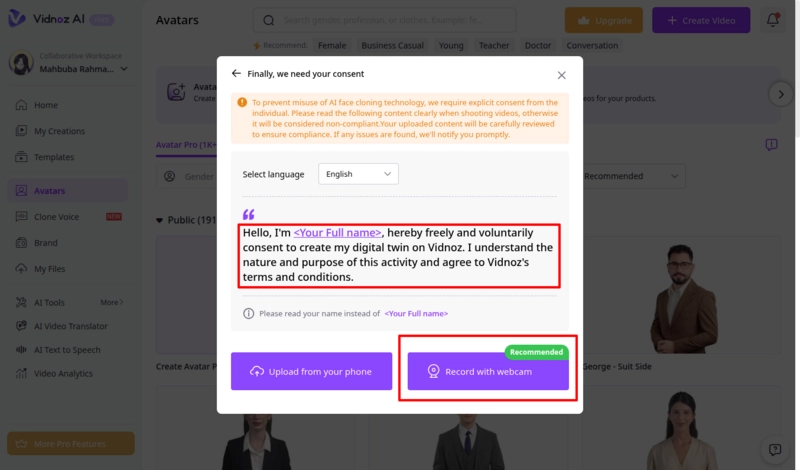
Step 4. Give consent: To generate the video, you have to read out the script aloud with your camera to give consent. Then you can click the generate button and let the AI process your video. It then renders a precise digital copy of you.
Step 5. Once your avatar is ready, you can start generating videos by typing scripts. It brings your avatar to life with natural movements and expressions.
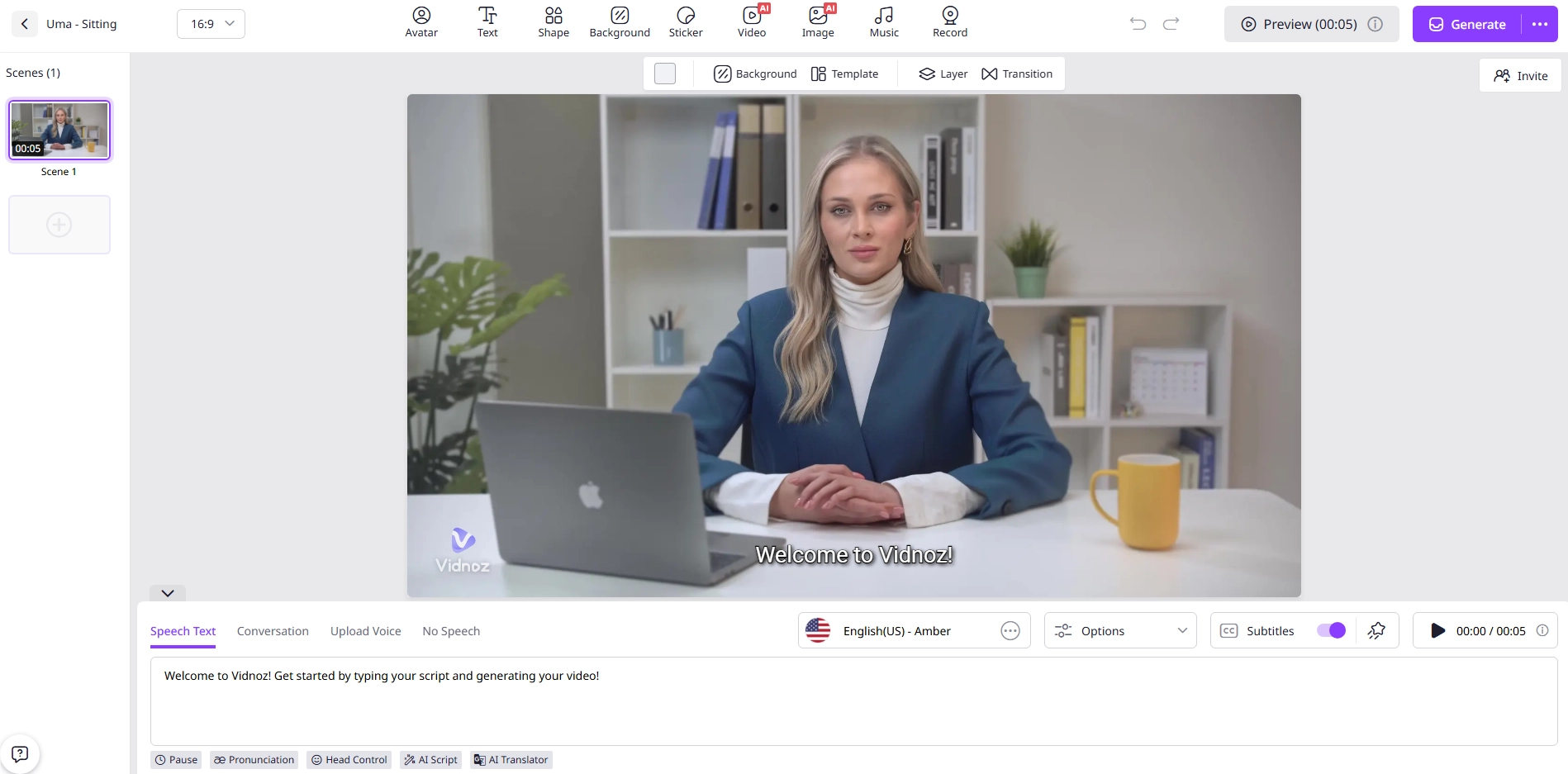
Alternative Way: How to Create an AI Avatar from a Photo
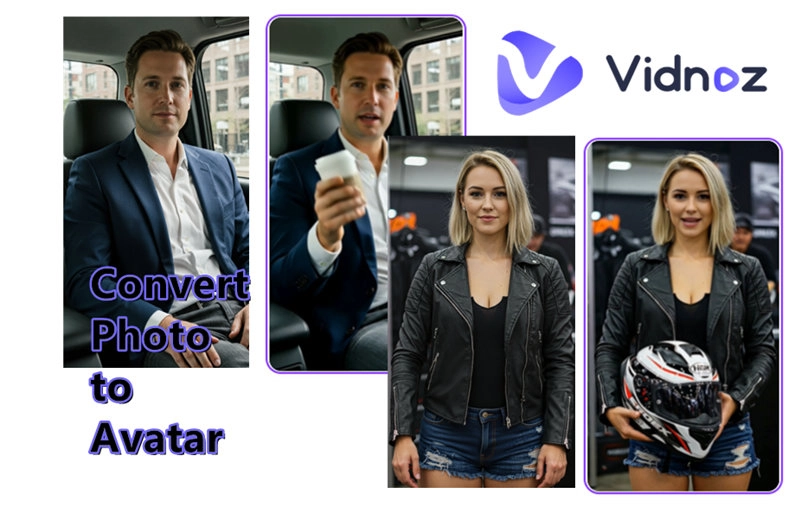
If you prefer not to record video footage, Vidnoz offers another fantastic option to create a digital avatar from your photo. You can simply upload a clear front-facing photo to create your digital twin. When speed matters and you don't want to bother with a bunch of recording gadgets, this approach works perfectly. You get your results right away.
You'll also discover a text to speech avatar feature. A digital character that speaks your typed messages. You can make digital characters by just typing out their look. You can describe the appearance you want, and the AI creates it from scratch. You get a ton of choices with Vidnoz. Pick the voice, background, and animation style to get your avatar looking just how you want it.
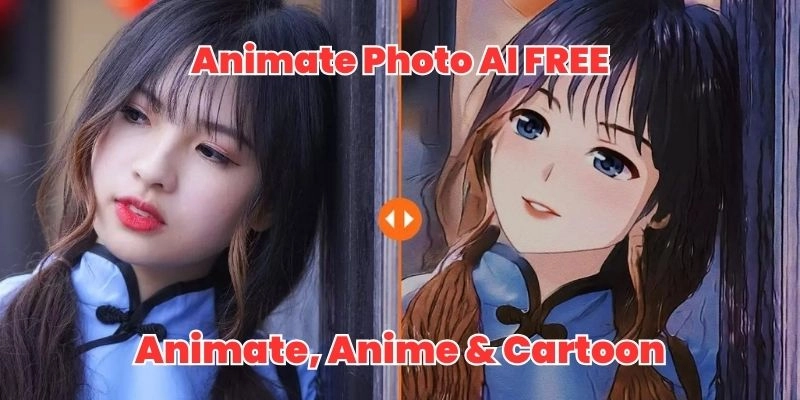
The talking photo online free tool is particularly impressive for bringing static images to life. And you also get to create an avatar from a photo. Craft a digital version of yourself or whoever you imagine. You'll find Vidnoz lets you build digital avatars with total freedom, using whatever sources you have.
Here's how to make your own AI avatar:
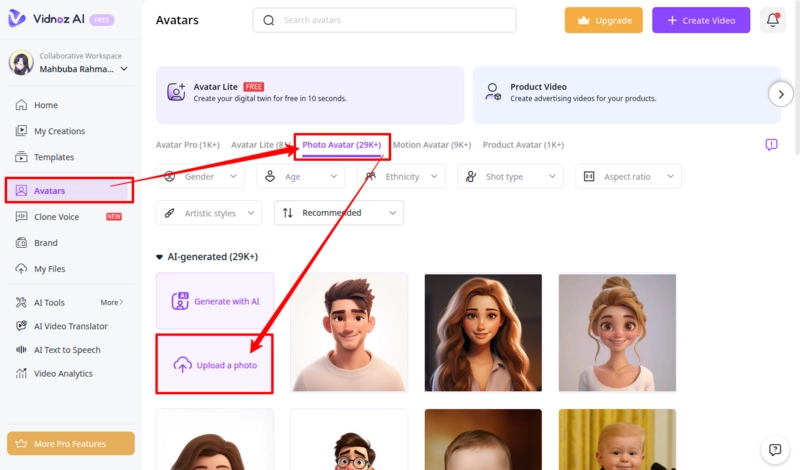
Step 1. Go to Avatar > Photo Avatar. Then click on upload photo or generate with AI: Make sure to use a clear image with a faint smile. Name your avatar, select gender, and click on “Next.”
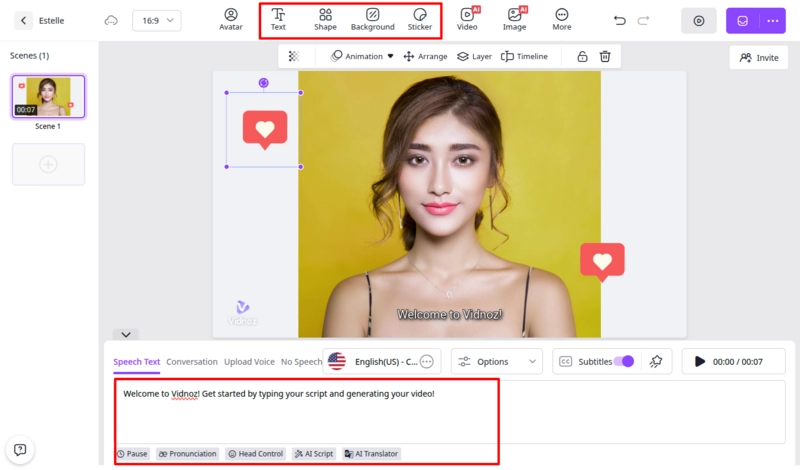
Step 2. Wait for the editor to load, then in “Speech Text,” type the script you want your avatar to speak. You can jazz up your video with a background song, customizing subtitles or adding stickers to stand out. Note that lipsync will only be generated after export.
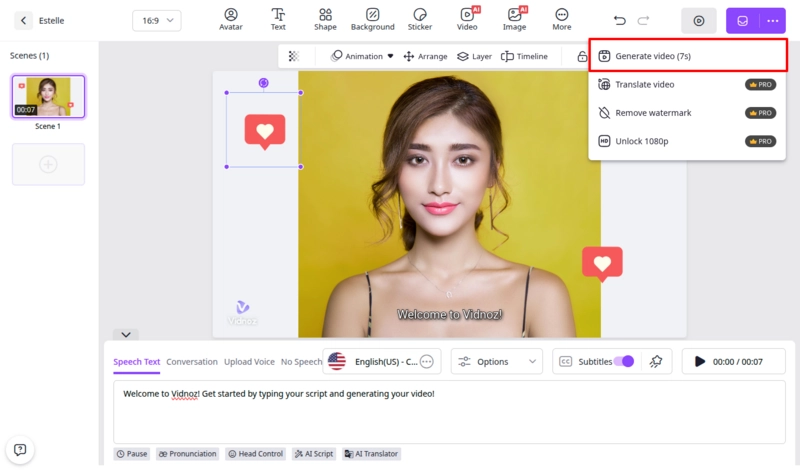
Step 3. Review your creation to ensure everything looks perfect. Once satisfied, export your video in your preferred format and resolution.
If you want to learn more about animating static images, check out this guide on how to make a picture talk.
Where You Can Use the Created AI Avatar
The versatility of video to avatar online free technology opens up countless possibilities for personal and professional use:
- Personal avatars for immersive gameplay: Gamers can create custom avatars that look exactly like them for streaming, virtual reality experiences, or in-game characters. When your digital self acts as your gaming identity, viewers get a truly personal and highly interactive experience.
- Professional avatars for presentations: Professionals can use avatars for training videos, corporate presentations, and internal communications. You can skip the camera stress, yet your content still feels polished and connects personally.
- Influencers can stand out with animated digital twins: Content creators and social media influencers use avatars to produce consistent, high-quality content without the daily demands of filming. Your avatar maintains your brand presence even when you're unavailable to record.
- Companies use avatars for marketing and customer interaction: Businesses deploy avatars for product demonstrations, customer service videos, FAQ responses, and marketing campaigns. Imagine your brand looking sharp and cohesive everywhere. You'll also save big on both production spending and the time it takes to get things made.
The Bottom Line
This capacity to make avatar from video has totally flipped how we put together and soak up information online. With AI video to avatar tools like Vidnoz, anyone can transform their recorded footage or photos into realistic, expressive avatars that work across countless platforms and purposes. This face animator smart technology keeps your online content flowing without the endless hours usually spent on filming and editing videos from scratch. Ready to see yourself in a whole new way? Try Vidnoz today and make your own avatar in minutes with no sign-up required for your first trial.

Vidnoz AI - Create Free Engaging AI Video with Talking Avatar
- Easily create professional AI videos with realistic avatars.
- Text-to-speech lip sync voices of different languages.
- 2800+ video templates for multiple scenarios.