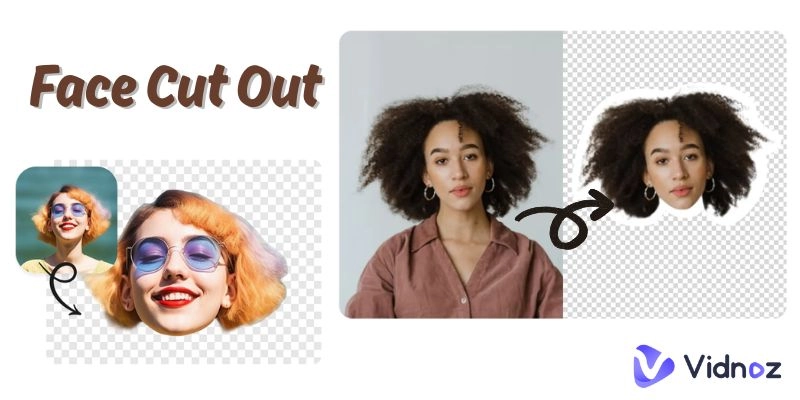
One may be required to cut out a face from a photo for varying reasons, such as editing requirements, meme production, or party costume making. It was a labor-intensive task and also full of challenges in the past. It was complex and time-consuming to use the software. Now, there are various face cut out apps and tools that can do it in a short amount of time. It is possible to delete faces with one or two taps or clicks of a mouse, without any prior experience in editing.
There are also AI face cut out makers that are available for free and can be used on both mobile phones and computers. Here in this article, we shall outline six of the best face cut-out apps and online tools to use today.
- On This Page
-
-
What Is Face Cut Out? A Quick Introduction
-
Manual vs. AI: How to Cut a Face Out of a Picture?
Manual Face Cut Out (For Control & Customization)
Automatic Face Cut Out with AI Tools (For Speed & Ease)
Which Method Is Right for You?
-
Best 3 Face Cut-Out Apps for Quick & Easy Results
YouCam Perfect AI Selfie Editor & Filters
ProKnockOut AI Background Eraser
-
Best 3 AI Face Cut Out Online Free: No Downloads Needed
Vidnoz AI Background Remover: Face Cut Out Online 100% Free
Fotor Online Face Cut-Out Tool
Remove.bg AI Background Remover
What Is Face Cut Out? A Quick Introduction
The term face cut out means that you have removed a person’s face from the picture or image. The cut-out face can then be placed on a new background or used in other projects that are related to the subject of the picture. This is a basic photo manipulation task for fun, professionalism, or creativity, depending on the need.
Face AI cutouts are also useful in business life, where they can be added to advertisements and digital prints. Regardless of whether you need to make a humorous meme or come up with a unique party accessory, face cut out tools will be helpful to you.
Use Cases of Face Cutout
- Social Media Posts: This idea entails posting funny and engaging content by putting people’s faces in different settings.
- Meme Creation: To create relatable or hilarious memes, use face cut out.
- Party Props: Create face masks or other items required for a birthday, wedding, or any occasion.
- Marketing Materials: Incorporate face cutouts as part of the advertisement, banners, or design.
- Photo Collages: Place faces in creative collages for individual or business use.
- Gift Items: One idea that may be implemented is to create mugs, t-shirts, or cards using faces cut-out.
Manual vs. AI: How to Cut a Face Out of a Picture?
Creating different project genres requires a different style of editing. Some people want full control to make detailed cuts of the images, and this is quite reasonable as it enables them to get the best results ,which suit their expectations. Some people only require an easy and efficient way to erase a face. The two options that are available are manual editing and the use of artificial intelligence.
Manual Face Cut Out (For Control & Customization)

Image from remove.bg
Manual face cut-out can be done using different software, which are usually professional applications like Photoshop. As for face selection, you draw or choose it with the help of lasso, pen, or magic wand tools. It is not an easy job, and it does need some basic knowledge of photo editing.
Advantages:
✔️ Total control of edges, small components, and the background.
✔️ Better quality results, especially for complex photos.
✔️ Another factor that makes social media a great platform for advertising is the opportunity to correct a mistake or adjust the choice made.
Disadvantages:
❌ Takes more time and patience.
❌ Requires learning how to use editing software.
❌ Can be difficult for beginners without experience.
Automatic Face Cut Out with AI Tools (For Speed & Ease)

Image from aiease.ai
The face cut-out tools used by artificial intelligence work by instantly identifying faces. When you upload a photo, the tool has the ability to segment the face without any interference. A lot of applications are available to perform quick background removal, cut-out downloads, and even basic touch-ups.
Advantages:
✔️ Extremely fast and easy to use.
✔️ No special skills or software needed.
✔️ Works well for most casual or simple tasks.
Disadvantages:
❌ Less control over the final look.
❌ Struggles with complicated or blurry backgrounds.
❌ Quality can be defined by how well the AI model performs.
Which Method Is Right for You?
- If you want full control → Choose Manual Tools
- If you need quick results → Choose AI Tools
- If you are a beginner → Choose AI Tools
- If you need professional-quality edits → Choose Manual Tools
- If you have limited time → Choose AI Tools
Best 3 Face Cut-Out Apps for Quick & Easy Results
If you wish to use a mobile app for fast face cut-outs, then there is no scarcity of good options.
-
YouCam Perfect AI Selfie Editor & Filters

YouCam Perfect is an application for photo editing for iOS and Android devices that offers many features in one package. It comes with features such as the face cut-out, face swap, object removal, and many other features. It is suitable for people who want quick and effective results that can be achieved without having an editor background.
Key Feature
- AI Object Removal to erase unwanted people or objects.
- Face Swap and AI Retake for fun and easy face edits.
- Body editing tools for slimming, height adjustment, and reshaping.
- AI Studio for creating portraits, avatars, and professional headshots.
How to Use It:
Step 1. First, download the YouCam Perfect app on your phone and upload the photo.
Step 2. Choose the tool you require, for instance, AI Object Removal or Face Swap.
Step 3. Make the necessary changes, review the changes, and either export the changes or share the new masterpiece.
Pros
- Wide variety of AI features beyond just face cut-out.
- Fast processing and high-quality results.
- Great for both casual edits and professional-looking projects.
Cons
- Some features require a paid subscription.
- Advanced manual editing options are limited compared to pro software.
Pricing: Free version is available with basic features. A subscription to the enhanced and more powerful version is $5.99 per month or $29.99 per year to unlock all the features.
-
ProKnockOut AI Background Eraser

ProKnockOut is a photo cutout and image editing application compatible with the Apple iOS. It is intended to allow face and object removal to be easily done for even those who are new to the platform, as well as for the more advanced users. By using both one-click AI and manual tools, it is possible to get very accurate adjustments in a short time.
Key Feature
- One-click automatic cutout and batch cutout support.
- Manual cutout tools like Lasso, Instant Alpha, and Eraser.
- “Hair Refine” and “Edge Refine” tools are more useful for fine selections, particularly for the hair and fur.
How to Use It:
Step 1. Open ProKnockOut and upload your photo.
Step 2. For the more precise selection you can use the one-click cutout tool or the Lasso or Edge.
Step 3. Refine, alter the background, polish general features, and optimize the final picture.
Pros
- Offers both automatic and manual cutout options.
- Subtle changes for hair and fur, as well as small objects.
- This supports professional output formats such as PNG, JPG.
- Easy for beginners but powerful enough for advanced users.
Cons
- Full features require a subscription.
- Interface may feel complex at first for casual users.
Pricing: ProKnockOut has a free version, with VIP Membership costing $3.99 per week or $16.49 every six months and $3.99 for saving images in HD.
-
Photo Cut Out Editor

Photo Cut Out Editor is an amazing and useful AI photo editing software that a user can apply on iOS device. This means that it saves time when you are editing face cut out photos since it enables you to erase an object or a person with all the details, such as hair and fur. This app gives a number of tools for the selection and editing of the ID photos or the product images with a high precision.
Key Feature
- Instant removal of persons, animals, plants, and objects and even hairs.
- Batch cutout capability for multiple photos.
- Advanced layer editing with tools for brushes, text, shapes, and more.
- 7 selection tools including smart brush, intelligent lasso, and shapes.
How to Use It:
Step 1. Launch the application and upload the picture that you wish to enhance.
Step 2. Select the object or person that you wish to cut out.
Step 3. Lastly, add effects, change background and then save the picture or share it.
Pros
- Extremely user-friendly with one-click cutouts
- Offers a wide range of creative filters and effects
- Supports PNG and other formats for a professional look of the given input image
Cons
- Some advanced features are behind a subscription paywall
- Free version may have limitations on certain tools
Pricing: Photo Cut Out Editor is available as a free app, and there are in-app subscriptions through the iTunes store.
Best 3 AI Face Cut Out Online Free: No Downloads Needed
Now, it is time to take a look at some of the most popular AI face cut-out online tools that do not need you to download anything, which means that you can edit your photos right in your browser.
-
Vidnoz AI Background Remover: Face Cut Out Online 100% Free

Vidnoz AI Background Remover is a powerful tool that is based on artificial intelligence and can be accessed through any browser; it is free of charge and allows erasing backgrounds in one click and isolating any foreground, including human faces. This makes the face extraction very easy and fast since the tool provides a transparent background on the output image. It is free of charge and does not need any registration and allows the users to upload the files of high resolution up to 4K.
Key Feature
- Quickly isolates faces from backgrounds.
- Accept images with a resolution of up to 4K for the cutouts.
- Software is offered with no registration and is absolutely free of charge.
- Has high accuracy for face detection and face recognition as well as face extraction from complex backgrounds.

Vidnoz AI - Create Free Engaging AI Video with Talking Avatar
- Easily create professional AI videos with realistic avatars.
- Text-to-speech lip sync voices of different languages.
- 2800+ video templates for multiple scenarios.
How to Cut a Face Out of a Picture With Vidnoz AI:
Step 1. Choose the appropriate image and upload it on the Vidnoz AI website.
Step 2. Let the AI automatically extract the face.
Step 3. Download the resulting transparent PNG.
Pros
- Fast and easy to use
- No need for account creation
- High-quality output, even with large images
Cons
- Best results with clear, high-quality images
Pricing: Free with no hidden costs.
-
Fotor Online Face Cut-Out Tool

The Fotor Online Face Cut Out Tool is an AI background eraser that can be used on any browser without the need for installation, and it is free to use for background removal and face cut-out purposes. It enables you to convert photos and other images into professional-looking images with a clean background without the use of any software or application.
Key Feature
- Facial detection and erasing tool where it is able to detect faces and remove them from the image.
- Select a background color after extraction of the image to be used in the logo design.
- It is user-friendly, and there is no need for the user to learn anything about the software.
- The cut-out images should be saved in PNG, JPG, or other formats that are easily recognizable by most programs.
How to Use It
Step 1. Go to the Fotor website and upload your photo.
Step 2. Let the AI analyze and extract the face from the image.
Step 3. Click on the ‘download’ button to download the image either in the transparent version or with the background of your choice.
Pros
- It is not necessary to register in order to use the site for free
- Quick and accurate face extraction
- Allows for the creation of output files in a number of formats
Cons
- Restrictions in terms of post-processing are the ability to extract faces only
- The use of some of these features may require the paid version of the software
Pricing: For basic utility, Fotor has a free version with Fotor Pro costing $3.33 per month and Fotor Pro+ $7.49 per month.
-
Remove.bg AI Background Remover

Remove.bg is a web-based AI tool that does not require any download and can remove objects from photos of any image in 5 seconds. It is ideal for anyone who requires the face cut-outs or background isolation with ease.
Key Feature
- Automatically removes backgrounds with AI.
- It results in new PNGs or new background images that are fully transparent.
- Works with people, animals, products, cars, and many others.
- Offers plugins for design software and eCommerce platforms.
How to Use It
Step 1. Submit your picture or provide the picture URL of the picture you want to use.
Step 2. Let the AI make some operations on the image and eliminate the background.
Step 3. Click on ‘Download transparent PNG’ or ‘New background image.’
Pros
- Fast, automatic background removal
- High-quality output for professional use
- Some advanced features require paid plans
Cons
- Some of the features are available in the paid versions.
Vidnoz AI - Create Free Engaging AI Video with Talking Avatar
- Easily create professional AI videos with realistic avatars.
- Text-to-speech lip sync voices of different languages.
- 2800+ video templates for multiple scenarios.
Conclusion
Finally, in the making of memes, digital designs or even props for a party, these face cut out applications and websites will assist you in achieving this in the shortest time possible. It is also equipped with AI and does not require the use of additional software to remove faces, which can be done in few steps. However, both approaches of using either mobile apps or browser-based tools have their own advantages depending on the individual needs of the user. Try out these and have fun with face cut outs in your projects as you desire today!






![4 Solutions to Make Smart Transparent Avatars Easily [With Free Picks]](https://www.vidnoz.com/bimg/transparent-avatars.webp)
![6 Best Sign Language Video Translators to Bridge the Gap [2026 Guide]](https://www.vidnoz.com/bimg/best-sign-language-video-translator.webp)