Video creators today are constantly seeking ways to make their videos look more attractive and professional. One of the powerful effects to add charm is the AI bloom effect. With bloom artificial intelligence, people can even bring blooming flowers around specific objects, such as cars, buildings, bicycles, and more.
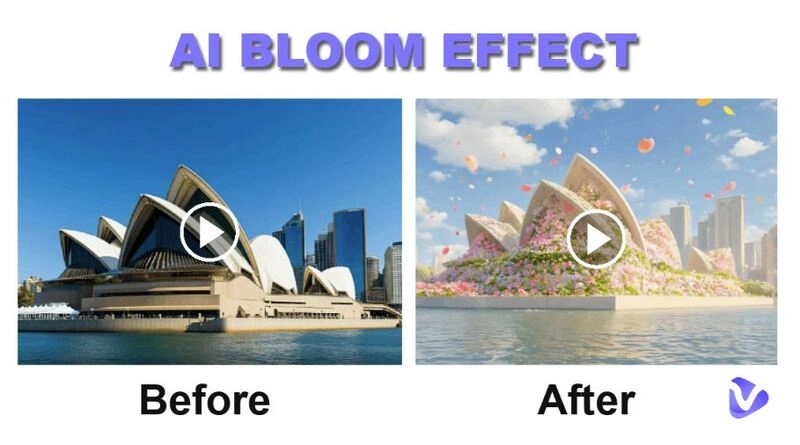
Thanks to the rise of AI bloom generators, anyone - from professional editors to casual users - can now make a still or dead image bloom with color and vitality, without deep technical knowledge. A good AI bloom video generator will handle everything from light detection to rendering, producing results that rival traditional video software but at a fraction of the time and cost.
Then, how to choose the best one? Keep reading.
- On This Page
-
What Is the Bloom Effect?
-
Benefits of Using AI Bloom Effect in Your Videos
-
Top 3 Best AI Bloom Video Generators
1. Pollo.ai – AI Bloom Effect for Professional Video Creators
2. Dreamlux – Free AI Bloom Effect for Beginners
3. AnimateMyPic – Bloom AI App Maker for Images & Videos
-
Tips for Creating Stunning Bloom Effects
-
Bonus: Use AI for More Advanced Video Creation
Vidnoz AI – All-in-One AI Video Platform
Vidnoz Gen Video Effect – Advanced Post-Production Tool
What Is the Bloom Effect?
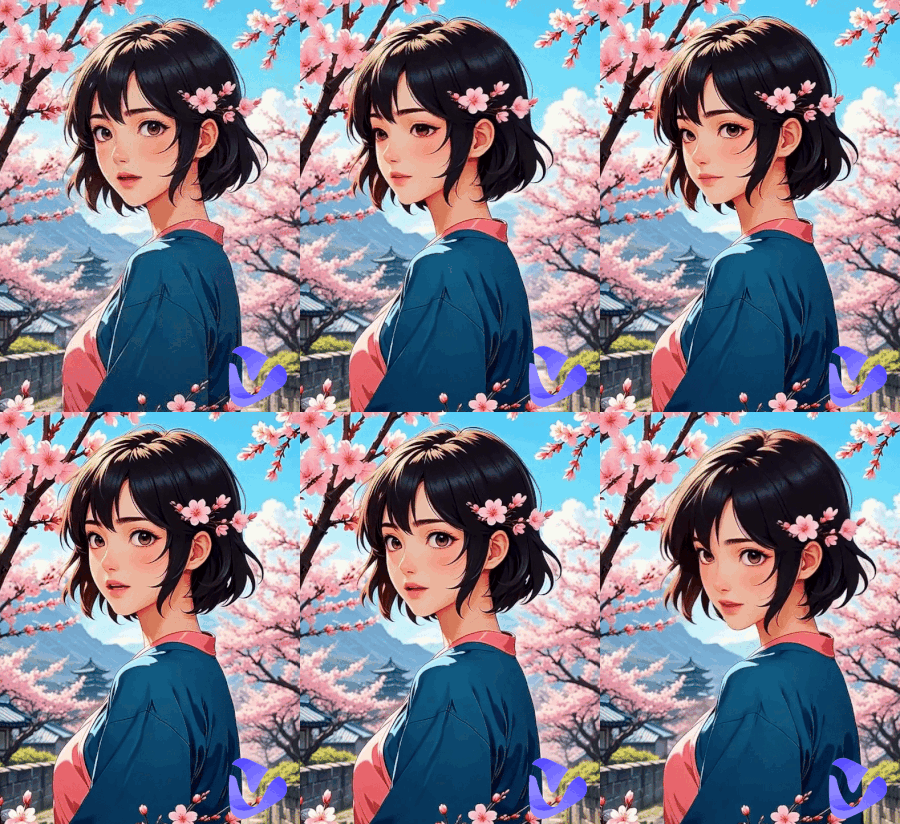
When people ask about the AI bloom effect, it often refers to a type of AI tool that causes flowers to sprout and grow across objects in a still image. It results in generating a smooth bloom video where petals naturally form and create a lively and dreamy animation.
After using a dedicated algorithm to detect object edges, the AI generates growth frames with flowers and maintains consistent motion. It allows anyone to turn photos into creative bloom animations with just a few clicks, with no manual editing required.
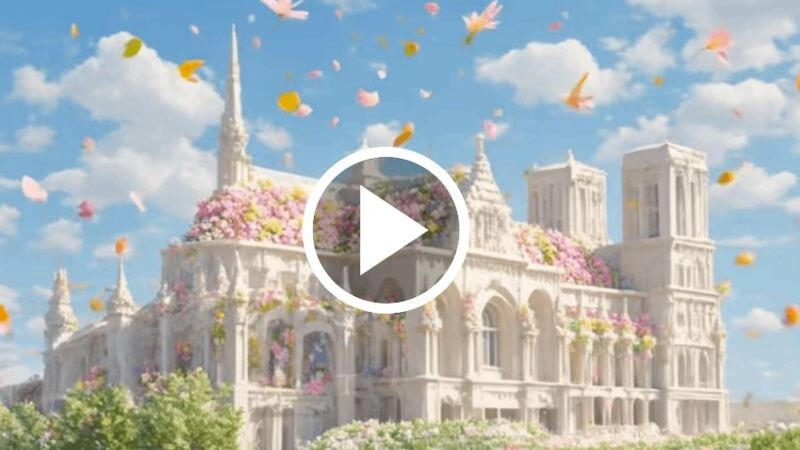
Benefits of Using AI Bloom Effect in Your Videos
Adding an AI bloom effect to your videos is not just about style - it’s about transforming ordinary scenes into captivating, dreamlike visuals. It is not just a visual gimmick - it fundamentally changes how audiences feel about your video content. By using an AI bloom generator for image to video, your video will be:
- Achieve professional aesthetics: AI bloom imbues your footage with exquisite color textures, instantly elevating and enlivening otherwise static or lifeless images.
- Catch your audience's attention: It helps highlight key details about people and objects, grabbing the viewer's attention and potentially retaining their attention.
- Increase emotional impact: Applying the AI bloom effect to your video will transform it from static to vibrant. It's a simple trick to add wonder, making visuals pop.
- Achieve professional-level luminosity adjustments: AI tools apply localized colorization, soft shadows, color grading, and a subtle wind-blown effect, making flowers appear illuminated by the scene's light and appear to grow over time.
- Fast and efficient: AI-automated features eliminate the need for complex editing; you just need to upload your image.
Top 3 Best AI Bloom Video Generators
To get an instant AI bloom effect, finding and using a good AI bloom video generator is the key to getting twice the result with half the effort. Below are three of the best AI bloom generators available to make bloom effects accessible to everyone. Whether you’re producing a short TikTok clip or a cinematic YouTube project, they can help enhance the fun.
1. Pollo.ai – AI Bloom Effect for Professional Video Creators
Pollo.ai is one of the most advanced AI video effect tools for generating videos with various effects with precision, like AI Into the Mouth effect, AI Hug effect, AI Kissing effect, etc. And the AI bloom effect is one of its hot effects.
As for AI Bloom effect video creation, its AI engine evaluates every frame, applies glow effects intelligently, and supports auto-fine-tunes, such as radius, intensity, and light color.
Pros
- Precise control over bloom parameters
- Real-time preview with instant adjustments
- Supports 4K and high-bitrate video exports
How to Use:
Step 1. Open Pollo's AI Bloom Effect page.
Step 2. Upload your image and choose the basic parameter settings.
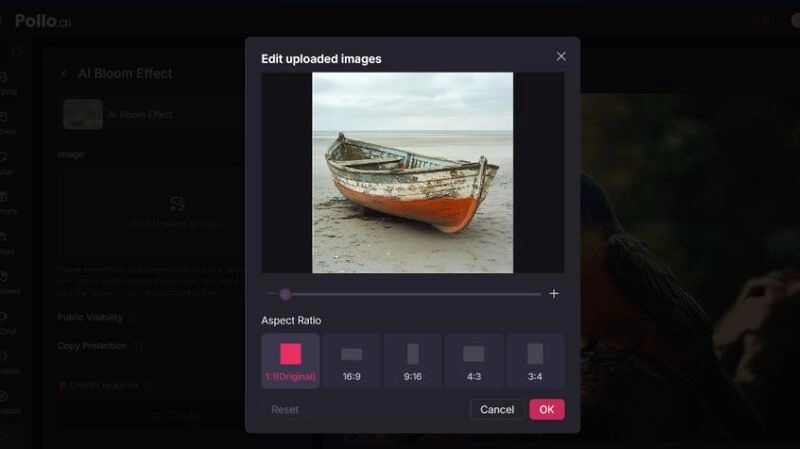
Step 3. Click the Create button to start generating.
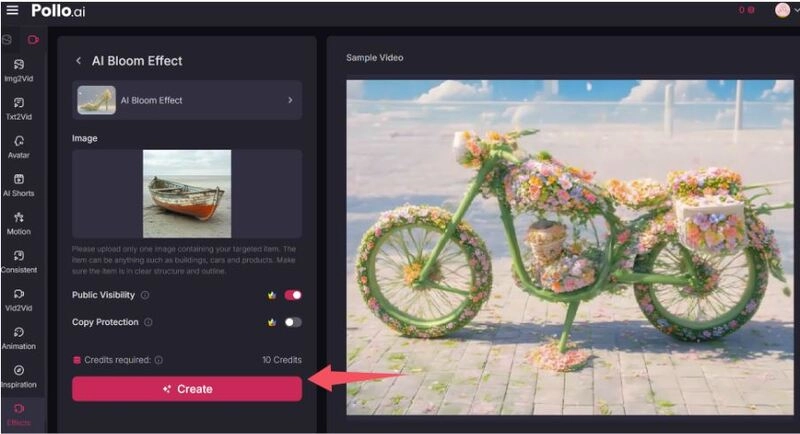
Make sure you have enough credits; each effect creation needs 10 credits. If not enough, you will be prompted to upgrade to get more credits.
2. Dreamlux – Free AI Bloom Effect for Beginners
Dreamlux is a lightweight, beginner-friendly AI bloom video generator perfect for short-form content like TikTok and Instagram Reels. Its biggest strength is simplicity and free, which is accessible for hobbyists or creators who just want to experiment without investing upfront.
Pros
- Completely free option for short clips
- Intuitive drag-and-drop interface
- Fast processing with minimal setup
Cons
- Limited advanced controls
- Watermark on free exports
How to Use:
Step 1. Open the Dreamlux website
Step 2. Upload your image and click Create
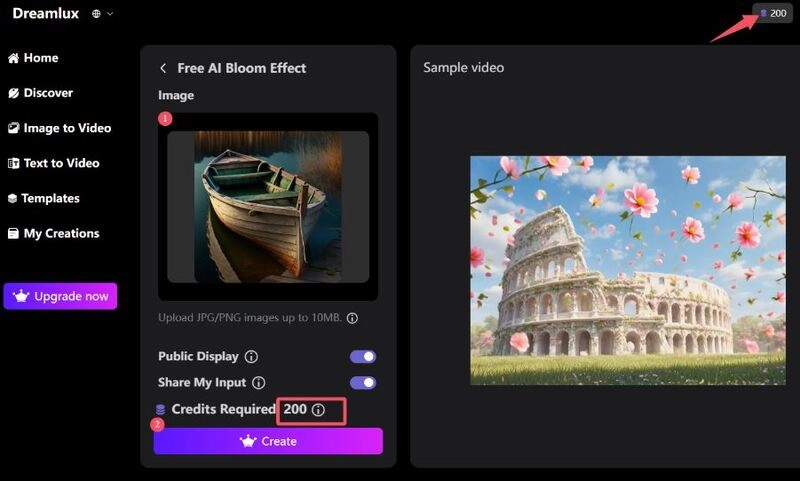
Note: It costs 200 credits to generate an AI Bloom effect video, but don't worry, when you log in for free for the first time, you will be given 200 credits. So, its first use is really free.
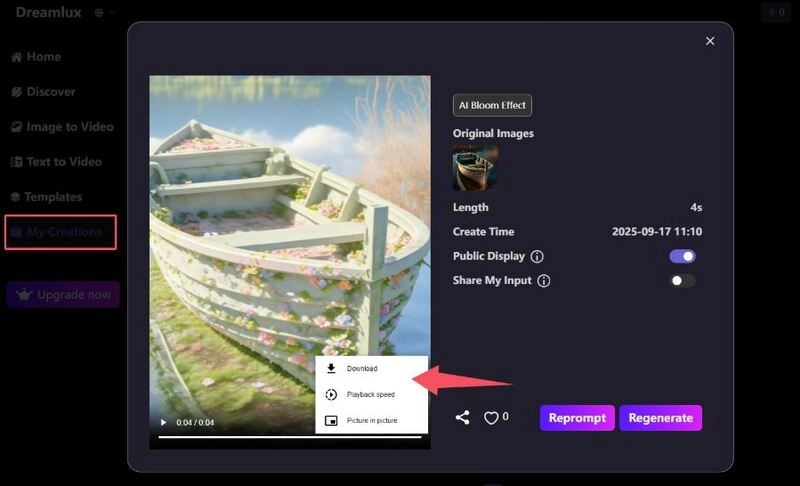
Step 3. Go to My Creations, and you can check, preview or download your generated AI bloom effect video here.
3. AnimateMyPic – Bloom AI App Maker for Images & Videos
AnimateMyPic is another unique bloom AI app maker that combines image to video AI with bloom technology. Instead of generating only with videos, it supports adding sound effects at the same time. Artists and marketers love this platform, as it makes turning still images into lively videos super easy. When you add a soft bloom with calming tunes, your videos really pop on the internet.
Pros
- Converts images into animated bloom clips
- Supports both image to video and text to video
- More AI video effects
Cons
- Limited for long-form video editing
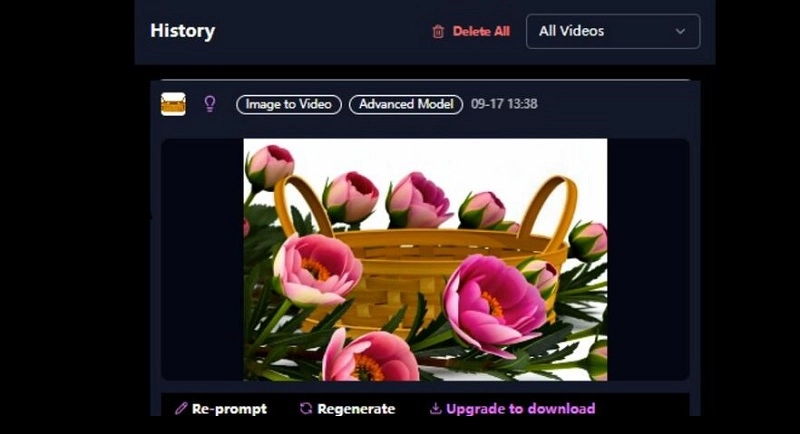
- Subscription needed for downloading
How to Use:
Step 1. Go to the effect page and select the AI bloom effect.
Step 2. Upload an image and select the image to video mode.
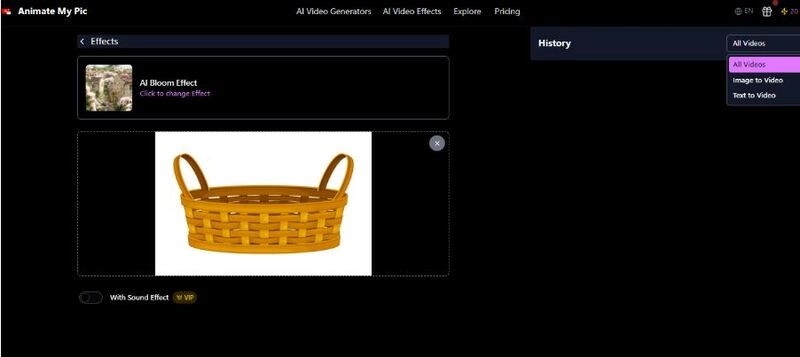
Step 3. Scroll down and click Create. This will cost you 20 credits, and you can also get it for free with the gifted 20 credits.
Tips for Creating Stunning Bloom Effects
Creating a professional-looking AI bloom effect takes more than just uploading a photo — adequate preparation and appropriate adjustment can make a huge difference in quality.
To get the best AI bloom results, you can:
- Use clean, well-lit footage for the best AI detection
- Keep bloom subtle for a natural look
- Combine with an AI video enhancer to sharpen details
- Match the glow tone to the overall color grading
- Add background music or smooth transitions for a cinematic finish
Following these tips ensures your bloom video looks professional and emotionally engaging.
Bonus: Use AI for More Advanced Video Creation
AI bloom effects are only one part of modern video editing. If you want to elevate your content even further, such as to do smart and quick video generation or get more AI video effects, try the following AI tools.
Vidnoz AI – All-in-One AI Video Platform
Vidnoz is a complete ecosystem for video creation. With it, you simply type out your story, and it magically builds a video. The AI platform provides massive, ready-made AI voices and customized voices, and it even gets the characters' mouths to move in perfect sync with the audio. Teachers build their lessons with AI-generated videos on Vidnoz. Marketers, businesses, YouTubers, and more users create their viral videos with ease here, as well.

Vidnoz AI - Create Free Engaging AI Video with Talking Avatar
- Easily create professional AI videos with realistic avatars.
- Text-to-speech lip sync voices of different languages.
- 2800+ video templates for multiple scenarios.
In addition to content creation, Vidnoz supports removing watermark from video, video translator for multilingual content, and image to video AI for turning static photos into animations, etc.
How to Use Vidnoz AI:
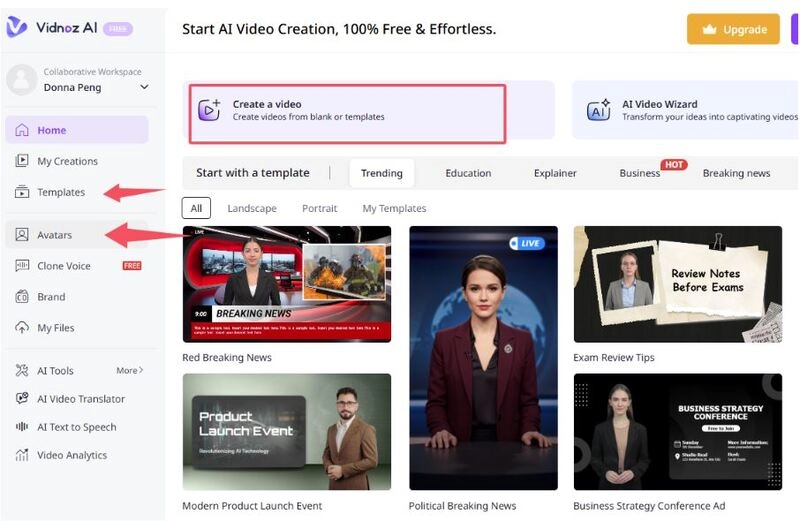
Step 1. Sign up on Vidnoz by clicking the following button.
Step 2. Start with an avatar or a template, or create a blank project.
Step 3. Customize your text, background, voice, and more details.
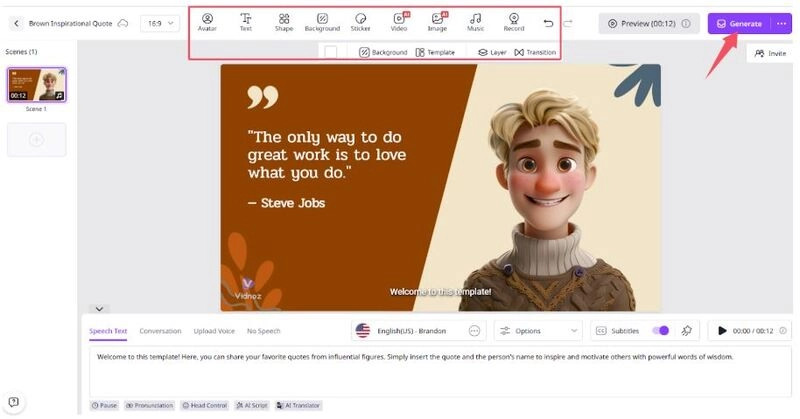
Step 4. Generate and download your video for free.
Vidnoz Gen Video Effect – Advanced Post-Production Tool
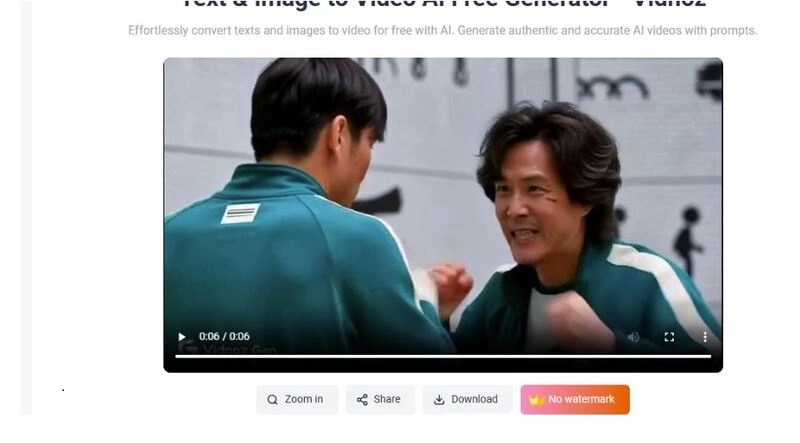
Vidnoz Gen is another AI-powered video generation product by Vidnoz, which combines image and video creation with various video effects. You can use it to create dynamic videos from text or images with one click, make people in pictures dance, change characters' clothes, etc.
Vidnoz Gen's Video Effect, like the previous tools, is also dedicated to infusing specific effects into your content. It gathers kinds of viral AI filters and effects, especially useful for creators to create magic style transformation in videos effortlessly.
How to Use Vidnoz Gen:
Step 1. Choose an effect from the library on Vidnoz Gen.
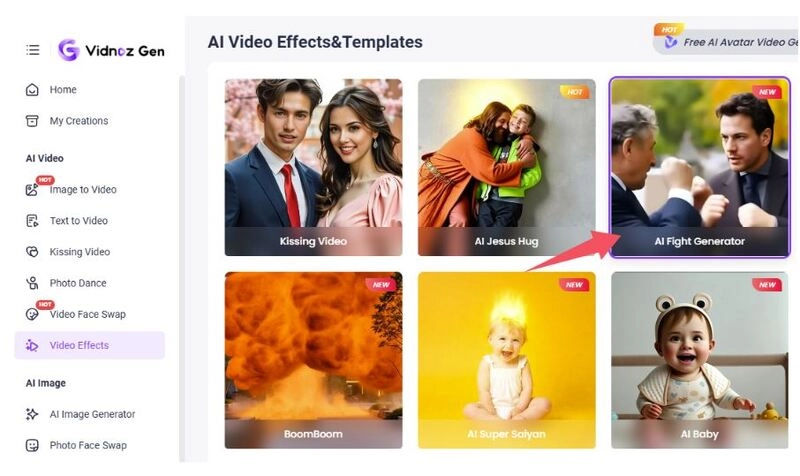
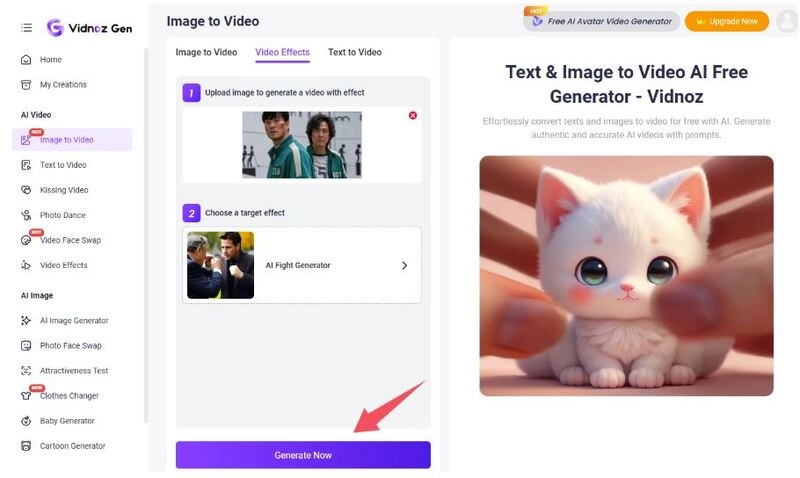
Step 2. Upload your image and click Generate Now.
Step 3. Check your generated videos and download.
The Bottom Line
AI bloom effect is a simple but powerful way to transform ordinary footage into lifelike art. Using a reliable AI bloom video generator and combining it with creative platforms like Vidnoz will help you produce engaging, professional-quality videos that truly stand out. Have a try now.





![Moving Photo Effect with AI: How to Make a Still Image Move [5 Ways]](https://www.vidnoz.com/bimg/moving-photo-effect.webp)
![How to Add Effects on a Video: Filters, BG Effects, Animations [Full Guide]](https://www.vidnoz.com/bimg/how-to-add-effects-on-a-video-online-free.webp)
