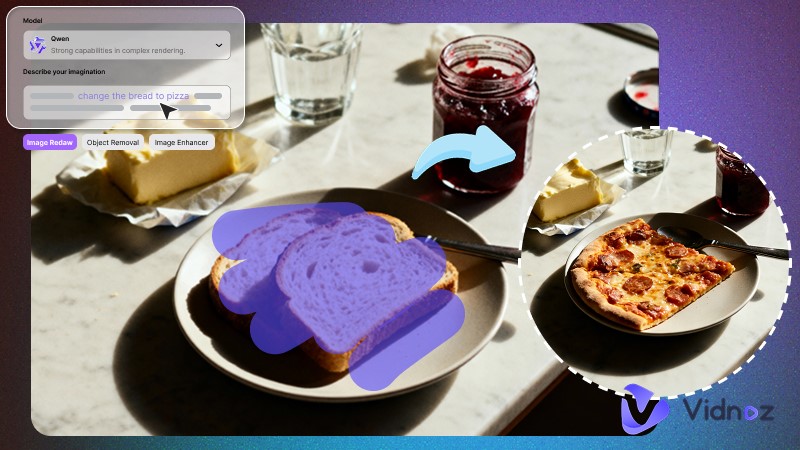
The internet is filled with an incredible number of high-quality image works. To prevent images from being misused, creators often add semi-transparent watermarks, usually in the bottom-right corner of photos. However, when these resources are reused, watermarks quickly become a distraction, disrupting the overall visual appeal of an image. In such cases, a fast and effortless remove watermark from photo AI becomes an essential solution.
This article will review some of the best-performing tools currently available, including options designed for both desktop and mobile devices, helping users restore clean, professional-looking images with ease.

- On This Page
-
Can You Remove a Watermark from a Photo?
-
What is an AI Watermark Remover?
-
Tested Online Tools to Remove Watermark from Photo AI Free
1. Vidnoz AI: How to Remove Watermark from Photo AI via Text Prompts?
2. DeWatermark: Remove Watermark from Photo Free via 4 Models
3. WatermarkRemover.io: Remove Watermark from Photo AI in Batches
-
Handy Apps to Remove Watermark from Photo AI (Android & iOS)
Apple Photos: Remove Watermark on Photo via Crop & Cleanup
2. PicWish: Free Photo Editor to Remove Image Watermark
3. PhotoDirector: Smart AI Object Remover to Clean Photo Watermark
-
FAQs on AI Image Watermark Remover
Can You Remove a Watermark from a Photo?
Can you remove a watermark from a photo? The answer is yes—but only when both technical feasibility and legal compliance are met.
Modern remove watermark from photo AI tools are already advanced enough to eliminate most technical barriers. From a legal and copyright perspective, watermark removal is generally acceptable only if you own the original work or have obtained permission from the creator, and the edited image is used for the following purposes:
- Processing personal original photos
- Editing properly licensed content
- Use strictly for personal learning or display
Disclaimer: Removing watermarks from other people's works or stock images without authorization may violate copyright laws and lead to legal risks. Please use such tools responsibly.
What is an AI Watermark Remover?
As the name suggests, AI watermark remover refers to the use of artificial intelligence to automatically detect watermark patterns, reconstruct the underlying pixels, and intelligently fill in textures, gradients, and edges within the marked area, resulting in a clean, natural-looking image.
Compared with manual watermark removal in tools like Photoshop, AI-based solutions save significant editing time and are better equipped to handle complex or semi-transparent watermarks. Most importantly, they are accessible even to non-professionals, allowing anyone to remove watermarks efficiently without advanced design skills.
Tested Online Tools to Remove Watermark from Photo AI Free
Let's explore real AI remove watermark tools that launch quickly, are easy to use, and work across devices.
1. Vidnoz AI: How to Remove Watermark from Photo AI via Text Prompts?
First up is a platform that offers two AI-powered approaches to watermark removal: Vidnoz AI. Both methods are simple and beginner-friendly—one lets you remove watermarks by giving the AI a text command, while the other allows you to manually select the area you want to erase. For users without professional editing skills, the text-based method saves effort, while manual selection offers more visual control.
Below is a closer look at how these two remove watermark from photo AI online methods work and how to use them.
Way 1. Remove Watermark from Photo AI via Text Prompts
Vidnoz's built-in Watermark Remover performs especially well with complex backgrounds or full-screen overlays. Within seconds, you'll receive a clean, watermark-free image at its original resolution.

Free Trial: 3-times-daily free trial
Core Features:
- Automatically detects and removes all types of image watermarks, like logos, text, symbols, and timestamps, via simple text prompts.
- Supports multiple image formats, including PNG, JPG, and WEBP.
- Flexible image adjustment and custom watermark removal of any area.
- High-precision AI watermark removal while restoring the background naturally.
- No long waits—results are delivered in just a few seconds.
How to remove watermark from photo AI with Vidnoz:
Step 1. Go to the page of “Remove Watermark from Photo”. Choose a preferred model, then upload your watermarked image.
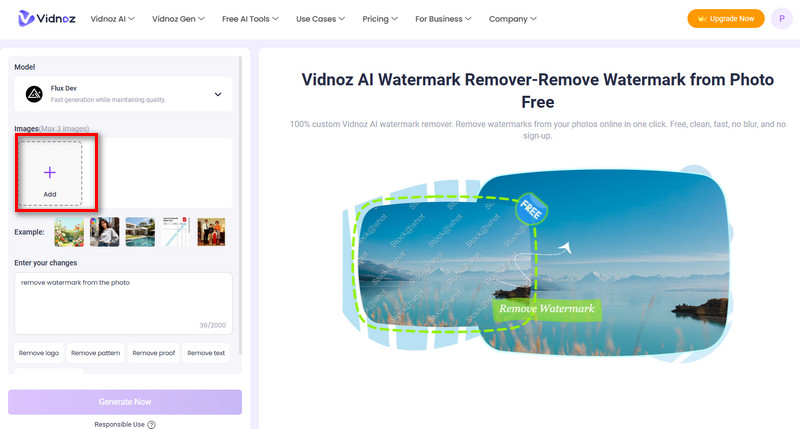
Step 2. Simply type a simple instruction, for example: Remove logo watermark from the photo.
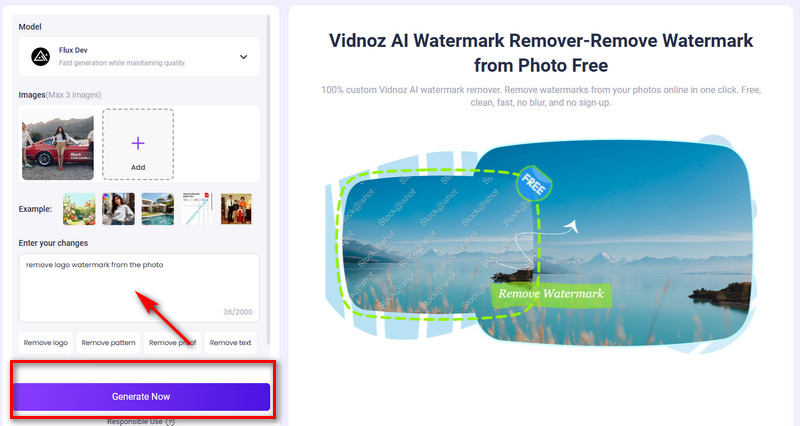
Step 3. Then click Generate Now. The watermark-free image will appear. Click Download to save it for free.
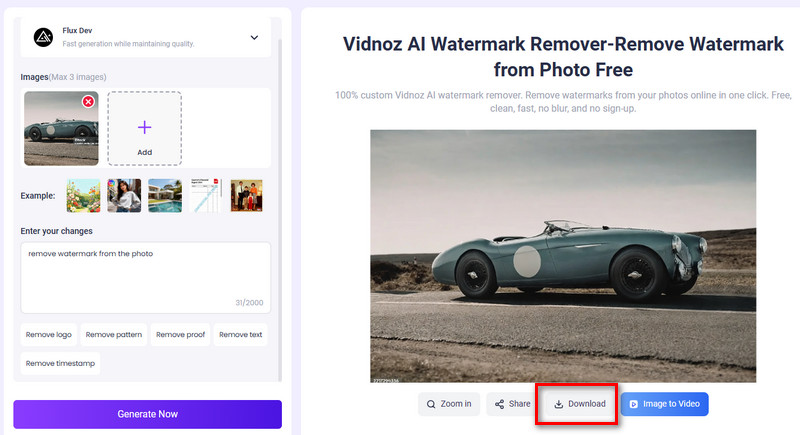
Way 2. Remove Watermark/Objects from Images Free via Manual Selection
If handing over all detection and removal tasks to AI automation feels a bit risky, there's another remove watermark from photo AI free option from Vidnoz AI worth trying: AI Image Remover.
This tool provides a draggable brush, allowing you to manually paint over the areas you want to remove. Once the target area is selected, simply confirm the removal and let the AI handle the rest—giving you more control over the final result.

Free Trial: daily free trial
Core Features:
- Manually select the area by brush and precisely remove the chosen watermarks.
- Remove any unwanted objects from photos—not just watermarks—while seamlessly preserving the background.
- The cleared area retains original sharpness, with no blur, stains, or visible artifacts.
- Works on any device. Whether on desktop, tablet, or mobile, simply open the webpage and start removing watermarks or objects instantly.
How to remove watermark from photo AI free:
Step 1. Locate on AI Image Remover page. Upload an image and enter the editing interface.
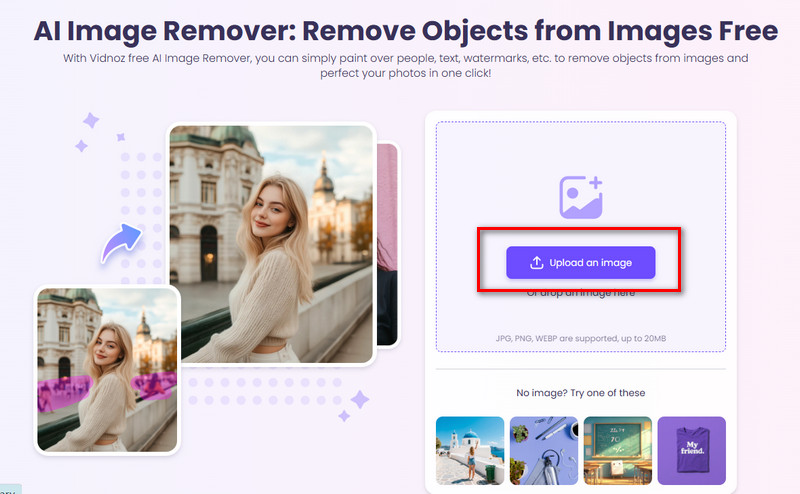
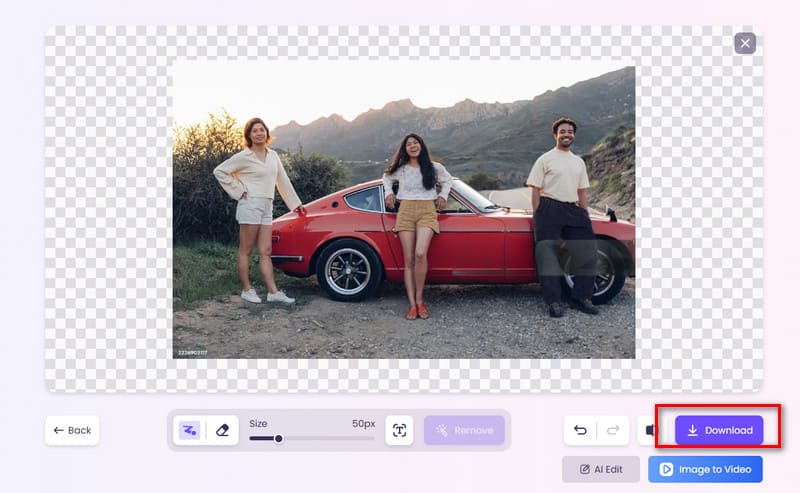
Step 2. Activate the brush and paint over the watermark you want to remove. Then click Remove below the preview window.

Step 3. Within seconds, a clean image will appear. Click Download to save the image.
2. DeWatermark: Remove Watermark from Photo Free via 4 Models
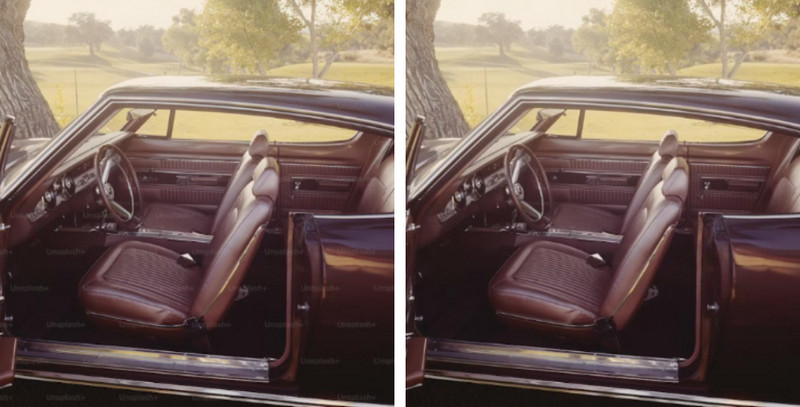
Watermarks are not always the same. Some cover the entire image, others hide in corners, and some are layered and highly complex. No matter the case, all of these challenges can be addressed with this remove watermark from photo AI solution: DeWatermark.
DeWatermark offers four specialized removal models, each optimized for different watermark types and image conditions. Below is a detailed breakdown of its features.
Free Trial: Available for Manual, 2.0, and 3.0 models
Core Features:
Specialized removal modes: DeWatermark provides four distinct watermark removal options.
- 2.0 Model: Best suited for emojis and older-style watermarks.
- 3.0 Model: The latest and most versatile option, covering nearly all watermark scenarios.
- Pro Model: Delivers the highest level of precision for complex watermarks.
- Manual Mode: Allows users to manually select the area to be removed for greater control.
Excellent compatibility: DeWatermark offers an online version optimized for desktops and tablets, as well as mobile apps compatible with both iOS and Android systems.
Generous upload limits: Supports images up to 6000 × 6000 px in formats including PNG, JPG, WEBP, and AVIF.
How to remove a watermark from a photo with DeWatermark:
Step 1. Visit the official DeWatermark website and choose the most suitable model based on the type of watermark in your image.
Step 2. Click Upload Image to upload the photo you want to process.
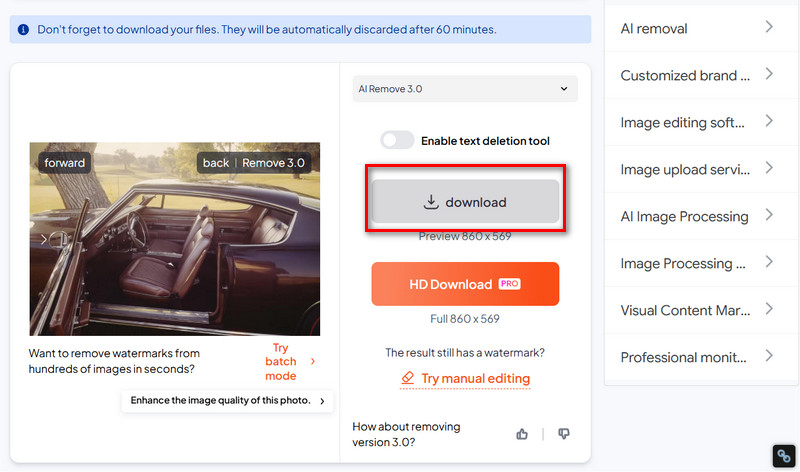
Step 3. Preview the final result. If it looks good, click Download to save the image.
3. WatermarkRemover.io: Remove Watermark from Photo AI in Batches
Building on its original AI photo editor, WatermarkRemover.io has expanded its supported input types. Users can not only upload images from local storage, but also submit images, PDFs, videos, or even URLs as sources for watermark removal. For users with high-volume needs, its batch watermark removal feature is especially appealing.

Free Trial: 3 free points
Core Features:
- Fully automated watermark removal: WatermarkRemover.io requires no manual input—simply upload the file and wait for the results.
- Wide upload compatibility: Supports local uploads of images, videos, and PDFs, as well as URL-based uploads, making it usable as a video watermark remover too.
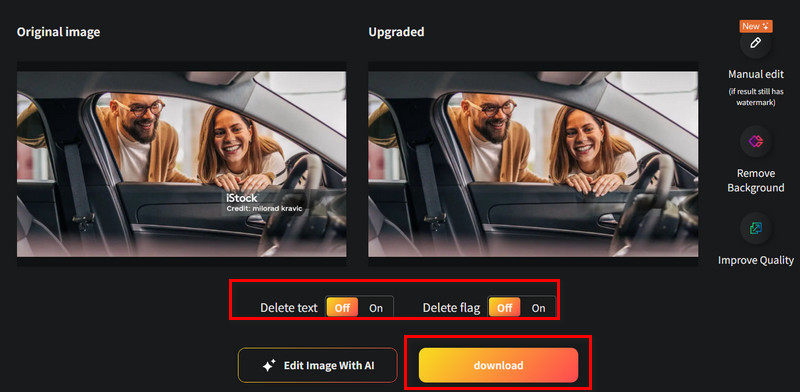
- Detailed removal options: Users can choose the type of watermark to remove, such as text or flags, offering greater flexibility.
- Batch processing: Bulk watermark removal becomes available after unlocking a commercial plan, ideal for large-scale workflows.
How to use WatermarkRemover.io:
Step 1. Visit the WatermarkRemover.io website and click Upload Image to upload your file.
Step 2. Preview the result on the editing screen, then choose whether to remove or keep text and flag elements based on your preference.
Step 3. Click Download to save the processed file.
Handy Apps to Remove Watermark from Photo AI (Android & iOS)
One issue to keep in mind is that some remove watermark from photo AI tools are primarily optimized for desktop websites, which can make them slightly inconvenient to use on mobile devices.
In such cases, it may be worth considering more specialized solutions—namely, apps that are specifically designed and optimized for mobile use.
Apple Photos: Remove Watermark on Photo via Crop & Cleanup
As more users express dissatisfaction with watermarks on saved or captured photos, smartphone manufacturers—such as Apple—have started to address this need directly at the system level.
On newer models released in recent years, including the iPhone 15 Pro and later devices, a built-in photo watermark removal feature is now available under the Crop & Cleanup tool. It is especially effective for handling small or subtle watermarks.
Pricing: Free
Core Features:
- Completely free: The watermark removal feature is built directly into the iOS Photos app and can be used anytime without subscriptions or extra costs.
- Natural watermark removal: Powered by Apple's neural network technology, the tool intelligently fills in the area where the watermark was removed, keeping the image visually consistent.
- Fast and convenient: No technical skills required—just find the feature, enable it, and remove watermarks in seconds.
How to remove watermark from a photo on iPhone:
Step 1. Open your iPhone and launch the Photos app. Find the watermarked image in your album, select it, and tap Edit in the top-right corner.
Step 2. Once editing options appear, locate Crop & Cleanup. Carefully highlight the watermark area with your finger. The system AI will automatically analyze and remove it.
Step 3. After the process is complete, tap Done to save the image.
2. PicWish: Free Photo Editor to Remove Image Watermark
If an all-in-one and fun image editing app on mobile is what you're looking for, PicWish is definitely worth trying. It brings together a wide range of creative tools in one place—watermark removal, object removal, background removal, photo enhancement, retouching, and more—all wrapped in an interface that's extremely easy to use.

Pricing: 3-Day Free Trial
Available on: iOS & Android
Core Features
- Comprehensive photo editing toolkit: Includes watermark and background removers, old photo restoration, blur effects, ID photo creation, and more.
- Perfect for portraits and selfies: Offers a variety of beauty effects and filters tailored to different styles and seasonal themes.
- AI-powered editing: AI can handle nearly any editing task, including virtual style, outfit, and appearance changes with minimal effort.
Convert Image to Video AI Online - Free
- Create a video from an image quickly for free.
- Use various AI models to turn photos into videos.
- Download and share the AI-generated video at no cost.
Convert Image to Video
How to remove a watermark from a photo using PicWish:
Step 1. Download the PicWish app on your smartphone.
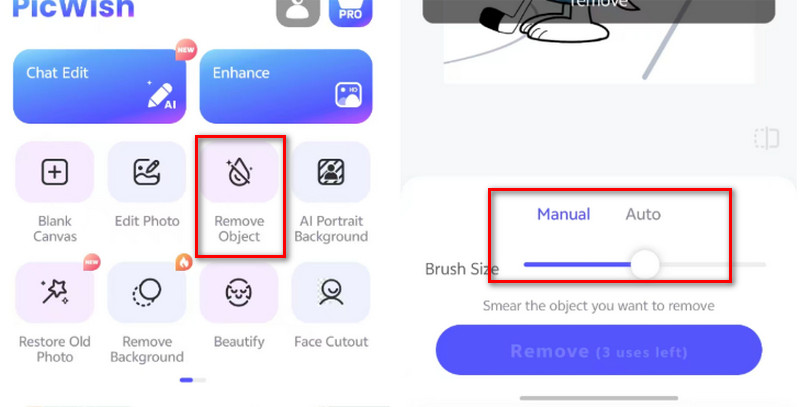
Step 2. Select the Remove Object feature, then choose the photo you want to edit.
Step 3. Use Auto mode and tap Remove to let AI erase the watermark automatically—or switch to Manual mode for more precise control.
3. PhotoDirector: Smart AI Object Remover to Clean Photo Watermark
For iOS users, PhotoDirector is a well-suited image editing assistant. It is especially popular for creating artistic portraits and stylized avatars.

Pricing: Free
Available on: iOS
Core Features
- One-tap removal of unwanted watermarks: PhotoDirector can remove distracting elements such as marks, logos, and watermarks from existing images, helping your photos look clean and polished.
- AI-powered styling: In just a few seconds, AI can perform face swaps, redesign hairstyles and outfits, enhance skin tone, and reshape facial features.
- Ad-free, distraction-free experience: The interface is clean and smooth, with no ads interrupting the editing process.
Create Your AI Talking Avatar - FREE
- 1900+ realistic AI avatars of different races
- Vivid lip-syncing AI voices & gestures
- Support 140+ languages with multiple accents
How to remove a watermark from a photo using a free app:
Step 1. Download PhotoDirector on your iPhone.
Step 2. Open the AI Remover feature. You can choose Auto mode to let AI remove the watermark automatically or switch to Manual mode to select the area you want to erase.
FAQs on AI Image Watermark Remover
Q: Can AI completely remove a watermark from a photo?
A: Yes, watermarks with regular shapes, fixed positions, and low transparency can often be removed completely. However, if the watermark has complex textures or multiple overlapping layers, some manual assistance may still be required.
Q: Are free AI watermark removers safe to use?
A: Generally yes, as long as the service comes from a legitimate official website or app. For added peace of mind, it's recommended to review the platform's privacy policy in advance.
Q: Will removing a watermark reduce image quality?
A: Not when using reliable, high-quality tools. These tools typically repair and fill the background while removing the watermark. That said, minor blurring can still occur in certain situations.
Q: What are the common watermarks that can be removed?
A: Common removable watermarks include text watermarks, timestamps, semi-transparent full-image overlays, and logo marks.
Conclusion
Whether you prefer using remove watermark from photo AI on mobile or desktop, this guide offers suitable tools for every scenario—and each option comes with detailed step-by-step instructions for easy reference.
Among them, Vidnoz stands out as the most comprehensive and versatile solution. For obvious or large watermarks, the Watermark Remover can handle everything automatically, from detection to removal. If more precise control is needed, AI Image Remover allows you to manually select the area to be erased, while the rest of the work is seamlessly completed by AI.

Vidnoz AI - Create Free Engaging AI Video with Talking Avatar
- Easily create professional AI videos with realistic avatars.
- Text-to-speech lip sync voices of different languages.
- 2800+ video templates for multiple scenarios.










![How to Turn Photo into Paint by Number Art? [2026 Guide]](https://www.vidnoz.com/bimg/turn-photo-into-paint-by-number.jpg)