



How to Turn Photo into Paint by Number Art? [2026 Guide]
Do you know how to turn photo into paint by number? Skip the manual process, give smart color by number generator tools a try!
Even if you're not a painter, you can still recreate the moments you love with 100% accuracy: all you need to do is turn photo into paint by number. However, hiring a professional to customize a paint-by-number outline can be quite expensive, and manually marking everything yourself......well, heaven knows how long that would take.
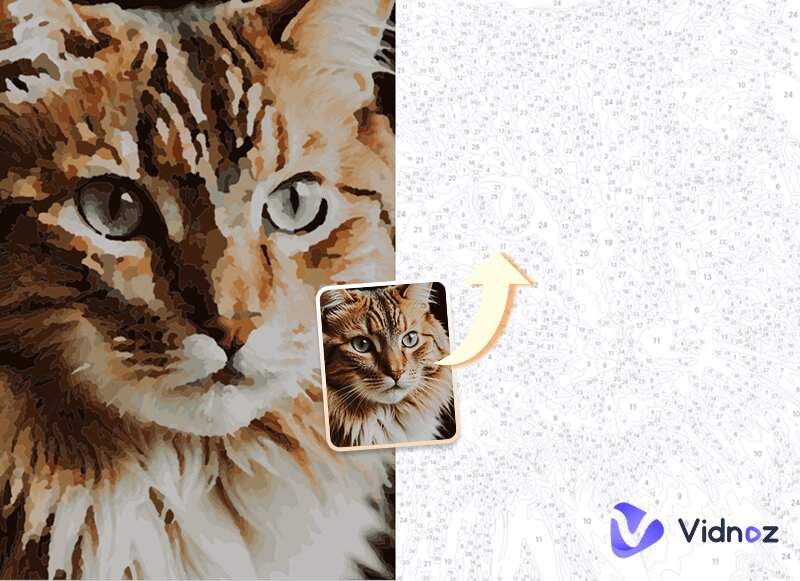
That's where you need a professional online paint by number generator. Simply upload your image, and the platform will automatically create the outline for you and guide you on how to use the paints. This guide has already selected four top-tier solutions for you. Let's take a look at what each of them does best, and then decide which one deserves your pick!
- On This Page
- Why Use Paint by Number Generator?
- Top 4 Color by Number Generators to Turn Photo into Paint by Number1. MimiPanda: Full-Controlled Paint by Number Generator2. Davincified: Turn Photo into Paint by Number with Accurate Colors3. PBNify: Color by Number Generator with Detailed Color Info4. Paint-by-Number.com: Styled Paint by Number Generator
- Deadstill to Dynamic: Bring Paint by Number Art to Life
- Photo Types That Work Best for Paint by Number ArtThe Bottom Line
-
Why Use Paint by Number Generator?
As mentioned earlier, using a professional paint by number tool is a better choice than making everything manually or paying for custom services. But why?
Let’s start with the definition. A paint by number generator is an online tool that automatically converts ordinary photos into paintings divided into numbered sections in different colors for further painting and fun, similar to AI photo-to-cartoon generators.
Then what does it bring to you? Check the following points:
Boost efficiency: A custom paint by number generator allows you to skip the tedious manual process of separating colors and adding labels, while ensuring high-accuracy color details.
- Easy Access: With the tool, it is no longer a high-threshold task for ordinary users to make paint by number from photo. Complex visual details are transformed into clear, actionable steps, allowing you to focus on coloring process itself.
- Lower cost: You no longer need to rely on expensive professional customization to turn photo into paint by number.
Top 4 Color by Number Generators to Turn Photo into Paint by Number
With a basic impression, are you ready to check the real products and their practical usage steps? This part will present four outstanding and representative color by number generator options in detail.
1. MimiPanda: Full-Controlled Paint by Number Generator
When you open MimiPanda's page, every scroll brings a new surprise. Its professionalism is fully on display: the platform supports converting photos into paint by numbers online, paired with extremely detailed customization options. It even provides guides for mixing paint-by-number colors—making the whole experience feel like real, hands-on customization.
- Full-Controlled: Impressive level of customization. Elements such as the max number of colors, complexity, minimum area, and professional color palettes can all be adjusted according to preferences.
- Flexible & convenient output formats: It provides a built-in converter to export custom palettes in popular and creator-friendly formats such as PDF, PNG, CSV, and Procreate .swatches.
- Professional color guidance: It supports restoring colors based on the RYB color model, breaking them down into primary and secondary colors.
Cons
- The product is not free; each new user only gets two trial opportunities.
- Registration is required to access the trial.
How to Make Paint by Number from Photos with Full Control?
Step 1. Visit the MimiPanda Convert Photo to Paint by Numbers Online page. Click + Choose photo to upload the image you want to convert.
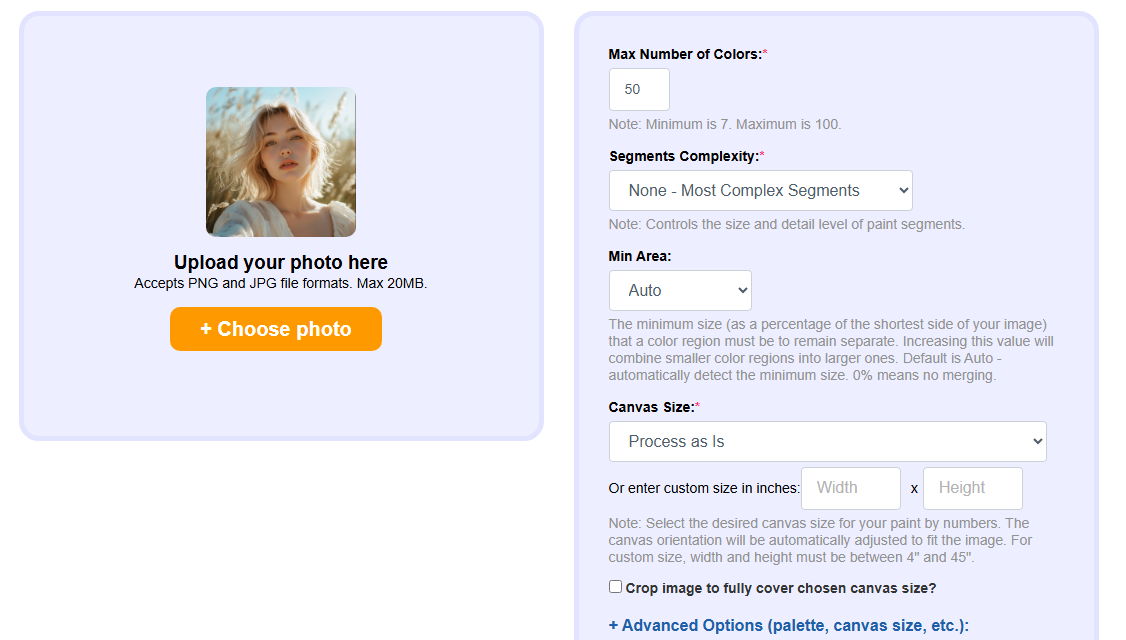
Step 2. In the right-side menu, set options such as maximum colors, complexity, minimum area, and canvas size. Then click Create Paint by Numbers at the bottom.
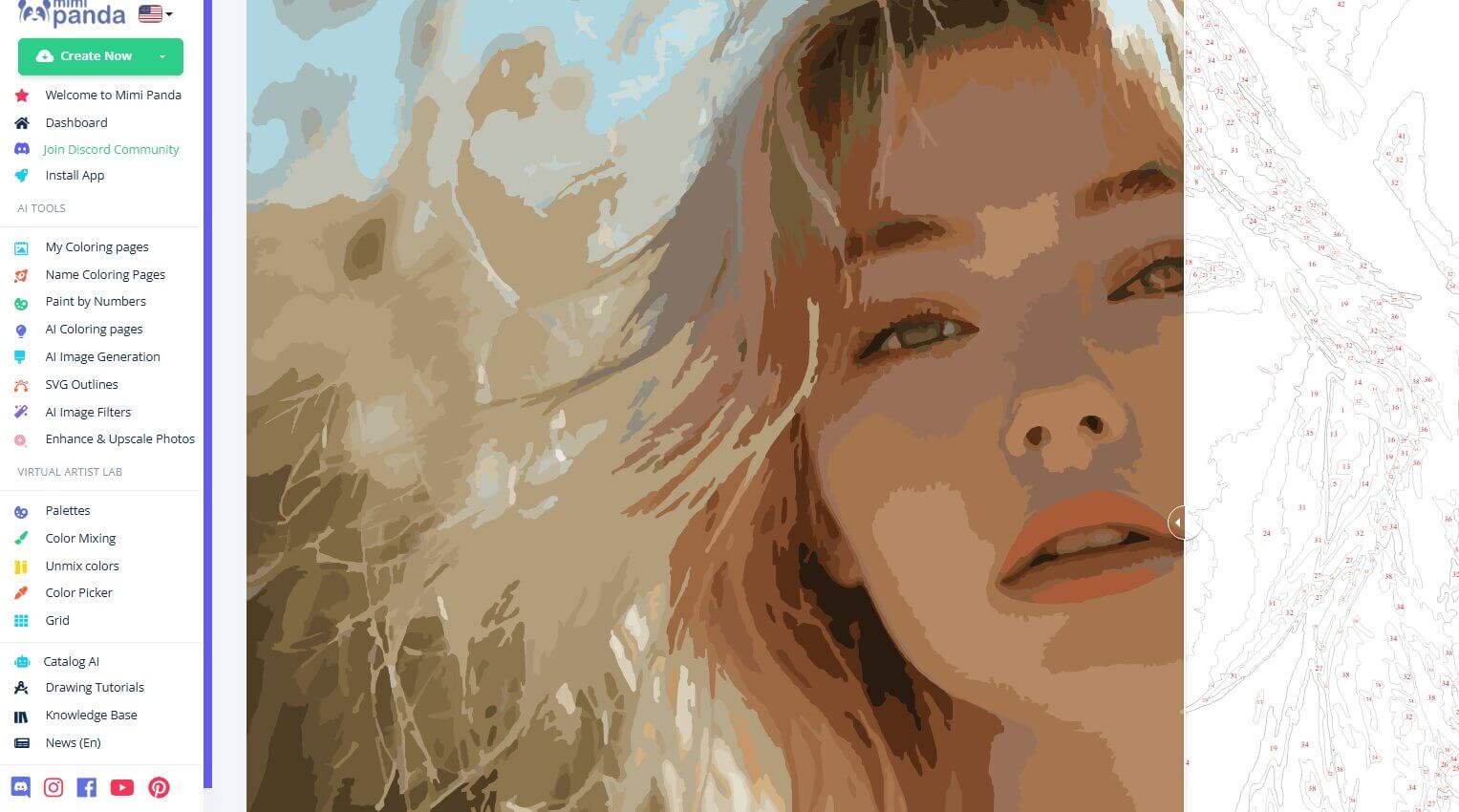
Step 3. Wait a moment for the result to generate. Preview it, then download the image with color numbers, the color list, and other assets as needed.
Never Miss: Love classic comic-style visuals? Unlock the convert photo to caricature feature and explore a more illustrated aesthetic.
2. Davincified: Turn Photo into Paint by Number with Accurate Colors
Davincified is another standout tool to make paint by number from photo. Its clean and minimal interface creates a great first impression the moment you open the page. Even better, it requires no registration, allows unlimited use, and generates results without adding any watermarks.
Let's take a closer look at what makes Davincified unique.
- Simple and intuitive setup: Davincified is especially beginner-friendly. You only need to adjust two basic parameters: the number of colors and the difficulty level, allowing you to find your own balance between detail and complexity.
- Fast generation speed: After uploading your image, the processing time is usually under one minute. You can quickly preview and download both the paint-by-number template and the color reference list.
- High-fidelity PDF output: Davincified lets you save your template directly as a PDF file while preserving fine details, making it ready for immediate printing.
Cons
- Some distortion and blurring may occur when processing human faces.
- Customization options are relatively limited.
How to Turn Photo into Paint by Number Free with Davincified
Step 1. Open the Davincified Free Online Custom Paint by Number Generator in your browser. Click the central upload area and add the image you want to convert.
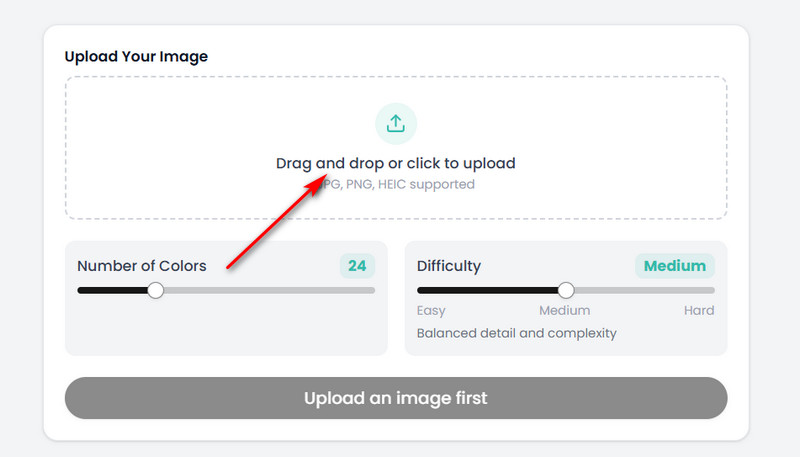
Step 2. Decide whether you want to zoom in on or crop the image. Once finished, click the Crop button in the pop-up window.
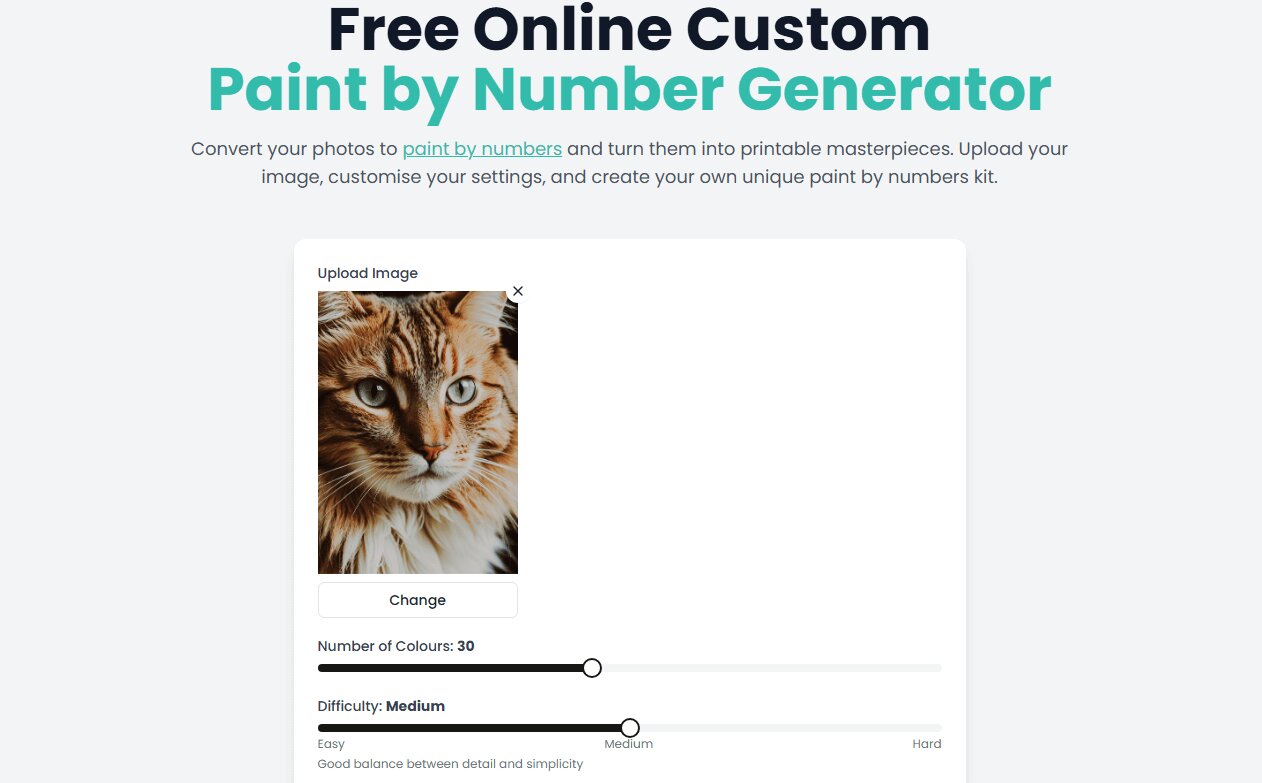
Step 3. Set the color quantity and difficulty level according to your preference, then click Generate Paint by Numbers.
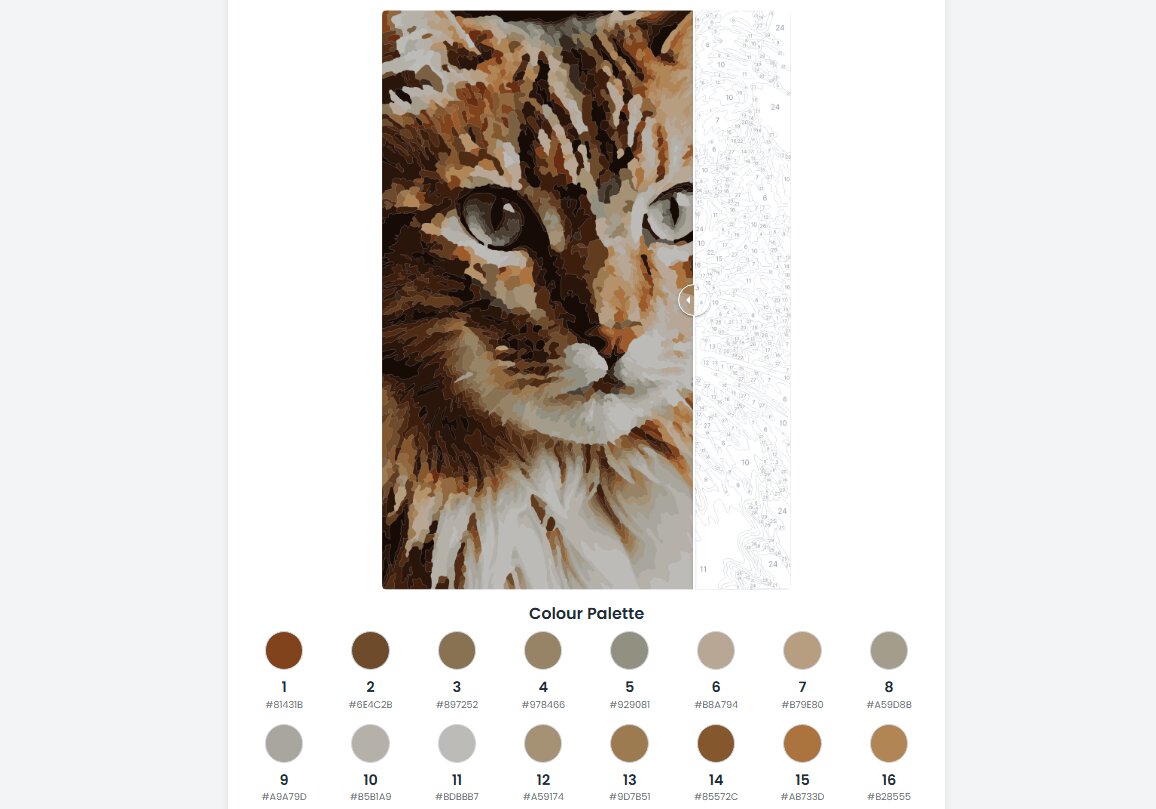
Step 4. After the result is generated, click the Download PDF button below the preview window to obtain your file.
3. PBNify: Color by Number Generator with Detailed Color Info
PBNify is a leading online platform that supports turning a photo into paint by number art. Its top ranking is not only due to its clean interface and simple workflow, but also its cleverly designed result presentation.
After processing your image, PBNify first extracts the required colors and then allows you to switch seamlessly between the outline view and the finished preview. Below are its core features.
- Detailed color information display: By clicking the Show Color Info button, you can access an extremely detailed breakdown of all the colors used in the artwork. This information makes it easy to prepare your paints accurately and confidently.
- Well-organized download options: PBNify allows you to download three different files separately: the colored result, the paint-by-number outline, and the color palette. Each file is clearly categorized, helping you avoid confusion during download.
Cons
- The level of detail can only be adjusted by changing the number of colors, which may feel less intuitive for some users.
How to Turn Photo into Paint by Number with PBNify
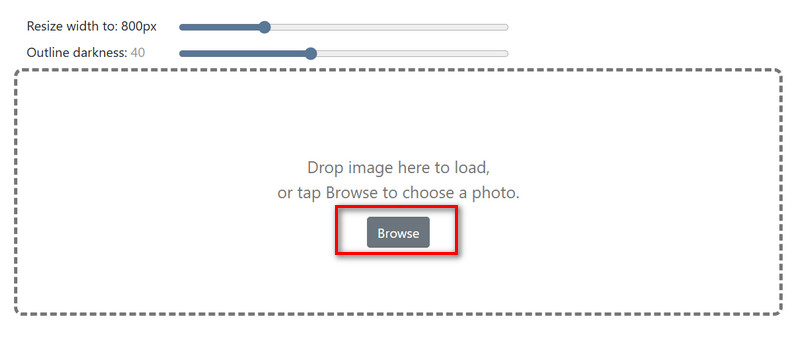
Step 1. Visit the PBNify custom paint by number generator page. First, set the image width and outline darkness. Then, click Browse to upload your selected photo.
Step 2. Next, choose the number of colors you want to use, then click Go > PBNify.
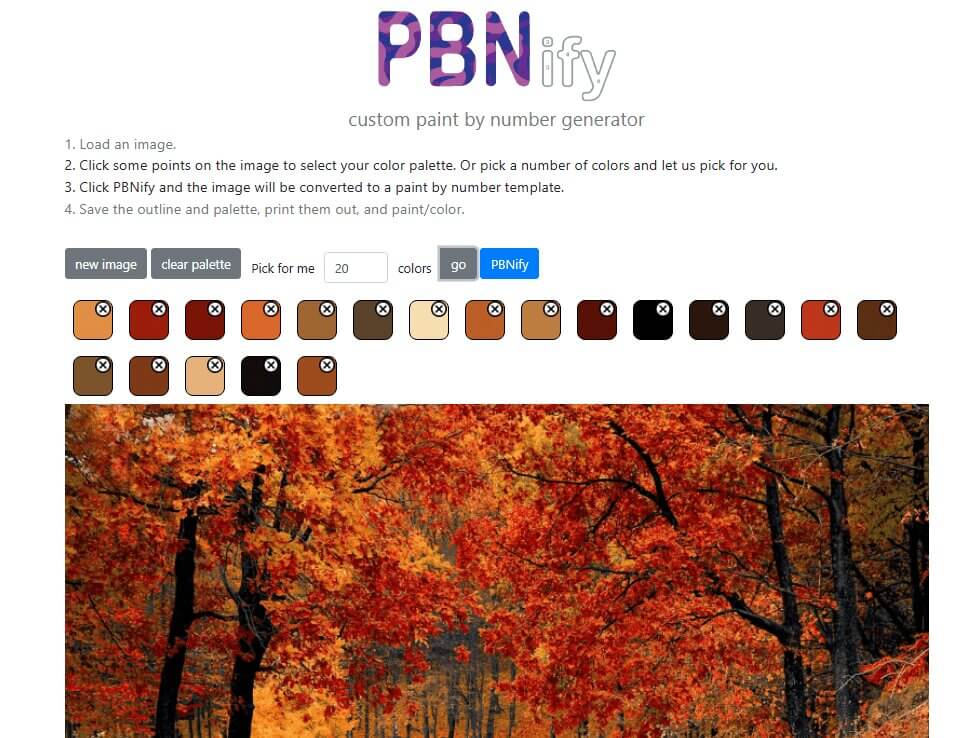
Step 3. You can now preview the paint by number result and review the colors that will be used.
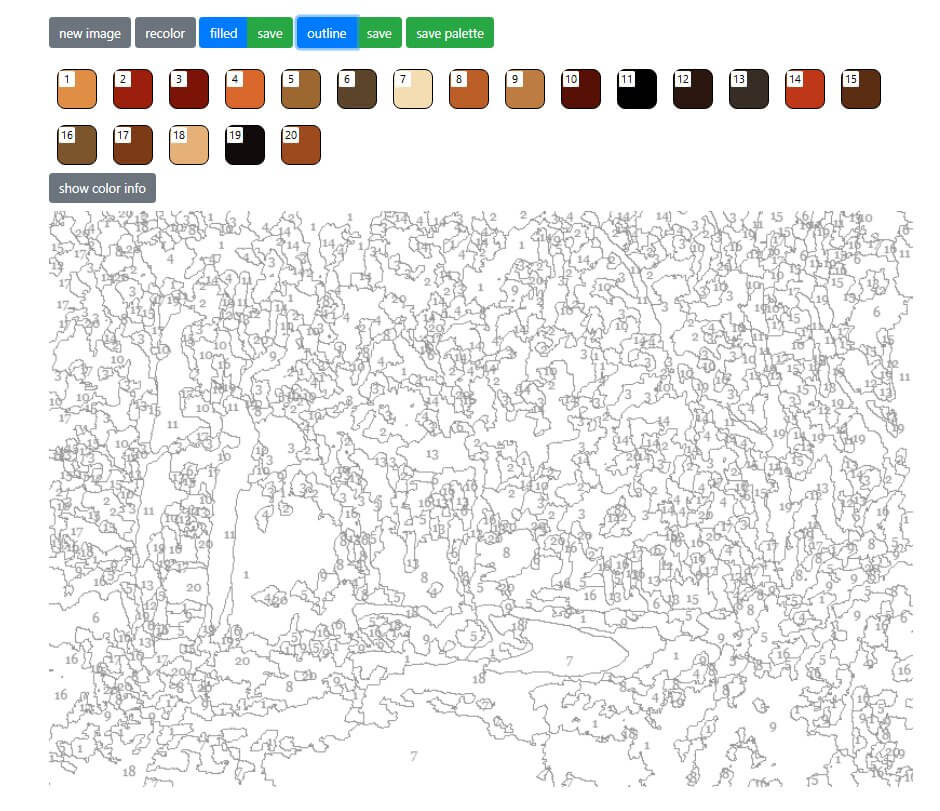
Use the categorized tabs in the interface to locate and download the finished artwork, outline, and color palette files one by one.
4. Paint-by-Number.com: Styled Paint by Number Generator
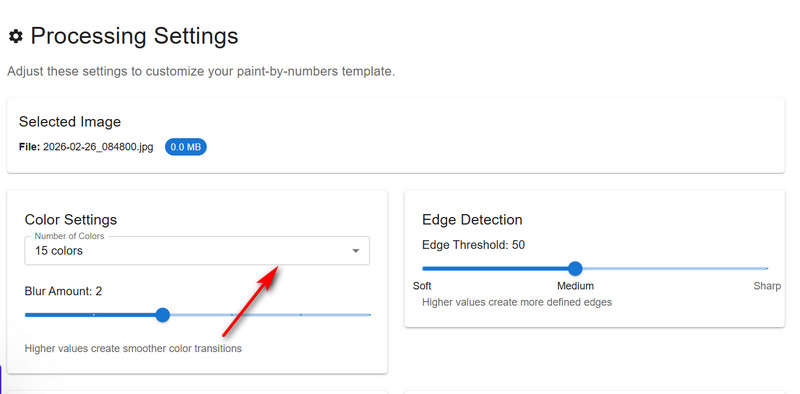
Paint-by-Number.com is a highly detailed paint by number generator, a quality that becomes immediately apparent through its extensive personalization options. The platform allows you to manually adjust settings such as color quantity, edge threshold, blur amount, minimum area, and output format. Despite this level of control, the entire process remains fast and smooth, with no noticeable lag or delays.
- Advanced customization options: The platform offers a wide range of adjustable parameters, each paired with flexible presets. If the settings feel overwhelming, you can always revert to the default mode and generate results effortlessly.
- Exceptional efficiency: Paint-by-Number.com strikes a strong balance between simplicity and completeness. Most notably, it can generate final results within 30–60 seconds, allowing you to move forward without long waiting times.
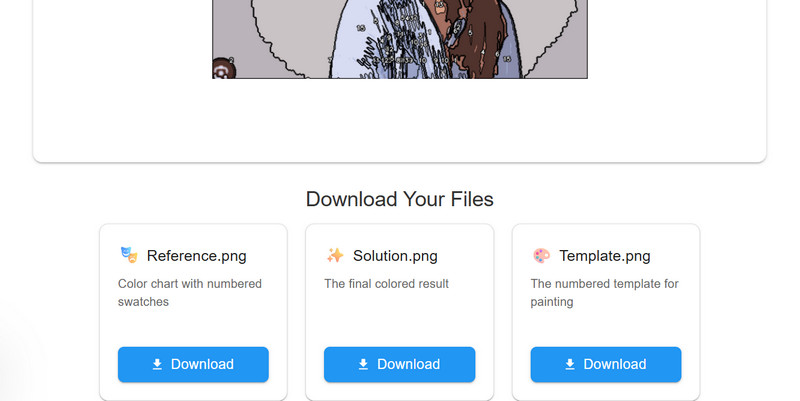
- Clear download options: The download buttons are well organized, enabling you to save the paint by number template, the fully colored version, and the color palette as separate files.
Cons
- The download format cannot be customized.
How to Convert a Picture to Paint by Numbers Online Using Paint-by-Number
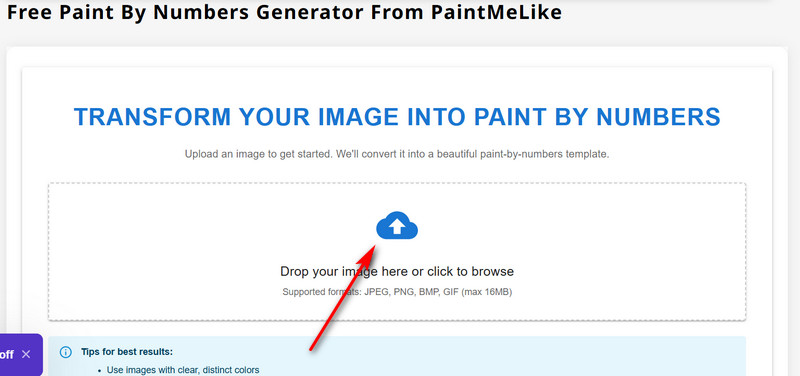
Step 1. Visit the Paint-by-Number.com website and click the upload area in the center of the page to select the image you want to process.
Step 2. Click PROCESS IMAGE to enter the settings panel and adjust the parameters as needed. Then click GENERATE PAINT BY NUMBERS to start processing.
Step 3. Once the process is complete, download the files you need by following the on-screen labels.
Deadstill to Dynamic: Bring Paint by Number Art to Life
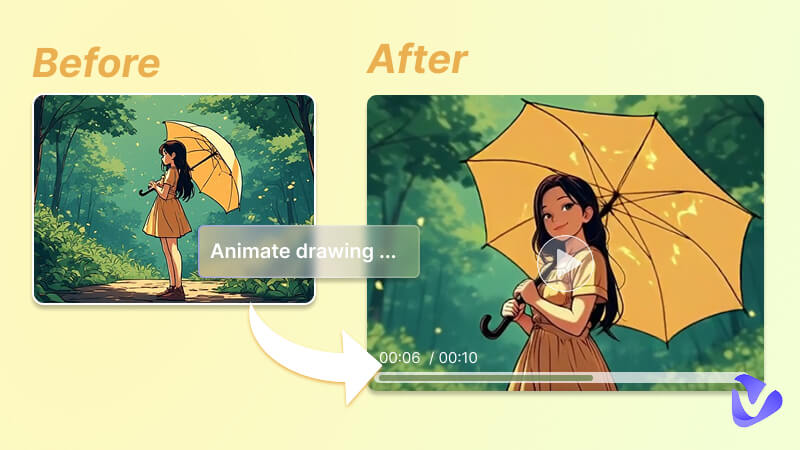
Keep in mind that after completing your paint-by-number artwork step by step, you'll end up with a beautiful finished painting—but just like your original photo, it remains static.
What if the person in the painting could come alive, move naturally, and even show expressions—almost as if the oil-painted version of you suddenly stepped into real life?
Here's a tool that feels almost like magic and can make that happen: Vidnoz Image to Video AI. With just a single image and one simple prompt, you can transform a still picture into a vivid, natural-looking video. The platform also offers a variety of trendy motions and visual filters under Video Effects, making your videos far more dynamic and engaging.


Convert Image to Video AI Online - Free
- Create a video from an image quickly for free.
- Use various AI models to turn photos into videos.
- Download and share the AI-generated video at no cost.
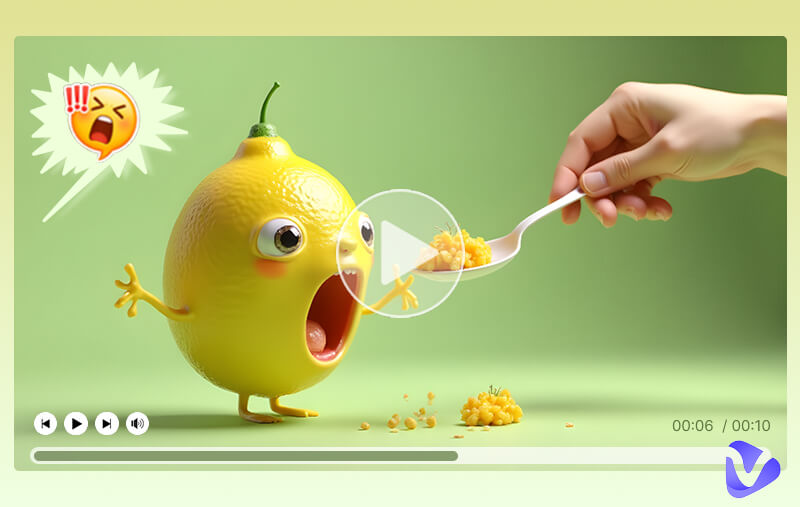
- Turn static art into vibrant videos online: Everything happens online—no downloads required. The people in your image can come to life, performing custom actions based on your instructions or using built-in presets provided by the platform.
- Realistic and consistent animations: Vidnoz doesn't just make images move. It delivers animations that feel genuinely lifelike, with high-quality texture rendering, lighting, color accuracy, and smooth, natural motion.
- Instant PBN art video creation for free: Simply upload your artwork and get a completed video within seconds or minutes. You can generate videos for free with no limits, saving hours or even days of traditional video rendering time.
How to Animate Your PBN Art
Step 1. Visit the Vidnoz Image to Video AI page. Choose your preferred generation model, then click Upload an image to add your paint by number artwork.
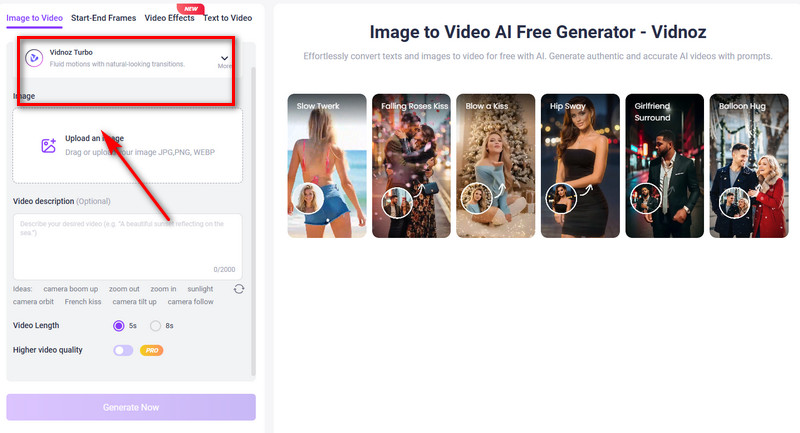
Step 2. In the Video description text box, enter a short prompt describing what action you want the person/object in the image to perform.
Step 3. Set the desired video length, then click Generate Now to create your animation.
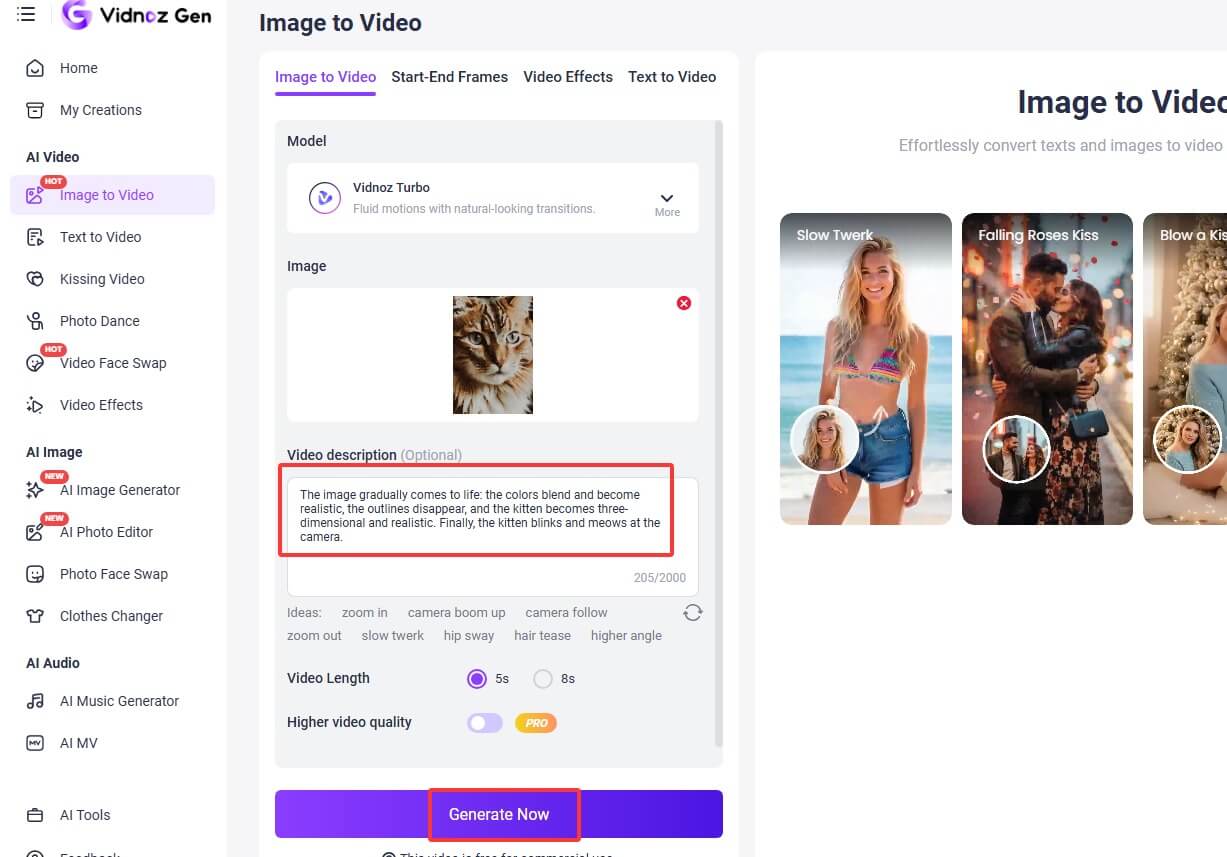
When finished, feel free to check, zoom, download, and share your AI animation photo work.

Imagine your character not only moving, but also speaking. You can control exactly what they say and even ensure accurate lip movement. Try pairing this tool with a free lip-sync AI for an even more immersive result.
Why not take your creation to the next level? Vidnoz has a clear answer—and it definitely won't disappoint. Vidnoz goes far beyond simple fun animations or basic ways to animate a picture with AI. You can confidently use it to create professional-grade, well-structured tutorial videos or storytelling content.
With Vidnoz AI Video Generator, you'll find video templates designed for a wide range of industries, along with AI avatars that look and perform like real presenters. With just prompts and settings, they can deliver exactly the message you want.

- Next-level PBN art video creation: Vidnoz unlocks far more possibilities for PBN art videos: more natural movements, accurate lip-syncing, multiple voice options, customizable avatars, and flexible video backgrounds.
- Industry-wide template library: When creating videos with Vidnoz, you never have to start from scratch. The platform offers a wide variety of templates covering different themes, professions, and scenarios. Simply choose one and customize it to fit your needs.
- Fully customizable avatars: Finding a presenter is never a problem. Vidnoz provides thousands of realistic AI expressive avatars that can be filtered by gender, age, and other attributes. You can also upload your own image and let AI clone a custom presenter for your video.
How to Create Engaging Videos for Your PBN Art
Step 1. Click the button below and follow the on-screen instructions to sign up and enter the workspace. Next, click Create a video, and choose your desired aspect ratio.
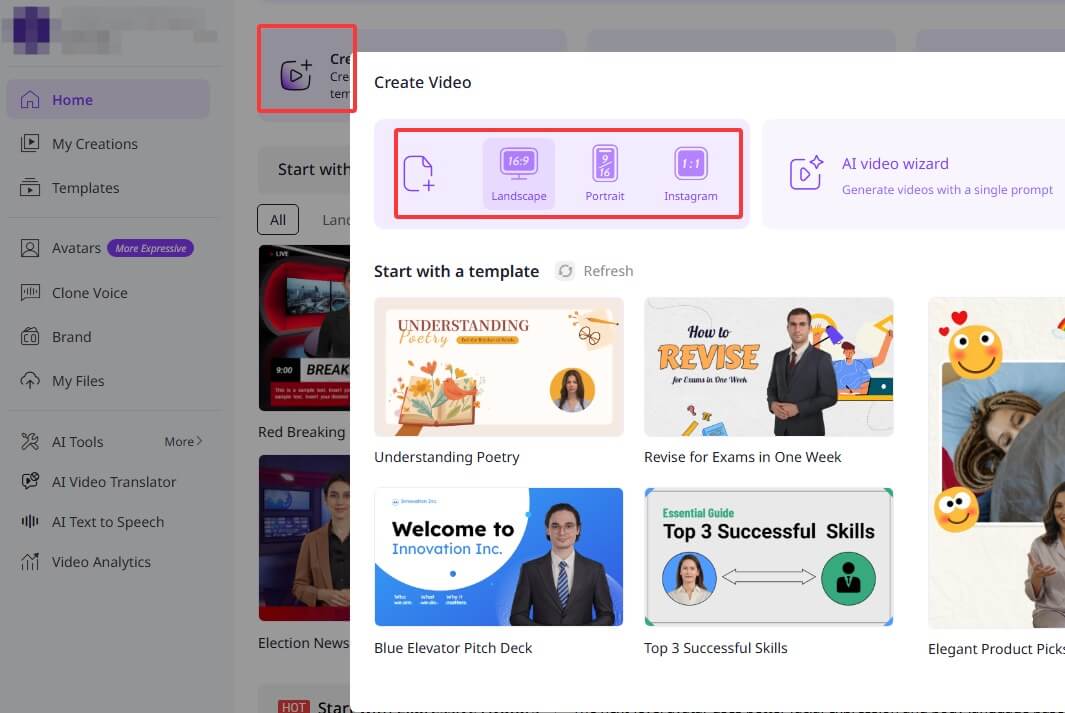
Step 2. Choose a template in the pop-up window. Or, you can also make your own design: upload your PBN art as the video background or use it as illustrations within specific scenes.
Step 3. Choose Avatar > select Expressive Avatar for more convincing and engaging storytelling, or other avatars based on your needs.
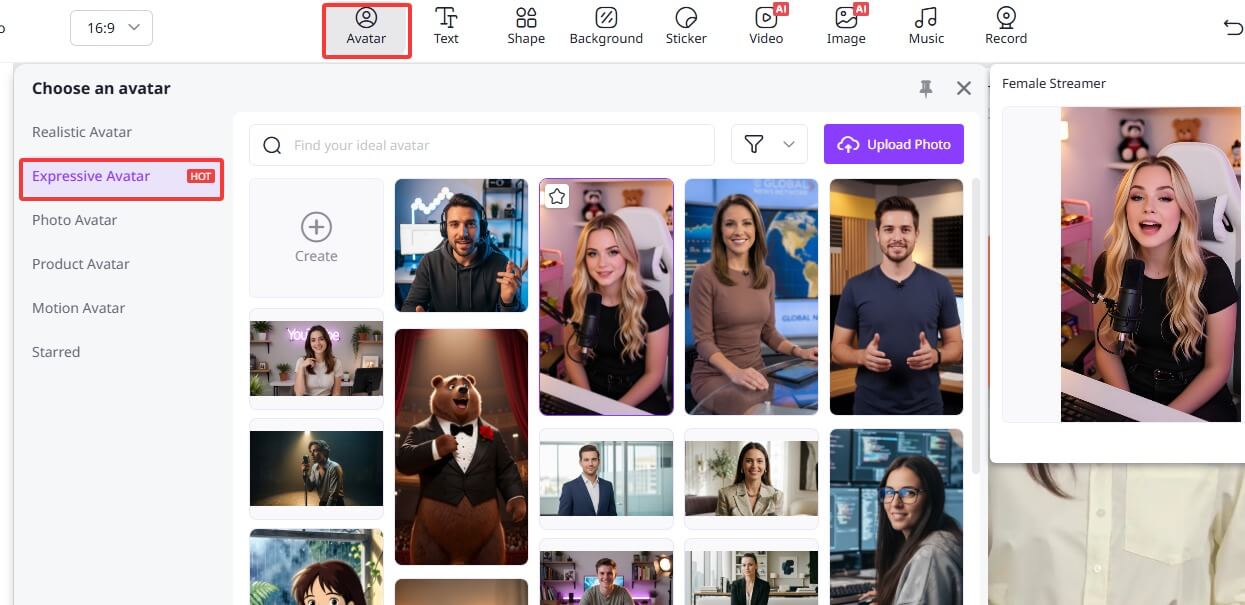
If you want to create a completely new character, click Expressive Avatar > Create > customize your own expressive avatar with details.
Step 4. Then, type in what you want the avatar to say, select a matching voice, and move on to the next scene. Repeat this process until you've created enough scenes for your video.
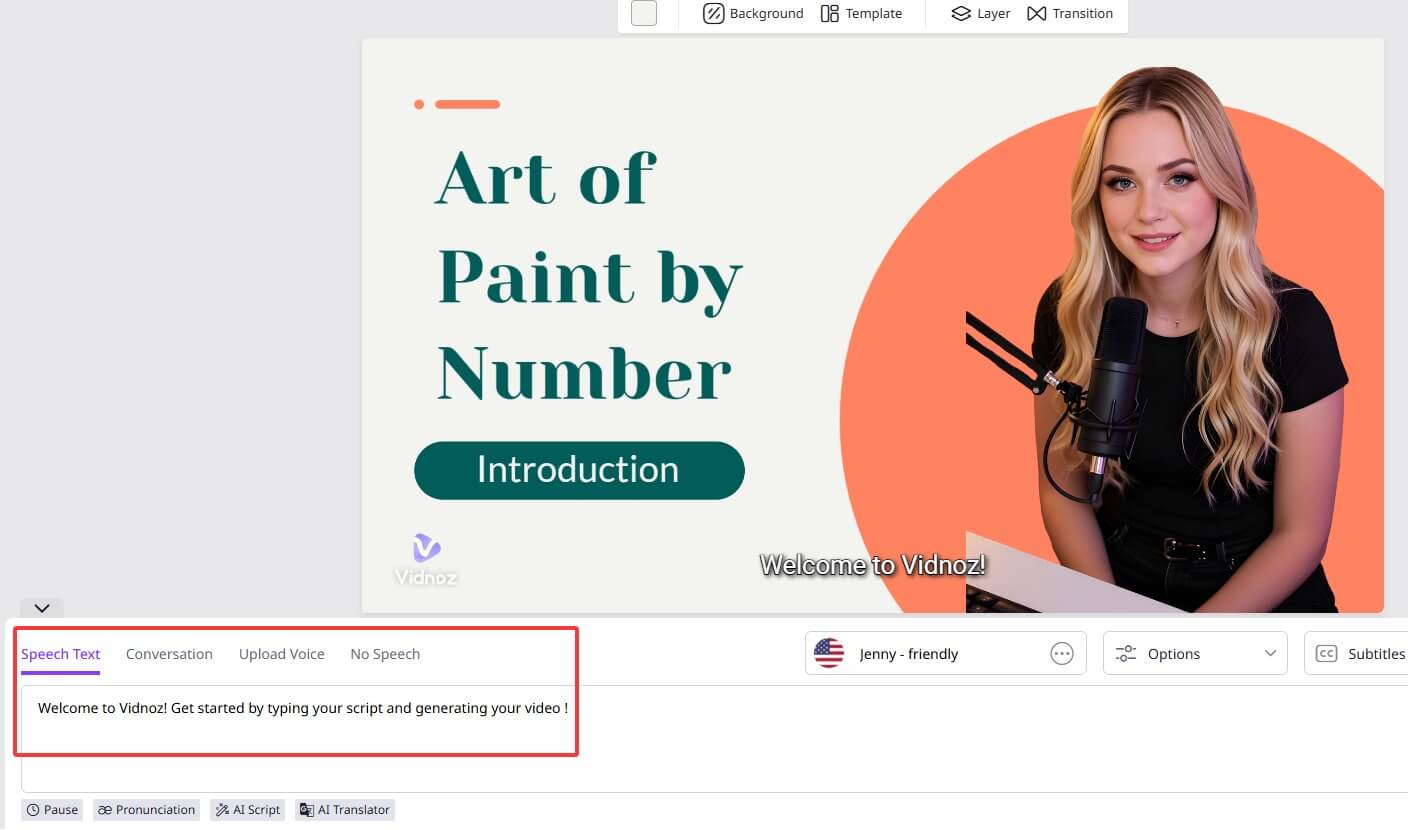
Click the purple Generate button in the top-right corner, then confirm by selecting Generate Now.
Photo Types That Work Best for Paint by Number Art
The choice of the original image largely determines how successful the final result will be when you turn a photo into paint by number art. In general, the following types of photos produce the best results when converted into number paintings.
Please give a natural transition here. Then explain in a bullet point format, or give examples.
- Natural objects
Photos featuring plants, animals, or natural landscapes usually have smooth color transitions and balanced color palettes.
- Classic oil paintings
Classic masterpieces often contain clear color blocks and artistic structure, which helps turn you into a “pro artist”, like Vincent van Gogh, without years of practice.
- Portraits with simple backgrounds
When the subject stands out clearly from the background, the image can be translated into clean, well-defined numbered sections.
- Images with clear color contrast
Photos with distinct light and dark areas or strong color separation are easier to convert into recognizable sections.
The Bottom Line
To turn photo into paint by number art, four tools, each with its own strengths, have been recommended here. Some stand out for their ease of use, others for their advanced customization options, and some for their clear, well-organized workflows.
But this doesn't have to be the end of the journey. If you'd like to unlock a more immersive, all-in-one creative experience, consider pairing your artwork with the Vidnoz product lineup, which provides more interesting tools like the AI image combiner. You can bring the characters in your painting to life—making them move, express emotions, and even speak.
With Vidnoz Image to Video AI and the Vidnoz AI Video Generator, you can turn imagination into reality and transform static art into living, dynamic stories.
Convert Image to Video AI Online - Free
- Create a video from an image quickly for free.
- Use various AI models to turn photos into videos.
- Download and share the AI-generated video at no cost.

Lora Lopez
Lora Lopez, an IT- centric SEO writer, delivers concise tutorials and software reviews to solve common IT challenges. With a focus on user-friendly content about AI tools, she offers practical solutions and insights to help readers effortlessly navigate the dynamic world of information technology.
