AI video creation tools are popping up everywhere, and they are changing the way we make content. One of the tools that stands out is Haiper AI, which lets you turn simple text or images into dynamic videos in just a few clicks. However, people have noticed something weird lately, that is, Haiper AI seems to be unavailable. Worry not. This guide will dive into Haiper AI, show how it works, and introduce an awesome alternative to help you keep making amazing AI videos easily!
- On This Page
-
What is Haiper AI?
-
How to Make AI Videos with Haiper AI?
-
Is Haiper AI Available Now?
-
Free Haiper AI Alternative for Unlimited Video Creation
-
Haiper AI Alternative Guide: How to Use Vidnoz AI Image to Video
What is Haiper AI?
Developed by former DeepMind researchers, Haiper AI is an innovative AI-powered platform that makes video creation super simple for everyone. When the Haiper AI video generator first launched as a free tool, anyone could just input a one-sentence prompt or upload an image and turn it into a high-quality video without any fancy editing skills.
So, here comes the question: is Haiper AI free? Yes. This is also the key that makes it stand out. Its AI models can generate realistic animations and cool effects that look way more professional than you can expect from a free tool. Haiper AI's main features included a variety of tools that set it apart in the AI video space. Let’s check out the major ones now.
- Image to Video AI Conversion: Just upload any static image, and Haiper AI will animate it into a short video. The Haiper AI Image to Video tool adds natural motion like moving objects or shifting backgrounds, making your content dynamic and perfect for social media or presentations.
Convert Image to Video AI Online - Free
- Create a video from an image quickly for free.
- Use various AI models to turn photos into videos.
- Download and share the AI-generated video at no cost.
Convert Image to Video
- Create Videos from Text: You can type in a scene or description, and Haiper AI will turn it into a full video with characters, actions, and environments. It’s an easy way for visual storytelling, and no editing skills are required. It also comes with realistic and animated styles for unlimited creatives.
- Custom Video Repainting: Refresh or restyle existing videos by changing colors, textures, or adding artistic filters. It’s perfect for experimenting with visuals. You can export your clips with a polished and creative look instantly.
- Video Extension: Haiper AI video generator lets you take an existing video and extend its length seamlessly. It can generate additional frames that match the original style and motion, which can enable a more cohesive storytelling.
How to Make AI Videos with Haiper AI?
With Haiper AI, you can easily transform your ideas into visuals with simple steps. Here’s how to use the Haiper AI free video generator easily.
Step 1. Go to the Haiper AI interface and choose how you create videos. Haiper AI video generator free credits allow you to make a video at no cost.
Step 2. You can start with the Haiper AI image to video, text to video, etc. For text to video, input the prompt to describe your video idea. Choose your preferred style and aspect ratio.
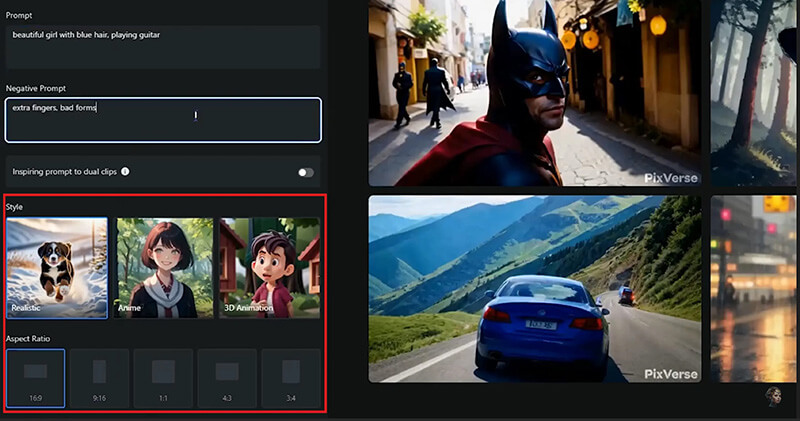
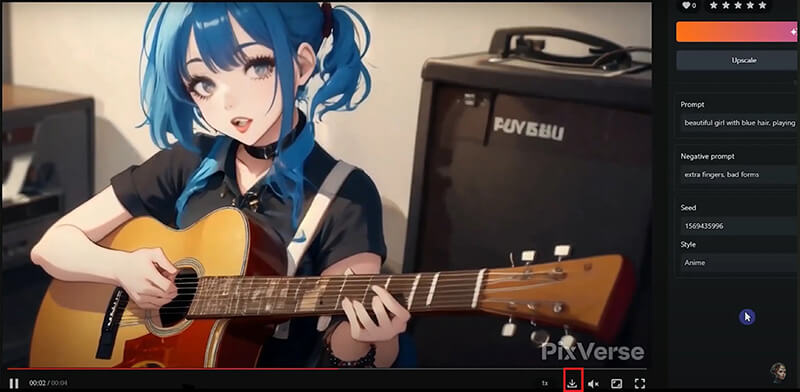
Step 3. Wait for a while, and your video will be ready soon. You can preview the video and download it for free.
Is Haiper AI Available Now?
Now you know the basics of Haiper AI and how to use it. So, what about the current status? Is Haiper AI down? Yes. At the time of writing, Haiper AI no longer offers any active video generation tools. While the Haiper AI website is still accessible, it only displays basic information without working features. This change happened in early 2025 when the team shifted focus toward enterprise-level services and shut down the public web app.
Looking for a Haiper AI alternative? Worry not. There are plenty of tools available that can do the same job, thanks to the development of AI. In the following part, let’s dive into the most reliable alternative for AI video creation!
Free Haiper AI Alternative for Unlimited Video Creation
While Haiper AI is no longer available, Vidnoz AI is the best alternative that truly stands out. Leveraging advanced AI algorithms, the web-based tool allows you to transform images and text into captivating videos with premium quality. Along with trendy filters, creative effects, and flexible customization options, it’s perfect for creators, marketers, and casual users who want professional-looking results.
Convert Image to Video AI Online - Free
- Create a video from an image quickly for free.
- Use various AI models to turn photos into videos.
- Download and share the AI-generated video at no cost.
Convert Image to Video
Highlights of Vidnoz AI Image to Video
- Animate a Photo with AI: Upload any image, and Vidnoz will add smooth motion and natural transitions. It can instantly turn static photos into dynamic videos that grab attention for marketing and social media.
- Turn Text into Videos: Enter a detailed prompt, and Vidnoz will generate a full video from scratch. It can smartly interpret scenes, actions, and styles to create polished content. No video editing experience is required.
- Custom Animation via Text Prompts: It allows you to control animations with commands. For instance, you can input “wink” or “zoom out” to have precise control over movement, expressions, and camera effects for creative video output.
- Trendy AI Video Effects and Filters: Choose from a collection of viral effects for kissing, hug, and other categories. You can also polish your video with visual styles like Oil Painting, Cyberpunk, Cartoon, etc.
- Updated Leading AI Models: Vidnoz integrates models like Turbo for fluid motion, Kling for realistic visuals with audio, and Sora 2 for cinematic quality. All of them can deliver high-fidelity videos across different styles and use cases.
- Daily Free Credits: You can get free generations per day, with optional upgrades for unlimited videos, HD downloads, and no watermarks. It’s the best Haiper AI alternative for both personal and commercial projects.
Haiper AI Alternative Guide: How to Use Vidnoz AI Image to Video
If you have missed Haiper AI, Vidnoz AI is another solid choice to create videos with ease. The free AI video generator is quick and beginner-friendly, and the workflow feels familiar, especially if you have used Haiper AI Image to Video tools before. Below is a simple step-by-step guide to show how it works.
Step 1. Go to Vidnoz AI Image to Video. You can also find it under Vidnoz Gen > AI Video > Image to Video.
Step 2. Choose the method you want for video creation: image to video, start-end frames, video effects, or text to video. Here, let’s see how to convert an image to a dynamic video.
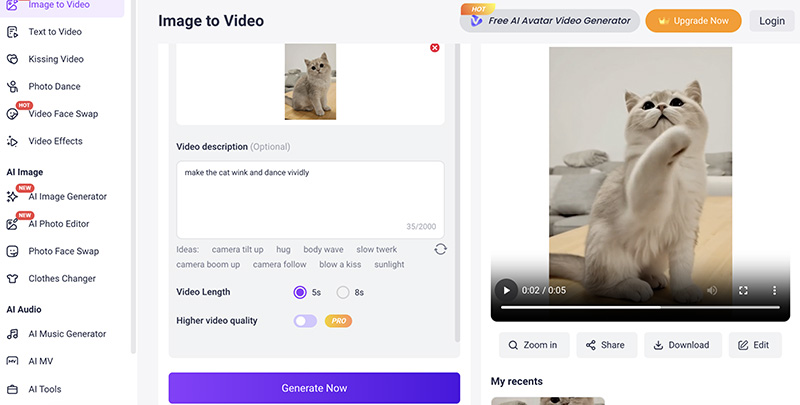
Step 3. Upload an image in a supported format. Input a prompt to describe how you want to make the video move. For instance, make the cat wink and dance vividly.
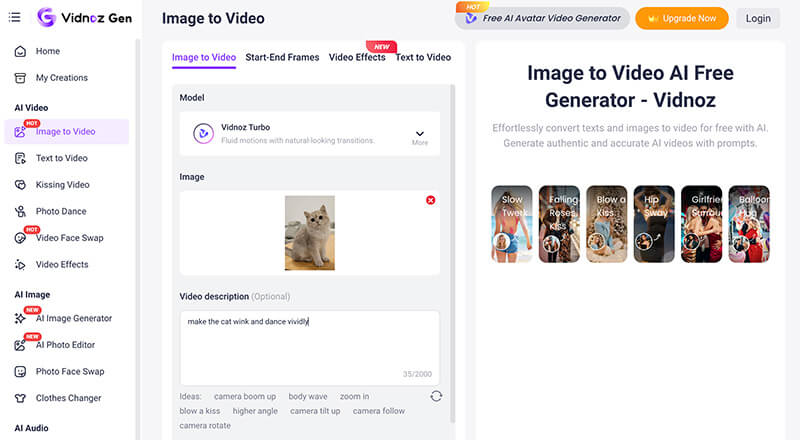
Step 4. Pick an AI model from the top or use the default one. Select the video length to create a video instantly.
The Bottom Line
Haiper AI used to be a powerful and creative tool that made AI video generation easy for everyone. Even though Haiper AI is no longer active, it doesn’t mean your AI video creation has to stop. Here, Vidnoz AI Image to Video is a reliable and easy-to-use alternative that offers advanced AI features. Whether you want to animate photos, turn ideas into videos, or experiment with creative effects, Vidnoz can help you create engaging videos without any editing hassle. Just try it for free!
Convert Image to Video AI Online - Free
- Create a video from an image quickly for free.
- Use various AI models to turn photos into videos.
- Download and share the AI-generated video at no cost.
Convert Image to Video