Turn still images or text into dynamic videos in any style, with leading AI models readily. Try the smart AI video generator now - stunning, free, and instant!
Best 6 Free Intro Maker Without Watermark [AI Online & App]
Lane Maxwell
Updated on
SHARE THIS POST
Looking for a free intro maker without watermark? This article introduces 6 of the best tools, all equipped with templates, logo, and AI-powered features.
Have you ever encountered this situation? After putting great effort into creating high-quality video content, it still struggles to retain viewers due to the lack of a compelling intro. Or after spending hours crafting a polished opening with a professional tool, the final export is ruined by a large watermark. Many so-called free intro makers force branding onto videos or limit export quality, making payment unavoidable.
For those searching for a free intro maker without watermark, this article provides exactly what is needed. It features a carefully selected list of 6 truly effective tools in 2026, covering both AI-powered online platforms and mobile apps, all designed to help create professional, cinematic-quality video intros with ease.
On This Page
Why You Need a Free Intro Maker Without Watermark
Best 6 Free Intro Maker Without Watermark [AI Online & App]
1. Vidnoz AI Intro Maker Without Watermark
2. CapCut Free Intro Maker No Watermark
3. Canva Free Intro Maker No Watermark Online
4. VEED.io Intro Maker No Watermark
5. Free Intro Maker Without Watermark for iPhone
6. Free Intro Creator no Watermark for Android
FAQs About Free Intro Maker Without Watermark
The Bottom Line
Why You Need a Free Intro Maker Without Watermark
Why is it so important to emphasize “no watermark” when choosing a video intro maker? From the viewer's perspective, a watermark is far more than a minor detail - it can directly impact the overall quality of a video.
First, watermarks significantly reduce professionalism. Whether it's for YouTube, short-form content, or brand promotion, a visible third-party logo can weaken brand identity and make the content feel less polished, even giving off an impression of being rushed or low-effort.
Second, many tools that claim to be free often come with hidden limitations. While there may be no upfront cost, they typically restrict export quality, template access, or key features, preventing full creative control.
A truly reliable free intro maker without watermark should be easy to use, offer a wide variety of templates, support customization of text, music, and animations, and at the very least provide 1080P export—without adding any unwanted branding.
Best 6 Free Intro Maker Without Watermark [AI Online & App]
Going through tools one by one and testing them yourself can be time-consuming and frustrating - but there's no need for that here. A curated list of free intro makers no watermark is already prepared below. If you're tired of dealing with watermarks, simply pick the one that fits your needs best.
1. Vidnoz AI Intro Maker Without Watermark
If you're looking for a free intro maker no watermark that requires no editing experience, can quickly generate a complete video intro, and still delivers a professional, human-like result, then Vidnoz AI Intro Maker is easily one of the best options to start with. What makes it stand out from traditional intro makers is the way it works. Instead of manually piecing together clips, adjusting animations, and fine-tuning timing—which usually takes both skill and time—you're essentially generating the entire intro with one click, while still keeping control over the overall direction.
Vidnoz AI - Create Free Engaging AI Video with Talking Avatar
Easily create professional AI videos with realistic avatars.
Text-to-speech lip sync voices of different languages.
2800+ video templates for multiple scenarios.
There's no need to search for assets, tweak transitions, or manage timelines. Just enter your script, and the free AI video generator will handle everything from structure to visuals, voiceover, and even character delivery. Let's take a closer look at what makes this free intro video maker no watermark special:
Key Feature
Ready-made intro templates: Vidnoz provides a wide range of professionally designed intro templates for different industries and scenarios. Instead of building everything from scratch, you can simply pick a template and customize it to get started quickly.
AI avatars and voiceovers: Don't want to appear on camera or lack recording equipment? Vidnoz allows you to choose a digital avatar to present your intro. Just input your script, select a voice, and the AI will deliver natural, fluent speech in multiple languages.
AI text-to-video intro creation: Unlike tools that only offer templates, Vidnoz can automatically generate a fully structured intro video based on your text. This means you can skip manual layout, design, and editing entirely—saving time and boosting productivity.
Pros
AI-generated videos with almost no learning curve, very beginner-friendly
Built-in AI avatars and voiceovers, no need for real filming
A wide variety of templates for different use cases
Supports watermark-free export
Cons
Higher resolution exports require a paid upgrade
How to Make a Free Intro without a Watermark with Vidnoz AI?
Step 1: Tap the button below to open the creation interface.
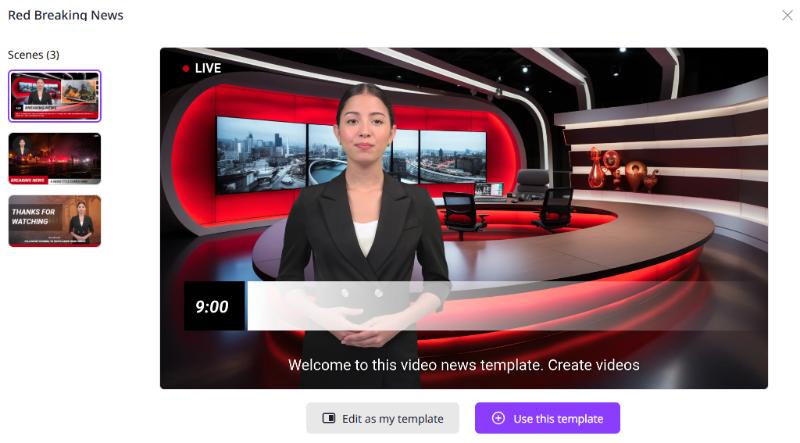
On the right side of the page, you'll find templates for different industries and scenarios. Browse and preview the one you like, then click Use this template to start.
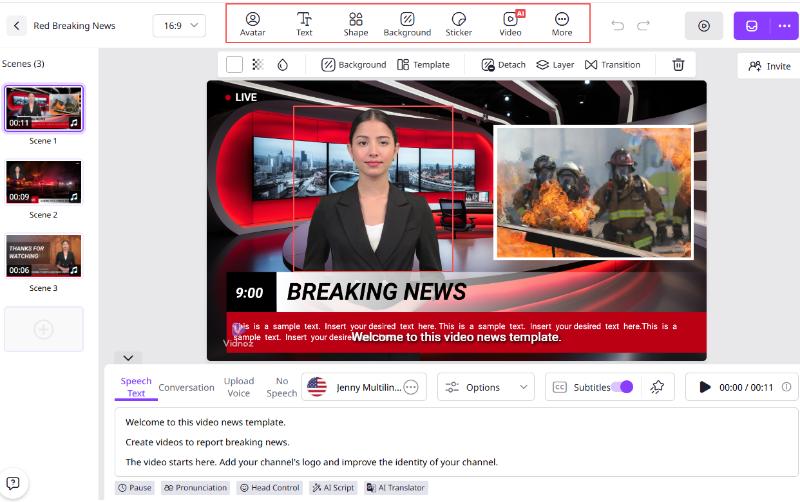
Step 2: Start editing the template.
Click on the avatar to adjust posture, appearance, and style. Use the toolbar above the preview window to modify the background and overall visual style.
Step 3: Enter your script in the text box under Speech Text, then adjust language, voice, speed, and tone as needed.
Step 4: Repeat the steps above to complete all the scenes you want.
Step 5: Finally, click the purple Generate Video button in the top-right corner to export your intro.
If you’ve already created an intro video but it has a watermark, click here to learn how to remove watermark from video.
2. CapCut Free Intro Maker No Watermark
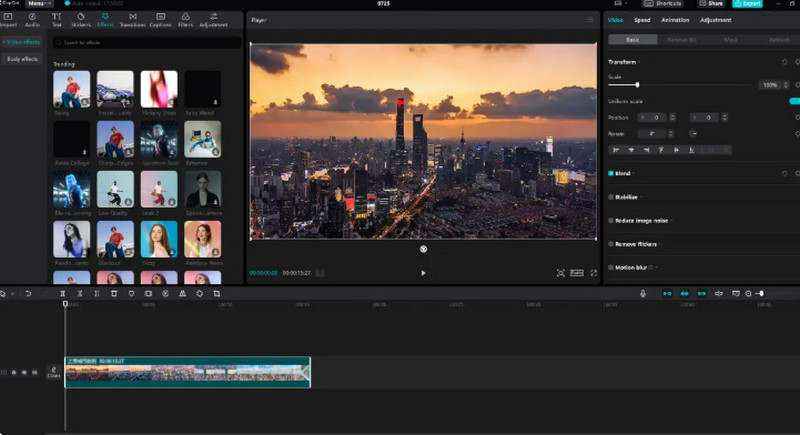
If you care more about full control over details - such as animation timing, scene transitions, and subtitle design - then CapCut is a much more capable assistant. At its core, CapCut is a complete video editing software, not just an intro maker. This means that while creating your video intro, you also retain a high level of creative freedom. For example, you can precisely control when each element appears, add dynamic text animations, layer multiple tracks, and fine-tune every visual detail.
Of course, this free intro video maker without watermark also provides a selection of ready-made templates. Instead of starting entirely from scratch, you can choose a template as a base and customize it according to your needs, which helps balance flexibility and efficiency.
Pros
Highly flexible editing with full creative control.
Supports multi-track video editing.
Offers rich text animations and visual effects.
Cons
Requires time to learn, especially for beginners.
Less efficient compared to one-click AI Free YouTube Intro Makers.
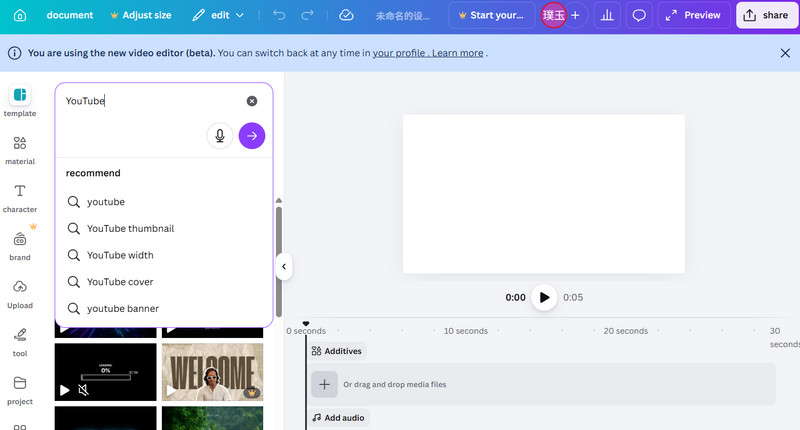
3. Canva Free Intro Maker No Watermark Online
If you prefer a more relaxed, design-oriented approach to creating video intros, Canva is a very comfortable tool to work with. Thanks to its drag-and-drop interface, Canva feels more like a design platform that also supports video creation. The process is straightforward: choose a template, replace the text, adjust visual elements, and add animations—then your intro is ready.
This makes it especially convenient for those who care about visual layout and aesthetics—such as creating educational content, brand videos, or product showcases—but don't want to invest time in learning complex editing software or spend too much effort on production. Another strong point is the overall quality of its templates. The final result tends to look clean, modern, and well-designed, rather than overly flashy or packed with heavy effects.
Pros
Very easy to use with drag-and-drop editing.
High-quality, professionally designed templates.
Supports animations, fonts, music, and other elements.
Allows direct sharing to social media or video platforms.
Cons
Some advanced assets and elements require payment.
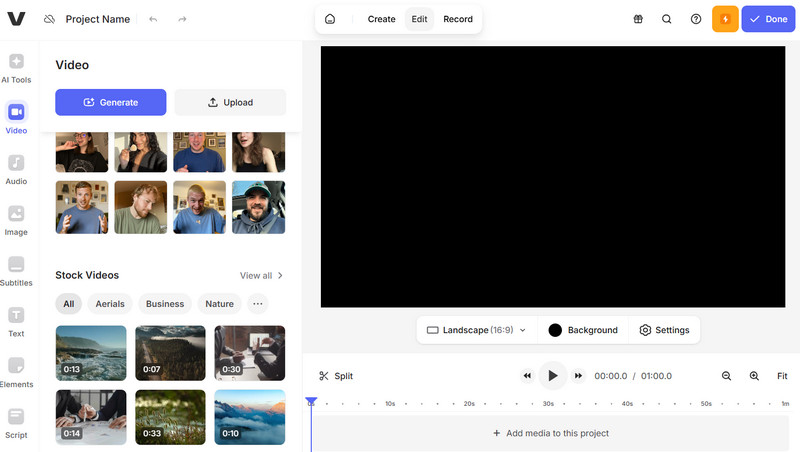
4. VEED.io Intro Maker No Watermark
If you don't want to install any software and prefer working directly in your browser—while still having access to professional-level editing features—then VEED.io is definitely worth trying. It strikes a great balance between accessibility and functionality. As an online free movie intro maker no watermark, VEED.io offers a more advanced editing experience compared to tools like Canva. It comes with a multi-track timeline, subtitle editing, animation controls, and other features you'd typically expect from more professional video editing software.
Another standout advantage is its collaboration capability. This free intro maker website allows multiple users to work on the same project simultaneously—something many competing tools don't offer. For those working in content creation or marketing teams, this can make the workflow much more efficient and seamless.
Pros
Fully online editor, no download required
Supports multi-track video editing and advanced effects
Allows real-time collaboration with team members
Cons
Free version has limitations, and some advanced features require payment
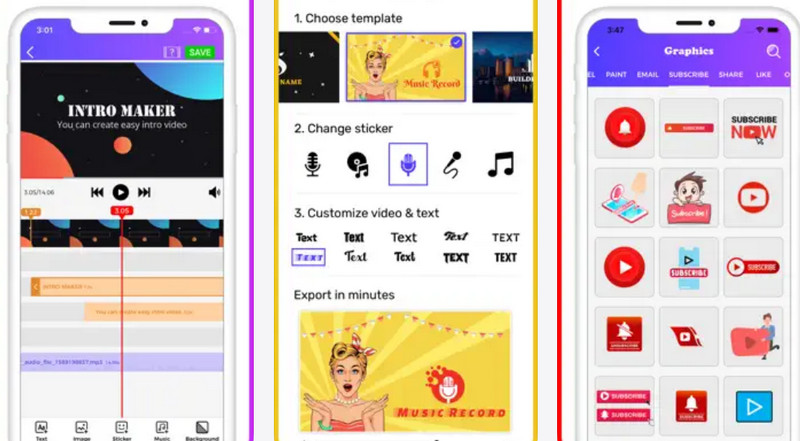
5. Free Intro Maker Without Watermark for iPhone
Of course, it's not always practical to carry a heavy computer around. And if you want to record some intro footage yourself, using a phone is often much more convenient. In this case, if the goal is to edit on mobile and quickly create an intro, choosing a free intro creator app without watermark is a better option. If you mainly edit videos on an iPhone and want to create an intro quickly without opening a computer, then it's worth trying Intro & Outro Maker.
Its workflow is built around templates. Simply choose a style you like—such as gaming, tech, or vlog—then replace the text and content to generate an intro in just a few steps. Another important advantage is that it's ready to use right after opening, with virtually no setup required.
Pros
Easy to use with a straightforward interface
Large number of templates with clear categories
Quick export and easy sharing directly from mobile
Cons
Limited customization options
Some features require a subscription
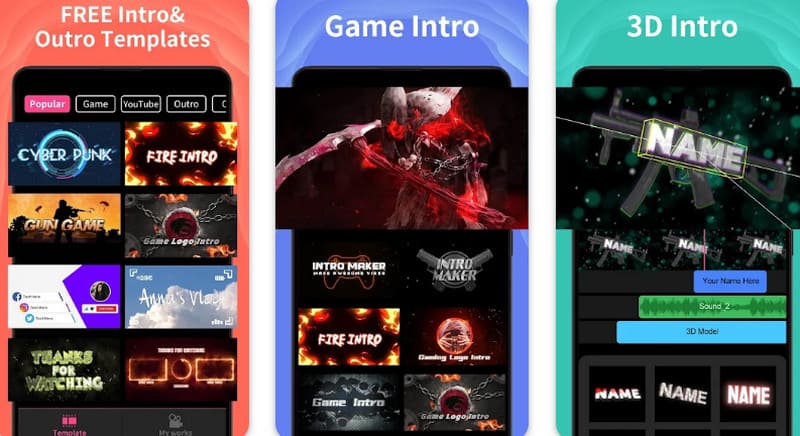
6. Free Intro Creator no Watermark for Android
If you’re an Android user, this guide recommends trying Intro Maker - Video Intro Outro. Its biggest advantage is its extremely wide range of templates, covering styles from gaming and high-energy effects to cute and playful designs—making it suitable for almost any type of content. It’s also a particularly strong gaming intro maker, with many dynamic, high-impact templates designed specifically for gaming videos.
Another thing worth noting is that this free intro maker for YouTube no watermark is known for its fast workflow and straightforward process. Using it often feels like quickly assembling something piece by piece, allowing you to create an intro in a very short time.
Pros
Huge template library (4000+)
Wide variety of styles for different content types
Quick to learn and efficient for fast creation
Cons
The interface is slightly complex
Contains ads in the free version
FAQs About Free Intro Maker Without Watermark
Here are some common questions creators often ask about free intro maker without watermark.
Yes, several tools allow this, including Vidnoz AI, CapCut, Canva, and VEED.io, with Vidnoz offering fully AI-generated intros with no watermark in its free plan.
Not at all—Vidnoz AI is beginner-friendly, while CapCut and VEED.io provide more control for those with some editing knowledge.
Yes, Vidnoz image to video AI lets you turn text descriptions into fully animated video intros.
Free subtitle generator no watermark tools like Vidnoz AI let you place text anywhere, choose fonts, and add animation to make your intro more engaging.
Yes, these tools provide templates suitable for a wide range of content, including tutorials, and educational videos.
The Bottom Line
Choosing the right free intro maker without watermark ultimately depends on how you like to create. Some prefer full control with detailed editing like CapCut, others enjoy the simplicity of Canva, while tools like VEED.io balance online convenience with advanced features. For quick mobile creation, intro maker apps are also reliable options. However, if the priority is saving time and getting professional results with minimal effort, Vidnoz AI stands out the most. It streamlines the entire process and helps turn ideas into finished intros almost instantly.
Vidnoz AI - Create Free Engaging AI Video with Talking Avatar
Easily create professional AI videos with realistic avatars.
Text-to-speech lip sync voices of different languages.
Lane Maxwell is an experienced technology industry editor specializing in providing users with actionable advice and insights. Her articles have helped millions of readers find solutions easily.







![AI Alive: Turn Photos to Life on TikTok & Beyond [2026]](https://www.vidnoz.com/bimg/ai-alive.jpg)
![How to Remove Proof from Photo: Step-by-Step Guide [2026]](https://www.vidnoz.com/bimg/how-to-remove-proof-from-photo-easily.jpg)
