Turn still images or text into dynamic videos in any style, with leading AI models readily. Try the smart AI video generator now - stunning, free, and instant!
5 Best Free Subtitle Generators No Watermark [2026 Tested]
Lane Maxwell
Updated on
SHARE THIS POST
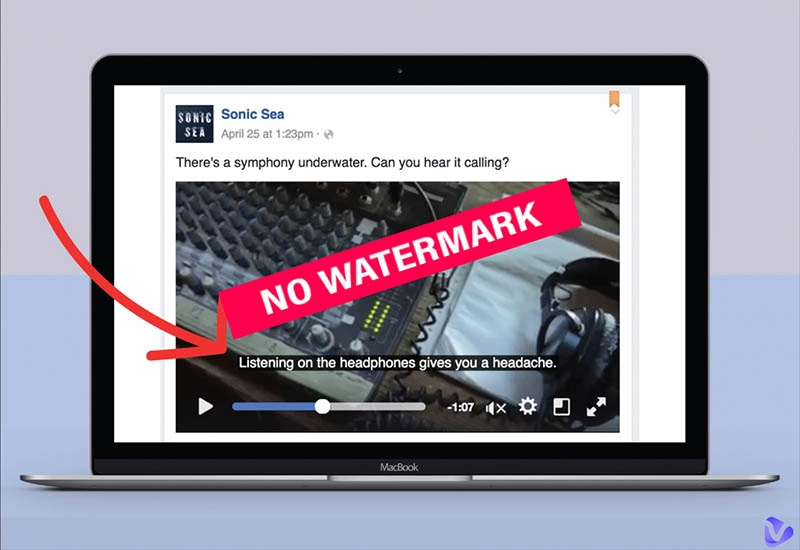
Discover the best free subtitle generator no watermark to create high-quality videos easily, and a bonus tool to generate watermark-free subtitle videos!
Adding subtitles to your videos is super important; it is the cleverest strategy to make your content accessible. But if you have ever tried using free subtitle tools, you probably noticed one huge annoyance: watermarks. Those ugly marks can spoil the look of your video and make it feel less professional.
So is there a free subtitle generator no watermark? The answer is positive. If you keep reading, there are 5 best free tools that won’t slap a watermark on your videos. You can truly save time and export polished results without spending a dime.
On This Page
Why a Free No-Watermark Subtitle Generator is Non-Negotiable
5 Best Free Subtitle Generators No Watermark With Pros & Cons
#1. YouTube - Best Free Subtitle Generator No Watermark for YouTube
#2. Google Drive - Best Free Subtitle Generator No Watermark Online
#3. Aegisub - Best Subtitle Generator Free without Watermark for Professionals
#4. CapCut AI Caption - Best Auto Caption AI Free without Watermark
#5. Happy Scribe - Best Free Subtitle Generator No Watermark AI
How to Use a Free Subtitle Generator Without a Watermark?
Alternative Solution: Need to Generate Professional Subtitles Easily and Quickly?
FAQ About Free Subtitle Generator No Watermark
The Bottom Line
Why a Free No-Watermark Subtitle Generator is Non-Negotiable
A free subtitle generator no watermark is crucial for creating any kind of video. Here are the reasons why you need it.
Watermarks largely distract viewers and make your videos look unprofessional.
Clean subtitles are for enhancing accessibility. Your videos can also reach a wider audience, and those with hearing difficulties.
Many platforms and brands require watermark-free videos for proper branding and copyright compliance.
The best free subtitle generator no watermark allows you to share videos on websites without quality loss or restrictions.
Vidnoz AI - Create Free Engaging AI Video with Talking Avatar
Easily create professional AI videos with realistic avatars.
Text-to-speech lip sync voices of different languages.
2800+ video templates for multiple scenarios.
5 Best Free Subtitle Generators No Watermark With Pros & Cons
Now you might be wondering: what is the best free subtitle generator no watermark? Here we have tested and selected 5 excellent tools. Just check them out.
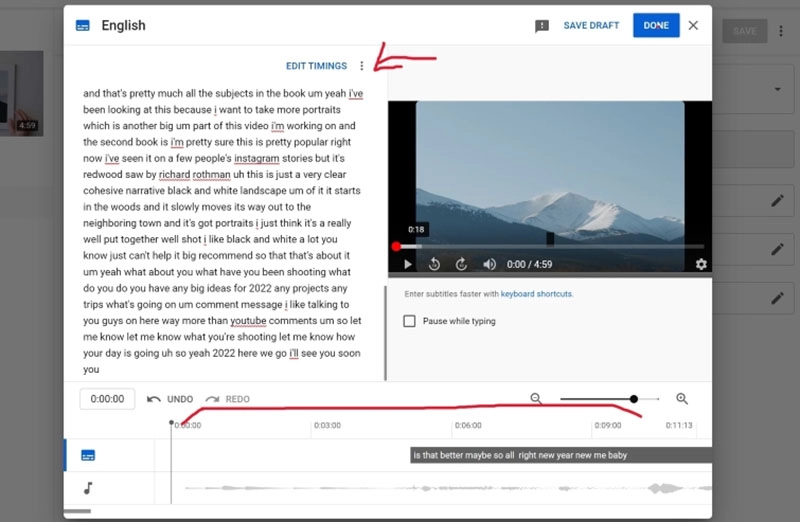
#1. YouTube - Best Free Subtitle Generator No Watermark for YouTube
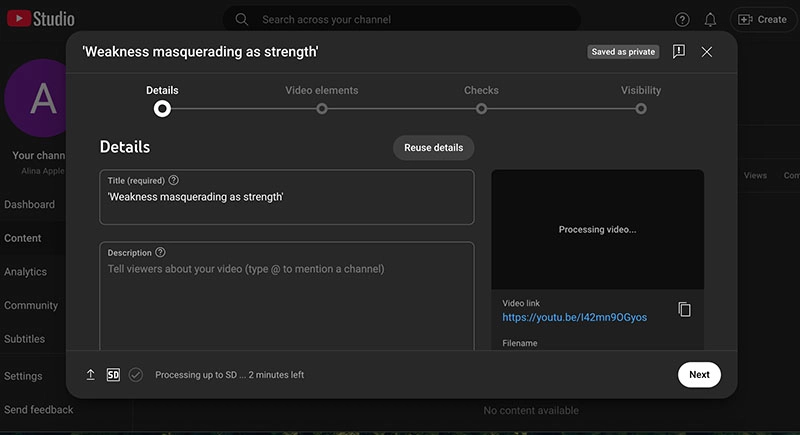
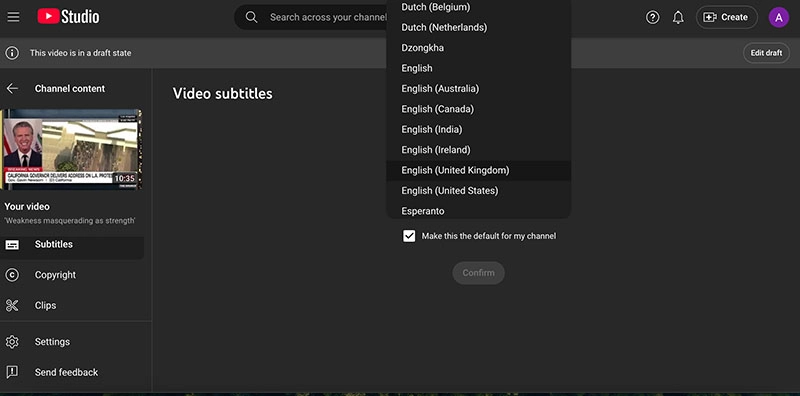
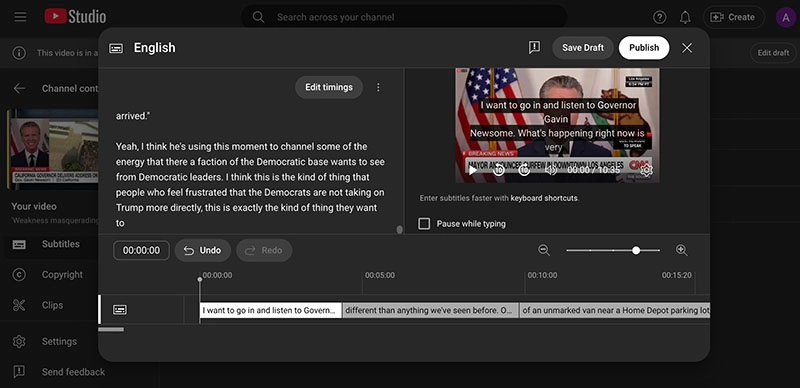
If you are looking for a free subtitle generator no watermark for YouTube, look no further, just upload your video and YouTube will generate subtitles automatically. Its auto subtitle generator feature is completely free, but it works on the platform only.
Pros
Seamlessly built into the platform
100% free video subtitle generator no watermark
Easy to sync captions with videos
Cons
Some manual edits are needed
Limited customization options for subtitle style
Subtitles are limited to YouTube only
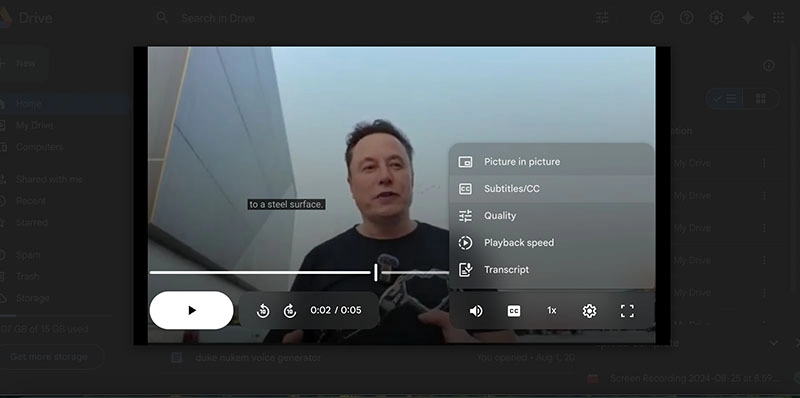
#2. Google Drive - Best Free Subtitle Generator No Watermark Online
With Google Drive, you can transcribe audio into text for free without any watermark. Just upload your file to the cloud-based platform to add subtitles in videos. You can even upload subtitle files to synchronize captions with the video's audio.
Pros
Free and accessible anywhere online
No watermark or usage limits
Support auto translation
Cons
Basic subtitle style
English subtitles only
Can not export videos with subtitles
#3. Aegisub - Best Subtitle Generator Free without Watermark for Professionals
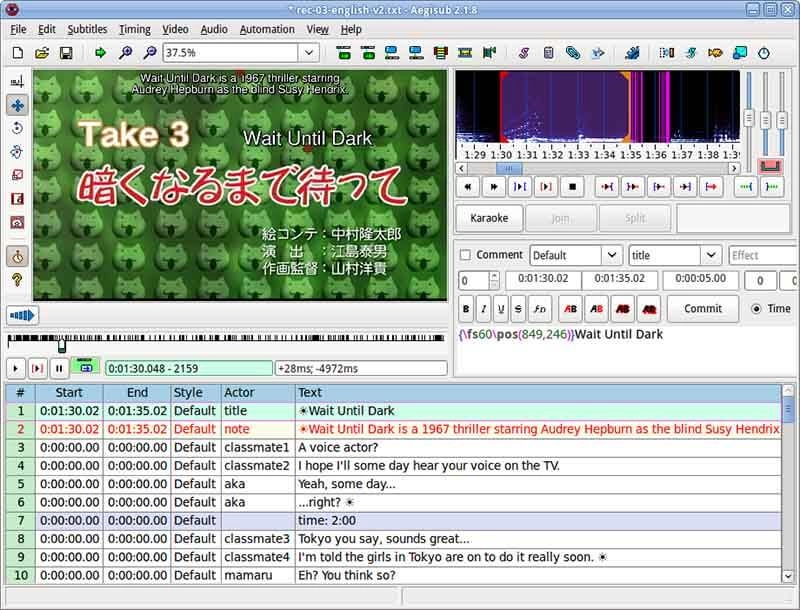
Aegisub is an advanced and open-source subtitle editor for precision work. As the best free subtitle generator no watermark, it offers full control over timing, styling, and formatting. It’s better suited for professionals since it’s entirely manual.
Pros
Full control over subtitle timing and appearance
Advanced subtitle generator free without watermark
Free and regularly updated
Cons
Steep learning curve for beginners
Completely manual subtitling process
#4. CapCut AI Caption - Best Auto Caption AI Free without Watermark
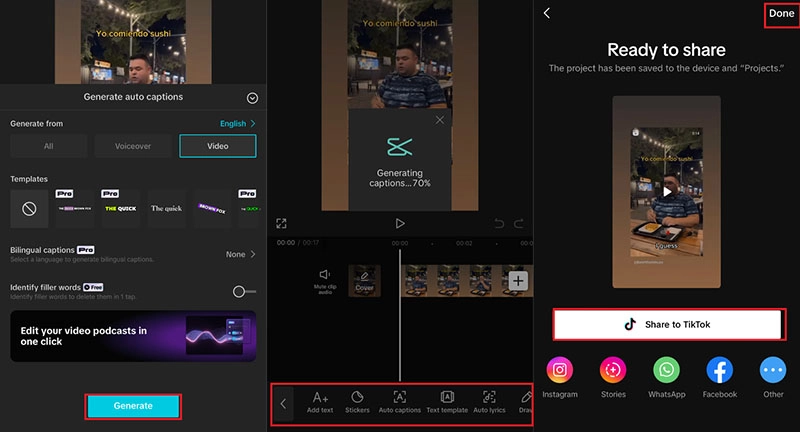
Compatible with mobile and desktop devices, CapCut uses AI to quickly create captions without watermarks. It’s fast, simple, and can enhance your video by generating auto-captions with almost perfect accuracy.
#5. Happy Scribe - Best Free Subtitle Generator No Watermark AI
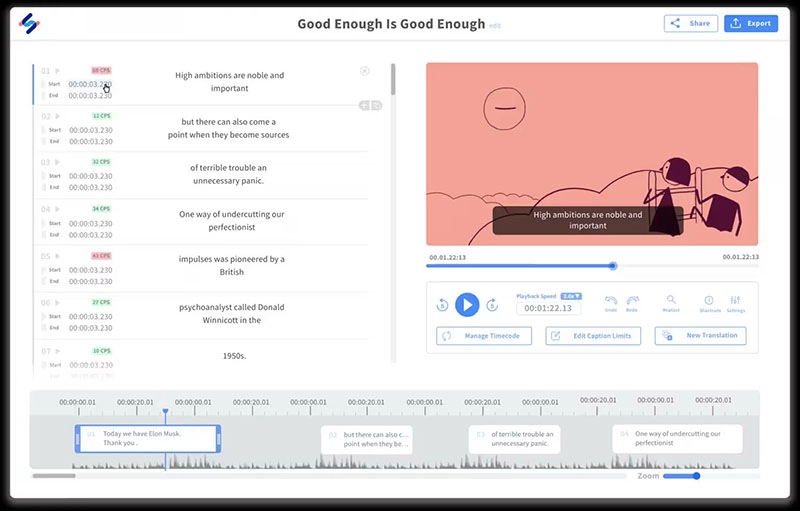
Happy Scribe is a platform that offers automated transcription, subtitling, and translation services. It delivers accurate AI-generated subtitles with multi-language support. The free subtitle generator no watermark feature is available for a few limited minutes.
Pros
AI automatic transcription
Subtitles in over 120 languages and dialects
Built-in editor to refine transcripts and subtitles
Cons
Limited free with credits
Occasional errors and glitches
Expensive subscriptions
How to Use a Free Subtitle Generator Without a Watermark?
The easiest way to generate subtitles without watermarks is via YouTube’s free subtitle generator no watermark system. Here’s a quick step-by-step.
Step 1. Click on the Create and upload your video to YouTube Studio.
Step 2. Go to the Subtitles tab. Choose the language you want and let YouTube auto-generate captions.
Step 3. Edit and adjust any incorrect text for accuracy. Save or export the subtitles to use directly in your video.
Alternative Solution: Need to Generate Professional Subtitles Easily and Quickly?
While the above tools are useful, they often come with limitations. For instance, platform exclusivity, manual editing, slow processing, etc. So is there a smarter and all-in-one solution? YES! Just check out Vidnoz, the best subtitle generator no watermark. It can automatically generate professional-quality subtitles perfectly synchronized with your video.
Vidnoz AI - Create Free Engaging AI Video with Talking Avatar
Easily create professional AI videos with realistic avatars.
Text-to-speech lip sync voices of different languages.
2800+ video templates for multiple scenarios.
Key Feature
Generate professional, watermark-free subtitle videos: Vidnoz AI instantly creates high-quality subtitles with zero watermarks. The process is fast and automated; you can easily produce polished videos ready for publishing without the extra hassle.
Perfect subtitle-to-speech synchronization: Subtitles are precisely timed to match every spoken word, ensuring a smooth and engaging experience. There are no awkward delays or mismatched captions; you can keep your audience focused on your videos for sure.
Support multiple languages and AI-powered auto captioning: Vidnoz AI automatically generates captions in various languages (up to 140+). Its advanced AI ensures high accuracy, so your subtitles are both correct and culturally relevant for different viewers around the world.
Easy to add, edit, or remove subtitles: Vidnoz AI comes with a built-in editor, which allows you to quickly make changes without starting over. Whether you want to remove subtitles from video clips, fix typos, or delete unnecessary captions, you can effortlessly edit the subtitles in a few clicks.
Optimized for various social platforms: There is no need to care about formatting, as it supports various aspect ratio options. The subtitle generator without watermark can export your subtitled videos in multiple formats for smooth sharing on YouTube, Instagram, TikTok, Facebook, and more.
How to Use Vidnoz AI to Create a Video with Subtitles?
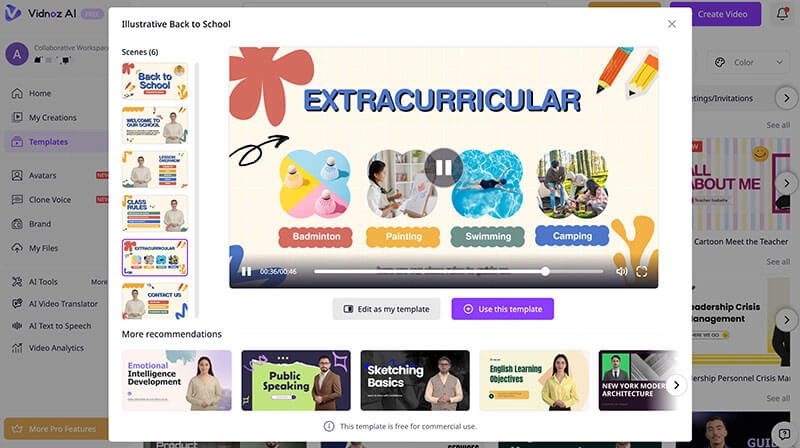
Step 1. Open Vidnoz AI and sign in with your email address. Go to the Template and choose a preferred one to proceed.
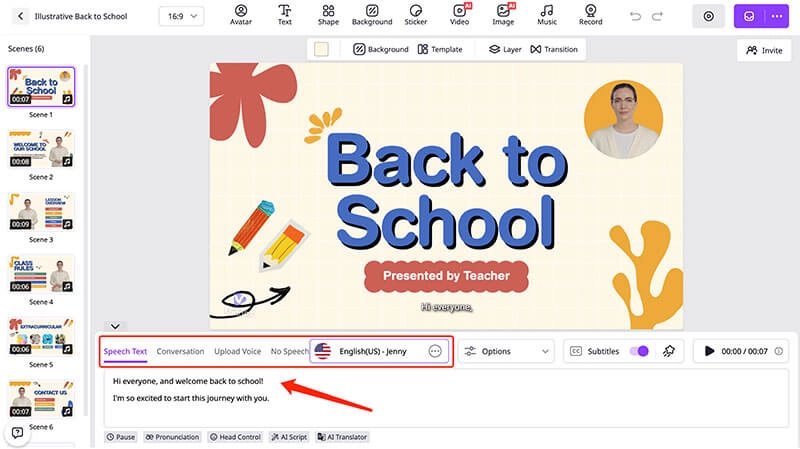
Step 2. In the template, input the script you want to convert to speech. The subtitles will automatically appear in the video.
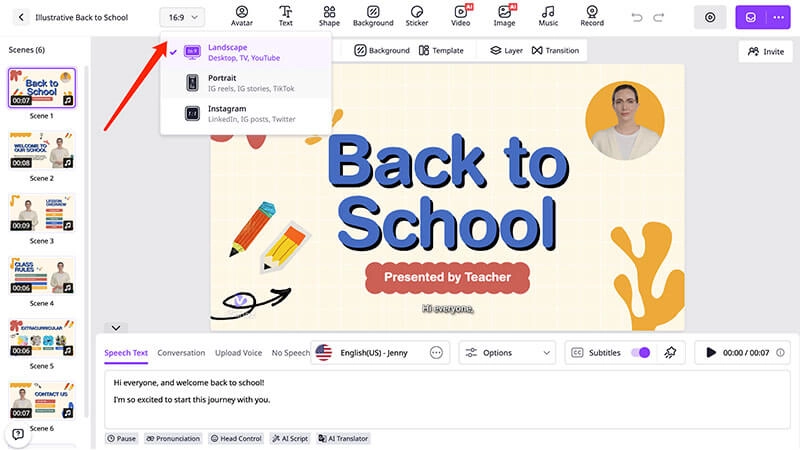
Step 3. You can add more scenes and subtitles as per your needs. Adjust the aspect ratio for different platform outputs.
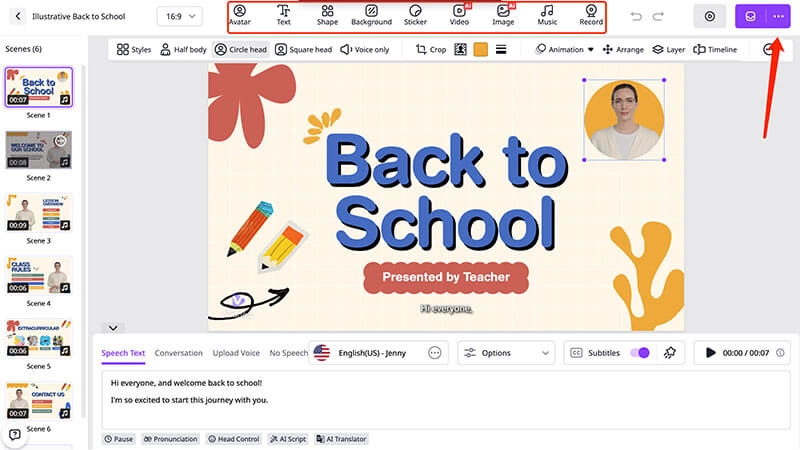
Step 4. The toolbar on top offers features like stickers, background music, etc., if you want to polish your video. Click on the Generate button to create a video with subtitles.
FAQ About Free Subtitle Generator No Watermark
All 5 options introduced above provide accurate subtitles in most cases. But CapCut AI Caption can be more sophisticated with its AI-enabled mechanism.
Yes. Vidnoz has an AI celebrity voice generator that allows you to create/change voices to singers, anime characters, etc. You can insert the voice into your video so it will look more engaging.
Yes, most free subtitle generator no watermark tools allow you to edit text, timing, and style before exporting.
Most free subtitle generator no watermark tools support popular formats like MP4, MOV, and AVI for broad compatibility.
Yes, Vidnoz AI includes a specialized AI video translator that can auto-generate subtitles in different languages.
The Bottom Line
With the guide above, now you should be able to find the right free subtitle generator no watermark that can boost your video’s accessibility and engagement. As you can see, Vidnoz AI is a great option for its accuracy, editing flexibility, and built-in translation features. You can create social media clips, tutorials, or professional content with subtitles hassle-free. Just start using Vidnoz today and create polished videos to resonate with viewers worldwide.
Vidnoz AI - Create Free Engaging AI Video with Talking Avatar
Easily create professional AI videos with realistic avatars.
Text-to-speech lip sync voices of different languages.
Lane Maxwell is an experienced technology industry editor specializing in providing users with actionable advice and insights. Her articles have helped millions of readers find solutions easily.





![Download Instagram to MP4: Top 5 Instagram to MP4 Converter [2026]](https://www.vidnoz.com/bimg/instagram-to-mp4.webp)
![Top 5 Online AI TV Show Generators to Create Your Own TV Show [2026]](https://www.vidnoz.com/bimg/best-ai-tv-show-generators.webp)
![Make a Video for Your Girlfriend: Free & Fast [2026]](https://www.vidnoz.com/bimg/video-for-my-girlfriend.webp)
![5 Best Italian Brainrot Generators for Hilarious Content [Free & Easy]](https://www.vidnoz.com/bimg/best-italian-brainrot-generators.webp)
