Turn still images or text into dynamic videos in any style, with leading AI models readily. Try the smart AI video generator now - stunning, free, and instant!
AI Alive: Turn Photos to Life on TikTok & Beyond [2026]
Lane Maxwell
Updated on
SHARE THIS POST
AI Alive is a feature that turns photos into videos using AI. Learn how to use AI Alive on TikTok and 5 Alive AI video generators for lifelike content.
With just one tap, TikTok's AI Alive can turn a still image into a short, animated video—and that's exactly why it has captured the attention of millions of users. By automatically adding motion, expressions, and scene details, it transforms ordinary photos into lively, emotional visuals. For creators looking to stand out and grow their accounts, AI Alive has become a powerful new storytelling tool. In this guide, you'll learn what AI Alive is, how it works, and the 5 best tools to make it.
On This Page
What Is AI Alive and How Does It Work?
How to Use AI Alive on TikTok Step by Step
Best 5 Alive AI Video Generators for Lifelike Content
1. Vidnoz Free AI Alive Photo Generator
2. Media.io AI Alive Filter Online
3. Vidwud AI Alive Video Generator
4. Mindvideo Alive AI Image Generator
5. Live Portrait AI Alive App
AI Alive FAQs: Everything You Need to Know
The Bottom Line
What Is AI Alive and How Does It Work?
Before getting started, it helps to understand the basics. This section explains what AI Alive is and how it works, so readers can better follow the creation process later.
AI Alive is built into TikTok's Story Camera as an AI-powered creative tool. It takes still photos and turns them into short videos by adding motion, facial expressions, and scene details.
When an image is uploaded, TikTok AI Alive first analyzes the subject, background, lighting, pose, and overall structure. Then, the AI predicts how people, objects, and light would naturally move. It generates multiple in-between frames and applies subtle atmosphere effects, making a static photo look alive and cinematic.
How to Use AI Alive on TikTok Step by Step
Now that the theory is covered, it's time to move on to real practice. This section walks through how to use AI Alive on TikTok step by step to create your own animated photo.
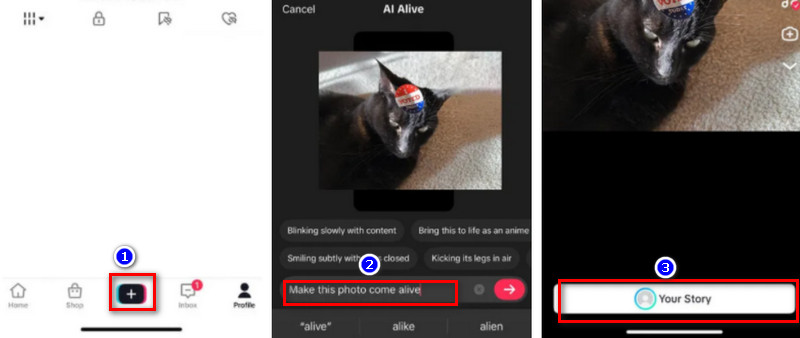
Step 1: Choose the device you want to use and open the TikTok app.
Step 2: On the home screen, tap Inbox or your Profile icon at the bottom.
Step 3: You'll enter your profile page. Tap the large + button to go to Add to Story. Make sure the Alive toggle is turned on, then select a photo from your device.
Step 4: After choosing the image, you'll see a prompt below the preview. Select Make this photo come alive and tap the red arrow to continue.
Step 5: TikTok will start creating your AI Alive photo and match it with suitable sound or background music.
Step 6: Once it's done, tap Your Story under the preview window to publish your creation.
Best 5 Alive AI Video Generators for Lifelike Content
TikTok is the original platform for making AI Alive free content, but it isn't perfect. First, TikTok has ongoing country and region restrictions, which means some users may not be able to access this feature at all. Second, to keep creation fast and simple, the TikTok Alive AI image generator offers only limited customization. That's why this guide suggests trying other, more professional and flexible tools.
With so many options available, choosing the right one can be difficult, so five of the best alive AI video generators have been selected for you, along with performance overviews.
1. Vidnoz Free AI Alive Photo Generator
Vidnoz proves its value with 3 standout strengths. It covers the essentials: simple image-to-video creation. Upload a photo, describe the scene you want in text, choose the model and video length, then click once.
Want more dramatic movements? Switch to the Video Effects tab, where you'll find ready-made actions like hugging, kissing, martial arts, flipping, or transforming—just pick one and apply it to the person in your image. Even better, if you don't have a photo at all, you can create AI Alive content purely from text prompts.
Convert Image to Video AI Online - Free
Create a video from an image quickly for free.
Use various AI models to turn photos into videos.
Download and share the AI-generated video at no cost.
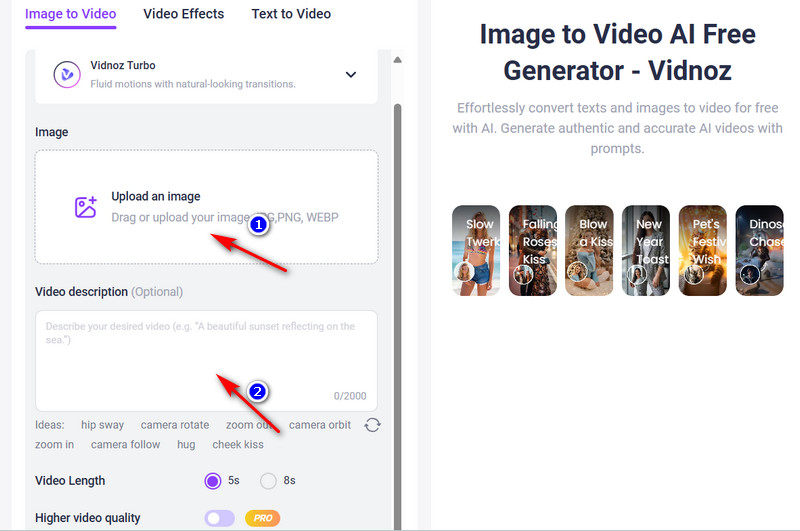
Step 2: Click the upload button under 1 and add the photo you want to use.
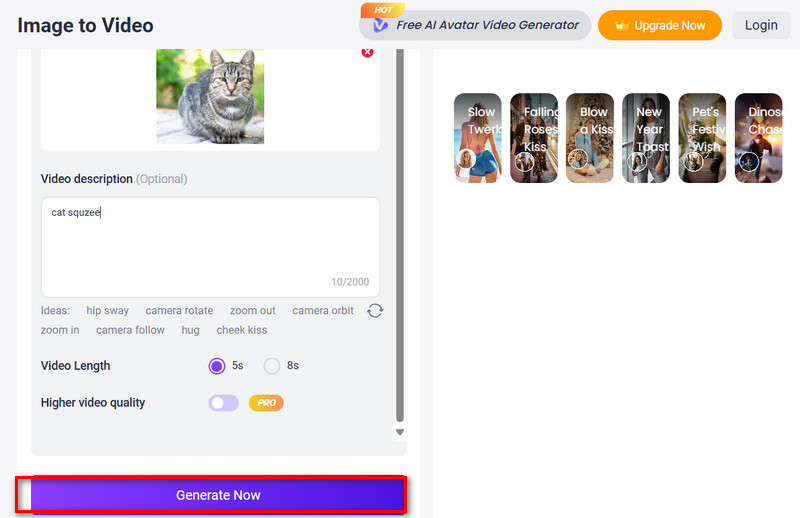
Step 3: Choose your preferred AI model and video length. Then, in the Video description box, type what you want to see in the scene.
If you want special movements, switch to Video Effects and select the action you like.
Step 4: Click Generate Now to create your AI Alive video.
2. Media.io AI Alive Filter Online
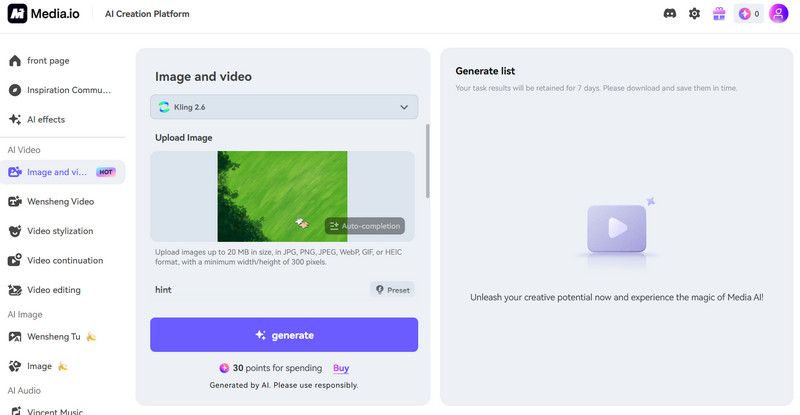
What's better than exporting a finished video with no watermark? If that's what you're after, Media.io's AI Alive photo generator is worth a look. It's a more globally friendly alternative to AI Alive TikTok, meaning users won't be blocked by regional restrictions. Media.io is very beginner-friendly. The homepage offers illustrated step-by-step guidance, and the actual editor is clean, with clear buttons and an easy-to-follow layout. One standout feature is the Inspire Me button in the bottom-right corner after you upload an image. Powered by an LLM, it expands on your original prompt with extra details.
It doesn't stop at creating an AI Alive photo. The platform can also add background music or sound effects automatically. When everything is ready, you can download your result in high definition, completely watermark-free.
Pros
No Watermark
Enhances your prompt with extra creative details
No regional restrictions
One-click music and sound-effect matching
Cons
Each generation requires payment
Limits on upload size and file dimensions
3. Vidwud AI Alive Video Generator
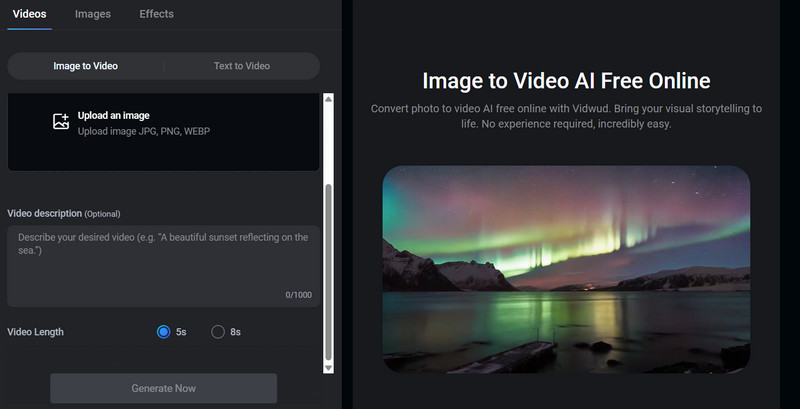
If Media.io's pricing feels a bit discouraging, don't worry—there's a great free alternative. Switch to Vidwud Alive AI Video Generator. Here, your creativity has plenty of room to run. This free AI video generator also offers multiple AI models designed for different styles to animate a picture. For example, Seedance 1.5 Pro delivers a cinematic feel, Vidwud Lite focuses on smooth transitions, and Seedance 1.0 Pro Fast is built for quick results.
All you need to do is choose a model, upload your image, and add a short video description. In just moments, you'll get a natural-looking AI alive photo. The results can be used for commercial purposes at no cost.
Pros
Completely free
Generated videos can be used commercially
Clean interface
Very fast generation
Cons
Limited options for video length
4. Mindvideo Alive AI Image Generator
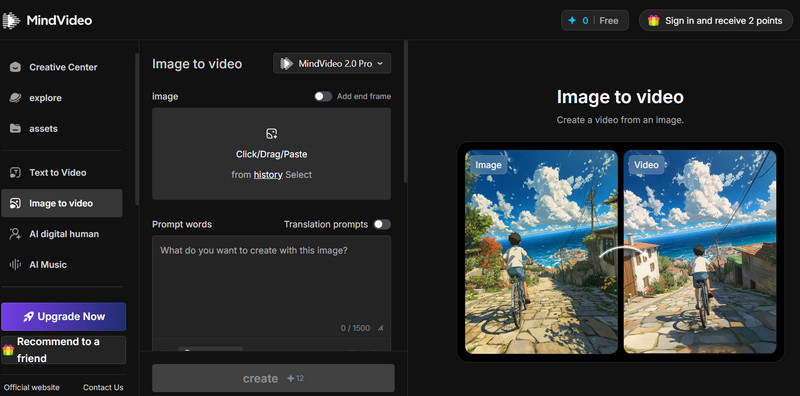
Many of the AI alive free tools mentioned above offer very limited options for customizing the final video. With that in mind, this guide introduces Mindvideo Alive AI Image Generator, a platform built for users who want more control. On its interface, you'll find settings for resolution, video length, aspect ratio, public visibility, and copy protection. It also offers a wide range of generation models, comparable to other leading tools.
Another standout feature is the built-in AI prompt generator under the text input box, which helps refine your instructions. You can also save presets and reuse them when creating future AI alive TikTok content.
If you have a series of still images instead of a full video, the Add end frame option is especially useful. Simply upload your image, set the last one as the end frame, and let the AI fill in the motion between them.
It also supports text to video AI, allowing you to create animations using only written prompts—no source images required.
Pros
Rich customization options
Supports end-frame uploads to guide animation flow
Includes an AI prompt generator
Cons
Copyright and visibility settings require a paid plan
No free generation available
5. Live Portrait AI Alive App
The final tool to introduce is a face animator focused on human expressions: Live Portrait AI Alive App. Unlike the 4 AI alive generators mentioned above, Live Portrait AI Alive App is designed mainly for mobile devices. Its strength lies in bringing still human portrait photos to life by making them display a wide range of facial expressions.
Of course, expression changes are just the beginning. Live Portrait AI is also an App to make photo talk, allowing the person in the image to say anything you want. Common uses include sending animated birthday or holiday greeting cards, or sharing voice messages—without ever needing to appear on camera yourself. There are even more creative possibilities to explore, such as trying to animate old photos, generating an AI avatar from prompts, or swapping faces in group pictures.
Pros
Offers many creative features.
Provides multiple AI animation models.
All transmitted data is encrypted to protect your privacy.
Cons
You cannot access the editing interface without a paid subscription.
AI Alive FAQs: Everything You Need to Know
If you still have some questions about AI Alive before getting started, feel free to check out this quick Q&A section:
AI Alive is an artificial intelligence technology that transforms still photos into animated videos by adding motion, expressions, and atmosphere.
No, it isn't. While TikTok has made AI Alive popular and many users are searching for how to use TikTok AI Alive, there are other platforms (such as Vidnoz AI) that offer more flexible features.
Yes, many tools offer AI Alive as a free option, including Vidnoz AI, which allows you to generate animated videos without upfront fees.
Not at all. Most AI alive free generators use simple upload and text prompts that are easy for beginners to follow.
As the best free AI video generator, Vidnoz AI offers powerful models, simple controls, and high-quality results, making it one of the best platforms for creating AI Alive videos.
The Bottom Line
Here, you'll learn what AI Alive is, how it works, and how to create AI Alive content on its original platform, TikTok. Since some users find TikTok's features too basic or face regional restrictions, this article also compiles 5 top AI-powered Alive generators, including web-based tools and mobile applications. To help you make faster and more informed decisions, each product clearly lists its key advantages and disadvantages. If you're ready to join the AI Alive trend, now is the perfect time!
Vidnoz AI - Create Free Engaging AI Video with Talking Avatar
Easily create professional AI videos with realistic avatars.
Text-to-speech lip sync voices of different languages.
Lane Maxwell is an experienced technology industry editor specializing in providing users with actionable advice and insights. Her articles have helped millions of readers find solutions easily.