Spent hours aligning lyrics to your video manually? Or struggled to make lyrics look professional on TikTok/YouTube? Ever feel like adding subtitles to videos is just too tedious and time-consuming? You're not alone—many creators feel the same way.
If you are watching a music video without lyrics, I believe you might quickly lose interest. Lyrics make music videos, vlogs, or social media clips more engaging — but manual editing is tedious. Be honest, a great set of subtitles can take your video from good to unforgettable. But often, technical hurdles get in the way.
Luckily, an online AI lyrics video maker can help you add lyrics to video in minutes—no skills needed. Take a look!
- On This Page
-
Why Adding Lyrics to Video Matters
-
How AI Is Revolutionizing Adding Lyrics to Videos
-
Best Platform to Add Lyrics to Video Free: Vidnoz AI
Vidnoz AI Video Dubbing - Quick Solution for Lyric Subtitle Generation
Vidnoz AI Video Editor - Start Detailed Lyric Subtitles Editing
-
How to Add Lyrics to Video in 5 Easy Steps
Why Adding Lyrics to Video Matters
When it comes to lyric captions, they're so much more than just displaying text. It's a powerful strategy to enhance your video's appeal. You can see videos with lyrics flooding various video platforms. They are more accessible, engaging, and way more shareable.
The reason lies in how lyrics subtitles help viewers keep up with the content. Think about it: on silent commutes or in quiet offices, videos with lyric captions are way more likely to be watched all the way through. Even better, you can fully customize the style—colors, fonts, layouts—to match your video's vibe and make it stand out.
Thus, in the era of short videos, mastering how to add lyrics to videos and crafting content aligned with social media trends is crucial.
How AI Is Revolutionizing Adding Lyrics to Videos
The old ways of adding lyrics are often frustrating. If you've ever tried manually adding lyrics to video, you're no stranger to the time-consuming, labor-intensive process and subpar results. It's precisely these frustrations that have spurred the development of smarter, more efficient solutions.
- Efficiency Revolution: Stop manually inputting lyrics and tediously adjusting timelines frame by frame. AI automatically recognizes audio content and rhythm, slashing production time from 1-2 hours to mere minutes for massive efficiency gains.
- Barrier-Free Operation: No need to grapple with complex interfaces or steep learning curves of professional software. The online free AI video generator streamlines the entire process of adding lyrics to videos. Its intelligent automation empowers even beginners to get started effortlessly, fully unleashing user productivity.
- More Styles to Choose From: Traditional free tools often offer limited customization options and generic effects. Now, with AI-powered tools, you get access to hundreds of professionally designed lyric templates and flexible styling options. No more boring layouts—just distinctive visuals that reflect your unique style.
- Eliminate Audio-Visual Desynchronization: Manual synchronization inevitably leads to mismatched lyrics and audio, severely compromising the viewing experience. AI now intelligently analyzes audio waves to ensure every word perfectly aligns with the music, fundamentally eliminating the awkwardness of desynchronization.
- Exceptional Cost Effectiveness: Compared to the high costs of traditional professional editing software, online AI tools often provide fully-featured free versions and cost-effective subscription plans, enabling users to achieve pro-level results at minimal expense.
>> Try AI Image to Video to instantly transform your photos into vivid, dynamic videos.
Best Platform to Add Lyrics to Video Free: Vidnoz AI
When it comes to seamlessly adding pro-level lyrics to videos, Vidnoz AI offers unique solutions with its AI capabilities specifically designed for lyric scenarios. Its built-in intelligent and automated features greatly simplify the process of adding lyrics. If your goal is professional-looking results without the steep learning curve, you've found your solution.

Vidnoz AI - Create Free Engaging AI Video with Talking Avatar
- Easily create professional AI videos with realistic avatars.
- Text-to-speech lip sync voices of different languages.
- 2800+ video templates for multiple scenarios.
Vidnoz AI Video Dubbing - Quick Solution for Lyric Subtitle Generation
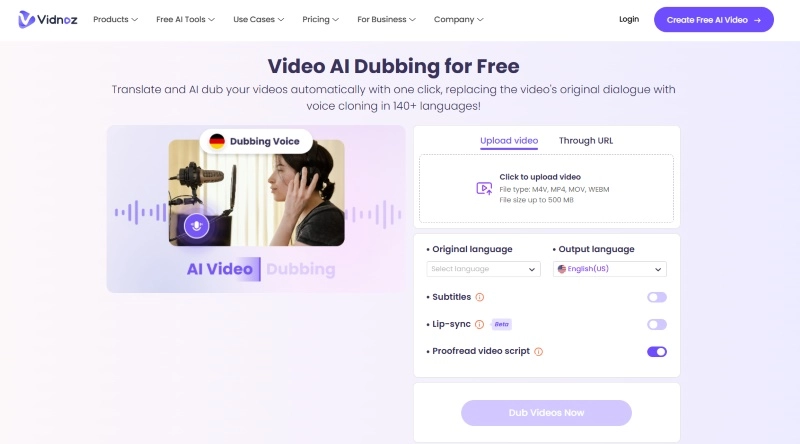
If you're striving for ultimate efficiency and need to quickly add basic lyrics subtitles to your videos, Vidnoz AI Dubbing is your ideal solution. This tool simplifies the process by analyzing audio tracks and adding lyrics to video automatically online free. Whether you're making short videos, social media clips, or anything else that needs quick and stylish lyric integration—it's got you covered.
Key Feature
- Enable Subtitles feature to automatically detect audio and generate synchronized captions with one click.
- Supports mainstream formats including MP4, MOV, M4V, and WEBM.
- Export videos in over 140 languages with the built-in translation feature, expanding your global reach.
- Optional AI lip-sync feature ensures character mouth movements match the translated audio.
Vidnoz AI Video Editor - Start Detailed Lyric Subtitles Editing
When your project demands greater control and customization, Vidnoz AI Video Editor stands as a comprehensive professional tool worthy of consideration. It transcends the role of a mere video editor to become a powerful lyric video production hub, enabling you to execute a complete workflow from automated generation to meticulous fine-tuning.
Key Feature
- AI Auto-Transcription & Sync: After uploading and adding your video, simply activate the Auto Subtitles feature. AI will automatically recognize the audio content, precisely generating and synchronizing the lyrics. You can also download the lyrics file for using in other scenarios.
- Multiple Lyric Input Options: Supports manual lyric input or direct import of existing subtitle files in various formats including SRT, LRC, VTT, SSA, SUB, and SBV, flexibly accommodating materials from various sources.
- Full Control Over Lyric Subtitles: For added lyrics, Vidnoz AI Editor supports manual editing of lyrics content and free adjustment of the timeline, ensuring precise synchronization between lyrics and beats.
- Extensive Style Customization: Complete lyric style editing features allow you to freely adjust font, color, size, shadow, and background, seamlessly integrating lyrics with your video's aesthetic.
How to Add Lyrics to Video in 5 Easy Steps
Here's a simple, step-by-step guide to adding lyrics to video online free with AI for stunning effects.
Step 1: Click the button below to create an account in Vidnoz for free.
Then, click the link here to go to the Vidnoz AI Video Editor tool.
Step 2: Click the button to upload your video file directly from your device.
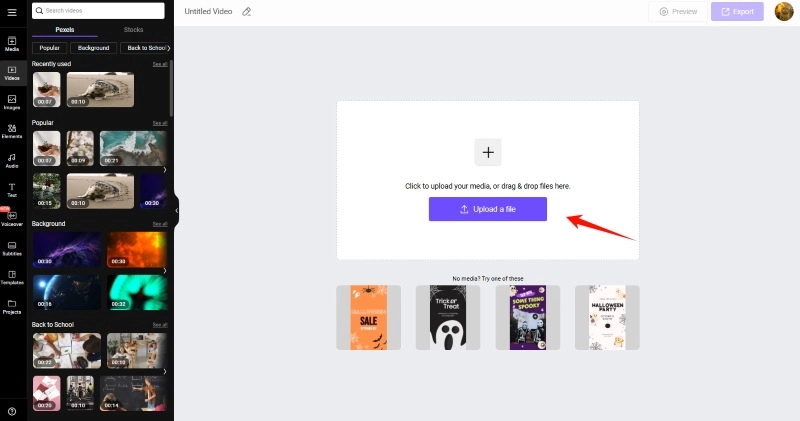
Step 3: Add Lyrics to Your Video
After the video has been uploaded, it will automatically be added to the track. Now you can start adding lyrics to the video. Click the Subtitles tab in the left sidebar. You have three options:
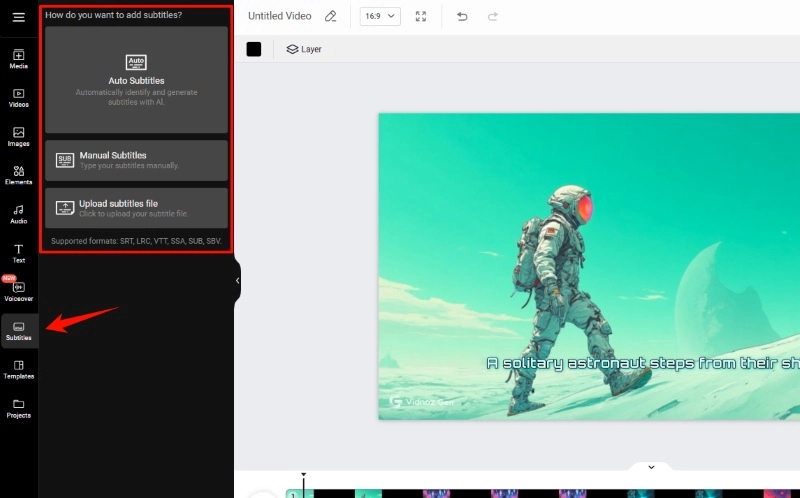
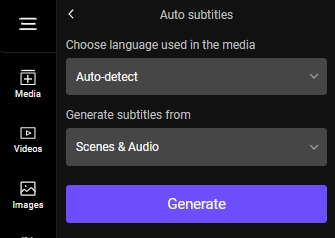
- Auto Subtitles: Enable the built-in transcription feature, select the lyrics language and source, then click Generate. Let the AI automatically generate and synchronize lyrics.
- Manual Subtitles: Manually input lyrics content and set timelines.
- Upload Subtitles File: If you already have a prepared lyrics file, you can also upload it directly to this tool for use.
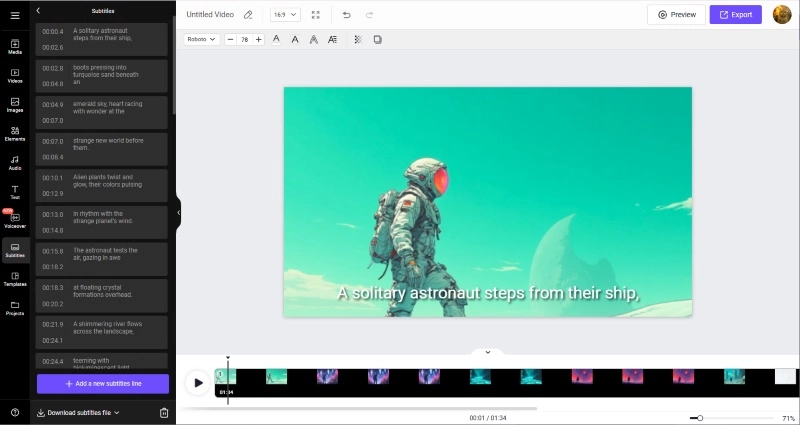

Tips: If you only need to transcribe lyrics, you can try using Vidnoz's AI Audio to Text tool. It can quickly convert your audio or video files and output a lyrics file.
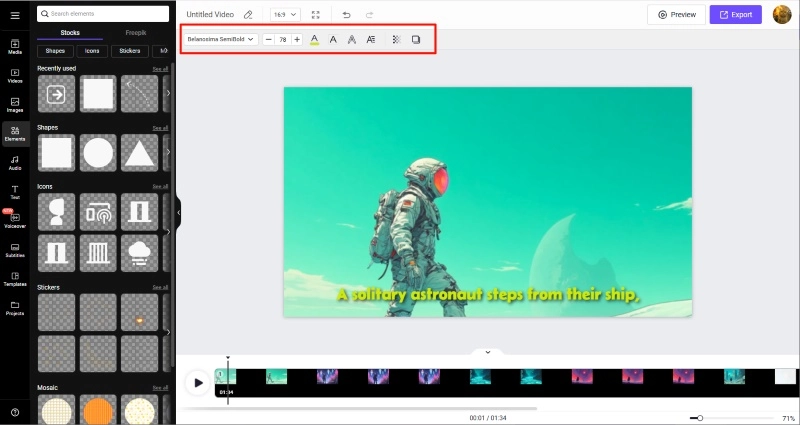
Step 4: Now you can customize the font, color, size, and opacity to your liking. You can also use the editor's built-in material library to enhance your video, you can even add your brand logo.
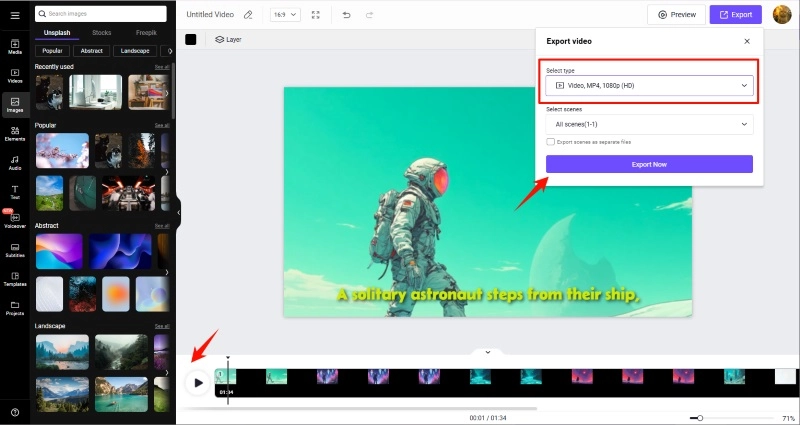
Step 5: Click the play button next to the track to preview your video anytime. If the AI-powered lyric sync looks perfect, you can export your video in 1080P resolution for sharing.
Conclusion
Creating an engaging lyric video doesn't have to be hard — with a free lyrics video maker online like Vidnoz, you can add lyrics to video in minutes, even if you're a beginner. Ready to try? Sign up for Vidnoz AI now — upload your video, and let AI add lyrics for you!
Vidnoz AI - Create Free Engaging AI Video with Talking Avatar
- Easily create professional AI videos with realistic avatars.
- Text-to-speech lip sync voices of different languages.
- 2800+ video templates for multiple scenarios.