In today's digital age, the ability to convert written Urdu text into spoken words has become increasingly valuable. Whether you're a content creator aiming to reach Urdu-speaking audiences, an educator developing learning materials, or a business looking to localize content in Urdu, Urdu text to speech technology offers the best solution.

Imagine narrating stories, creating voice-overs for videos, or developing educational content—all without the need for professional voice artists. With advancements in AI, generating natural-sounding Urdu speech from text is now more accessible than ever.
- On This Page
-
What You Can Benefit From Urdu Text to Speech
-
Vidnoz Text to Speech - Create Urdu Text to Speech AI Voice for Free
How to Generate Text to Speech Urdu AI Voice?
-
Vidnoz AI - Create Urdu Voice Over AI Free for Videos
How to Generate Urdu Text to Speech AI Voice-Overs for Videos
-
FAQs on Vidnoz Urdu Text to Speech
Q1: How Does the Urdu Text to Speech Tool Work?
Q2: Does Vidnoz Text to Speech Support Other Languages?
Q3: Can I Use the AI-generated Urdu Text to Speech Content for Commercial Purposes?
Q4: What is the Best Urdu Text to Speech Tool?
What You Can Benefit From Urdu Text to Speech
Utilizing Urdu text to speech tools brings numerous advantages across various domains:
1. Create Local-Based Content Easily
For content creators and businesses, producing localized content is crucial. Text to speech Urdu free tools enable the transformation of written content into spoken Urdu, facilitating better engagement with local audiences. This is especially beneficial for marketing campaigns, tutorials, and informational videos.
2. Reach a Wider Audience
By converting text into speech, you cater to individuals who prefer auditory learning or have visual impairments. Urdu text to speech AI ensures your content is accessible to a broader demographic, enhancing inclusivity and reach.
3. Fast Engagement Growth
Audio content often leads to higher engagement rates. With Urdu AI voice generator, you can produce compelling voice-overs that resonate with listeners, thereby increasing viewer retention and interaction on platforms like YouTube and social media.
4. Efficient Language Learning
Educators and learners benefit immensely from text to speech in Urdu. Listening to accurate pronunciations aids in better comprehension and retention, making it an effective tool for language acquisition and teaching.
Vidnoz Text to Speech - Create Urdu Text to Speech AI Voice for Free
Vidnoz Text to Speech is an online free AI voice generator with advanced TTS voice models included. It offers fully competent solutions for users to generate voices in any language. This user-friendly text to speech Urdu free tool can generate high-quality Urdu audio from text effortlessly, in MP3 audio format. And the outputs can be used for audio versions of any content.

Vidnoz AI - Create Free Engaging AI Video with Talking Avatar
- Easily create professional AI videos with realistic avatars.
- Text-to-speech lip sync voices of different languages.
- 2800+ video templates for multiple scenarios.
What Users Can Benefit From the Best Free Urdu Text to Speech Tool:
- Online Unlimited Urdu Text to Speech: Convert extensive Urdu text into speech without any restrictions, ensuring uninterrupted content creation.
- Multiple Male/Female Voice Styles: Choose from a variety of voice options to match the tone and context of your content. Set your preferred gender, emotion, and tone for the audio narration.
- Lifelike Urdu Audio Output: Vidnoz Urdu Text to Speech produces natural-sounding speech, enhancing the authenticity of your audio content.
- Instant Conversion: From short phrases to long scripts, it requires no wait. Vidnoz can generate audio files swiftly, streamlining your workflow.
How to Generate Text to Speech Urdu AI Voice?
Follow these simple steps to create text to speech Urdu for free on Vidnoz.
Step 1: Access Vidnoz Text to Speech
Navigate to Vidnoz Text to Speech on your browser.
Step 2: Input Your Urdu Text
Enter or paste your Urdu text into the provided text box. It supports long scripts for sure.
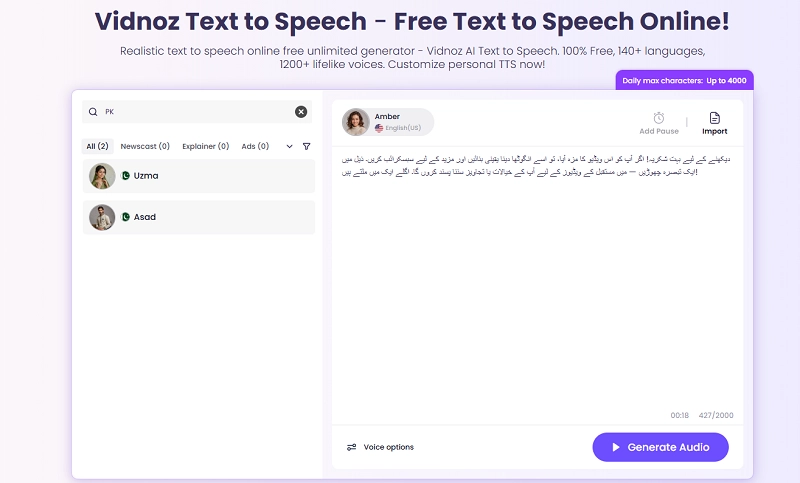
Step 3: Select Voice Parameters
Use filters to search for and select an ideal voice for your content. For Urdu text to speech, you can set the language as “اردو” using the language filter. Then, it will show you all available voice models in Urdu. The Voice options below the text box are where you can adjust the speech speed, pitch, and volume.
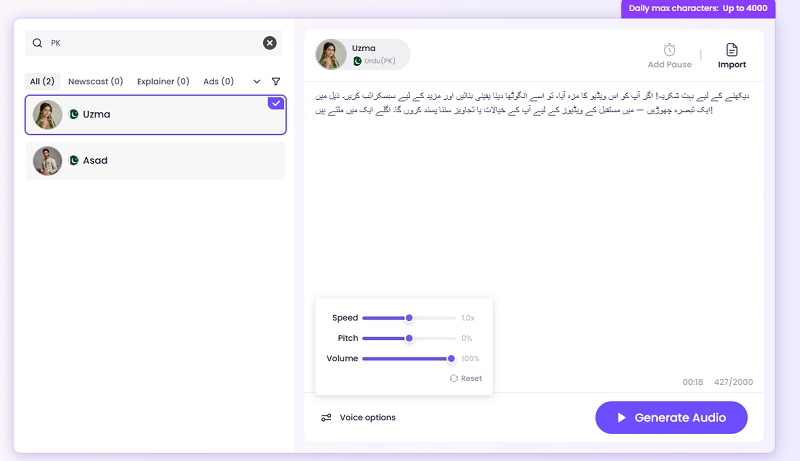
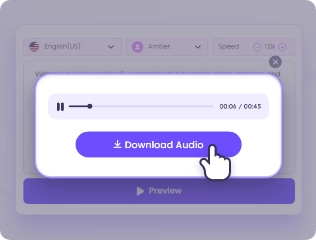
Step 4: Generate and Download
Click on the Generate Audio button to start creating the audio. Once processed, you can download the file for personal and commercial use.
Vidnoz AI - Create Urdu Voice Over AI Free for Videos
Hope to use the AI Urdu text to speech content as voice-overs in your videos? You don’t need to install a third-party video editor program to insert and sync the audio file into each scene by hand as Vidnoz AI refines the process to be more effective. This free AI video generator integrates its TTS tool, helping users create AI voice-overs for videos directly.
Vidnoz AI - Create Free Engaging AI Video with Talking Avatar
- Easily create professional AI videos with realistic avatars.
- Text-to-speech lip sync voices of different languages.
- 2800+ video templates for multiple scenarios.
What Users Can Benefit From Vidnoz AI TTS Feature:
- AI Dub Videos with Urdu Voice-overs: It automatically adds Urdu voice-overs to your videos. With the support for AI lip sync, Vidnoz also empowers users to dub a video in different languages.
- Advanced TTS Voice Models: Vidnoz AI utilizes cutting-edge Microsoft TTS and ElevenLabs TTS models for realistic and expressive speech synthesis.
- Clone Any Voice for Video: Beyond the massive preset voice, you can choose to clone a voice and add unique touches to your content.
- Adjust AI Voice Freely: Feel free to fine-tune voice attributes such as tone, speed, and emotion to suit your content's needs.
How to Generate Urdu Text to Speech AI Voice-Overs for Videos
Here's a step-by-step guide to creating Urdu voice-overs for your videos on Vidnoz AI:
Step 1: Go to Vidnoz AI Creation Center
Click the button below to access Vidnoz AI. Sign up via your Google email account to start quickly.
Step 2: Go to Vidnoz AI Editor
Click Create Video at the upper right of the homepage. It will direct you to the video editing page. Upload your video or select from the ready Vidnoz video templates.
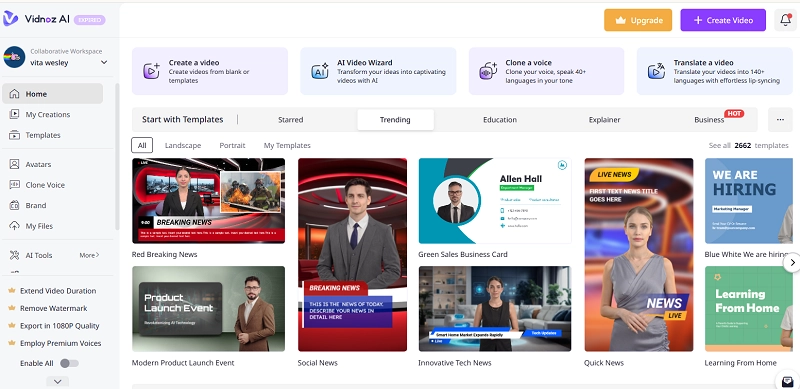
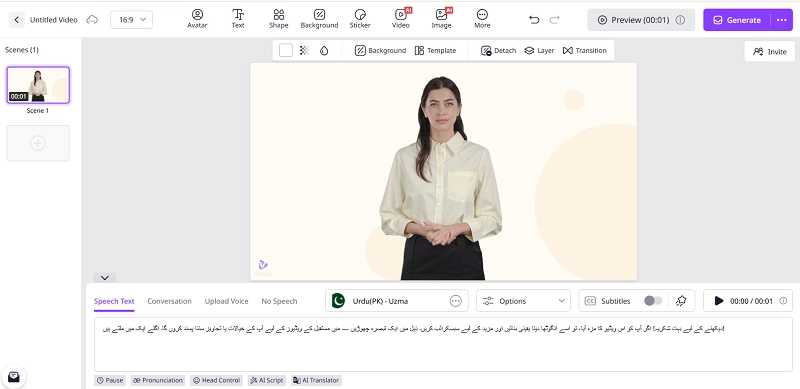
Step 3: Add Urdu Script
Input your Urdu script into the designated text box for speech synthesis. Select the appropriate voice style and adjust settings like speed and pitch to match your video's tone.
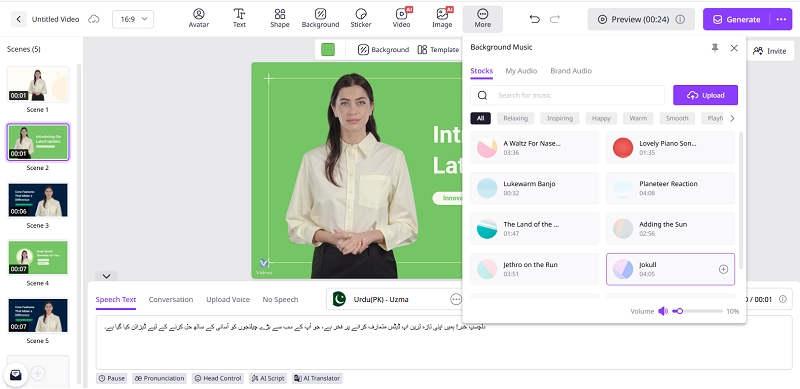
Step 4: Customize the Video
Moreover, you can polish the video and attach more personalized vibes. Add background music, call-to-action stickers, overlay text, etc. Modify graphics, add a grasping intro, and tweak the subtitles. You have full control over the video.
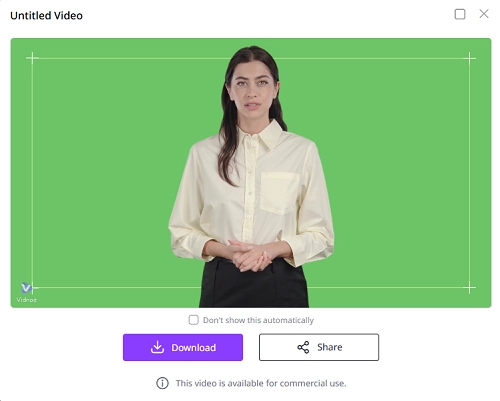
Step 5: Generate and Export Video
Once satisfied, click 'Generate' to process the video. After rendering, download or share your video as needed.
FAQs on Vidnoz Urdu Text to Speech
Q1: How Does the Urdu Text to Speech Tool Work?
Urdu text to speech tools like Vidnoz work by using smart AI and TTS (text-to-speech) technology to read your written Urdu text and turn it into clear, lifelike voice audio. You simply paste your text, choose a voice style, and the system will create a natural-sounding Urdu AI voice generator output. It’s fast, accurate, and completely online.
Q2: Does Vidnoz Text to Speech Support Other Languages?
Yes, Vidnoz supports more than 140 global languages in addition to Urdu. That means you can create text to speech in English, Arabic, Hindi, Chinese, and many others. You can switch between languages easily. This is useful for content creators, educators, and businesses looking to make multilingual AI voice content from a single platform.
Q3: Can I Use the AI-generated Urdu Text to Speech Content for Commercial Purposes?
Absolutely. Vidnoz allows full commercial use of the audio you create. Whether you're making YouTube videos, podcasts, digital ads, or online courses, your AI-generated Urdu text to speech can be used legally and freely. You don’t need to worry about licensing. Vidnoz is perfect for creating Urdu voice over AI content for business and monetized platforms.
Q4: What is the Best Urdu Text to Speech Tool?
There are many tools for text to speech Urdu free, but Vidnoz stands out due to its simple interface, high-quality voice output, and advanced features. It offers free Urdu text to speech online, multiple voice styles, instant conversion, and supports video voice-overs too. Meanwhile, options including Google TTS and Narakeet are also worth a try if you need an alternative.
The Bottom Line
Embracing Urdu text to speech technology opens up new avenues for content creation, education, and business communication. Vidnoz offers robust solutions for generating high-quality Urdu audio and video content effortlessly. Start using this platform for Urdu text to speech online free unlimited, and enhance your outreach and engagement with Urdu-speaking audiences.
Vidnoz AI - Create Free Engaging AI Video with Talking Avatar
- Easily create professional AI videos with realistic avatars.
- Text-to-speech lip sync voices of different languages.
- 2800+ video templates for multiple scenarios.







![5 Best Free Text to Speech Translators [Sites and Apps]](https://www.vidnoz.com/bimg/cover-of-text-to-speech-translator.webp)