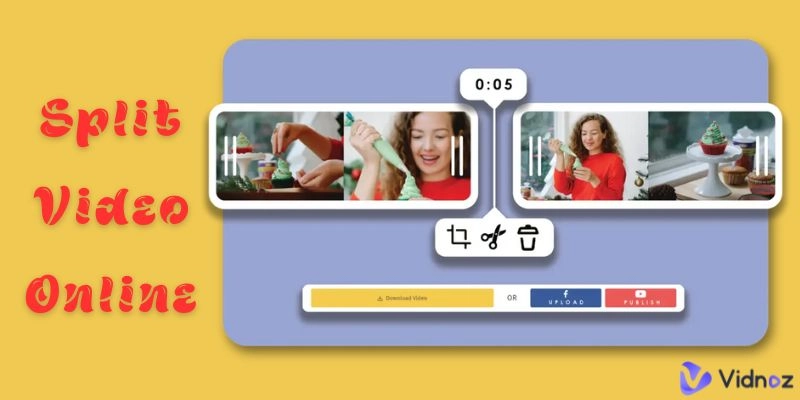
Imagine, you filmed a travel montage and realize it's too long to upload to Instagram Stories. Or you are a video content creator who films a long video and wants to split it into small digestible short clips that can be uploaded to TikTok, etc. Either way, you need to figure out how to split video online in a quick and easy way without having to download a large editing program. That's where online video splitters come into play.
In this guide, we will discuss some of the basic reasons why you should consider online video splitters tools, followed up with 5 of the best tools to split video online for free, easy, and with no downloads or hassles. So let's get to it.
- On This Page
-
-
Why Split Video Online Instead of Traditional Ways?
1. Create Instagram Stories, TikToks, Reels Instantly
2. No Software Installation or System Limits
3. AI-Powered Smart Splitting
4. Easily Split Large Video Files Online
5. User-Friendly and Accessible Anytime, Anywhere
-
Best 5 Tools to Split Video Files Online: Fast & Free
Vidnoz AI Video Highlight: Free & Quick Automatically Split
Split Video: 4 Splitting Methods Available for Your Needs
VEED Video Splitter, Offers Additional Editing Tools
Kapwing Video Splitter, Split Large Video Into Parts Online Free
Canva Video Splitter, Easily Split Videos on Any Device
-
General Steps on How to Split Video Online & Best Example
Example: Using Vidnoz AI to Create Instagram-Ready Clips
Why Split Video Online Instead of Traditional Ways?
With all the editing options on the web and in apps, you may be asking the question: why split video online vs traditional software? The simple answer is, convenience, flexibility, and speed with online delivery formats. Here are 5 primary reasons to consider splitting video online.
1. Create Instagram Stories, TikToks, Reels Instantly
With online tools, you can easily split video online for Instagram story online and for other short-form content platforms. Online video splitters allow for automated splitting into 15 or 60-second clips ideal for social media upload without having to manually trim each section with editing software that may not support short-segmented clips.
2. No Software Installation or System Limits
Traditional editing software generally has higher system specification requirements for installation, licenses, and updates. Online video splitters remove all of these hassles. Now, you can split video online for free from any browser and not worry about software compatibility or system performance.

Image from canva.com
3. AI-Powered Smart Splitting
The latest technology uses artificial intelligence (AI) to analyze the video for scene changes, highlights, and pauses to suggest potential split in the video. The new AI-powered smart splitting engages will save editing time. This is even more useful to those who need to split large videos into parts online quickly.
4. Easily Split Large Video Files Online
Want to split large videos into parts online without crashing your computer? Online platforms actually allow for high file sizes due to the processing being done in the cloud, meaning they are ideally suited for HD or 4K videos.

Vidnoz AI - Create Free Engaging AI Video with Talking Avatar
- Easily create professional AI videos with realistic avatars.
- Text-to-speech lip sync voices of different languages.
- 2800+ video templates for multiple scenarios.
5. User-Friendly and Accessible Anytime, Anywhere
Users can access these online video splitters on a laptop, tablet, or smartphone 24-7. Each of these tools carries a user-friendly front end, making it easy to split a video file online anyone, even those with no video editing experience, can do it with a few clicks.
Best 5 Tools to Split Video Files Online: Fast & Free
Now that we have outlined the reasons for splitting videos online, here is a list of five tools to get you started splitting videos online for free. Each of these tools is unique in its features, formats, and costs.
-
Vidnoz AI Video Highlight: Free & Quick Automatically Split

Vidnoz AI is an free AI video generator that also provide video highlight feature, ready to help automate the online task of splitting video. Vidnoz AI Video Highlight interface is minimalistic allowing functionality with drag-and-drop or by simply pasting a YouTube link.
Splitting capabilities: Automatically detects highlights and produces short clips (perfect for Reels, Shorts, etc.) and manual trim.
File support & limits: MP4, M4V, MOV, WEBM; up to 5 GB or 1-hour videos.
Pricing: Vidnoz AI Video Hightlights tool is 100% free to use.
-
Split Video: 4 Splitting Methods Available for Your Needs

This online tool's purpose is to cut videos from YouTube, allowing you to create quick workflows without added complexity. The browser UI will allow you to split with the free (manual split), by average (split equal parts), by time delay, or by file size.
Splitting capabilities: You can choose to manually mark the cuts (useful if wanting precision) or make auto-splits: average (equal), fixed time-delay (ex. every 2 minutes), or fixed timecode that you input for the desktop UI. You will have control if you want it.
File support & limits: Use this tool in any browser (Crucial! Only HTML5 player) without needing to upload to a server. Typically use standard video formats: MP4 (most common), MOV; approximately 1 GB limit for splitting.
Pricing: It is 100% free to split video with no signup. Perfect for once-off splits or needing to keep your video private.
-
VEED Video Splitter, Offers Additional Editing Tools

VEED is a more fully-featured online editor, it has transcripts, timeline features, etc. convenient for someone who wants to split video files online and have the capacity to create titles, subtitles, split pitch videos or add effects editing if desired.
Splitting capabilities: Place the blue playhead and click "Split" (or press "S"). You can easily create multiple segments, delete segments, and rejoin them!
File support & limits: Clips can be uploaded from MP4, MOV, WMV, AVI, MKV, WebM and have a file limit of approximately 2 GB. Although, you can use a video with a YouTube URL.
Pricing: The free plan includes watermarked exports and has limits to export (1 quality). The pro tier removes the watermark, HD exports, team collaboration, and unlimited use; it now supports integrations.
-
Kapwing Video Splitter, Split Large Video Into Parts Online Free

Kapwing has a clean, cloud-based experience with optimized speed. It is fast at tasks like splitting large videos into clips for Instagram Stories.
Splitting capabilities: Split by timestamps, trim handles, auto-split; and an intuitive drag-and-drop in the timeline.
File support & limits: Accepts most formats. Free users have a 30-minute monthly export limit, which covers uploads of 4GB.
Pricing: The free trial has a small watermark and export limits. Pro removes the watermark, unlimited exports, 4k quality, and 100% access to assets.
-
Canva Video Splitter, Easily Split Videos on Any Device

Canva AI has objectives of video splitting embedded in its well-established drag-and-drop design platform—ideal for users who have to occasionally split videos as well as perform other design-oriented tasks.
Splitting capabilities: Click on a clip in your design, use the scissors icon or timeline tools to set split points, then adjust and resize the segments.
File support & limits: Supports MP4, AVI, MOV, MKV, WEBM, MPEG, 3GP; confidently handles typical uploads of 2GB and less.
Pricing: The free plan has a watermark on some exports. Canva Pro removes watermarks, adds premium templates, multiple aspect ratio exports, and advanced brand controls.
Whatever the way you wish to split video files online—automatically, manually, by size, or time, each of these tools has you covered. The free tiers are more than generous; if paid features are unlocked, there are professional features available.
General Steps on How to Split Video Online & Best Example
Considering the way users typically navigate indicative online video splitters, it is evident that many platforms in this space showcase similar and clear user experience. Here's how split large video into parts online tools typically works:
Step 1. Upload your video file
Uploads your video file—through either drag-and-drop, file chooser, or importing by cloud link. Most tools support standard formats like MP4, MOV, or WEBM, while some, impose limits on file sizes ranging from 1–5 GB.
Step 2. Choose a splitting method
For most platforms, you can choose manual cuts (by dragging the handles), time-based cuts (e.g. every 15 seconds), size-based cuts, or cutting using AI - including scene or highlight detection.

Image from flexclip.com
Step 3. Export and download segments
After the clips are split, export and download each part, in their desired format. Free plans often export videos branded with a watermark, while other free plans limit with time or number of exports. Premium plans usually remove limits and watermarking.
Ultimately, splitting a video online comes down to these three straightforward steps, especially for first-time video users, without complex editing software.
Example: Using Vidnoz AI to Create Instagram-Ready Clips
Instagram Stories is still one of the more popular ways for anyone to split video content on the Internet, especially with the longer 60-second duration for stories. But generally, you may still like short, snackable videos, it is important to split manually or using AI.
Here is a simple example of using Vidnoz AI Video Highlight, which is designed specifically for producing quick videos in Instagram story length:

- Visit Vidnoz AI's Highlight tool: Simply visit Vidnoz AI website and nevigate to Video Highlights, then upload a video (MP4, MOV, WEBM, up to 5 GB and under 1 hour).
- Upload the video you want to split: lmport video from a YouTube link or Upload a video from your device.
- Click ‘Import’ to check the result: Now hit the ‘Import’ button; Vidnoz leverages AI to determine key moments and then output the clips according to your selected duration.
- Preview and fine-tune: From the dashboard, you will see the overview of each clip. You can edit the clip start/end times if necessary before finally exporting the clips.
- Export your clips: You can export each clip individually or collectively. With the "free plan" chosen, this plan includes a small watermark, whereas the paid plan has no watermark and faster service.
Vidnoz AI - Create Free Engaging AI Video with Talking Avatar
- Easily create professional AI videos with realistic avatars.
- Text-to-speech lip sync voices of different languages.
- 2800+ video templates for multiple scenarios.
Conclusion
It's helpful to know split video online free quickly and easily. Whether someone is creating Instagram Stories, sharing clips for work, or just organizing personal videos, the tools in this guide make the job fast and simple. There's no need to download any software, just upload, split, and share. These free tools save time and make video editing easy for anyone.
Whether you're a content creator, marketer, or everyday user, give one of these tools a try and see how easy it is to split video online in just a few steps.






![Free Dog Name Generators 2026 [Tested & Provide Links]](https://www.vidnoz.com/bimg/vd---dog-name-generator.webp)