Shiny things are always eye-catching, no matter if they are in reality or in photos. Let’s be real, if your photo is a general shot with normal content, it is destined to be a drop in the image ocean on social platforms. But there is still a chance to change its fate if you add a neon filter to your image. The neon filter is like magic, which is good at decorating ordinary photos with high-contrast, glowing lines, injecting energy into them, and making them cool and striking with a cyberpunk vibe.
The best part? Just scroll down and you’ll access really stunning and easy neon filter photo editors. Let’s dive in.
- On This Page
-
Why Are Neon Filters Trending?
-
See the Visual Shock of Neon Photo Effects
-
3 Best Neon Photo Editors Free Use & Export
Vidnoz AI-Almighty Neon Photo Effect Editor
Tips: Hidden Gameplay of Vidnoz AI Photo Editor
Logo AI-Add Neon Lines Filter to Photo
Canva-Add Neon Glow Effect to Image
-
Prompt Tips to Make Amazing Neon Effects on Photos with AI Tools
Why Are Neon Filters Trending?
The neon filter photo effect is really and persistently popular on TikTok, Instagram, and Snapchat. Because it can easily create visual shock on ordinary photos, whether they are profile pictures, story posts, or digital art, catching viewers' eyes at first sight on crowded social media feeds and spurring their interests to move on.
See the Visual Shock of Neon Photo Effects
Before trying the neon photo effect, get an easy and concretized understanding of them as below.
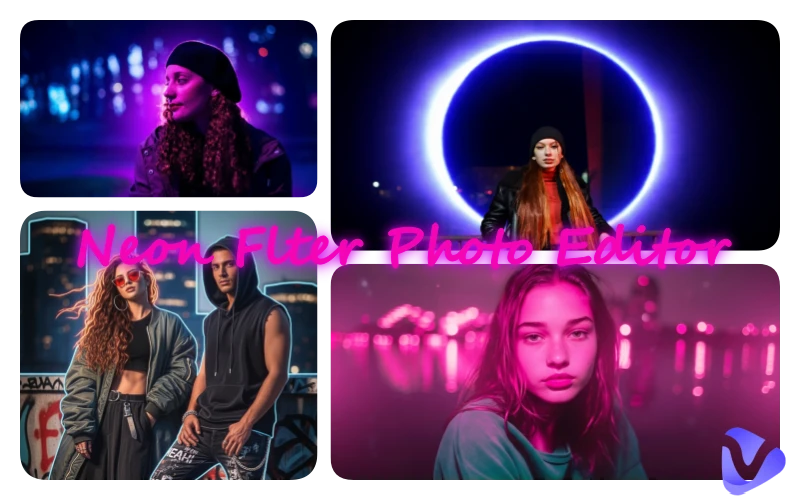
Neon Purple Filter
The neon purple filter adds a vibrant, magenta-violet hue to everything in the photo, simulating glowing and making them look cool, moody, and a little edgy. This is suitable for adding a cyberpunk vibe to night photography.
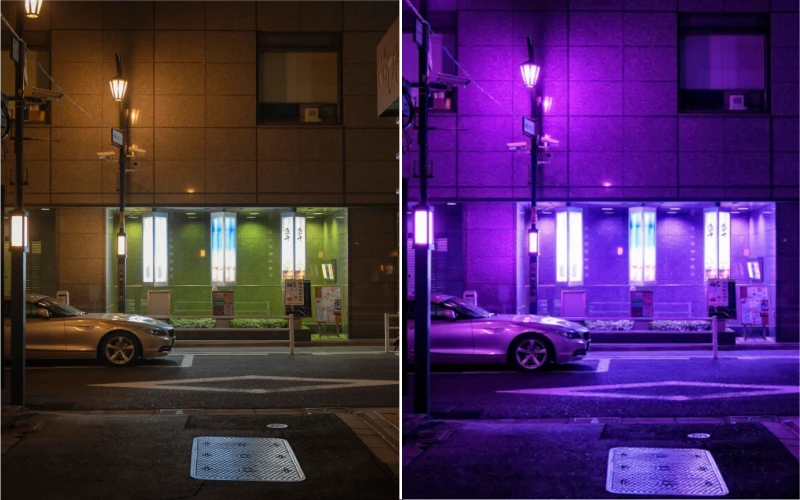
Neon Pink Filter
The neon pink filter screams fun. It wraps your photo in a bright, electric pink glow that feels playful, sweet, and totally eye-catching. It is popular for portraits or selfies.
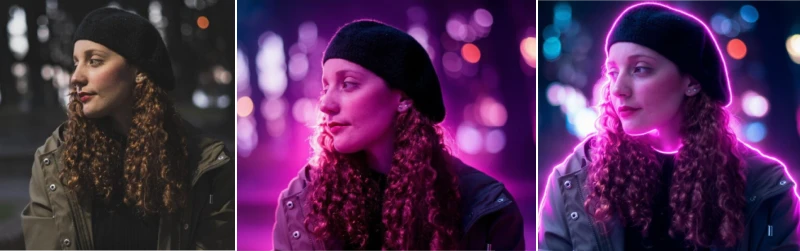
Neon Lines Filter
As implied by its name, the neon lines filter will trace your outline in the light with colorful glowing lines, making you sleek, bold, and super dynamic. Great for you to explore creative edits.
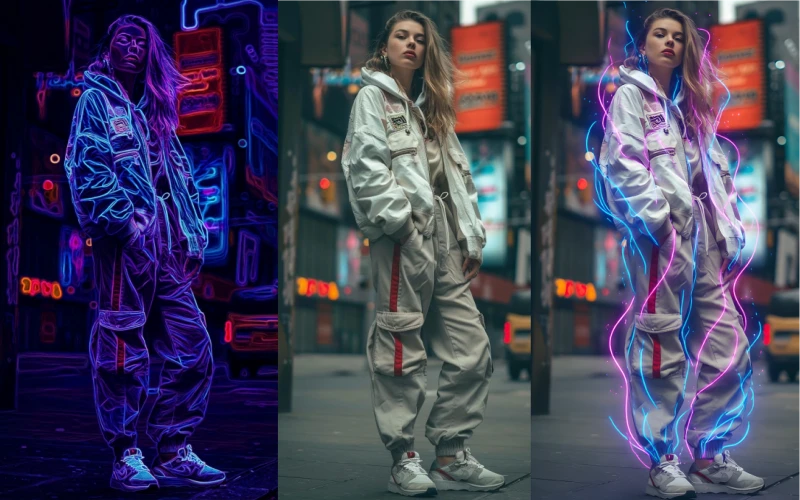
Neon Eclipse Filter
Picture a glowing ring of neon light surrounding you, like a solar eclipse but way more stylish. The neon eclipse filter creates a dramatic and mysterious look on images. This makes artworks more trending.
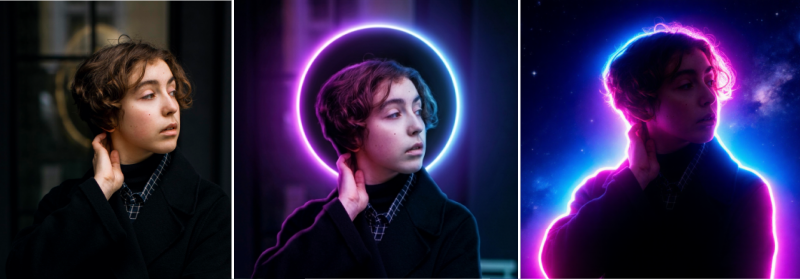
FYI, all these image examples are edited by Vidnoz AI’s image-editing-related tools. You can get more detailed info about them below.

Vidnoz AI - Create Free Engaging AI Video with Talking Avatar
- Easily create professional AI videos with realistic avatars.
- Text-to-speech lip sync voices of different languages.
- 2800+ video templates for multiple scenarios.
3 Best Neon Photo Editors Free Use & Export
If you want to apply a neon filter or create glowing effects like neon lines and colorful overlays to your pfp picture, selfies, or normal night landscapes, these options are worthy of trying.
Vidnoz AI-Almighty Neon Photo Effect Editor
Vidnoz develops tens of free AI tools that also include many effective image processing features for all levels of users to easily achieve stunning effects. Surely, it definitely can be used as a neon photo editor, and it has many ways to add various types of neon filters to photos in one click.
Vidnoz AI Photo Editor
Vidnoz AI photo editor comes first for its ease of use and endless creativity. You can simply use prompts to transform ordinary pictures into magnificent, mysterious, and sci-fi ones in a quick process.
Quick Guide:
Step 1. Open Vidnoz AI Photo Editor.
Step 2. Select an AI model and upload an image.
Step 3. Type down the direct need of adding a neon filter to it or feel free to refine the commands like "neon pink photo effect" , “outline the subject with colorful glowing lighting lines," etc.
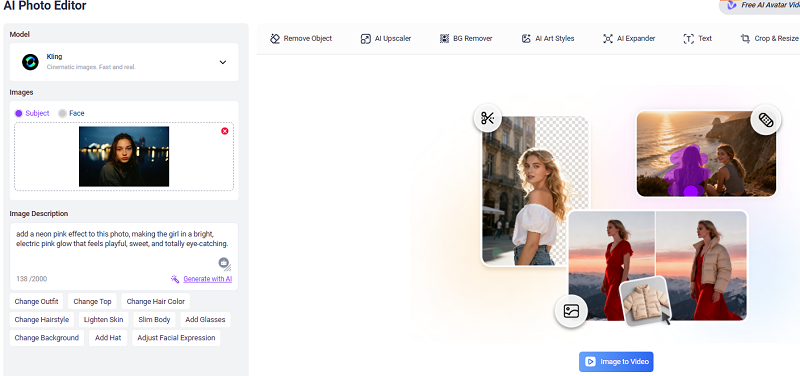
Step 4. Customize the aspect ratio and choose batch generations if needed. Then click on Generate.
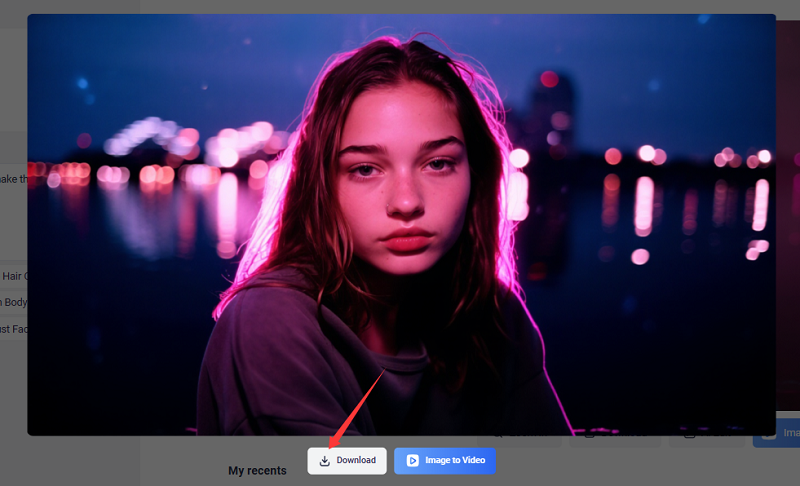

Different models offer special edit customizations, e.g., Kling enables you to add the neon filter to the subject or face only, while Nano Banana permits the neon effect to be totally controlled by text command. Each AI model or method may present different results on the same prompt and uploaded image. You can try them to explore surprising effects.
Also Read: #1 AI Image Generator Online Free - Unleash Your Creativity >>
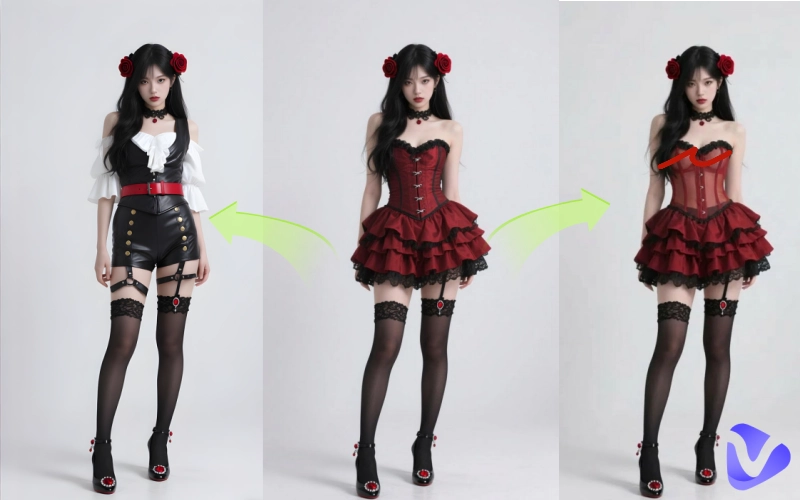
Besides, this neon photo effect editor supports more combined changes while applying a neon filter, such as watermark removal, background changing, clothes altering, and dedicated portrait retouching. As for what you can prompt, it can implement.
Convert Image to Video AI Online - Free
- Create a video from an image quickly for free.
- Use various AI models to turn photos into videos.
- Download and share the AI-generated video at no cost.
Convert Image to Video
Tips: Hidden Gameplay of Vidnoz AI Photo Editor
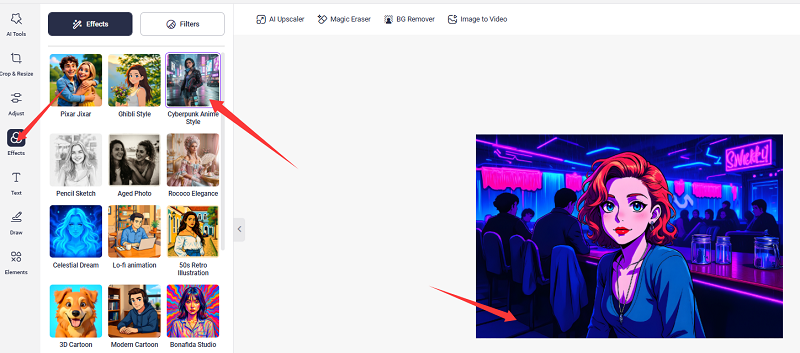
Vidnoz is truly a treasure of software. It has hidden gameplay to achieve a neon filter effect for your pictures named "anime cyberpunk photo style." To put it simply, this feature converts images into anime and adds a cyberpunk vibe to it, simulating a neon photo effect.
Quick Guide:
Step 1. This photo-style function has no direct access, and once you’ve finished the edit through the AI photo editor, the access will appear automatically as “AI Edit”.
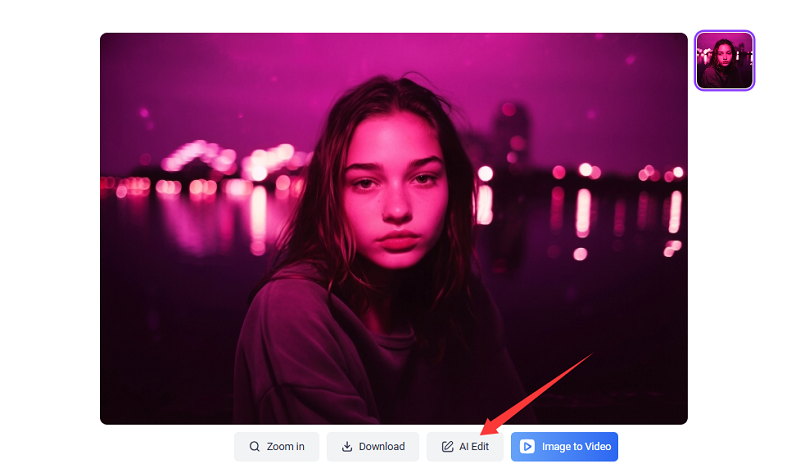
Step 2. Click on it and skip to a totally different and more customizable photo editing interface. Upload a new photo.
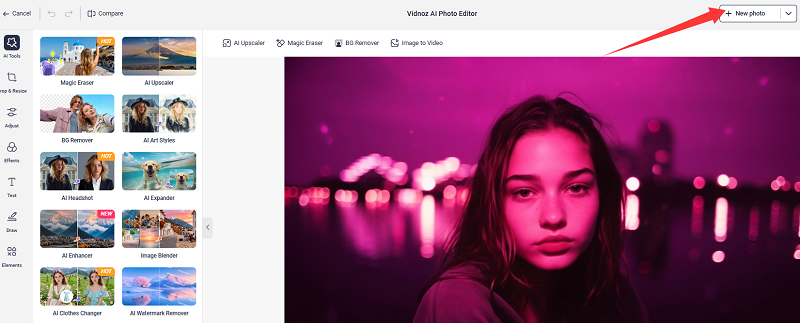
Step 3. Go to Effects and apply the cyberpunk anime style instantly.
Also Read: Animate Images to Videos with Customized Motions for Free >>
Logo AI-Add Neon Lines Filter to Photo
This product is rather niche. Judging from its name, it seems to have nothing to do with the neon filter. However, it has a "turn logo to neon effect" function. There is no strict restriction that the uploaded picture must be a logo because it powered by the Nano Banana model. Therefore, it is also very easy for you to add the neon line effect to the picture with it.
Site: https://www.logoai.com/design/logo-to-neon-sign
Quick Guide:
Step 1. Land on LogAI’s log-to-neon-sign page. Upload your image.
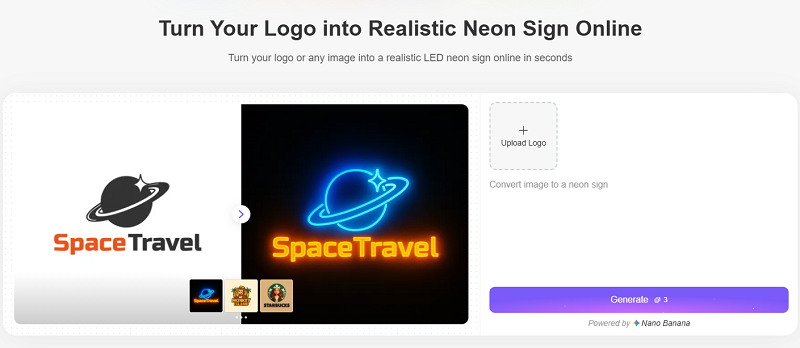
Step 2. Click on "generate," and it will add a neon line effect to your photo.
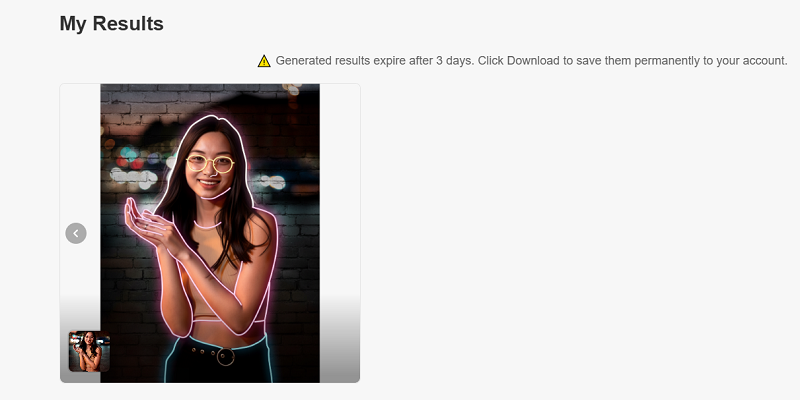
Step 3. Click download to freely export the result without a watermark.
There are 3 free alternatives to create a neon lines filter effect on photos, but the final result may not be so good as the above-recommended online neon photo editor. Anyway, try them if you need to.
- https://www1.lunapic.com/editor/?action=neon/
- https://funny.pho.to/neon/result/
- https://elektrobild.org/photo-filter/neon-lines
Canva-Add Neon Glow Effect to Image
More than a design tool, Canva is also a super easy neon glow photo editor too. It is free to use and download without a watermark. With simple sliders and one-tap effects, you can add electric neon outlines, vibrant glows, and futuristic vibes to any photo.
Site: https://www.canva.com/your-apps/AAGFwQnN2BM/neon-glow
Quick Guide:
Step 1. Upload your original image and adjust the neon glow color, the glow intensity, and the line thickness.
Step 2. Here, we set the value of the parameter sliders to 1. Regenerate several neon glow effects and superimpose them on each other; the final visual will be more creative.
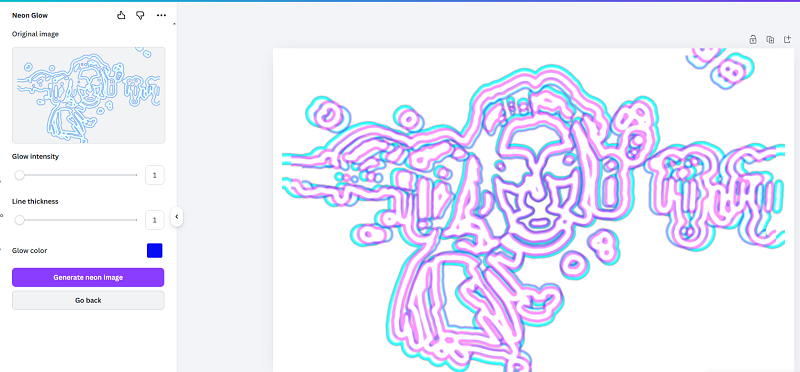
Step 3. Once you make a little change, the result will be quite different.
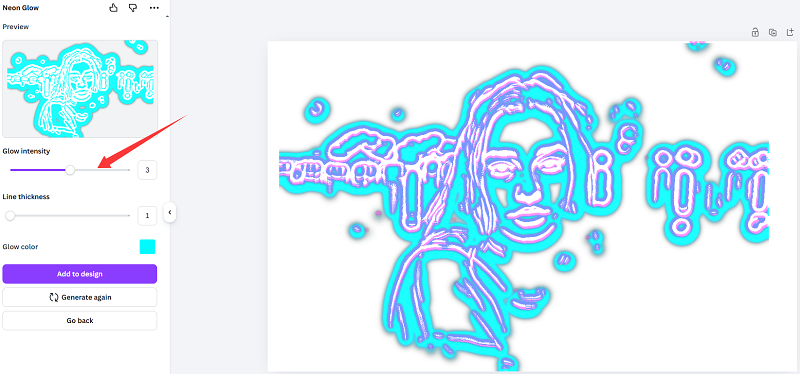
Step 4. Click on Share > Download, and confirm the file type and size.
Prompt Tips to Make Amazing Neon Effects on Photos with AI Tools
Get inspiration and take references from the following prompts. Create outstanding neon effect photos with ease.
- Neon portrait: Add a bright neon pink glow around the subject's face and shoulders. Dark background. Cyberpunk style.
- Neon outline: Trace the outline of the person with glowing neon blue lines. Clean, minimal, futuristic.
- Neon purple vibe: Apply a deep purple neon filter over the whole photo. Moody, dramatic, with soft glow.
- Neon lines overlay: Add flowing neon green and pink light streaks across the image. Retro synthwave style.
- Neon eclipse effect: Create a glowing neon ring behind the subject, like a halo or eclipse. Bright cyan light, dark surroundings.
- Neon text effect: Add glowing neon text that says 'GLOW UP' in electric blue with a light trail. Futuristic font.
- Double neon glow: Apply two neon colors—pink on one side, blue on the other—blending into a gradient glow around the subject.
- Neon city background: Replace the background with a neon-lit rainy cityscape at night. Purple and orange lights. Reflective wet streets.
Conclusion
Neon filters are taking over social media for fun, flashy, and instantly transform any photo. So go ahead, try out different online AI neon photo effect editors, especially the powerful Vidnoz AI photo editor combination, play with the glow, and experiment. Grab your favorite neon filter and start creating stunning photos today.
Vidnoz Photo Dance - AI Make a Photo Dance FREE
- Create a smooth AI dance video from a photo.
- Animate a photo with diverse dance moves.
- Generate and download the video for free in seconds.
Make a Photo Dance Now





![Who Are My Disney Parents Filters & Quizzes [2026 Top Pick]](https://www.vidnoz.com/bimg/who-are-my-disney-parents.jpg)