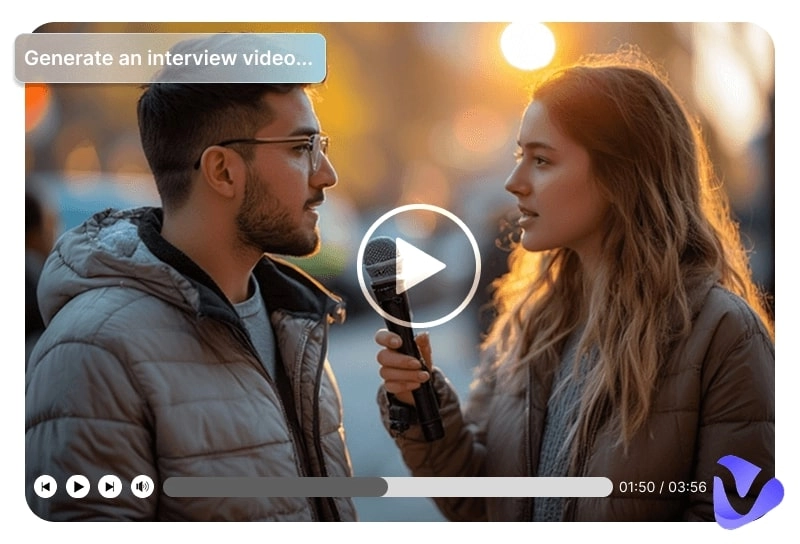
Have you seen those viral AI street interview videos flooding YouTube? Random questions, hilarious answers, and lifelike virtual characters that feel just like real people.
Now, it's your turn to create your own—with fully customizable interviewees, appearances, and voices. This guide explores the best street interview AI tools, generation steps, and creative ideas to help your next video go viral.
- On This Page
-
What Are AI Street Interview Videos?
-
Hilarious & Inspiring Street Interview AI Videos
-
Top AI Street Interview Video Generators That Are Worth Trying
1. Vidnoz Image to Video - AI Street Interview from Picture & Text
2. Veo 3 - One-Stop Street Interview AI Generator
3. StreetInterview AI - Customize Every Detail
4. Galaxy AI Street Interview Generator with Ready-Made Prompt
5. Vidnoz AI Video Generator - Long Conversational Street Interview with Voice
-
How to Make AI Street Interview Videos?
-
Funny Street Interview Ideas & Inspirations
What Are AI Street Interview Videos?
Before getting started, it's important to understand what AI street interview videos really are.
These videos replicate the style of real street interviews, where a host asks random passersby questions and receives interesting or unexpected answers. The AI street interview generator, powered by artificial intelligence, allows users to customize interview characters, topics, tone, and background while maintaining a highly realistic look.
By combining AI video generation, text-to-speech, facial animation, and natural language processing, it automatically produces lifelike interviews with synchronized voices, expressions, and movements.
Hilarious & Inspiring Street Interview AI Videos
Text descriptions alone might not fully capture the creativity behind an AI street interview video, so let's take a look at a few real examples from short video platforms.
Showcase 1: Funny Interview Video by StreetInterview.AI
Description: A street interview about a funny question, and the AI-generated female interviewee humorously gave her answer.
Showcase 2: Interviews on the Streets of Ancient Rome
Description: Travel even further back in time with this AI street interview, where Roman citizens share their thoughts about life under the rule of the Roman government.
Top AI Street Interview Video Generators That Are Worth Trying
Alright, after exploring the concepts and examples, are you ready to create your own AI street interview video?
In this section, the guide has prepared the 5 best AI street interview video generators for you and included a table at the beginning to clearly highlight their features and differences.
| Feature |
Vidnoz Image to Video AI |
Veo 3 (Gemini) |
StreetInterview AI |
Galaxy AI |
Vidnoz AI Video Generator |
| Free or Not |
Free for basic features |
Paid; limited free tier |
One free generation, then paid credits |
Paid; monthly or yearly plan |
Free with daily limits |
| How does it work |
Image to video |
Text or image to video |
Form-based customization |
Text-based generation only |
Video template & TTS |
| Clip length |
Short to medium |
Medium, based on credits |
Short (≈8 seconds) |
Short (≈8 seconds) |
Long; no strict limit |
| Processing speed |
Fast (seconds to generate) |
Very fast (high-end models) |
Moderate |
Fast |
Fast and stable |
| Ease of use |
Very easy; intuitive UI |
Moderate; less intuitive interface |
Easy; guided form |
Easy |
Easy |
| Best for |
Beginners creating realistic AI interviews from images |
Professionals seeking all-in-one AI generation |
Quick TikTok/YouTube-style interviews |
City-themed, viral urban interviews |
Long-form conversational interviews with AI voice |
1. Vidnoz Image to Video - AI Street Interview from Picture & Text
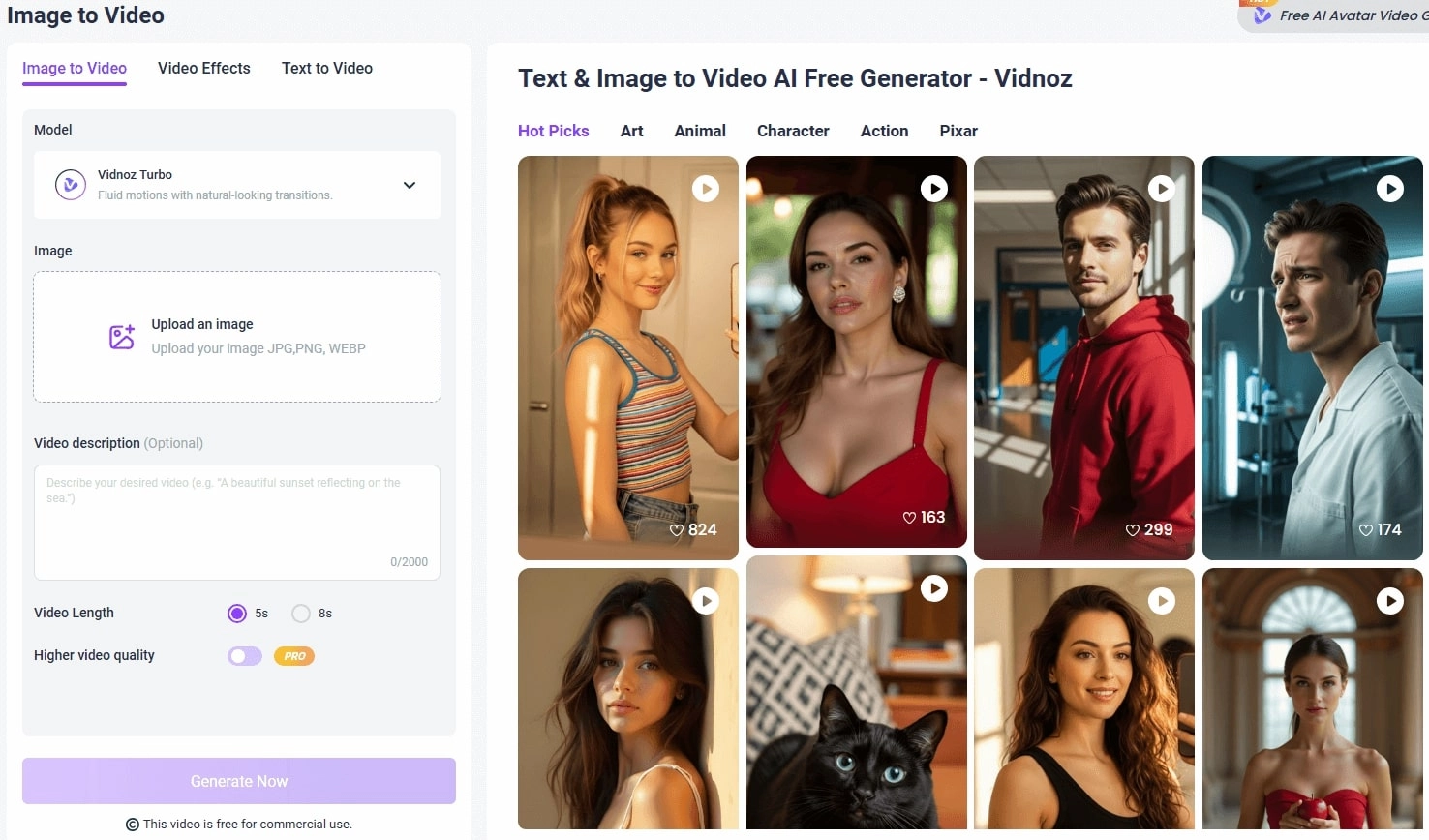
With just one image, you can create your very own AI street interview video—all thanks to Vidnoz Image to Video. This AI-powered video generator transforms your uploaded image and written prompt into a realistic, dynamic video with smooth motion transitions and natural expressions. You can also control the video's duration and output quality with ease.
Convert Image to Video AI Online - Free
- Create a video from an image quickly for free.
- Use various AI models to turn photos into videos.
- Download and share the AI-generated video at no cost.
Convert Image to Video
Worried the style might be too plain? Not here—Vidnoz Image to Video offers a variety of creative themes, including art, animals, action, and character options to match your concept.
Key Features:
- Free AI Street Interview from Image & Text: No complex steps or clicks needed—simply upload a reference image, type your prompt, and instantly generate a free animated video. E.g., apart from a street interview, you can also generate an AI kissing video by uploading a couple’s pic.
- Natural & Realistic Video in 1 Click: No long waits or technical barriers—within seconds, you'll get an interview video with natural facial expressions and body movements, all generated with just a few clicks.
- Advanced Options and High-Quality Tech: Whether you prefer ultra-realistic visuals, cinematic sound, or smoother motion, Vidnoz Image to Video offers multiple AI models optimized for your needs. No matter which you choose, lifelike details and refined textures are guaranteed.
Drawbacks:
- Access to advanced models or higher video resolution may require upgrading to the Pro plan.
2. Veo 3 - One-Stop Street Interview AI Generator
When it comes to a versatile AI content creation tool, Gemini Veo 3 should not be missed. With just a simple concept and provided assets, this AI street interview generator brings your images to life. It delivers lightning-fast generation, high-quality visuals, and built-in text-to-speech capabilities for natural, realistic audio in your videos. With this hyper-real AI generator, you can even make a vivid pet interview video.
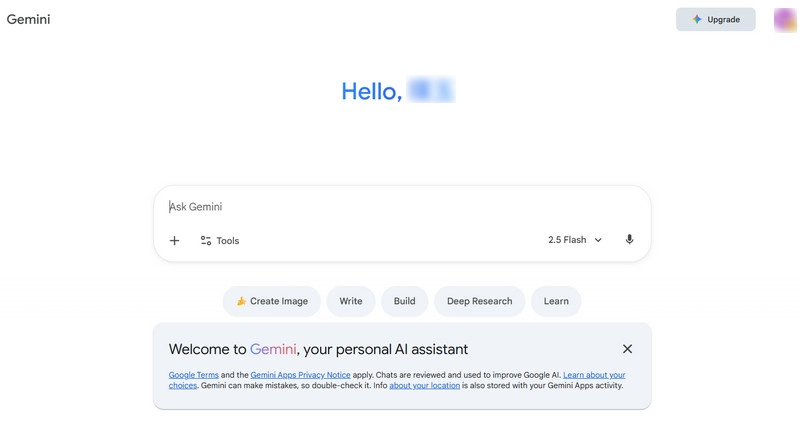
Beyond street interviews, Gemini Veo 3 also supports text creation, image generation, and transforming images into animations or videos.
Key Features:
- All-in-One Service: Gemini handles text generation, reasoning, math, and coding tasks, image creation, animation, and video production—essentially any creative task.
- One-Click Text or Image to Video: Quickly turn your imagined scenes into films by providing instructions in the chat box and selecting the appropriate model.
- Fully Realistic Output: Gemini-produced AI street interview videos feature top-tier visual effects, audio quality, and motion realism. Free users also receive 15 GB of cloud storage to easily save their creations.
Drawbacks:
- Limited Experience for Free Users: Only partial Veo 3.1 features are unlocked, with 100 generation credits per month.
- Interface Could Be More Intuitive: The user interface guidance is not very detailed.
Price:
| Plan |
Price (USD/month) |
Key Features & Benefits |
| Free |
$0 |
- Image generation & editing
- 100 monthly AI credits (video generation in Flow & Whisk)
|
| Google AI Pro |
$19.99 / month (first month $0) |
- Video generation with limited Veo 3.1 Fast
- 1,000 monthly AI credits
|
| Google AI Ultra |
$124.99/month for 3 months |
- Veo 3.15 access (state-of-the-art video generation)
- Gemini 2.5 Deep Think (advanced reasoning)
- 25,000 monthly AI credits
|
3. StreetInterview AI - Customize Every Detail
Now you can explore a tool specifically designed for street interview AI videos: StreetInterview AI. This platform offers finely categorized scenes tailored for street interview TikTok or YouTube, such as futuristic tech interviews, life advice interviews, travel memory interviews, and health habit interviews.
Each category provides video templates and generation prompts, which you can customize to your needs.
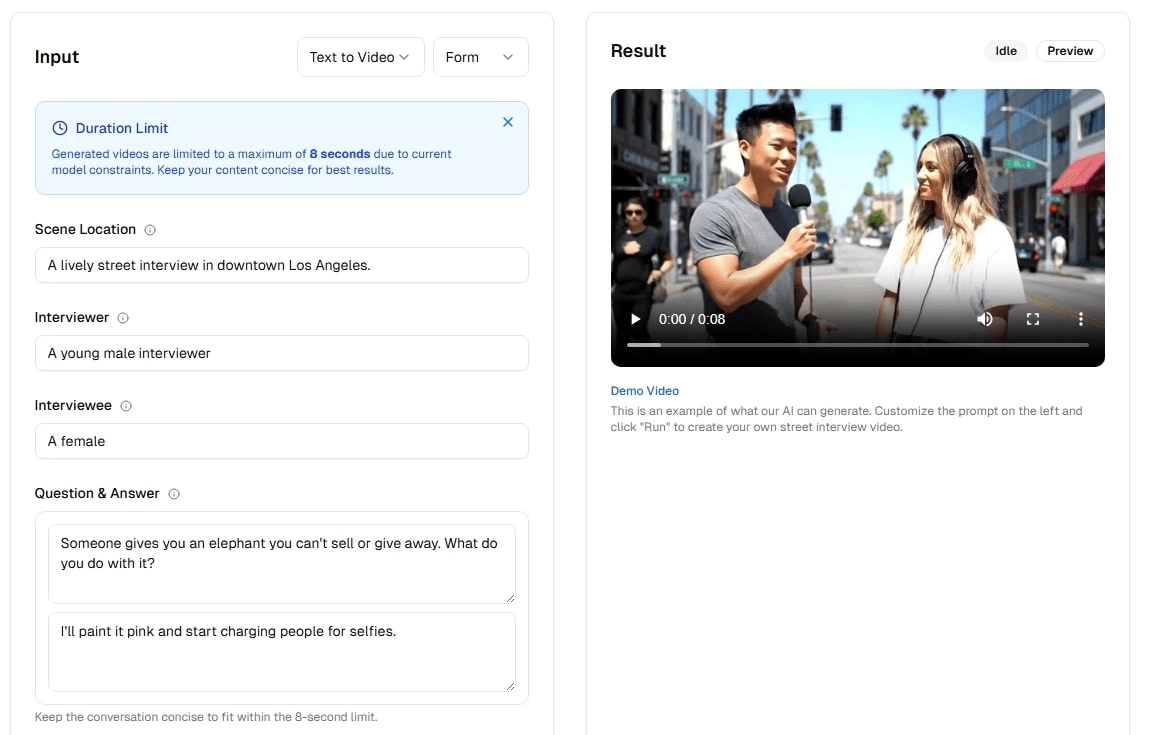
Key Features:
- Detailed Customization: Enjoy more granular options than other platforms, including interview scenes, video length, aspect ratio, resolution, and interviewer appearance.
- Easy-to-Fill Forms: StreetInterview AI provides a clear parameter form so you can adjust each detail smoothly to your preferences.
- Realistic Audio Generation: Voice is essential in interviews. This tool allows you to enable audio generation, producing lifelike dialogue based on your prompts.
Drawbacks:
- Login Required: You cannot start creating immediately; registration and login are necessary to generate videos.
- Usage Limitations: Free users only get one free generation. Additional credits must be purchased for further video creation.
Price:
| Credits |
Price (USD) |
Difference |
| 20 |
$10 |
4 videos no audio/2 videos with audio |
| 50 |
$25 |
10/5 |
| 100 |
$50 |
20/10 |
| ... |
... |
... |
| 5,000 |
$2,500 |
1000/500 |
| 10,000 |
$5,000 |
2000/1000 |
*5 credits per video.
4. Galaxy AI Street Interview Generator with Ready-Made Prompt
If you want to produce AI street interview videos that look like instant viral hits—with bustling atmospheres and iconic urban scenes—Galaxy AI is the tool to try.
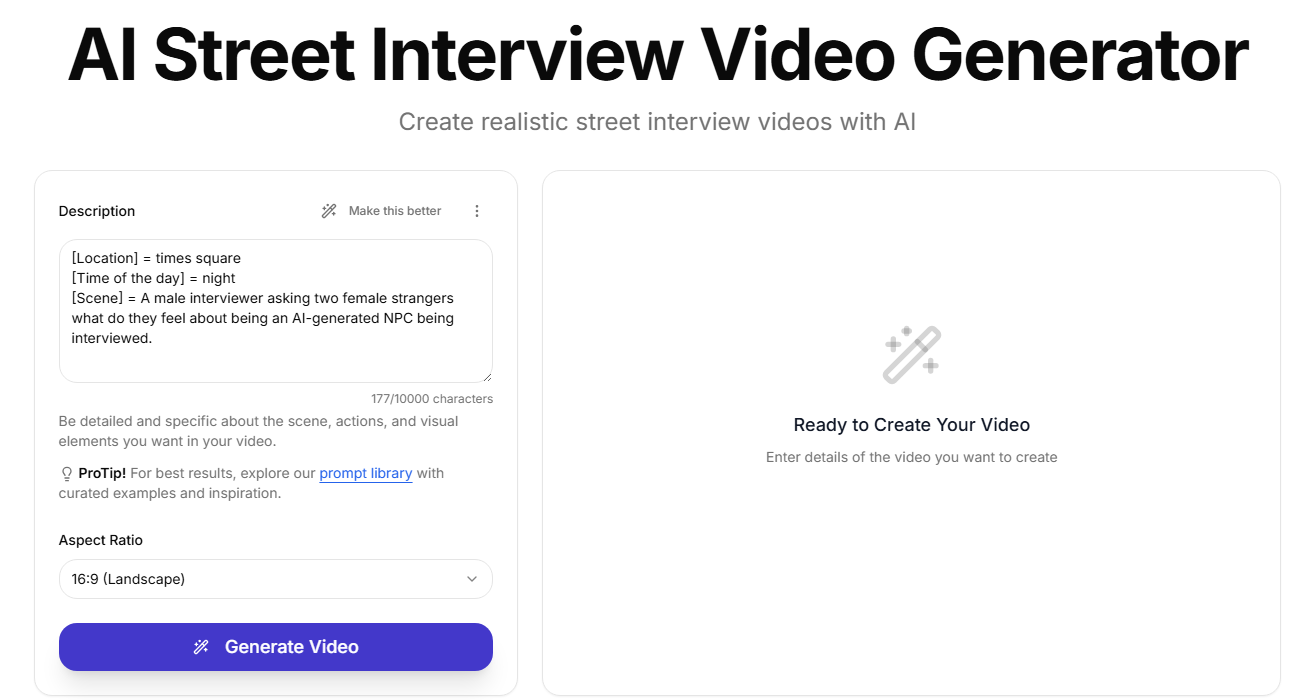
It excels at generating interview sets in city environments, especially in crowded urban backgrounds. You can customize the setting (e.g., Times Square, downtown), add ambient crowds, and even include natural city background sounds for realism.
Key Features:
- Ready-Made Prompts: On the Galaxy AI homepage, you'll find example command formats. If you're short on inspiration, explore its built-in library of prompts and ideas.
- Perfect Urban Realism: From city lights and background crowds to ambient noises and realistic interview voices, the generated videos feel truly recorded on lively city streets.
- Diverse Customization Options: Choose from different interview locations, dialogue styles, and personality traits for interviewees to create distinctive, standout videos.
Drawbacks:
- Frequent Subscription Pop-Ups: When you hit the generate button, subscription reminders often appear; you must subscribe to generate full videos.
- Text-Only Commands: Galaxy AI doesn't support image uploads—you can only use text prompts to guide generation.
Price:
- Monthly Plan: $14.99/month–includes 15 million credits per month
- Annual Plan: $99/year–includes 15 million credits per month
5. Vidnoz AI Video Generator - Long Conversational Street Interview with Voice
Most of the tools mentioned above share one common limitation—they only allow creating short clips under 8 seconds, which usually fit just one exchange of dialogue. But what if you want to produce longer, more immersive street interviews?
That's where Vidnoz AI Video Generator comes in. This advanced AI street interview generator lets you upload your own text, video, or image materials, while also providing a wide selection of industry- and scenario-based templates. You can fine-tune visuals, text-to-speech, pacing, subtitles, and much more.

Vidnoz AI - Create Free Engaging AI Video with Talking Avatar
- Easily create professional AI videos with realistic avatars.
- Text-to-speech lip sync voices of different languages.
- 2800+ video templates for multiple scenarios.
Key Features:
- Long Conversational Street Interviews with Voice: No more duration limits—as long as you have the material, Vidnoz allows creating videos of any length. Just input your Veo 3 street interview prompt to start generating.
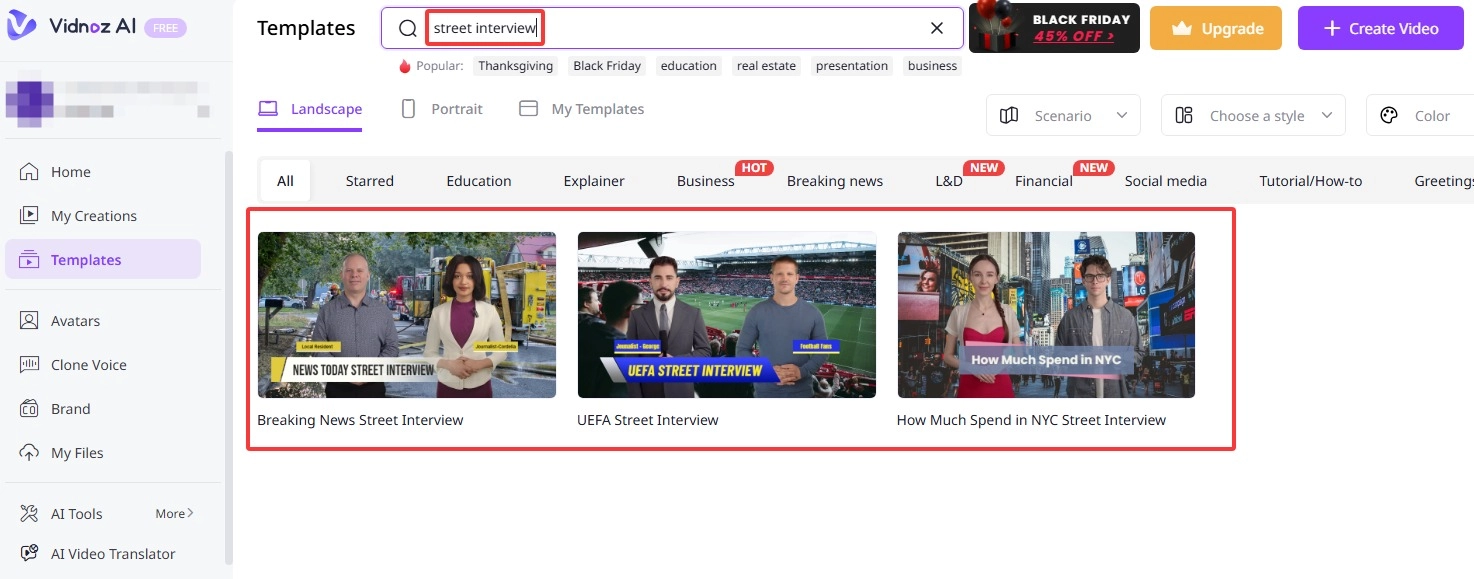
- Pre-Made Templates: Don't want to start from scratch? Explore Vidnoz's extensive template library filled with diverse scenes and customizable AI Avatars. Simply adjust them to your liking.
- Vivid AI Voice: Customize voice tone, gender, and age; add natural pauses—or even clone your own voice for a personal touch. Plus, all voice is lip-synced with natural mouth movement animation.
Drawbacks:
- To remove watermarks from video, unlock premium templates, and access higher-quality exports, a paid subscription is required.
How to Make AI Street Interview Videos?
Now that you've explored all the options, are you ready to create your own AI street interview video—whether it's a human-to-human chat, a fun conversation with an animal, or even an AI alien street interview?
This guide will take Vidnoz AI Image to Video as an example to show you exactly how to do it step by step.
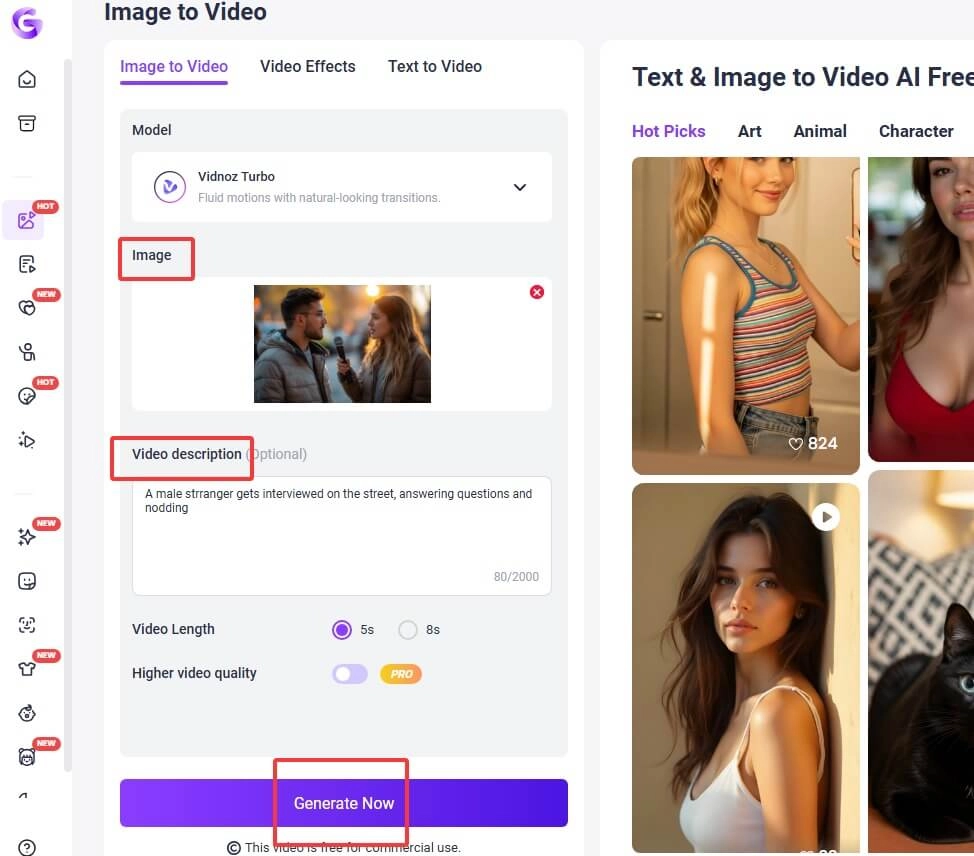
Step 1: Try it Free
Access the image to video AI tool through your browser.
Step 2: Upload Image
Under the Model section, choose your preferred model, then click Upload an Image to upload the picture you want to use as your interview material.
Step 3: Input Prompt
Scroll down to find the Video Description section, then enter your command or creative prompt in the text box.
Step 4: Generate Video
Set your preferred video length and click Generate Now to start creating your video.
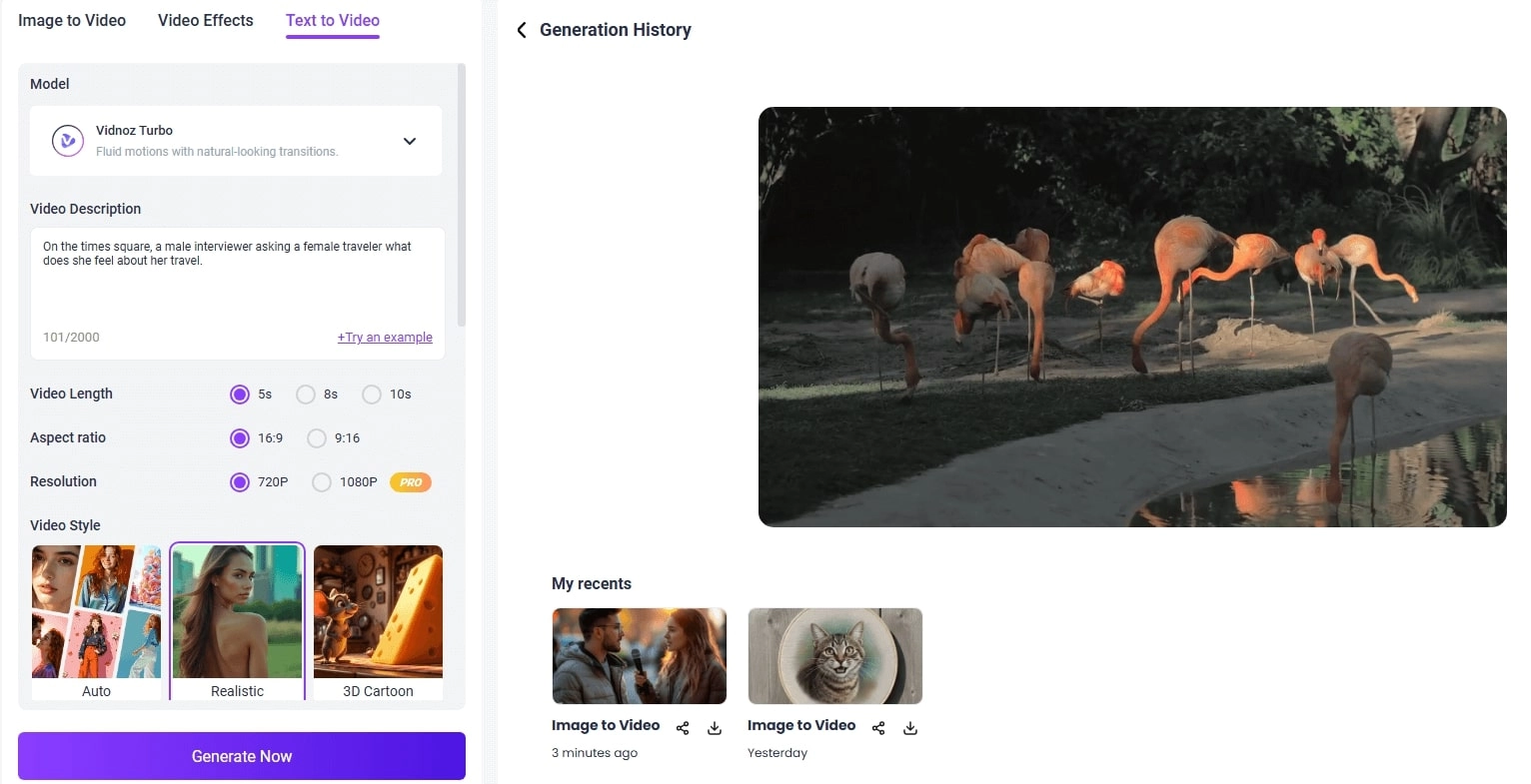
If you don't have any image material available, you can still generate a video using only text. Simply switch from Image to Video mode to Text to Video mode.
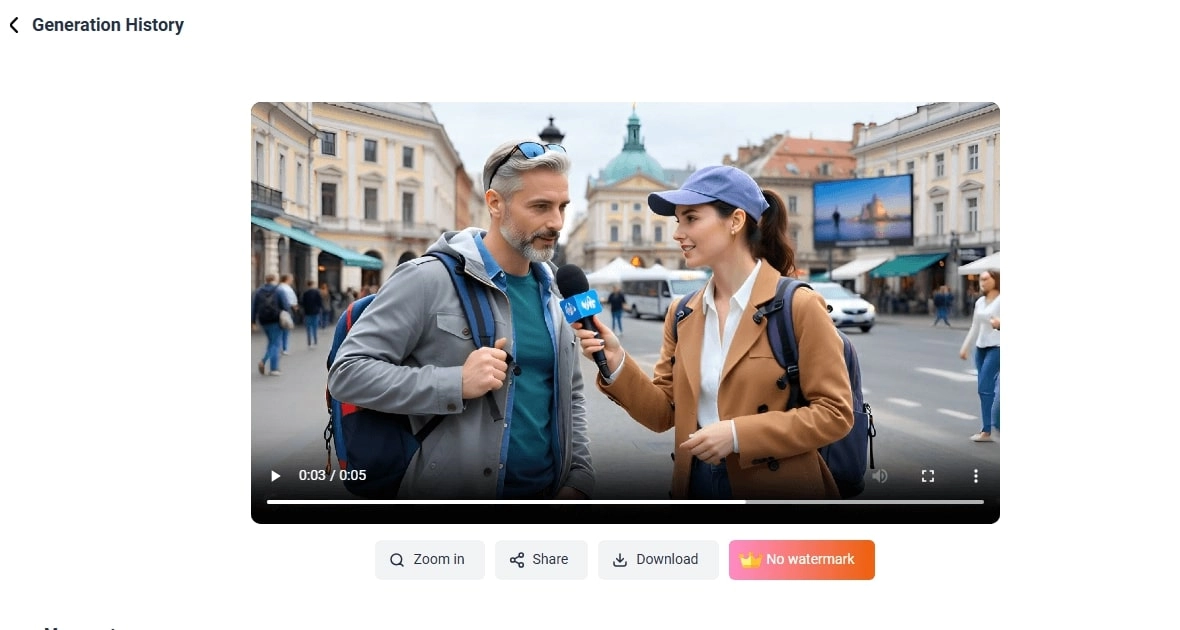
When finished, you can click to zoom in for a detailed check, share, and download.
In addition to image and text to video, Vidnoz also allows you to make a picture talk using Talking Photo AI, which features natural lip movements and vivid AI voices.
Funny Street Interview Ideas & Inspirations
Now that you've learned how to make AI street interview videos, it's time to spice them up with humor and creativity. Add a twist, surprise your viewers, and make your interviews unforgettable!
Inspirational Directions to Elevate Your Street Interview AI Videos
- Unexpected interviewees: animals, aliens, robots, or even objects like a lamp or a coffee cup.
- Absurd questions: What would you do if aliens landed today? or Who would you call first after winning $1 million?
- Time-travel conversations: a modern host interviewing a Victorian gentleman or an ancient Roman citizen.
Worth-Trying Prompts to Create AI Street Interview Videos
- A talking dog or cat being interviewed about life as an internet celebrity.
- A street interviewer talks to an alien learning human slang.
- An ancient philosopher explains TikTok trends to a modern host.
Final Thought
By now, you should have a clear understanding of how to create engaging and creative AI street interview videos. From exploring different tools to learning practical steps and fun ideas, you’re ready to start your own project.
To bring your imagination to life effortlessly, try Vidnoz AI—it helps you turn images or text into realistic videos with natural voices and smooth animation. Start creating your viral AI interview video today!