Turn still images or text into dynamic videos in any style, with leading AI models readily. Try the smart AI video generator now - stunning, free, and instant!
Complete Guide to Pet Interview Generators - Craft AI Pet Videos to Ignite Your Social Media
Andrew Garcia
Updated on
SHARE THIS POST
Make your pets the stars of the show with AI pet interview videos! From thumbs-ups to talking, and playful antics, create fun clips your friends will love.
If you've been browsing TikTok or YouTube recently, you've probably seen a new viral trend called the pet interview.
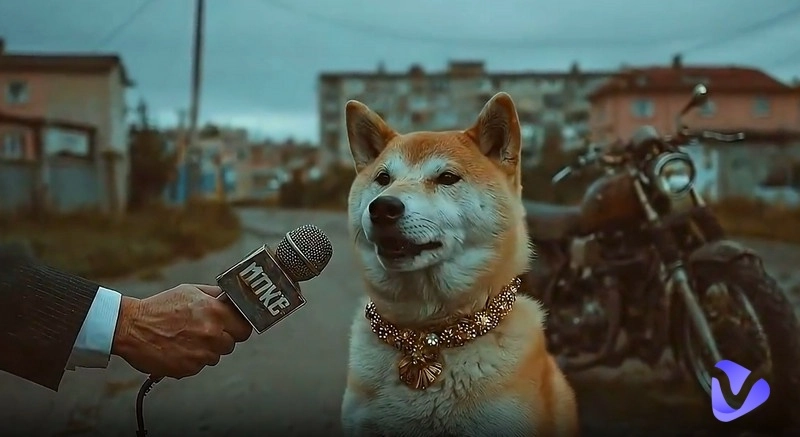
In these short clips, an interviewer holds a tiny microphone and asks the pet: Do you have anything to say to your owner? The adorable cats and dogs respond with a thumbs-up gesture. Although simple, this response feels like a real bridge of communication between pets and their humans.
That's why pet interview videos have gone viral, capturing countless animal lovers who eagerly share them. So, how can you join in to create your own charming video? All the answers are in this guide—read on and explore.
On This Page
Why Social Media Loves Pet Interviews
Top 3 AI Pet Interview Generators - Make Your Viral Pet Video
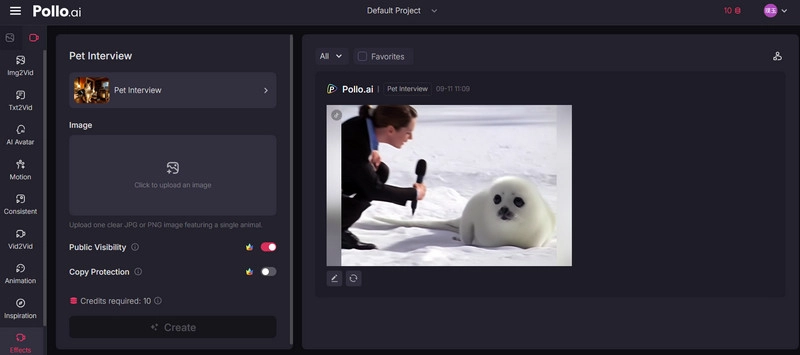
Pollo.ai Pet Interview
Media.io AI Pet Interview Generator
MemeClip AI Pet Interview
How to Make an Engaging AI Pet Interview Video
Transform Your Pet Photos into Diverse AI Pet Videos Free
Detailed Steps for Animate Your Pet with Vidnoz Image to Video:
Conclusion
Why Social Media Loves Pet Interviews
People's love for cats and dogs is the core driver behind likes and shares of pets interview content. However, the sudden rise of a trend on specific platforms is always the result of multiple factors. This section outlines why pet interview videos have gone viral on social media platforms:
Inherent appeal of pet content: The adorable appearance of pets and the warmth of their companionship naturally bring comfort. Viewers who come across pet-related content often feel uplifted and are more likely to share it. This alone gives pet-themed videos a higher chance of gaining traction.
Humanization of pets fulfills emotional needs: For most pet owners, cats and dogs are like family—the only regret being that they can't speak. Pet interview videos partially fill this gap by making it seem like pets are communicating in a humanized way, sparking strong emotional resonance.
Short and funny videos fit social media perfectly: A simple question, paired with a pet's anthropomorphic gesture or a short response, creates a clear and entertaining story in just a few seconds. This brevity and humor align perfectly with the fast-paced nature of social media platforms.
Here's a super cute pet interview example:
Top 3 AI Pet Interview Generators - Make Your Viral Pet Video
After watching countless AI pet interview clips, have you ever looked at your own adorable pets and thought about making one yourself?
Exactly—it's not only a fun way to bring joy to you and your family, but also a chance to share it on video platforms and attract more views. So why wait? Let's get started by choosing a reliable AI pet interview generator and take action right away. This section introduces three great options for you:
Pollo.ai Pet Interview
Pollo.ai Pet Interview is one of the best tools for creating the most natural-looking pet thumbs-up videos. It supports image to video, allowing you to turn any pet photo into a lively, animated thumbs-up clip.
Every animal has unique fur colors and appearances, but Pollo.ai Pet Interview can always generate the most realistic thumbs-up effect based on each pet's fur and posture. Whether it's a cat, dog, or even a parrot, this AI pet interview tool handles it effortlessly. With a natural microphone gesture and a zoomed-in focus on the pet's thumbs-up action, you can almost feel the deep trust they have in sharing life with you.
Key Feature
Create videos of pet interviews and pets giving a thumbs-up, perfectly matching their fur and body details.
Wide selection of cute animal thumbs-up templates you can easily apply.
It also supports text prompts to precisely control generation results.
Pros
Effects blend seamlessly with each pet's fur and body traits.
Two free trial attempts for every new user.
Save videos to the cloud, download them, or share directly on X or Facebook.
Cons
Free version adds a watermark to videos.
Free version videos are public by default and cannot be changed.
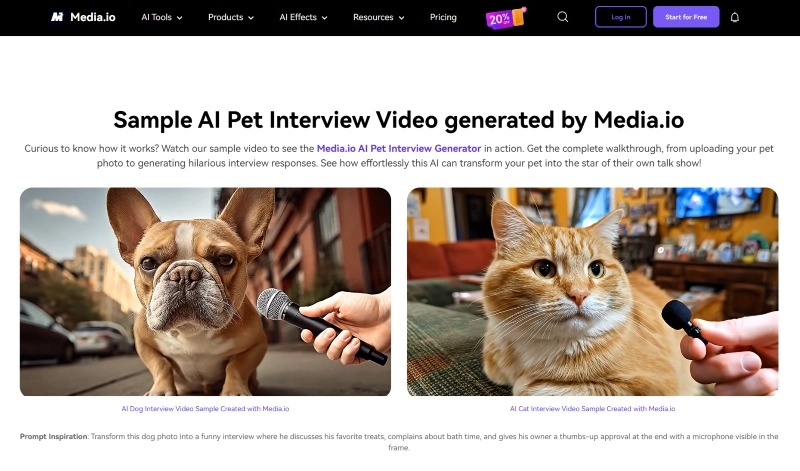
Media.io AI Pet Interview Generator
As another expert tool supporting the creation of pet interview content, Media.io AI Pet Interview Generator takes things even further than the previous option.
Not only can it generate videos based on images, but it also supports text to video, allowing results to be created entirely from text prompts. Now, your pets can not only give a thumbs-up but also speak and answer questions according to your chosen theme — an incredible upgrade.
Your pet isn't just limited to body movements; it can also display small, human-like facial expressions, all while keeping its fur movements natural and smooth.
Key Feature
Ability to generate pet interview videos directly from text prompts.
Create interview videos using pet images as the base.
Able to adjust video duration, resolution, and the generation model.
Add voices that match each animal's appearance to answer questions.
Pros
Create pet interview videos with images or just text prompts.
Fully customizable duration, resolution, and aspect ratio.
Easy download with no watermark.
Cons
Free version videos are publicly accessible on the platform.
Only one free trial opportunity.
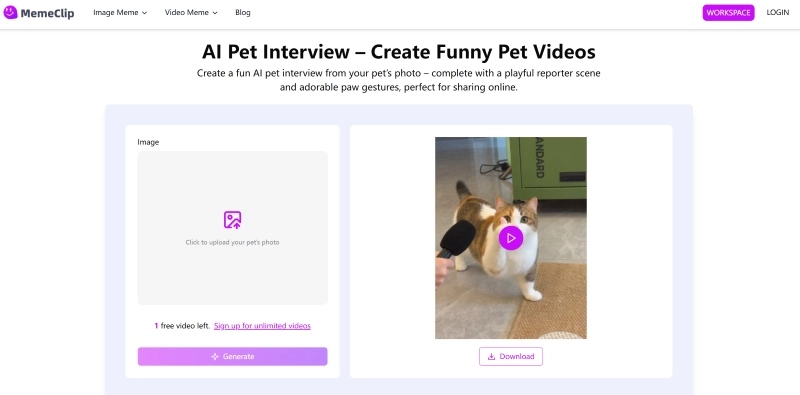
MemeClip AI Pet Interview
If you're looking for a pet interview generator that produces videos ready to share directly on Instagram or YouTube Shorts, your best choice is here: MemeClip AI Pet Interview.
It supports adding adorable thumbs-up gestures to pet interview videos. The final output is optimized for the aspect ratios of major social media platforms.
Key Feature
Generate pet interview videos based on uploaded animal images.
Optimizes video aspect ratios for TikTok, YouTube, and more.
Preview generated videos in a small floating window.
Pros
Fast video generation speed.
Supports both video output and GIF creation.
Offers flexible video playback settings.
Cons
The thumbs-up effect doesn't match the pet's fur color, looks like a human finger.
Another hidden reason why pet interview videos go viral is their low barrier to entry—anyone can quickly learn how to create them. For example, the three tools introduced above all follow the same simple workflow: upload your media, click generate, then preview and save the results.
This section will use Pollo.ai Pet Interview as an example to show you the full creation process:
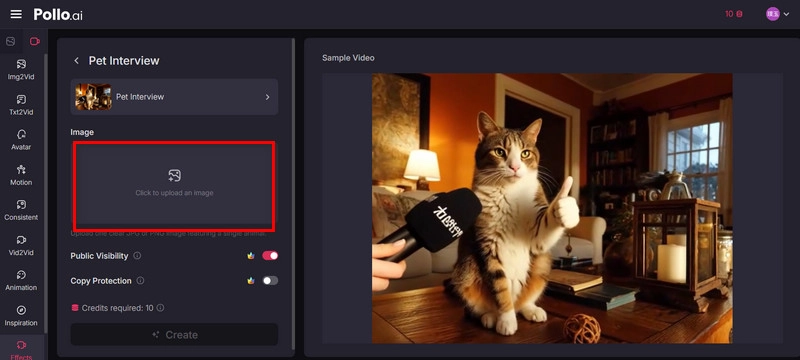
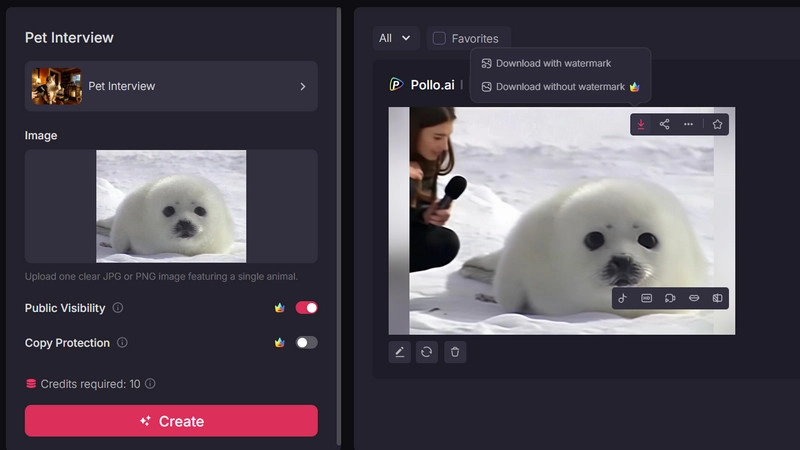
Step 1: Open Pollo.ai Pet Interview in your browser. Click the “Click to upload an image” area to upload a photo of your pet.
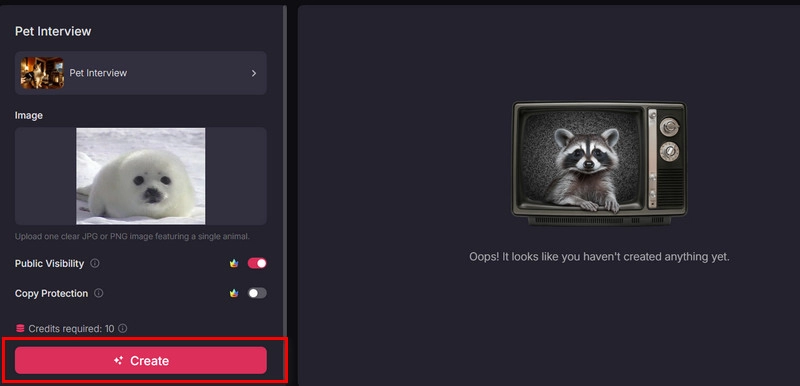
Step 2: Once your pet photo is loaded, click Create to generate the thumbs-up video.
Step 3: After the video is generated, click to preview the result. You can even do some edits on the preview page, such as Upscale or adding sound effects. If unsatisfied, select Regenerate.
Finally, click the download icon to save the video to your device.
Transform Your Pet Photos into Diverse AI Pet Videos Free
Aren't pet interview videos just irresistibly cute? By now, you probably understand that the core of creating such content is using an AI that can transform static images into dynamic videos.
Convert Image to Video AI Online - Free
Create a video from an image quickly for free.
Use various AI models to turn photos into videos.
Download and share the AI-generated video at no cost.
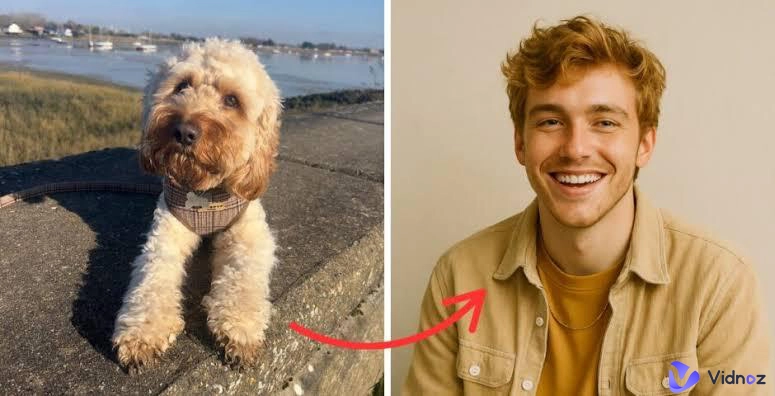
Following this principle, you can also use image to video AI to create even more adorable and entertaining pet clips! Vidnoz Image to Video is the key tool to bring these fun and creative ideas to life. This advanced AI tool can transform your uploaded images into smooth, natural-looking animations. You can customize the AI model, video length, resolution, and more.
This isn't just a pet interview—you can have your pet walk, show off expressions, or simply lounge in cozy scenes. You can even make the picture dance along with various funny motion effects — your cat could even groove to a lively soundtrack!
Key Features of Vidnoz Image to Video
Experience Everything for Free: The Image to Video feature of Vidnoz has no usage limits! You can continuously tweak prompts and create new videos, with all basic functions fully accessible—play as much as you like.
Precisely Imitate Pet Movements: Stiff motions or blurry edges? You'll never see that in Vidnoz Image to Video creations. The pet movements are 100% natural—just like your cat is walking right in front of you.
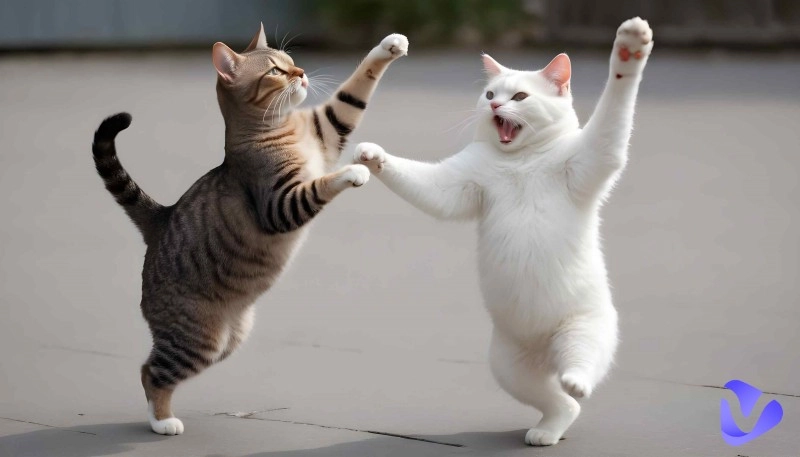
Multiple Funny Video Effects: Vidnoz offers a variety of hilarious dynamic video effects, such as hugging, play-fighting, pinching kittens, or cuddling dogs. Try them now and see what funny videos you can make with your pet!
One-Click Social Media Sharing: Once your adorable pet video is ready, share it with friends instantly! Vidnoz Image to Video allows you to post your finished video directly to X, Facebook, TikTok, Discord, and more with one click.
Detailed Steps for Animate Your Pet with Vidnoz Image to Video:
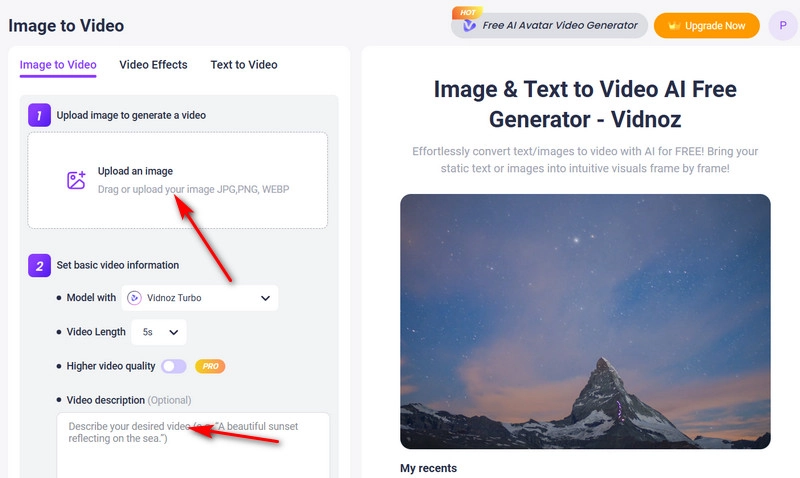
Step 1: Open the Vidnoz Image to Video webpage in your browser. Click Upload an image and add your pet photo.
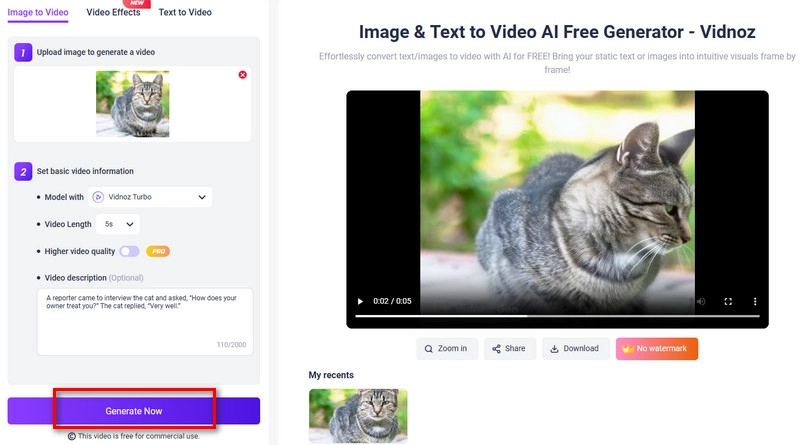
Step 2: Customize the AI model and video length. In the Video description text box, enter your instructions, for example: A reporter came to interview the cat and asked, 'How does your owner treat you?' The cat replied, 'Very well’.
Then, click Generate Now.
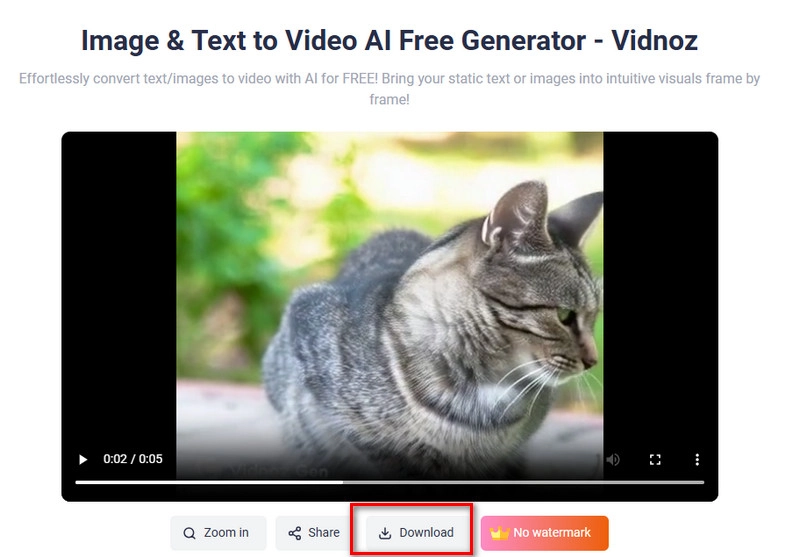
Step 3: Preview your video, and if satisfied, click Download to save it.
For more effects, explore Video Effects to pick your favorite actions, or adjust your text prompts—Vidnoz will bring any idea to life!
Want to create your own pet interview videos and join this viral trend, sharing the cuteness of your pets? This guide has introduced three easy-to-use AI tools with step-by-step instructions to help you get started.
Actually, under the hot topic of pets, you can create even more content: with Vidnoz Image to Video, anything is possible—pet interviews, dancing, singing, chatting, and more—all from simple prompts. Ready to try? Open this free AI video generator now and bring your furry friend to life!
Convert Image to Video AI Online - Free
Create a video from an image quickly for free.
Use various AI models to turn photos into videos.
Download and share the AI-generated video at no cost.
Andrew Garcia is a writer who focuses on the field of technology. He is committed to producing high-quality articles to help users solve their problems. He is working hard to discover and introduce the latest AI tools so that users can experience the joys of emerging technologies. Hope his articles can give you some aid.