Imagine stumbling upon an engaging foreign-language YouTube video - but you don’t speak the language! Or maybe you’re a YouTube creator wanting to expand your audience by making your content understandable globally. That’s when YouTube video dubbing becomes your best ally.
With the rise of YouTube AI dubbing, both creators and viewers can now dub YouTube videos into different languages for posting and watching. AI-dubbed videos have accurate lip sync and natural speech flow. How does AI YouTube video dubbing work? This guide will compare it to traditional methods, showcase real examples, and recommend top tools to help you transform your dubbing workflow easily and affordably.
- On This Page
-
AI YouTube Video Dubbing VS Manual Video Translation
-
Watch How AI YouTube Video Dubbing Gives You a Wow
-
4 Next-Level YouTube Video Dubbing Online Tools for Creators
1. Vidnoz AI Video Translator: Dub YouTube Videos in Best Speech Speed
2. Kapwing: Dub YouTube Videos with Speaker Focus
3. Elevenlabs: Dub YouTube Videos & Edit in Full Control
4. Veed: YouTube AI Dubbing That Matches Video Voice
-
How to Dub YouTube Videos Just for Quick Watching?
AI YouTube Video Dubbing VS Manual Video Translation
Dubbing video YouTube has become a new favorite among content creators and ordinary viewers around the world. Unlike traditional manual translation and dubbing, AI not only saves time and money but also can process multilingual content on a large scale, greatly improving the dissemination range of YouTube videos.
Here’s a clear comparison to help you understand why AI dubbing is taking over:
| |
AI Video Dubbing |
Manual Video Translation |
| Speed |
Very fast, minutes for an entire video |
Slow, days to weeks |
| Quality |
High-quality, AI-generated natural voices |
High, but depends on human skill |
| Cost |
Often free or low cost |
Expensive due to human labor |
| Languages |
100+ languages |
Limited by translator availability |
| Lip Sync |
Automated accurate lip sync |
Manual, time-consuming |
| Customization |
Flexible, many voice options |
Limited by voice actors |
| Ease of Use |
No special skills needed |
Requires professional help |
| Integrations |
Seamlessly integrates with editing, subtitles, and export features |
Often needs separate outsourcing or extra software |
Thanks to AI, YouTube video dubbing online free services now deliver near-human voiceovers at a fraction of the time and cost.
Watch How AI YouTube Video Dubbing Gives You a Wow
Seeing in person is way more convincing than just hearing. To see AI-powered dubbing in action, you might as well check the example. Here’s a 15s quick demo:
YouTube Video Dubbing Example with Vidnoz:
- Source: Still Watching Netflix
- Address: https://www.youtube.com/watch?v=QfySIkxdBDw
- Language: English ➜ Spanish
As you can see, AI instantly transforms the original video into Spanish with excellent lip sync and natural voice - a clear showcase of YouTube AI dubbing in real life.
4 Next-Level YouTube Video Dubbing Online Tools for Creators
After understanding the principles and examples, you may be eager to dub YouTube videos yourself! The following 4 popular YouTube video dubbing AI free tools are suitable for creators with different budgets and needs, helping you quickly create multilingual content and easily manage a YouTube channel.
1. Vidnoz AI Video Translator: Dub YouTube Videos in Best Speech Speed
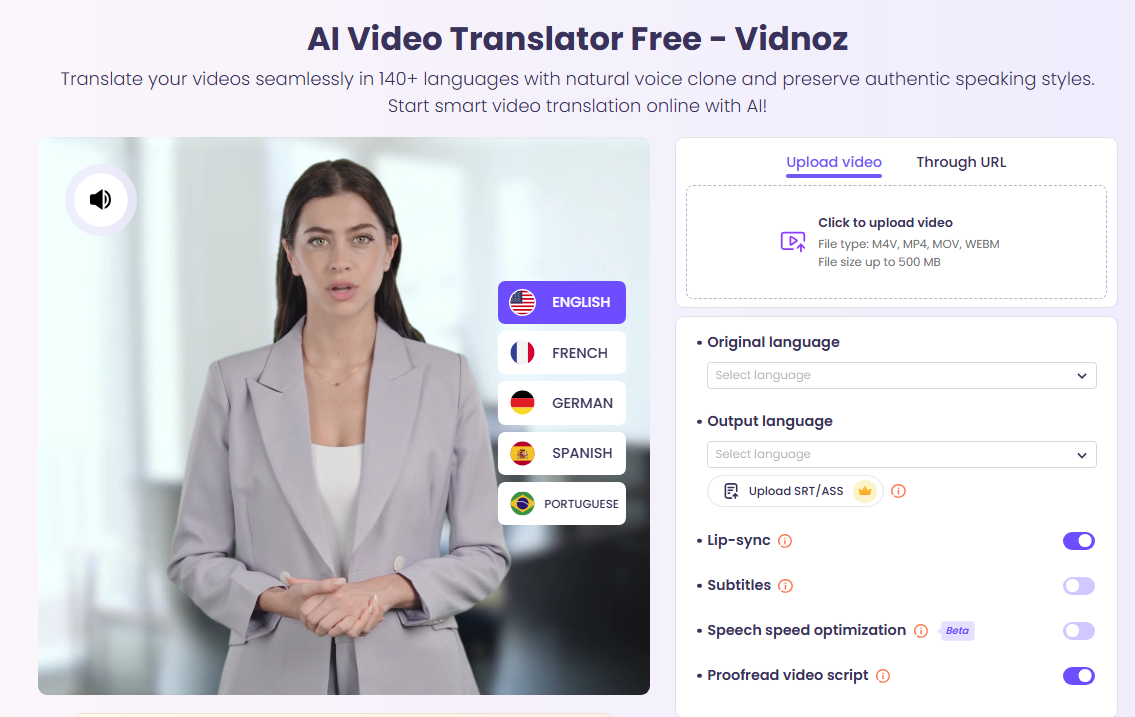
One standout choice is Vidnoz AI Video Translator, as one of the most widely used YouTube AI dubbing tools, which is known for its extreme speed, accuracy, and ultimate lip sync. It is fully operated on the web, no installation is required, and even users with zero basic knowledge can easily get started.
Key Feature
- Dub YouTube Videos in Best Speech Speed: AI automatically matches the speaking speed to ensure that the translation duration is consistent with the original video, avoiding early or delayed dubbing.
- YouTube Video Dubbing with Accurate Lip Sync: Uses lip sync AI online free to achieve natural mouth movement.
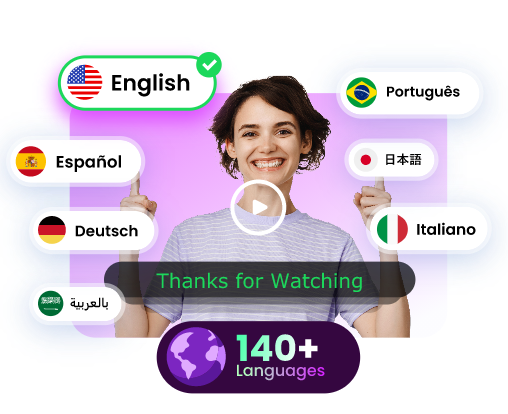
- 140+ Languages for Global Reach: Covering the most commonly used languages around the world, easily expanding the international fan base, perfect for growing a YouTube channel. E.g., you may translate Spanish video to English or vice versa to acquire more audience.
- AI YouTube Video Dubbing Online Free: No downloads needed, web-based and beginner-friendly.
With this tool, you can watch, enjoy, and create dubbed YouTube videos without any hassle.
How to Dub YouTube Videos with Matched Speed & Lip Sync?
The easy interface design also makes it easy to operate. Check the detailed tutorial below.
Step 1. Access The Tool
Navigate to the YouTube video translator.
Step 2. Upload The Video
Upload your video or paste the YouTube link.
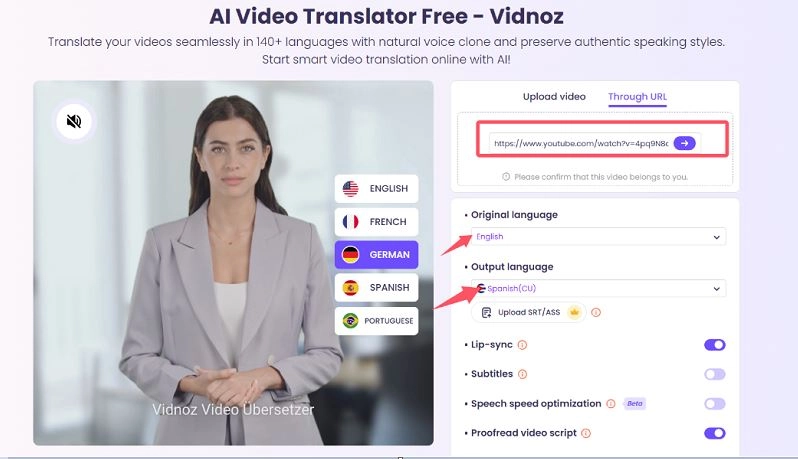
Step 3. Confirm & Customize
Click the arrow next to the URL to confirm that the video is to be dubbed. Then set the translation parameters, such as whether to lip sync, whether to translate subtitles, etc., and finally click the Translate Now button.
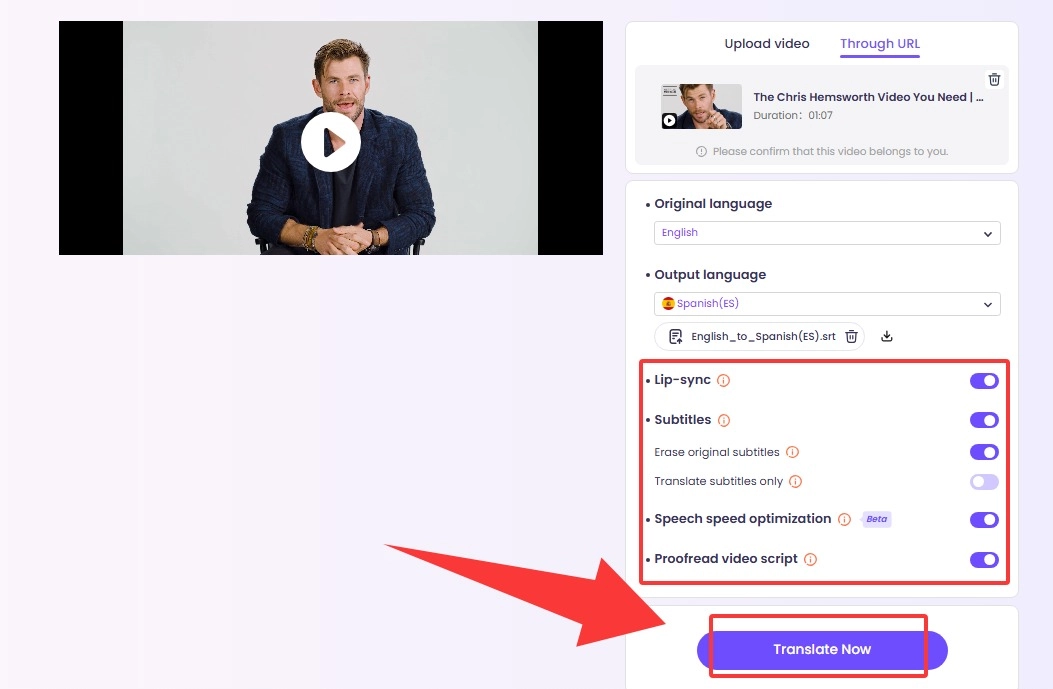
Vidnoz AI will automatically start translating and dubbing your original video.
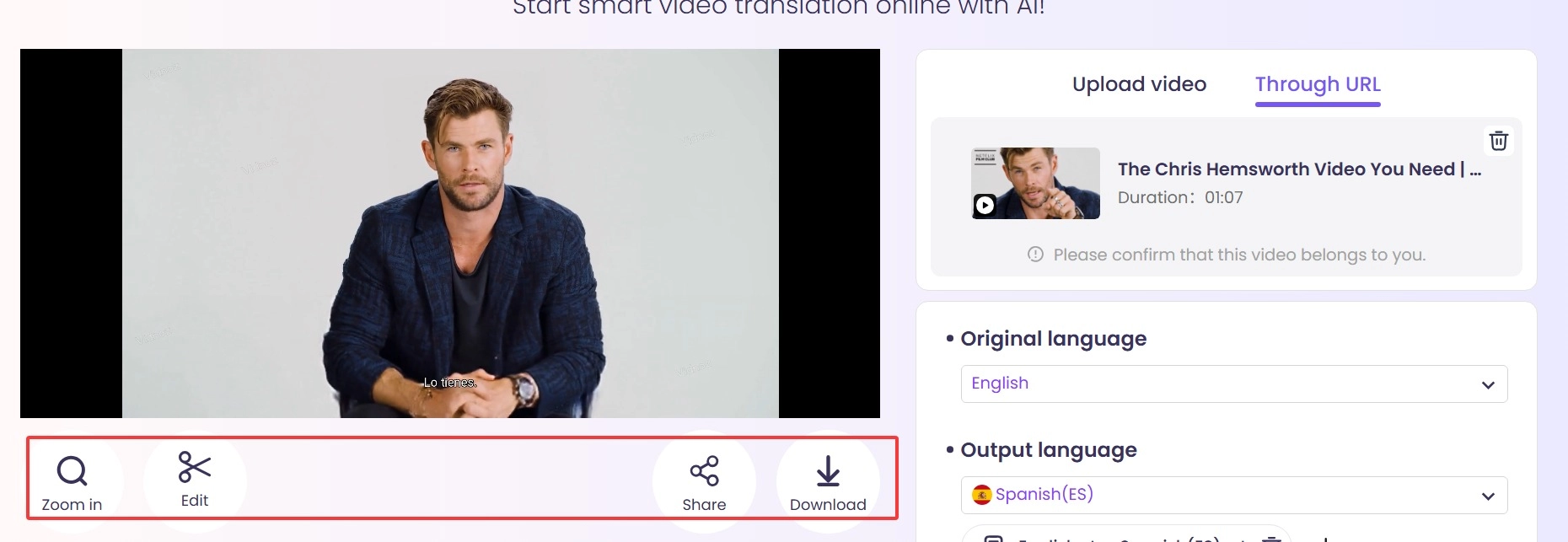
Step 4. After the translation and dubbing are completed, you can click or zoom in to play, or share and download directly.
Exclusive Tips: You can also use features such as translating movies to achieve professional multilingual dubbing at the film and television level.
2. Kapwing: Dub YouTube Videos with Speaker Focus
If you need more sophisticated vocal tracking and editing functions, Kapwing is definitely one of the treasure tools for the creator community. It not only supports multi-speaker tracking but also assigns different AI voices to different characters in the video. It shines when it comes to handling multiple speakers in one clip. This is perfect for interviews, multi-character skits, or podcast videos. Plus, it combines editing, subtitles, and animations in a single platform to save you time.
Key Feature
- Smart Speaker Detection: Identifies and separates different voices automatically.
- Custom Voice Assignment: Assign a distinct AI voice for each speaker for a lively conversation feel.
- All-in-one Editing Suite: Cut, trim, subtitle, and animate - all within one dashboard.
- It allows you to extract subtitles from videos to refine your project.
What You Don’t Like:
- Free exports come with a watermark
- Longer or larger files require upgrading to a paid plan
How to Dub Using Kapwing
Step 1. Go to Kapwing AI VIDEO TRANSLATOR.
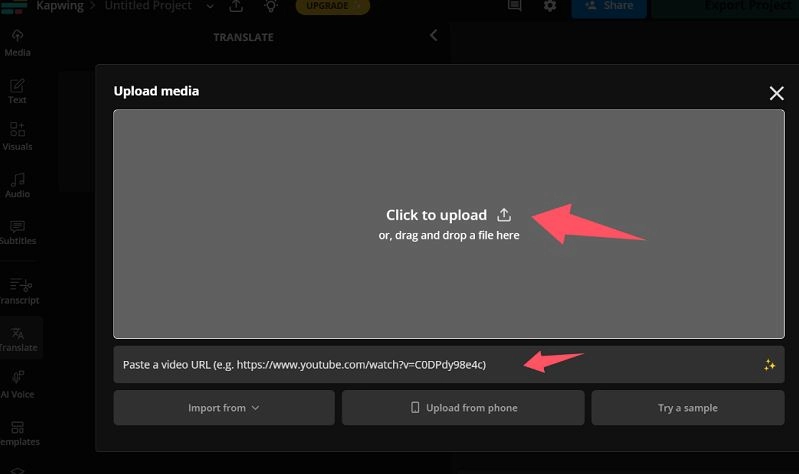
Step 2. Upload a YouTube video or paste a URL. Notice that you need to upgrade for pasting an URL.
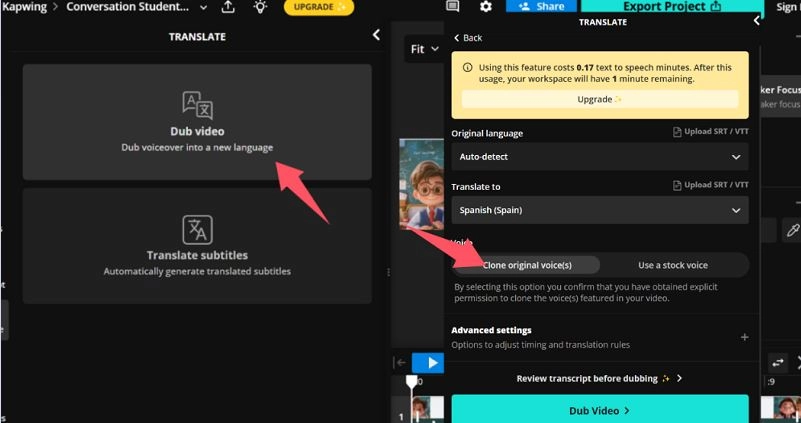
Step 3. Click Dub video to set the target language, sound and other advanced settings, then click Dub video.
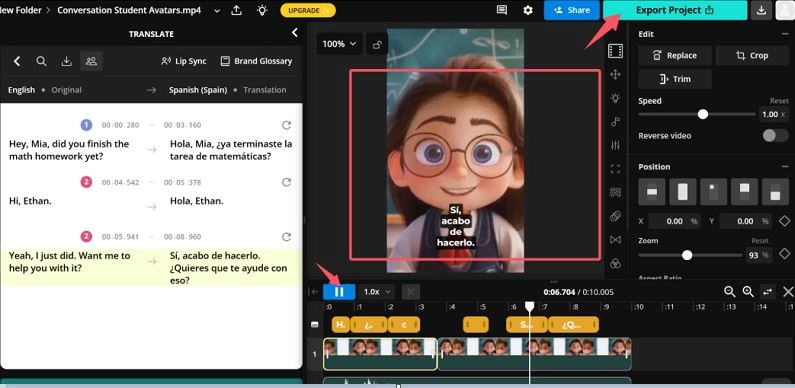
Step 4. After the video translation is completed, click Speaker Focus, select one speaker and apply it.
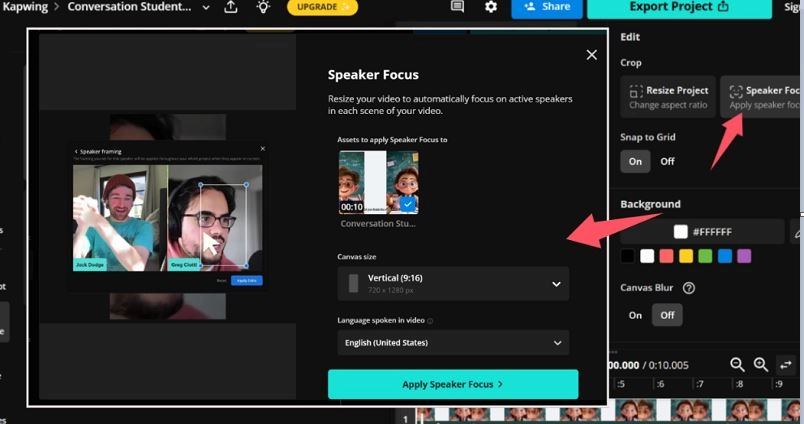
Finally, you will get a translated and AI dubbed video with focus on one speaker as shown below. You can preview or download it.
3. Elevenlabs: Dub YouTube Videos & Edit in Full Control
When you want studio-level voice detail and expressive delivery, Elevenlabs is hard to beat. It’s famous for ultra-realistic AI voices that can mimic human tones and emotions, making it perfect for documentaries, storytelling, or news-style YouTube videos. With Elevenlabs, you have full control over pitch, emotion, and speed, so you can craft a voiceover that feels truly authentic.
Key Feature
- Voice Cloning: Clone your voice or pick from a realistic voice library.
- Full Audio Editing: Adjust pitch, speed, and emotion.
- Multi-Speaker Support: Great for interviews or narrative videos.
What You Don’t Like:
- Free credits are limited.
- Requires learning curve for advanced editing.
- No subtitle translations, and no option to remove original subtitles.
How to Dub with Elevenlabs
Step 1. Register on Elevenlabs and get free credits.
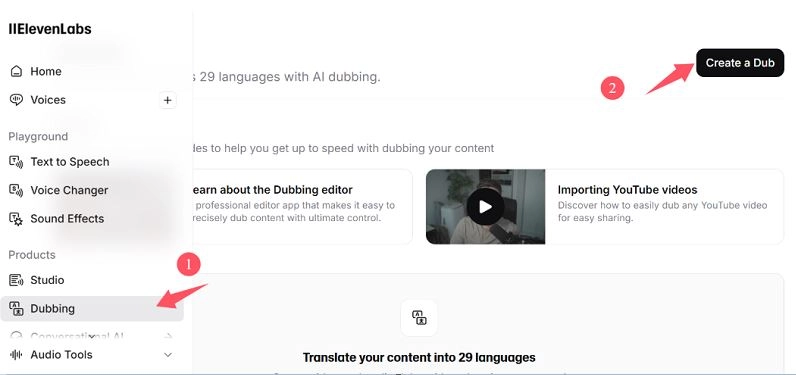
Step 2. Click Dubbing > Create a Dub.
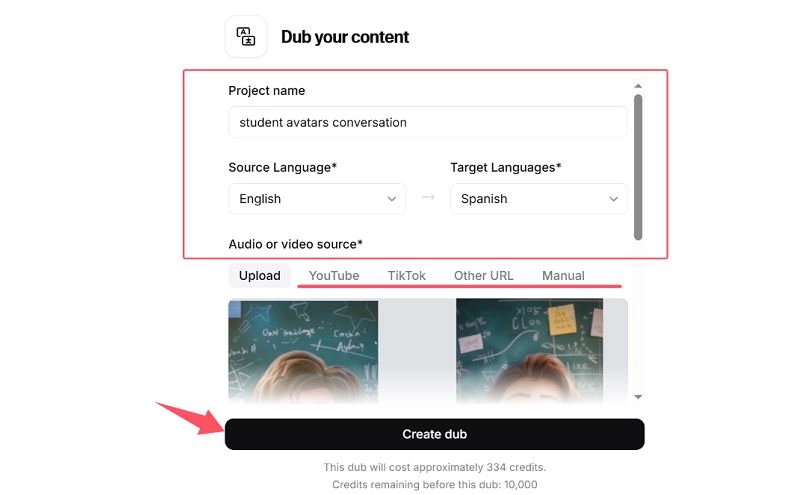
Step 3. Upload your video or upgrade and paste an URL from YouTube, TikTok and more. Then, click Create dub.
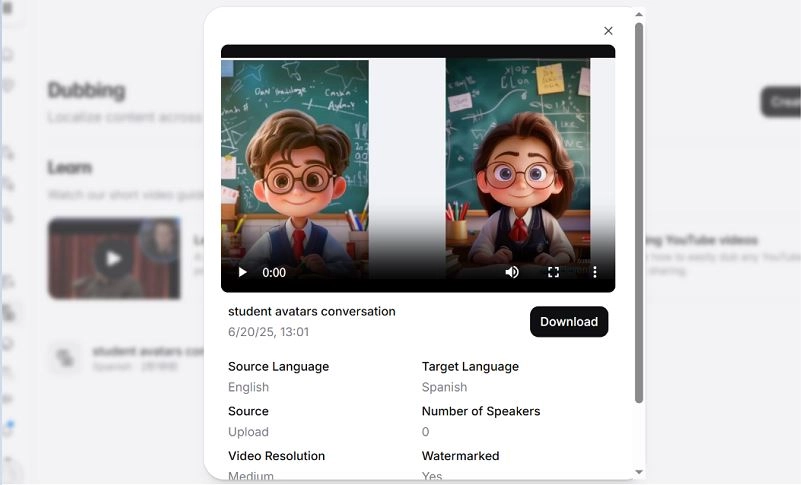
Step 4. After AI automatic translation is completed, you can preview or download.
4. Veed: YouTube AI Dubbing That Matches Video Voice
Veed is another beginner-friendly, cloud-based video editor known for its clean interface and clever voice-matching AI. Its standout feature is the ability to analyze the original voice tone and generate a dubbed track in your target language that sounds strikingly similar.
Key Feature
- Voice Tone Matching: Generates a dubbed voice similar to the original.
- On-screen Editor: Subtitles, effects, and cuts in one place.
- Multiple Export Options: Download in various formats for any platform.
What You Don’t Like:
- No direct YouTube link upload; must download video first.
- Lip-sync feature is in beta.
- Paid-only.
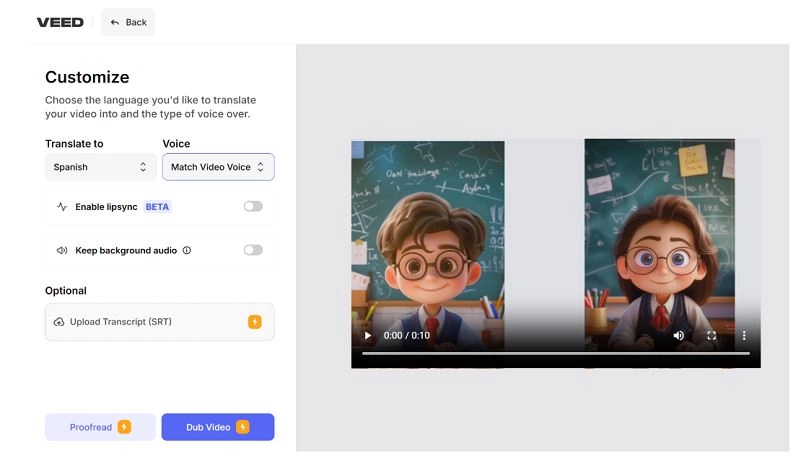
From here, you need to upgrade to proceed to the next step. If you also want to compare the dub effect of this tool, you can pay and try it yourself.
How to Dub YouTube Videos Just for Quick Watching?
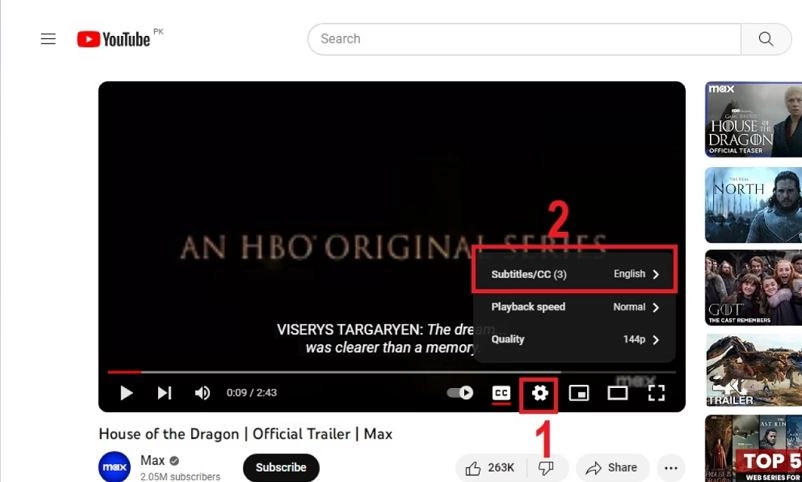
Of course, for ordinary viewers who just want to quickly understand the video, YouTube also provides a built-in automatic translation subtitle function, which is suitable for generating multi-language subtitles for "pseudo dubbing" with one click. This built-in auto-translate feature is super handy.
Here’s how to do it:
Step 1: Open the video you want to watch.
Step 2: Click on the gear icon (Settings) and select Subtitles/CC.
Step 3: Choose ‘Auto-translate’ and select your target language.
Final Thought
Ready to level up your YouTube watching or creation journey? From Vidnoz AI Video Translator to Elevenlabs, these YouTube video dubbing tools help you dub videos quickly, naturally, and affordably. Try them today and expand your audience with seamless multilingual content!