For centuries, people have never stopped trying to reconnect with loved ones who have passed away—from mediums and spiritual communication to memory preservation.
But now, a new shift has emerged: artificial intelligence can create a virtual version of your deceased loved one based on your inputs, allowing you to talk to a dead loved one.
Naturally, questions arise:
Is it really possible?
Do I need advanced technical skills?
All the answers are right here.
This article will explain the value of using AI to talk to dead loved ones, the available tools, and the exact steps to make it work.
With all this information, you can decide for yourself whether you want to “meet” them again.
- On This Page
-
How to Talk to a Dead Loved One?
3. Use Vidnoz AI Talking Photo
-
Talk to Dead Loved One Video Ideas
-
Bonus: Make Dead Loved One AI Videos
How to Talk to a Dead Loved One?
In fact, with the help of AI, talking to a dead loved one is no longer uncommon. The core idea is that AI analyzes the videos, audio, and text prompts you upload and then generates a virtual representation of the deceased.
Currently, the most advanced talk to dead apps in this field include the following three:
1. 2wai App
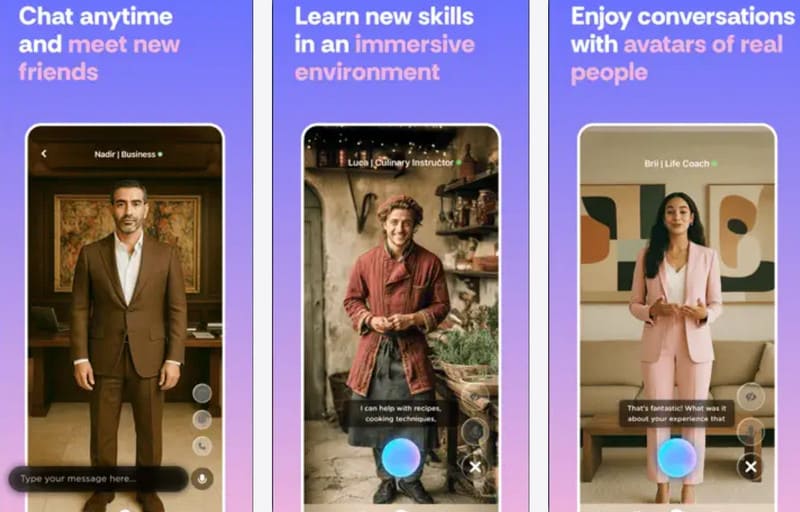
As long as you prepare images and voice recordings of the person you want to recreate and follow the guided steps, the 2wai App can clone a HoloAvatar that looks identical and even carries similar memories. You'll be able to interact with them and even have two-way conversations. The responses aren't overly scripted—they're filled with personalized traits.
Let's take a look at how to use the 2wai App to talk to deceased loved ones.
Step 1. Install 2wai from the app store and launch it.
You'll be greeted by a friendly avatar—similar to the reviewer's experience with Worthy—who will guide you through some introductory questions about your lifestyle, hobbies, and personal preferences.
Step 2. The app will ask you to record videos so it can capture facial features, expressions, and voice patterns.
You will:
- Align yourself with the white outline on the screen
- Record a short clip of you standing still
- Record yourself speaking or reading a scripted passage so the app can clone your voice
The system will then take around 20 minutes to generate the avatar.
Step 3. Once the avatar is generated, you can begin a conversation with it.
You may talk to it as if you're talking to a deceased loved one, using the personality, memories, or traits you provided.
Pros
- Highly realistic conversational experience
- Preserves memories for future generations
- Easy to use
- Built-in personality and memory system
Cons
- Requires account registration
- Limited free trial
- Unstable avatar quality
- Personality may feel stiff
- Occasionally robotic responses
2. HereAfter AI App
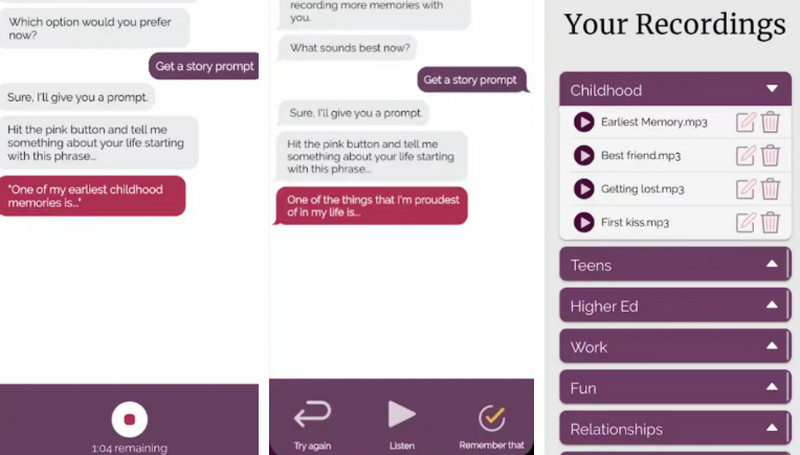
HereAfter AI App is another tool that allows you to talk to a dead loved one. What makes it truly unique is its approach: it works like a virtual biographer, patiently guiding you with prompts to help you recount your loved one’s life story and uncover meaningful memories.
These personality traits and recorded stories, combined with their photos, then come together to form a virtual version of your family member.
Here are the complete steps for talking to dead loved ones using the HereAfter AI App:
Step 1. Download the app or open it in your browser, then create an account.
This gives you access to the built-in “virtual interviewer,” which will guide you through the entire process.
Step 2. The app will ask you a series of warm, biographical questions about your loved one—covering childhood, major life events, personality, favorite stories, habits, and more.
You record your answers using your voice. You can also upload photos so the app can link each memory with a visual reference.
Step 3. Once the memory collection is complete, the app generates a conversational profile.
Pros
- Conversational and interactive experience
- Friendly virtual interviewer
- User-friendly interface
- Convenient access
Cons
- Higher cost
- Not a real-time interactive deceased recreation
- Time-consuming preparation
3. Use Vidnoz AI Talking Photo
If you're exhausted from collecting personal details about your loved one or waiting a long time for a full virtual avatar to be generated, here's a much simpler tool that lets you experience a talk to a dead loved one moment instantly.
Try Vidnoz AI Talking Photo.
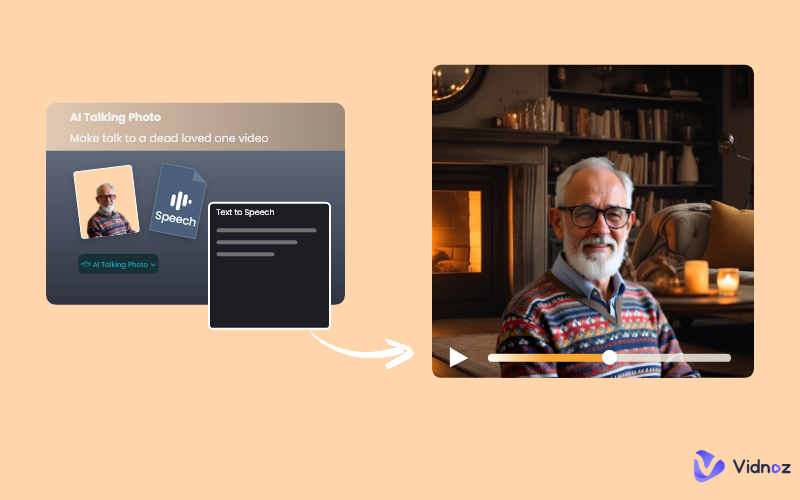
All you need to do is upload a photo of your deceased loved one, type in the words you want them to say, and choose the voice that best matches their original tone. Within moments, you'll get a short video where they appear to speak to you—as if they were right in front of you again.
Let's walk through how to use this talking photo AI.
Step 1. Open Vidnoz AI Talking Photo in your browser.
Step 2. After entering the interface, click Upload to upload a photo of your loved one.
Then, type the words you want them to say in the text box below.
Next, choose the language, voice type, and emotion.
If you want the result to feel even more authentic, click Clone my own voice to create a voice similar to your loved one's, and use it for the video.
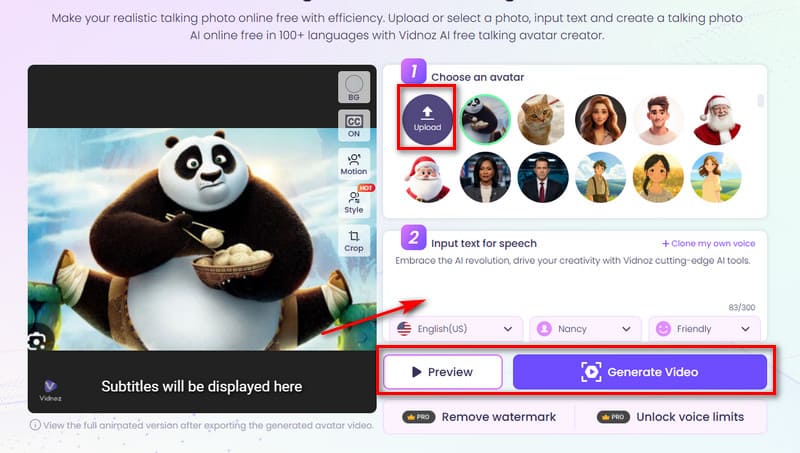
Step 3. Once everything is ready, click Preview to check the result.
If you're satisfied, click Generate Video.
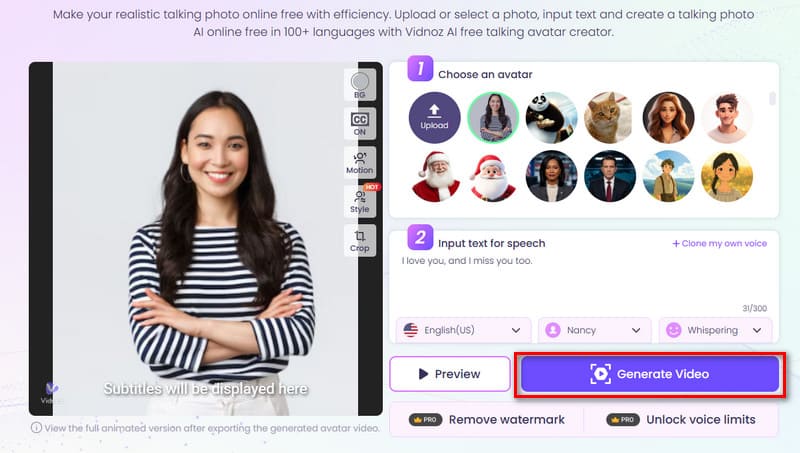
By combining these features, you can easily create an image-and-text-to-speech avatar—a simple yet touching way to recreate a moment of connection with your loved one.
Talk to Dead Loved One Video Ideas
If you haven't seen your loved one for a long time and, after learning how to make a picture talk, still aren’t sure what to say when you talk to a dead loved one, try exploring these gentle and meaningful ideas:
·Teach Children Through Their Grandparents' Wisdom
Create a video where a grandparent gently shares life lessons—how to be kind, how to stay strong, and how to love others. This helps the younger generation feel connected to the family's values, even if they never met in person.
·Send a Message of Comfort on Special Days
Whether it's a birthday, anniversary, or holiday, you can make a video where your loved one speaks warm words of blessing or encouragement.
·Recreate a Cherished Memory
Turn an old family story into a touching video moment—maybe a favorite joke they used to tell, a saying they repeated, or a habit you remember fondly.
Bonus: Make Dead Loved One AI Videos
Beyond making a loved one's photo speak, there's another way to feel their presence as a real, three-dimensional person—by turning their photo into a video.
With Vidnoz Image to Video AI and a single portrait (or a photo of you together), you can describe the scene you want, and the AI will instantly create a complete, vivid moment.
Convert Image to Video AI Online - Free
- Create a video from an image quickly for free.
- Use various AI models to turn photos into videos.
- Download and share the AI-generated video at no cost.
Convert Image to Video
Here's how to do it:
Step 1. Open Vidnoz AI Image to Video in your browser.
Step 2. Click Upload an image to add your loved one's photo, then describe the visuals you wish to see in the text box.
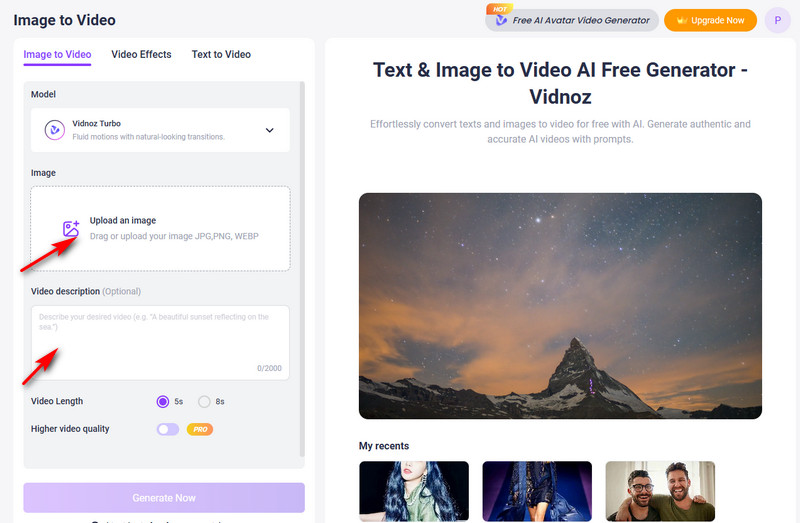
There's also a hidden surprise: under the Video Effects tab, you'll find options like kissing, outfit changes, sports, and even Jesus hug. You can apply these effects to your loved one for an even more emotional result.
Imagine creating an AI animation photo of you and your partner—holding each other again, sharing a gentle kiss. It can feel incredibly touching.
If you don't have any digital photos left, try the simpler Text to Video AI. With detailed descriptions, Vidnoz can recreate the person you're longing to see.
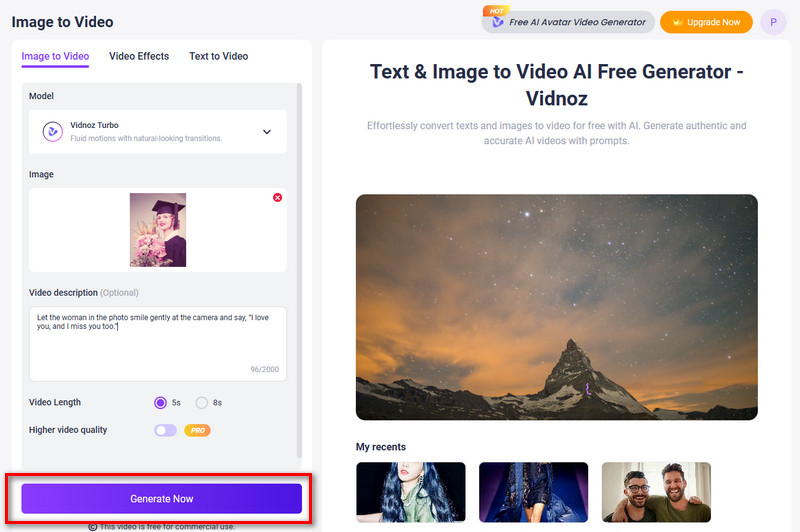
Step 3. Choose your preferred video length and quality, then click Generate Now.
The Bottom Line
AI is undeniably one of the best tools to help you talk to a dead loved one. By analyzing the photos and descriptions you provide, it can generate a virtual digital version of your loved one and allow you to interact with them.
This guide introduces three powerful tools that excel in this area. Among them, Vidnoz AI is the easiest to use and gives you the greatest control over what your loved one says.
Simply upload a photo, enter the script, choose or customize a voice, click once—and your loved one appears right before your eyes.

Vidnoz AI - Create Free Engaging AI Video with Talking Avatar
- Easily create professional AI videos with realistic avatars.
- Text-to-speech lip sync voices of different languages.
- 2800+ video templates for multiple scenarios.