In some leading schools with digital education, a student avatar has become an essential representation of learners in virtual classrooms, learning management systems, and e-learning platforms. Well-designed student avatars are an auxiliary tool for learning and socializing.
Some schools or tutoring platforms record speeches or video reports through customized avatars so that students do not need to reveal their real faces. In addition, for shy or inarticulate students, virtual images can help them speak more freely in public. Then, how to create student avatars? Is there any student avatar creator? Keep reading.
- On This Page
-
What Is a Student Avatar & Its General Looks?
Character-Styled Student Avatar
-
Where to Free Download Student Avatars: Best Sites
-
Top-Notch 3 Ways to Create Student Avatars
1. Vidnoz AI Avatar Builder: Customizable Student Avatars
2. Avatoon Avatar Maker: DIY Student Avatars by Selections
3. Canva AI Avatar Generator: Preset Student Avatars Templates
-
How to Make a Video with a Lip-syncing Student Avatar
Core Highlights of Vidnoz AI Student Avatar Talking Video:
Craft a Narration with a Student Avatar
Craft a Conversation with Student Avatars
What Is a Student Avatar & Its General Looks?
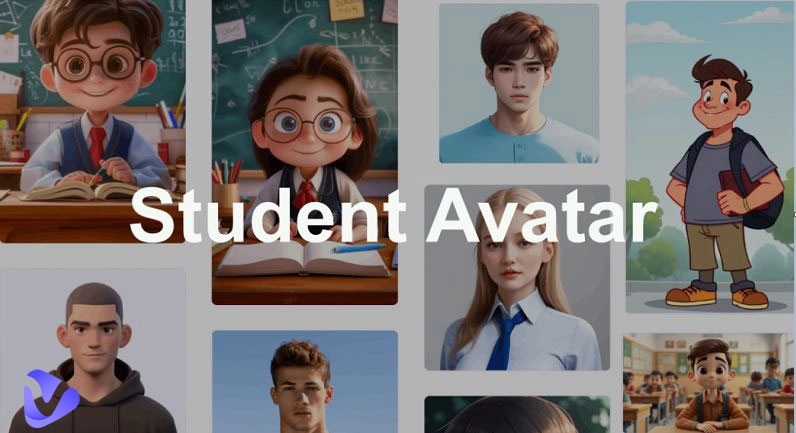
Before you start to create student avatars, it’s helpful to understand what they represent visually. A student avatar is a digital icon or illustration, a digital student's personal image, representing a learner’s personality. It often includes characteristic features such as backpacks, books, glasses, caps, or school uniforms that immediately relate to student life.
Character-Styled Student Avatar
These are playful avatars with artistic and stylized designs. They come in various subtypes:
Anime student avatar: Inspired by Japanese manga and anime, featuring big eyes, colorful hairstyles, and trendy school uniforms.

Cartoon student avatar: Soft, fun illustrations with exaggerated facial expressions and bright colors, perfect for young kids and classroom games.

Drawing student avatar: Hand-drawn or sketch-like avatars give a creative, artistic feel—often used for school projects or personal branding.

Realistic Student Avatar
For a more lifelike depiction, realistic avatars mimic real students' appearances. Examples include:
Avatar styles for different grades—elementary, middle, high school, and college.

Characters wearing detailed school uniforms and backpacks.

Diverse nationalities and facial features to fairly represent students worldwide.

Whether you choose a cartoon-like or realistic look, these avatars help shape engaging, relatable visual identities for students in digital spaces.
Where to Free Download Student Avatars: Best Sites
Now that you know how a student avatar typically looks, where can you get one for free? Many sites offer quality student avatars ready to use in projects, presentations, or profiles. However, always check each site’s license terms if you plan to use avatars commercially.
Here are some of the best sources for downloading student avatars for free:
1. Freepik
site: https://www.freepik.com/free-photos-vectors/student-avatar
Freepik Student Avatars provides a vast collection of vector student avatars in cartoon, anime, and realistic styles. Ideal for educators making slides or students creating reports.

2. iStock
site: https://www.istockphoto.com/photos/student-avatars
iStock Student Avatars hosts premium-quality stock photos and illustrations, including diverse student avatars. Use them for presentations, e-learning modules, or school websites.
3. Flaticon
site: https://www.flaticon.com/free-icons/student-avatar
Flaticon Student Avatars specializes in icon-style avatars. You’ll find minimalistic, flat, and cute student avatars suitable for app interfaces, educational infographics, and web design.
4. VectorStock
site: https://www.vectorstock.com/royalty-free-vectors/student-avatar-vectors
VectorStock Student Avatars offers royalty-free student avatar vectors. Teachers and students can pick from various school-themed characters to brighten up worksheets and posters.

5. Iconfinder
site: https://www.iconfinder.com/search?q=student%20avatar
Iconfinder Student Avatars provides unique icon packs for student avatars. These work well for educational software, profile icons, or classroom gamification.
Always ensure you respect each platform’s attribution and licensing requirements when using student avatars outside personal or educational contexts.
Top-Notch 3 Ways to Create Student Avatars
While ready-made avatars are convenient, many students and teachers love to create student avatars themselves for better self-expression and an inclusive classroom experience. Here are three top-notch tools to help you craft your own student avatar with ease.
1. Vidnoz AI Avatar Builder: Customizable Student Avatars
Vidnoz AI stands out as a powerful student avatar creator that’s completely online and free to use. It is one of the most powerful online student avatar creators, especially for students and educators to quickly create student avatars and use them flexibly in a variety of scenarios. It integrates advanced AI image generation technology and free AI video generator, allowing you to not only create static student avatars but also directly turn them into dynamic and intelligent characters that can move and talk.
Create Your AI Talking Avatar - FREE
- 1900+ realistic AI avatars of different races
- Vivid lip-syncing AI voices & gestures
- Support 140+ languages with multiple accents
Key Feature
- Free access to create, edit, and download student avatars online.
- Upload your own photos or use over 18,000 preset AI avatar templates.
- Generate static or dynamic avatars from text prompts.
- Choose among realistic, cartoon, or anime student avatars.
- Filter options for gender, age, clothes, nationality, and more.
- Customize the avatar’s voice, movement, view, and background.
Quick workflow:
Step 1. Visit Vidnoz AI Avatar builder.
Step 2. Locate the Avatars tab and turn to the Photo Avatar. Select a preset photo student avatar. Optionally, you can upload one of your favorite student avatars.

Step 3. Refine with edits and save as your avatar, and you can use it for more creation.

2. Avatoon Avatar Maker: DIY Student Avatars by Selections
Avatoon is a popular avatar-making app for all ages, especially for students and teachers who want to quickly create student avatars. It does not require professional design skills, and everyone can easily get started and create cute cartoon-style student avatars in a few minutes. lets you build school-themed avatars with creative outfits and accessories.
Key Feature
- Intuitive interface perfect for kids and teachers.
- Lots of cartoon presets to pick facial features, hairstyles, and clothes.
- Allows custom backgrounds and stickers.
- Fast export for use in classroom activities and reports.
Simple workflow:
Step 1. Open Avatoon and select “Create Avatar.”
Step 2. Pick your preferred cartoon base and adjust features.
Step 3. Dress up your avatar in school outfits.

Step 4. Download and share instantly.
3. Canva AI Avatar Generator: Preset Student Avatars Templates
As a renowned online design platform, Canva also has a built-in powerful AI Avatar Generator, which provides a large number of preset student avatar templates specifically for educational scenarios, helping students and teachers to easily design learning content and presentations. It’s great for those who want avatars for slides, group projects, or social media profiles.
Key Feature
- Massive template library with student characters.
- Flexible customization for face, clothes, and accessories.
- Direct integration into Canva’s design suite for instant use in presentations or infographics.
- Easy sharing and collaboration for classroom teams.
Simple workflow:
Step 1. Log into Canva and search for “Avatar Generator.”
Step 2. Choose a student avatar template and customize it.

Step 3. Adjust elements like color, pose, and props.
How to Make a Video with a Lip-syncing Student Avatar
What if you want your student avatars to talk in presentations or e-learning videos? Vidnoz makes this possible with its free AI video generator and advanced AI lip sync technology. You can easily craft narration or even conversations between avatars for more interactive learning.

Vidnoz AI - Create Free Engaging AI Video with Talking Avatar
- Easily create professional AI videos with realistic avatars.
- Text-to-speech lip sync voices of different languages.
- 2800+ video templates for multiple scenarios.
Core Highlights of Vidnoz AI Student Avatar Talking Video:
Support upload and AI generation: Upload real student photos or enter a simple description; AI will automatically generate a matching student image.
18,000+ preset AI avatars: Covering different styles (cartoon, realistic, anime) and multicultural backgrounds, including various roles, students, doctors, teachers, etc., convenient for quick selection and secondary editing.
Advanced filters: 1-click filtering by gender, age, clothing, region, and other dimensions makes it easy to match user needs and styles. For those who love anime-style student avatars, this anime avatar maker helps ensure that every student can find an avatar that closely reflects their own image.
Full range of custom editing: In addition to avatar shape, you can also adjust the background, voice, and action of the avatar to generate more vivid scene-based materials.
Dynamic function: With AI talking photo and AI lip sync, you can make static avatars speak with one click, achieve lip synchronization and speech synthesis, and even create multilingual dialogue videos with subtitles, which are suitable for classroom presentations or online courses.
Craft a Narration with a Student Avatar
Step 1. Also visit Vidnoz AI, create an account and log in, or directly log in with a Google account.
Step 2. Select Avatars, search “student,” select one, and proceed to edit. You can also upload a photo or enter a prompt to generate a custom student avatar to narrate.

Step 3. You can further edit this avatar and then use it to generate a video.

Step 4. Input your narration text, make all the detailed settings, and click Generate Video. Vidnoz will automatically lip-sync your avatar.

Step 5: Preview and download your narrated video.

Craft a Conversation with Student Avatars
Step 1. Open the Vidnoz video generator again. Select any avatar to enter the editing page. Then click Conversations.

Step 2. You will see two default avatars.

Replace them with your desired student avatars.

Step 3. Assign dialogue text for each character, select a voice, or use a text-to-speech avatar to add voices.

Step 4. Preview the conversation and adjust timing and gestures. When generated, download or share it.

For multilingual class projects, you can even try video translation to translate your student avatars’ speech into different languages!
Conclusion
A student avatar is more than just a picture. It’s a creative tool that brings life, personality, and inclusivity to modern education. Whether you download one or use a student avatar creator like Vidnoz AI to design and animate your own, avatars help students feel seen and engaged. Try the Vidnoz Free AI video generator today and see how easily you can make your student avatars talk, boosting connection and excitement in digital learning!
Create Your AI Talking Avatar - FREE
- 1900+ realistic AI avatars of different races
- Vivid lip-syncing AI voices & gestures
- Support 140+ languages with multiple accents






![4 Solutions to Make Smart Transparent Avatars Easily [With Free Picks]](https://www.vidnoz.com/bimg/transparent-avatars.webp)
![How to Create Remini AI Avatar for Free? [2026]](https://www.vidnoz.com/bimg/create-remini-ai-avatar-for-free.webp)