



Best 10 Stable Diffusion Anime Models Ever & How to Run SD Models Locally
Need Stable Diffusion anime models for anime art creation? This post comes with the best 10 naime SD models you will like! Check it out.
Unlike Midjourney, DALL-E, and other cloud-based AI image generators, Stable Diffusion won a decent user group since it runs locally and is highly customizable. Many AI artists and individuals use Stable Diffusion models to generate stunning art in various styles. However, the base model sometimes lets you down when creating art in specific styles like anime.
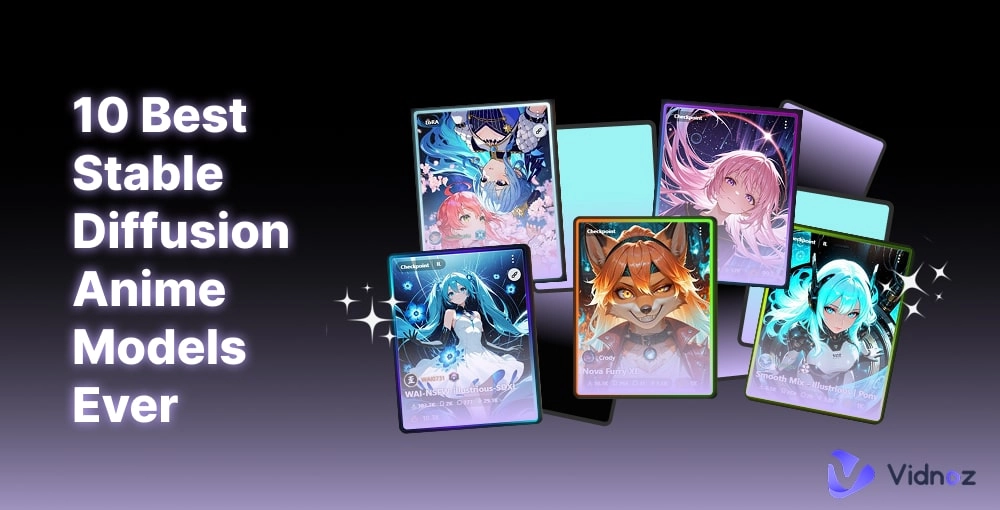
Image sample from civitai.com
If this gets your point, then what you need is a fine-tuned model, like a Stable Diffusion anime model, to create your compelling anime masterpiece. This article rounds up several fine-tuned anime models and the key points you need to know. Just move on reading!
- On This Page
- What Is the Stable Diffusion Anime Model?
- The 10 Best Stable Diffusion Anime Models of All Styles1. Stable Diffusion Anime Model Featuring Both Reality & Beauty2. Pastel-Like Stable Diffusion Model with Soft Brushwork3. Stable Diffusion AI Anime Model Extremely Vivid4. SD Anime Model with Various Perspectives5. SD Model Featuring Both Thickline and Thinline Art6. Anime Stable Diffusion Model for Anime Magazine Cover7. Stable Diffusion Anime Lineart Model8. Screencap Style Anime Stable Diffusion Model9. Stable Difussion Anime Kawaii Model10. Stable Diffusion Model Turns Photo to Makoto Shinkai Cartoon
- Where to Download Stable Diffusion Anime Models?CivitAI - Preview Stable Diffusion Anime Models with Clear DetailsHugging Face - Safest Place to Download Stable Diffusion Anime Models
- How to Generate Anime Art with the Anime Stable Diffusion Model?
- Bonus: Infuse Life into Your Stable Diffusion Anime ArtThe Bottom Line
-
What Is the Stable Diffusion Anime Model?
Prior to the main theme, let’s start with the intro—what is a Stable Diffusion anime model?
Stable Diffusion is a text to image model powered by deep learning tech. It generates images from text prompts, basically similar to creating videos from text using text to video AI tools.
Turn Text into Video with AI - FREE
Generate high-quality videos from PDFs, PPTs, and URLs in one step!
Generally, Stable Diffusion provides a base model for broad/general image creation. But if you want to create art in specific styles, you need a fine-tuned model, aka an SD checkpoint, which is trained with datasets and contains deep-learned parameters and weights.
By installing a Stable Diffusion anime model, you can generate Stable Diffusion AI anime art more accurately.
The 10 Best Stable Diffusion Anime Models of All Styles
Still scrolling and struggling to find a satisfying SD anime model? Well, this section will show you a full list of the most stunning and worth-trying anime Stable Diffusion models in different styles and target anime lovers. No matter which distinctive style you love, you will find one that hits you.
1. Stable Diffusion Anime Model Featuring Both Reality & Beauty
- Checkpoint Name: Nova Anime XL
- Author: Crody
- Model Type: Checkpoint Merge
- Base Model: NoobAI
- Style: Detailed illustration, natural and harmonious coloring
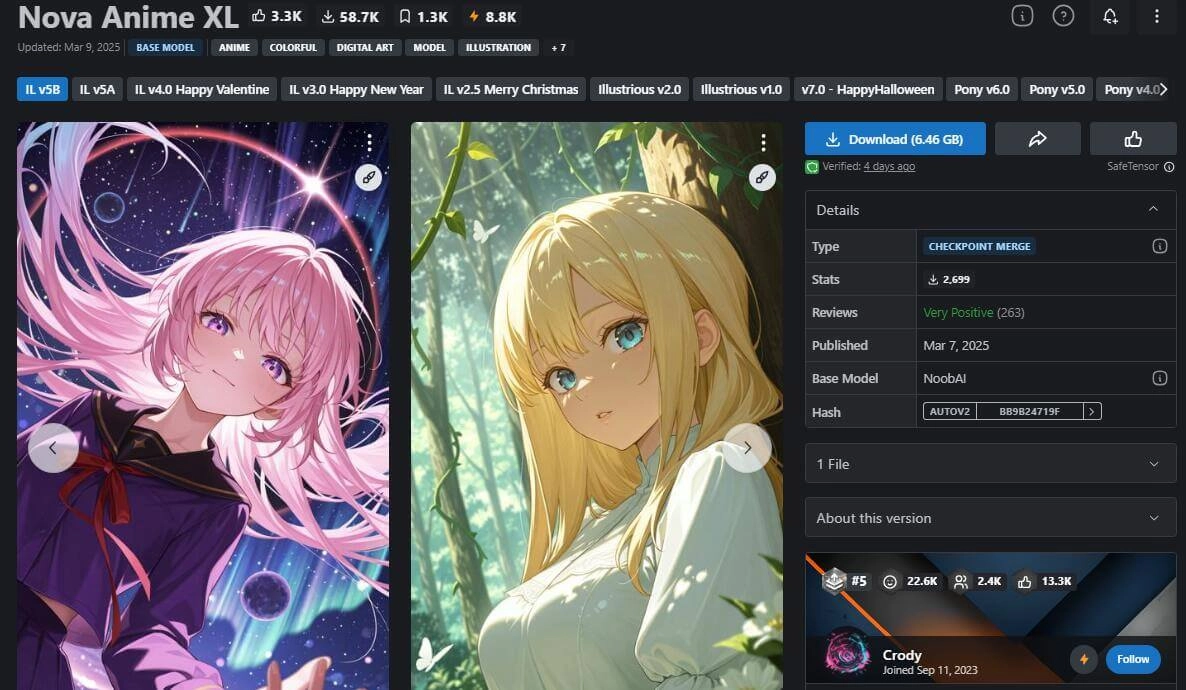
This SD model is a must-try if you are to create some natural and extremely charming art pieces. This checkpoint generates not only harmonious coloring and attractive and dramatic lighting but also accurate and natural limbs like body poses, arm and leg angles, and lifelike fingers, even under unconventional perspectives like overlooking and uplooking angles.
It features hard brushwork and outlines, classic cel anime coloring, and broad and hyperreal backgrounds. If you want to create AI art that looks like an SSR card art or an Elite 2 art for your loved anime character, this Stable Diffusion anime AI model won’t let you down.
With the high-quality anime art prepared, you can also use the anime text to speech tool to let your character speak and come to life.
2. Pastel-Like Stable Diffusion Model with Soft Brushwork
- Checkpoint Name: Pastel-Mix [Stylized Anime Model]
- Author: andite
- Model Type: Checkpoint Merge
- Style: Pastel-like, soft brushwork
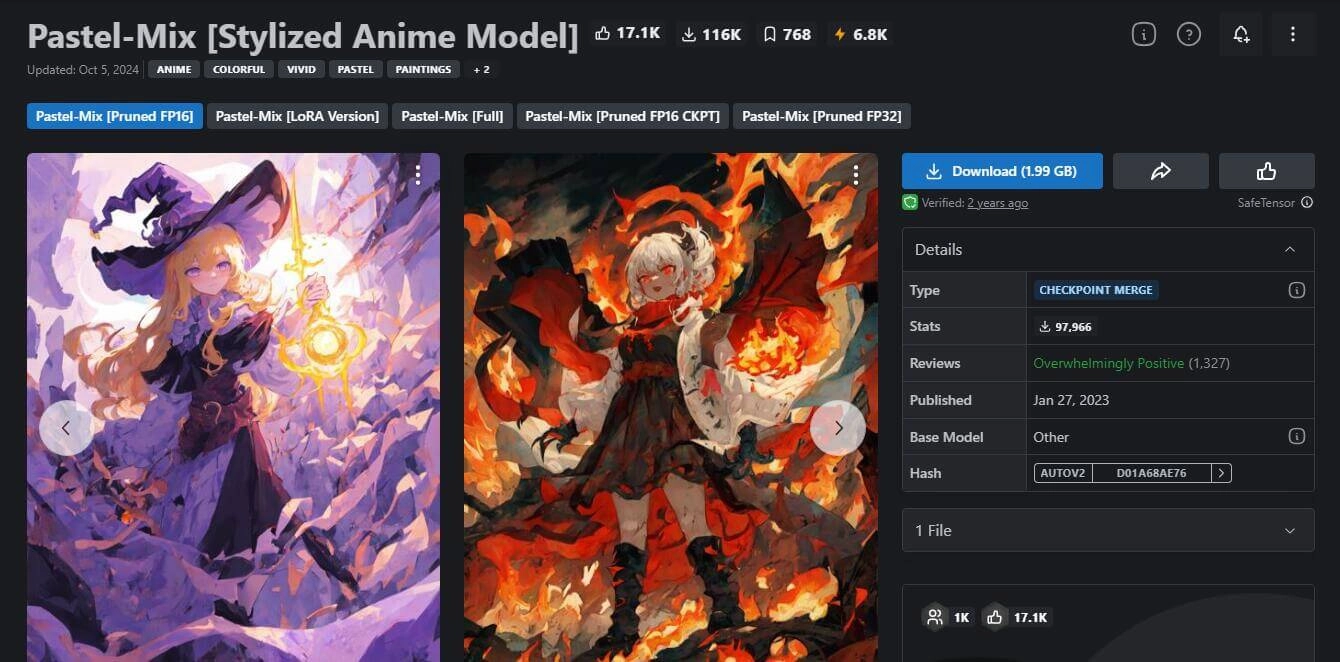
This Stable Diffusion anime art model lives up to its reputation. The pastel-like brushwork makes it natural and more human-like, different from some art that is way too accurate but over-rending details and lighting. Sometimes, you won’t love that kind of digital art, and you can spot the AI sense/vibe even a mile away.
You may find some mistakes and places that lack proper details, but the soft brushwork and the harmonious coloring make up for it, making it much more natural and casual.
3. Stable Diffusion AI Anime Model Extremely Vivid
- Checkpoint Name: AnimeXL-xuebiMIX
- Author: XBX
- Model Type: Checkpoint Merge
- Base Model: SDXL 1.0
- Style: Hard brush, enriched details, and high saturation
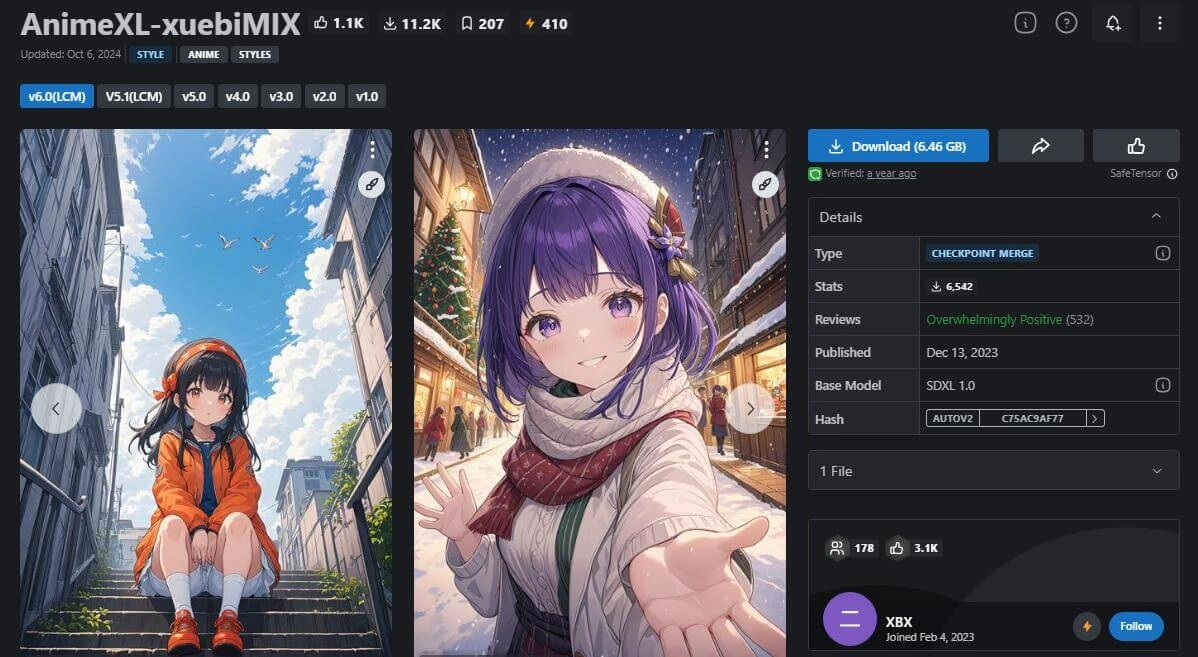
This model wins seas of AI art creators’ love due to its extremely detailed depiction of the anime character, background, and vibe. The coloring and lighting complement each other perfectly, bringing the most proper and engaging vibe. Just input your anime AI art prompts, and it will give you compelling art pieces.
The only fly in the ointment is the deformity in the limb details: extra fingers, weird hand shapes, etc.
4. SD Anime Model with Various Perspectives
- Checkpoint Name: Counterfeit-V3.0
- Author: rdqwdw
- Model Type: Checkpoint Trained
- Base Model: SD 1.5
- Style: Hard brush, enriched details, and high saturation
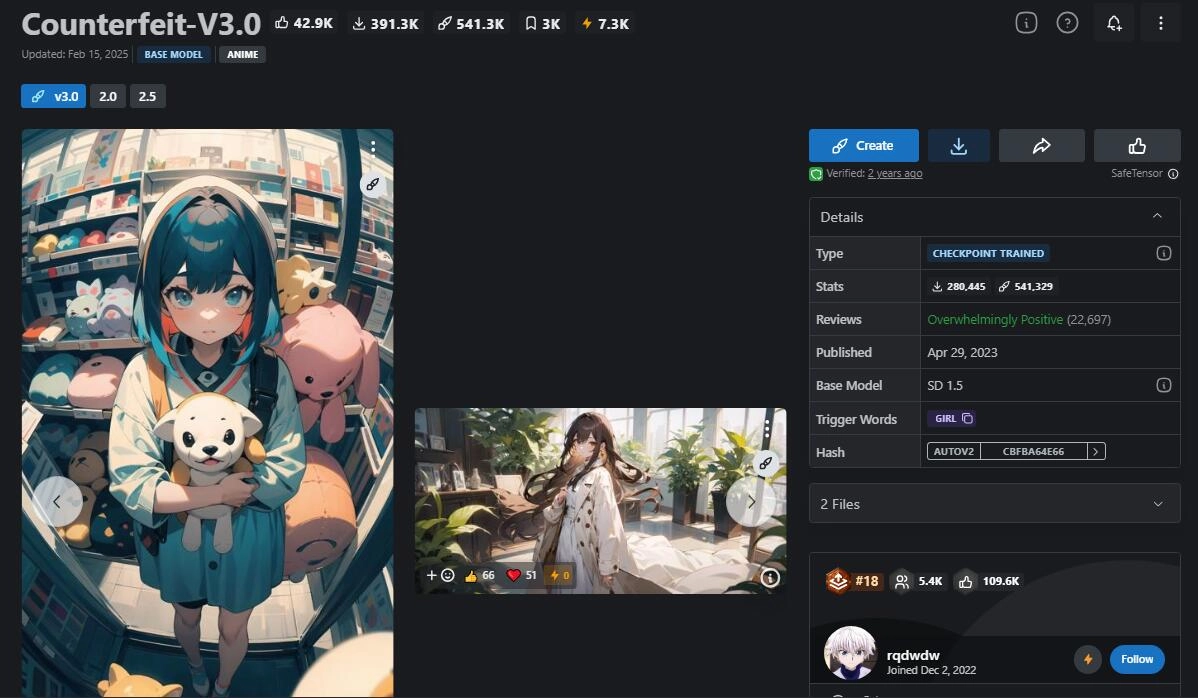
If you like distorted perspectives, such as the fisheye perspective in the above picture, you will love this Stable Diffusion AI anime model. This SD model does well in generating art with wide-angel lenses, 3-point perspective, and more curved perspectives. These unusual and abnormal perspectives bring dramatic and overwhelming feelings. In this case, you will find the art really vivid and dynamic.
Don’t Miss: Which Anime Character Do I Look Like in Photo? Check Your Own Animated Character Online >>
5. SD Model Featuring Both Thickline and Thinline Art
- Checkpoint Name: T-illunai3
- Author: Tonade
- Model Type: Checkpoint Trained
- Base Model: Illustrious
- Style: Various, both thick and thin lineart, thick brushwork and flat coloring
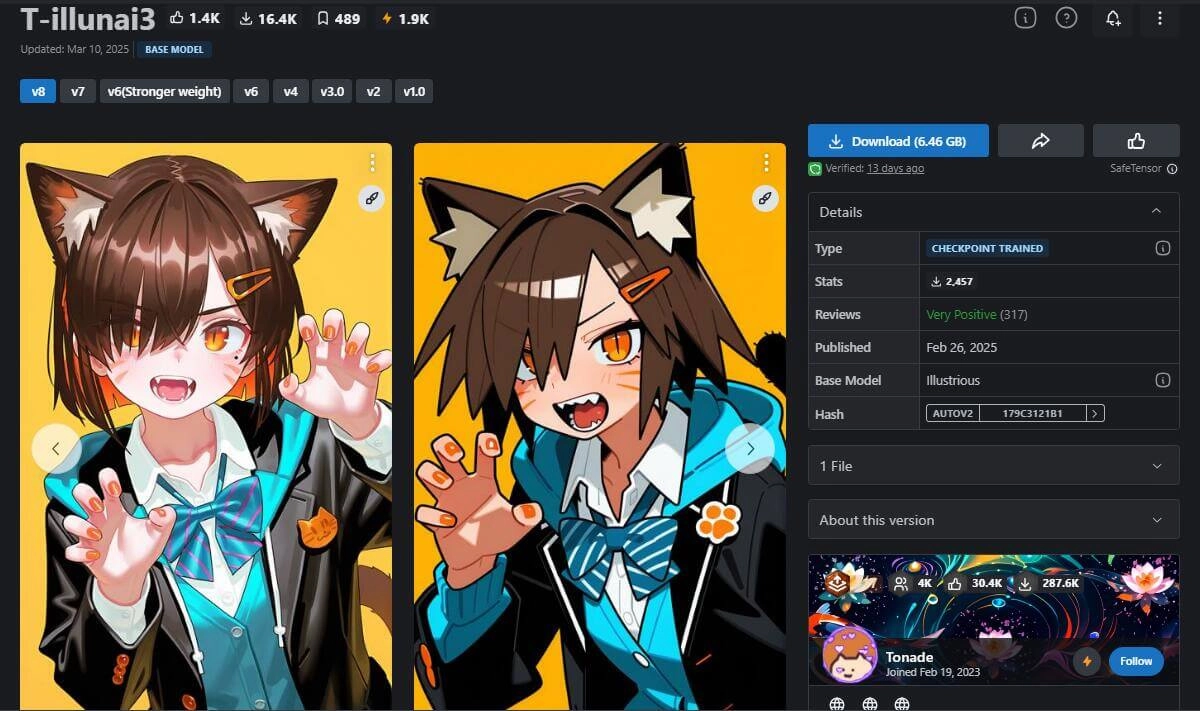
T-illunai3 Stable Diffusion anime model will be your go-to place if you want to create some simple but still vibrant illustrations. This checkpoint works well in various styles, generating stunning anime art according to your trigger words. Be it from thick lineart, flat and cel-coloring, to thin lineart and pastel-like coloring, it won’t let you down.
This kind of dynamic art with a simple background is really suitable for profile avatars. It just works well and is even better than some anime avatar makers.
6. Anime Stable Diffusion Model for Anime Magazine Cover
- Checkpoint Name: Anime Magazine Cover
- Author: rules
- Model Type: LoRA
- Base Model: SD 1.5
- Style: Anime magazine cover with random text
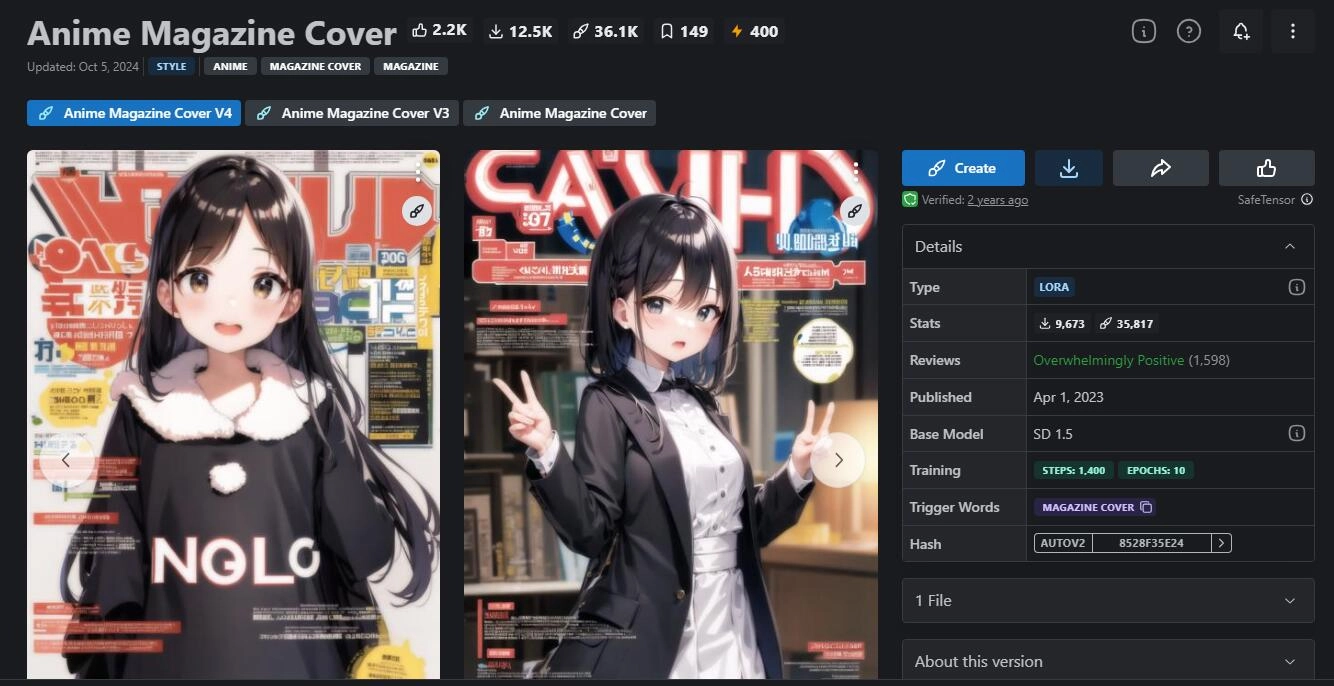
Many anime lovers use this model as well due to its vivid magazine cover style. It adds some random text and shapes in front of and behind the anime characters with well-designed typography and color blending. The soft lighting looks like a lambency filter over the image, bringing a classic and nostalgic vibe. If you ever followed the anime magazine serials like Newtype and Animerica, this checkpoint will definitely unlock your sealed memory.
7. Stable Diffusion Anime Lineart Model
- Checkpoint Name: Anime Lineart / Manga-like (线稿/線画/マンガ風/漫画风) Style
- Author: CyberAIchemist
- Model Type: LoRA
- Base Model: SD 1.5
- Style: Lineart, monochrome
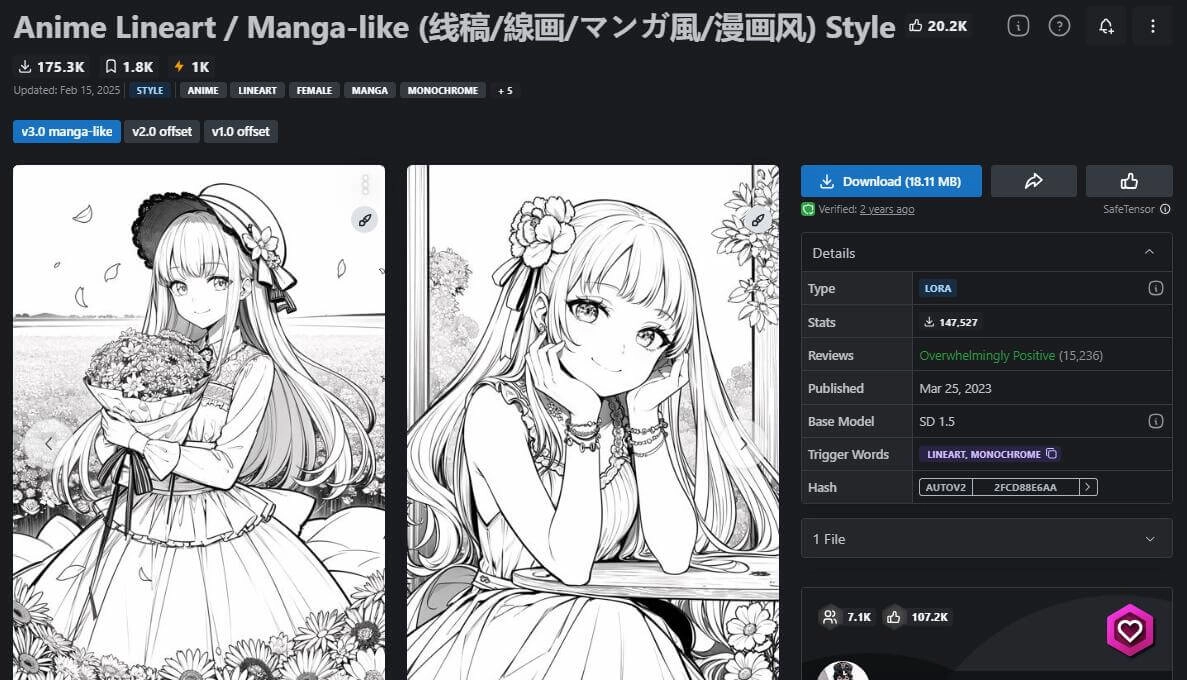
This checkpoint helps generate Stable Diffusion AI anime lineart. While it is black and white, it features extreme details with brush strokes, screentone, and a manga vibe. If you are a big fan of Japanese monotone manga, then this model will be your must-have choice.
Don’t Miss: Convert Video to Cartoon Online FREE: 5 AI Video to Anime Converter Free >>
8. Screencap Style Anime Stable Diffusion Model
- Checkpoint Name: Anime Screencap Style
- Author: OneRing
- Model Type: Checkpoint Trained
- Base Model: SD 1.5
- Style: Screenshot of animation, cel-animation
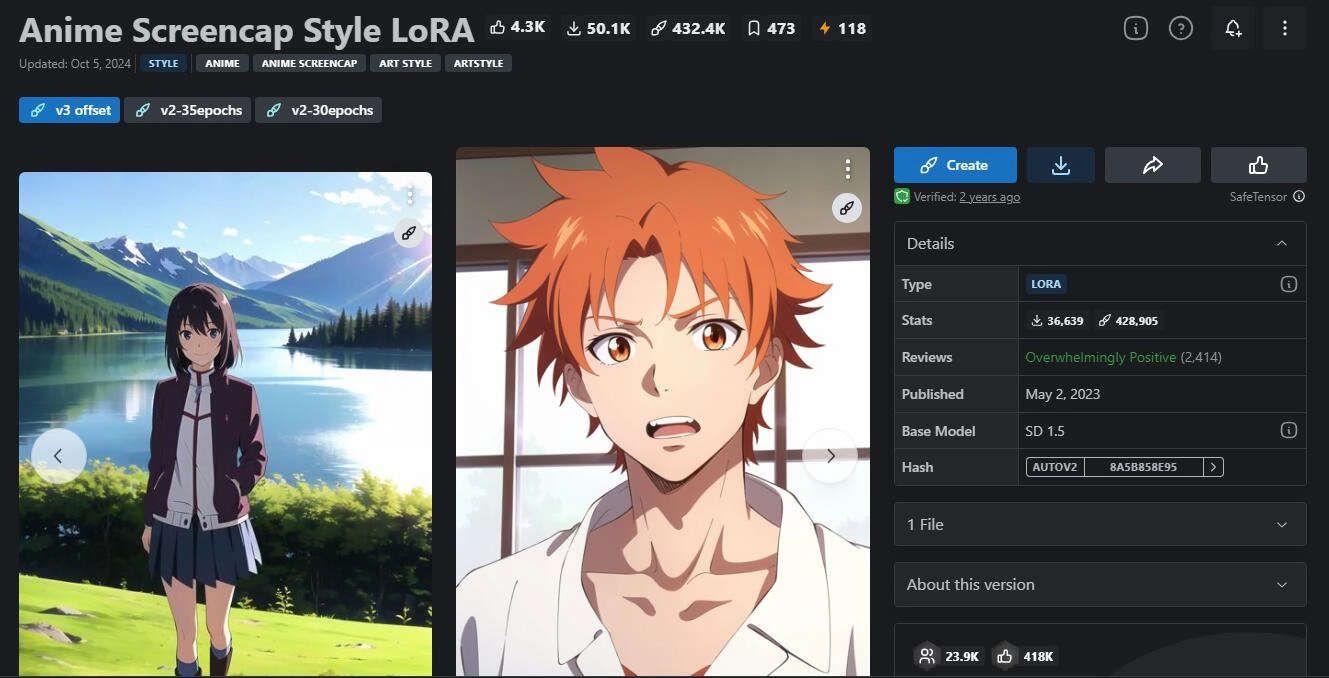
This Stable Diffusion anime model comes with a classic cel-animation flavor. You can see these features in the art it created: the thin outline of the character and objects, blurry background, clean and tidy coloring, and more details that make you hardly ever tell the difference between it and the real animation.
9. Stable Difussion Anime Kawaii Model
- Checkpoint Name: anime-kawai-diffusion
- Author: Huy Nguyen
- Base Model: Runwayml
- Style: Cute cel anime
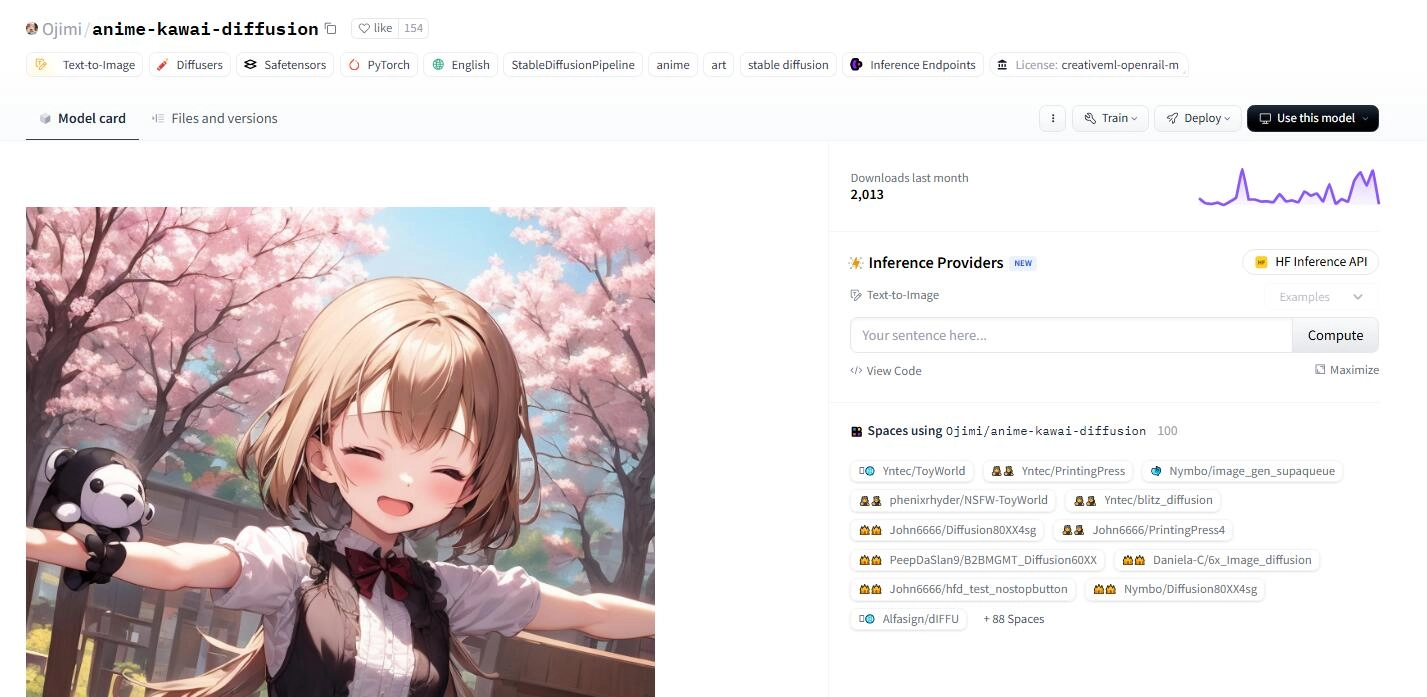
This fine-tuned model is suitable for those who like cute girl anime characters. The anime art generated with this checkpoint comes with hard drawing outlines, low saturation but still vivid coloring, and the most welcomed super cute face. What is noticeable is that this model may not be appropriate for all ages. If you don’t want the NSFW content, you may need to add it as the negative prompt.
10. Stable Diffusion Model Turns Photo to Makoto Shinkai Cartoon
- Checkpoint Name: AnimeBackgroundGAN-Shinkai
- Author: akiyamasho
- Style: Makoto Shinkai anime screencap
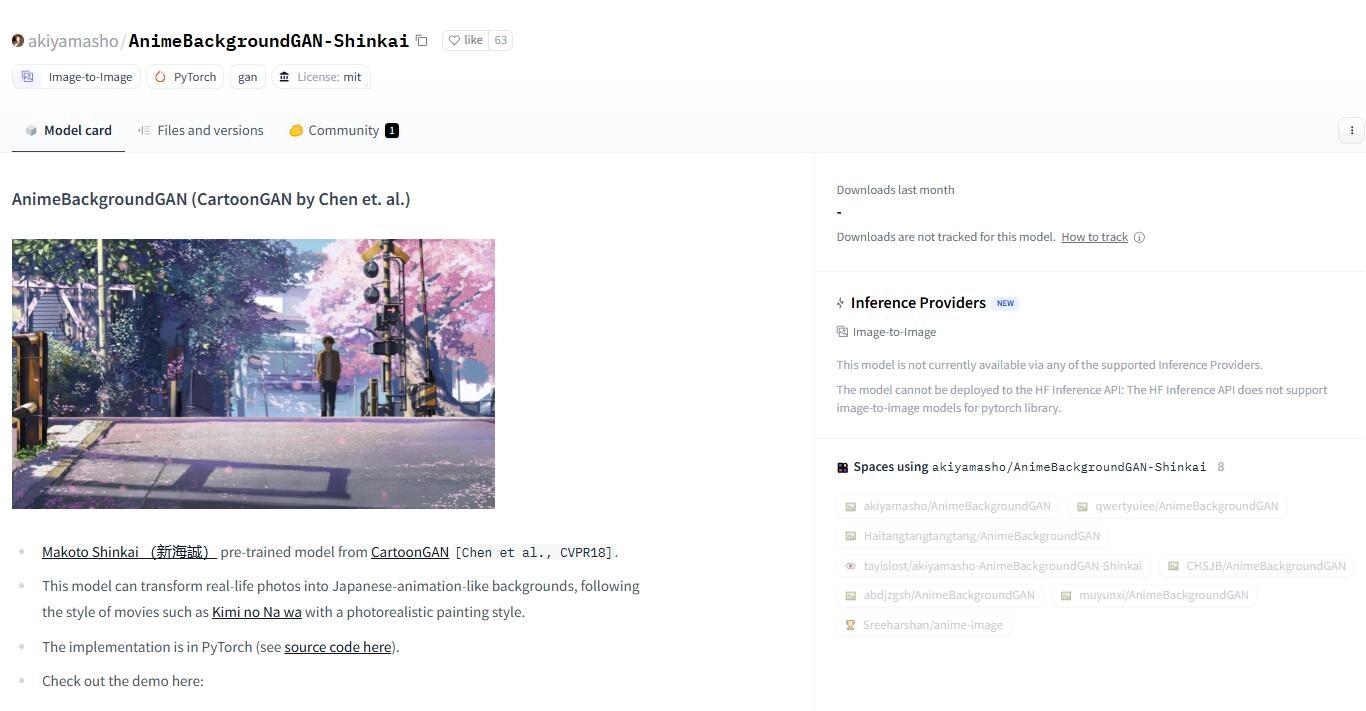
This checkpoint is pre-trained with Makoto Shinkai’s movies’ art style, like君の名は。 Kimi no Na wa, 秒速5センチメートル 5 Centimeters per Second, etc. What makes it special is that this model is an image-to-image model. You may import your real-life photos and get a vibrant coloring palette-like anime screencap.
Where to Download Stable Diffusion Anime Models?
Have you ever picked a Stable Diffusion model that hits you? Do you know where to download them and get started? Check out this section for various places to get your loved models.
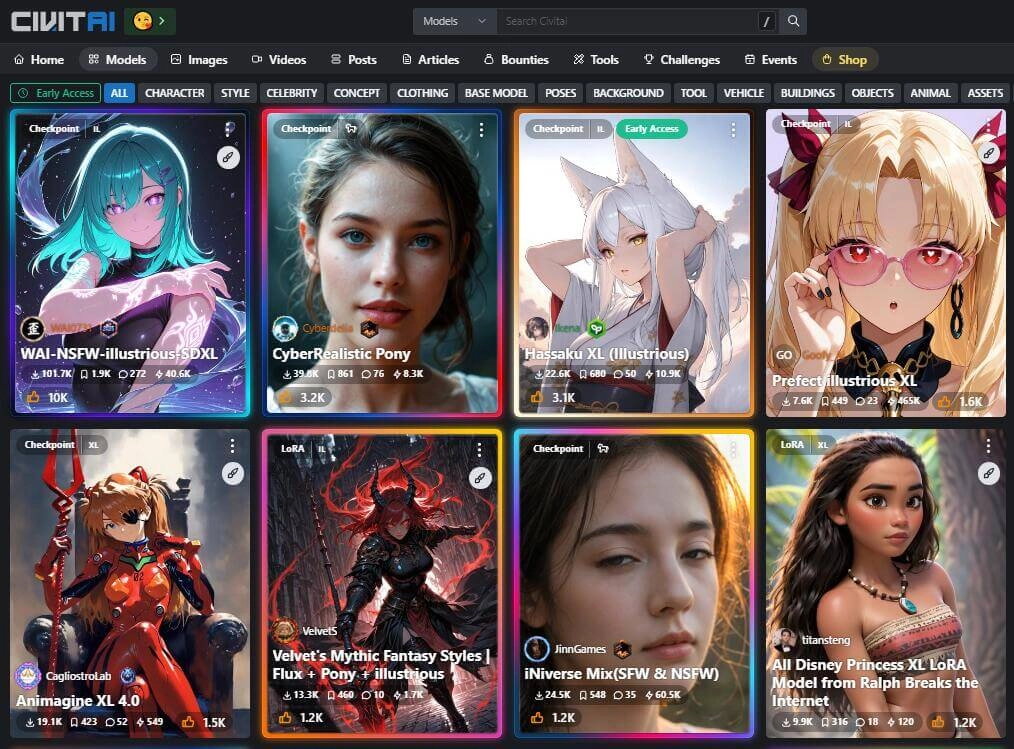
CivitAI - Preview Stable Diffusion Anime Models with Clear Details
- Link: https://civitai.com/models
- Best for: Anime, hyperreal, stylized art styles.
CivitAI will be your go-to place for downloading an SD model, especially when you want anime Stable Diffusion models. It provides seas of free SD checkpoints, LoRAs, textual inversions, etc. With the intuitive user interface, you can preview the results created with these modes easily, and this helps you filter and decide which model to use.
Hugging Face - Safest Place to Download Stable Diffusion Anime Models
- Link: https://huggingface.co/models
- Bets for: Model seaching
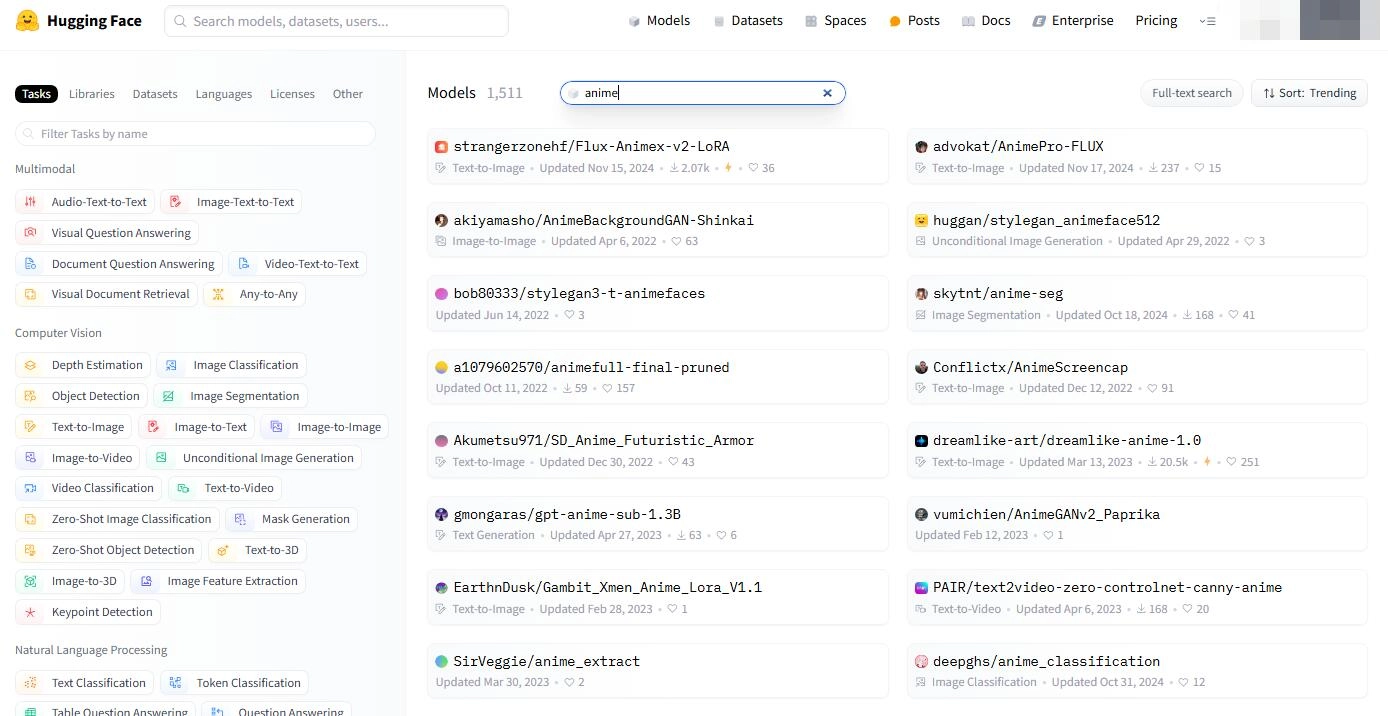
Hugging Face is also ideal for accessing models since it builds the biggest community for machine learning models and dataset sharing. In addition to text-to-image models of Stable Diffusion, you can also find models for DALL-E, Midjourney, Flux, etc.
What may stop users from downloading checkpoints from this site might be the user interface: while searching for models, there is no result/model card preview available. You have to click to check the models one by one, or get suggestions from forums or communities, and then head over there for model downloading.
What’s more, it provides some models that work well as a face animator and turns your selfie into animated videos.
How to Generate Anime Art with the Anime Stable Diffusion Model?
If you are ready to create your art with your chosen Stable Diffusion models, then just check this tutorial. It will be quite a long journey.
Before you start:
Ensure your system meets the requirements.
- Windows 10 or above / Mac Apple Silicon M1/M2/M3/M4
- NVIDIA GPU 4GB+ VRAM
- 16GB RAM and above
Here you go:
Step 1. Install Python 3.10.6 from the below link; remember to check “Add Python to PATH”.
https://www.python.org/downloads/release/python-3106/
Step 2. Install Git from the below link. Choose Git Bash & Git GUI.
https://git-scm.com/downloads/win
Step 3. Clone the repository
Run Github > File > Clone repository > choose URL > then input the link below. A folder will be created.
https://github.com/AUTOMATIC1111/stable-diffusion-webui.git
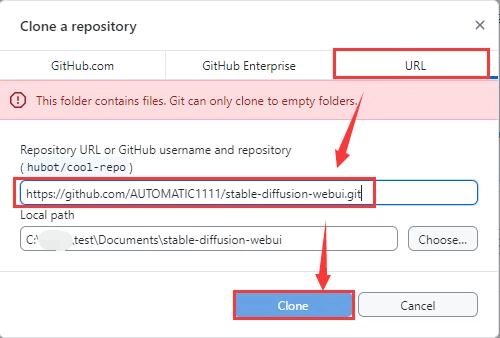
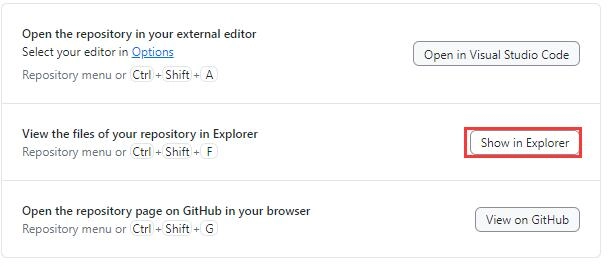
Step 4. When all cloning is finished, choose Show in Explorer on the Github app > you will be guided to the stable-diffusion-webui folder.
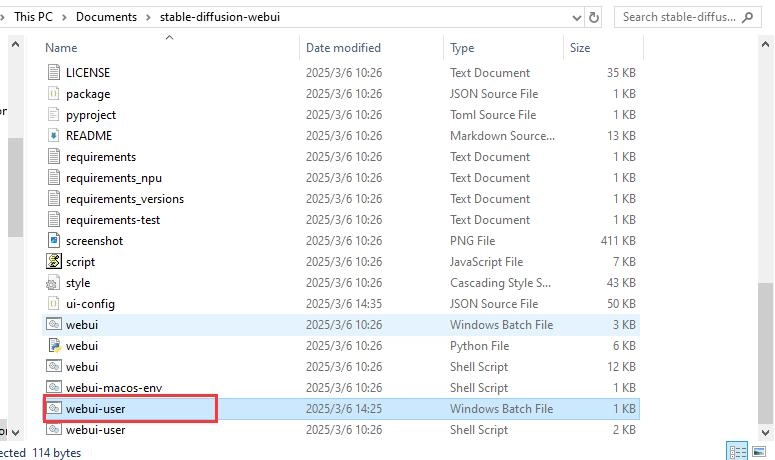
Step 5. Find webui-user.bat and run it.
Step 6. When the installation is finished, a web page http://127.0.0.1:7860/ will pop up, and you have now successfully run Stable Diffusion locally on your PC.

Please keep the CMD, Github, and the web page window running while downloading models or doing other matters. Or you will have to run the installation all over again.
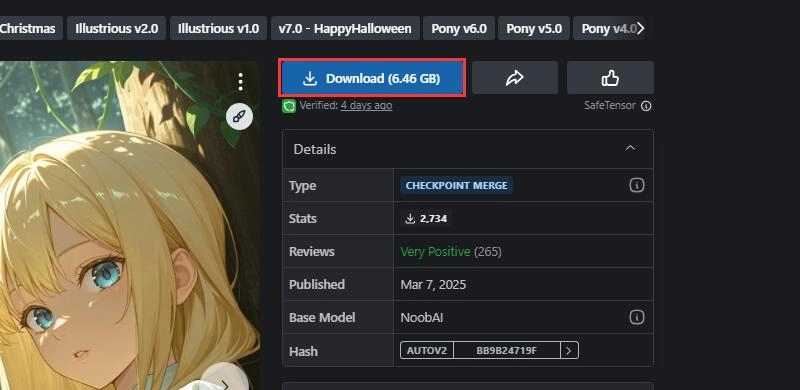
Step 7. Now you can download your loved Stable Diffusion anime checkpoint from CivitAI or Hugging Face.
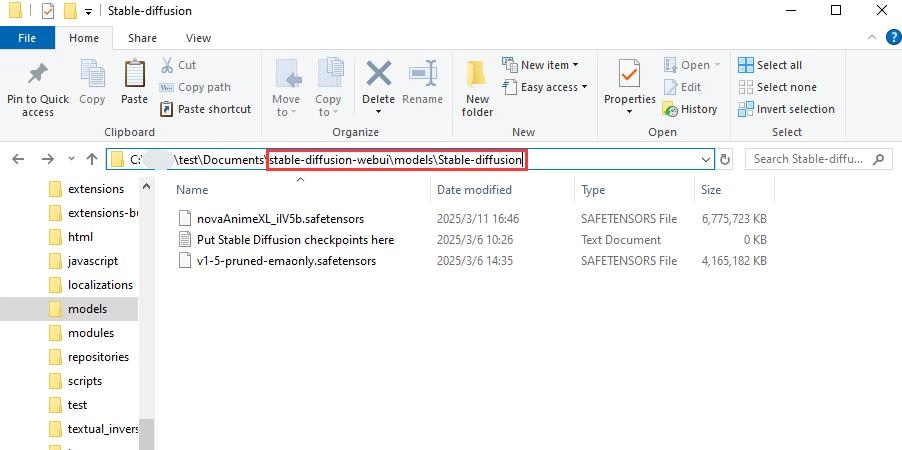
Step 8. Move your downloaded model to the Stable Diffusion model folder.
Folder directory: stable-diffusion-webui/models/Stable-diffusion/
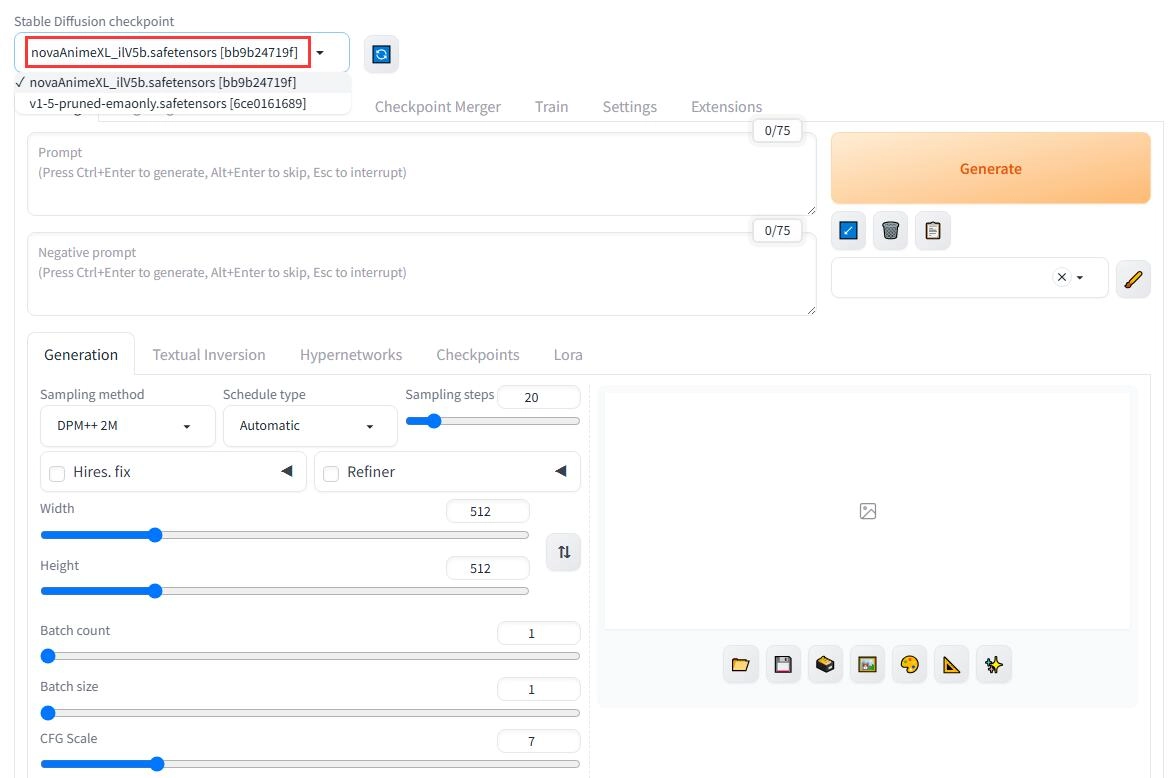
Step 9. Back to http://127.0.0.1:7860/, choose your downloaded model from the Stable Diffusion checkpoint. Then, you are all ready for your Stable Diffusion anime art creation!
Bonus: Infuse Life into Your Stable Diffusion Anime Art
These fine-tuned Stable Diffusion anime models are indeed really helpful in creating stunning anime art. In addition to making still-image-form art, did you know you can also infuse life into your art with proper AI tools?
Vidnoz Talking Photo will be the tool to look into. It analyzes facial details like expressions and predicts the correct lip movement; moreover, it turns the text prompt into an AI voiceover with a natural voice line.
Create Your AI Talking Avatar - FREE
- 1900+ realistic AI avatars of different races
- Vivid lip-syncing AI voices & gestures
- Support 140+ languages with multiple accents


Thus, your still anime art becomes vivid and dynamic like animation, and you have brought anime to real life! Let’s see what it can do in detail.
- Turn a Stable Diffusion anime art photo to animation with vivid and natural expressions.
- Hyperreal AI voiceover with life-like voice line, pauses, tone, and intonation.
- Easy to use for all users without any challenges.
- Convert your text prompt into AI voice with text to speech AI tech.
- Free to use and download.
- Quick video processing.
How to Turn Stable Diffusion Anime Art Into Animation?
Step 1. Click the button below, and it will guide you to sign up for an account.
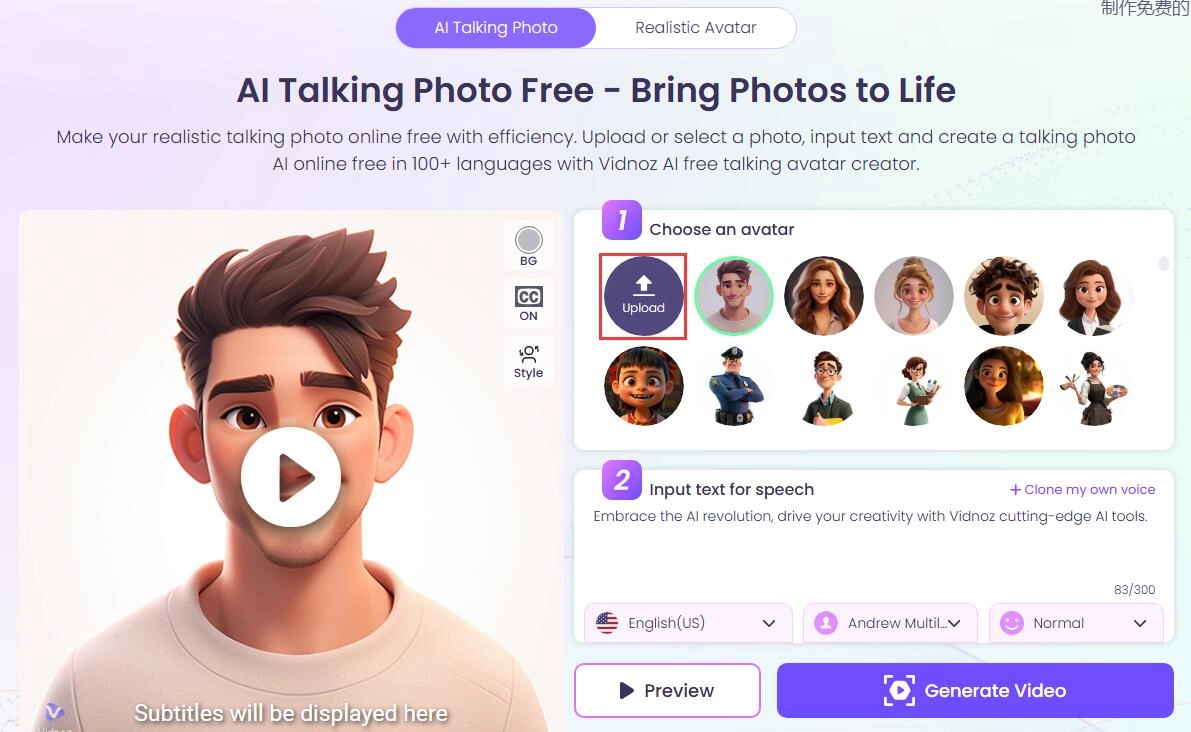
Step 2. Back to the talking head web page, click Upload, and upload your generated Stable Diffusion anime art photo.
Step 3. Input what you would like the anime character to say. Choose a proper voice, and then click Generate Video.
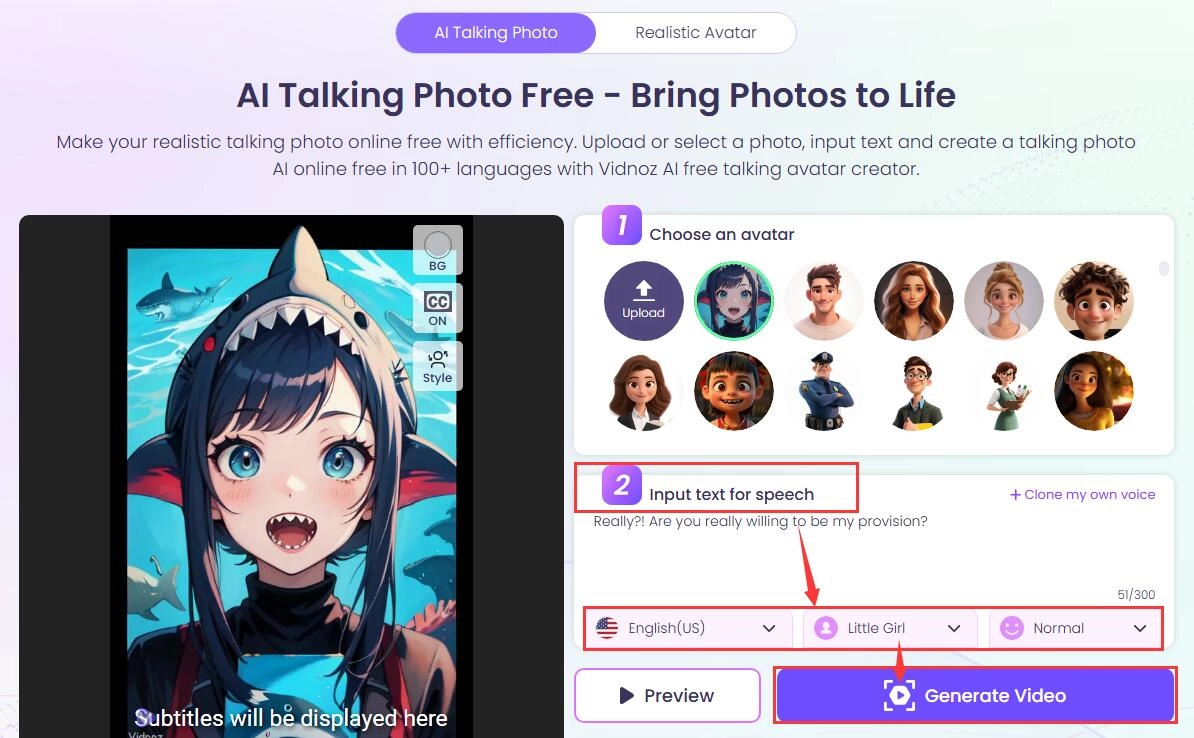
Let the AI process your video. When ready, check how it looks.
Your anime art will become vivid like real humans. If you like chatting with anime characters on an AI anime chatbot, you could also make it talk like real people using this app.
The Bottom Line
Going through all the best anime model Stable Diffusion checkpoints, have you decided which to download and try? Apart from the 10 best Stable Diffusion anime models, you might as well also check where to download, how to run Stable Diffusion models locally on your PC, and how to convert your anime art into animation.
Just don’t hesitate to try these stunning models and the AI tool brought by Vidnoz AI!
Lora Lopez
Lora Lopez, an IT- centric SEO writer, delivers concise tutorials and software reviews to solve common IT challenges. With a focus on user-friendly content about AI tools, she offers practical solutions and insights to help readers effortlessly navigate the dynamic world of information technology.
