Turn still images or text into dynamic videos in any style, with leading AI models readily. Try the smart AI video generator now - stunning, free, and instant!
5 Best Slowed and Reverb Generators: Unlock Emotional Power of Music
Rebecca Carr
Updated on
SHARE THIS POST
Create music with echo and deep tones right at home. All you need is the right slowed and reverb generator. Here are 5 top options, each with instructions.
Some songs have melodies you absolutely love, bringing up different emotions every time you listen. But after a while, even the best tracks can start to feel a little familiar—so you begin searching for versions performed by different instruments. And when there are no high-quality remixes out there, it can be frustrating......
Not anymore. With slowed and reverb generator, you can create dreamy new versions of your favorite songs. A brand-new track is born—filled with nostalgia and a touch of melancholy, ready to enjoy anytime or even share on social media.
This article introduces 5 top-tier slowed and reverb generators that transform music into slow-burning, atmospheric versions. If you can't wait to refresh your favorite tracks, start reading and exploring them now!
On This Page
What is Slowed and Reverb?
5 Best Slowed and Reverb Generators [2026 List]
1. Slowed+Reverb
2. Music Creator AI
3. OpenMusic AI
4. Imagine Art
5. Jammable
How to Slow and Reverb Songs? [Step-by-Step Guide]
Generate Slowed and Reverb Music Right at Your Fingertips
Conclusion
What is Slowed and Reverb?
Slowed and reverb songs may seem like nothing more than slower versions of the originals with some added sound effects, but the actual principle is a bit more complex.
Let's first take a quick look at what these two terms mean:
Slowed: As the word suggests, slowed refers to significantly reducing the tempo of the original track, making the melody sound more melancholic and softer.
Reverb: Reverb is short for reverberation. It refers to the phenomenon where sound continues to reflect and gradually fade after it is produced. In nature, this is similar to the echoes heard in a valley or a large empty room. It can also be artificially created to produce echo-like effects.
When these effects are combined, the entire track will be more dreamy and ethereal, giving listeners a strong, mist-like sense of immersion.
5 Best Slowed and Reverb Generators [2026 List]
I'm not a professional musician—can I still choose my own songs and add effects? In the past, this might have required a long learning process, but now, with well-tuned smart slowed + reverb generators, it can be done anytime with ease. Here, this article will recommend 5 best slowed + reverb generator candidates for you:
1. Slowed+Reverb
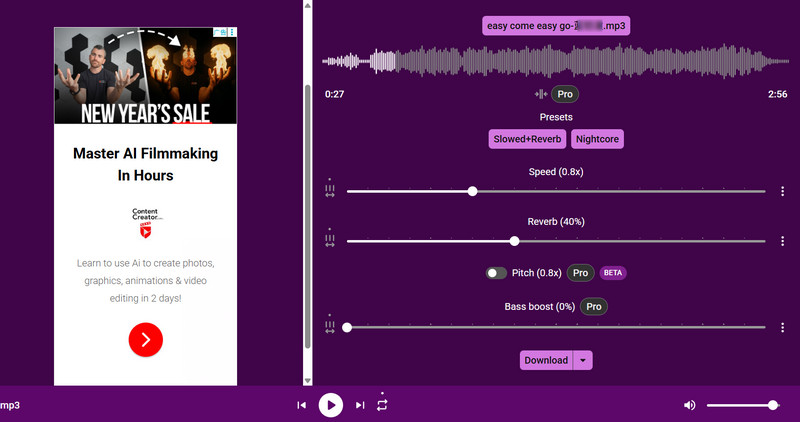
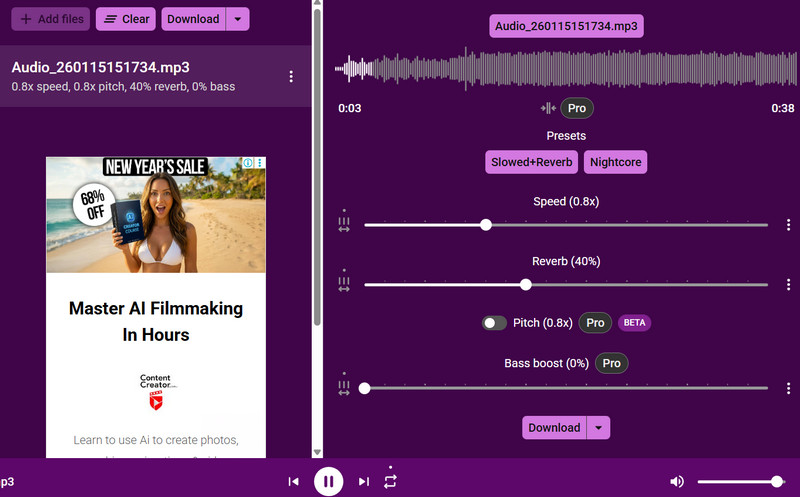
It is great to introduce the first slowed and reverb maker, Slowed+Reverb, which is extremely easy to use. This platform is designed specifically for this type of task and is a true specialist. Once a song is uploaded, a preview of the audio processed with the default settings is available immediately. The interface displays the slowed speed and reverb intensity through sliders and numerical values. For a deeper and richer sound, combining the effect with bass boost is recommended.
Pros
The platform automatically displays the edited effect based on preset parameters.
Adjusting audio settings is highly intuitive.
Includes an additional bass boost feature.
Cons
The free version only supports WAV as the output format.
Large advertising windows appear on the interface.
Slowed and Reverb Music Example:
2. Music Creator AI
Music Creator AI serves as a highly capable slowed and reverb generator. Beyond applying effects to local music files, it enables instant live recording and processing—a prominent audio recording button sits right next to the upload function. Whenever inspiration strikes, just open your mic and start singing; the next second, it delivers a more melancholic, deeper version.
Another commendable feature is Music Creator AI's clear separation of effects: you can apply Slow or Reverb individually, or apply both simultaneously with one click. In either case, you can manually adjust the speed and percentage.
Pros
Provides an online audio recorder.
Displays previews of each effect's result on the interface.
Supports a wide range of audio formats.
Cons
Does not support downloading processed music.
Slowed and Reverb Music Example:
3. OpenMusic AI
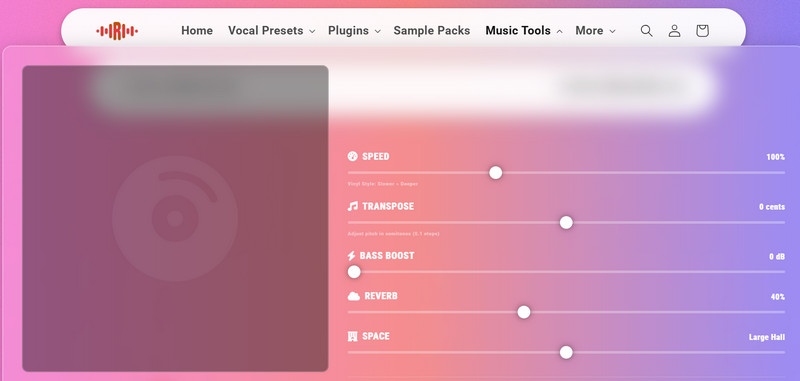
The most detailed AI music mashup has arrived: On OpenMusic AI's homepage, you'll find the most customizable features, including Tempo, Transpose, Bass Boost, Reverb, and Space. Additionally, you'll be delighted to discover audio clipping functionality here—simply select start and end points to achieve your desired effect. Everything is handled seamlessly without needing additional tools.
Pros
More detailed editing options.
Provides a basic audio clipper.
Completely free, completes tasks in seconds.
Cons
Only outputs audio in WAV format.
Slowed and Reverb Music Example:
4. Imagine Art
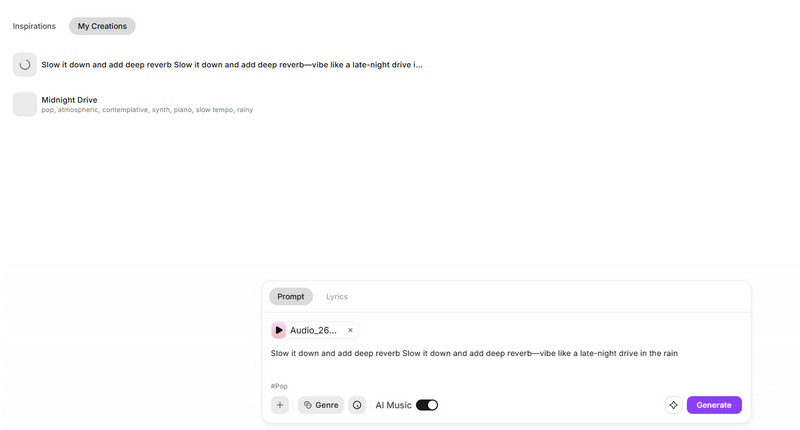
What makes Imagine Art unique is that it isn't a traditional editing interface—it appears as a chatbot. This means your creative space on this slowed and reverb generator is more flexible. Essentially, you don't edit by selecting options; instead, you write your own text commands.
You can either choose an existing song to edit or generate your own track from scratch. AI Music will polish it for you, and you can even write your own lyrics. Oh, and Don't hesitate to experiment with different genres: Pop, Rock, R&B, and more.
Pros
Offers multiple genres to explore—a groundbreaking feature.
Enables song creation from scratch.
Features an extensive library of musical assets.
Cons
Generation isn't free. Each use consumes credits.
Slowed and Reverb Music Example:
5. Jammable
If you frequently use YouTube to listen to music, Jammable slowed and reverb generator offers a convenient solution. It supports uploading audio via web links from YouTube, though uploading local files is also perfectly fine.
It provides more versatile options: not only can it seamlessly blend reverb with tempo slowing, but it can also create emotionally expressive effects. You can even take it further: select a melody with a quiet, gentle rhythm and transform it into a lullaby perfect for rainy nights or quiet evenings.
Pros
Supports direct audio uploads from YouTube.
Free and unlimited usage.
Cons
No intuitive slider for adjusting speed.
Slowed and Reverb Music Example:
How to Slow and Reverb Songs? [Step-by-Step Guide]
Reading through, you'll find that the operation of the above slowed and reverb converters is quite similar: upload audio, adjust parameters, preview, and output the final result.
This article details the step-by-step process of how to slow and reverb songs using Slowed+Reverb Studio as an example, based on practical experimentation, for your reference when using it in real scenarios.
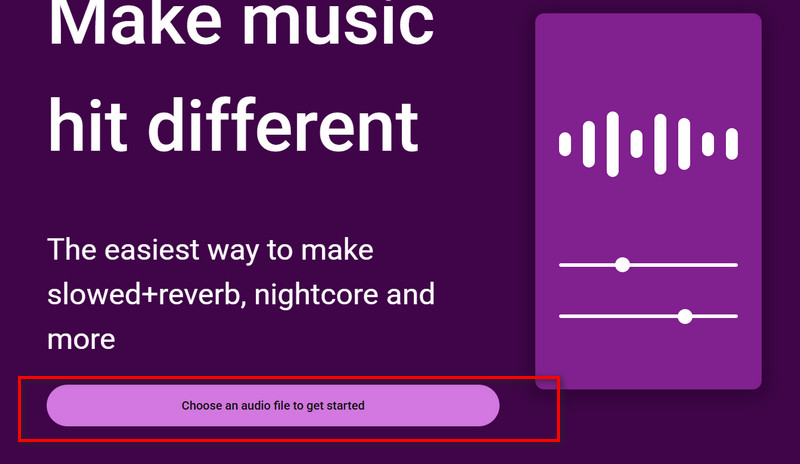
Step 1. Access the Slowed+Reverb Studio website interface. Next, click the prominent Choose an audio file to get started button and follow the prompts to select your song.
Step 2. Almost instantly, you'll receive the version processed by this slowed and reverb generator. Click the play button to preview the effect, then adjust the slowdown and reverb levels to your preference.
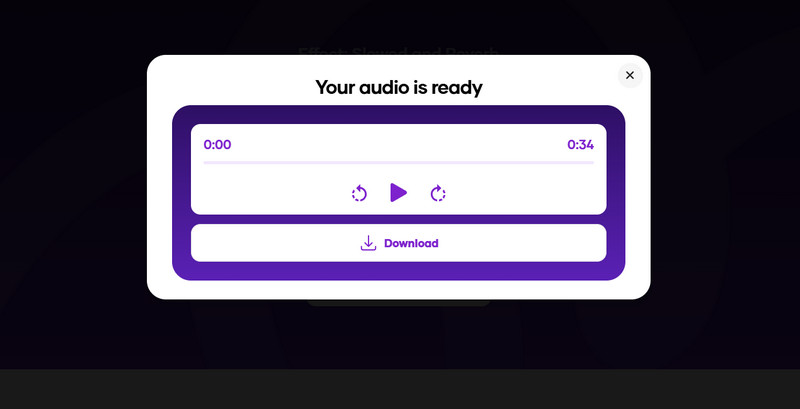
Step 3. Once you achieve the desired effect, click Download and select your output format.
Generate Slowed and Reverb Music Right at Your Fingertips
Not satisfied with existing music and eager to create something of your own? You can make a song from scratch—even without any music production experience. Simply decide on a theme and write the lyrics (and if you can't write lyrics, that's fine too—AI can help refine them once the theme is set). If inspiration runs dry, you can also choose a song as a style reference.
Vidnoz Free AI Music Generator
Free to generate & download for commercial use!
100+ combinations of musical styles, moods and themes
Vidnoz AI Music Generator offers even more possibilities. Add emotion, pick any genre you like, and even choose the instruments for the background music, such as piano, guitar, violin, and more. There's plenty of room for trial and error, since Vidnoz generates two tracks at once, letting you decide which one to keep.
100% free slowed and reverb music generator: No payment required, no lengthy sign-up or login process. Just enter your prompt—there are no usage limits.
Instant one-click creation, no installs required: Everything runs online. No software downloads—every step happens in the browser.
Professional-quality audio outputs: Vidnoz AI music generator is trusted by professional composers, video creators, and advertisers, and is also ideal for creators on TikTok, Instagram, and more.
A complete toolkit for all music production goals: From choosing styles and accompaniments to writing lyrics and exporting files, Vidnoz AI handles everything—you only need an idea to end up with a finished song.
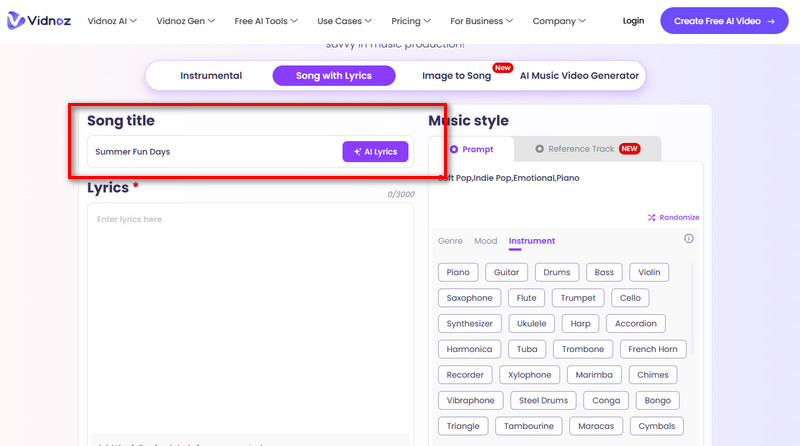
Now, here's how to convert text to music with Vidnoz:
Step 2. Enter your lyrics in the Lyrics field. If you have no inspiration, click AI Lyrics to let Vidnoz write them for you. Then select the genre, instruments, and emotional tone on the right.
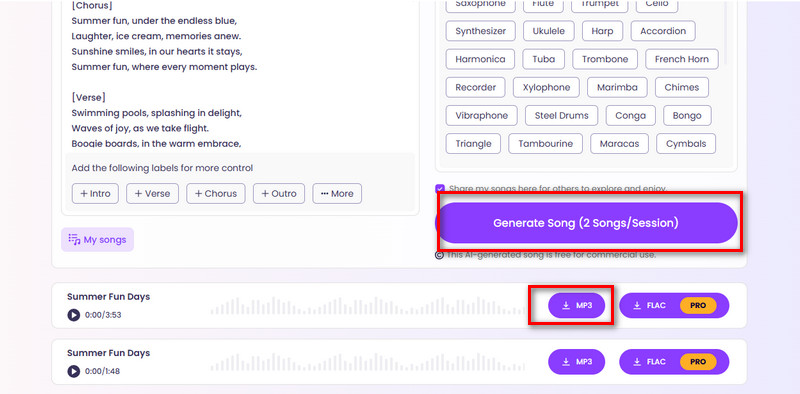
Step 3. Click Generate Song to start creating.
Step 4. After the results are ready, preview the two samples, choose the one you like, and select a download format.
If the result is especially satisfying, enable Share my songs here for others to explore and enjoy, so others can listen to and rate your music.
Vidnoz can even create a matching music video for your song. Simply switch to the Vidnoz AI music video generator on the song creation page.
Conclusion
Here are slowed and reverb generators, each with its own strengths: some offer detailed tuning options, some work at lightning speed, some support a wide range of formats, and others can even pull audio directly from YouTube. If you're looking to create tracks with a deep, slow, melancholic, or peaceful tone, you're in the right place. A full-from-scratch music creator, Vidnoz, is also included as a bonus.
Guides are provided for both creating slowed and reverb effects and composing your own music. Feel free to unleash your musical creativity here.
Rebecca Carr, with over 8 years of experience in SEO writing, garners a wealth of knowledge about online recorders and VPNs, staying up-to-date with the latest algorithm changes and best practices in SEO and content marketing.