Singing dog videos are trending fast on TikTok, Instagram, and YouTube. People enjoy watching a singing dog video because it feels cute, funny, and surprisingly real. These videos often go viral as memes, reels, and short clips. The trend keeps growing because AI tools now allow anyone to create singing dogs without editing skills.
Users only need a dog photo, music, and a few clicks. Many people search for a free AI video generator to make these videos quickly. In this guide, you will learn how to create AI singing dog videos free using four easy and practical methods.
- On This Page
-
What Is a Singing Dog Video?
-
Popular Singing Dog Videos on TikTok
-
How to Create a Singing Dog Video Online (3 Methods)
Method 1: Create AI Dog Singing Video with Image & Text
Method 2: Generate Lip-Sync Pet Singing AI Free with Template
Method 3: Create Singing Dog Videos with Online Video Editor
-
How to Make a Singing Pet Video with AI App
How to Get Funny Singing Dogs with YouCam Video
-
Inspirations of Other AI Trend Dog Video Creation
What Is a Singing Dog Video?
A singing dog video shows a dog moving its mouth like it sings a song or speaks words. AI creates this effect using mouth movement animation and lip-sync tools. This trend goes viral because it feels funny and cute at the same time. Many creators turn pet photos into short videos and share them as memes, reels, or shorts. A good singing dog video often gets strong likes and shares.
Popular Singing Dog Videos on TikTok
Here are three popular and funny examples of singing dogs on TikTok:
APT Singing Dog
Dog Singing with Piano
Pet Barking to a Beat
How to Create a Singing Dog Video Online (3 Methods)
Now let’s move to the most useful part. Below are three easy online ways to create a singing dog video without hard editing skills.
Method 1: Create AI Dog Singing Video with Image & Text
Vidnoz Image to Video AI allows users to create a singing dog video using just one dog photo and a short text prompt. The tool works fully online, so users do not need to install software. It uses AI dog singing features to add natural mouth movement animation that matches the music or text. This method suits beginners who want quick results and fun content. It also helps create singing dog memes and videos that look smooth and share-ready.
Convert Image to Video AI Online - Free
- Create a video from an image quickly for free.
- Use various AI models to turn photos into videos.
- Download and share the AI-generated video at no cost.
Convert Image to Video
Highlights of Vidnoz Image to Video AI
- Turn a static dog photo into a fun singing dogs video with natural face and mouth movement that looks lively and engaging.
- Use text prompts to control AI dog singing actions, such as singing style, mood, and timing, without any editing skills.
- Get clear video output with smooth lip movement and natural mouth motion that matches music or spoken audio well.
- Works as a free AI video generator for basic use, making it easy for beginners to create a singing dog video online.
How to Make a Singing Dog Video with Image to Video AI
Step 1: Open Vidnoz Image to Video AI in your web browser and log in to your account to access the image-to-video feature.
Step 2: Upload a clear and front-facing photo of your dog so the AI can detect the face and mouth properly.
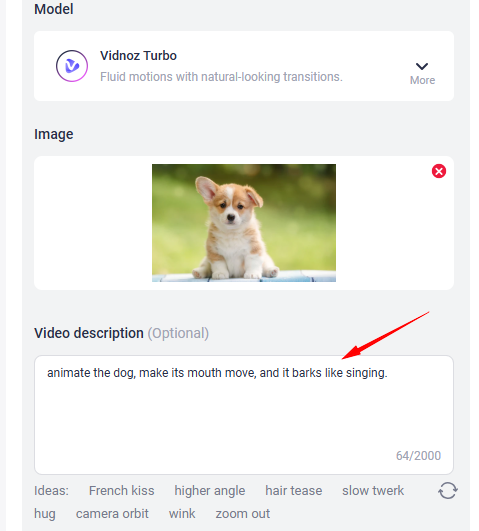
Step 3: Type a short text prompt such as “dog singing a happy song” to guide the AI on how the dog should move and sing.
Step 4: Click Edit to add music or audio, then preview the result and generate your final singing dog video.
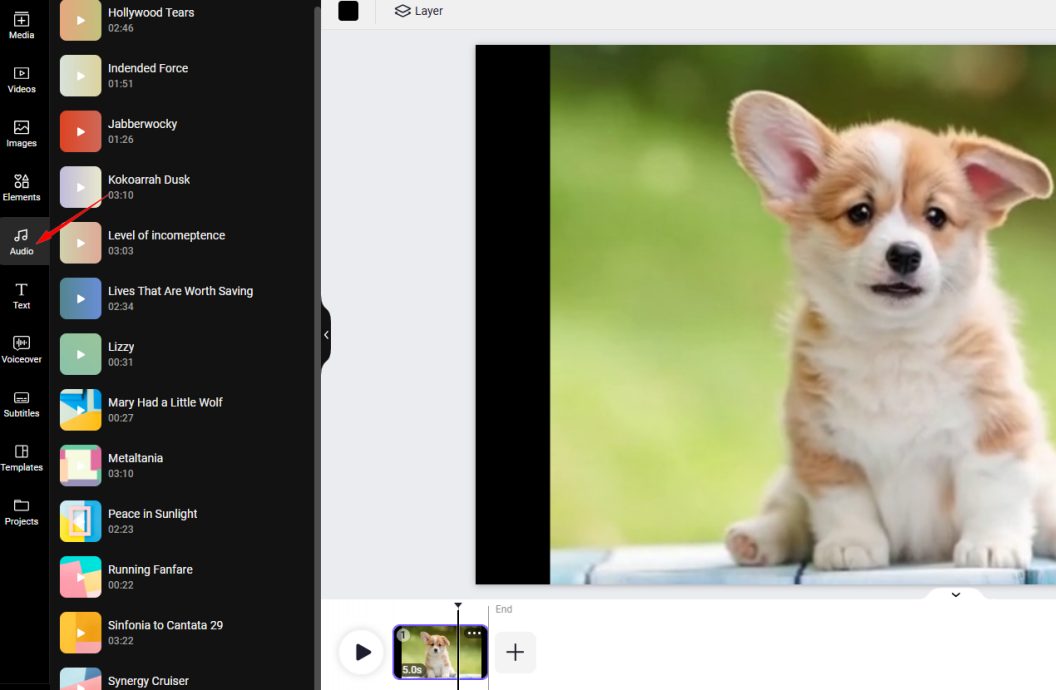
This method works well if you want to learn how to make dog singing video content fast.
Method 2: Generate Lip-Sync Pet Singing AI Free with Template
Vidnoz AI Video Generator helps users create a singing dog video using ready-made templates. The tool works fully online, so users do not need to install any software. It supports lip sync AI online free, which allows the dog’s mouth to move in sync with music or spoken text. This method works best for users who want quick results with less setup. It also helps create fun singing dogs videos for social media in just a few clicks.

Vidnoz AI - Create Free Engaging AI Video with Talking Avatar
- Easily create professional AI videos with realistic avatars.
- Text-to-speech lip sync voices of different languages.
- 2800+ video templates for multiple scenarios.
Highlights of Vidnoz AI Video Generator
- Use ready-made singing dog video templates that save time and help beginners start without design work.
- Access built-in music, images, and AI filters to improve the look and sound of AI dog singing videos.
- Enable auto lip-sync from text or audio so the dog’s mouth moves naturally with the selected sound.
- Add captions and subtitles in one click, making the video easier to watch and share on social platforms.
- Support a video translator to change voice style or language while keeping lip movement aligned.
How to Create AI Singing Puppy Free with Vidnoz AI
Step 1: Sign up for Vidnoz AI Video Generator and open the dashboard to start a new singing dog video project.
Step 2: Click Create Video to enter the editing page. Pick a suitable canvas to start a blank or use a ready video template.
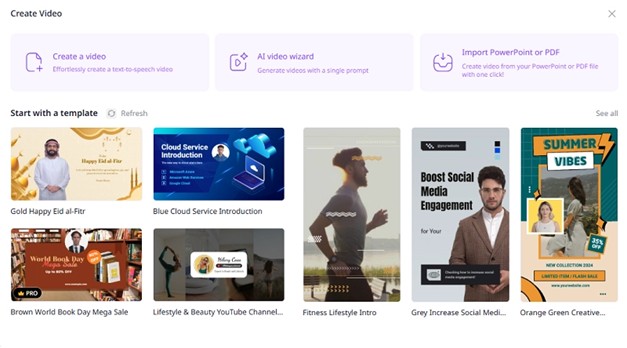
Step 3: Upload your dog’s image, add music or text speech, preview the result, and export your final video.
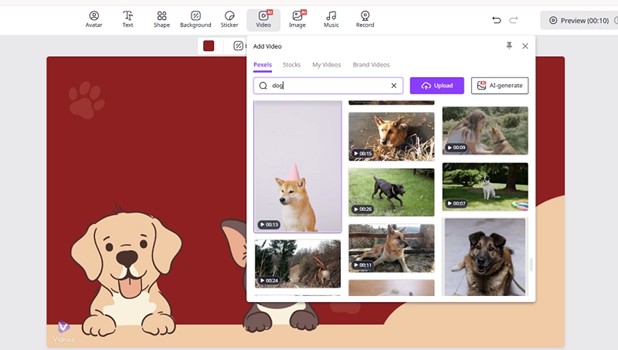
This method suits users who want pet singing AI free tools with less effort. (Create more studio-level singing MV with Vidnoz AI Music Video Generator!)
Method 3: Create Singing Dog Videos with Online Video Editor
Wondershare Filmora allows users to create a singing dog video using AI image-to-video tools and simple editing features. This online and desktop editor suits users who want more control over sound, timing, and visuals. Filmora helps adjust mouth movement animation, add background music, and fine-tune clips easily. This method works well for users who already have a short dog video or photo and want to turn it into a singing dogs clip with better control.
Highlights of Wondershare Filmora
- Use AI image-to-video tools to turn dog photos into short AI dog singing videos with smooth motion.
- Add music, sound effects, and voice tracks easily to match the dog’s mouth movement.
- Edit clips on a simple timeline that helps beginners control timing and video flow.
How to Design an AI Pet Singing Video with Filmora
Step 1: Open Filmora on your computer and select Image to Video from the home screen to start creating a singing dog video.
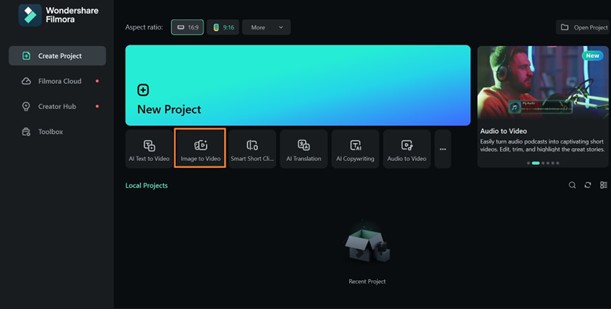
Step 2: Choose Custom mode so you can create a video that is not limited to Filmora’s preset templates.
Step 3: Upload your dog photo, set the resolution and aspect ratio, then enter a short and simple text prompt describing how the dog should sing. Click Generate and wait a few minutes.
Step 4: To create a video with two dogs, switch to Stitch Mode, upload the second photo, enter your text prompt, and submit the project for generation.
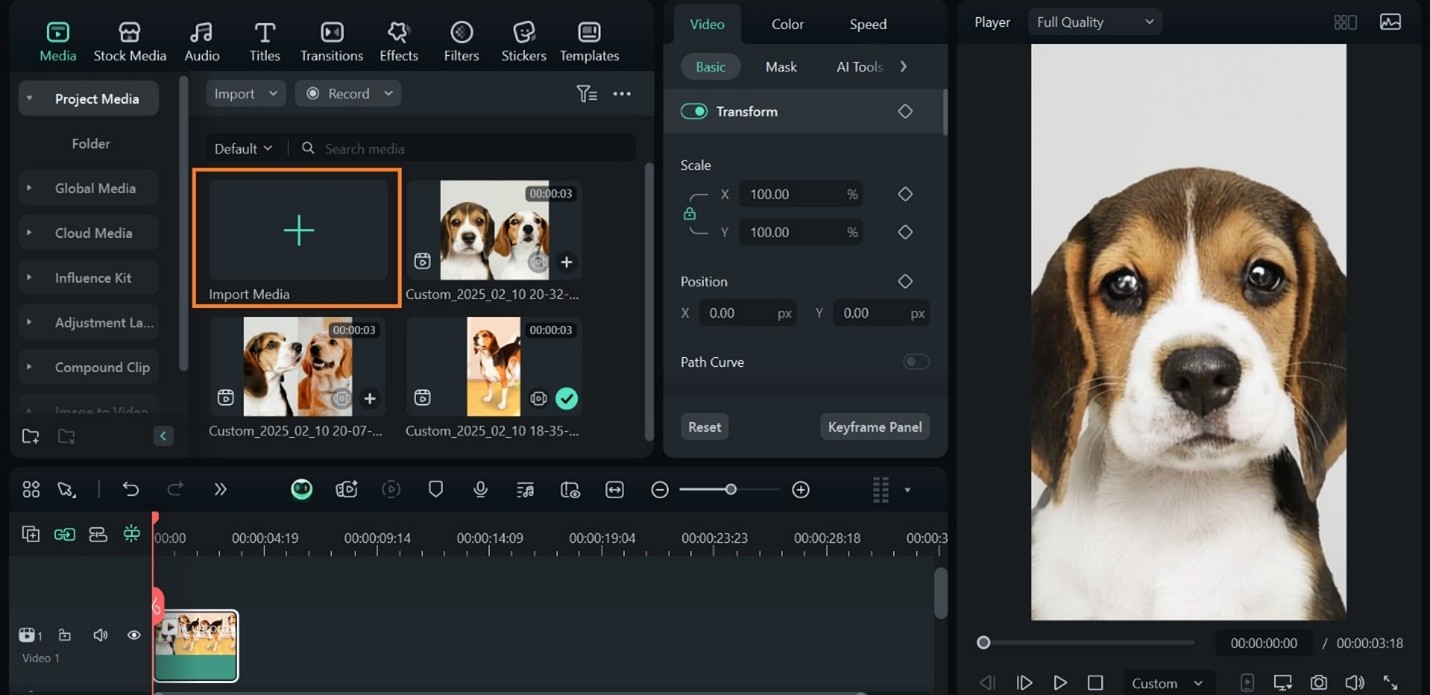
Step 5: Once the video is ready, drag it to the timeline and add music by importing audio from Project Media, then preview and export your final singing dog video.
Remove watermark from video online free if you’re troubled by default video watermarks.
How to Make a Singing Pet Video with AI App
If you prefer mobile editing, YouCam Video works as a free singing pet app that helps users create fun pet videos on their phones. This app uses AI face animation to make dogs sing or speak. It suits beginners who want quick results for reels and shorts. Users can create a singing dog video funny style clip without any editing experience.
How to Get Funny Singing Dogs with YouCam Video
Step 1: Install and open YouCam Video on your mobile phone, then tap Image to Video on the home screen to get started.
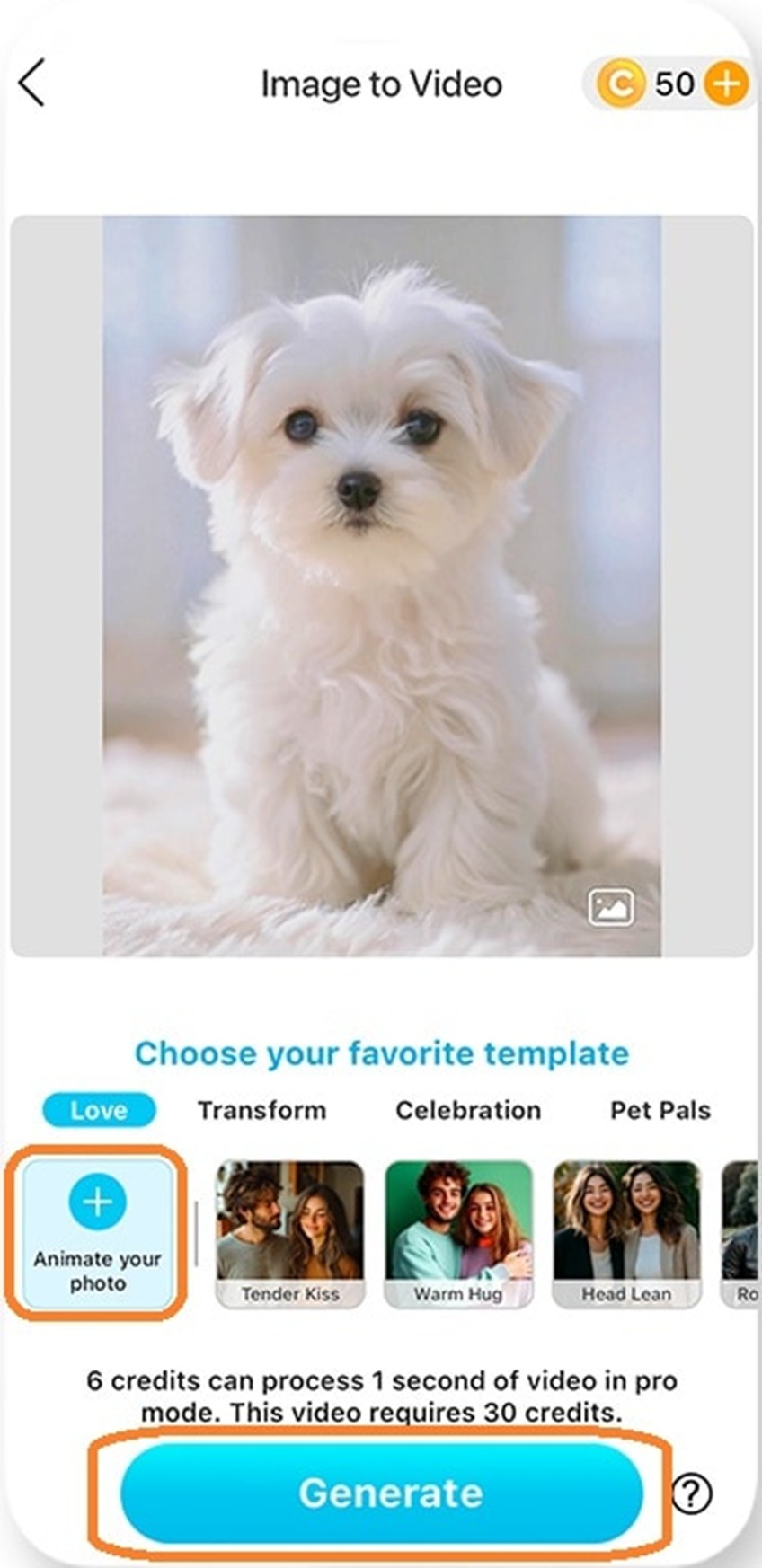
Step 2: Upload your dog photo, select Animate Your Photo, and enter a short prompt like “make the dog’s mouth move and sing.”
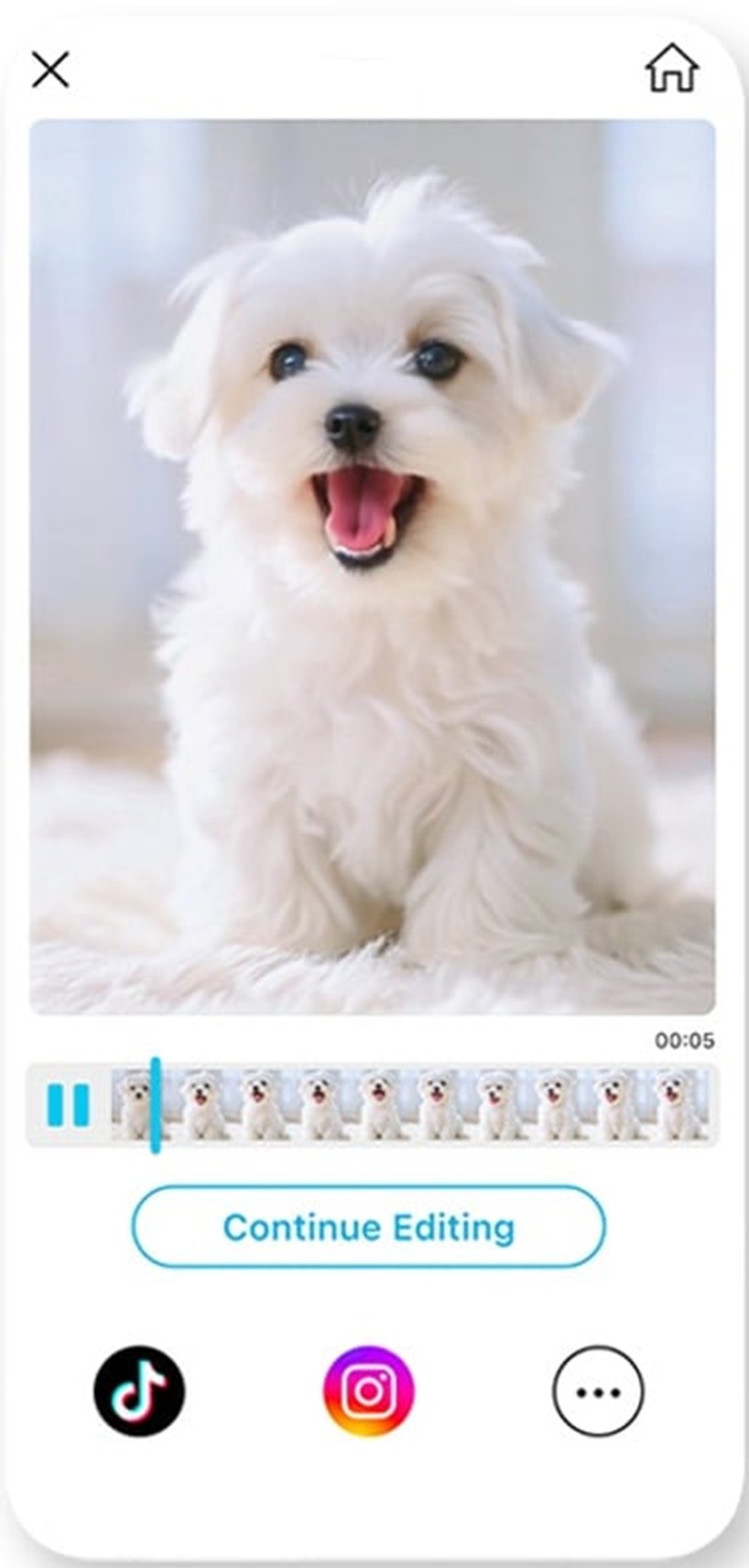
Step 3: Set the video duration, tap Generate, wait for the process to finish, and save or share your singing dog video directly to social media.
Inspirations of Other AI Trend Dog Video Creation
Besides singing dogs, creators now try many other AI pet video styles.
1. AI Talking Dogs
AI talking dogs use talking photo AI tools to make pets speak human words. These videos feel fun and work well for stories.
Example:
2. AI Pet Dancing
AI pet dancing videos show dogs moving to music like a dance cat. These clips attract high views because they feel playful.
Example:
3. Dog AI Kissing
Dog AI kissing videos show pets giving kisses using AI face motion. These videos feel cute and warm.
Example:
The Bottom Line
Creating a singing dog video is now simple with the help of modern AI tools and mobile apps. Anyone can turn a dog photo into a fun and shareable video without editing skills or software knowledge. Vidnoz provides image-to-video AI, ready-made templates, music options, and lip-sync features in one place. These tools help users create singing dogs, funny pet clips, and viral short videos for social media. You can also adjust audio, captions, and visual effects easily. Sign up for free, explore Vidnoz AI video generators, and start making your own AI dog singing videos today.
Convert Image to Video AI Online - Free
- Create a video from an image quickly for free.
- Use various AI models to turn photos into videos.
- Download and share the AI-generated video at no cost.
Convert Image to Video