Turn still images or text into dynamic videos in any style, with leading AI models readily. Try the smart AI video generator now - stunning, free, and instant!
Seaweed AI Video Generator: Features, Limitations & Best Alternative
Lane Maxwell
Updated on
SHARE THIS POST
Explore Seaweed AI video generator, its features, limitations, and why Vidnoz AI is the best alternative for high-quality, unrestricted AI video creation.
Seaweed AI is a new video generation tool developed by ByteDance and PixelDance. The name Seaweed actually comes from Seed-Video, showing how it learns visual details from tons of multimodal data.
As one of ByteDance's latest AI innovations, the Seaweed AI video generator has caught plenty of attention. In this guide, you'll learn what it can really do, where it falls short, and which alternative might be an even better choice.
On This Page
What Is Seaweed AI and How Does It Work?
How to Use Seaweed AI to Make Video: A Step-by-Step Guide
Limitations of Seaweed AI Video Generator
Seaweed AI Strong Alternative - Vidnoz AI Video Generator
Seaweed AI vs Vidnoz AI Video Generator: Full Comparison Table
FAQ About Seaweed AI
The Bottom Line
What Is Seaweed AI and How Does It Work?
Seaweed AI is a lightweight AI video generation model developed by ByteDance. It's designed to create high-quality videos in a wide range of styles—from realistic short clips to cinematic visuals—all with rich detail and impressive clarity.
What truly makes it stand out is its powerful Diffusion Transformer model, equipped with around 7 billion parameters and trained using computing power equivalent to 1,000 H100 GPUs. It learns from massive amounts of text, images, and videos to understand the world and generate lifelike motion, natural expressions, and emotional realism. The Seaweed AI video model allows users to produce videos of various resolutions, lengths, and aspect ratios based on their input prompts. Here's a quick look at its main features:
Key Feature
Seaweed AI Text to Video: Generate a full video in just a couple of minutes from a simple text prompt.
Seaweed AI Image to Video: Turn an image into a dynamic video by using it as a reference or first frame.
Realistic Short Clips: Create highly detailed and dynamic scenes with realistic human movements, gestures, and even lip-syncing.
Given this flexibility, it's easy to see why the Seaweed AI video generator has gained so much attention in the short-form content and TikTok creator space—it offers freedom, completeness, and quality all in one package.
How to Use Seaweed AI to Make Video: A Step-by-Step Guide
Alright, it looks like the ByteDance Seaweed AI video generator performs impressively when it comes to features. But here's the big question—is it actually easy to use? Let's walk through how to use Seaweed AI step by step.
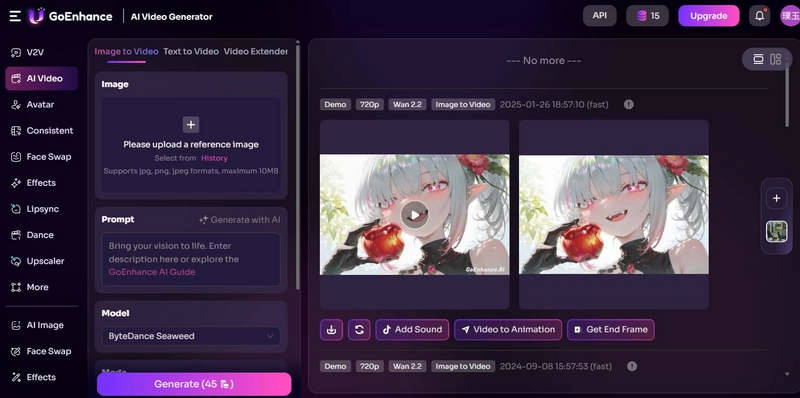
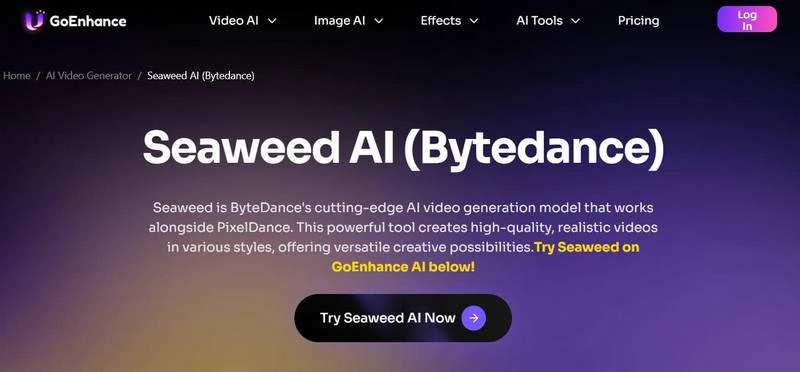
Step 1: Start by launching Seaweed AI through the GoEnhance AI platform and open the video generation interface.
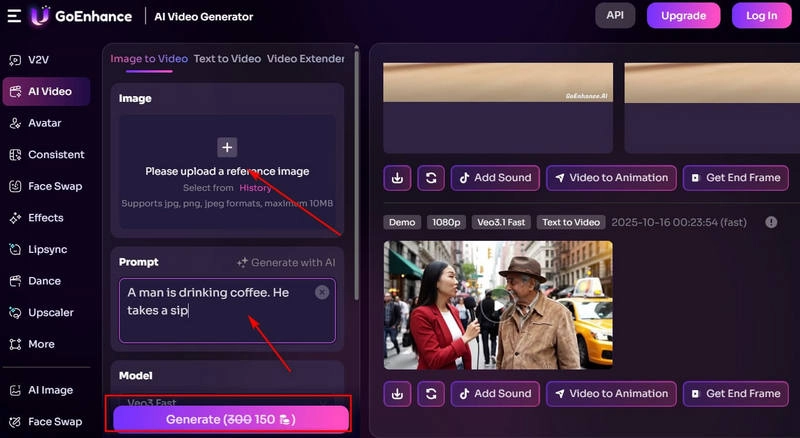
Step 2: Upload your prompt and reference materials. Enter your text prompt in the box under Prompt, then click the + icon under Image to upload an image you'd like Seaweed AI to use as a reference.
Step 3: The platform automatically sets Seaweed as the default generation model. Simply click Generate to start the process.
Within about two minutes, your video will be ready. Click Preview to check the result - and if you're happy with it, hit the download icon to save it locally.
Limitations of Seaweed AI Video Generator
You shouldn't decide to use a tool based only on its advantages—it's equally important to know its downsides. This section lists several issues that the Seaweed AI video generator may have, which could affect your experience.
Limited Free Trial
Seaweed AI is not a free AI video generator. It only provides one trial for each free user, and the output video quality is limited to 480p with a short generation time. To unlock more opportunities and other features—such as saving watermark-free videos, generating longer clips, or setting videos to private, you must subscribe to a paid plan.
Minor Issues in Generated Videos
In most cases, Seaweed AI video is clear and realistic. However, if you test multiple actions or scenes, you may encounter problems like flickering, blurred faces, or distorted graphics.
Unstable Text Generation Results
Seaweed AI video generator performs better when generating videos based on images. In comparison, its text to video AI generation can sometimes fail to fully reproduce your prompt.
Seaweed AI Strong Alternative - Vidnoz AI Video Generator
Satisfied with the results from Seaweed AI video generator, but ran out of credits for another try? If you don't want to deal with such limitations, the best option is to try the Seaweed AI alternative—Vidnoz AI Video Generator. It is a free model that lets you create videos of any kind without credit restrictions. It comes with a huge media library, including realistic avatars and voice options. You can build new content from scratch or use ready-made templates suited for different industries.
Vidnoz AI - Create Free Engaging AI Video with Talking Avatar
Easily create professional AI videos with realistic avatars.
Text-to-speech lip sync voices of different languages.
2800+ video templates for multiple scenarios.
Of course, Vidnoz perfectly covers everything the Seaweed AI video creator can do—and more.
Key Feature
Text/Image to Video: This text/image to video AI free tool can turn your prompts and reference images into lifelike videos. You can even customize character actions in your clips.
Avatar Videos with Narration: No need to appear on camera. Vidnoz offers digital avatars of various genders, ethnicities, and ages. Simply set a background, choose a voice, and add your script to produce professional videos for training or education.
Create Your Unique Digital Avatar: Vidnoz can clone your face and voice to build a digital version of yourself—no filming required.
Make Characters Speak Any Language: With support for over 140 languages and 1,800+ AI voices, Vidnoz lets you produce multilingual videos. You can even translate existing ones and achieve perfect AI lip sync for natural-looking speech.
How to Create Free AI Video with Vidnoz AI?
Here's how to make a video from an image:
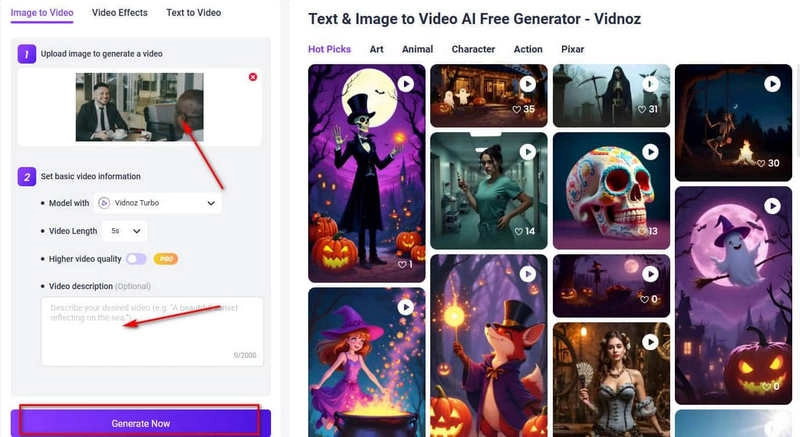
Step 1: Launch Vidnoz AI by clicking the button below and open the workspace. On the left panel, go to AI Tools, then select Image to Video.
Step 2: On the new page, click Upload an image to add your reference photo. Then, set your desired video length and quality. If you have additional scene or motion details, enter them in the text box.
Step 3: Click Generate Now to start creating your video.
Seaweed AI vs Vidnoz AI Video Generator: Full Comparison Table
Just reading the descriptions might not make it immediately clear why Vidnoz stands out as the best alternative to the Seaweed AI video creator or how it improves on Seaweed AI's weaknesses. In this section, let's take a look at a comparison table to see the differences more clearly.
Seaweed AI
Vidnoz AI
Core Features
Text-to-video, image-to-video, realistic short clips
Text/image-to-video, avatar video creation, digital human voice cloning, AI voiceover
Video Quality
Up to 480p (free); higher resolutions for paid users
High Quality for free users
Realism
Highly realistic visuals but occasional flicker or distortion
Smooth motion with customizable avatars and natural lip sync
Ease of Use
Requires GoEnhance AI platform to run
Fully browser-based, no extra setup required
Free Trial Limitations
One free generation; credit-based system
Unlimited free video generation
Language
Basic
140+ languages, 1800+ AI voices with AI lip sync
Performance
May produce flicker, blur, or text inaccuracies
Stable performance with consistent output quality
Ideal For
Short creative clips, TikTok-style videos
Marketing, education, training, and professional presentations
FAQ About Seaweed AI
Have more questions about the Seaweed AI video generator? Here are some common answers:
No. It only offers new users a single free trial. For unrestricted use, a subscription is required. The Seaweed AI price starts at $8 per month. For users who don't want to pay, Vidnoz is a better alternative.
Free users can only export videos up to 480p. Paid users enjoy clearer output. As an alternative, Vidnoz provides higher-quality base resolution for all users.
It's ideal for content creators, short-video influencers, and users exploring AI video generation. Vidnoz is similar in this regard, offering easy-to-use features with a large library of video templates and assets.
The AI video model called Seaweed is developed by ByteDance. It can generate realistic videos from text, images, or short clips and targets short-video creators, like TikTok users.
Seaweed AI video creator has limited multilingual support. In contrast, Vidnoz AI supports over 140 languages and 1,800+ AI voices, making it more user-friendly for creators needing translations.
The Bottom Line
You probably know what Seaweed AI is and how it performs. This tool produces clear visuals, with natural character and scene movements, and coherent storylines. However, its free version has heavy usage limitations.
If you don't want to be constantly interrupted by credit-limited pop-ups, use Vidnoz AI as an alternative. Its features and performance rival Seaweed AI, and in areas like action generation, unlimited free creation, and multilingual support, it even outperforms Seaweed AI. Head to the website now, prepare your assets and prompts, and let Vidnoz bring your visuals to life!
Vidnoz AI - Create Free Engaging AI Video with Talking Avatar
Easily create professional AI videos with realistic avatars.
Text-to-speech lip sync voices of different languages.
Lane Maxwell is an experienced technology industry editor specializing in providing users with actionable advice and insights. Her articles have helped millions of readers find solutions easily.






![Top 5 Online AI TV Show Generators to Create Your Own TV Show [2026]](https://www.vidnoz.com/bimg/best-ai-tv-show-generators.webp)
![Best 5 Dragon Ball Character Creators Online & App [2026]](https://www.vidnoz.com/bimg/dragon-ball-character-creator.webp)
