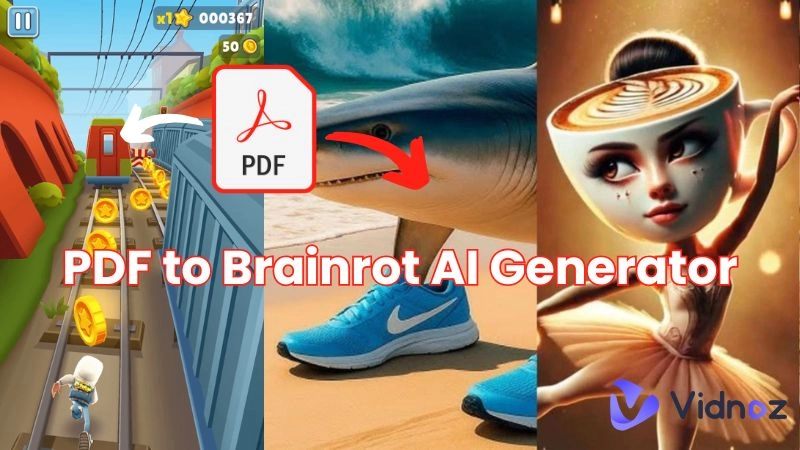
Welcome to the chaotic, meme-fueled world of brainrot content—a style that dominates TikTok, YouTube Shorts, and Instagram Reels. If you’ve ever been sucked into a video with Subway Surfers gameplay, robotic narration, and overstimulating edits, you've witnessed brainrot. This genre, chaotic by design, is engineered for maximum attention retention.
But here's the twist—what if you could turn that style into a tool? Using PDF to brainrot AI, you can transform academic research, technical manuals, or even classic novels into digestible, hilarious short videos. It’s not just satire anymore—it’s how Gen Z (and even brands) are learning, laughing, and going viral. This guide explores how to create a PDF to brainrot video using the top PDF to brainrot free tools available.
- On This Page
-
Reasons to Convert Dry PDFs to Brainrot
-
Top 5 PDF to Brainrot Free AI Tools for Viral Brainrot Video Creation
#1. ImageToVideo Free PDF to Brainrot Video Generator Online
#3. StoryShort PDF to Brainrot Video Generator
#5. Galaxy.ai PDF to Brainrot
-
How to Turn a Dull PDF to Brainrot Video Free
-
Bonus! Generate Engaging Video from PDF with Vidnoz AI
Reasons to Convert Dry PDFs to Brainrot
Why would anyone want to turn a serious document into chaotic video snippets? Turns out, there are good reasons:
- Brainrot video simplifies/sums up long PDF content: Attention spans are short. A PDF to brainrot video breaks down heavy content into bite-sized summaries.
- Short brainrot media improve engagement and are better for sharing: TikTok-style edits make static PDFs social-media-ready. What once bored readers now becomes an eye-catching meme or mini-lesson.
- Addictive brainrot content is more likely to go viral on social media: Platforms boost chaotic videos that keep users glued.
- It’s a new form of satire/meme: PDF to brainrot can parody the content it presents—think ironic versions of academic journals or corporate memos.
Top 5 PDF to Brainrot Free AI Tools for Viral Brainrot Video Creation
Below are five standout tools to turn any PDF into a shareable, scroll-stopping brainrot video. All tools were tested for interface usability, customization options, and video output quality.
#1. ImageToVideo Free PDF to Brainrot Video Generator Online
Best for: Basic brainrot video generation from PDF file or text
Free credits: 1 per PDF to Brainrot video
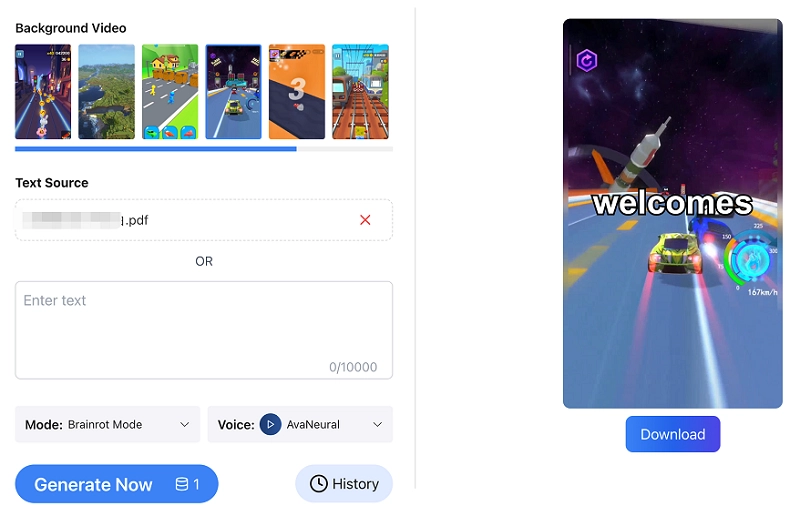
ImageToVideo AI's Free PDF to Brainrot Video Generator Online aims to transform static PDF content into engaging, viral-ready "brainrot" videos, perfect for platforms like TikTok. You can either upload a PDF file directly or paste text from their PDF, which is useful for documents that aren't easily scanned. The tool then allows for customization of sound tones and the selection of popular TikTok video backgrounds, such as Subway Surfers gameplay, to enhance viewer engagement. After generation, videos can be rendered in 1080p and directly published to various social media platforms.
Key Features
- Converts PDFs or text into short, humorous "brainrot" videos.
- Offers customizable voice tones for reading PDF text.
- Provides trending TikTok video backgrounds (e.g., Subway Surfers).
- Designed for quick content creation and social media virality.
#2. PDFtoBrainrot.org
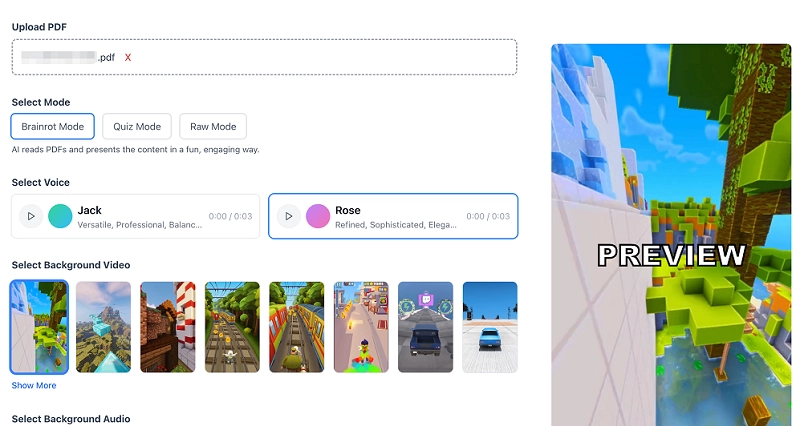
Best for: Cost-free PDF to game-themed Brainrot video conversion
Free credits: 3 credits per day (each credit allows one PDF to Brainrot free generation).
PDFtoBrainrot.org offers a free online tool to convert PDFs into "brainrot" style videos. It allows you to upload a PDF or paste text, then choose from various AI voice styles (like Jack or Rose), background videos, and background music tracks (e.g., Fluffing a Duck, Monkeys Spinning Monkeys). The generated videos can be downloaded in 720p MP4 format. While it provides a functional free tier, the presence of on-page and pop-up advertisements can detract from the user experience.
Key Features
- Converts PDFs, notes, URLs, essays, and text into "brainrot" videos.
- Offers multiple AI voice options.
- Allows selection of background videos and audio.
- Supports MP4 download in 720p resolution.
- Provides 3 free generations daily.
#3. StoryShort PDF to Brainrot Video Generator
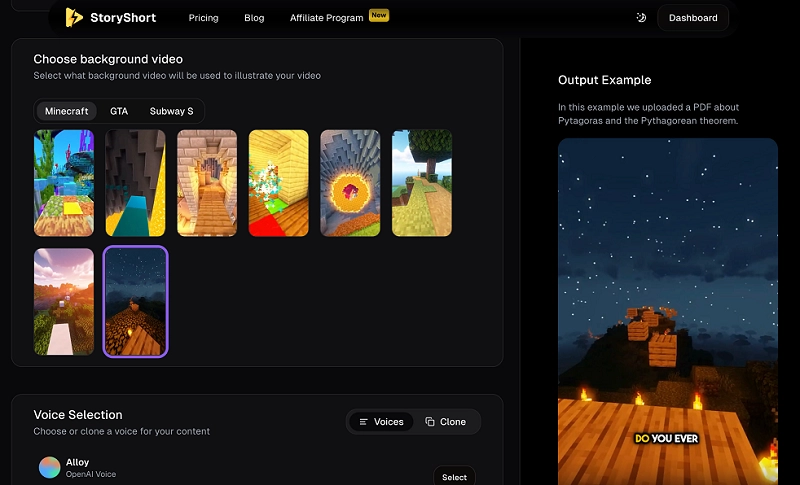
Best for: Transforming PDFs into short, viral-style Brainrot videos quickly
Free credits: 0
StoryShort’s PDF to Brainrot Video Generator transforms any PDF into fast-paced, viral-style videos perfect for TikTok, Instagram Reels, and YouTube Shorts. With support for various video types like faceless videos, gameplay edits, POVs, and even the unique Italian Brainrot, it brings flexibility to your content creation. You can select Minecraft or GTA-style backgrounds, customize voices (Echo, Alloy, etc.), and add popular soundtracks like Bladerunner 2049 or Snowfall. Once the video is generated, it allows for further edits as well.
Key Features
- Multiple Brainrot styles including UGC, Italian, and Gameplay
- PDF-to-video in 30 seconds to 3 minutes
- Voice cloning and OpenAI voice integration
- Post-generation edits: captions, music, pace
- Optimized for vertical formats and social virality
#4. Revid.AI
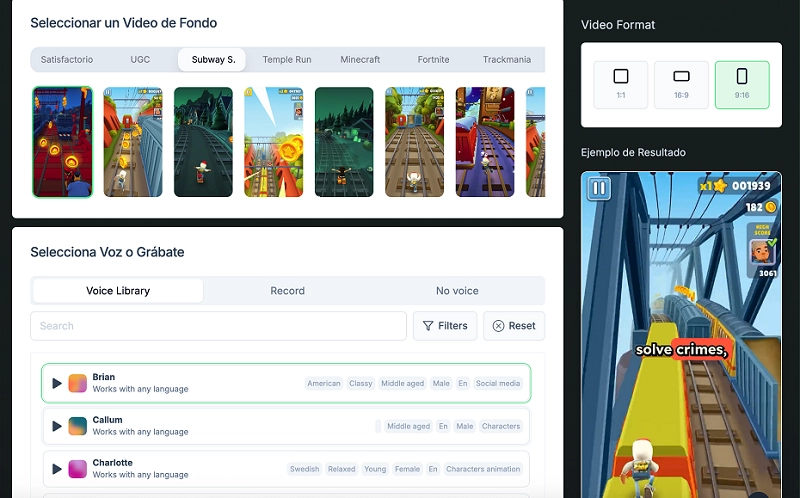
Best for: More flexible settings on video games, audio, background music, etc.
Free credits: Few minutes of generation time free
Revid.AI's "PDF to Brainrot Video Generator" stands out for its extensive customization options, allowing users to transform PDFs into viral-style videos with significant control over the final output. The platform's interface, exclusively in Spanish on this specific page, offers a rich selection of background videos like Subway Surfers and Minecraft Parkour, alongside a vast library of AI voices with diverse accents, ages, and tones (including real-time recording). The tool supports different aspect ratios, catering to platforms like TikTok, Instagram Reels, and YouTube Shorts.
Key Features
- Extensive AI voice library with real-time recording option.
- Diverse selection of trending background videos (e.g., Subway Surfers, Minecraft).
- Customizable background music and ability to generate music.
- Supports multiple aspect ratios (1:1, 16:9, 9:16) for social media.
- Focuses on generating viral-ready video content from PDFs.
#5. Galaxy.ai PDF to Brainrot
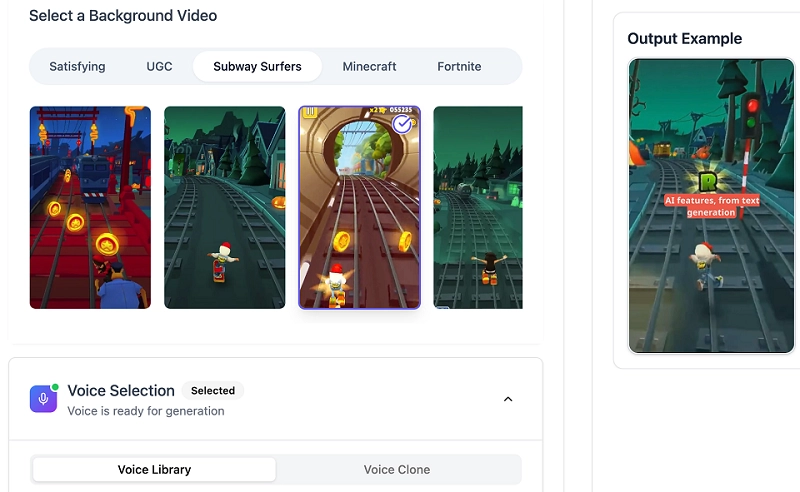
Best for: Auto transform PDF into brainrot with celebrity voice narration
Free credits: 30 credits (1 per day) on its free plan
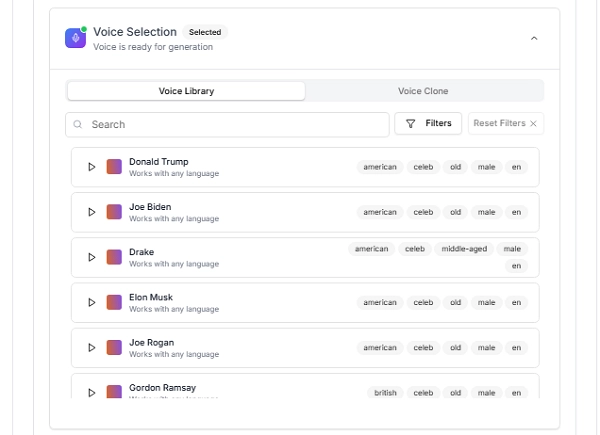
Galaxy.ai's PDF to Brainrot tool automates the transformation of standard PDF documents into viral "brainrot" videos. This platform excels at converting educational or informational content into highly shareable and attention-grabbing short-form videos that you can share on platforms like TikTok and YouTube Shorts. Users simply upload a PDF (up to 10MB) and choose from a variety of trending background visuals, including engaging "Subway Surfers" gameplay, "Minecraft" parkour, or "Fortnite." A key highlight is the extensive selection of AI voices, featuring popular celebrity impersonations like Donald Trump, Elon Musk, Joe Rogan, and Taylor Swift, alongside diverse general voices for various accents and tones.
Key Features
- Transforms PDFs into dynamic, "brainrot" videos.
- Offers trending video backgrounds like "Subway Surfers" and "Minecraft."
- Includes celebrity voices (e.g., Donald Trump, Elon Musk) and other AI voices.
- Provides 30 credits (1 per day) on its free plan.
How to Turn a Dull PDF to Brainrot Video Free
Here’s a step-by-step on how to use a PDF to brainrot AI generator to create captivating videos from pdfs.
Step 1 Access AI online PDF to brainrot generator: For example, go to Galaxy AI PDF To Brainrot free Generator.
Step 2 Upload PDF file from your local hard drive: Locate the "Upload PDF Document" section and upload your file (often with a 10MB limit).
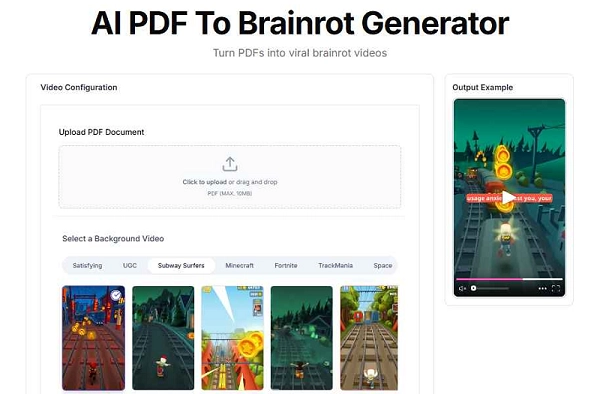
Upload Pdf file
Step 3 Configure settings:
- Voice Selection: Pick celebrity-like voices or explore other options.
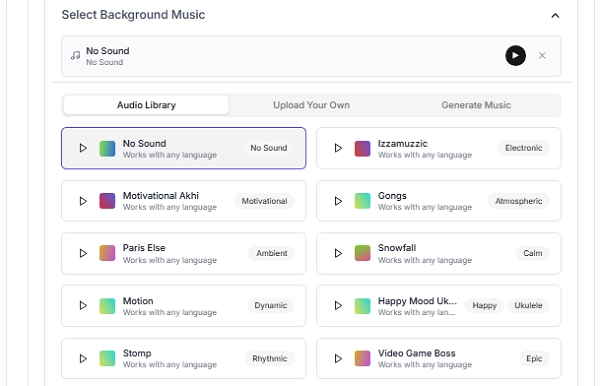
- Background Music: Select from an "Audio Library" or upload your own.
- Advanced options: Customize screen ratio (e.g., 9/16), caption styles (e.g., "GALAXY"), alignment, language, and voice filters.
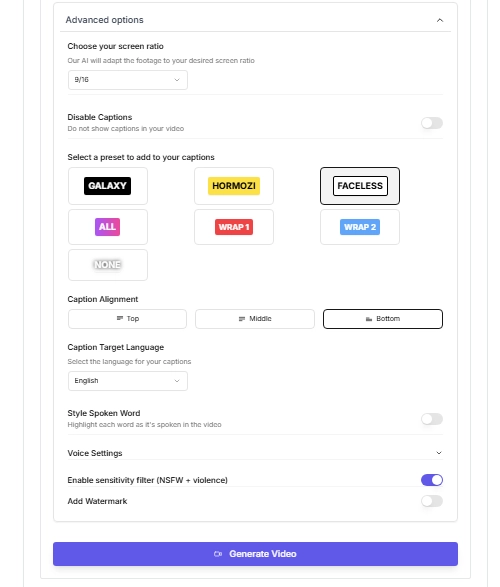
Step 4 Generate brainrot video with AI: Click "Generate Video" to process your PDF and settings.
Step 5 Download or share it with others: Once complete, download or directly share your new brainrot video.
Bonus! Generate Engaging Video from PDF with Vidnoz AI
Since dedicated PDF to brainrot AI video generators often produce chaotic videos with similar styles, such as game backgrounds and repetitive audio, you might need a more versatile PDF to video generator for diverse purposes. Vidnoz Free AI Video Generator enables you to make professional and engaging presentations that go far beyond the "brainrot" aesthetic. This platform provides a comprehensive suite of features to create videos for explainer content, e-learning, training, sales, marketing, and customer service.

Vidnoz AI - Create Free Engaging AI Video with Talking Avatar
- Easily create professional AI videos with realistic avatars.
- Text-to-speech lip sync voices of different languages.
- 2800+ video templates for multiple scenarios.
Vidnoz AI empowers you with a vast library of over 1500 AI avatars, 1830+ realistic AI voices in 140+ languages, and 2800+ editable video templates. This expansive content library guarantees your video perfectly complements your individual communication objectives, whether it's a corporate presentation or an educational module with engaging appeal. It simplifies video production to a level that even those with no advanced editing capabilities can easily use.
Conclusion
The PDF to brainrot AI trend isn’t just for laughs—it’s a powerful way to turn static documents into viral visual stories. Whether you're creating memes, micro-lessons, or social satire, tools like ImageToVideo, PDFtoBrainrot.org, and Galaxy.ai make it easy and fun. For those seeking polished, educational or commercial presentations, Vidnoz AI is the perfect PDF-to-video alternative. Don't let your PDFs gather digital dust. Use the power of AI to transform them into viral, unforgettable content.





![How to Convert PDF to Speech for Free [3 Ways]](https://www.vidnoz.com/bimg/pdf-to-speech.webp)