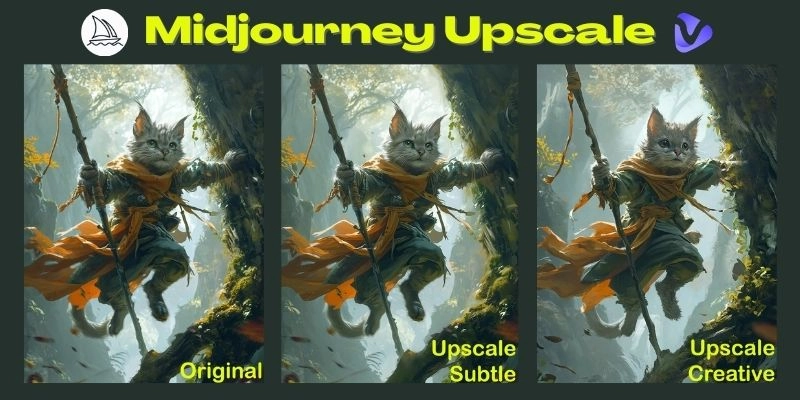
Users of Midjourney feel confused when they notice the choices in the form of Upscale or Creative Upscale. Midjourney upscaler are not very clear initially, as in upscaling, is it merely magnifying the image, or does it change the details too? Unless you know how the process works, you may find yourself confused as to whether you should take one or another approach. This blog explains align what does upscale mean in Midjourney, how Midjourney upscaler functions, and when to use various upscalers. You will also get to know how to use the tool step-by-step, the difference between versions, and a bonus easy-to-use upscale alternative.
- On This Page
-
What Does Upscale Mean in Midjourney?
What is Midjourney Upscaler?
Two Modes: Subtle and Creative
-
How to Upscale in Midjourney: Step-by-Step
Step 1. Access the Midjourney Upscale Tool
Step 2. Select and Upload Your Image
Step 3. Choose Upscale Mode: Subtle or Creative
Step 6. Review and Download
-
Bonus: One-click Upscale for Beginners – Vidnoz AI Video Enhancer
-
FAQs: MidJourney Upscale Basics
Q: How to Upscale 4X in Midjourney?
Q: How to Upscale MidJourney Images to 300 DPI?
Q: What’s the Difference Between Variation and Upscale in MidJourney?
What Does Upscale Mean in Midjourney?
If you are looking for how to use the Midjourney upscaler, in simple terms, upscaling in Midjourney is the process of taking an initial low-resolution preview image and transforming it into a polished, high-resolution version. Midjourney generates a grid of images at first, usually lower in detail. The upscale option refines one of those images, making it sharper, larger, and suitable for professional use.
The purpose of upscaling is not only to improve clarity but also to unlock finer textures and enhanced realism. This is particularly important because the preview images are meant for selection, not for final use. Without upscaling, the outputs may look impressive in small previews but appear pixelated or blurry when enlarged.
What is Midjourney Upscaler?
It's helpful to distinguish the action “upscale” from Midjourney’s “upscaler” modes. When you click Upscale, Midjourney upscale applies an internal algorithm to boost an image’s resolution and bring out more detail. Over time the platform has added different upscalers so users can choose the balance they want between sharpness, creativity, and natural-looking results.
Midjourney upscaler is a fine tuner, unlike other AI image upscalers. Depending on the version being used it determines whether the finished image would stay close to the original composition or whether the artist is free to interpret it more. That is why sometimes users can find some differences in the outcome of the upscaled grid image and the picture they see.
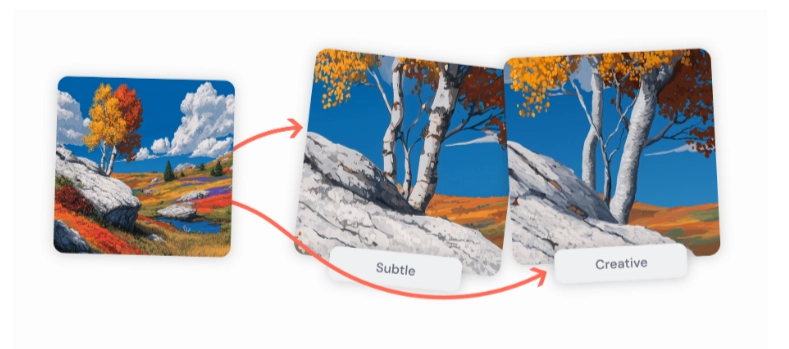
Image from docs.midjourney.com
Two Modes: Subtle and Creative
Within both Version 6 and Version 7, Midjourney also offers the application of two main upscalers: Subtle Upscale and Creative Upscale.
|
|
Subtle Upscale
|
Creative Upscale
|
|
What it does
|
Raises resolution and refines small details without changing composition.
|
Raises resolution but can reinterpret artistic elements (lighting, textures, composition).
|
|
Visual changes
|
Softens contours, smooths texture, clarifies fine detail, and preserves original look.
|
Adds stylistic flair, may change mood, lighting, or texture for a more artistic result.
|
|
When to use
|
When you want the final image to match the preview closely.
|
When you want a more expressive or fantastical interpretation.
|
|
Effect on preview
|
Keeps the preview’s appearance with conservative adjustments.
|
May differ noticeably from the preview; more subjective changes.
|
|
Strength / degree of change
|
Minimal → conservative.
|
Moderate → potentially noticeable artistic shifts.
|
|
Typical outcome
|
Cleaner, higher-res version of the same image.
|
Reimagined, higher-res version with creative variations.
|
Quick recommendation: use Subtle when fidelity to the preview matters; use Creative when you want the upscale to add artistic interpretation.

Vidnoz AI - Create Free Engaging AI Video with Talking Avatar
- Easily create professional AI videos with realistic avatars.
- Text-to-speech lip sync voices of different languages.
- 2800+ video templates for multiple scenarios.
How to Upscale in Midjourney: Step-by-Step
After understanding the basics, the actual process should be learned. How to upscale in Midjourney is not a complex process, but it is enormously beneficial to know the proper order to perform them in to maximize results and prevent GPU wastage.
Step 1. Access the Midjourney Upscale Tool
Join the Midjourney Discord right now and stop wondering how to make a video less blurry. With the grid generated, the buttons labeled U1, U2, U3 and U4 will appear under each image. These are the high-end variations of every quadrant of the grid. Upscaling use takes GPU time or Fast Hours so be considerate of your time usage.
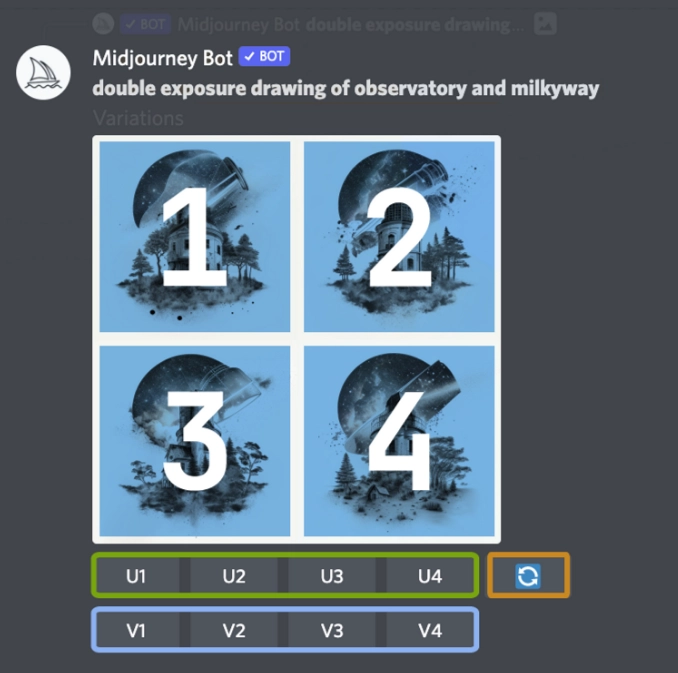
Image from kaggle.com
Step 2. Select and Upload Your Image
Select the preview image you would like to optimize. To start the process, one just clicks one of the upscale buttons.
Step 3. Choose Upscale Mode: Subtle or Creative
In Version 6 or 7, choose whether you want Subtle scale or Creative scale. This selection also dictates whether the final image would be close to the original one or there would be new artistic modifications.
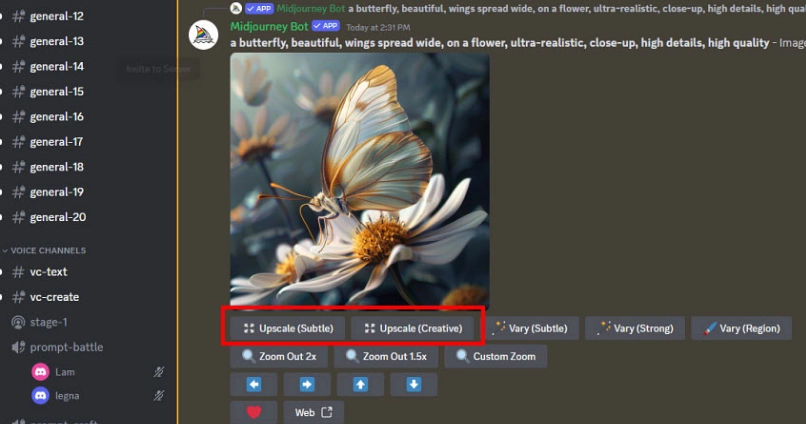
Image from aiarty.com
Step 4. Set Resolution
Midjourney automatically performs the standard upscale, however, more advanced users have access to options of experimentation with aspect ratios or variations in upscale.
Step 5. Create and Wait
The upscaler will produce the upgraded copy. This can range anywhere from a few seconds to several minutes depending on the demand and complexity of the request.
Step 6. Review and Download
And lastly, look at the upscaled image. When you are satisfied with it, just download it. Otherwise, rerun the upscale, or use “Variations” to consider other ways of interpreting. Always remember that every trial will eat up moreGPU resources.
Any person is then able to do this easily to bring preview pictures into the professional level using the Midjourney upscaler.
Bonus: One-click Upscale for Beginners – Vidnoz AI Video Enhancer
Midjourney also offers elite solutions to those who find these overwhelming, there is a newbie-friendly alternative. The Vidnoz AI Video Enhancer offers an easy single-click upscale option of images and videos alike. In contrast to MidJourney, which gives a choice between subtle and creative modes, in Vidnoz, the most suitable enhancement is automatically made.
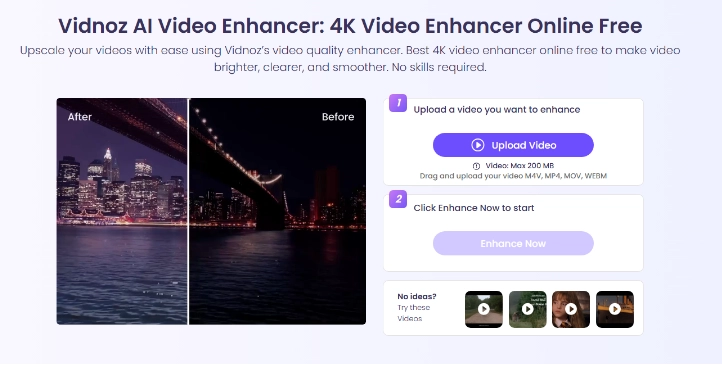
This tool enhances up to 4K resolution, eliminates blurring, and sharpens fine details without changing the design. Its simplification can be of profit to inexperienced users who simply require quick effects.
Steps include:
Step 1. Visit this free AI video generator website and go to the Video Enhancer feature page, and upload an image or video.
Step 2. Select the enhancement level.
Step 3. Click start and wait for the result.
Vidnoz is specifically attractive to users who do not want to go through numerous options to ensure clarity and excellence of visuals.
FAQs: MidJourney Upscale Basics
To respond to typical inquiries, common questions about Midjourney upscale are answered as follows:
Q: How to Upscale 4X in Midjourney?
Presently, the 4X option existed in Version 5.2 but not in Versions 6 and 7. Users are forced to rely on 2X upscale only.
Q: How to Upscale MidJourney Images to 300 DPI?
Midjourney doesn't set DPI directly. To print images, export the resized image and set DPI in applications like Photoshop without changing the resolution.
Q: What’s the Difference Between Variation and Upscale in MidJourney?
Variations create new copies of a chosen image, and upscaling deals with increasing the resolution and quality of the chosen preview.
With these definitions, operations are more understandable, and new users are less disoriented.
Conclusion
In conclusion, learning about the definition of what does upscale mean in Midjourney will help create professional AI art. Upscaling enhances preview images to high-resolution images, and the Subtle and Creative Upscaling modes provide two types of refinements. Midjourney upscaler is flexible in versions, but users must keep in mind that 4X combination is not supported in recent updates. Vidnoz AI Video Enhancer can be used by anyone who uses simple tools effectively and benefits more when a single tap can do the work. With the help of the built-in tools in Midjourney or other applications, learning how to effectively address Midjourney upscaling guarantees that an AI-generated picture will have its maximum visual outcomes.