Faceless TikTok videos are trending like never before. Most creators resort to this type of style to ensure privacy, and at the same time continue growing their audience and earning money. In case you are wondering how to make TikTok videos without showing your face, this tutorial will provide all the information you will need. You will learn useful tools and creative techniques for producing engaging faceless content, not only for applying filters but also for turning it into a successful company.
- On This Page
-
Why You Make TikTok Videos Without Showing Face?
-
How to Make TikTok Videos Without Showing Your Face Using Filters
-
How to Create Faceless TikTok Videos with Video Editing Tools
-
How to Make TikTok Videos Without Showing Face Using AI Avatar
Why is Vidnoz AI the Best Faceless TikTok Video Generator?
Go Viral on TikTok Without Showing Face with AI Photo/Product Avatar:
-
How to Make TikTok Without Showing Face with Image to Video AI
How to Turn Image to TikTok Video with AI:
-
Best TikTok Content Ideas Without Showing Face
-
How to Make Money on TikTok Without Showing Your Face
Why You Make TikTok Videos Without Showing Face?
There are times when you may want privacy for religious or personal reasons. Running a TikTok channel is such a case, where creating content without showing your face comes with compelling advantages:
- Keep Anonymity: Protect your privacy and personal brand while sharing ideas or entertainment, ensuring that your personal identity remains undisclosed to both followers and potential advertisers.
- No Limitations to Content: Enjoy complete freedom to explore subjects, industries, and niches without worrying about how you look on camera, making your TikTok creative journey much more flexible.
- More Creative & Appealing: Experiment with animation, voiceovers, stock visuals, or even a text to speech avatar to make videos more captivating, resonating better with audiences who love fresh and innovative presentation styles.
For many, choosing TikTok without showing face helps them focus on content quality instead of personal exposure.
How to Make TikTok Videos Without Showing Your Face Using Filters
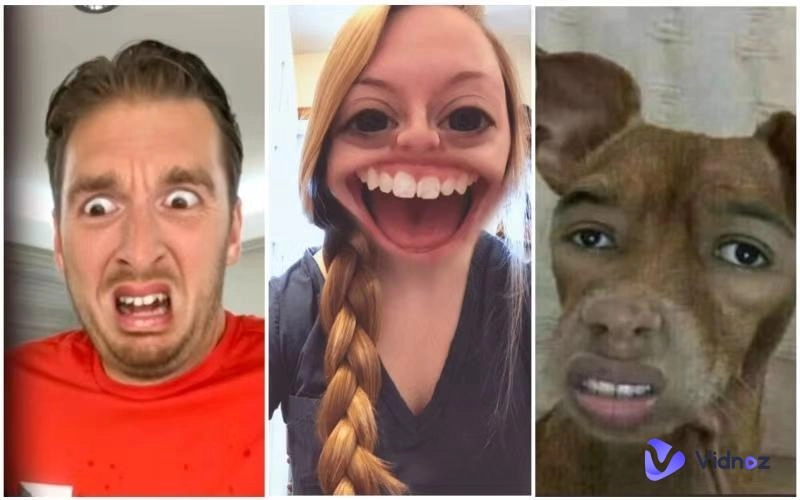
A strong means of creating interesting faceless videos is the built-in filters on TikTok. Suppose you’re exploring how to make TikTok videos without showing your face. In that case, these AI TikTok filters can replace real expressions with animated or artistic overlays, helping your content stand out while keeping your identity private.
Examples of Trendy Face Filters:
Cartoon Character Masks: Turn yourself into a colorful animated character that looks unique and entertaining while hiding your actual face. This is one of the easiest tricks for anyone exploring how to make TikTok video without showing face.
3D Animated Skins: Overlay futuristic digital skins on your video, creating an appealing sci-fi or cyberpunk vibe with minimal effort.
Holographic Overlays: Add glowing holograms that disguise your face and simultaneously make your clips look futuristic and attractive.
AR-Based Effects: Use augmented reality masks that track movements smoothly, adding a realistic layer of interactivity to your TikTok content.
Step by Step Guide:
Step 1: Open TikTok and tap the “search” button.
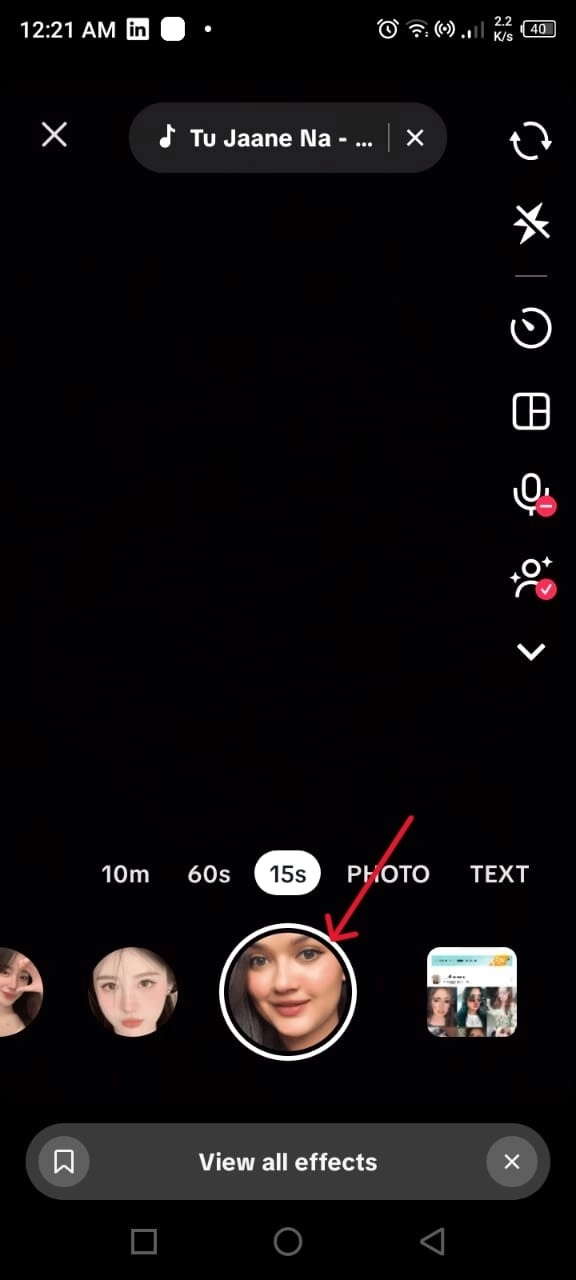
Step 2: Browse the trending face filters and select one that suits your theme.
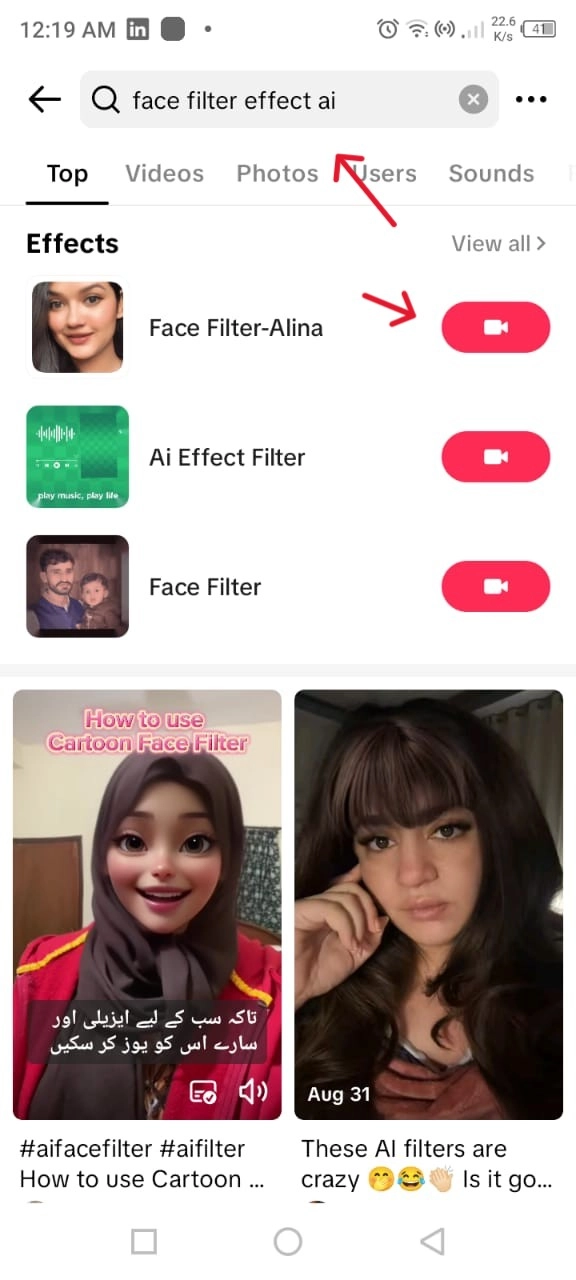
Step 3: Record your clip using the chosen filter, then edit with captions or sounds.
Benefits:
- Quick to use for beginners who want instant privacy while producing faceless videos.
- Provides a massive selection of filters that are updated frequently, which makes the content relevant and fashionable.
- Filters add vibrant, eye-catching effects that naturally boost viewer interest and interaction.
Limitations:
- Other filters become overused, and this factor can decrease originality if they are used by numerous creators.
- Restricted to TikTok’s available library, limiting advanced customization compared to editing software.
How to Create Faceless TikTok Videos with Video Editing Tools
Another effective method for how to make TikTok videos without showing your face is by using video editing software. The other programs, such as CapCut, Adobe Premiere Pro, etc, allow you to produce finished video products without appearing on screen and combine packaged media, effects, and voice-overs to make professional video files.
Guide with CapCut:
Step 1: Download CapCut and import your clips or stock footage.
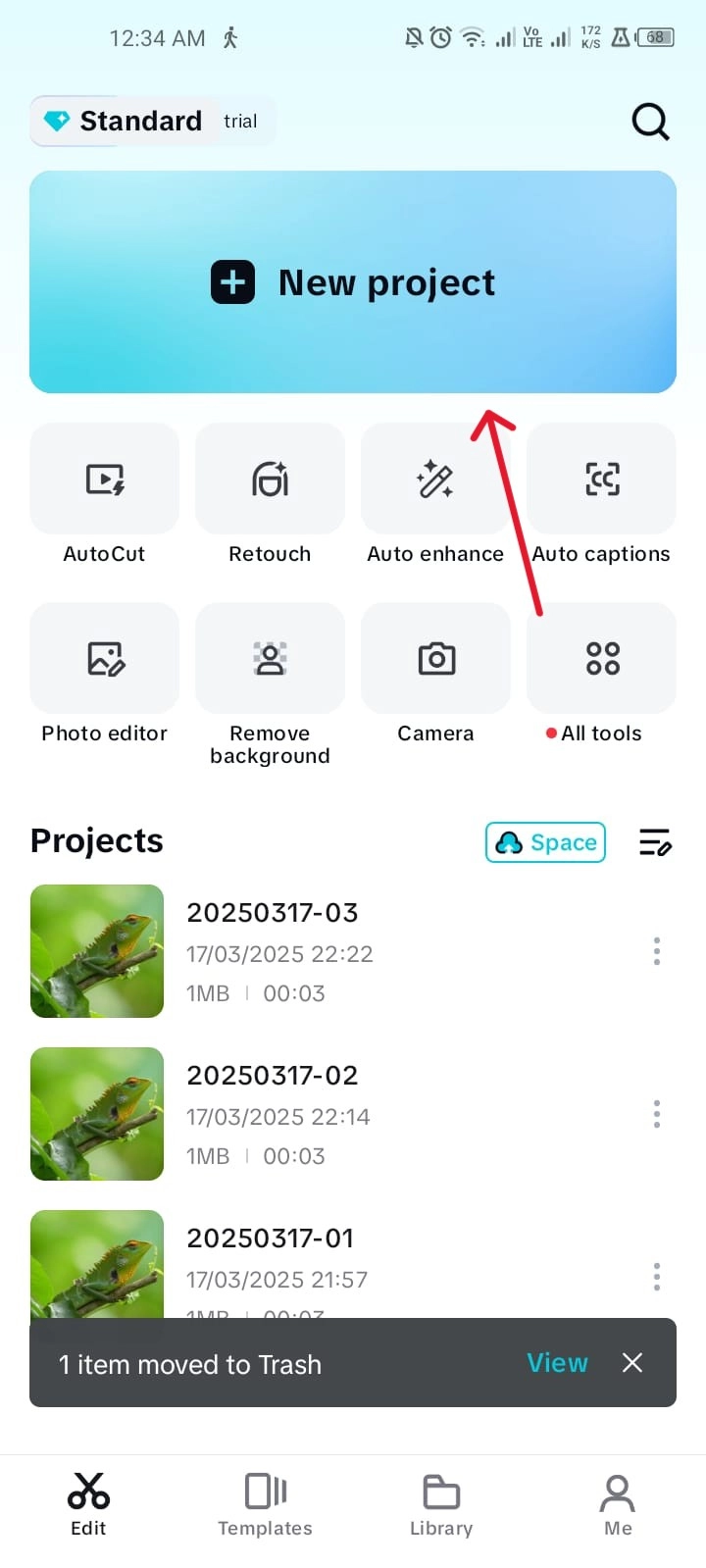
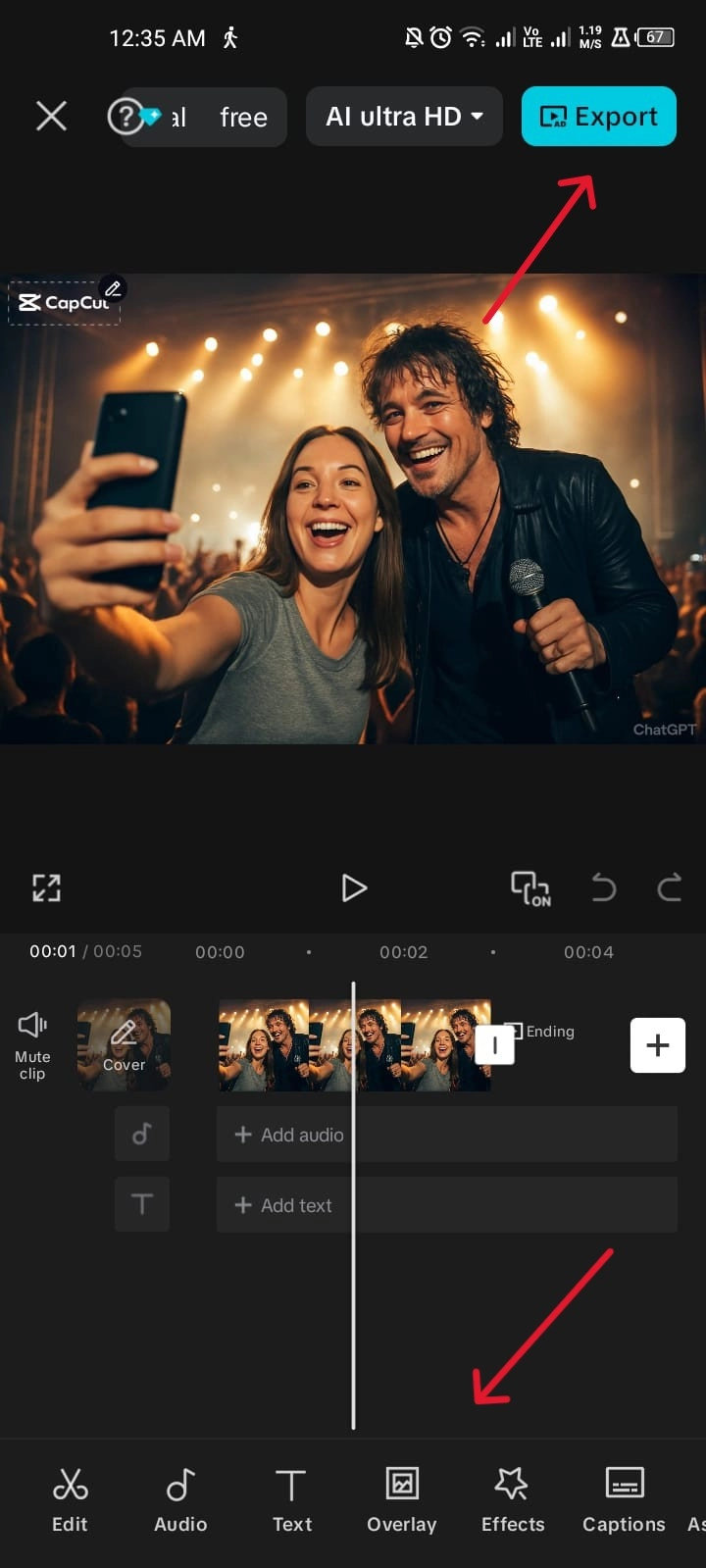
Step 2: Add text overlays, voiceovers, or background music to make videos more engaging.
Step 3: Export your edited video in TikTok’s recommended size and upload.
Benefits:
- Provides greater flexibility with advanced features, enabling you to craft personalized faceless TikTok content with professional-quality polish.
- Especially useful for businesses and influencers who want to produce product reviews and tutorials without showing their faces.
- Edited faceless videos can be easily repurposed for YouTube Shorts, Instagram Reels, or Facebook, expanding your reach beyond TikTok.
Limitations:
- Editing may take up time, especially for the novice who may be new to the high-technological tools.
- Certain premium features or templates may require paid subscriptions, limiting free users.
This workflow is ideal if you’re learning how to make TikTok without showing your face in a more professional style.
How to Make TikTok Videos Without Showing Face Using AI Avatar
The rise of AI has revolutionized faceless content creation. Vidnoz AI is a free AI video generator and one of the most advanced platforms for building TikTok videos with digital avatars that speak and move naturally.
Why is Vidnoz AI the Best Faceless TikTok Video Generator?
- Free AI Video Generator for TikTok: Quickly generate unlimited videos with AI without needing professional editing skills, making content creation smooth and accessible to all, perfect if you’re learning how to make TikTok videos without showing your face.
- AI Avatars to Speak for You: Select from a wide variety of realistic avatars that present your message naturally, allowing you to remain completely anonymous on TikTok.
- Auto Lip-Sync AI Voiceover: The advanced AI lip sync engine matches mouth movements with audio, producing professional-quality faceless TikTok content in minutes.
- Pre-designed TikTok Templates: Use ready-to-go video templates tailored for different niches, saving hours of editing time while keeping videos on trend.
- Auto Subtitles & AI Video Effects: Instantly add captions and dynamic effects that improve accessibility and boost engagement for global audiences.

Vidnoz AI - Create Free Engaging AI Video with Talking Avatar
- Easily create professional AI videos with realistic avatars.
- Text-to-speech lip sync voices of different languages.
- 2800+ video templates for multiple scenarios.
Go Viral on TikTok Without Showing Face with AI Photo/Product Avatar:
Step 1. Click the button to visit Vidnoz AI and sign up with email.
Step 2. Choose your digital avatar and enter your script.
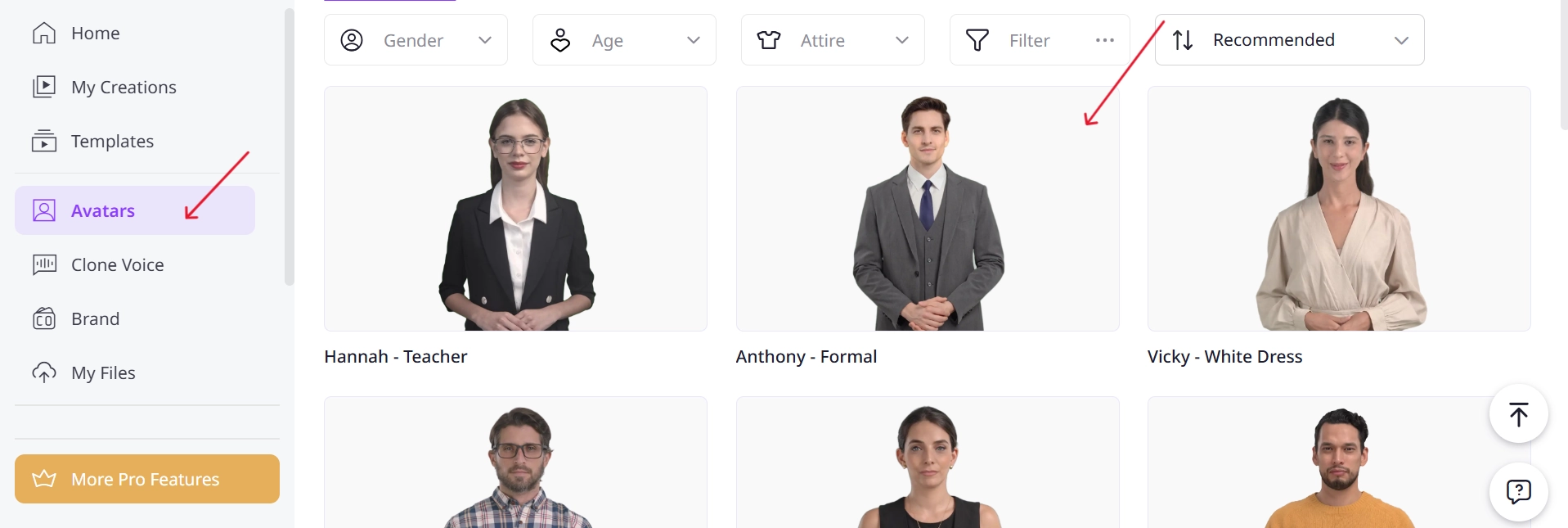
Step 3. Add music, subtitles, and AI voiceovers to your video.
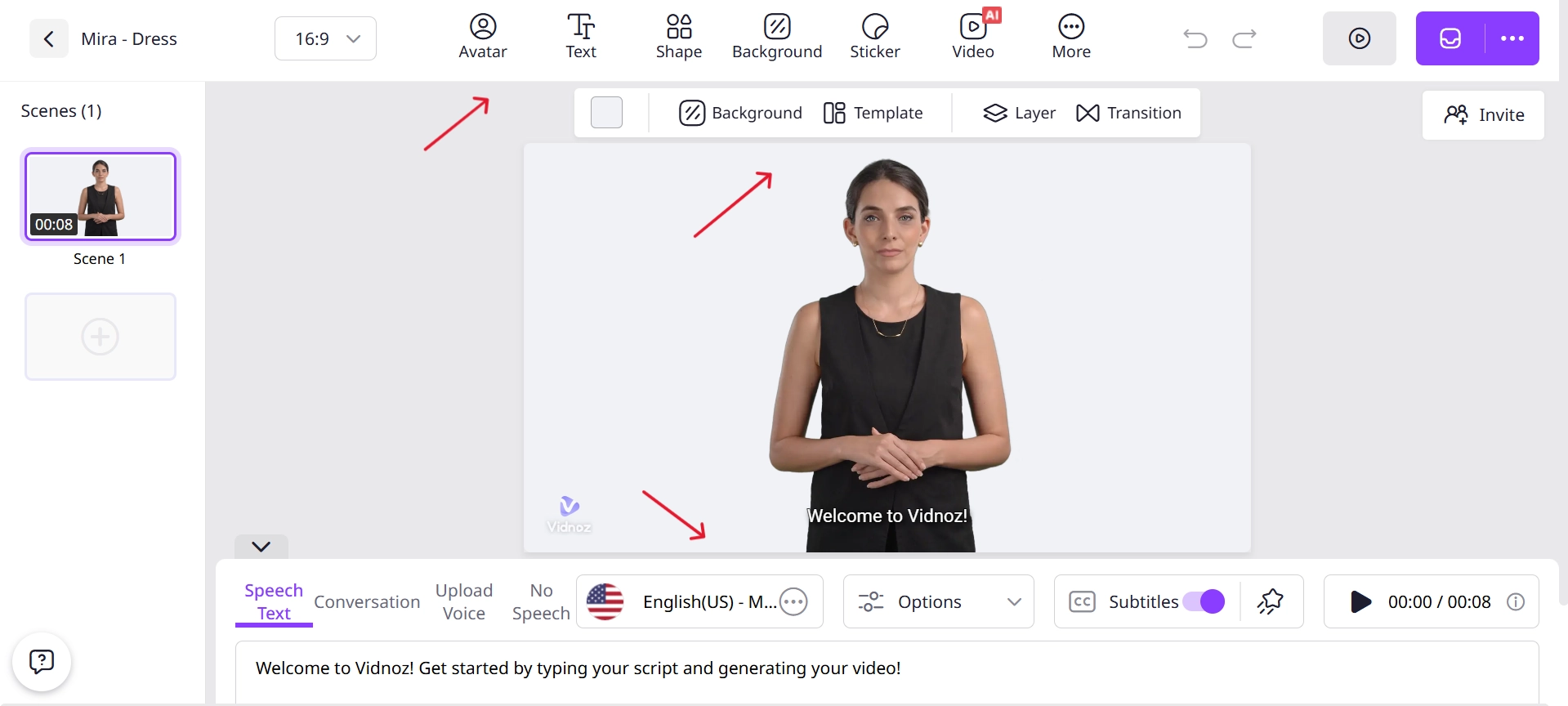
Step 4. Generate and export your video.
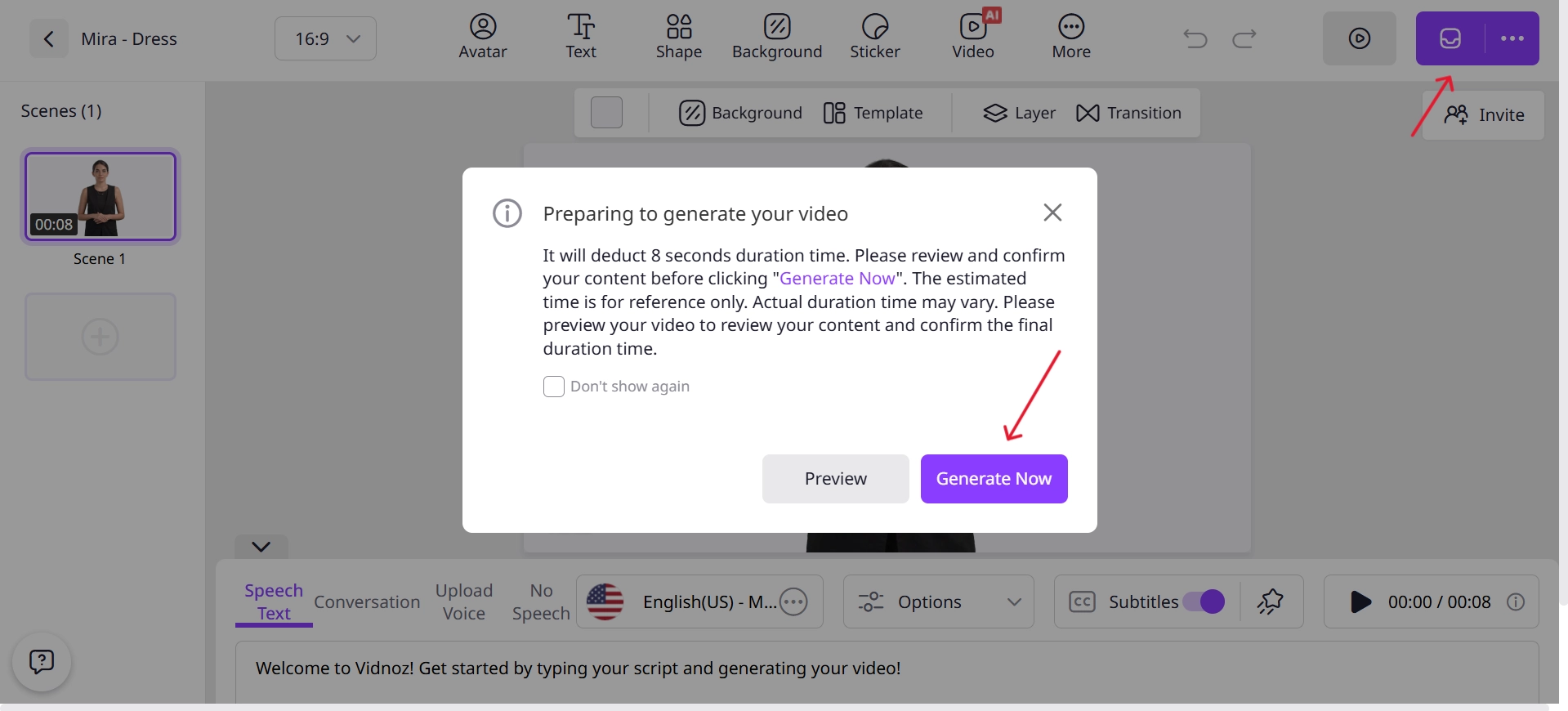
With this free AI video generator, creators no longer need to worry about personal exposure—plus, features like AI TikTok filter make content highly engaging and more likely to go viral.
How to Make TikTok Without Showing Face with Image to Video AI
Another cutting-edge solution for how to make TikTok videos without showing your face is Vidnoz Image to Video AI, which transforms a static image into a moving, talking avatar.
Convert Image to Video AI Online - Free
- Create a video from an image quickly for free.
- Use various AI models to turn photos into videos.
- Download and share the AI-generated video at no cost.
Convert Image to Video
Main Features of Vidnoz Image to Video AI:
- AI Image to Vivid TikTok Video: Convert ordinary images into captivating video clips, allowing you to produce engaging TikTok without ever appearing on screen.
- HQ & Smooth Motion Effect: Enhance animations with professional-quality transitions and realistic body movements that impress your audience.
- Fast & Free Unlimited Generation: Generate videos instantly with no restrictions, making it easier to experiment with fresh TikTok ideas every day.
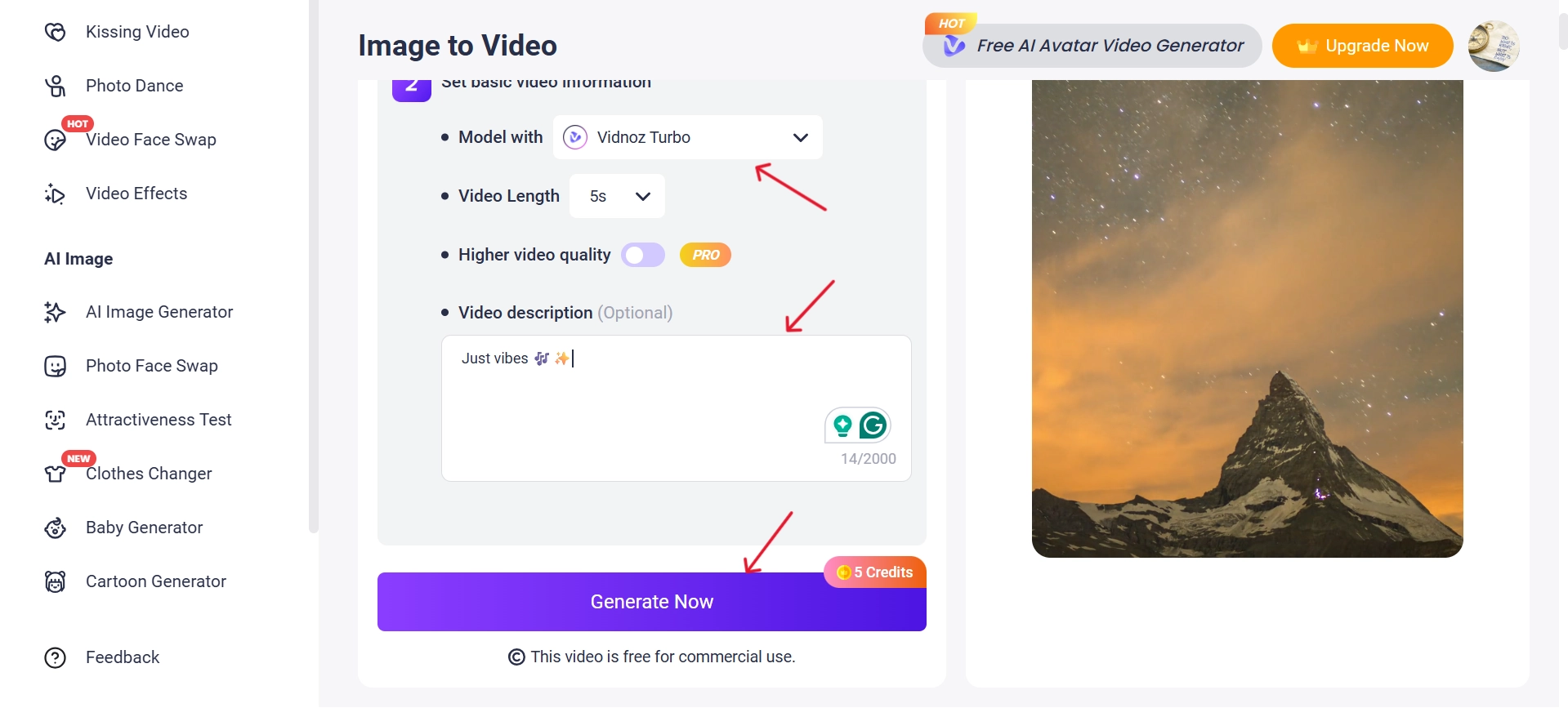
How to Turn Image to TikTok Video with AI:
Step 1. Upload an image to Vidnoz Image to Video AI.
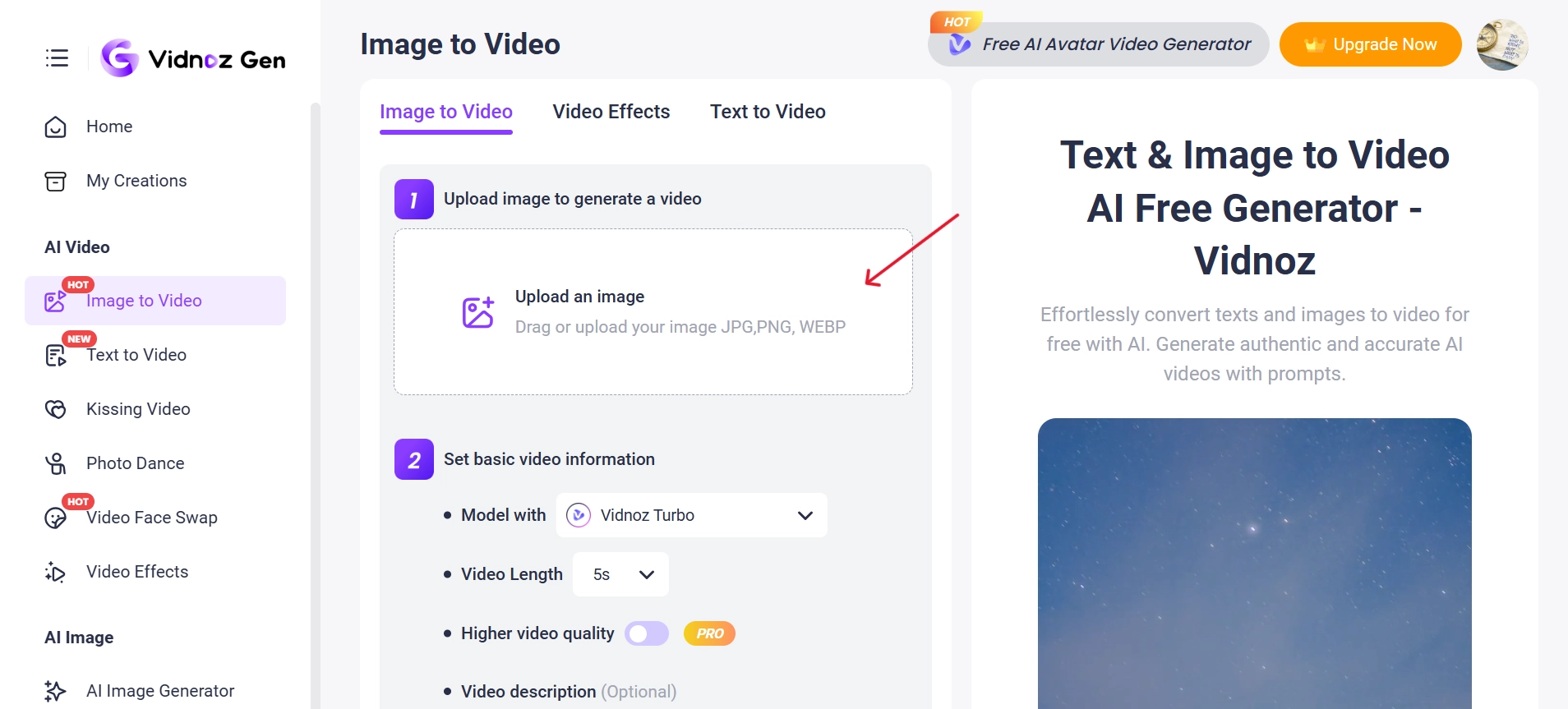
Step 2. Adjust necessary settings like video length, video description.
Step 3. Click on Generate and then export the generated video.
When combined with a talking photo online free tool, this solution becomes even more powerful.
Best TikTok Content Ideas Without Showing Face
If you’re stuck for inspiration, here are some of the best TikTok content ideas without showing face:
Text-Based Storytelling: Add strong captions, detailed narration, and background music to deliver your message powerfully. This style keeps attention on the content rather than the creator’s appearance.
Stock Footage with a Voiceover: Pair free or premium stock clips with your narration for professional-looking faceless TikTok videos. It’s also a simple way for how to make TikTok without showing your face while sharing reviews or opinions.
AI-Generated with Avatars: Use advanced digital avatars to present topics naturally, almost like a human.
Product Reviews & Unboxings: Focus only on product shots while keeping your face private. Show packaging, unbox items step by step, and share your honest opinion while building audience trust.
ASMR Videos: One of the best examples of how to make money on TikTok without showing your face is through ASMR content. By capturing unique soundscapes—like whispering, tapping, or everyday objects—you can intrigue millions of TikTok users. This style works perfectly without needing to be on camera, while still building an engaging audience.
Gameplay Highlight Clips: Share epic gaming moments with commentary, background music, or captions. This strategy is applicable in particular cases when you are in need of learning how to make TikTok videos without showing your face, and you would like to go beyond one platform.
How-To Videos: Teach skills clearly with slides, screen recordings, or voiceovers. Educational content works perfectly in the faceless format and consistently attracts viewers.
Travel Vlog: Show landscapes, cityscapes, or cultural highlights while narrating your experiences. The focus remains on the destination rather than your personal appearance, making the vlog both professional and anonymous.
These are evergreen TikTok video ideas without showing your face that continue to trend.
Vidnoz AI - Create Free Engaging AI Video with Talking Avatar
- Easily create professional AI videos with realistic avatars.
- Text-to-speech lip sync voices of different languages.
- 2800+ video templates for multiple scenarios.
How to Make Money on TikTok Without Showing Your Face
Once you’ve mastered faceless content, monetization is the next step. Here’s how to make money on TikTok without showing your face effectively:
1. Affiliate Marketing: Promote products and earn commissions by placing affiliate links in your TikTok bio.
2. TikTok Creator Fund: Receive payouts directly from TikTok based on qualified video views. The more engaging and consistent your content is, the higher your earning potential through the Creator Fund.
3. Sponsored Content: Partner with brands and showcase products creatively without needing to appear on screen.
4. TikTok Live Gifts & Donations: Interact live with fans while receiving gift points that can later be converted into cash.
5. Digital Products/Courses Selling: Share knowledge, create courses, or sell digital downloads that fit your niche.
TikTok to YouTube Shorts: Repurpose faceless TikTok clips to generate extra income from YouTube. This method proves to be particularly handy when you are learning how to make TikTok videos without showing your face and you want to reach a wide audience on a variety of platforms.
In these strategies, there is a clear explanation of how to make TikTok videos without showing your face, and you will have numerous options on how to increase income and remain anonymous.
The Bottom Line
Faceless TikTok content is no longer just a niche; it’s a booming trend. With the help of such tools as Vidnoz AI, the creators can develop engaging videos, generate audiences, and even generate revenue streams without being revealed to personality. Now that you know how to make TikTok videos without showing your face, it’s time to try it yourself and take your content strategy to the next level.
Vidnoz AI - Create Free Engaging AI Video with Talking Avatar
- Easily create professional AI videos with realistic avatars.
- Text-to-speech lip sync voices of different languages.
- 2800+ video templates for multiple scenarios.







![How to Remove Filter from Video Online | AI Video Filter Remover Online Free [Lossless]](https://www.vidnoz.com/bimg/remove-filter-from-video.webp)