Do you ever feel inspired to make your track? Many people dream of creating EDM music, but challenges like expensive gear, complex software, and production skills often get in the way.
This is where the AI EDM music makers come to be the savior. Just enter your mood, rhythm, or style, and you can get a full track of EDM music without any effort.
- On This Page
-
AI EDM Auditory Feast Go First
-
What Is EDM
-
Top AI EDM Music Makers to Fuel Your Creativity
1. Boomy – EDM Music Maker Free to Rewrite & Rearrange
2. Vidnoz AI Music Generator – AI EDM Music Maker Free with Lyrics
3. Soundful – AI EDM Music Maker with Abundant Subgenres
4. Soundverse – EDM Music Maker Chatbot
-
How to Create EDM Music Online with AI
1. How to Create EDM Songs with Lyrics
2. How to Create EDM Instrumental Tracks
-
Bonus Track: 1 Click to Make an MV for Your EDM Masterpieces
AI EDM Auditory Feast Go First
Not sure if an AI EDM song maker is really that powerful? Let's find out by listening first before actually using them to create EDM music online.
Showcase 1: AI EDM Rock Remix by Soundful
Description: A Rock EDM fusion track with strong rhythm and energy. Around 128 BPM, in E minor.
Showcase 2: AI Hip-hop EDM Beats by Vidnoz
Description: Deep basslines and crisp drums combine to create the perfect balance between street groove and electronic flow. 95 BPM, D minor.
Showcase 3: AI Chill Beats EDM by Beatoven.ai
Description: A Chill Beats / Lo-fi EDM style track with smooth, relaxing rhythm—ideal for studying, relaxing, or working.
What Is EDM
Before you start creating, it's helpful to build some basic knowledge of EDM:
1. What is the EDM genre
EDM is a genre built around synthesizers, drum machines, and digital sound effects. It was designed especially for clubs, parties, and large music festivals.
2. Pioneer / Most Famous Artists
- Daft Punk brought a futuristic retro-electronic sound;
- Avicii made EDM melodic and emotional; and artists like Calvin Harris,
- David Guetta, and Marshmello pushed the genre onto the global stage.
3. Popular Subgenres
- House: Smooth beats and upbeat melodies, perfect for dance floors.
- Techno: Repetitive, mechanical rhythms with a futuristic vibe.
- Trance: Dreamy melodies and flowing rhythm that create immersive experiences.
4. AI in EDM Creation
Today, more creators are using AI to generate melodies, beats, and mixes. AI can even learn from famous DJs' styles to produce customized rhythms.
Top AI EDM Music Makers to Fuel Your Creativity
After the previous AI EDM showcases, you've probably felt how powerful and inspiring an EDM music maker can be.
If you're ready to create your own AI-generated EDM track, this section is your go-to guide. Here are 4 of the most creative AI EDM music generators—whether you want to make a lyrical EDM song or an instrumental-only beat, you'll find the perfect match below.
1. Boomy – EDM Music Maker Free to Rewrite & Rearrange
No experience? Not sure where to start or how to fine-tune every detail? Try Boomy.
This EDM music maker online is one of the earliest and most popular AI tools for music creation. It walks beginners through every step—from choosing instruments and filters to mixing, harmonics, and naming—helping anyone create a complete EDM track in seconds.
After generating the first version, the Boomy AI EDM music generator still allows you to Rewrite & Rearrange the structure, melody, rhythm, and instruments to extend the music.
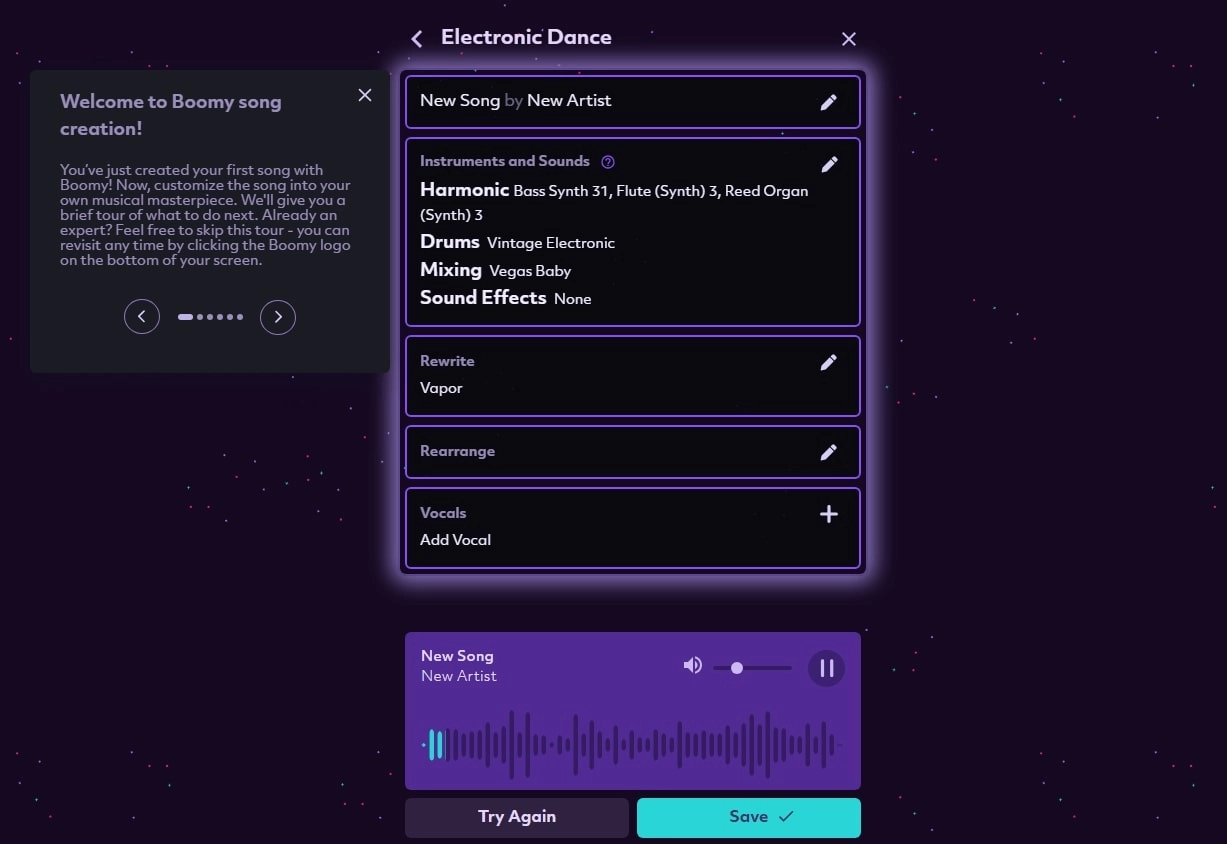
Key Features:
- Rewrite & Rearrange: Regenerate melodies, beats, or arrangements with just a few clicks.
- Multi-instrument support: Offers electric guitars, drum machines, synths, and more.
- Diverse styles: Besides EDM, it supports Lo-fi, Hip-hop, Pop, and cross-genre creation.
Drawbacks:
- Limited customization: Deep editing of melody or rhythm is restricted.
- High-quality export requires upgrade: The free plan compresses audio quality.
Price:
- Free: Unlimited song generation and preview
- Creator Plan: $9.99/month–Save 500 tracks, unlock advanced tools, allow commercial use
- Pro Plan: $29.99/month–Unlimited songs, full editing access, commercial license
2. Vidnoz AI Music Generator – AI EDM Music Maker Free with Lyrics
If you want not just beats but full songs—with lyrics, rhythm control, and expressive emotion—then Vidnoz AI Music Generator is your best EDM music maker.
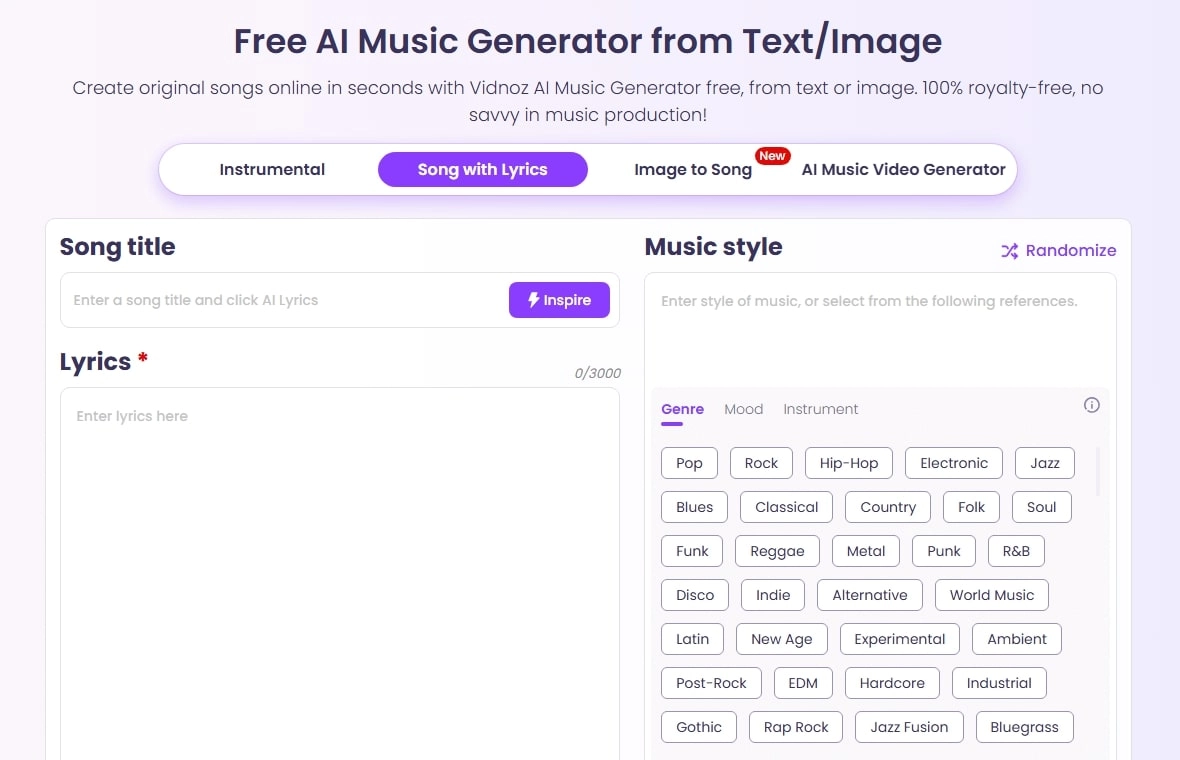
Unlike other platforms that only create instrumentals or loops, Vidnoz can generate complete EDM songs with automatically written lyrics and melodies from your text prompts. It also provides plenty of preset styles like Hip-hop, Trap, Drill, and Rock, with full control over emotion, mood, and instruments.
Vidnoz Free AI Music Generator
Free to generate & download for commercial use!
- 100+ combinations of musical styles, moods and themes
- Turn your texts into songs and music videos
- AI to create an original song with your lyrics
Create Music with AI
Key Feature
- AI EDM Music Maker Free with Lyrics: Built-in AI lyric generator—type your theme or mood and let AI write and sing it with rhythm-based phrasing.
- Text to Instrumental EDM Pieces: This EDM music maker free easily performs text to song generation; using it, you can easily get consistent instrumentals only by describing what you want.
- Full Control of the EDM Music: Customize instruments, mood, and style. Whether it's Trance, Techno, or House, Vidnoz gives you full freedom over the sound.
3. Soundful – AI EDM Music Maker with Abundant Subgenres
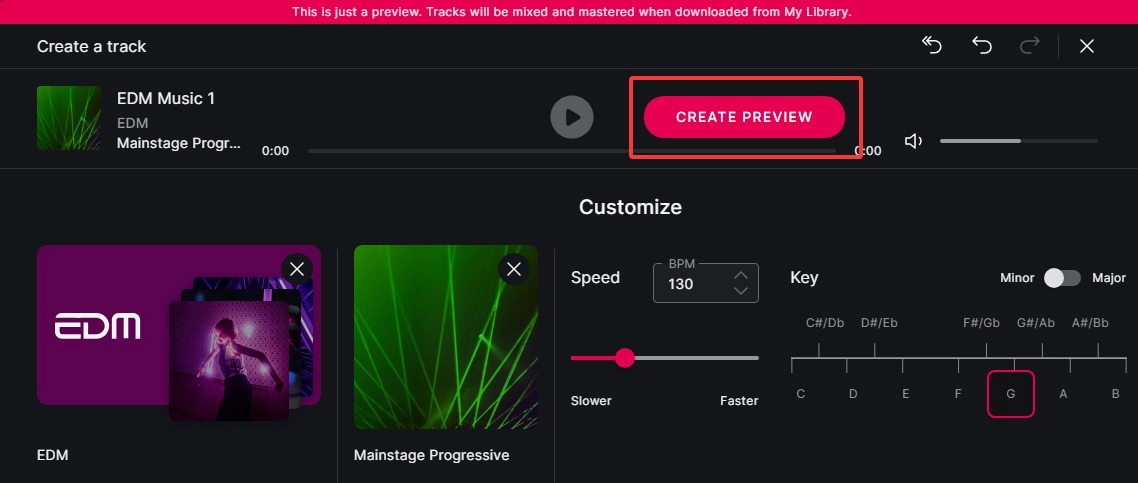
When you open Soundful, its professional layout and rich genre library will impress you immediately.
It acts like a powerful virtual DJ—offering nearly every EDM subgenre you can imagine. You can even search by type, mood, or use case (like gaming, studying, café, or sports). This software to make EDM music lets you customize loops, sound effects, and ambient tones freely.
Key Features:
- Extensive style library: Choose from dozens of genres, moods, and scenarios — each with pre-set vibes.
- One-click template creation: Quickly generate professional-grade tracks using built-in templates or the search bar.
- Adjustable sound and rhythm: Fine-tune drums, synth layers, filters, and loops for detailed control.
Drawbacks:
- Login required for premium content: Some advanced options are only available to registered users.
- Slow rendering on complex tracks: Generation speed can vary by genre complexity.
Price:
- Free Trial: Access 25+ free styles, 1 download per month
- Premium: $5/month–Unlock 150+ styles, 100 downloads/month
- Pro: $9.99/month–400 downloads/month, 20 STEM packs included
4. Soundverse – EDM Music Maker Chatbot
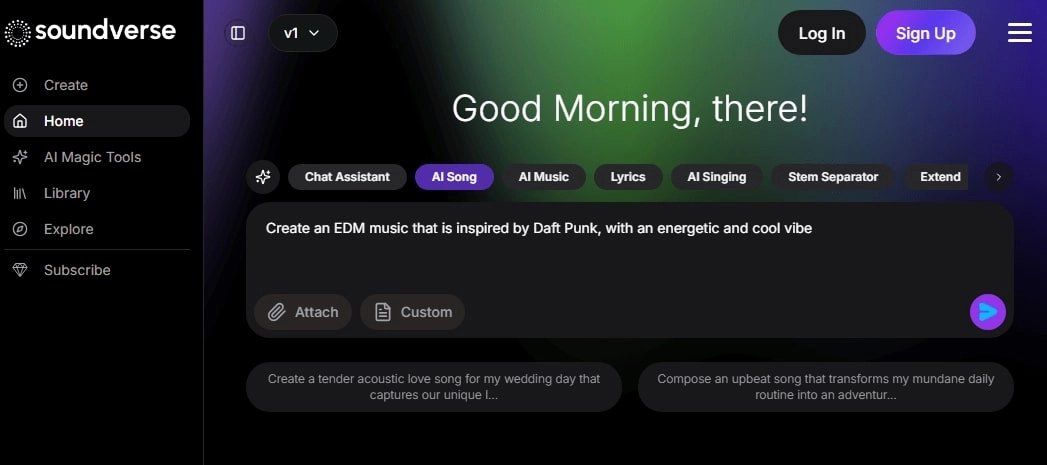
Unlike other EDM music makers free, Soundverse takes a big leap forward—no templates or settings required. Instead, it uses a chatbot interface to create music through conversation.
Simply describe your desired style, tempo, or emotion, and the EDM music maker free will compose a full EDM rhythm or melody for you.
Key Features:
- AI Chatbot Music Creation: Control the music-making process via natural conversation — more intuitive and fun.
- Built-in editor: Modify beats, adjust mixing, and add sound effects for a personalized result.
- Real-time collaboration: Work online with teammates or other creators, edit together, and export directly.
Drawbacks:
- Depends on prompt quality: Vague descriptions may lead to off-target results.
- Complex interface: New users may need some time to adapt.
Price:
- Creator: $9.99/month–4,000 tokens, unlimited exports, non-commercial use, collaboration features
- Pro: $24.99/month–10,000 tokens, royalty-free & sample-use license
- Max: $60/month–25,000 tokens, priority rendering, dedicated processing power
How to Create EDM Music Online with AI
Among all the tools introduced above, Vidnoz AI Music Generator is undoubtedly the most flexible and comprehensive one.
Therefore, this section will take Vidnoz AI as an example to show you how to create your own EDM music.
1. How to Create EDM Songs with Lyrics
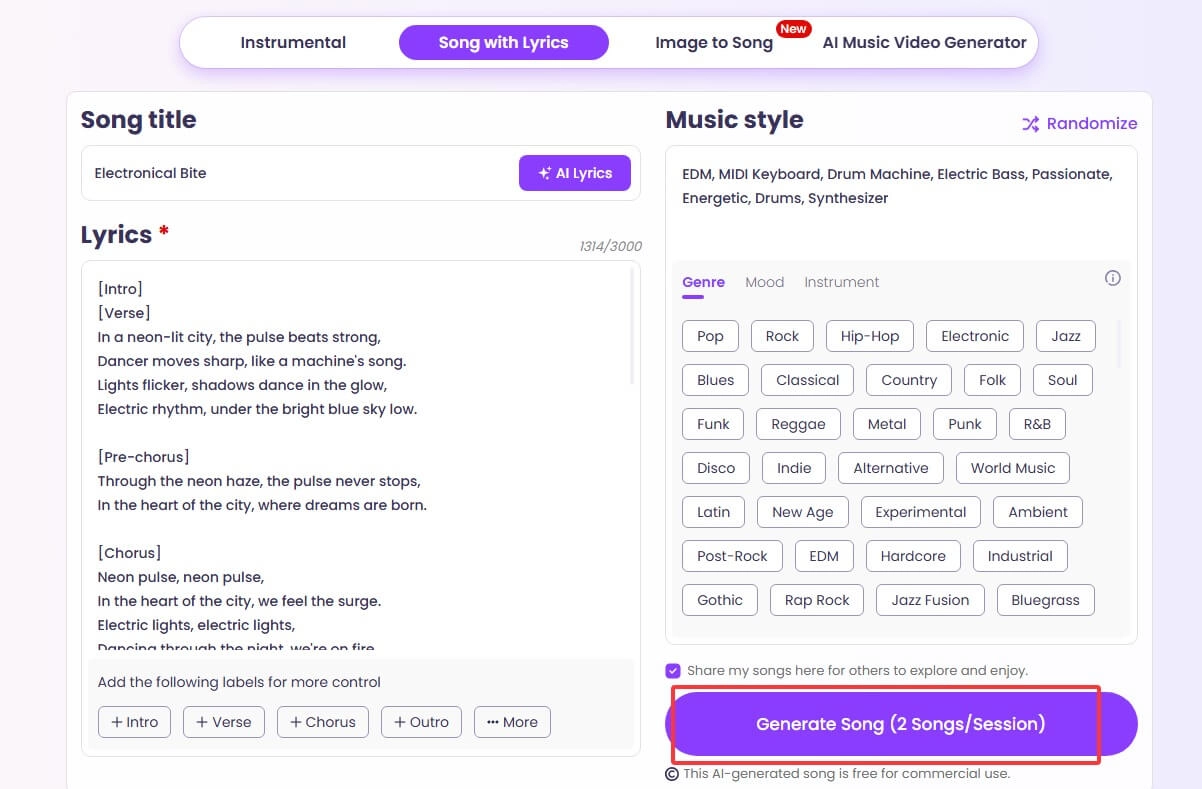
Step 1: Go to the official Vidnoz AI website and enter the Music Generator interface. Switch to the Song with Lyrics mode.
Step 2: Give your music a name. Then, enter your written lyrics in the Lyrics text box.
Next, in the Music Style box on the right, type in the theme, genre, or mood you want the AI to create. You can also apply one of the preset tags listed.
Step 3: Once all settings are completed, click Generate Song.
2. How to Create EDM Instrumental Tracks
Step 1: Launch Vidnoz AI Music Generator in your browser and switch to the Instrumental mode.
Step 2: Under the Input text for your music field, enter the description of the music style or mood you want to generate.
Step 3: Scroll down and select the Music genre, mood, and theme that match your preferences.
Then, set the desired music length and number of tracks to generate.
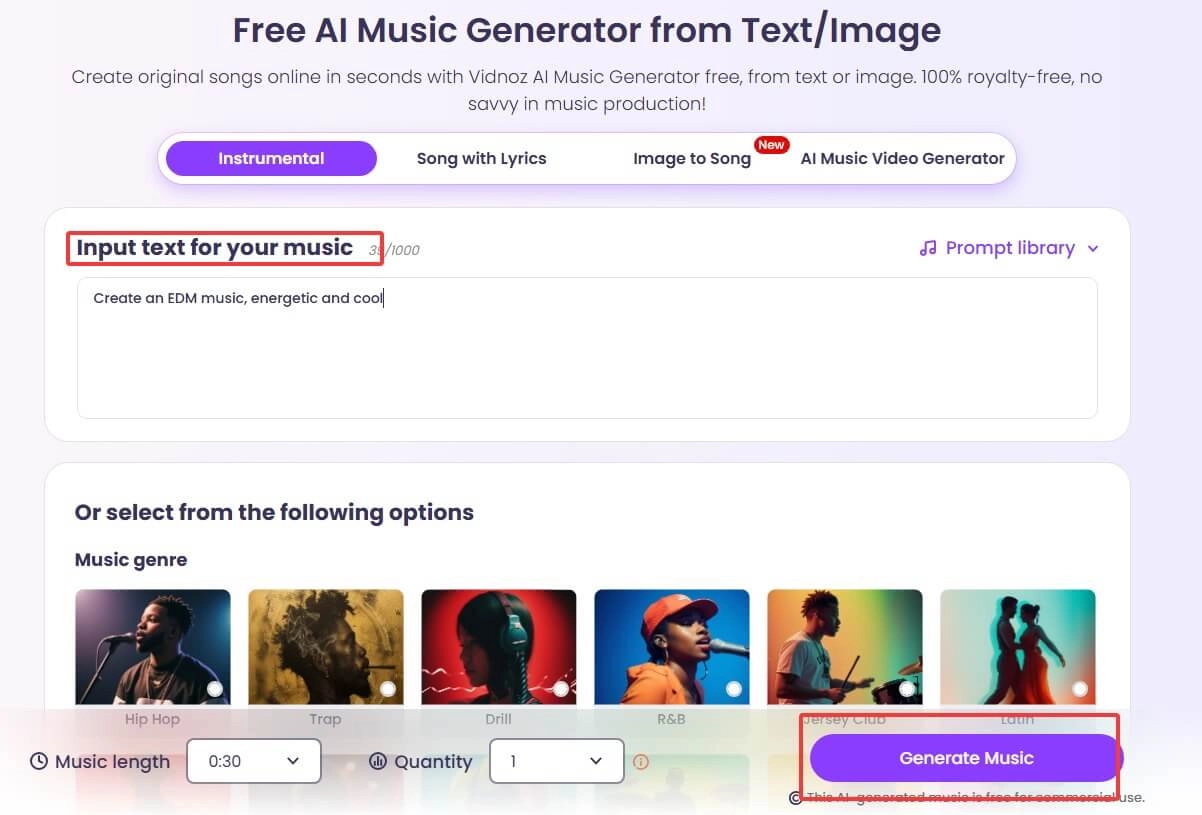
Step 4: Finally, click Generate Music to create your EDM instrumental track. Download your pieces to use as your intro music, background sound, or any more creative use.
Bonus Track: 1 Click to Make an MV for Your EDM Masterpieces
Have you ever thought about going beyond just audio and creating an MV for your unique EDM track?
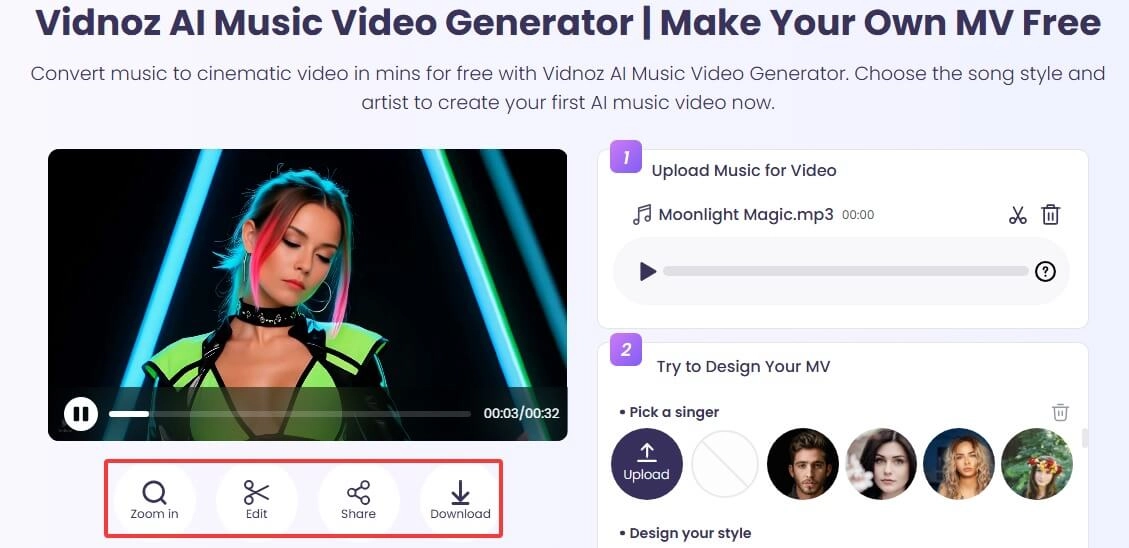
Yes! The Vidnoz AI platform also offers another tool, Vidnoz AI Music Video Generator, that can make this dream come true. No need for actual filming—simply upload your music, choose your favorite digital singer avatar, and with one click, turn your track into a music video ready to share on social media.

Key Feature
- AI EDM Music Video Online Free: Fully web-based, free to use, no need to download complex software to generate music videos.
- Lip Sync MV Singer to Perform Your EDM Songs: Uses smart lip-sync technology and context-aware AI to automatically make virtual singers perform your EDM tracks.
- Design & Create Your EDM MV: Design the singer's appearance, stage background, as well as music styles as you like; if you don’t have any idea, just choose the ready-for-use EDM style and generate professional-level music videos.
Here is how to use this AI music video generator:
Step 1: Log in to the Vidnoz website and launch Vidnoz AI Music Video Generator.
Step 2: Click Upload Music to upload your completed track. Then choose a singer avatar from the presets, or upload a new character photo.
Step 3: Select your preferred video style and set the aspect ratio. Finally, click Generate Video.
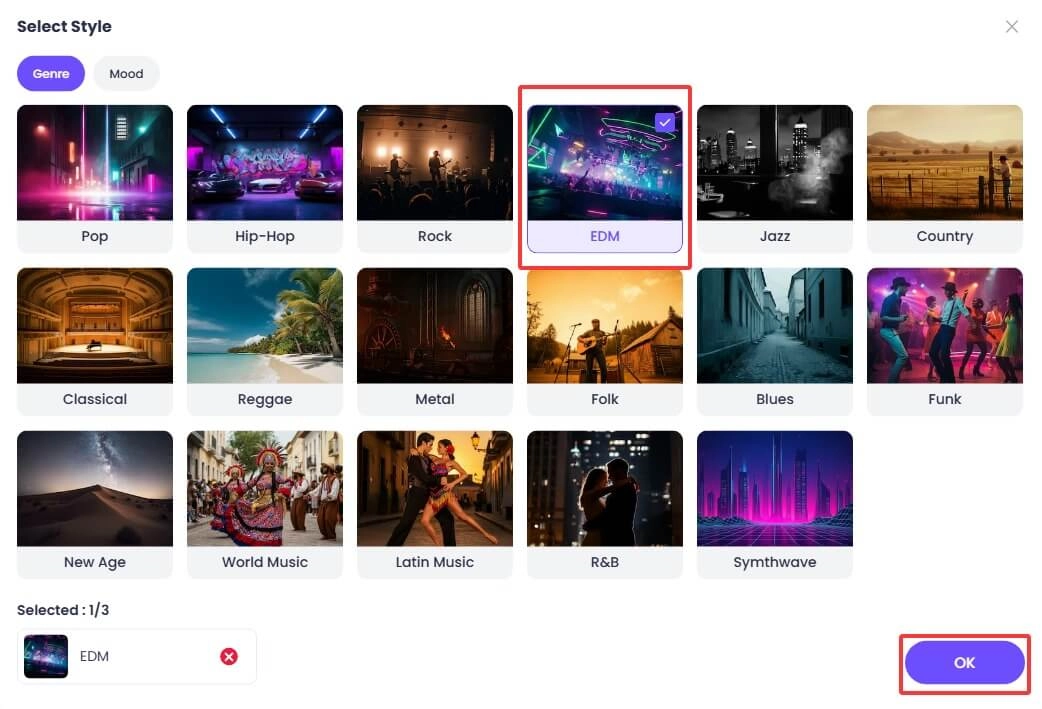
When ready, check, edit, and download the EDM music video you made.
Explore More Ways:
AI Song Mashup Maker: Blend songs like a pro and create something entirely new >>
Celebrity Voice AI: Hear your songs performed in the voice of a celebrity >>
The Bottom Line
Actually, creating your own dance tracks isn't that hard if you choose the right tools. This guide has selected the four best EDM music makers on the market, and also introduces a platform to take your creations further by making MVs. What are you waiting for? Check the top, stable, and unlimited-use tool, Vidnoz AI, and start creating now!