Are you a content creator, podcaster, or YouTuber searching for the perfect opening for your videos? A great intro not only sets the tone but also grabs attention and makes your content instantly recognizable. But composing from scratch requires musical skills, technical knowledge, and often expensive software. What if you could use an intro music maker that generates catchy, professional tracks in seconds? With the power of AI, you can. Go through this article to learn about the best platforms for crafting intro music that is unique, royalty-free, and easy to create online.
Image Material from musiclab.com
- On This Page
-
Auditory Appetizer: Mood-Fitting Intro Music
-
Introduction Maincourse: AI Intro Music Maker Top List
#1 Soundraw Intro Music Maker: Customize Different Tracks & Strength
#2 Vidnoz AI Music Generator Based on Genre, Mood, Theme
#3 AI Music Intro Maker from Text Prompt
#4 Mubert: AI Intro Music Generator from Image
-
How to Make Intro Music with AI [With/Without Lyrics]?
-
Chef Secrets: Best Ingredients for a Better Intro Music
-
Bonus Dessert: Get Intro Video Template with Music Instead
Auditory Appetizer: Mood-Fitting Intro Music
Think of your intro music as an appetizer that gives the audience a taste of what’s to come. With an AI intro music generator, you can instantly produce tracks that reflect any mood or vibe you want. Whether your content is playful, professional, or dramatic, there is an AI tool that can help you find the right sound.
Here are some examples that show how mood-fitting intros transform a video:
Showcase 1: AI Song Intro for a Coffee Time Vlog
Description: Mellow acoustic piece, smooth jazz with bossa nova, chill vibe, suitable as a coffee time vlog or any chill time.
Showcase 2: AI Intro Music for YouTube Gaming Channel
Description: Heavy bass, electronic effects, and rising rhythms give an adrenaline rush before gameplay starts. Viewers immediately feel ready for intense action.
Showcase 3: AI Intro Music for a Commercial Ad
Description: Clean guitar riffs, uplifting piano melodies, and smooth transitions create a sense of trust and professionalism. It helps a product look polished and credible.
Showcase 4: AI Song Intro for a Lo-fi Study Video
Description: An energetic, delightful, and vigorous intro to arouse viewers’ expectations for the following travel scenes.
The right intro music is not just background noise. It sets the stage, influences viewer emotions, and makes your content memorable.
Introduction Maincourse: AI Intro Music Maker Top List
Now that we’ve covered how intro music can shape your content, let’s explore the best platforms that can help. Each music intro maker has its strengths, from detailed customization to lightning-fast generation. The following tools are the most effective for creators who want professional results without the stress of composing from scratch.
#1 Soundraw Intro Music Maker: Customize Different Tracks & Strength
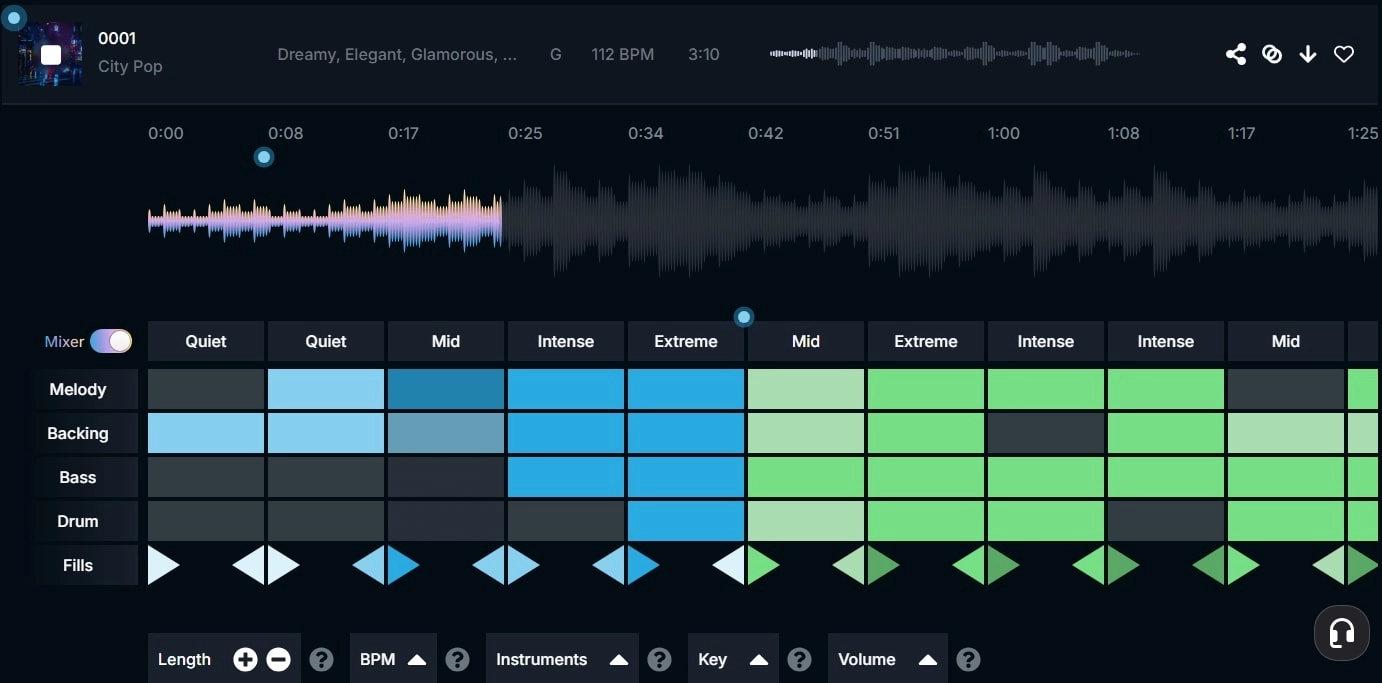
Soundraw is one of the most advanced platforms for generating and editing music with AI. Unlike some tools that give you only a finished track, Soundraw separates the music into layers so you can control every instrument. This makes it feel closer to music production while still being easy to use.
Key Feature
- Layered Customization: Control the strength of drums, bass, melody, and other elements. For example, lower the drums to make a softer intro or boost the synths for an energetic track.
- AI Inspiration: The tool generates multiple variations instantly, giving you a foundation to build on when you feel stuck creatively.
- Diverse Instruments: From traditional pianos to electronic beats, you get access to a wide sound palette that keeps your intros unique.
Pros
- Advanced control over sound layers
- Multiple generated options in seconds
- Clean and user-friendly interface
- Royalty-free tracks for commercial projects
Cons
- The free plan has download limits
- More advanced than beginners may need
Soundraw is ideal if you want flexibility and enjoy adjusting details. It feels like a bridge between AI generation and traditional music editing.
#2 Vidnoz AI Music Generator Based on Genre, Mood, Theme
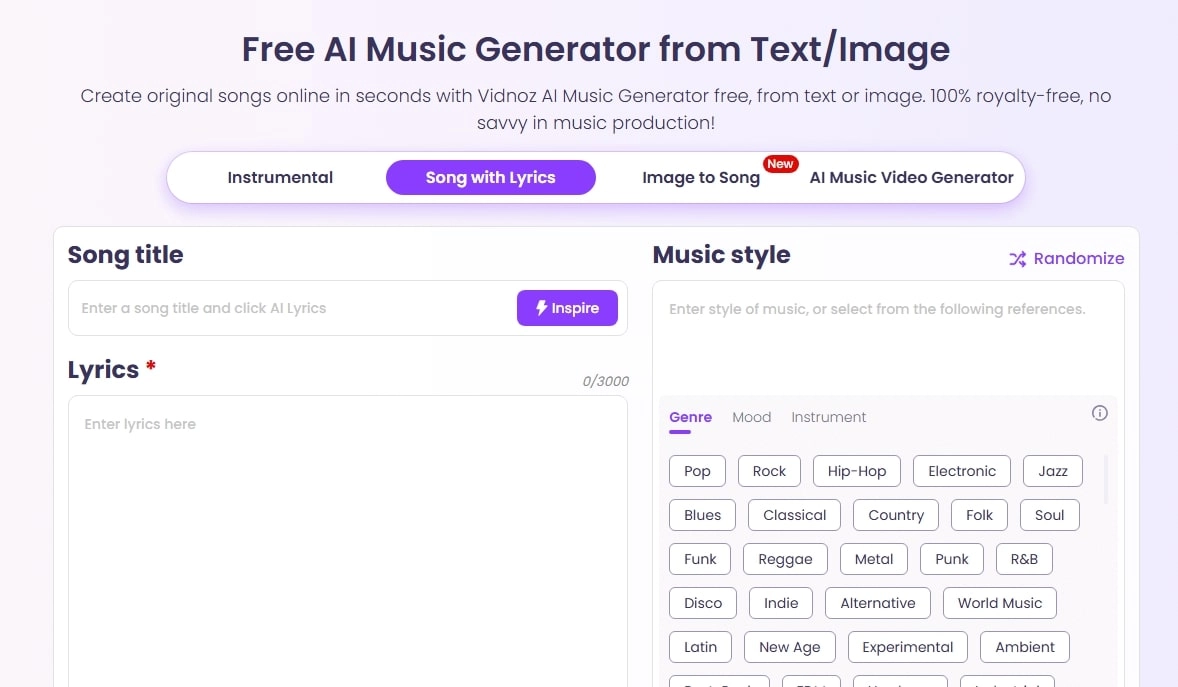
The Vidnoz AI Music Generator stands out for its balance of simplicity and power. It is perfect for creators who want quick results without sacrificing quality. Vidnoz supports both customization and text prompts, meaning you can either select options from a menu or simply describe the music you want.
Key Feature
- AI Intro Music Maker from Customization: This AI intro music maker helps shape the instrumental music with different customizations: Genres like Rock and Hip Hop, Moods like Epic and Dark, and Themes such as cinematic.
- 1-Click Free Intro Song Generator from Text: Based on text-to-music tech, this app allows you to simply input what you want to generate music effortlessly in 1 click, download, and use for personal and commercial purposes.
- Diverse Hints & Options Out-of-the-Box: The platform offers ready-made prompts and presets for different use cases. You can choose instrumental intros or full songs with lyrics, depending on what fits your video.
Pros
- Extremely beginner-friendly
- Works with both customization and text prompts
- Royalty-free downloads for commercial use
- No hidden costs in the free plan
Cons
- No advanced track-layer editing
Vidnoz is a great option if you want to create intro music online quickly. If the music isn’t long enough as you prefer, you may also extend music with AI.
#3 AI Music Intro Maker from Text Prompt
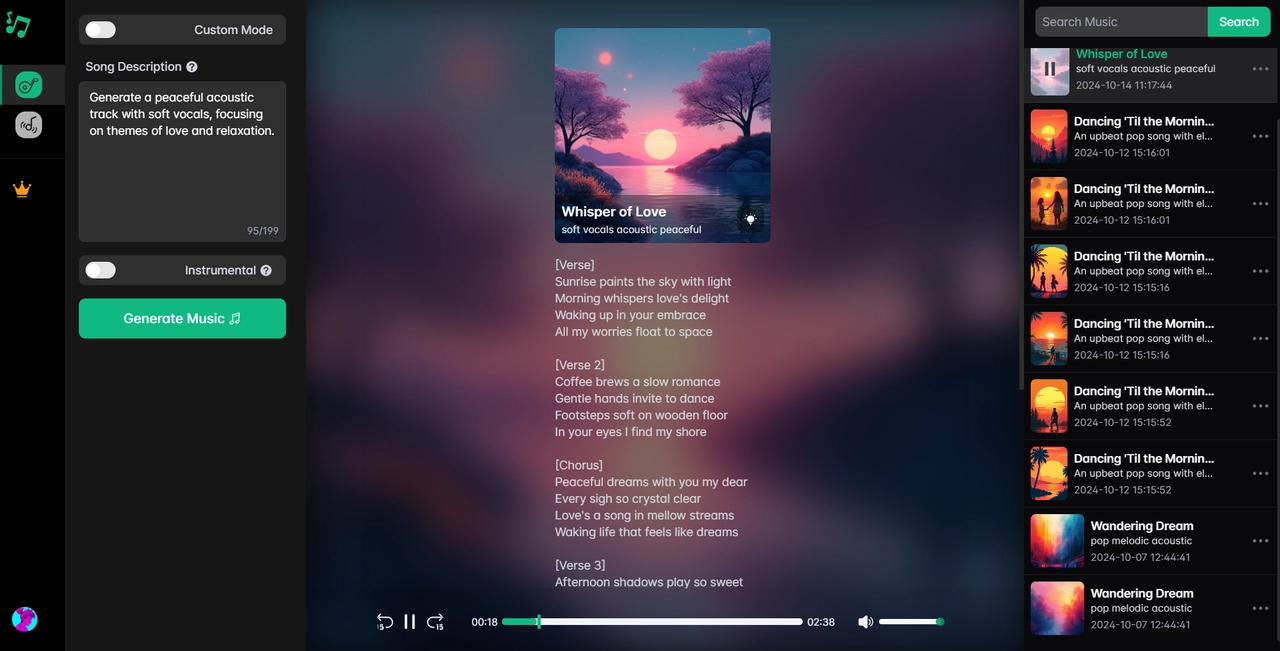
If you love describing creative ideas in words, this category is for you. An AI intro music generator that works with text prompts, interprets descriptions, and converts them into complete songs.
Key Feature
- Description-to-Song: You can specify the genre, instruments, mood, tempo, and even lyrical themes. The AI builds a track that closely follows your vision.
- Automatic Vocal Generation: It goes beyond instrumentals and can generate lyrics and vocals. This is useful if you want an intro song that includes singing.
- Multiple Modes: It lets you choose between instrumental-only, vocal-inclusive, or hybrid modes.
Pros
- Highly creative and versatile music intro maker
- Can generate songs with or without lyrics
- Easy for beginners who like text-based input
Cons
- Results can vary in quality
- Free versions usually limit generation credits
Pairing this with features like celebrity voice AI allows you to add realistic voiceovers to your intros, making them even more engaging.
Clone Anyone’s Voice with AI - Free
Make realistic voices of famous people and characters.
Clone anyone's voice to create personalized voiceovers.
Support 2000+ languages and accents.
Change Voice Now
#4 Mubert: AI Intro Music Generator from Image
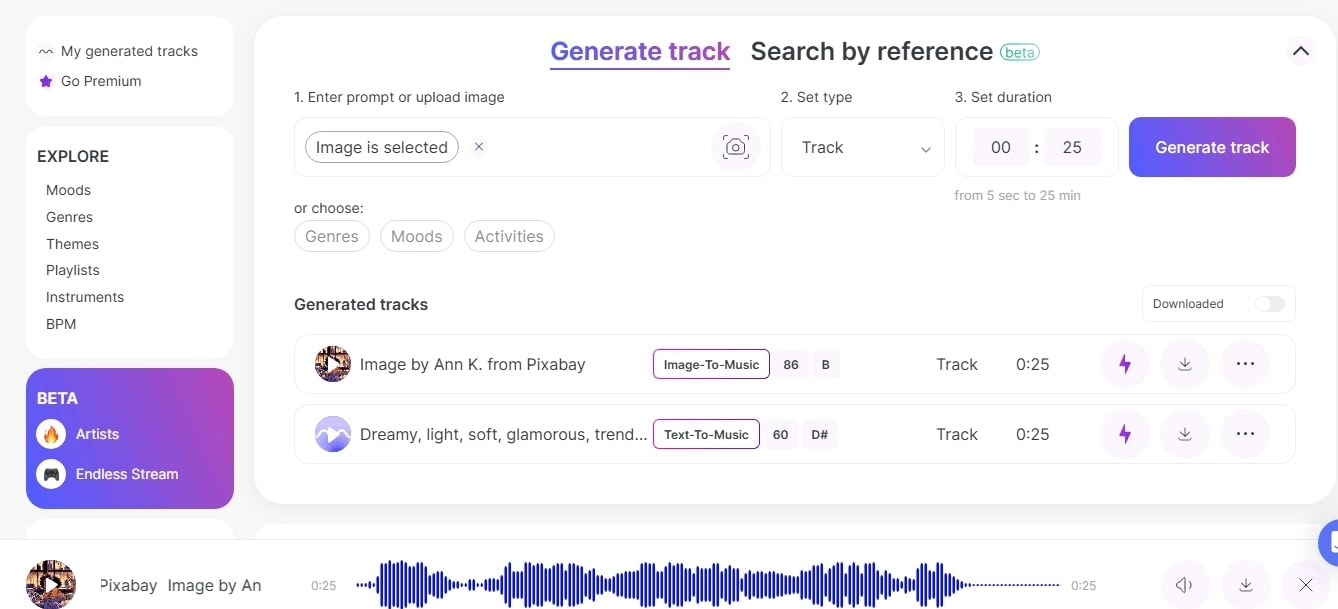
Mubert is a unique AI intro music generator that works visually. Upload an image, and it analyzes the mood and colors to create music that matches the aesthetic.
Key Feature
- Image-to-Music: Turn visuals into sound. A sunset photo might inspire a calm ambient track, while a city skyline might create upbeat electronic beats.
- Audio Types: Mubert provides intros, full-length tracks, and looping audio for different needs.
- Royalty-Free Library: Every generated track can be used safely in commercial projects.
Pros
- Fun and creative way to generate music
- Perfect for visual designers and branding projects
- High-quality AI song mashup maker with minimal effort
Cons
- Image interpretation is not always accurate
- The free plan has restrictions
Mubert is ideal if you want your audio to connect directly with your visuals. It creates an artistic link between sound and imagery.
How to Make Intro Music with AI [With/Without Lyrics]?
Since the Vidnoz AI Music Generator is simple yet so powerful that it allows you to generate intro music with or without lyrics as you like, here’s a quick tutorial to get started.
Guide: How to Make AI Intro Music with Lyrics:
Step 1: Try It Free Now
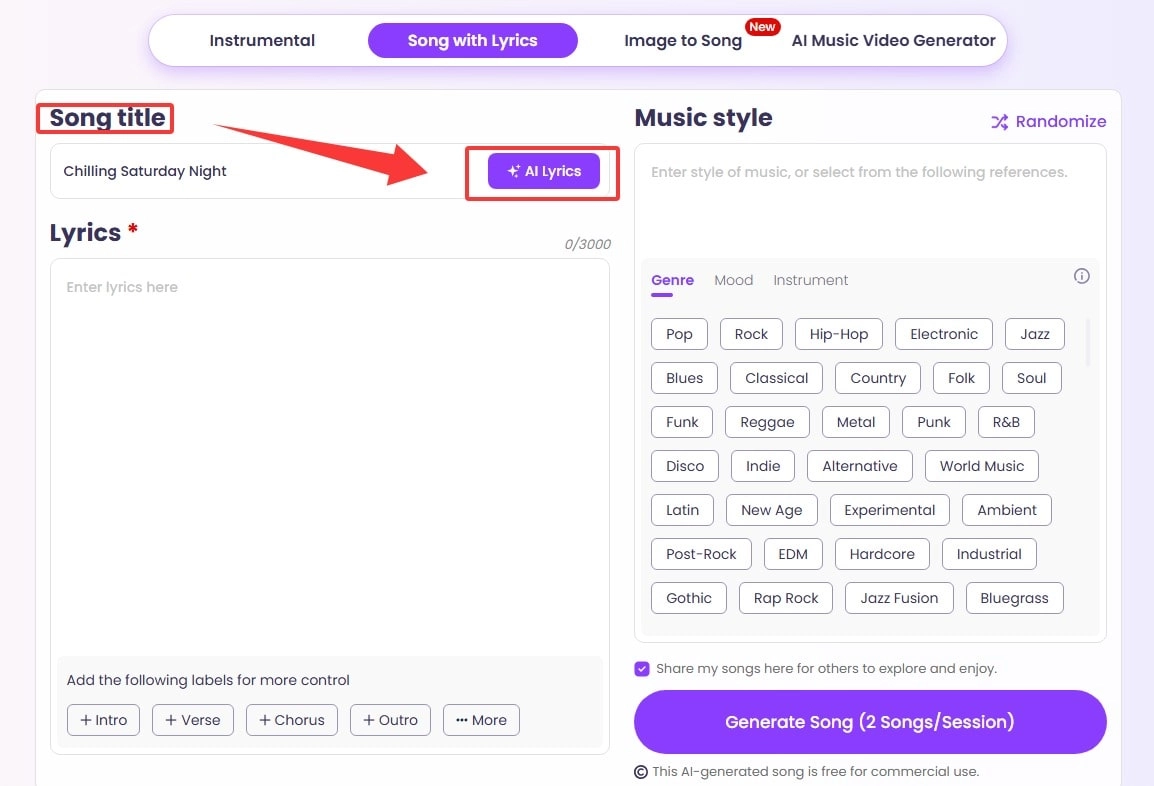
Go to the AI music intro maker. Navigate to the Song with Lyrics tab.
Step 2: Generate Lyrics with AI
Describe your song title in the text box. Click AI Lyrics.
Step 3: Customize & Generate
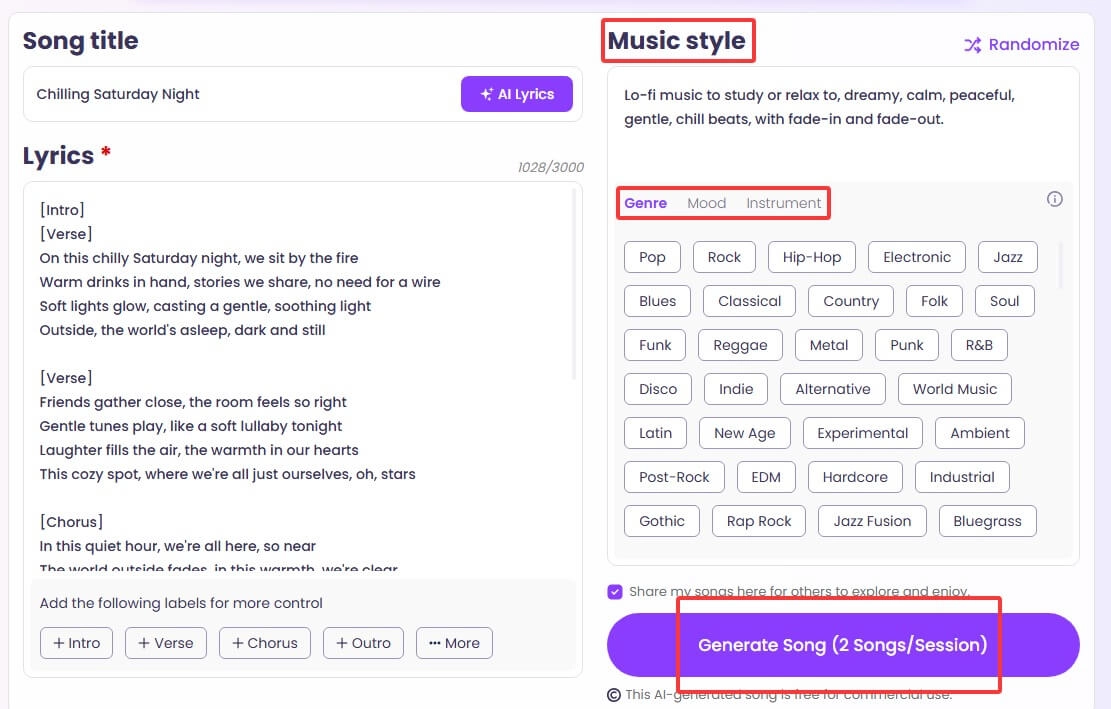
Customize your music style. Input your description, or choose from the Genre, Mood, and Instrument prompts. You may also click Randomize if you don’t have any preferences or an idea. Click the Generate Song option and download it instantly.
Check if you like the music generated:
Guide: How to Make AI Intro Music with Lyrics:
Step 1: Try It Free Now
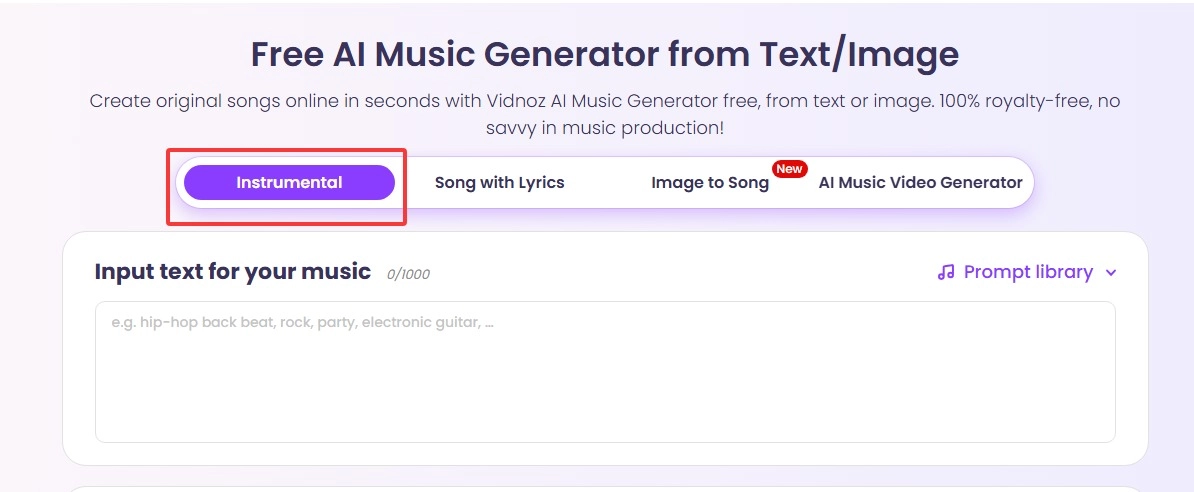
Go to the AI intro music generator, and click Instrumental from the tab.
Step 2: Enter Your Prompt or Choose from Options
Describe your song title in the text box. E.g., “a Lo-fi music to study or relax to, dreamy, calm, peaceful, gentle, chill beats, with fade-in and fade-out.”
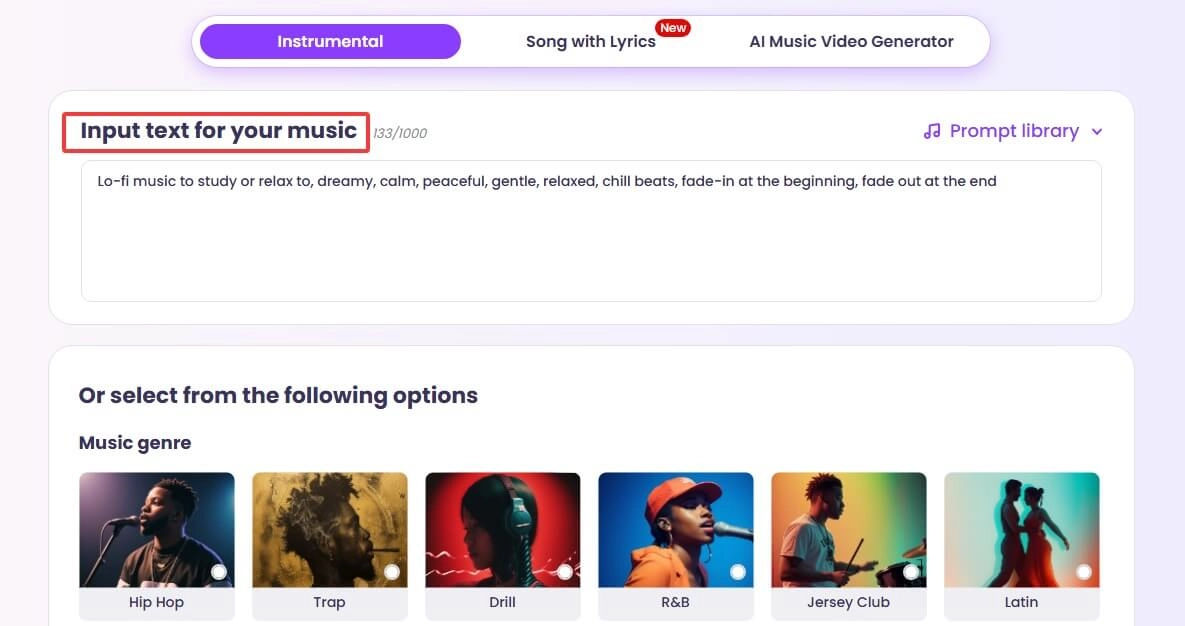
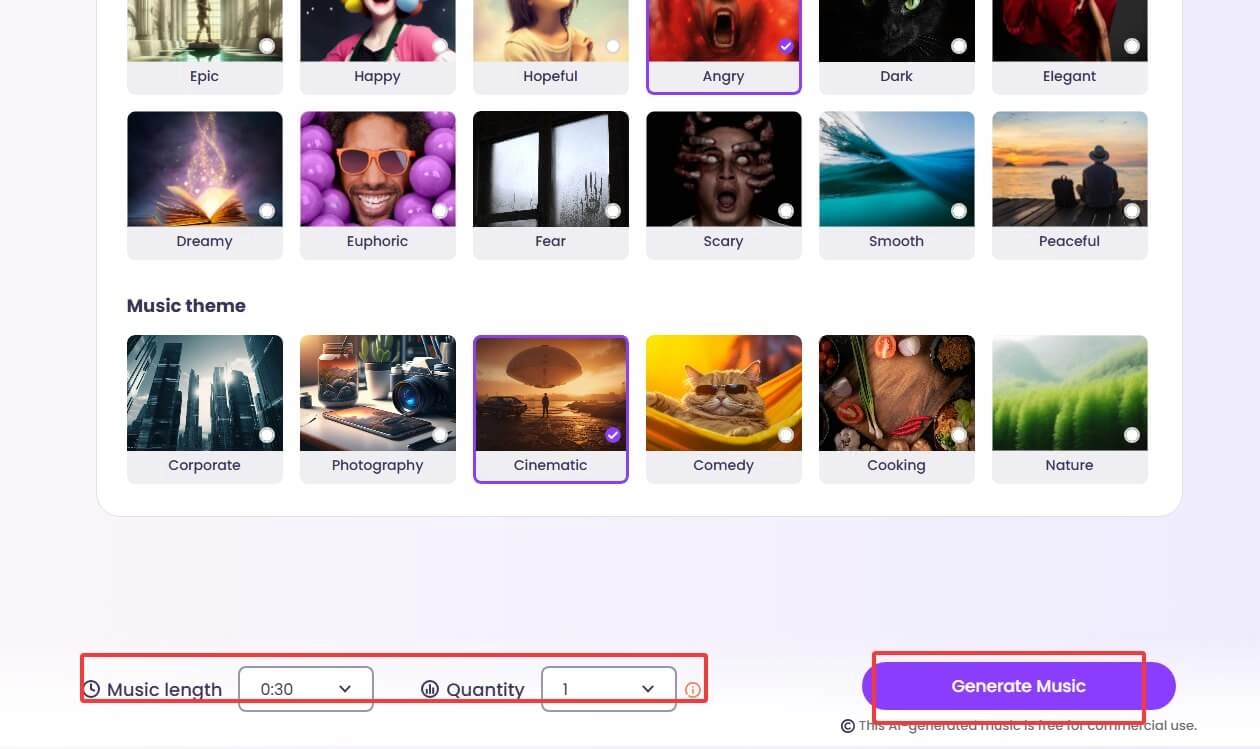
Or, you can also choose from the given options of Genres, Moods, and Themes to create your music. Choose Length, and click Generate Music.
Chef Secrets: Best Ingredients for a Better Intro Music
A great intro requires more than just any track. Here are some practical tips for creating music that enhances your brand:
- Short & Memorable: Keep it 5–10 seconds long as a hook for maximum impact to build your brand and impression.
- Correct Mood: Match the music vibe with the tone of your video to make it consistent and harmonious.
- Align with Visuals: Sync beats with edits or logo animations.
- Consistency Across Videos: Use similar styles for stronger branding.
Bonus Dessert: Get Intro Video Template with Music Instead
Sometimes you want a complete video intro, not just music, so that your intro music can match the on-screen content perfectly. Is it possible? Why not! The Vidnoz AI Video generator offers ready-made templates that include music, visuals, and animations. This saves hours of editing while keeping your brand professional.

Vidnoz AI - Create Free Engaging AI Video with Talking Avatar
- Easily create professional AI videos with realistic avatars.
- Text-to-speech lip sync voices of different languages.
- 2800+ video templates for multiple scenarios.
Key Feature
- Abundant Intro Templates: A Wide range of professional intros, each with mood-fitting music and a big music stock to choose from.
- Handy Editing Tools: It leaves full control in your hands as well; you can add and edit text, colors, transitions, and animations easily.
- AI Power Support: Not only for the intro, but also for the whole video. It comes with vivid talking AI avatars, text-to-speech, and lip sync to bring scripts and your idea alive.
Check how to get intro video with intro music:
Step 1: Try It Free Now
Click the button here to sign up for an account.
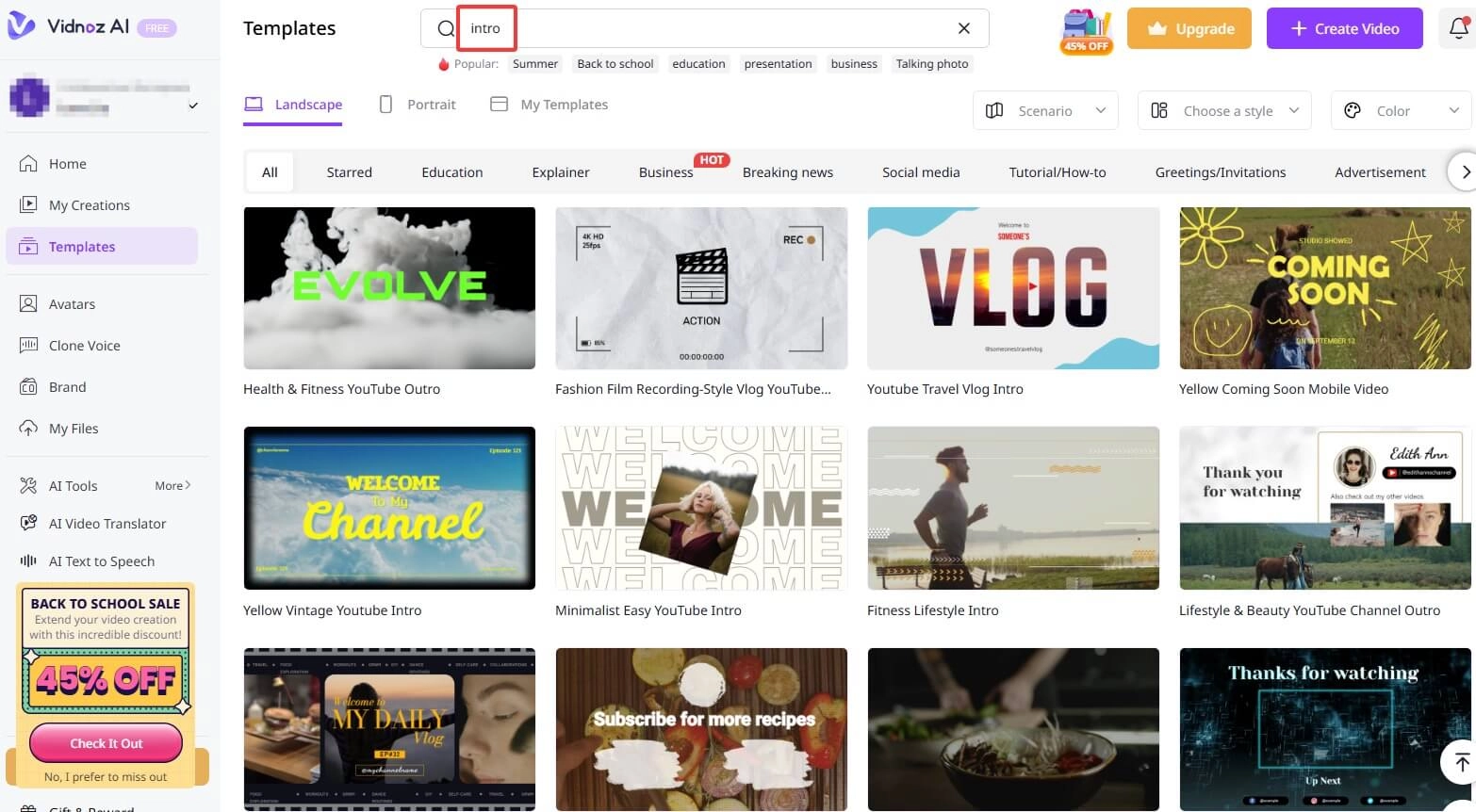
Step 2: Choose Templates
Locate the Templates tab from the sidebar > search for “intro” in the template section > pick one and click Use this template.
Step 3: Customize & Edit
Add your logo, adjust text, generate scripts using the built-in AI features, and make any further tweaks.
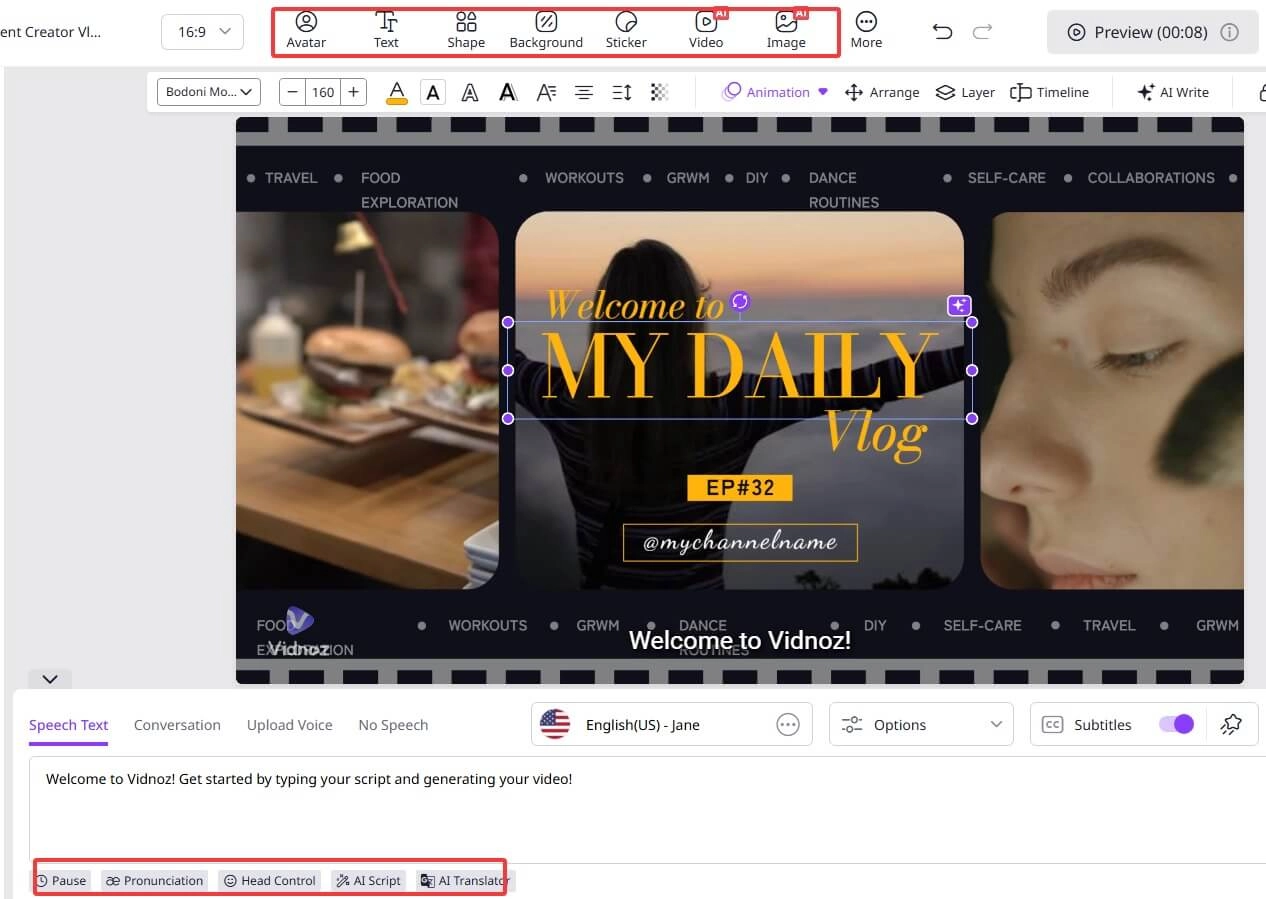
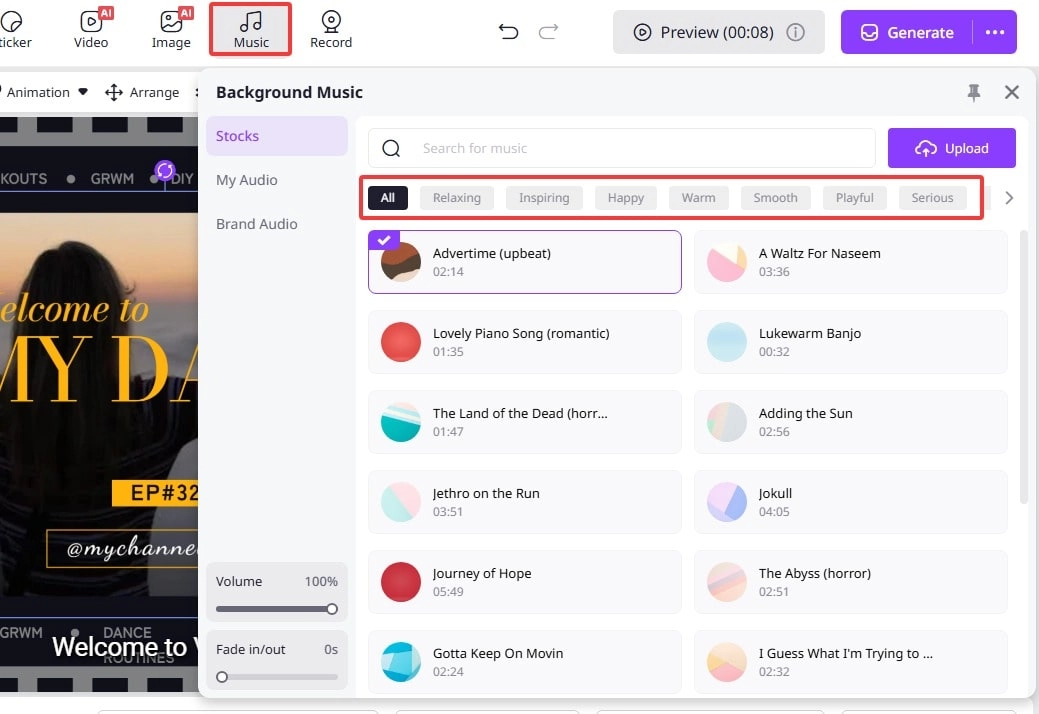
Of course, you can change the ready-for-use intro music as you prefer. Click Music and choose from Stock, Brand Audio, or Upload.
The Bottom Line
Creating a professional intro no longer requires expensive equipment or deep music knowledge. With tools like Vidnoz AI Music Generator and Vidnoz AI Video Generator, anyone can generate custom intro tracks or complete video templates in minutes. Whether you want flexibility, speed, or creativity, there is an intro music maker that fits your needs. Start experimenting AI music video generator today and give your content the signature sound it deserves.