As digital content creation continues to evolve, Dreamina AI is a popular tool among digital artists and social media creators. Since there are tons of choices out there, many users wonder whether Dreamina AI is truly worth their time. If you are having the same questions, this blog is a complete Dreamina AI review that has the answers you need.
Just read on to learn more about its main features, advantages and drawbacks, and pricing details. You can also find step-by-step tutorials, and the best free alternative that is worth trying!
- On This Page
-
What Is Dreamina AI?
-
Key AI Features of Dreamina AI
Image-to-Image Transformation:
Massive Presets & Filters:
-
CapCut’s Dreamina Review: Pros and Cons
-
Dreamina AI Pricing Plans
-
How to Use Dreamina AI for Video & Image Generation
How to Use Dreamina AI Video Generator
How to Use Dreamina AI Image Generator
-
Who Needs Dreamina AI Generator Most?
-
Best Dreamina AI Alternatives: Create Image & Video Online Free with Vidnoz
-
Dreamina AI vs. Vidnoz Alternative: Which Is Better?
What Is Dreamina AI?
Dream AI is an all-in-one creative platform developed by the same company as CapCut (ByteDance). Integrated seamlessly with CapCut's PC video editing software, Dreamnia AI can help users create stunning visuals and videos based on simple text prompts or pure images.
So is Dreamina AI free? Yes. Dreamina AI CapCut is also available online, which is particularly popular for its free access and user-friendly interface. It simplifies the process of content creation for beginners and professionals. Users can easily craft posters, logos, or dynamic videos, truly hassle-free with it.
Key AI Features of Dreamina AI
Dreamina AI boasts a robust suite of AI features that can satisfy various creative needs. Let’s check out its main capabilities first.
Text-to-Image Generator:
Dreamina AI image generator allows users to enter detailed text prompts via the image describer box to instantly generate high-quality images with realistic details.
Image-to-Image Transformation:
Users can upload an existing image and refine it with text prompts. This feature supports various aspect ratios and up to 2K resolution output.
AI Video Generation:
Dreamina AI video generator lets you convert text and static images into dynamic animated videos with smooth motion. It supports video creation with up to 1080p resolution and different aspect ratio options.
Massive Presets & Filters:
It comes with a rich library of built-in styles for image or video creation. You can remix the ready-to-use template to create stunning visuals for various creative projects.
AI Avatar Creator:
It can create customized avatars from photos online with image and audio uploads. You can use it as an AI cartoon generator if you want to create an animated avatar for your profile.
CapCut’s Dreamina Review: Pros and Cons
With impressive features mentioned above, Dreamina AI is a powerful tool that is embraced by many creators. In this part, let’s dive into a balanced review of its pros and cons.
Pros of Dreamina AI
- Dreamina AI video generator free tool to get bonus credits every day for content creation.
- Versatile creative tools to produce images, videos, and avatars quickly and easily.
- High-quality image and video outputs with detail and textures that are impressive enough.
- Create royalty-free digital content, which is ideal for freelancers, marketers, and professionals.
Cost of Dreamina AI
- Limited free credits daily, and no lip sync AI online free.
- It might take some time during peak hours for processing.
- You need to repeatedly adjust prompts for small details and the results you want.
- Subscription pricing for advanced plans can be expensive for casual users.
What Users Say About Dreamina:
-“As someone……I was excited to try out Dreamina on CapCut, and honestly, it’s been a game-changer.” – Gorkha Das from Product Hunt.
-“The subscription is valid…However…my account only shows “System Upgrade in Progress” and all advanced features are blocked.” – Akira N from Trustpilot.
Convert Image to Video AI Online - Free
- Create a video from an image quickly for free.
- Use various AI models to turn photos into videos.
- Download and share the AI-generated video at no cost.
Convert Image to Video
Dreamina AI Pricing Plans
Aside from the pros and cons, pricing is another factor to consider before commitment. Here are the details of Dreamina AI’s subscriptions.
|
Plan
|
Price
|
Credits
|
Resolution & Generation
|
Video & Audio Features
|
|
Free
|
$0/month (Forever)
|
Bonus credits daily
|
Limited standard generation
|
Basic access only
|
|
Basic
|
$0 for 7 days, then $73 for the first year, renews at $145/year
|
2,700 credits/month
|
Free unlimited 2K generation with Seedream 4.0
|
Up to 60 FPS, lip-sync audio generations
|
|
Standard
|
$168/year, renews at $335/year
|
10,800 credits/month
|
Free unlimited 2K generation with Seedream 4.0
|
Up to 60 FPS, lip-sync audio generations
|
|
Advanced
|
$335/year, renews at $670/year
|
29,700 credits/month
|
Free unlimited 4K/2K generation with Seedream 4.0
|
Up to 60 FPS, lip-sync audio generations
|
How to Use Dreamina AI for Video & Image Generation
Getting started with Dreamina AI is pretty straightforward. In this part, let’s see how to use it easily.
How to Use Dreamina AI Video Generator
Step 1. Navigate to the Dreamina video generator feature.
Step 2. If you don’t know how to write a proper prompt, just use the existing template to begin with. You can fine-tune the prompt if you want.
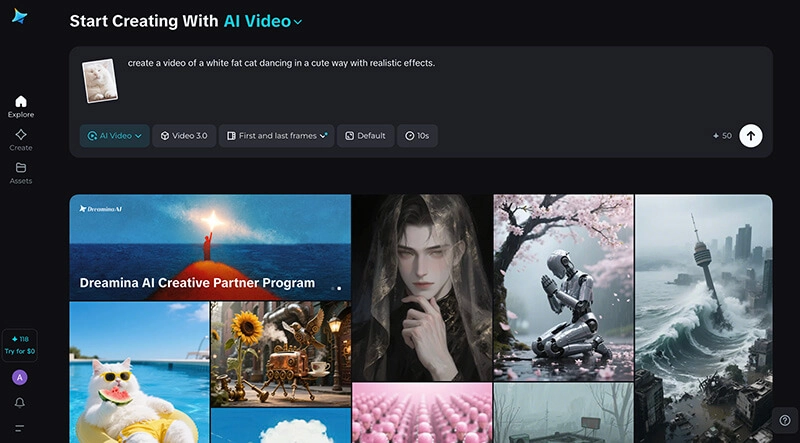
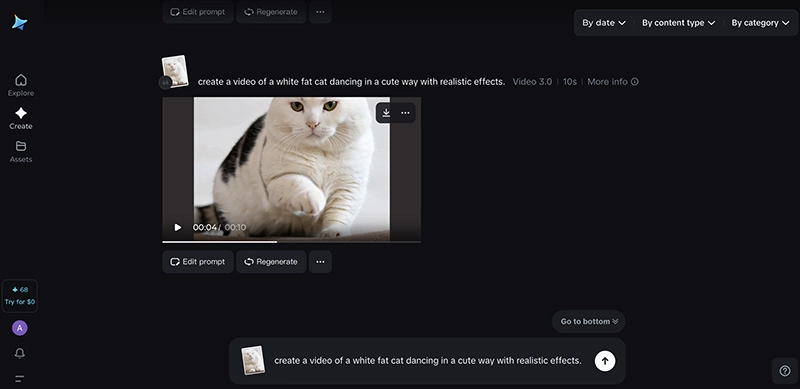
Step 3. Then you can just wait for the video generation to be done soon.
How to Use Dreamina AI Image Generator
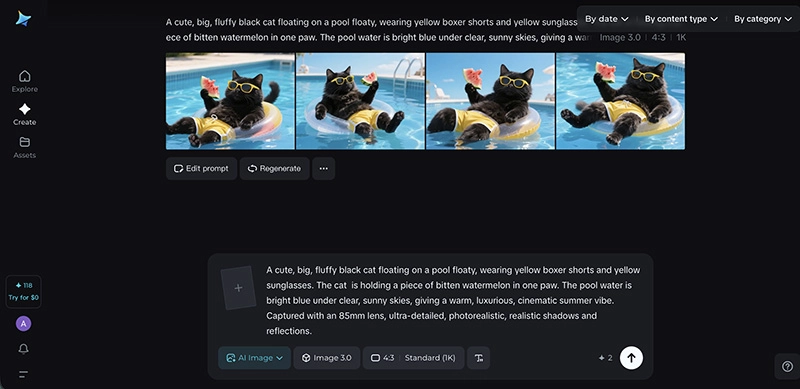
Step 1. Head to Dreamina AI and choose the AI Image feature.
Step 2. Input the text prompt and upload a reference image if needed. Adjust the output options(aspect ratio, AI model, length, etc.)

Step 3. Adjust the aspect ratio and resolution. Click on the Generate button, and you can get the results instantly.
Who Needs Dreamina AI Generator Most?
With its easy-to-follow guides, you should know how to use Dreamina AI in simple steps. So, who is this tool best for? Here are the users who benefit from this Dreamina video generator.
- Artists and Designers - Quickly generate concept art, illustrations, and AI cartoon-style visuals using flexible text-to-image transformations.
- Content Creators - Produce engaging social media videos using the Dreamina AI video generator with lip-sync features for dynamic short-form content.
- Digital Marketers & Advertisers - Rapidly create product promos, visuals, and video ads using text/image-to-video tools.
- Game Developers - Easily generate characters, avatars, and other assets to streamline prototyping and early-stage game development workflows.
- Online Educators - Turn scripts into lessons with talking photo AI or talking avatar videos for more engaging education content.
- Personal & Hobby Users - Enjoy features like AI kissing video generator free effects, background removal, and creative AI image tools for personal purposes.
Best Dreamina AI Alternatives: Create Image & Video Online Free with Vidnoz
While Dreamina AI excels in content creation, its pricing can be way too expensive for regular users, and the free plan is simply not enough. If you are looking for the best free tool to get started, Vidnoz is the place to go. Similarly, it’s an all-in-one platform for image and video generation for truly free!

Vidnoz AI - Create Free Engaging AI Video with Talking Avatar
- Easily create professional AI videos with realistic avatars.
- Text-to-speech lip sync voices of different languages.
- 2800+ video templates for multiple scenarios.
Vidnoz AI Text to Video
Vidnoz AI Text to Video is a simple yet powerful tool that lets you easily create videos via text prompts. You can generate professionally look videos for marketing, training, or talking photo AI educational content with natural-sounding voiceovers!
Key Features:
- Generate videos based on text prompts and export videos with high-quality visuals, subtitles, and audio.
- Create HD videos within minutes, featuring avatars and AI voices across various languages.
- Best free AI video generator to create videos for full commercial-use permissions.
How to Use It to Create AI Videos
Step 1. Navigate to Vidnoz AI Text to Video Generator. Use the prompts below as a reference to describe the video you want.
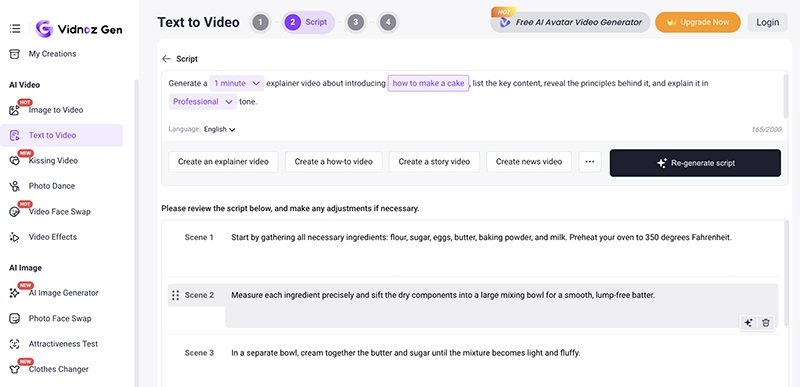
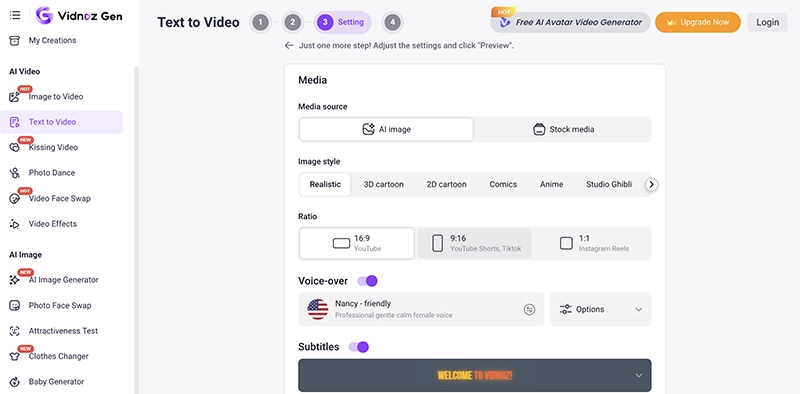
Step 2. Review the AI scripts. Adjust the image style, aspect ratio, voice-over option, etc.
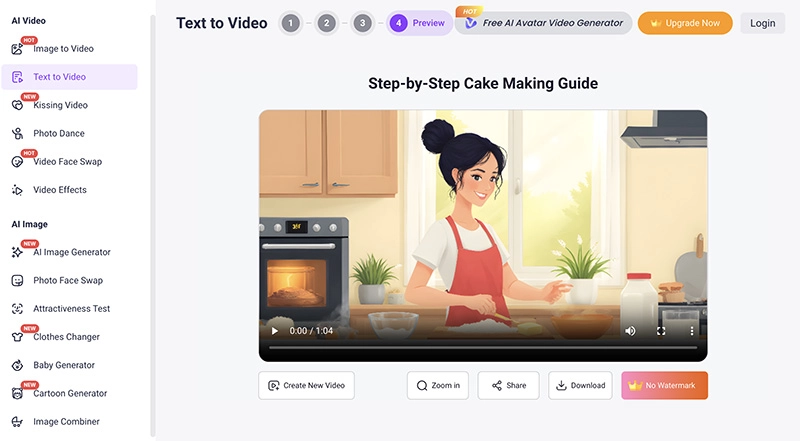
Step 3. Preview the video and scripts. Click on the Generate video button to confirm the creation.
Vidnoz AI Image to Video
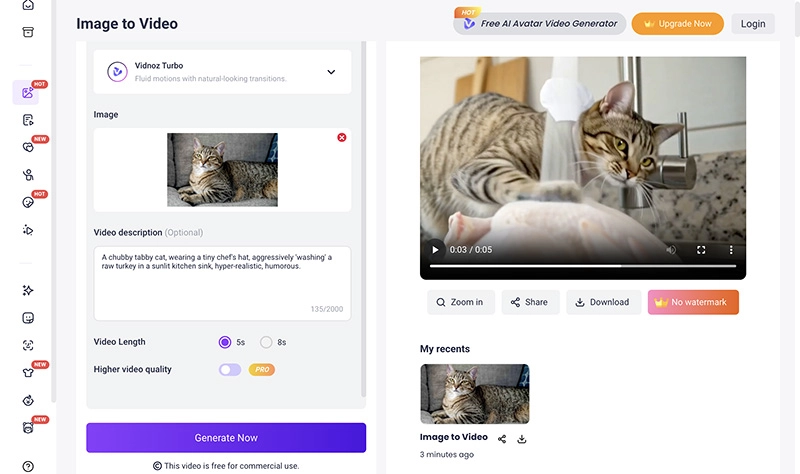
Just like Dreamina AI, Vidnoz allows you to convert images to videos as well. Just go with Vidnoz AI Image to Video, and you can easily animate static images into dynamic, eye-catching videos with smooth transitions and excellent visual effects.
Convert Image to Video AI Online - Free
- Create a video from an image quickly for free.
- Use various AI models to turn photos into videos.
- Download and share the AI-generated video at no cost.
Convert Image to Video
Key Features:
- Multiple AI models(Vidnoz Turbo, Google Veo, Kling, etc.) for fluid motion and cinematic-level realism.
- Tons of video templates of various themes. Remix and fine-tune templates to create videos of your own.
- Support up to 8s video for free with HD quality. Standard and professional modes for video creation.
How It Works to Turn Image to a Videos
Step 1. Head to Vidnoz AI Image to Video. Pick a template from the panel on the right.
Step 2. Choose an AI model first. Input the prompt and upload a reference image.
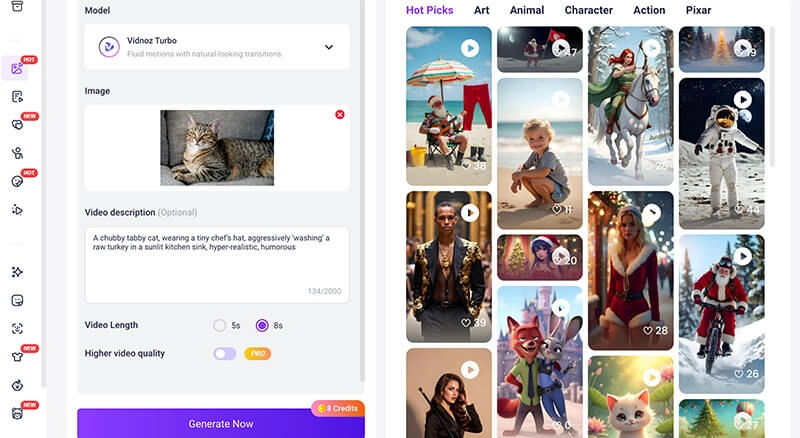
Step 3. Select the video length and creation mode. Then generate a stunning video in seconds.
Vidnoz Image Generator
Vidnoz Image Generator is where to create splendid images online for free. You can produce visuals based on text prompts, image references, and a wealth of graphic templates that are ready to use.
Key Features:
- Text or image inputs for creation with adjustable aspect ratios, visual styles, and dimensions.
- Advanced AI models such as Flux Dev, Google Nano Banana, etc. to create high-quality images.
- Unleash your creativity with a handful of image templates and export professional images in minutes.
How to Use Vidnoz Image Generator
Step 1. Launch Vidnoz Image Generator. Select Text to Image or Image to Image from the top.
Step 2. Input prompts to describe the image you want or choose one from the library. Upload an image reference if needed.
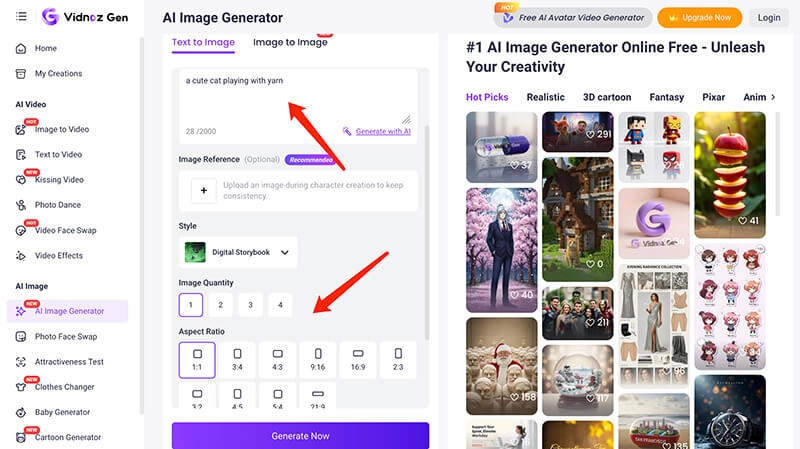
Step 3. Adjust the output options like aspect ratio, quality, and style. Click on the purple button for creation.
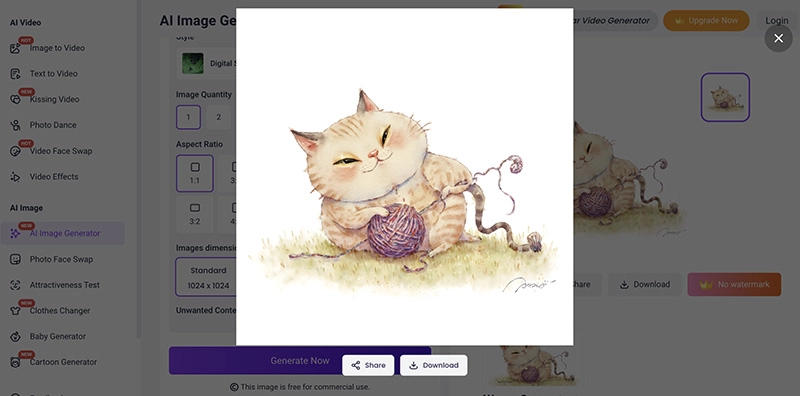
Dreamina AI Vidnoz Create Image
Dreamina AI vs. Vidnoz Alternative: Which Is Better?
Now you have the two best video creation tools at hand. So, Dreamina AI and Vidnoz, which one is better? Check out the brief comparison below.
|
Feature
|
Dreamina AI
|
Vidnoz AI Generators
|
|
Text to Image
|
Yes
|
Yes
|
|
Image to Image
|
Yes
|
Yes
|
|
AI Video Generation
|
Yes
|
Yes
|
|
Interface
|
Sleek, modern
|
Web-based, intuitive
|
|
Styles
|
Massive preset library
|
Tons of creative filters and visual effects
|
|
Speed
|
Depends on queue times
|
Fast, seconds to minutes.
|
|
Pricing
|
Free tier with subscriptions
|
Free
|
|
Credit System
|
Daily free limits
|
Daily free limits
|
As you can see, Vidnoz offers faster generation speed and highly customizable options. In addition, it is a more comprehensive all-in-one AI video platform, offering a wide range of built-in AI features such as AI Video Translator, Talking Photo, Vidnoz AI music video generator, etc., making it a more versatile choice for creators with diverse production needs.
The Bottom Line
While Dreamina AI offers powerful tools for image and video creation, its credit-based limitations may frustrate many users on low budgets and those who need to create content on a large scale. But worry not. Vidnoz AI is a far superior solution, which delivers fast, high-quality results with unlimited access. Just sign up and create your content without restrictions now!
Vidnoz AI - Create Free Engaging AI Video with Talking Avatar
- Easily create professional AI videos with realistic avatars.
- Text-to-speech lip sync voices of different languages.
- 2800+ video templates for multiple scenarios.






![How to Remove Filter from Video Online | AI Video Filter Remover Online Free [Lossless]](https://www.vidnoz.com/bimg/remove-filter-from-video.webp)