Today, video content is not limited by borders, but language can be a barrier. This is the time an AI video translator comes into play. One such tool is BlipCut AI Video Translator—an online platform that successfully breaks down linguistic walls with fast translations, voiceovers, and subtitles.
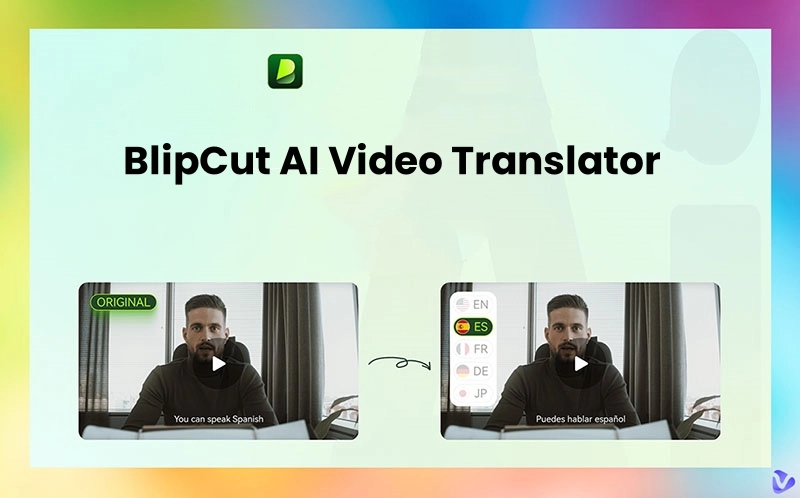
Haven’t got your hands on it? Worry not. This blog will review the main features, pricing, and BlipCut AI Video Translator Chrome extension. We will also introduce a powerful free alternative, Vidnoz AI Video Translator, that delivers premium features at no cost. Just keep reading to find the best video translation tool for your needs.
- On This Page
-
Main Features of BlipCut AI Video Translator
Online Free AI Video Translator, No Sign-Up
130+ Language Support with 300+ AI Voices
Multi-Speaker Recognition
Accurate Video Content Translation
AI Lip-Sync Video Translation
How to use BlipCut AI Video Translator?
-
Brief Introduction of BlipCut AI Video Translator Chrome Extension
-
Price of BlipCut AI Video Translator
-
Application of BlipCut AI Video Translator
Translate Videos for Marketing
Translate Videos for Education
Translate Videos for News
Translate Videos for Social Media
-
BlipCut AI Video Translator Free Alternative
Key features of Vidnoz AI Video Translator
How to translate a video with Vidnoz AI Video Translator?
Main Features of BlipCut AI Video Translator
BlipCut AI Video Translator is a web-based platform that simplifies video localization. With a wide range of impressive features, BlipCut video translator allows users to effortlessly translate and dub videos into over a hundred languages online.
Key features of the BlipCut AI video translator
Online Free AI Video Translator, No Sign-Up
BlipCut is a browser-based video translation service with no registration required. Users can simply upload a video and get started in an instant. The quick AI translator can be the best tool to handle translation tasks hassle-free.
130+ Language Support with 300+ AI Voices
BlipCut supports over 130 languages and 300+ natural-sounding AI voices with a wide selection of voice tones and accents available. Ever want to make your content reach the world? BlipCut is a handy tool for hassle-free localization.
Batch Video Translation
BlipCut AI translator can process multiple video translations at once, saving you valuable time. You can easily manage online courses, YouTube videos, marketing campaigns, or news outlets in bulk.
Multi-Speaker Recognition
BlipCut’s AI engine can detect and separate multiple speakers in one video. You can generate more accurate dubbing and subtitles, preserving the structure of dialogues or interviews perfectly.
Accurate Video Content Translation
Regardless of casual speech or formal narration, BlipCut ensures high translation accuracy. With advanced algorithms, the tool adapts the tone and meaning to fit the target language naturally.
AI Lip-Sync Video Translation
BlipCut is an AI video translator with lip-sync, which aligns translated voiceovers with speakers' lip movements. This is just perfect to improve viewer immersion and reduce the awkwardness often found in dubbed content.
How to use BlipCut AI Video Translator?
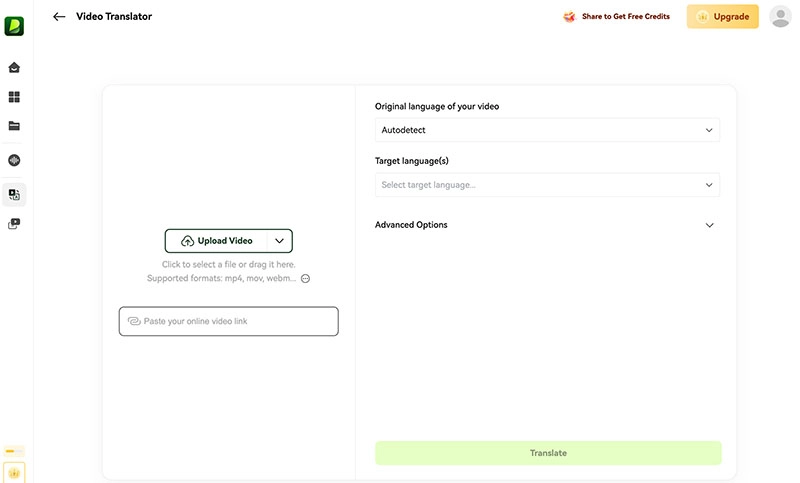
Step 1. Head to BlipCut AI Video Translator page > Video Translator. Upload a video or input a video link.
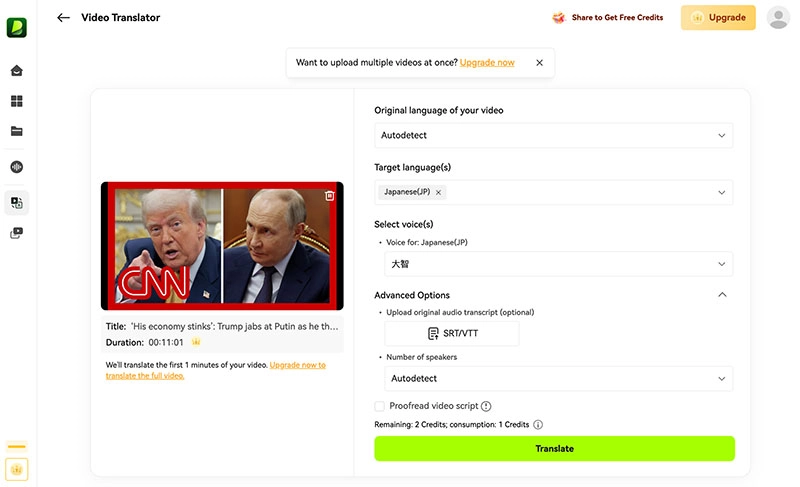
Step 2. Choose the target language and voice. Adjust the settings for advanced options.
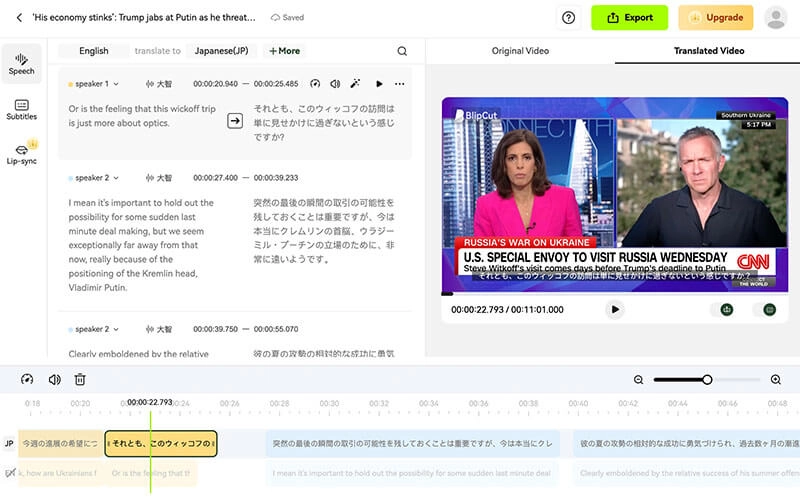
Step 3. Click on the Translate button. Your video will be ready after a few minutes.
Brief Introduction of BlipCut AI Video Translator Chrome Extension
Today, some users search for BlipCut AI video translator MOD APK or try to use BlipCut AI video translator crack to unlock premium features. Unfortunately, BlipCut doesn’t offer desktop software, and these methods are unsafe and illegal.
But if you are looking for an easier and official solution, there is the BlipCut AI video translator extension for Chrome. It can translate YouTube videos into hundreds of languages instantly, and its text-to-speech (TTS) function can convert subtitles into natural, spoken audio in real time.
Pros
- Lightweight YouTube video translator
- Support over 100 voices and languages
- TTS for Real-time subtitle translation
- Personalize voice type, speed, and volume
Cons
- Works only on YouTube
- Requires a stable internet connection
Price of BlipCut AI Video Translator
BlipCut Video Translator provides multiple pricing plans with all premium features included. Here’s a detailed comparison of the available plans and their benefits:
|
|
Weekly Plan
|
Monthly Plan
|
Yearly Plan
|
Pay As You Go
|
|
Price
|
$16.99
|
$39.99
|
$299.99
|
$189.99
|
|
Credits
|
30
|
90
|
900
|
300
|
|
AI translation time
|
30-min translation with AI voice;
6-min translation with lip-sync
|
90-min translation with AI voice;
18-min translation with lip-sync
|
900-min translation with AI voice;
180-min translation with lip-sync
|
300-min translation with AI voice;
60-min translation with lip-sync
|
|
Video translation languages
|
130+
|
130+
|
130+
|
130+
|
|
Voice clone languages
|
29
|
29
|
29
|
29
|
|
Premium voices
|
300+
|
300+
|
300+
|
300+
|
|
URL upload
|
Yes
|
Yes
|
Yes
|
Yes
|
|
Subtitle edit
|
Yes
|
Yes
|
Yes
|
Yes
|
|
Subtitle export
|
Yes
|
Yes
|
Yes
|
Yes
|
|
Subtitle generator
|
Yes
|
Yes
|
Yes
|
Yes
|
Application of BlipCut AI Video Translator
BlipCut AI Video Translator is a versatile tool that empowers users across various fields to overcome language barriers and reach global audiences effectively. Here are the cases where you can apply the BlipCut AI Video Translator.
Translate Videos for Marketing
Businesses can use it to localize promotional videos to target international customers with accurate translations and natural voiceovers. Brands can expand their reach more easily by talking to people in their own language.
Translate Videos for Education
Educators and e-learning platforms can translate lectures, tutorials, and training videos into multiple languages. Knowledge is more accessible to students worldwide. Users can have a better learning experience as the courses have a natural flow of speech enabled by AI lip sync.
Translate Videos for News
News agencies can quickly translate breaking news videos and reports to deliver timely content to audiences. The multi-speaker recognition feature perfectly ensures clear, accurate translation for interviews and panel discussions.
Translate Videos for Social Media
Content creators and influencers can easily translate their videos for platforms like TikTok, Instagram, and YouTube. Whether for boosting visibility and connecting with followers across different regions, BlipCut is one of the most useful tools available.
BlipCut AI Video Translator Free Alternative
While BlipCut offers powerful features, it’s limited free with credits. Not to mention, its plans are not cheap. It comes with a cost. If you are looking for a free alternative, Vidnoz AI Video Translator is an excellent choice. Instead of charging you a huge cost, Vidnoz AI provides premium-quality video translation without requiring downloads or subscriptions.
Key features of Vidnoz AI Video Translator
Free online AI video translator, no download required: Vidnoz runs entirely in your browser; you don’t need to install any software. It’s quick, secure, and accessible from any device.
Support 140+ language translation: Supporting 140+ languages, Vidnoz AI ensures your videos can reach audiences in almost every part of the world.
Support videos up to 500MB: Unlike many free tools with strict limits, Vidnoz allows videos up to 500MB. You can use it for longer content like tutorials, vlogs, or even as a short movie translator.
Allow you to input video URL for translation: You can simply paste the URL for translation instead of uploading a file, greatly saving you much time, and it is perfect for content from platforms like YouTube.
Lip-sync available: Vidnoz uses advanced AI to match translated audio with the speaker’s lip movements. You can export a video that looks 100% professional and natural.
Auto subtitles: Vidnoz AI subtitle translator can automatically add subtitles and translate videos to different languages. You can also download subtitles as SRT files for post-editing.
Multi-voice detection: The AI detects and differentiates multiple speakers within a video. Each voice is translated and dubbed appropriately, maintaining conversation clarity.
Automatic speech rate adjustment: Vidnoz AI adjusts the translated audio speed to match the original video timing. So the content is smooth, synchronized, and easy to follow.
How to translate a video with Vidnoz AI Video Translator?
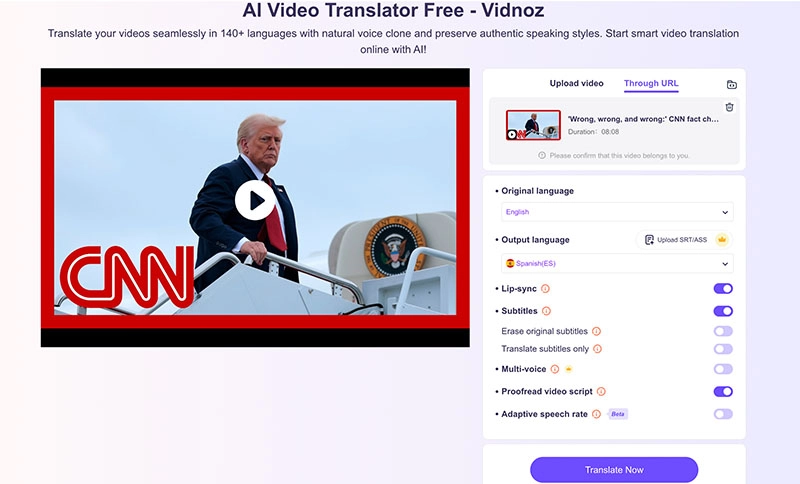
Step 1: Go to the Vidnoz AI Video Translator page by clicking the button below. Upload a video from your device or via a link (YouTube only).
Translate Videos in One Click with AI - Free
- Instantly translate local files and video URLs in 1 minute.
- Accurate translation in 140+ languages for global reach.
- Perfect lip sync and speech rate for authentic results.
Translate Video Now
Step 2: Choose the original and target languages. Adjust the settings for lip sync, subtitles, multi-voice, proofread, and adaptive speech rate.
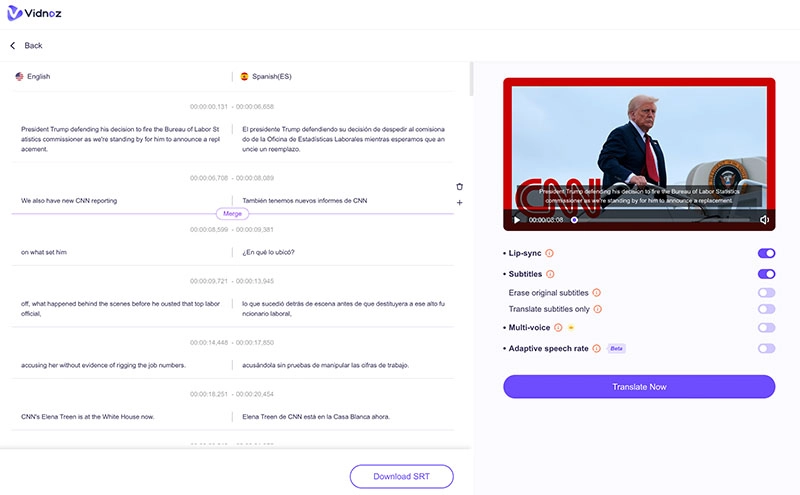
Step 3. Click on Translate now, and it will generate an SRT later.
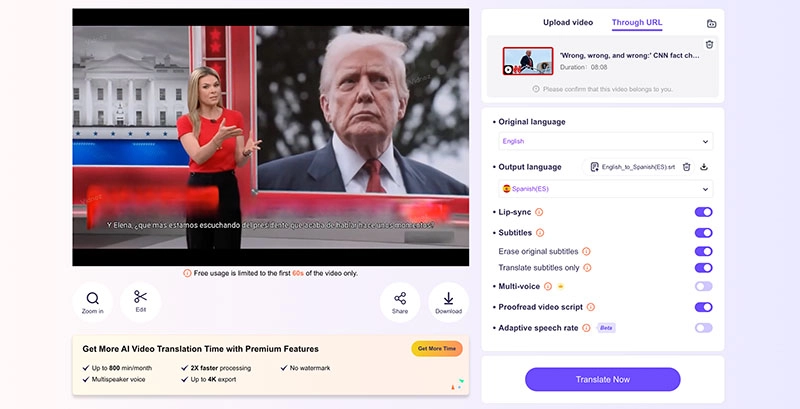
Step 4. Click on Translate Now to translate your video. You can download or share the translated video for free.
Conclusion
What is BlipCut AI Video Translator? Offering AI lip-sync, instant subtitles, and AI voice options, BlipCut is a powerful tool for multilingual video translation. However, BlipCut video translator offers limited free use with credits only. For a cost-free solution, Vidnoz AI Video Translator stands out with similar advanced features. Just wait no more and try Vidnoz for free and translate videos and voices effortlessly today!