Few fictional characters have remained as culturally significant and visually iconic as Snow White. Having her roots in the traditional fairy tales and being a prominent part of the Disney animated history, she still inspires generations. Yet, interest has been rekindled around the world in 2026 through the Snow White live-action remake, which made heavy use of CGI technology. Audiences are captivated not only by the story but also by how technology brings it to life.
Today, the fusion of AI and cinema isn’t limited to Hollywood. All goes to emerging tools; anyone can now explore the world of AI Snow White and create stunning visuals effortlessly.
- On This Page
-
What Is AI Snow White and the CGI in the 2026 Snow White Film?
-
How AI Enhances the CGI Process on Realistic Character Generation
-
Get Inspirations from the Stunning Snow White AI Art Creations
-
How to Make Your Own AI Snow White Art: 5 Ways
1. Generate Your Own AI Snow White Art with Vidnoz
2. Make Your Own Snow White AI Art with Starry AI
3. Create Your Own AI-Generated Snow White Art with Lumenor AI
4. Produce Your Own AI-Generated Snow White Art with Easy-Peasy AI
5. Craft Your Own AI-Generated Snow White Art with NightCafe
-
Experience the Snow White Transformation Yourself
How to Turn Your Photo into a Snow White POV Video?
Other Tools for Snow White Transformations:
What Is AI Snow White and the CGI in the 2026 Snow White Film?
AI Snow White refers to digitally reimagined versions of the iconic character, created using artificial intelligence tools. These tools allow artists, fans, and creators to produce lifelike or stylized renditions of Snow White without traditional drawing or animation skills, spanning everything from portraits to immersive video content, including dynamic animations powered by the Snow White video effect.
In contrast, CGI (Computer-Generated Imagery) is a filmmaking technique that uses computer graphics to create scenes or characters. In the 2026 live-action Snow White film, CGI is being used extensively to craft magical environments and animate characters with stunning realism, blending human performances with digital artistry.
How AI Enhances the CGI Process on Realistic Character Generation
As the CGI is becoming more sophisticated, artificial intelligence has been increasingly significant in expanding its functionality, particularly when it comes to the creation of the characters in movies such as Snow White. This is how AI can boost the CGI process:
Realism and Creative Character Design
AI can generate highly detailed facial features, skin textures, and facial emotional nuances that elevate the believability of characters while allowing for bold artistic interpretations.
Seamless Integration
The AI algorithms facilitate greater consistency in the fusion of digital characters and other live-action scenes so that there is a harmony in the visual aspect of the entire scene. Particularly in the case of such works of art as Snow White AI art.
Precise Motion Capture
Machine learning refines motion capture data, making character movements more lifelike, expressive, and consistent with human behavior.
Unlimited Creation Boundaries
AI removes creative limitations, allowing designers to explore alternate versions of Snow White, be they futuristic, dark fantasy, or anime-inspired, without starting from scratch.
This powerful fusion of AI and CGI isn’t limited to big studios. With accessible tools, anyone can now explore the world of AI Snow White and create stunning visuals from a simple photo.
Get Inspirations from the Stunning Snow White AI Art Creations
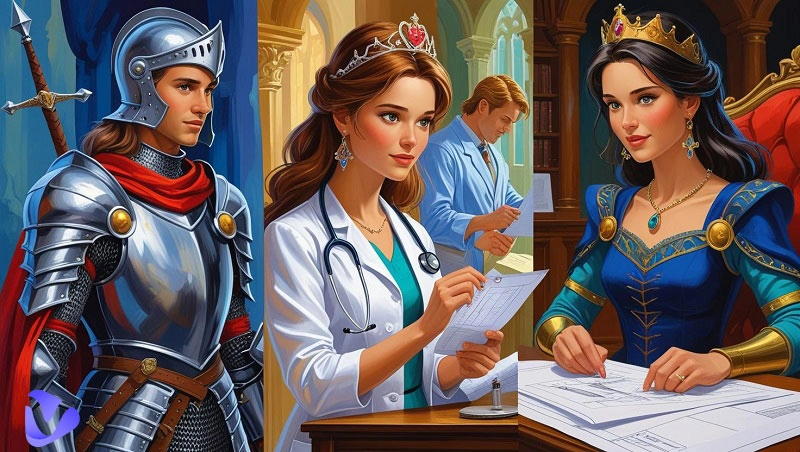
With AI pushing the boundaries of digital creativity, fans are now reimagining Snow White in captivating new styles that go far beyond her classic look.
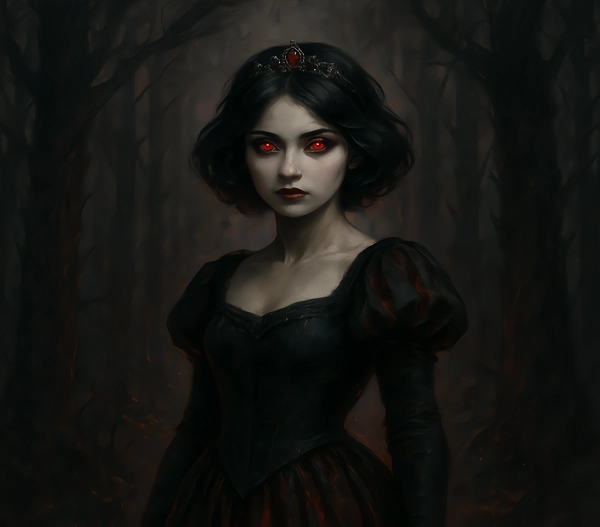
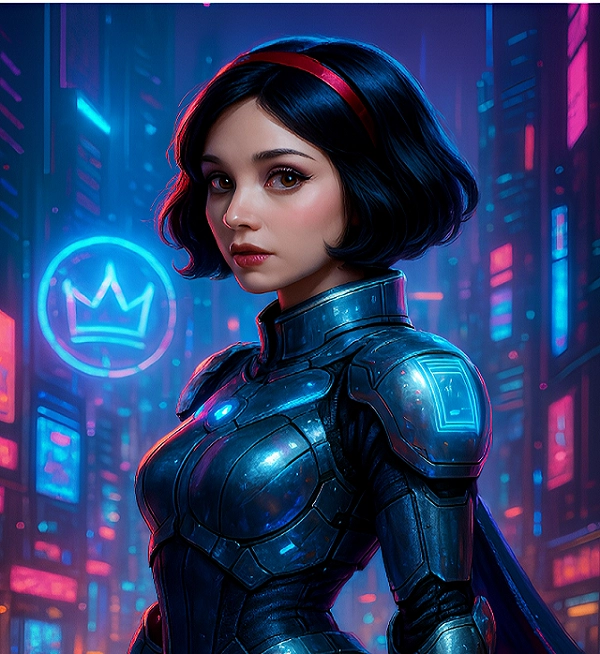
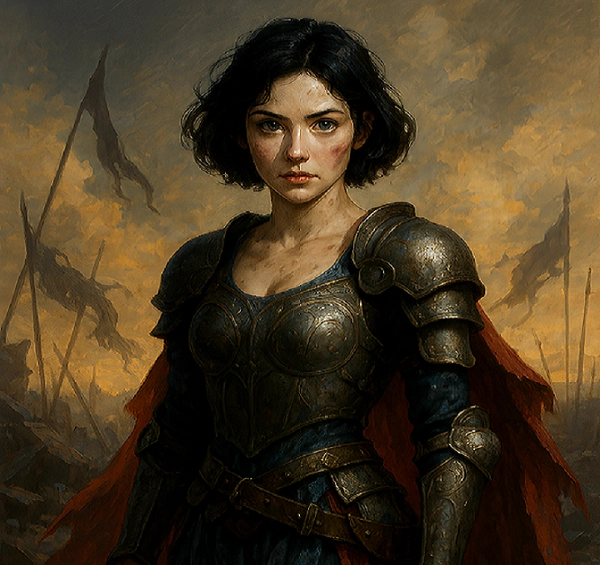
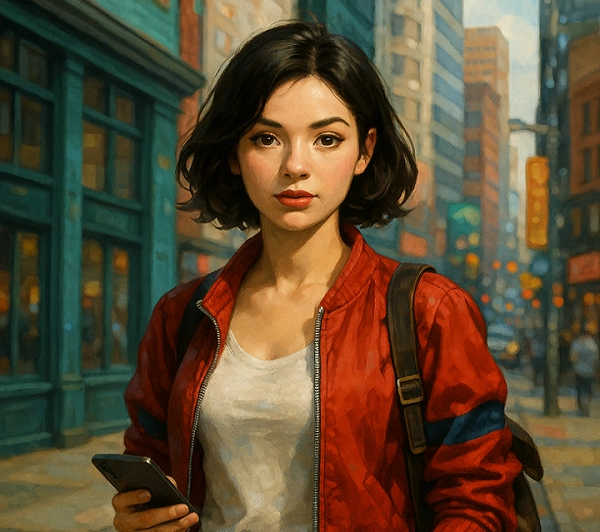
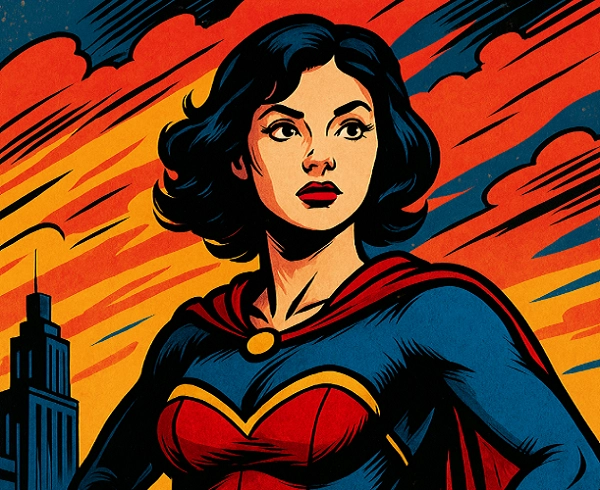
The range of artistic genres that Snow White AI art covers is no less impressive: there are hyper-realistic works and anime portraits, fantasy landscapes and gothic reinterpretations, 3D animations, and bright cartoon styles. Such works of art have not only drawn crowds on the Internet, but they are also redefining the perception of the well-known Disney princess character.
Here are some standout examples of viral creations:
Dark Fantasy Snow
Futurist Snow White
Warrior Snow White
21st-Century Snow White
Comic Book Aesthetic Snow White
Note that AI-generated Snow White art may not be copyrightable because it has no human author. So if you want to use it for commercial purposes, it may cause infringement issues.
For those ready to dive into their own creative journey, here are the best tools:
Vidnoz AI Image Generator: https://www.vidnoz.com/ai-image-generator.html
StarryAI: https://starryai.com/app/create/art
Lumenor AI: https://lumenor.ai/ai-image-generator/
Easy-Peasy AI: https://easy-peasy.ai/ai-images
NightCafe: https://creator.nightcafe.studio/studio
How to Make Your Own AI Snow White Art: 5 Ways
Ready to step into the shoes of a creator? With powerful tools now at your fingertips, generating your own AI Snow White artwork has never been more accessible or engaging. If you're wondering how to generate Snow White with AI, here are five of the most user-friendly platforms, each offering unique features to help you design stunning and personalized Snow White visuals with ease.
1. Generate Your Own AI Snow White Art with Vidnoz
Vidnoz is a powerful AI art generator offering simplicity and creativity in one platform, perfect for everything from fantasy reworks to cartoon transformations of classic characters like AI generated Snow White.
Key Feature
- 81 AI art styles, including realism, anime, gothic, and fantasy
- One-tap template application for faster generation
- AI-based prompt assistant & prompt writer
- Batch generation with HD & 2K output quality
- Daily free trials for everyday users
Step-by-Step Guide:
Step 1.
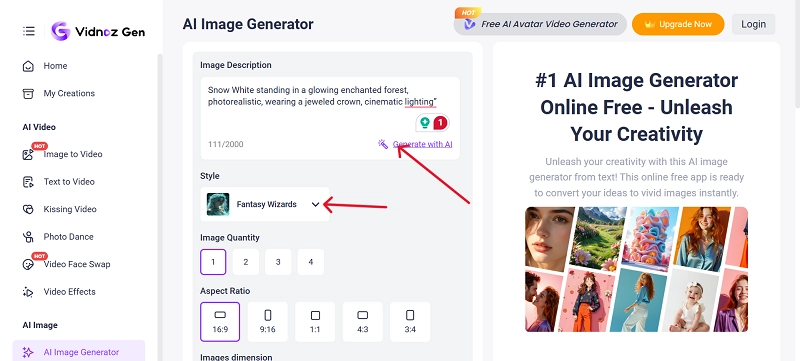
Head to Vidnoz AI website and find the Vidnoz Gen under Product tab. Next, go to Vidnoz AI Image Generator.
Step 2.
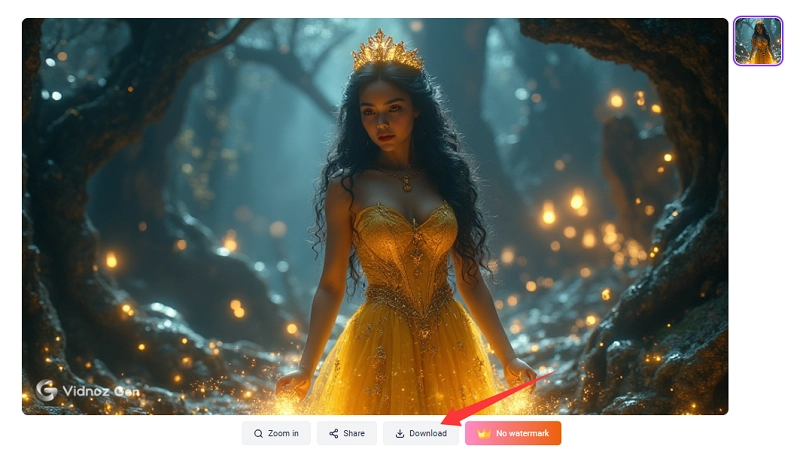
Enter an image description, for instance, “Snow White standing in a glowing enchanted forest, photorealistic, wearing a jeweled crown, cinematic lighting”.
Step 3.
Choose the "Fantasy Wizard" style. Also, confirm the dimensions, aspect ratio, and image quantity.
Step 4.
Click “Generate Now”. Save or refine your masterpiece by clicking on download.
2. Make Your Own Snow White AI Art with Starry AI
Starry AI combines artistic flexibility with AI-driven precision, making it a popular choice for creating stylized and experimental AI Snow White artwork—and while it focuses on static visuals, platforms like Vidnoz complement it with advanced AI video effects for full-motion transformations.
Key Feature
- Multiple models and artistic styles, including fantasy, sketch, and anime
- Upscaling and aspect ratio controls
- Adjustable style intensity and canvas size
- Supports text-to-image generation using custom prompts
- Enable batch production up to 4 images and negative prompts
Step-by-Step Guide:
Step 1.
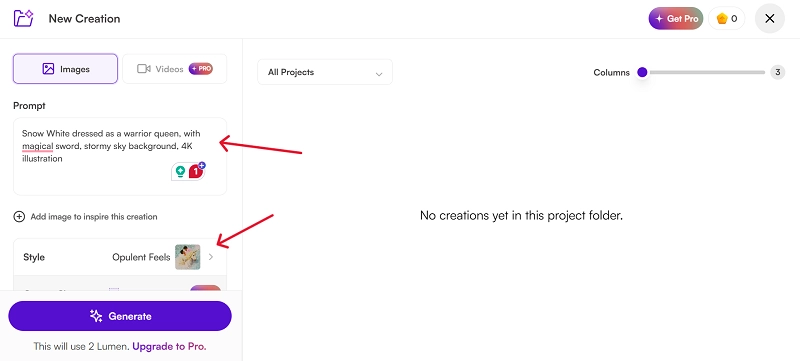
Visit Starry AI.
Step 2.
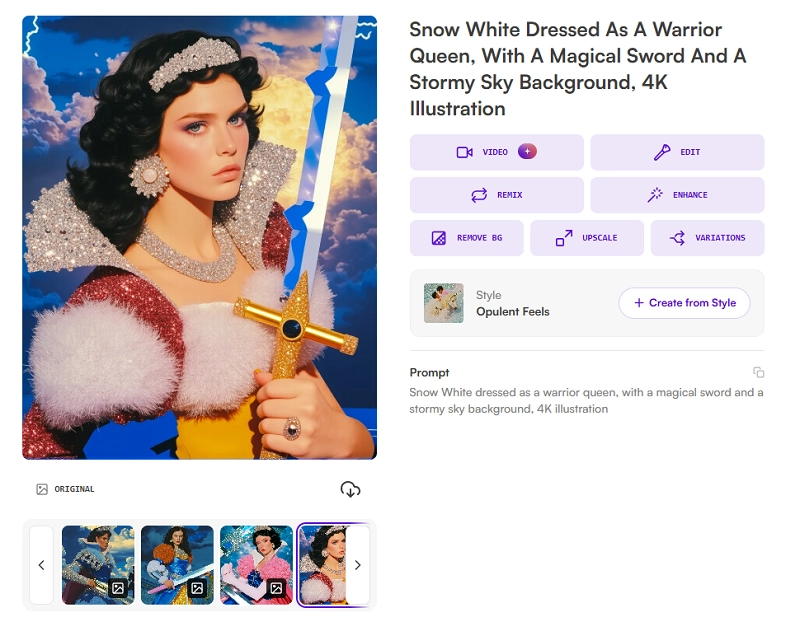
Prompt: “Snow White dressed as a warrior queen, with a magical sword, stormy sky background, 4K illustration”.
Step 3.
Select the “Opulent Feel” style.
Step 4.
Click “Generate.” Then, download or enhance the image.
3. Create Your Own AI-Generated Snow White Art with Lumenor AI
Lumenor AI places a strong emphasis on artistic realism and rich, layered depth, making it a highly effective and creative tool. For users who want to produce immersive, painterly interpretations of classic characters, especially iconic figures like AI Snow White.
Key Feature
- High-quality renders with dynamic shading
- Artistic filters such as oil painting and 3D fusion
- Real-time prompt feedback and image preview
- Supports gothic, futuristic, and surreal themes
Step-by-Step Guide:
Step 1.
Head to the Luminar AI tool.
Step 2.
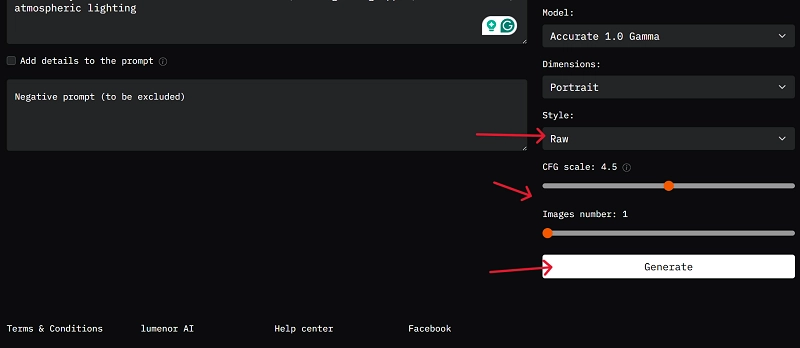
Write the prompt: “Gothic-style Snow White in a dark throne room, with a glowing apple, ultra-detailed, atmospheric lighting”.
Step 3.
Select the dimensions, style, CFG scale, and image number.
Step 4.
Click on Generate and save to your device.
4. Produce Your Own AI-Generated Snow White Art with Easy-Peasy AI
This beginner-friendly tool simplifies the process of generating high-quality AI art with pre-optimized prompts and minimal setup. It is ideal for casual creators exploring snow white transformation effects.
Key Feature
- Drag-and-drop simplicity
- AI-written prompts based on basic inputs
- Various moods and filter presets
- Quick generation with fast download
Step-by-Step Guide:
Step 1.
Go to Easy-Peasy AI.
Step 2.
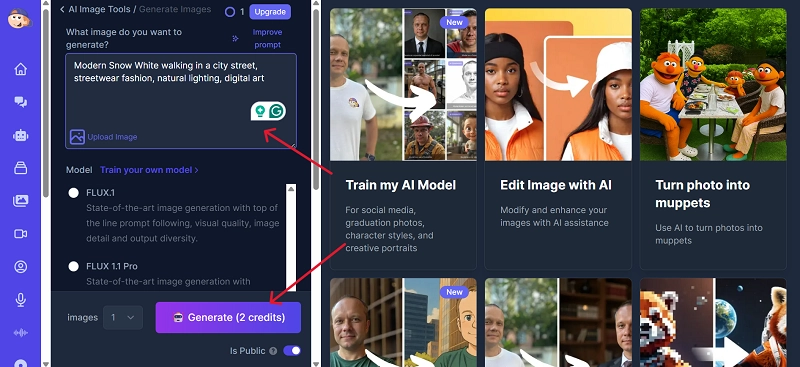
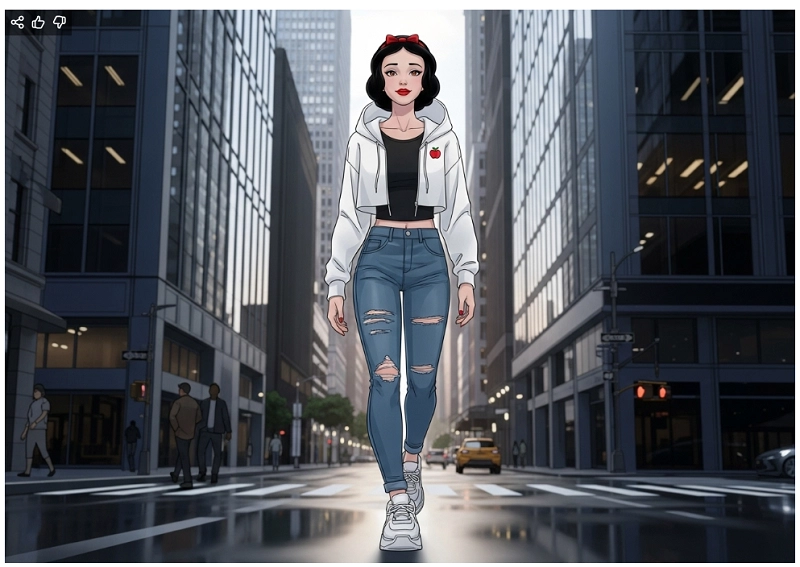
Input the prompt: “Modern Snow White walking in a city street, streetwear fashion, natural lighting, digital art”.
Step 3.
Click the “Generate” button.
Step 4.
Review and download.
5. Craft Your Own AI-Generated Snow White Art with NightCafe
NightCafe is a community-driven AI art platform packed with style diversity and creative tools. Though it focuses primarily on static art, it complements platforms that offer AI-powered video effects for bringing characters like Snow White to life.
Key Feature
- Community gallery for inspiration and feedback
- Multiple models, including VQGAN+CLIP, CLIP-Guided Diffusion
- Customizable settings for output detail and style strength
- Daily credits for free generations
Step-by-Step Guide:
Step 1.
Navigate to NightCafe Studio.
Step 2.
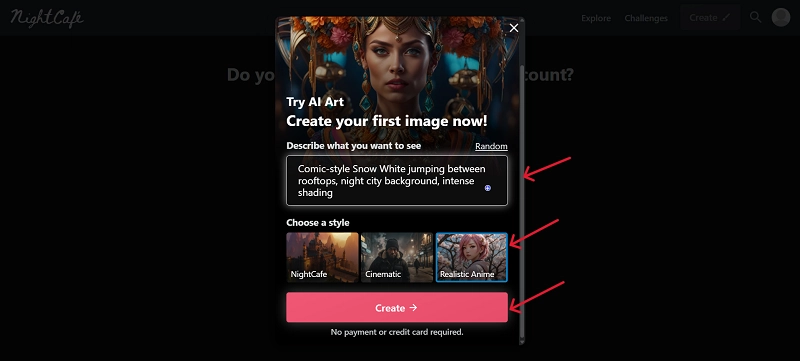
Prompt: “Comic-style Snow White jumping between rooftops, night city background, intense shading”.
Step 3.
Select the “Anime” style. Click on “Create.”
Step 4.
Download the generated AI Snow White art image.
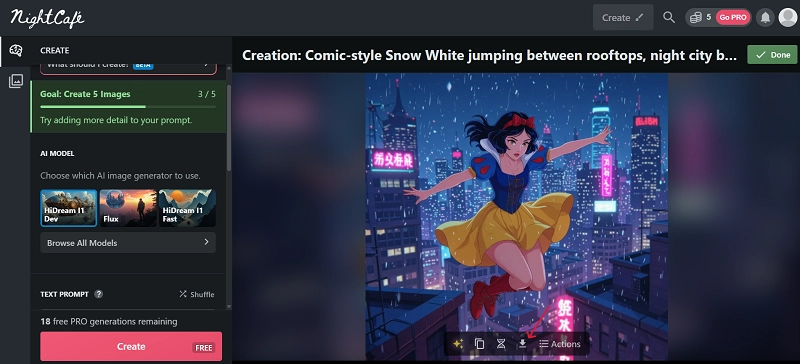
Now that the tools are this accessible, there’s nothing stopping you from creating your very own fairy tale masterpiece.
Experience the Snow White Transformation Yourself
Creating AI Snow White art is no longer limited to static images. With advanced tools like Vidnoz AI Video Effects, you can bring the character to life through animated visuals, all starting from a single photo. Use Vidnoz’s video effect tool to generate AI Snow White videos that allow users to animate facial expressions and replicate the iconic princess look effortlessly from one uploaded portrait.
Key Features
AI Talking Photo Tech
The feature of AI talking photo, which uses AI technology, transforms the dull portraits into a lifelike talking animation; thus, the character, like Snow White, really seems to be talking, adding to the fun in the video and in the storytelling.
Animated Facial Mapping
It detects and animates facial features such as eyes, mouth, and expressions with precision, adding realism and emotional depth to characters like AI Snow White from just a single photo.
Multiple Preset Effects
Offers a variety of themed visual effects like fairy tale filters and lighting presets that instantly stylize your Snow White transformation without needing any design experience or manual editing.
User-Friendly Video Interface
Being quite simple, it allows people to load images, add effects, and create animated videos with no effort, which is why even an amateur can use the interface to come up with AI Snow White videos.
How to Turn Your Photo into a Snow White POV Video?
Step 1.
Locate on the Vidnoz AI > Product > Vidnoz Gen > Go to Vidnoz AI Video Effects.
Step 2.
Upload a high-quality portrait of yourself. Select the “Snow White” effect. Click “Generate Video.”
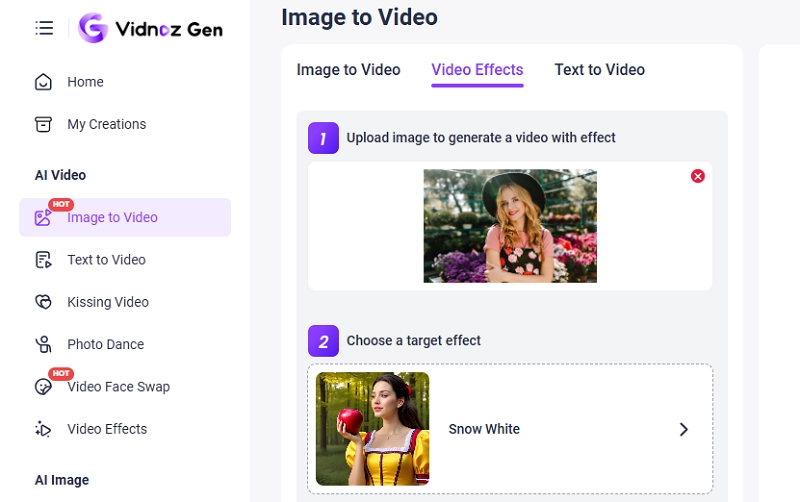
Img Alt: Transform Yourself into a Snow White
Step 3.
Wait for a while, and you’ll see yourself animated in the photo and transformed into a Snow White look. Download it or share it on your short video platforms, surprising your friends and followers instantly.
Also, the “Disney Princess” video effect creates brilliant visuals:
Other Tools for Snow White Transformations:
- YouCam Makeup App: Offers Disney-inspired AI filters. Many TikTokers use it for stunning Snow White looks.
- TikTok Live Filter: For those seeking even more enchantment, platforms like Vidnoz offer themed fairy tale AI video effects that transform reality into animated fantasy.
- Snapchat AR Lens: Adds Snow White’s facial features and dress using facial tracking tech.
Each of these apps lets you live out a fairy tale dream, and some even double as a free AI video generator, making the transformation experience both magical and accessible.

Vidnoz AI - Create Free Engaging AI Video with Talking Avatar
- Easily create professional AI videos with realistic avatars.
- Text-to-speech lip sync voices of different languages.
- 2800+ video templates for multiple scenarios.
Conclusion
No matter if it is snow white AI realistic renders or full mobility change, the technologies available today enable everyone to discover their creativity in a strong manner. Whether you’re exploring the world of AI Snow White or stepping into the magical realm yourself, platforms like Vidnoz offer endless possibilities. Start crafting your own AI Snow White journey today.





![Cute Cozypelt Cats: Is it Real Breed? How to Make a Vivid Crochet Cat?[FREE]](https://www.vidnoz.com/bimg/cozypelt-cats.webp)