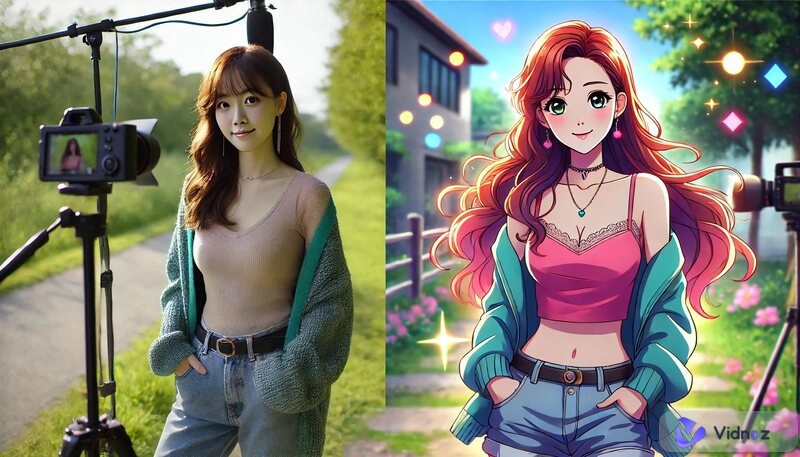
You are aware of the fact that AI image tools are entertaining, but the real magic is when you set the styles for image generation. Choosing the appropriate art styles for AI image generation makes your projects more personal, from moody realism, colorful fantasy to gritty retro.
This guide takes you through the meaning of these art styles of AI, the choice between them as well as the best platforms to test, whether art styles of AI prompts affect the result or not, how to make free AI images and videos appear professional. Let us start creating.
- On This Page
-
-
What Are Styles for Image Generation
-
Top 10 Art Styles for Image Generation
-
How to Choose the Right Art Styles for AI Generation
-
Top 5 AI Styles for Image Generation Platforms – 100% Free
Vidnoz AI Image Generator
-
Bring Your Images to Life – AI Image to Video Free
Simple Steps to Make AI Image to Video With Vidnoz AI
What Are Styles for Image Generation
Think of AI art styles for image generation as mood boards for a painter. When you include a style in your prompt, like “anime,” “fantasy,” or “GTA-style art,” the AI uses that aesthetic as its guide, shaping colors, textures, and overall vibe.
Choosing a style for image genration isn’t just about decoration, it sets the emotional tone and visual consistency of your project. By sticking to one style across a series of images or video frames, you create a clear narrative or brand identity. That’s why it’s important to decide on your art style early. It steers every prompt you write and ensures your final images look intentional, not random.
Top 10 Art Styles for Image Generation
Here are a mix of top art styles for AI image generator users:
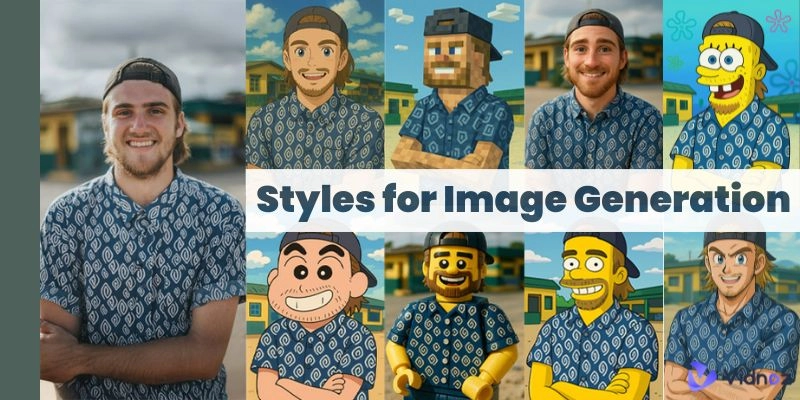
- Anime: Bold lines, stylish figures, excellent comic books or character arts.



Every AI art style changes the perception of the viewers. You can use either of them depending on the purpose and audience of your project.
How to Choose the Right Art Styles for AI Generation
This is the way to select the best possible art styles for AI generation:
- Define mood: Decide whether you want moody, vibrant, futuristic, or fun vibes.
- Build a moodboard: Gather reference images that would capture what you want to achieve visually.
- Know the platform: If you are posting to Instagram, go for art styles for AI work, bold it. For blogs and businesses, clean and readable styles are more preferable.
- Check customization options: Tools vary, some give you control to alter what you can pinch in terms of saturation, brush strokes or texture. That allows you to squeeze chosen art styles for AI.
What this actually translates into is investing time in the front end saves headaches in the back end. To resonate better with your audience, match the aesthetics with goals and platform.
Top 5 AI Styles for Image Generation Platforms – 100% Free
The following five are some of the best tools, which have their own styles for image generation:
-
Vidnoz AI Image Generator

Vidnoz AI has a lot of styles to create an image, including anime, fantasy, realistic, and digital art. It is easy to use and it is ideal when you want to experience using art styles for AI image generator as a beginner with no learning process. All you have to do is type your cue, select one of the prepared styles, and download free high-resolution images. You may even add in references to direct the result.

Vidnoz AI - Create Free Engaging AI Video with Talking Avatar
- Easily create professional AI videos with realistic avatars.
- Text-to-speech lip sync voices of different languages.
- 2800+ video templates for multiple scenarios.
Pros
- Diverse style choices.
- Free to use in limited times.
- Fast results.
- AI-generated images.
Cons
- Limited advanced editing.
-
OpenArt AI

OpenArt AI features an uncluttered interface and clear choices of art styles for AI image generator. Like the style of comic books, retro, or sleek, and turn any image into a silhouette? It is just as easy as typing a prompt in to explore various art styles for AI. It is particularly stable with onerous styles of art styles for AI prompts.
Pros
- Easy to use.
- Available for generating one image in multiple styles.
Cons
- Few free credits and less rendering of images during high usage periods.
-
DeepAI Image Generator

DeepAI is all about transforming words to images with an emphasis on clear and expressive styles for AI image animation. You select pre-set art styles for AI, write down your prompt, emotion, color tone or era and it will give you pictures in a short period of time. It is actually pretty good when it comes to art styles for AI prompts that contain descriptive flair or storytelling.
Pros
- No sign-up required.
- Quick output.
Cons
- The quality of images is inconsistent.
- The choice of art styles for AI image generators is limited.
-
Canva AI Art Generator

The Canva AI Art Generator is designed to fit into this design suite with ease, which makes it convenient to use when explaining styles for image generation that are clean, trendy, and ready to be used in social media. It has particular strength in art styles for AI image generators employed in marketing, branding, and presentation imagery. This is a great choice in case you require finishes quickly.
Pros
- Suitable with templates.
- Incorporated with Canva tools.
Cons
- Premium access only.
- not suitable to wild or experimental art styles for AI.
-
Recraft AI

Recraft AI stands out in styles for image generation, providing a possibility to upload a reference image and render it in various art styles for the AI image generator. Need to convert a picture into the vintage comic style or the abstract artwork? Recraft reinvents it with artistic effects in it. It is a default request on art styles for AI prompts on style transfer and artistic remixes.
Pros
- Good in image reinterpretation
- Rich preset styles.
Cons
- Less user-friendly than it is intended to be.
- Fewer one-click results.
Bring Your Images to Life – AI Image to Video Free
AI image-to-video tools can transform your still images into moving and animated clips using movement, transitions, and zoom. Making your styles for image generation to move gives some depth. You have now stopped being still, you are storytelling in motion.
Convert Image to Video AI Online - Free
- Create a video from an image quickly for free.
- Use various AI models to turn photos into videos.
- Download and share the AI-generated video at no cost.
Convert Image to Video
Vidnoz AI Image to Video animates your still AI-created pictures. You choose the motion style of your image, such as cinematic pan, dance motion, or parallax, and then Vidnoz creates a brief video clip. Gives movement to design, which is ideal in the context of social posts or introductions.
Simple Steps to Make AI Image to Video With Vidnoz AI
Step 1. Visit Vidnoz website and create your account, then navigate to AI image-to-video feature.
Step 2. Upload your AI image and choose a movement style, adjust speed and zoom options.
Step 3. Generate and download your video clip.
It is as simple as that. You enjoy engaging content, and you need no editing skills.
The Bottom Line
Styles for image generation cause your images to express. Nailing those styles will make your work not only look good but also feel good. Whether it is the art styles for AI prompts or animated videos, tools such as Vidnoz AI can accomplish all that and more at no charge. Play with style presets across platforms. Finally, animate your images using AI motion and give your story a professional feel. Jump in, experiment, and make graphics that portray your imagination.