Have you ever wondered this: How to create professional weather forecast videos without expensive software or a studio? Today, the task is so much easier with AI technology. For instance, you can use a forecast video generator to produce dynamic, high-quality weather reports that look like they came from a TV newsroom.
So, which weather forecast maker is the right fit? This blog is the place to land today. Just read on to find the best weather forecast generator options and how to make an AI weather forecast video effortlessly!
- On This Page
-
What is a Weather Forecast Generator?
-
Weather Forecast Video Maker with Realistic Avatars - Vidnoz AI
-
Plenty of Weather Templates & Editable Videos - Envato
-
Make Weather Forecast Videos with Templates Online - Canva
-
Bonus: Turn Static Weather Images into Dynamic Videos
What is a Weather Forecast Generator?
A weather forecast generator is an AI-powered tool that transforms scripts, weather data, or text into realistic forecast videos. There is no need for filming, editing, and animating visuals; these smart tools simply automate everything: background visuals, scripts to speech, and even text to speech avatar creation. Users can easily produce a polished forecast complete with temperature maps, icons, and narration.
Unlike traditional video creation, which requires manual editing, filming, and software like Adobe Premiere, AI tools streamline everything. They are truly handy tools to create quick updates on social media, news sites, or educational content on a budget! Let’s move and check out the best weather forecast generator available!
Weather Forecast Video Maker with Realistic Avatars - Vidnoz AI
When it comes to the best tool to create weather forecast videos easily, Vidnoz AI is the ultimate choice. The platform is impressively user-friendly; it is also loaded with features that make high-quality content creation accessible to everyone. It’s completely free to start, with no credit card required.
The free AI video generator provides over 2,800 templates; you can find many news-style layouts ideal for weather reports. It even supports transforming any photo into a custom talking avatar with precise lip-sync and natural facial expressions!
How to create a weather forecast video:
Step 1. Sign up or log in to Vidnoz AI for free. Enter the homepage.
Step 2. Head to the dashboard and select "Templates" to access its massive library.
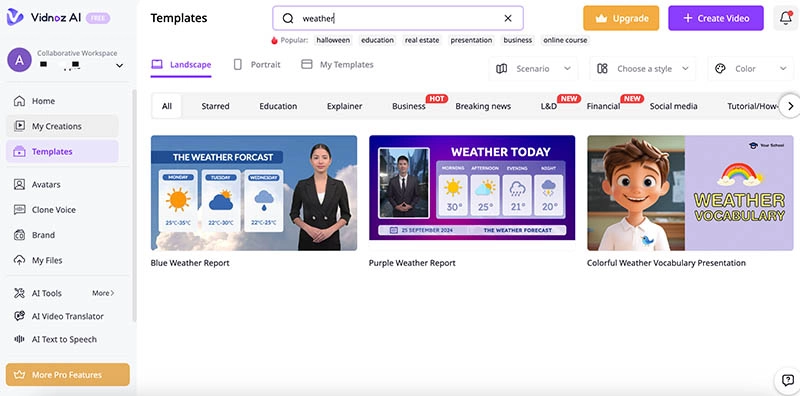
Step 3. Search for “weather” to find a preferred video template. Add your script with weather details, select a voice, and customize language for global reach.
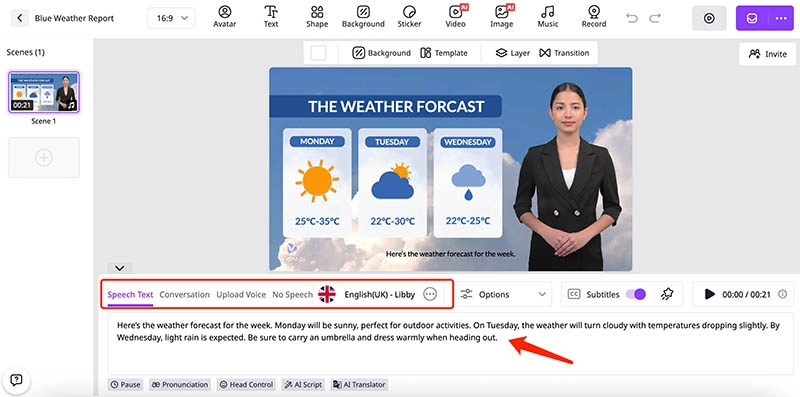
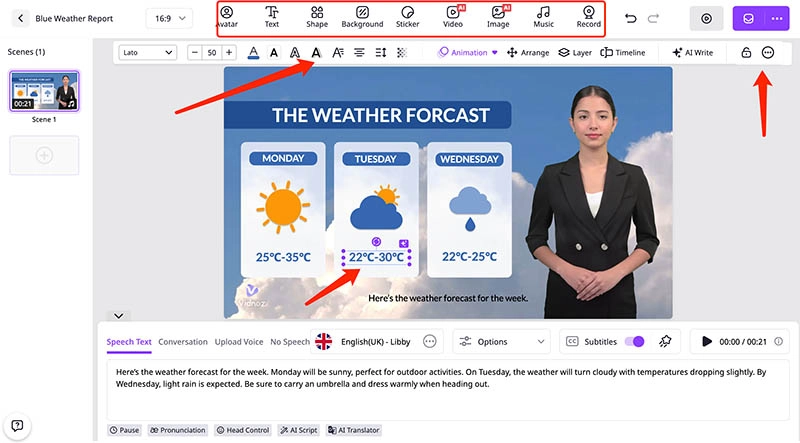
Step 4. Adjust the information. Personalize with effects, music, or transitions, then click "Generate." Preview, download, or share the video for free.
Highlighted features of Vidnoz:
- 100% Free Weather Forecast Maker
Vidnoz AI offers daily free minutes for video generations. Just start with your free account and use this weather forecast generator to produce short, professional weather reports.
- Report Weather Forecast with Templates
With over 2,800 ready-to-use templates, including broadcast-style layouts, Vidnoz AI is the best breaking news video maker to check out. You can easily create polished weather forecast videos that visually align with professional TV channels.
- Massive Realistic Avatars to Choose
Vidnoz AI lets you choose from more than 1,500 realistic AI avatars. You can select diverse presenters to report weather forecast with sophisticated AI lip sync and natural, smooth facial/body movements!
- Turn Anyone’s Photo into a Talking Avatar
As the best talking photo AI free generator, it allows you to upload any photo and generate a talking avatar instantly. Whether you want to create a weather forecast video or a math class for kids, there are plenty of choices available.
- 140+ Languages to Reach Global Audience
Supporting 1,830+ voices in 140+ languages, Vidnoz AI ensures your weather forecast videos resonate with audiences worldwide. Just say goodbye to language barriers and expand your global reach effortlessly now.
- Use and Share Weather Videos Commercially
All videos created with Vidnoz AI are free for commercial use. Whether for YouTube, education, or brand promotion, you can confidently share your weather forecasts anywhere without licensing restrictions.
Plenty of Weather Templates & Editable Videos - Envato
Envato is a comprehensive resource hub that offers a lot of creative assets: stock footage, graphics, professional video templates, etc. Envato is especially suitable for professionals who have some video editing experience because the templates are compatible with editing software.
Each template is highly customizable, compatible with advanced editing software, and available in resolutions up to 4K. Envato operates on a convenient subscription model starting at $16.50 per month. While it is not free to use, it’s still a great choice for creators who need premium visuals regularly.
How to download a weather forecast video template and edit:
Step 1. Enter the Envato Weather Forecast Video Template page. Choose one to proceed.
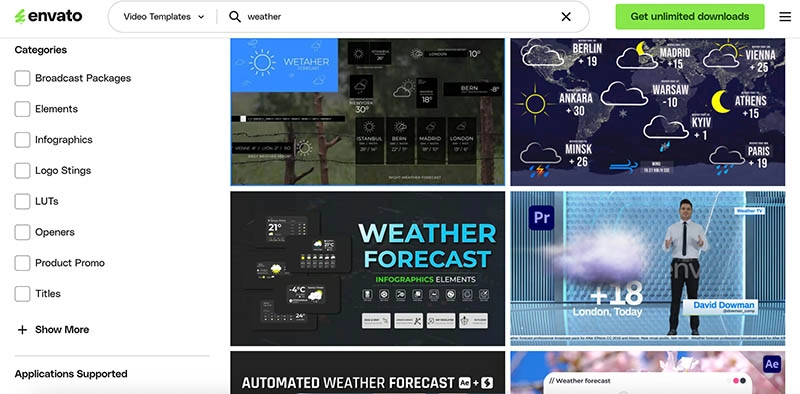
Step 2. Choose filters from the left: category, application supported, resolution, etc., so you get the right type of video template.
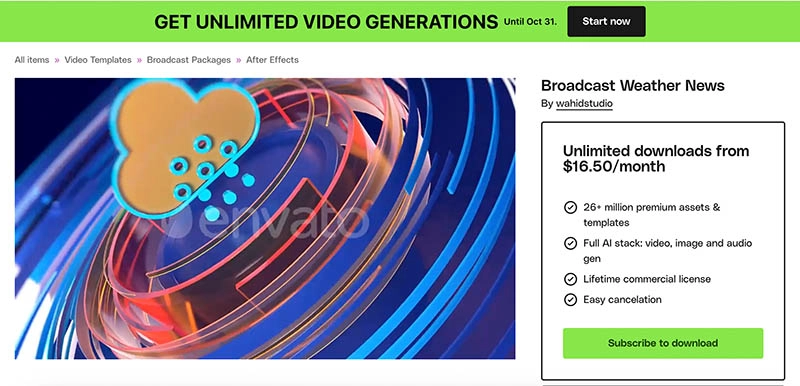
Step 3. Download the video template and use the supported software to create your own weather forecast video easily!
Benefits of Envato:
- Weather-focused assets available: AI reporter, weather forecast broadcast packs, animated icons for rain and sunshine, and full meteorological animations like storm or wind effects.
- Access millions of assets, including weather templates, for one flat fee. Perfect for frequent creators.
- Templates are crafted by experts to ensure broadcast-ready graphics for weather reports.
- Works with popular software like After Effects for deep customization.
Make Weather Forecast Videos with Templates Online - Canva
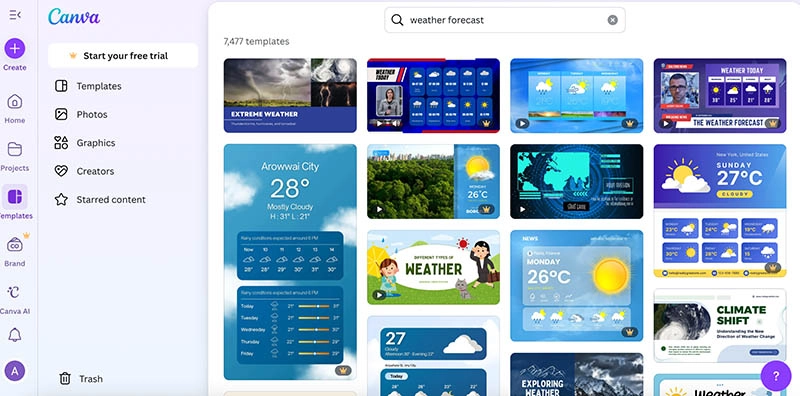
So, is there a weather forecast generator online? Check out Canva—one of the premier platforms out there for graphic design. It features tons of customizable weather forecast templates in various visual styles: cute cartoon-themed layouts, realistic maps, chart-based designs, etc., for professional broadcasts.
The drag-and-drop interface is rather intuitive! You can easily add animations, text overlays, or background music to enhance your weather presentation. It is a beginner-friendly weather forecast generator to create videos without advanced editing skills!
How to report weather forecast:
Step 1. Open Canva’s weather forecast video templates. Pick one with an illustrative weather chart to customize the video.
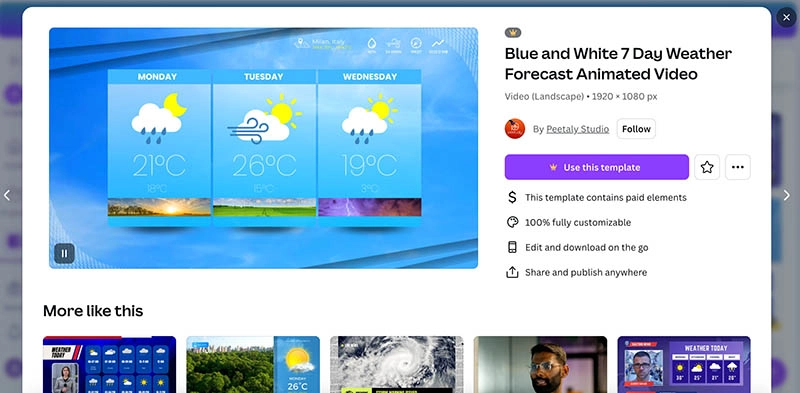
Step 2. Enter the video editing panel, edit elements, for instance, to update temperatures, add icons, or insert maps.
Step 3. You can add animations or voiceovers, preview, and download as an MP4 for sharing. (it’s not free)
Features of Canva Weather Forecast Video Maker:
- Intuitive interface with Drag-and-drop simplicity, which makes editing templates effortless for all skill levels.
- Vast template library with thousands of free and premium options; easily create diverse weather forecast videos with any style.
- Magic Studio AI tools to enhance videos with auto-edits, backgrounds, and animations quickly.
- Support different aspect ratios for social media platforms. Create social media videos or posts seamlessly.
Bonus: Turn Static Weather Images into Dynamic Videos
You’ve just explored the 3 best weather forecast generators online! However, sourcing footage for your video can be tedious; many clips are copyrighted, and creating everything from scratch takes time.
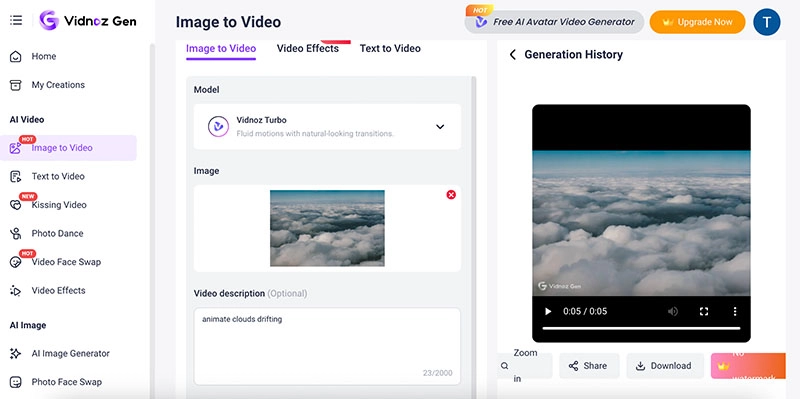
But worry not. This is where the Vidnoz image to video AI tool comes into play. The smart solution can turn static weather photos into vivid, animated videos instantly. Simply upload a landscape or weather image, and watch it come alive with motion effects like drifting clouds, falling snow, or waving trees for free!
How to make a vivid weather video from an image:
Step 1. Head to image to video AI tool. Upload a landscape image to get started.
Step 2. Enter a prompt describing the motion, like "animate clouds drifting." Choose the video length you want.
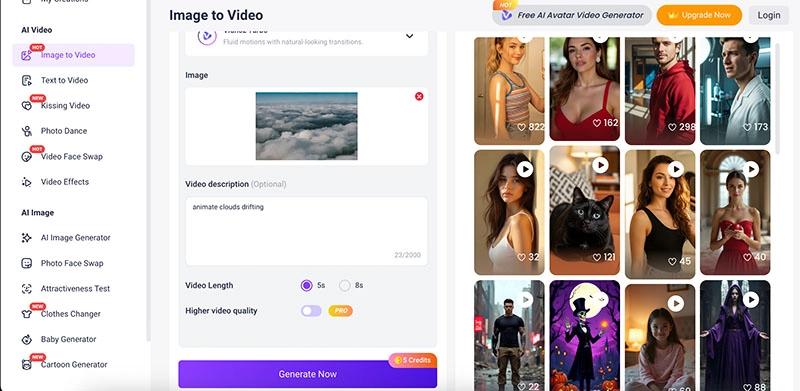
Step 3. Click "Generate," preview the animated video, and download it for free.
Final Words
So, what exactly is a weather forecast generator, and which one should you use? We recommend Vidnoz AI for realistic avatars, Envato for premium templates, and Canva for effortless online editing. Among them, Vidnoz AI truly stands out as a powerful, free AI video generator for crafting professional weather forecast videos. It also offers an image to video tool for quick animation! Just wait no more; head to Vidnoz AI today and create your first weather forecast video now.






![Make a Video for Your Girlfriend: Free & Fast [2026]](https://www.vidnoz.com/bimg/video-for-my-girlfriend.webp)