You may have written down a lot of ideas or important information in text form—but reading requires focused attention, and when people are on the move or busy at home, there's often no time to sit down and read.
So what's a better alternative? One of the most popular solutions right now is converting note to podcast—turning written text into immersive, engaging audio with compelling voice delivery. Listeners simply need speakers or headphones to consume information anytime, anywhere.
Do you have to write a script and record everything yourself to make a podcast?
That's exactly what this guide is about. With the right AI note to podcast tools, all you need to do is prepare your original materials. With just a few clicks and simple settings, you can generate professional-quality results. This guide has selected five outstanding AI tools and provides step-by-step instructions to help you explore them with ease.
- On This Page
-
Tips for Turning Note to Podcast
-
5 Note to Podcast AI Generators
1. AI Podcast Generator–NoteGPT
2. Free AI Podcast Generator - Vidnoz
3. Monica Free AI Podcast Generator
5. Quizgecko AI Podcast Generator
-
Bonus: Make Video Podcasts with AI
Tips for Turning Note to Podcast
Handing over the task of converting notes to podcast to AI is easy, but to ensure your final work is meaningful and well structured, it's still important to organize and plan your materials in advance.
This guide provides several tips for your reference:
1. Organize your note structure
Listeners tend to prefer podcasts with clear sections and logical flow. Before you start creating your podcast, it's best to sort out the structure of your notes, divide the content into reasonable sections, and add subheadings and key points. Also, avoid making any single section too long or overly dense.
2. Use a conversational writing style
Overly formal or bookish wording can make a podcast sound like someone is reading from a textbook. It's recommended to revise long, written-style sentences into shorter, more conversational ones so the final result sounds like a real host speaking.
3. Pay attention to technical terms
If you plan to include professional terminology or special proper nouns, consider adding pronunciation notes after them to prevent the AI from misreading them.
4. Adjust voice settings flexibly
Before converting notes to podcast, carefully choose a voice that matches your content and style, and fine-tune parameters such as speaking speed, emotion, and pauses. Try different combinations to find the most suitable and polished voice output. After all, expressive voices with emotion and natural pauses sound far better than flat, mechanical audio.
5 Note to Podcast AI Generators
All set and ready to go? Let's jump straight into the main topic and take a look at the top notes to podcast AI tools, exploring their features and how to use them.
1. AI Podcast Generator–NoteGPT
NoteGPT stands out as one of the most flexible and fully customizable notes to podcast AI tools available. From note sources and languages to the number of speakers, topics, podcast length, voice styles, and emotional tone—almost every element you can think of can be adjusted to match your personal preferences. The wide range of high-quality examples showcased on its homepage clearly demonstrates its powerful capabilities.
Main Features
- Easy note uploads: NoteGPT allows you to provide notes by pasting text directly in real time, or by uploading text files, article links, or even YouTube content links.
- Diverse voice options: NoteGPT offers voice presets across multiple languages, genders, voice styles, and emotional tones. It also supports creating new voice samples using text prompts—and even cloning your own voice.
- Make your podcast more engaging: With dynamic audio features, NoteGPT lets you adjust pitch, add pauses, and emphasize key points, making the final output sound more natural and engaging for listeners.
Now, let's see how to use NoteGPT to turn note to podcast.
Step 1. Prepare your notes and make edits if necessary. You can paste the text directly into the input box, or upload it via files or links.
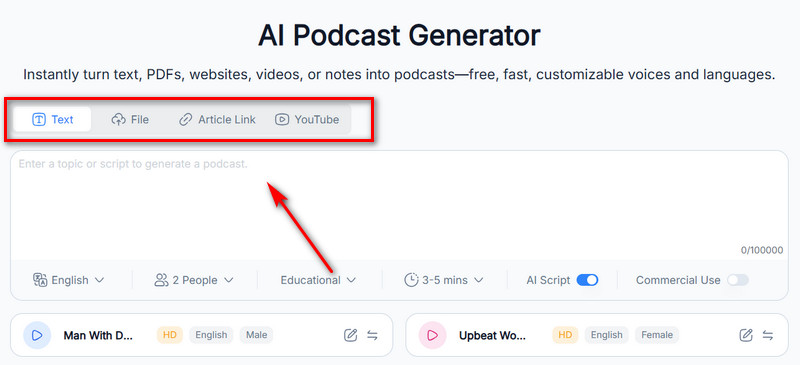
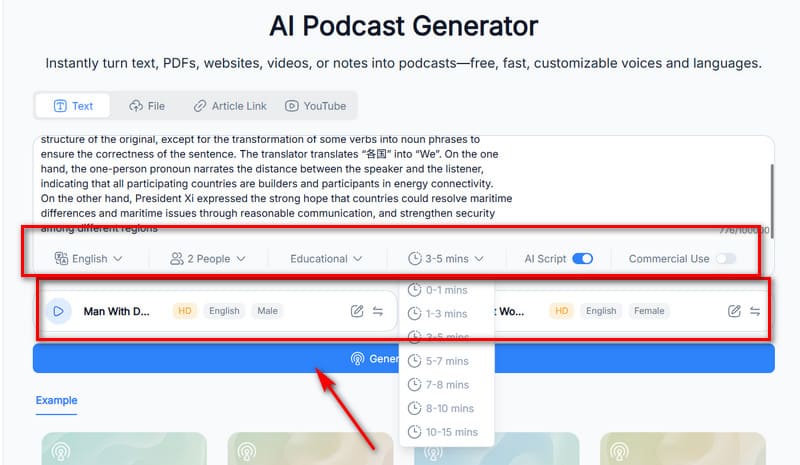
Step 2. Select the podcast language, number of speakers, topic, and duration. Then preview the available voices and choose the one that best fits your theme.
Step 3. Click Generate Podcast.
2. Free AI Podcast Generator - Vidnoz
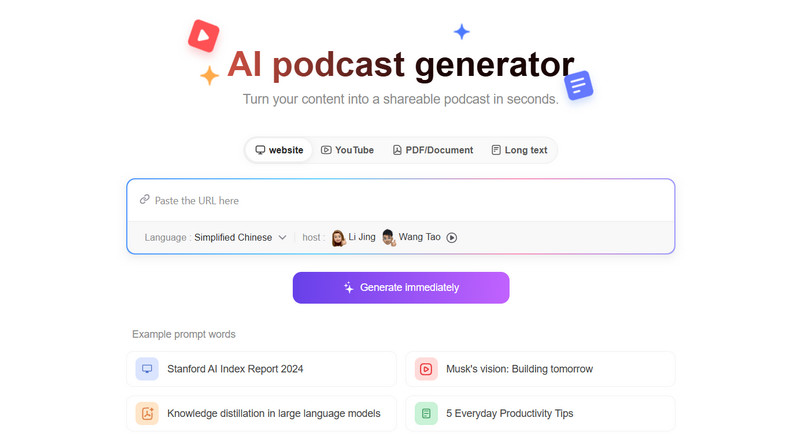
If you're looking to combine quality, speed, and free access with comprehensive podcast creation settings in a note to podcast turner, then Vidnoz AI Podcast Generator is undoubtedly your best choice.
Vidnoz AI Podcast Generator offers highly flexible upload options, including text input, file uploads, links, and YouTube content. Of course, combining methods is also a great idea—you can upload your original notes first and then add instructions in the text box, such as your desired topic or style.
The previously mentioned advantages—quality, speed, and more—are explained in detail below:
- Quick podcast creation in minutes: Vidnoz excels in both file upload speed and final generation speed. The progress bar won't keep you waiting long—you can get a polished, AI-assisted podcast in just a few minutes.
- Transfer text/link/video to podcast: Vidnoz's flexible input options are truly impressive. You can paste text, upload files, provide links, or import YouTube videos with ease.
- 50+ podcast styles available: Vidnoz ensures your outputs never feel repetitive by offering over 50 preset podcast styles, including education, interviews, storytelling, news reporting, talk shows, and more. Simply choose the style that matches your content to produce an industry-standard result.
- 2000+ free voices: A podcast narrator should never sound flat or mechanical. Vidnoz provides 2,000+ voice options across different genders, accents, languages, and emotional tones. Preview them and decide which one fits best. (No worries—you don't have to scroll endlessly; filters help you quickly locate suitable voices.)
- Automatic podcast cover generation: Vidnoz automatically generates a podcast cover that matches your content theme, features lively design elements, and attracts listeners to click and explore. The final output is polished enough to be published immediately.
Read the steps below to learn how to create a podcast with AI.
Step 1. First, open Vidnoz AI Podcast Generator in your browser.
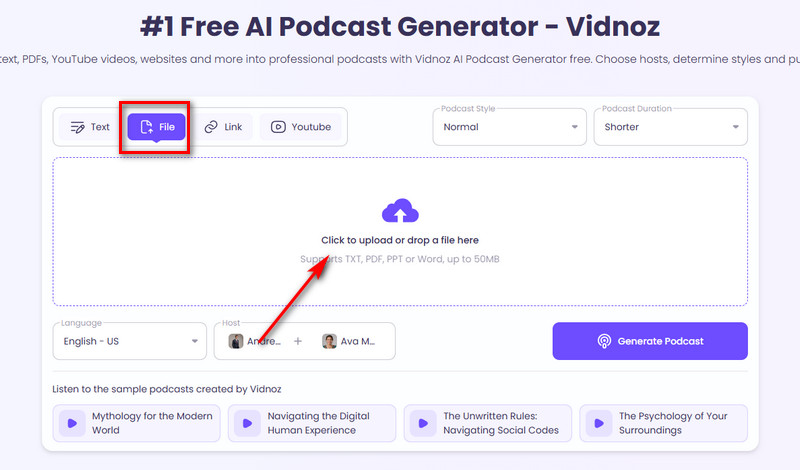
Next, decide how you want to upload your notes—by pasting text, uploading a file, or providing a link. This guide uses file upload as an example.
Select the File tab and click the blank area to upload your text file.
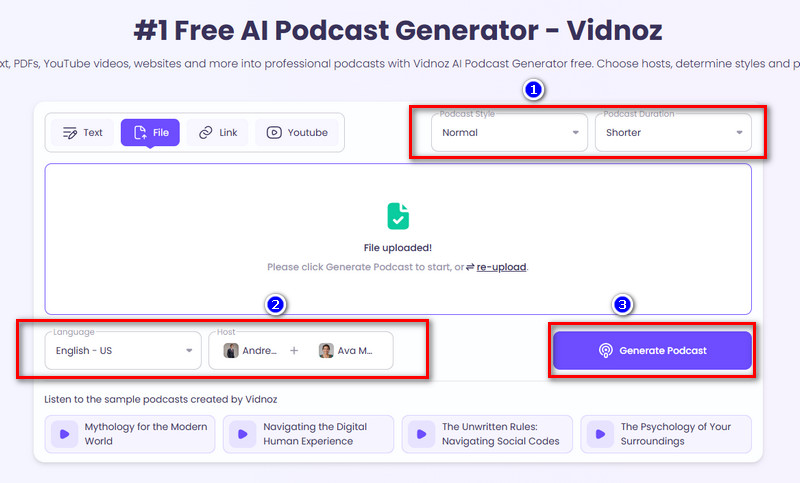
Step 2. Choose the appropriate language based on your notes, then select the voice, podcast style, and final output length.
Step 3. Click Generate Podcast to start creating.
Just getting started with your own podcast? Check out the guide How to Create AI Podcast Channels—you might find exactly what you need there.
3. Monica Free AI Podcast Generator
If you want to start creating anytime, anywhere without device limitations, this guide recommends Monica Free AI Podcast Generator. It excels in versatility: you can create content on Windows, Mac, iOS, or Android—all you need is a browser. More importantly, your creations sync seamlessly across platforms.
Naturally, it offers ample features and options for converting notes to podcasts:
Main Features
- Convert any digital content into a podcast: Articles from websites, blogs, YouTube audio, local Word, PPT, and PDF files, as well as plain text you paste—all can become material for your podcast.
- Professional content extraction and creation: Monica AI extracts key points from your notes to craft compelling content that doesn't just summarize but amplifies. Final generation takes only minutes.
- Create Anytime, Anywhere: Monica AI supports mobile and desktop creation with cross-platform content synchronization. With any electronic device nearby, you can produce and listen to your podcasts.
4. Wondercraft AI
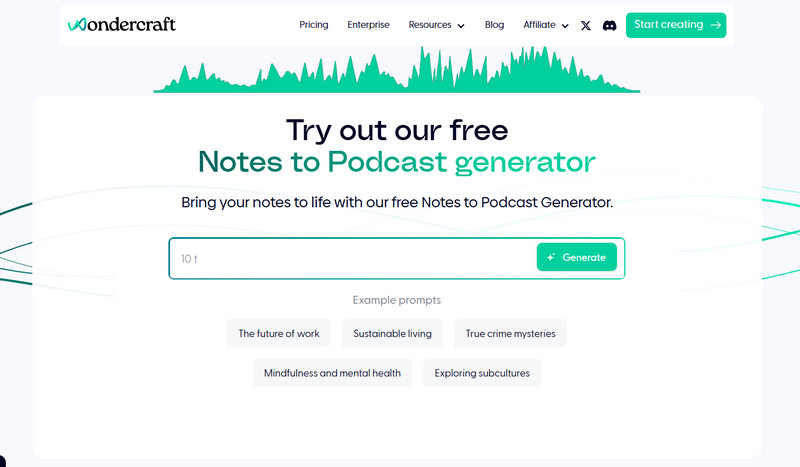
If you're creating podcasts for professional use, Wondercraft AI is the most suitable solution for your design and workflow needs.
Beyond the essential features for converting notes into podcasts, Wondercraft AI offers additional capabilities like inviting colleagues to collaborate, implementing approval workflows, and adding comments. It also supports generating public links for easy sharing of the final audio.
Furthermore, it's highly beginner-friendly, featuring comprehensive tutorial videos on its main interface. You can follow each step guided by the video markers.
Main Features
- Script Creation Assistance: Wondercraft AI guides you through collaborative podcast script development. Share your documents, content URLs, or initial ideas. You can also choose keyword presets or reference platform-provided prompts.
- Real-Time Optimization: Wondercraft AI features built-in editing tools and dedicated pages to refine every detail with simple modifications.
- Voice Customization: Choose from preset voices, create new ones using custom commands, or clone your own voice for podcasts.
- Content Enhancement: Highlight keywords, add emotional emphasis to key sentences, and insert laughter or other effects between lines.
5. Quizgecko AI Podcast Generator
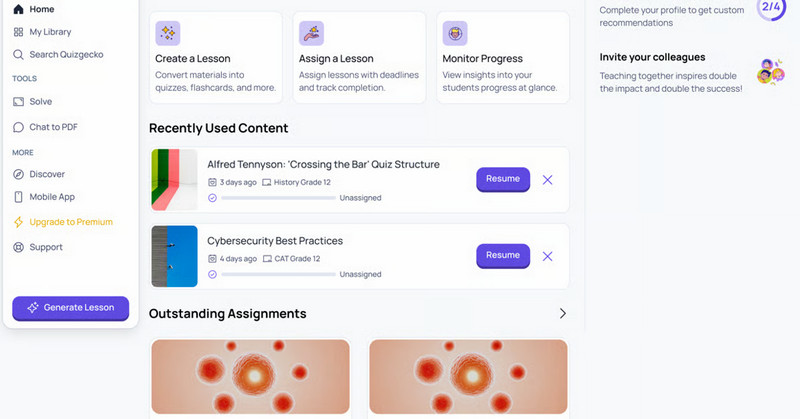
Quizgecko is a note-to-podcast converter designed specifically for students needing to review coursework. If you're overwhelmed by piles of PDF study materials or PPTs—or find them completely unreadable—hand them over to Quizgecko. The platform's AI will transform them into audio tutorials perfect for pre-exam review.
Just listening? No! Quizgecko integrates with a testing engine. After finishing each session, you can immediately take a quiz to verify your mastery of the material.
Main Features
- Multi-platform listening: Podcasts created by Quizgecko are stored in the platform's library. You can listen online or within the app—offline mode is available to avoid ads or other distractions during review.
- Integrated Review System: Quizgecko builds a learning system around your materials, including flashcards for quick memorization, listening summaries, and online quizzes. These tools help you track progress and pinpoint knowledge gaps.
- Hyper-Interactive Engagement: Quizgecko doesn't just transform your study materials into podcasts—its AI host interacts with you, discussing concepts and posing questions about key points to solidify your memory.
Bonus: Make Video Podcasts with AI
Sometimes, pairing audio with visuals can make your work more engaging and dynamic, or help your study materials stick better in your mind. Why not try this new approach? Instead of just using Vidnoz Text to Speech to convert notes into podcasts, turn them into video podcasts.
With Vidnoz AI's assistance, you don't have to start from scratch. The platform offers video templates suitable for any industry—simply customize them to fit your needs.
Here are the detailed steps to create a video podcast using Vidnoz:
Step 1. Open Vidnoz AI in your browser. Click Create Free Video > Create a video to enter the workspace.
Step 2. Select your desired template from the platform's options and click Use this template.
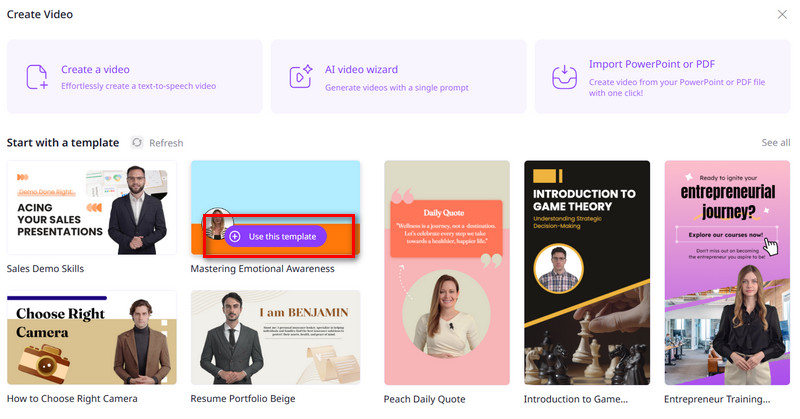
Step 3. Now begin editing the template. Enter your desired narration text in the text box below the video preview window. Then select language, voice type, speaking speed, volume, and finally decide whether to add subtitles.
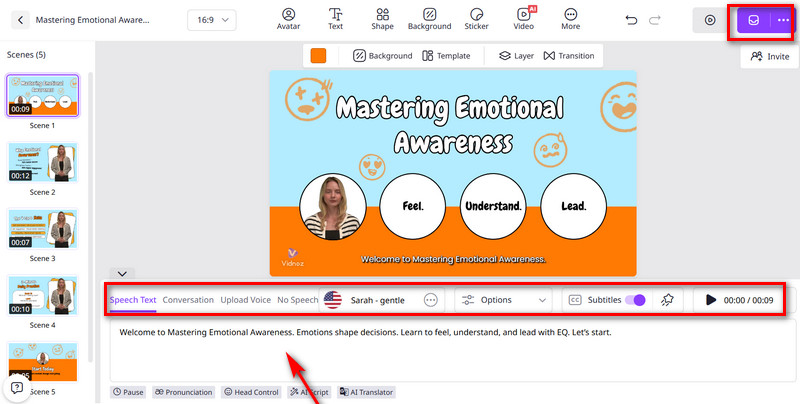
Repeat the above steps to fill each Scene in the video template. Finally, click the purple button in the top-right corner and select Generate Now.
The Bottom Line
Turning notes to podcasts makes information consumption more convenient for most people. Your eyes and brain don't need to focus simultaneously—you can do anything with your hands while your ears capture the important content.
All you need is a note-to-podcast AI tool to accomplish this, delivering a finished audio file within minutes. This guide has curated five specialized products for you, including Vidnoz. If you desire more immersive podcast visuals, Vidnoz's AI Video Generator will fulfill that wish as well.

Vidnoz AI - Create Free Engaging AI Video with Talking Avatar
- Easily create professional AI videos with realistic avatars.
- Text-to-speech lip sync voices of different languages.
- 2800+ video templates for multiple scenarios.