A stencil is somelike a template for the creation of a specific shape, letter or image quickly. It can be utilized in many situations, street art, graffiti, home decoration. Tattoo, and so on. It’s such an easy thing to turn a detailed image into a template with the help of AI tools. There are some image to stencil generator tools that convert your image into stencil instantly. More than that, there is another free tool to generate stencils from image. Read on to learn details.
- On This Page
-
Bylo AI: Free Image to Stencil Generator Online
-
Free Stencil Maker with Threshold Changer
-
Stencil Creator: Convert Image to Stencil App Online
-
Fx Stencil: Photo to Stencil App for Android and iOS
-
Details about Image to Stencil and Image to Line Drawing
-
How to Generate Stencils from Text?
Bylo AI: Free Image to Stencil Generator Online
Bylo AI is a free stencil maker online AI. It turns your images into high-contrast stencils for various situations, crafts, street arts and more. With this tool, you can upload any image and convert it into a clear black and white stencil. You can also choose the aspect ratio of the image: 3:2, 2:3, or 1:1. While it costs 5 credits to turn your image into stencil, you'll receive 5 free credits per day after logging in, which means you can get one free credit per day.
How to convert image to stencil with Bylo AI?
Step 1. Upload your image and give prompts about how to edit your image if you need.
Step 2. Choose the aspect ratio, and click the Generate button. Then you’re required to sign up and log in for 5 free credits to generate and download the generated image.

Free Stencil Maker with Threshold Changer
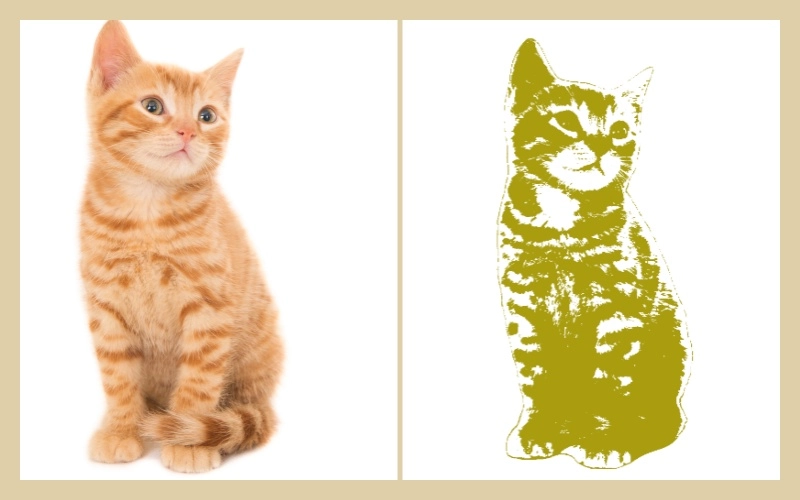
Open the website and upload your picture. You can remove the image background using AI and then click the Generate Stencil button. On the editing screen, free users will see two editable layers. Users can add more layers and choose the color of each layer. The background color of the stencil can also be decided by your own. However, you will need to log in to download or save the stencil on your device.
Step 1. Upload your picture, and choose an area by cropping.
Step 2. Click the Generate Stencil button. Then you can edit in detail to change the generated stencil by adjusting the threshold for different layers and changing the background color.
Step 3. Login your account and download it on your device.
Stencil Creator: Convert Image to Stencil App Online
Compared to other stencil maker tools, this free tool can not only generate black and white stencils, but also generate colorful stencils. You can choose to fill with solid colors or gradient colors. And no matter how many layers you add, it is free. One of its great advantages is that you have no need to login to use and download.
Step 1. Click the Create New Stencil button and upload your image.
Step 2. Click the Create More Choices for more color options where you can change the number of layers or directly click the Next Step button.
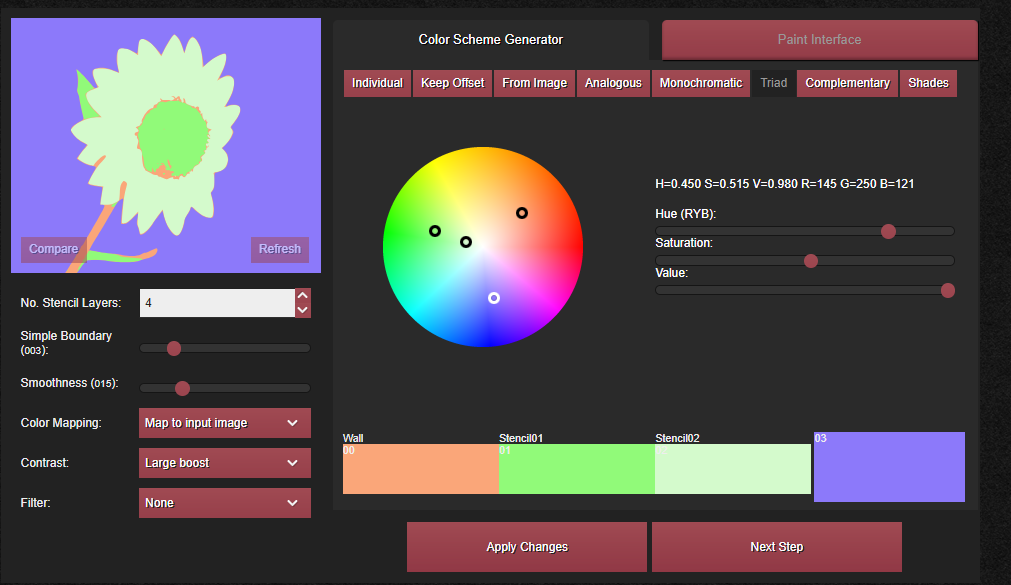
Step 3. Then stencil is created and you can download it on your device. If you want to share this stencil with other users, you can add it to gallery.
Also Read: Best Tattoo Stencil Makers >>
Fx Stencil: Photo to Stencil App for Android and iOS
Fx Stencil is a stencil maker app for Android and iOS devices. Its clean interface and simple operation have made it popular. On the App Store, it has a 4.5 out of 5 rating, with very positive user reviews. Like most stencil maker, it can quickly create stencils in black and white or in a color of your choice.
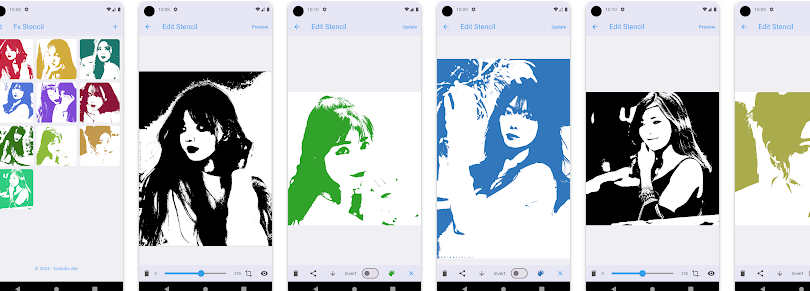
Step 1. Tap the Create New Stencil button. Choose an image form your gallery or camera now.
Step 2. Then it generates stencil according to your image. You can change the color before saving it on your phone.
You May Like: How to Turn Image to Emoji >>
Details about Image to Stencil and Image to Line Drawing
Image to stencil and image to line drawing share some similarities, making it difficult to distinguish the difference. Some tools even say "image to stencil," but the actual effect is image to line drawing. Let's take a look at the similarities and differences between the two.
Similarities:
- Simply details and focus on the edges and outlines of an image
- High contrast between the lines and the background of the final output image
As for the differences between the two, see the comparison table below.
|
|
Image to Stencil
|
Image to Line
|
|
Color
|
More color options
|
Black-and-white
|
|
Purpose
|
Templates for transferring a design
|
Sketch or outline drawing for artistic work
|
|
Key characteristics
|
Consist of solid shapes and “islands” (isolated ares)
|
Composed of lines and curves
|
How to Generate Stencils from Text?
You can not only generate sencils from image, but also from text. Free AI image generator made by Vidnoz allows you to generate stencils without limitation. You can input your image description as detail as possible so a stencil is made as you want. Follow the steps below to generate stencils with AI.
Step 1. Go to AI image generator page.
Step 2. Enter the image description within 2000 characters. Here we take advantage of Gemini to generate a tattoo stencil.
Prompts: “A minimalist tattoo stencil design of a majestic lion's head, facing forward. The lines should be bold, clear, and easy to trace, with simplified features suitable for a stencil. Include strong outlines for the mane, eyes, nose, and mouth, ensuring there are no overly intricate details that would be difficult to cut or ink. The overall aesthetic should be modern and clean, with a strong emphasis on readability as a stencil. Black and white, no shading, just solid shapes and connecting lines.”
Step 3. Choose your image style, quantity, aspect ration (16:9, 9:16, 1:1, 4:3, 3:4), and dimension. Then click the Generated Now button to generate a tattoo stencil instantly.
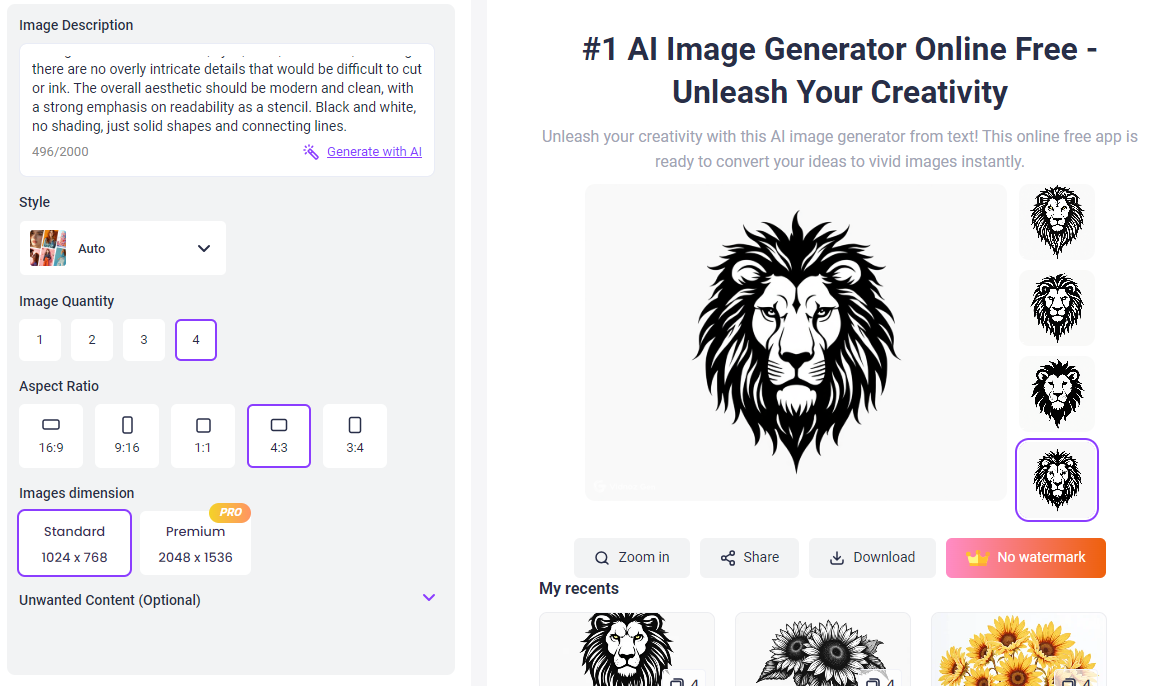
Important features of Vidnoz AI Image Generator:
Online free AI image generator without login. You have free times daily, no login. It can be used on any device as long as you have an internet. Very convenient.
A variety of image styles to choose from. Stencil, graffiti, illustration, animation, anime, FLUX, chibi, and more. It means that you can create images with the AI for various purposes. One AI image generator for all needs.
Large image dimension. Free users could generate an image of 1024x768 pixels and the premium users could get an image of 2048x1536 pixels.
Generate up to 4 images at once. You decide the number of generated images at once, from one to four. Generate four images at once to pick one that you like most.
More AI image tools you may be interested in:
AI image extender: Expand an images online without compromising quality
AI image combiner: Merge two or more images to create a new image.
AI image describer: Give a detailed description of your uploaded image.
AI baby generator: See how your future baby look like.
Conclusion
AI Image to stencil generator tools are very useful and fast to generate stencils with black and white. Among the four tools introduced in this article, Bylo AI is the one of the best free stencil image maker for its fast speed and good results. If you want colorful stencils, try another 3 tools. To try to generate stencils from text, visit Vidnoz AI Image Generator and explore more AI tools on the website.