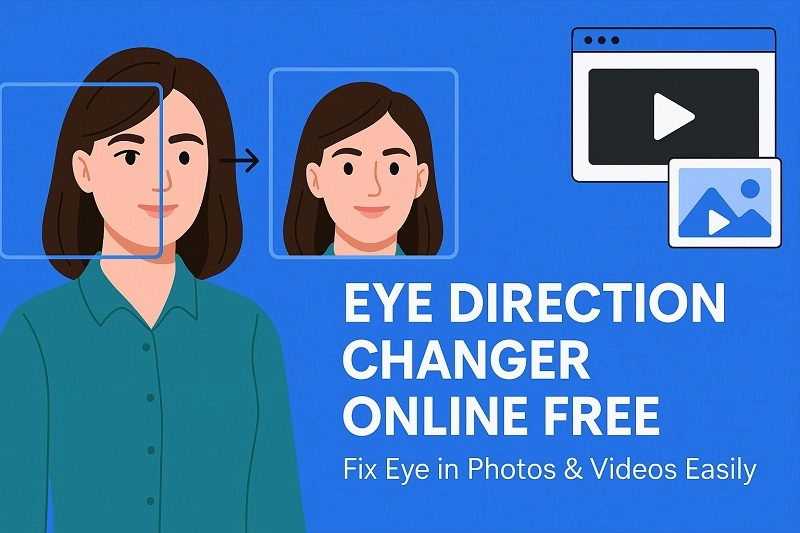
You take an awesome photo or video, and everything seems perfect, but when you look closely, your eyes are in the wrong direction; seems frustrating, right? Whether you’re recording a professional video or taking a selfie, having your eyes looking in the right direction is crucial. But if you got a perfect shot and only your eyes are looking in the wrong direction, there are some incredible eye direction changer online free tools that adjust eye gaze in both photos and videos.
- On This Page
-
What You Need to Know About Changing Eye Direction
What is Wrong Eye Direction?
What Causes Wrong Eye Direction?
Why to Correct Eye Direction?
-
Change Eye Direction in Photo Online Free: 5 Best Picks
Reshot AI: Free to Change Direction of Eyes Online in Photo
How to Change Eye Direction in Photos?
HeyPhoto: Fast to Correct Eye Misalignment in Photo
Createimg: AI Eye Contact Correction Online Free
Piktid: Custom to Change Eye Position in Photo
Lightxeditor: Fix Lazy Eye in Photo with Customization
Pro Tips to Maintain Eye Contact with Camera
-
AI Eye Direction Changer Online Free in Videos: 2 Top Options
Captions AI: Fix Eye Movement in Video
How to Change Eye Direction in Video?
Kapwing Change Eye Gaze Direction in Video
-
Your First App to Change Eye Direction in Photo
-
Am I Beautiful with Fixed Eye Direction in Photos?
How to Test Your Beautifulness via an Uploaded Photo?
Tips to Fix Misaligned Eyes in Daily Life
What You Need to Know About Changing Eye Direction
Correcting eye direction might seem like a minor detail, but its impact on the overall quality and impression of your visual content is significant. Let’s have a closer look at why you need to change eye direction if it’s wrong.
What is Wrong Eye Direction?
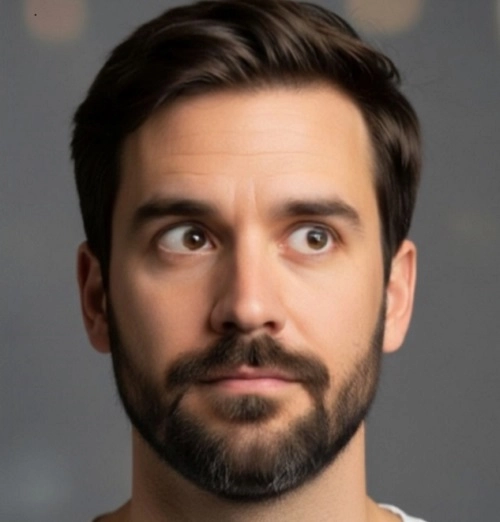
Wrong eye direction refers to when a subject in a photo or video is not making proper eye contact with the camera. This often results in a distracted and disengaged appearance.
What Causes Wrong Eye Direction?
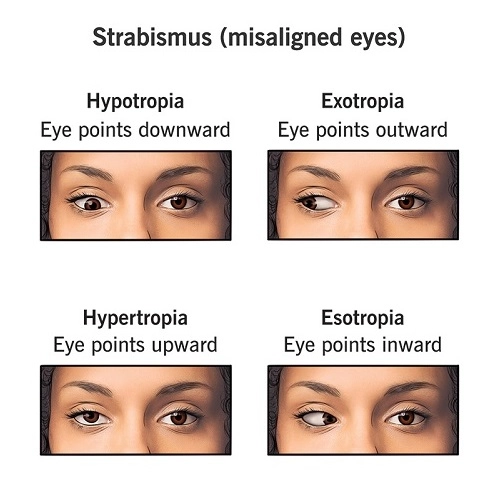
- Eye Conditions like Strabismus: This is a misalignment of the eyes where one may turn in or out, affecting the gaze direction.
- Camera Distraction: During photoshoots or video recordings, it's easy to accidentally look away from the lens, even for a split second.
Why to Correct Eye Direction?
Correcting eye direction offers numerous benefits:
- Enhances professionalism: Aligned eye contact gives a more polished and credible appearance.
- Boosts engagement: Direct gaze draws viewers in and creates a stronger connection.
- Improves aesthetics: It makes photos and videos look more visually appealing and natural.
- Conveys confidence: Maintaining eye contact projects self-assurance and trustworthiness.
- Saves retakes: Instead of reshooting, you can quickly fix minor eye direction issues.
Change Eye Direction in Photo Online Free: 5 Best Picks
Changing eye direction in a static image is easier than ever, thanks to modern AI eye contact correction online free tools. Whether you want to correct eye misalignment or enhance engagement, these two tools stand out:
Reshot AI: Free to Change Direction of Eyes Online in Photo
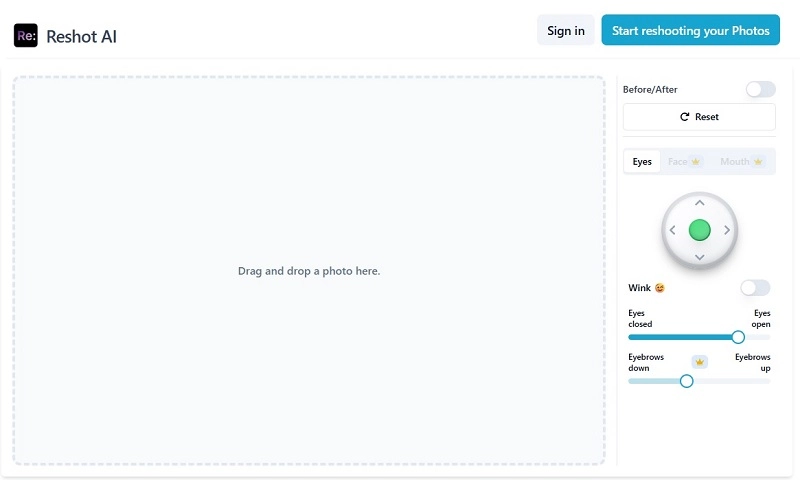
Reshot AI eye editor offers a dedicated tool to change eye direction in photo with just a few clicks. This eye direction changer online free tool uses advanced AI to detect and subtly adjust eye alignment with a flexible control handle, making your gaze look more natural. It also offers facial editing, background removal, sliders to fix eyes open or closed and to control eyebrows down and up, and other cosmetic enhancements.
Site: https://www.reshot.ai/tools/ai-eyes-editor
Pros:
- The ‘control handle’ can be adjusted according to the users’ choice.
- 100% free to use with a simpler interface.
- Offers a slider to adjust how much open or closed the eyes should be.
- Allows users to add a ‘wink’ expression.
Cons:
- Less control with the free version.
- Face and mouth editing comes with a paid version.
- Not ideal for bulk photo corrections.
Also Read: Find Eye Shape with Eye Shape AI Online, Apps & Quiz >>
How to Change Eye Direction in Photos?
Step 1. Visit Reshot AI eye editor tool, and upload the desired image.
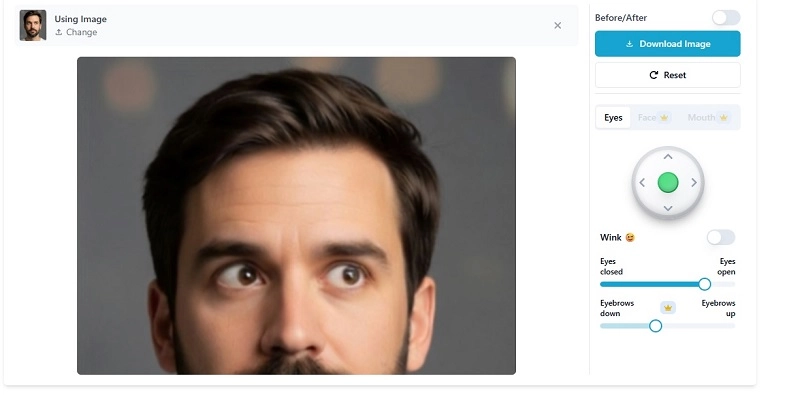
Step 2. Use the ‘control handle’ on the right side of the window to change eye direction in photo. You can also adjust how much open or closed you need the eyes to be.
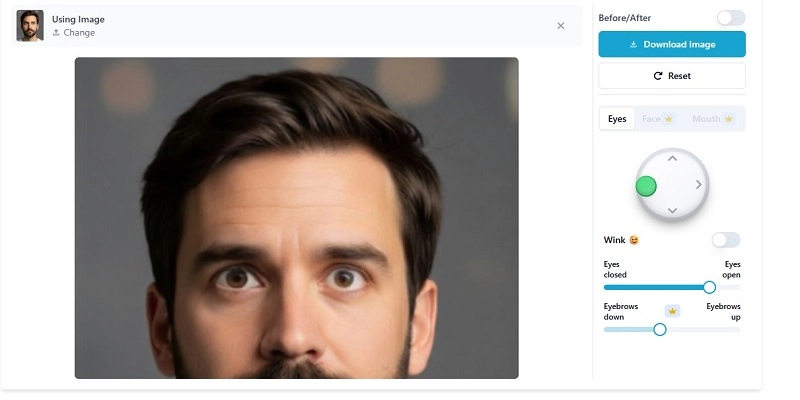
Step 3. Once done with the editing, click on the Download Image button to download your image.
HeyPhoto: Fast to Correct Eye Misalignment in Photo
HeyPhoto is another excellent eye direction changer online free option for photos, specifically designed for quick and efficient AI eye contact correction online free in photos. It’s ideal for quick, intuitive tweaks (the bird really helps adjust the eyes). It stands out for its simplicity and the speed at which it can correct eye misalignment, making it a user-friendly app to change the direction of eyes.
Site: https://hey-photo.com/tools/gaze

Pros:
- Fast corrections with an easy-to-use interface.
- Accurate and natural adjustments with its AI-powered algorithms.
- Offers tons of tools to adjust smiles, age, gender, and even anonymize faces.
Cons:
- Edited images may reduce its resolution and overall quality.
- Creating an account is necessary.
Createimg: AI Eye Contact Correction Online Free
Createimg is a 100% free eye direction changer to help you create perfect eye contact in photos easily. It allows two uploads at once, and you just need to input a simple prompt like “Make the person maintain direct eye contact with the camera”, it will automatically fix gaze direction naturally. After enhancement, you can freely download the eye-fixed image without a watermark; however, it resizes the downloaded images to a smaller size.
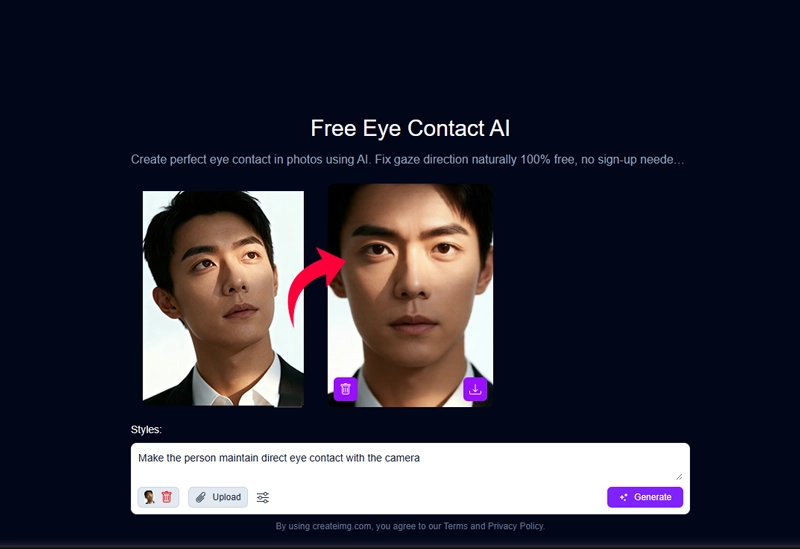
Site: https://www.createimg.com/eye-contact-ai/
Pros:
- It enables you to fix eye direction in photos at no cost.
- It allows adjusting the output image aspect ratio, like portrait, square, and landscape.
- You can control the eye direction in photos via easy text.
Cons:
- It will lose quality to some extent after AI eye contact correction.
Piktid: Custom to Change Eye Position in Photo
Piktid is a comprehensive AI eye direction changer that integrates with other eye edits and face expression enhancement features. Different from the above recommendations, it has four fixed gaze positions for your choices. They are left, right, up, and down. You can only import an eye misalignment photo, select a gaze direction, and apply it. This tool is more appropriate for side-alignment eyes to go back to the focus center and not for slight adjustments.
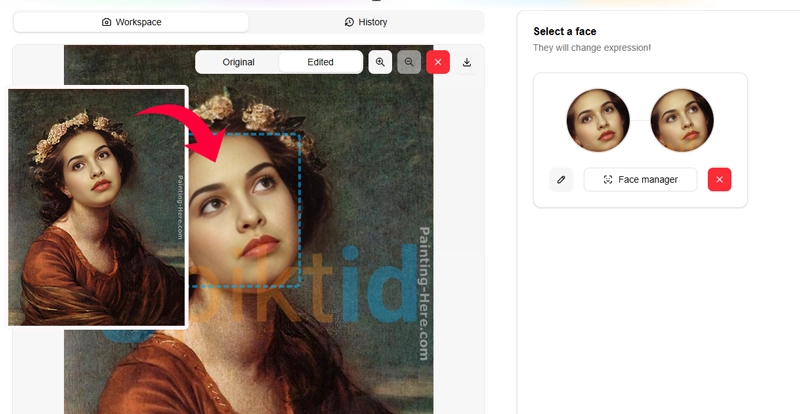
Site: https://piktid.com/blog/change-eye-gaze-direction-online/
Pros:
- It is free to use.
- It is easy to change eye direction in photos with a click.
- It also allows fixing closed eyes and unnatural facial expressions.
Cons:
- It has no "looking at the camera" eye position choice.
- It has watermark on the edited photo
Lightxeditor: Fix Lazy Eye in Photo with Customization
LightX Editor is a fully hand-controlled eye direction changer online free option. Whether it’s for lazy eyes, strabismus, or drifted eyes, you can correct the eye contact to your demand by slightly changing the eyeballs’ locations vertically or horizontally. With it, photographers can simply make people look straight in photos and catching viewers with direct eye contact easily.
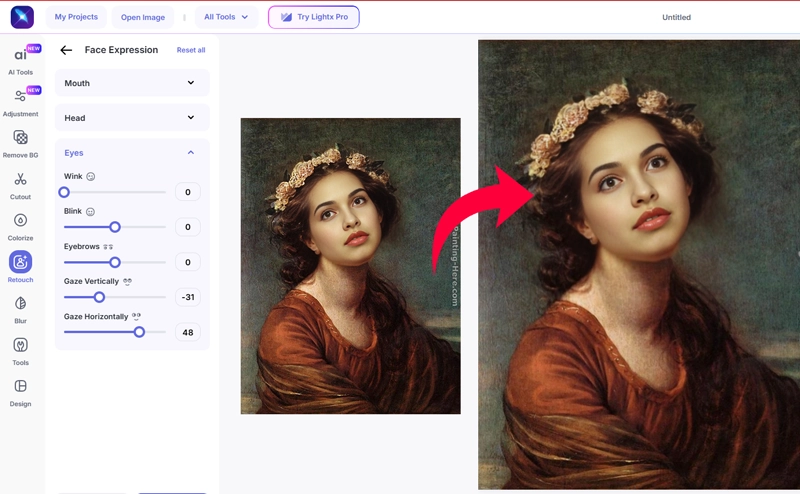
Site: https://www.lightxeditor.com/photo-editing/ai-lazy-eye-fixer/
Pros:
- It has an unlimited free trial for eye direction changing.
- It’s completely controllable for people who pursue precision.
- It has adjustable sliders for wink, blink, and eyebrows as well.
Cons:
- It's hard to control the values of the eye offset in the vertical and horizontal directions.
- It only supports JPEG downloading for free users, and it has quality limits for export.
Pro Tips to Maintain Eye Contact with Camera
- Look into the lens, not the screen.
- Position your camera at eye level.
- Use small stickers or dots behind the lens as focus guides.
- Practice before shooting.
- Blink naturally to avoid looking unnatural.
Also Read: What Color Are My Eyes Photo Test Free Online >>
AI Eye Direction Changer Online Free in Videos: 2 Top Options
Correcting eye direction in videos is more complex than in photos, but advanced AI tools now make it possible. In videos, you need dynamic tools that adjust eye movement across each frame. Here are the top picks of eye direction changer apps for videos.
Captions AI: Fix Eye Movement in Video
Captions AI uses its AI change eye direction feature to simulate direct eye contact throughout your video. It offers a powerful eye-tracking tool that automatically refines eye movements in videos, helping correct eye contact with the viewers, which fosters positive engagement. This online app to change eye direction is particularly useful for content creators who need to maintain consistent eye contact without numerous retakes.
It is best for those who are too introverted and embarrassed to look right at the camera but have to take a video.
Site: https://www.captions.ai/eye-contact
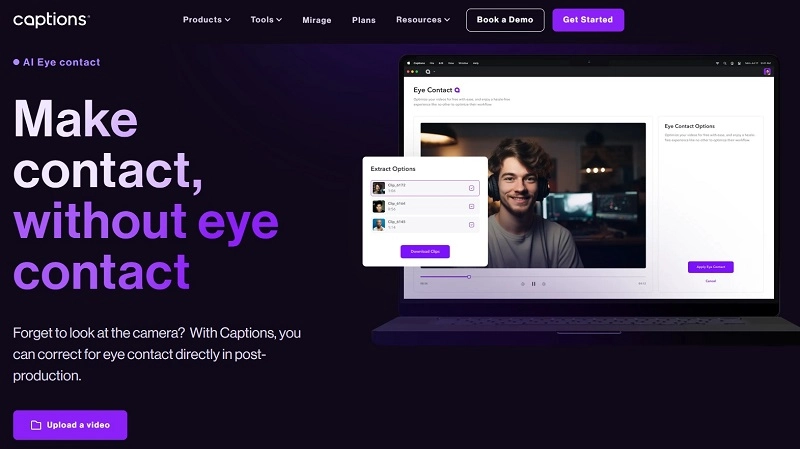
Pros:
- AI automatically adjusts eyes to face the camera, even if you look away.
- Creates a stronger sense of connection with the audience.
- Supports longer video files and watermark-free export.
- Eliminates the need for re-recording due to poor eye contact.
- Works well with auto-subtitles and clip adjustments.
Cons:
- Account creation is necessary to proceed with this eye direction changer app.
- Video processing can sometimes take longer, especially for longer clips.
- Premium features can get pricey.
How to Change Eye Direction in Video?
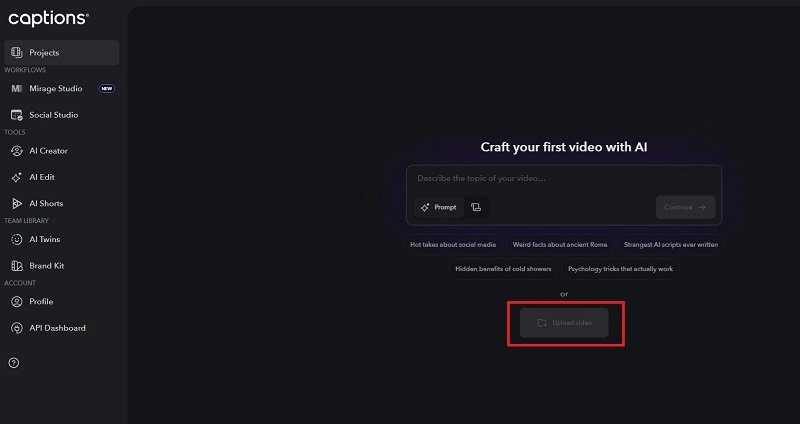
Step 1. Visit the Captions AI website and upload the video you want to edit.
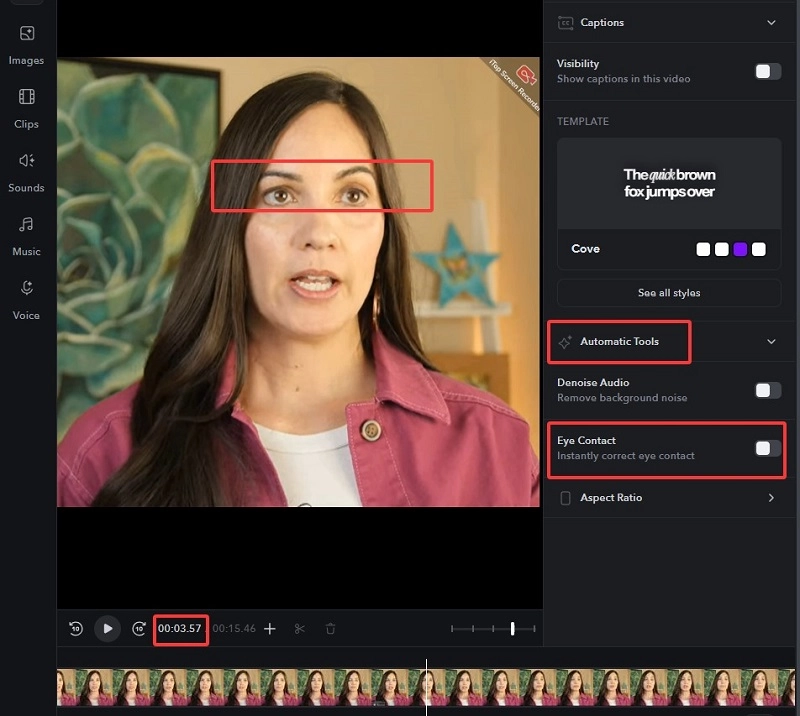
Step 2. Once the video is uploaded, unfold the Automatic Tools and tick the Eye Contact. Then the AI will fix the eye alignment of each frame in the video for you.
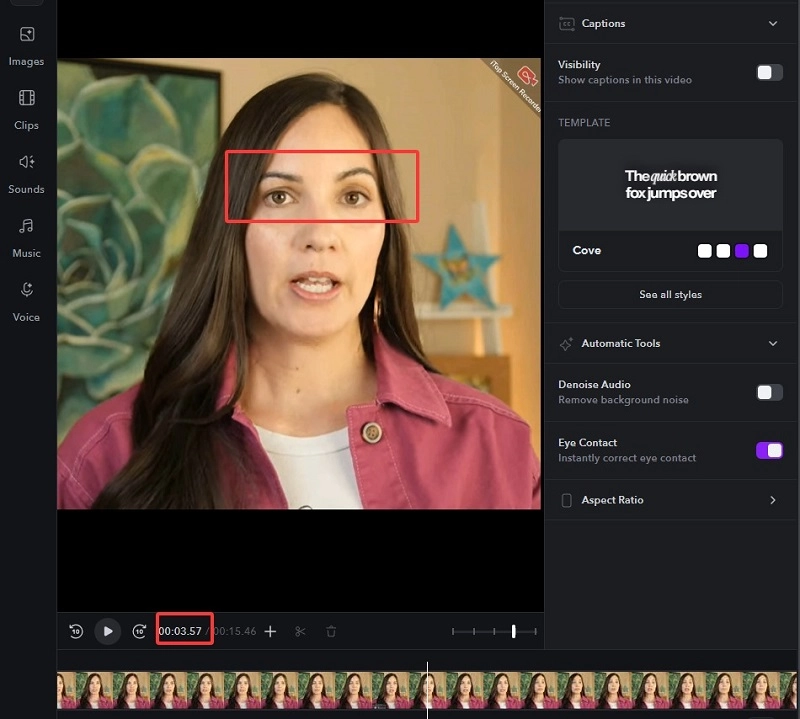
Step 3. Once it is finished, you can move the cursor to stop at any point on the timeline to check if the eyes are looking straight into the camera. Finally, download your video with correct eye contact.
Kapwing Change Eye Gaze Direction in Video
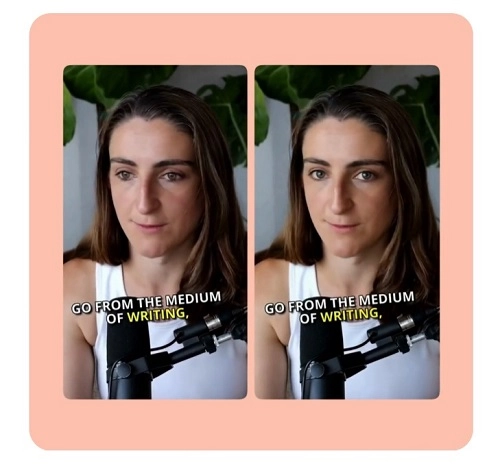
Kapwing is a versatile eye direction changer online free editor that includes gaze correction. Simply import your clip and apply the AI eye-contact correction. It's an excellent option for creators looking to quickly adjust eye gaze and enhance the professionalism of their video content without needing complicated software.
Site: https://www.kapwing.com/tools/adjust/eye-contact
Pros:
- Offers a wide range of AI video editing tools alongside eye contact correction.
- Effectively corrects eye gaze to face the camera with one click.
- No need to download the software; it’s a browser-based tool.
Cons:
- Free exports will include a Kapwing watermark.
- AI eye contact correction is only for a premium subscription.
- Its complex interface needs a learning curve for new beginners.
Your First App to Change Eye Direction in Photo
Looking for a mobile app to change eye direction in photo for free? YouCam Perfect (iOS/Android) is your ideal companion. It uses facial recognition plus AI to subtly redirect your gaze. Along with gaze control, it offers filters, retouch options, and AR makeup for comprehensive beautification.
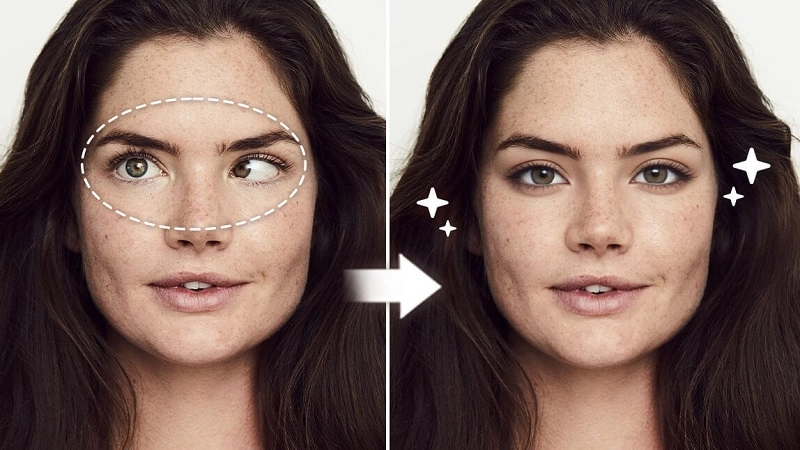
Wondering how to make one eye look the other way and move eye in photo? Here’s how to do that using YouCam Perfect:
- Install and open YouCam Perfect.
- Tap "Photo Edit" and upload your image.
- Look for "AI Retake" or similar eye-correction tools.
- Follow the prompts to adjust or replace the eye direction.
- Save your perfected photo.
Am I Beautiful with Fixed Eye Direction in Photos?
After using an eye direction changer online free tool to perfect your gaze, you might wonder about the overall impact of eye misalignment on your appearance. Does corrected eye direction truly enhance your beauty? This is where tools like the Vidnoz AI Attractiveness Test come into play.
Vidnoz AI offers a free, online AI attractiveness test that can analyze your photo and provide insights into various facial dimensions, including attractiveness, confidence, smartness, and trustworthiness. This tool is free, online, and incredibly easy to use. You can upload a photo where your eye direction has been corrected by an eye direction changer online free tool and compare it with a photo where your eyes were misaligned. This can visually demonstrate the positive impact of proper eye contact on your perceived attractiveness.
How to Test Your Beautifulness via an Uploaded Photo?
Step 1. Go to the Vidnoz AI official site > free AI tools > AI Attractiveness Test > then locate this tool in Vidnoz Gen.
Upload the image with misaligned eyes.
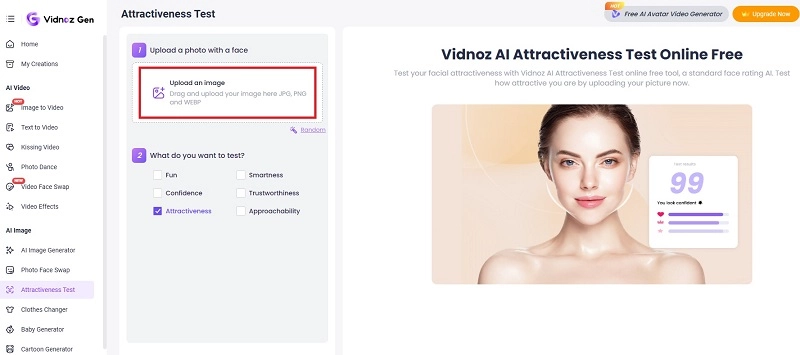
Step 2. Select the Attractiveness box and continue by clicking on the Generate Now button.
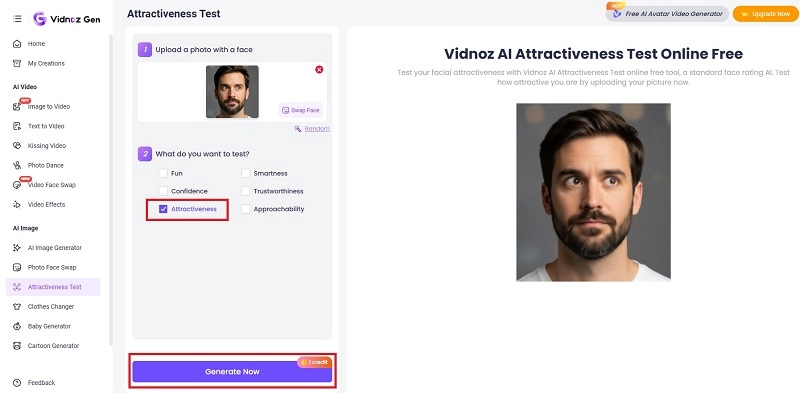
Step 3. In just a few seconds, your results will be here.
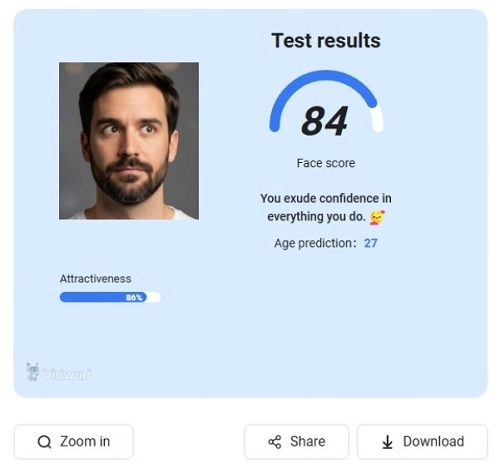
Step 4. Now let’s repeat the same steps with an image that represents properly aligned eyes.
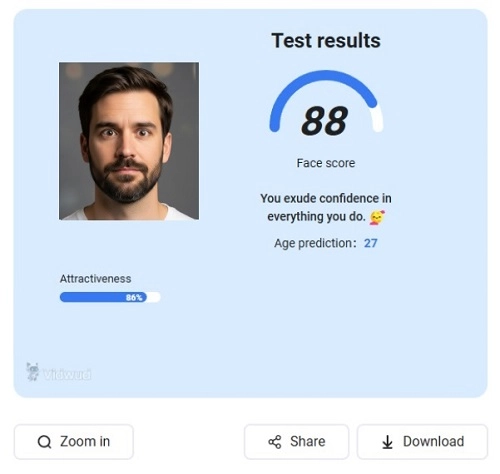
As you can see in the compared result, the photo with right eye contact gets a higher score than the photo with misaligned eyes. Thus, fixing eye direction in photos and videos is kind of helpful for improving your attractiveness.
Also Read: Golden Ratio Face Calculator via Uploading a Photo >>
Tips to Fix Misaligned Eyes in Daily Life
- Eye-tracking exercises: Follow moving objects to train gaze.
- Mirror drills: Practice holding eye contact with your reflection briefly each day.
Beyond the attractiveness test, Vidnoz also offers a free AI video generator and an AI Talking Photo tool, allowing you to create engaging video content with perfectly aligned eye contact using AI-generated avatars.
Create Your AI Talking Avatar - FREE
- 1900+ realistic AI avatars of different races
- Vivid lip-syncing AI voices & gestures
- Support 140+ languages with multiple accents
Conclusion
In just a few clicks, an eye direction changer online free can transform your appearance, making you look confident and professional. From Reshot AI eyes correction and HeyPhoto for photos to Caption AI and Kapwing for video, plus mobile support with YouCam Perfect, there’s a solution for every need.
Once you’re done with editing your photos with misaligned eyes, don’t forget to try the Vidnoz AI Attractiveness Test and see the beauty difference clear eye contact makes.





.webp)
![Top 3 AI Beatbox Generators to Create Dynamic Beatboxing Music [No Mouth Skill]](https://www.vidnoz.com/bimg/ai-beatbox-generators.gif)