Are you wondering how to get the look of photos or videos that would appear to have been taken on an abandoned digital camera? Well, look no further because you have found the best guide. Here you will get to know of the best digital camera filter tools, how to obtain old digital camera filter video and photos, both via digital camera filter apps and via digital camera filter online applications. You will find out how easy it is to apply a digital camera filter iPhone style, or turn the footage into vintage looks. Learn how to simulate digital camera filter effects cross-device, cross-format by the end, and become able to experiment with all the tools we discuss.
- On This Page
-
-
What is a Digital Camera Filter?
-
Old Digital Camera Filter Video & Photo Effects
-
Top Digital Camera Filter Apps and Online Tools
Canva Photo Filter (Online Tool)
BeFunky Photo Effects (Online Tool)
Pixlr Editor (Online Tool)
-
Bring Static Digital Camera Filter Photo to Life With AI Image to Video
How to Make Image Move With Vidnoz
-
FAQ - Digital Camera Filter
Q: Are there any filters that make a video look like it was taken from an old digital camera?
Q: How to use AI to filter photos?
Q: What’s the best free digital camera filter app?
What is a Digital Camera Filter?
A digital camera filter is a software effect that mimics the antique effect of older point and shoot cameras to produce the impression of grain, limited color palette, scan lines, or chromatic aberration. Such filters give photos and old digital camera filter video a nostalgic, retro feel and make the photos feel like they belong in the early 2000s.
Through social media fads and adoration of digital nostalgia, there has been an increased popularity of digital camera filters. No matter what kind of device you operate on whether its digital camera filter app, digital effects online or even editing using the vintage photo filter, these tools will help you change what you see. Experiment with making your own digital camera filter photos and videos so you can make your content have more character and storytelling elements.
Old Digital Camera Filter Video & Photo Effects

This photo with faded color and a timestamp in the corner, resembling something from a 2003 digital still camera.

This photo has a greenish tint, slight chromatic aberration, and grain reminiscent of an early low-res digital camera.

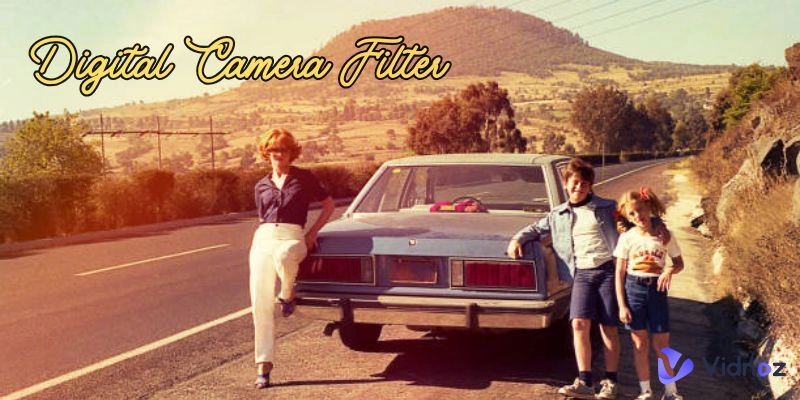
This photo appears to depict a lively street scene from the 1970s. The people are dressed in retro fashion, flared pants, afros, tank tops, and accessories, standing in front of a colorful storefront that seems to sell fabric or craft supplies.
These examples display the ability of an old digital camera filter photo to create nostalgia and vintage video filter. You will see how those flaws, noise, low saturation, and timestamp image forced overlay make this type of early digital photo so attractive. You will later learn how to use these effects and how to easily apply them with digital camera filter apps and through digital camera filter iPhone tools, and also through digital camera filter online editors.
Top Digital Camera Filter Apps and Online Tools
It is time to investigate the best tools that can help you obtain the nostalgic effect. The following table can help you make decisions.
|
|
Digital Camera Filter Apps
|
Digital Camera Filter Online Tools
|
|
DAZZ Cam
|
VSCO
|
Ism APP
|
Canva Photo Filter
|
BeFunky Photo Effects
|
Pixlr Editor
|
|
Customization Option
|
Full-strength slider for each filter.
Adjustable color balance.
Vignette & grain intensity controls.
|
Film-emulation presets with an intensity slider.
Manual tone curve and HSL adjustments.
Exposure, contrast, and saturation controls.
|
AI-powered smart filter that adapts to image content.
Manual tweak of brightness & contrast.
Crop & rotate.
|
Basic filter selection.
Single slider for filter strength.
Simple brightness and contrast slider.
|
Dozens of themed filter packs.
Intensity adjustment per filter.
Add-on effects like frames or textures.
|
Layer-based editing with curves, levels, color balance.
Custom LUT import & filter creation.
Selective color & vignette tools.
|
|
Easy to Use
|
⭐️⭐️⭐️⭐️
|
⭐️⭐️⭐️⭐️
|
⭐️⭐️⭐️
|
⭐️⭐️⭐️⭐️
|
⭐️⭐️⭐️
|
⭐️⭐️⭐️⭐️
|
|
Available For
|
Photo & Video
|
Photo & Video
|
Photo & Video
|
Photo
|
Photo
|
Photo
|
|
Price
|
Free & Paid
|
Free & Paid
|
Free & Paid
|
Free
|
Free & Paid
|
Free
|
Now I will provide the top six digital camera filter apps and digital camera filter online tools. On each, you will find out how to use a digital camera filter and the advantages and disadvantages of each.
-
DAZZ Cam

DAZZ Cam is a well-known digital camera filtering app, simulating the retro look of point-and-shoot cameras of the early 2000s. It is popularly applied to produce grainy, dated, and low-saturation filter video and old digital camera filter video.
How to Apply Digital Camera Filter
Step 1. Open DAZZ Cam and import your photo or video.
Step 2. Select an old digital camera filter overlay (e.g., “2003 Camera” style).
Step 3. Adjust intensity, add timestamps or borders, and then export.
Pros
- Specialized for retro old digital camera filter video and photo.
- Real-time preview and timestamp feature.
- Easy workflow for digital camera filter iPhone styles.
Cons
- Limited manual customization.
- Paid filters may cost extra.

Vidnoz AI - Create Free Engaging AI Video with Talking Avatar
- Easily create professional AI videos with realistic avatars.
- Text-to-speech lip sync voices of different languages.
- 2800+ video templates for multiple scenarios.
-
VSCO

VSCO is a wide-range digital camera filter app with purposes in its aesthetically preset 80s AI features and high-technology editors. It will assist you in making nostalgic, film-like photographs and videos.
How to Apply Digital Camera Filter
Step 1. Import your photo.
Step 2. Choose a filter that mimics analog or vintage digital styles.
Step 3. Fine-tune exposure or fade settings, then save.
Pros
- Strong color controls.
- High-quality digital camera filter app experience.
Cons
- No video support, and it lacks the timestamp style of old digital camera filter videos.
-
Ism APP

Ism APP has been highly effective and uses quite nice-looking old digital camera filter video effects, which include timestamp, grain, and old color tone. It’s perfect for recreating early 2000s camcorder vibes.
How to Apply Digital Camera Filter
Step 1. Launch the app and select your footage.
Step 2. Go to “Retro” or “Digital” filters.
Step 3. Adjust grain and frame rate look, then export.
Pros
- Works with both photos and old videos.
- Good for digital camera filters online style on mobile.
Cons
- Some filters place watermarks in the free version.
-
Canva Photo Filter (Online Tool)

Canva AI Photo Filter is an introductory-level online platform which allows you to add vintage and digital camera filters styles to photos with a few clicks. It is perfect when doing fast editing and social media graphics.
How to Apply Digital Camera Filter
Step 1. Upload your image to Canva.
Step 2. Go to “Effects” to “Vintage” style filters.
Step 3. Add overlay textures (e.g., grain, lens flare) manually.
Pros
- Free online tool, great for simple digital camera filter online use.
- Flexible layering.
Cons
- No video support; more manual effort to mimic authentic video.
-
BeFunky Photo Effects (Online Tool)

BeFunky Photo Effects is an online tool with a simple interface that has a lot of creative digital camera filters, such as retro and old school effects. Perfect for both non-professionals and professionals.
How to Apply Digital Camera Filter
Step 1. Upload a photo to BeFunky.
Step 2. Choose “Old Film” or “Vintage” filter.
Step 3. Customize for grain, saturation drop, vignette, then save.
Pros
- Free online digital camera filter online tool with quick results.
- Good granular adjustments.
Cons
- Photo-only, no video features or timestamp overlay.
Vidnoz AI - Create Free Engaging AI Video with Talking Avatar
- Easily create professional AI videos with realistic avatars.
- Text-to-speech lip sync voices of different languages.
- 2800+ video templates for multiple scenarios.
-
Pixlr Editor (Online Tool)

Pixlr Editor is a powerful browser-based tool that lets you apply digital camera filter effects with high customization, perfect for creating old digital camera filter video aesthetics or photo edits. It’s an awesome online tool that allows you to use the digital camera filter effect with the maximum customization in case you need to create animate old photos or get photos edited.
How to Apply Digital Camera Filter
Step 1. Open image in Pixlr Editor in browser.
Step 2. Apply preset filters like “Retrolux” or custom color curves.
Step 3. Add overlay textures manually, save project.
Pros
- Powerful free editor for digital camera filter online use.
- Supports advanced manipulation like color curves.
Cons
- Learning curve; not designed for videos or beginner-friendly interface.
Bring Static Digital Camera Filter Photo to Life With AI Image to Video
Bringing a static photo to life is easier than ever with AI-powered image-to-video tools. Imagine taking a still shot with your favorite digital camera filter, maybe a soft vintage look or a vibrant pop of color, and watching it bloom into a short, moving clip. AI cleverly analyzes the shapes, colors, and textures in your photo, then adds smooth motion, subtle zooms, and realistic lighting changes.

Vidnoz AI Image to Video is one of the best tool that can make your image move. Simply upload your generated digital camera filter photo, the system will detect the details of the photo, all you have to do is wait and watch the magic happen.
How to Make Image Move With Vidnoz
Step 1. Go to the free AI video generator Vidnoz AI website and create your account, then nevigate to Image & Text to Video AI Free Generator.
Step 2. Upload the filtered photo and set the basic information.
Step 3. Click ‘Generate Now’ to check the final video, download it if you are satisfied with the result. If you are not satisfied with it, remake it for free to achieve your satisfactory.
FAQ - Digital Camera Filter
Eager to respond to frequently raised questions about the use and ability of digital camera filters.
Q: Are there any filters that make a video look like it was taken from an old digital camera?
Yes, you can install third party apps such as DAZZ Cam or Ism APP to make an old digital camera filter video style with grain, timestamp and low-color depth.
Q: How to use AI to filter photos?
Some digital camera filter apps and online platforms that use AI recognize content and add retro styles automatically, alter tone and grain.
Q: What’s the best free digital camera filter app?
Canva photo Filter and Pixlr Editor can be used to access free digital camera filter online, Ism APP provides retro effects on free trial.
The Bottom Line
And the next time you want to find the best digital camera filter that you can install on your iPhone, or that is available as an app, or on the web, you now know the best tools to make old digital camera filter video and photo effects. DAZZ Cam helps you perfect the real retro video styles, VSCO has great photo settings, and Ism APP brings both worlds together. BeFunky, Pixlr Editor, and Canva offer convenience and easy online processes for digital camera filters online. Hopefully now you know how to get digital camera filter effects on any device. Experiment and mix styles between tools to fit your vision. Easy to use, Vintage Free enables you to create beautiful, nostalgic, charming visuals and enhance your pictures and videos with retro flair.