With over 28 million users per month, Character AI is one of the most popular AI chatbot platforms around the world. It allows people to interact with realistic and imaginary persons, build unique AI characters, and create custom conversations with powerful artificial intelligence. Since its setup, Character AI has experienced iterative improvements in copyright protection, user safety, and performance. At the same time, many people have run into Character AI blocked errors and failed to access this platform.
Why do I blocked by Character AI? How to work it out? This post will go deeply into Character AI Unblocked. If you’re also in this situation, before you panic, let’s follow the post to narrow down the problem and try these verified workarounds.
- On This Page
-
Common Reasons You’re Blocked by Character AI
School or Workplace Restrictions
Character AI Geo-Blocking
Security or Firewall Settings
Copyrighted Content Removal
Violation of Terms of Service
-
How to Get Character AI Unblocked?
1. Switch to a Private Browser
2. Clear Caches for Character AI
4. Modify the Firewall Settings
5. Reinstall the c.ai App
6. Reach out to the Character AI Support
7. Try a Character AI Unblock Alternative
-
Don’t Stop Making Your Dream Character Come Alive
How to Create a Talking Character on Vidnoz AI
Common Reasons You’re Blocked by Character AI
The Character AI blocking issue could be caused by many kinds of factors. Here are the main sides where people seek unblocked Character AI solutions.
School or Workplace Restrictions
Many places limit access to Character AI due to their policies and concerns about distractions. They may adjust network DNS settings, block proxies, enforce firewall restrictions, or use other methods to prevent access to platforms like Character AI.
Character AI Geo-Blocking
Likewise, Character AI is believed to be banned in certain European countries, mainly due to concerns about misuse and privacy breaches.
Security or Firewall Settings
For security purposes, the firewall configurations on your computer, router, and even private network might limit access to Character AI, serving as a protective barrier.
Copyrighted Content Removal
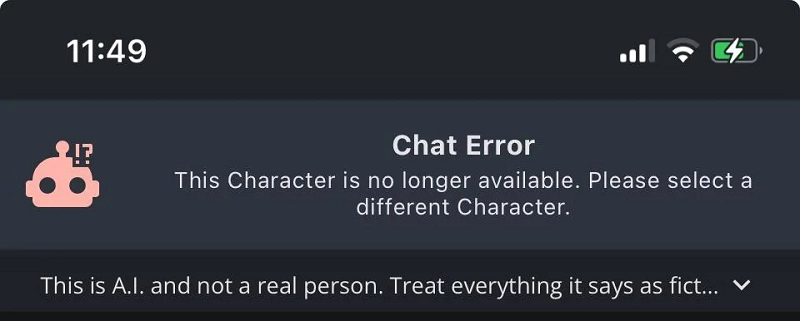
Because of copyright issues, Character AI voluntarily deleted a significant number of AI characters from its library late in the year 2024. You will see a Chat Error dialog when you run into this situation.
Violation of Terms of Service
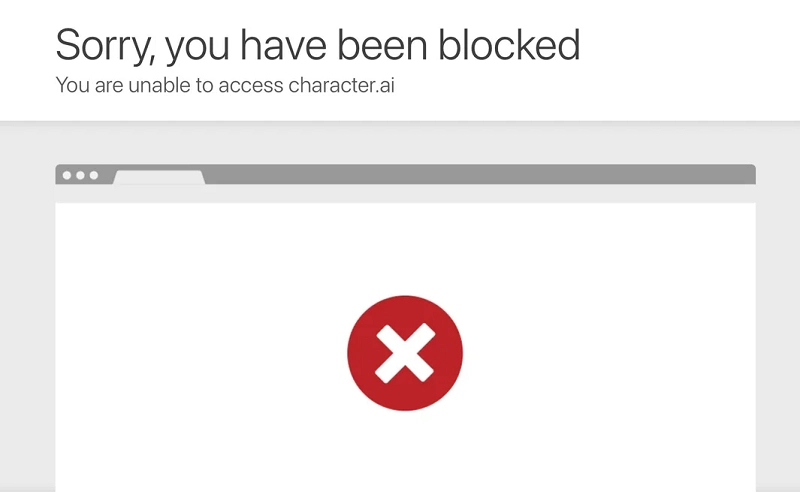
Character AI has rolled out multiple measures to ensure safe and stable user experiences. Anyone who infringes its service agreement will be prohibited from accessing the platform. See two of the most common breach types:
- Age restriction: Those who are under 13 years old will be blocked by Character AI. Remarkably, citizens and residents in the EU are permitted to access the service only when they are 16 and above.
- Character AI Filter is activated: When one creates something harmful or enters offensive prompts, there is a big possibility of triggering the Character AI filters and getting the user blocked.
Service Glitches
For no reasons, some people find that they are stopped from connecting to Character AI. Some instances have suggested that this issue can also a result of the service maintenance or temporary blocks due to unknown glitches.
How to Get Character AI Unblocked?
Given the various possible factors, there is no one-size-fits-all Character AI unblocked free troubleshooting. Fortunately, some methods have tested to be workable for the most part. Here are 6 good practices you can perform when experiencing the issue.
1. Switch to a Private Browser
You can first try a different browser if you can’t access the character.ai website. It is advisable to use a private search engine like Tor Browser and Brave that not only hide your authentic IP address but also avoid security extensions that may affect your access to Character AI.
2. Clear Caches for Character AI
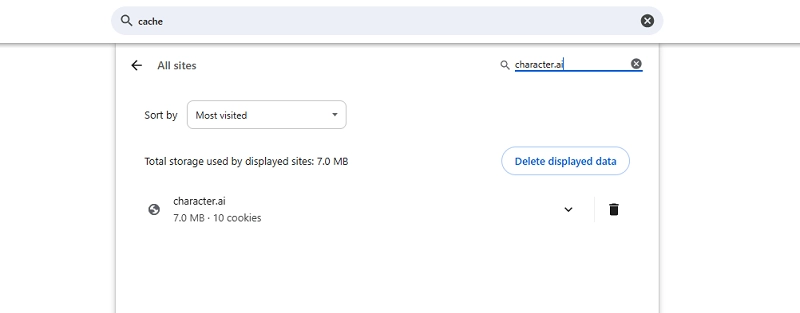
Cache cleanup is an alternative try for people who want to visit character.ai on a regular browser. Take Google Chrome as an example: go to the browser Settings > search for Cache > Locate Site settings > Go to View permissions and data stored across sites. Then type in character.ai to search for caches for this website. Click the trash icon next to it to delete all related data.
After the deletion, return to character.ai and refresh to see whether this site works.
3. Use a VPN Client
This method can come into play in the Geo restriction occasions. Simply connect to an IP location where Character AI is available, and most non-EU countries are good spots to go. It is also applicable for Character AI unblocked school free as long as these places don’t make use of VPN IP blocking measures.
4. Modify the Firewall Settings
Private browsers and VPNs are the most straightforward methods to unblock Character AI. Yet if you have permission to modify the router's firewall settings, you may also check whether Character AI is in the blocked URL list and modify the settings instead.
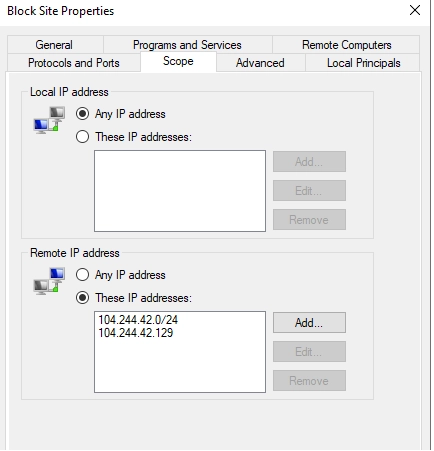
Beyond the route level, Character AI may also be blocked by other firewall programs. Depending on the connection and device you’re using, the configuration varies. If you’re not proficient in computer settings, however, this method will be risky to your connection.
5. Reinstall the c.ai App
If you’re blocked by the Character app, try to reinstall the latest version from official sources. Remember to uninstall the previous one with all data & caches deleted before you make an installation.
6. Reach out to the Character AI Support
In some instances, Character AI displays an on-screen notification saying they have detected suspicious login behaviors and would block further user attempts. As mentioned earlier, this is probably caused by Character AI security updates. The only action you can take is to submit a support ticket to ask for Character AI unblocked no sign up errors.
7. Try a Character AI Unblock Alternative
Finding a replacement for Character AI is another nice shot if you’re tired of unexcepted defects and need something fresh. Here are 3 of the high ranked choices by enthusiasts.
- Yodayo AI
- Janitor AI
- Xoul.ai
Don’t Stop Making Your Dream Character Come Alive
Character AI helps build strong interactions with digital avatars and lets people have immersive dialogues with any figures in their minds. As technology has advanced, artificial intelligence is transforming abstract imagination into more impressive forms. Besides sending text messages to AI characters, you can also let them move, talk, and make facial expressions at your prefer.
Vidnoz AI Talking Photo is a pioneer in this type of generation. It can convert any character in a still image into a talking presenter with smooth movements.
Create Your AI Talking Avatar - FREE
- 1900+ realistic AI avatars of different races
- Vivid lip-syncing AI voices & gestures
- Support 140+ languages with multiple accents
What Vidnoz AI Talking Photo Can Do
- Turn a portrait photo into a talking video: This AI generator supports realistic portraits, movie/game/anime characters, and animal pictures. Feel free to convert any image to video for presentation.
- Text-to-speech conversion: Backed by the latest AI models, Vidnoz AI Talking Photo can generate high-quality voice-overs from scripts. Over 140 languages are available for outputs.
- Automatic lip-sync animation: It will generate lip animation and sync the mouth movement to the audio. No manual editing is required.
- Create personalized video avatar: Vidnoz allows users to make a custom avatar from a photo and use it for other video creations. In virtue of this feature, you don’t have to record videos by yourself. Just pick a template from Vidnoz, add your unique avatar, and create well-designed presentation videos swimmingly.
How to Create a Talking Character on Vidnoz AI
Step 1. Sign up via the quick button below and go to the Vidnoz dashboard.
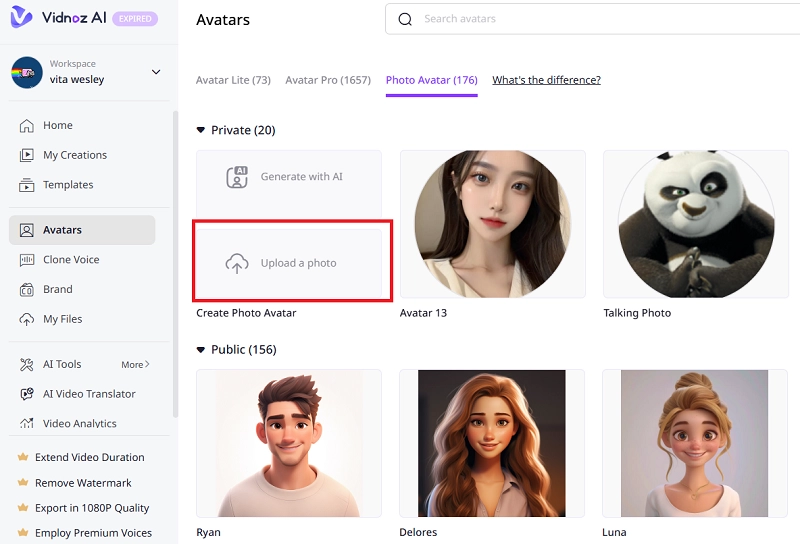
Step 2. Head to Avatars and select Photo Avatar.
Step 3. Click Upload a photo to select your own photo. You can also generate a photo with AI.
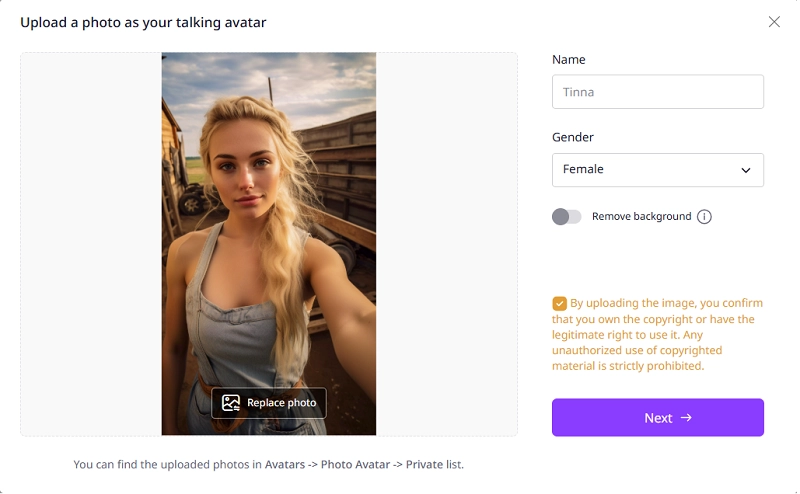
Step 4. When the upload is finished, name the avatar, and select the gender. Then click Next.
Step 5. You will be directed to the editing page. Here you can infuse more personal touches into this AI talking character. Set the aspect ratio as square, landscape or horizontal orientation. Enter what you hope the character to speak out and choose a consonant voice. Add elements and transitions. Vidnoz has all editing options for advanced customization.
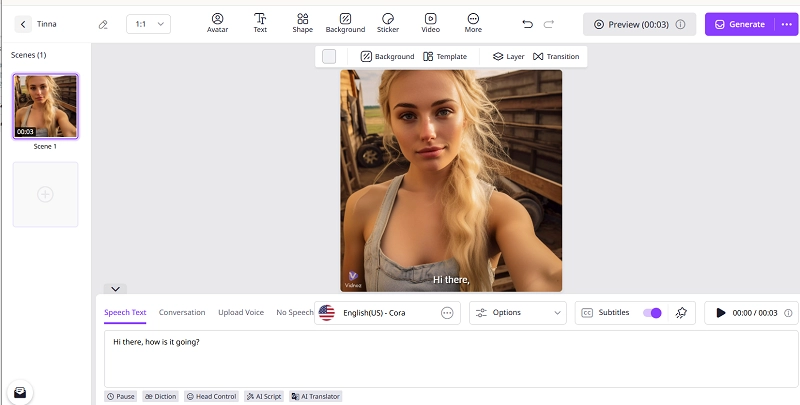
Step 6. Now click Generate to save it as a vivid talking video. Preview the result:
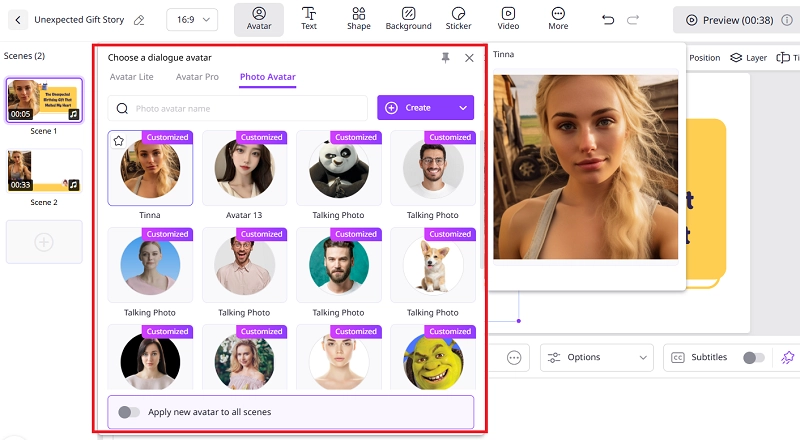
Meanwhile, the AI talking avatar you have generated will be ready under Avatars > Photo Avatar as your private avatar. It will be available for every video creation later in the free AI video generator. Click Avatar on the editing menu bar to select and apply it for new videos.
The Bottom Line
To get Character AI unblocked, you can try a browser with IP protections, use a VPN client, clear data and cookies for this platform, etc. Considering that various factors can lead to this issue, you may have to make multiple attempts to take your chance. Otherwise, you need a Character AI alternative for an uninterrupted AI chatbot game. This article has tested and rounded up the most-voted solutions. Hopefully, some of the solutions will save you from the irritation.