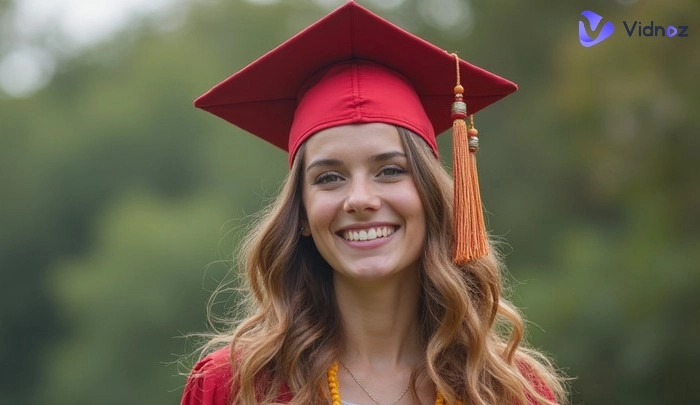
Graduating from one stage of study is always worth celebrating. We'll take graduation photos, parties, and trips. But on the actual graduation day, things might get a little hectic—you may not have the perfect gown or the flawless ceremony. Don't worry! You can try creating AI graduation photos, where AI dresses you up in a formal academic outfit and captures your best moment against the background you love.
This guide introduces the 4 best AI graduation photos generators, each with detailed tutorials. Hopefully, it will help you preserve those unforgettable memories of your graduation.
- On This Page
-
Graduation Photo Time Travel from Different Eras
-
How Does AI Generate Graduation Photos?
-
Top 4 AI Graduation Photo Generators Free Online
1. Vidnoz AI Graduation Photo Generator Free & Random
2. PromeAI Customizable AI Graduation Pictures with Multi-Scenes
3. Pincel AI-Generated Graduation Photos from Selfie
4. FaceHub AI Graduation Portrait Template
-
AI Graduation Photos vs Traditional Photos: Pros & Cons
-
Make Sincere Wishes: Create Blessing AI Graduation Video in One Go
Graduation Photo Time Travel from Different Eras
Let's take a little time-travel journey and compare graduation photos from different eras.
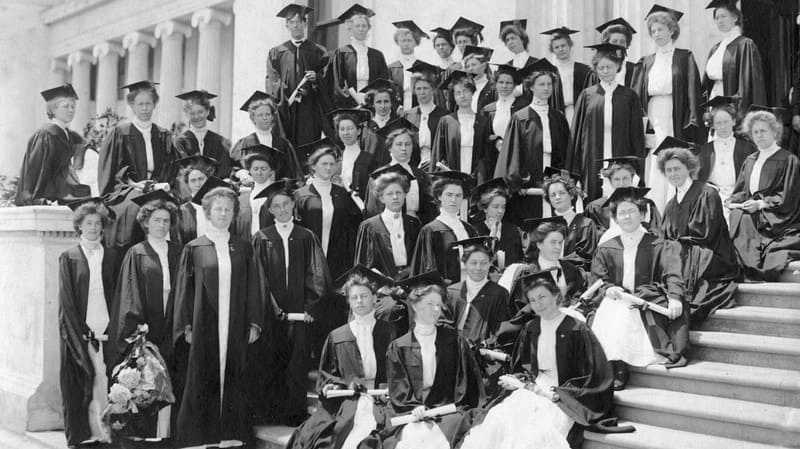
Example 1
See a graduation photo from 1900. At that time, color photography wasn't yet widespread, but the black-and-white images and vintage styles truly capture the charm of the era.
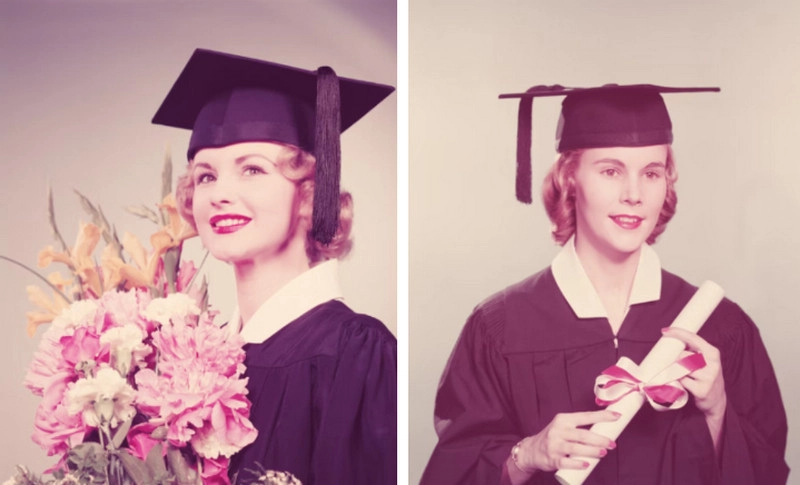
Example 2
Look at some graduation photos from the 1950s in America. Photos from this era burst with bright, saturated colors, and you can almost feel the vitality on the graduates' faces.
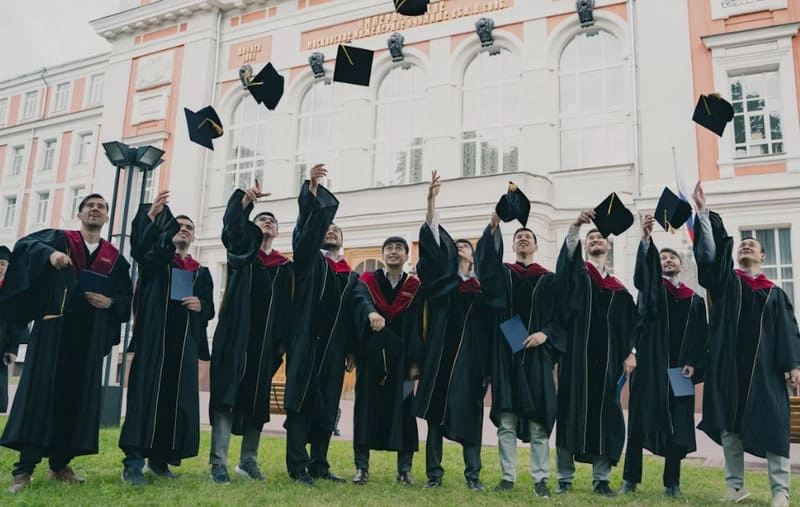
Example 3
Today's graduation photos are noticeably sharper, with brighter, more natural colors. The backgrounds are often spacious outdoor scenes.
How Does AI Generate Graduation Photos?
AI graduation pictures make it simple to create professional-looking graduation portraits without needing a studio session. Just upload a personal photo, choose from ready-made gown and cap templates, or let the AI generate one for you, then place yourself in classic scenes such as a library, auditorium, or campus yard. Within minutes, you'll have polished graduation photos that look authentic and memorable.
If you missed the chance to take real graduation photos—or feel like your outfit or background wasn't the best choice that day—then turning to AI is absolutely the way to go.
Top 4 AI Graduation Photo Generators Free Online
Ready to perfect your graduation memories? This guide highlights the best AI tools for generating AI graduation photos, along with simple steps to use them.
1. Vidnoz AI Graduation Photo Generator Free & Random
Vidnoz ranks the first AI graduation photos generator because it stands out in price, speed, and generation quality. Provide a simple scene description, and it will produce ultra-realistic graduation photos in seconds, with fully customizable styles and aspect ratios. This AI graduation photo generator online free also includes an unwanted content field to help avoid inaccurate results. Free, high-quality, and natural, it's a near-perfect choice.
Why choose Vidnoz AI Image Generator?
- Create High Quality Graduation Photos Free: Vidnoz places no limits on generation. No fees, no credit pop-ups—you can create and refine endlessly without worries.
- Fast AI Graduation Pictures Generation in Seconds: Once you enter your prompt, Vidnoz delivers AI graduation pictures within seconds. No long waits, no staring at progress bars.
- Customize Photo Style as You Want: Vidnoz always has more creative options to explore. You can generate realistic AI graduation photos, or experiment with vintage, dreamy, cartoon, or even 3D styles to see yourself graduate in different worlds.
- Top-tier Technology Ensures Photo Authenticity: Robotic-looking results won't happen here. Vidnoz's advanced tech ensures lifelike photos, with expressions, robe folds, and strands of hair reproduced in stunning detail.
- Free to Share and Download: Vidnoz lets you download with zero paywalls, and you can even share directly to X, Facebook, Discord, and more.
How to create perfect AI graduation photos
Step 1. Open your browser and go to the Vidnoz AI Image Generator page.
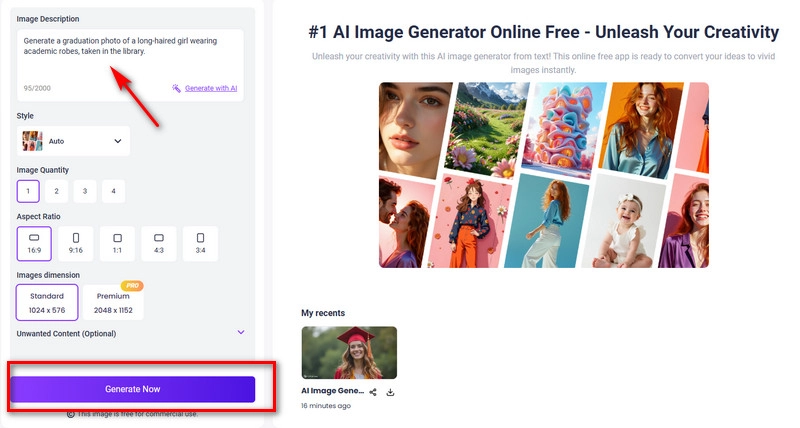
Step 2. In the new page, type your graduation photo prompt, for example: Generate a graduation photo of a long-haired girl wearing academic robes, taken in the library.
Step 3. Then choose image style, quantity, and aspect ratio. If needed, enter any unwanted content elements to avoid. Finally, click Generate Now.
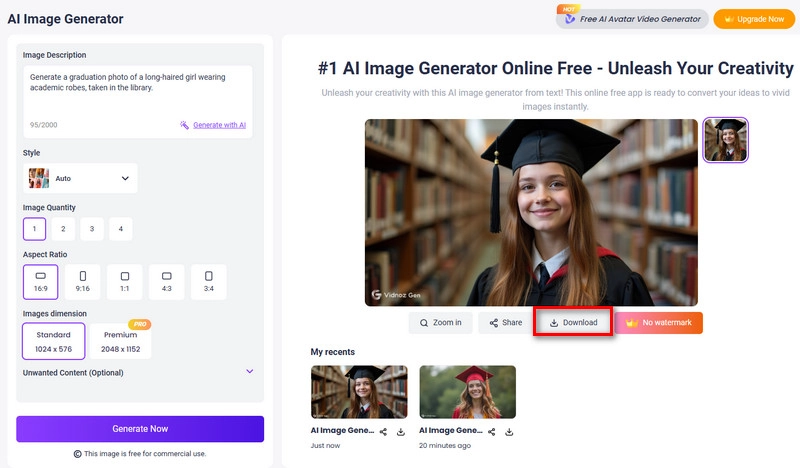
If satisfied, click Download to save.
Vidnoz also offers photo to video AI, allowing the person in your photo to perform any expression or action!
2. PromeAI Customizable AI Graduation Pictures with Multi-Scenes
If you want precise control over every detail of your AI graduation photo, PromeAI is a great choice. It supports prompts and templates, plus advanced customization for models, styles, scenes, tones, and even angles. With options for aspect ratios, lighting presets, and excluding unwanted elements, it delivers highly tailored, professional results.
Features of PromeAI:
- Templates + Prompts: Choose from a library of graduation photo templates with editable prompts.
- Full Customization: Adjust styles, scenes, and shooting angles like wide-angle or close-up.
- Lighting Effects: Apply presets such as natural light, neon, or candlelight with adjustable brightness.
How to Customize AI Graduation Images with PromeAI
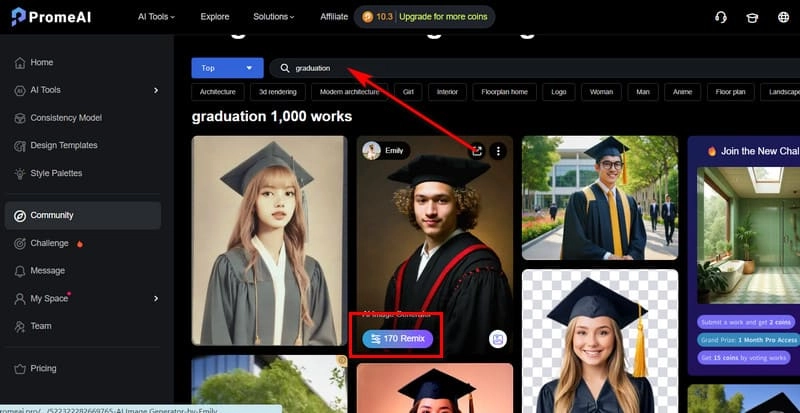
Step 1. Open the PromeAI homepage in your browser. In Discover & Remix, search for graduation photos to find templates. Browse, pick your favorite, then click Remix.
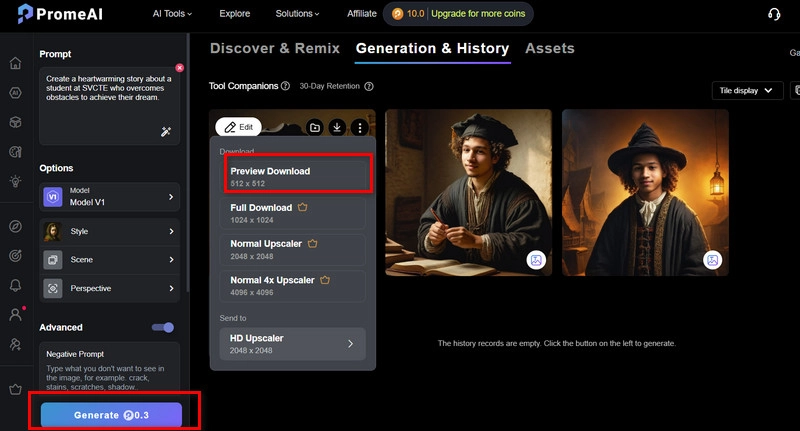
Step 2. On the new page, check the left-side Prompt box to see the default instructions. Modify them as needed. Then scroll down to fine-tune model, style, scene, camera angle, artistry, aspect ratio, and lighting. Click Generate.
Step 3. PromeAI generates 3 images at once. Pick the one you like best and click Download.
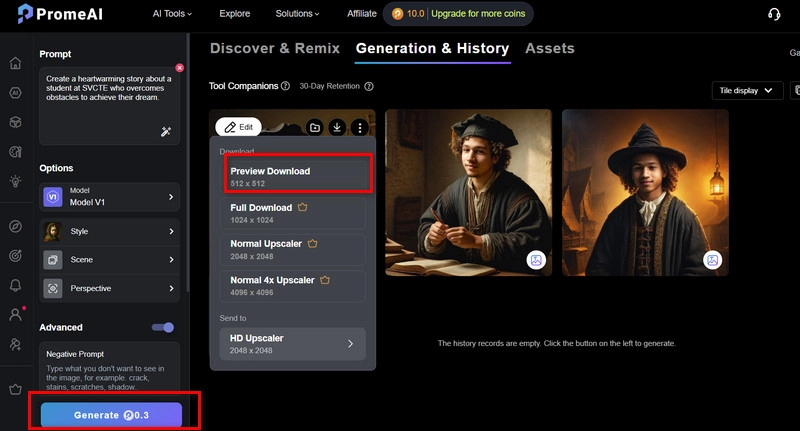

PromeAI provides free trial credits. Each generation consumes 0.3 credits. After the trial, pricing starts at $16/month for 500 credits.
3. Pincel AI-Generated Graduation Photos from Selfie
Pincel is an AI graduation photo generator free designed for quick results. Instead of building photos from scratch, it uses pre-designed templates—just upload a selfie, apply it, and add prompts for personalization. The process is simple and fast, though customization options are limited compared to other tools.
Features of Pincel:
- Template-Based Photos: Ready-made options for different genders and ethnicities.
- Pose Reference Library: Choose from preset full-body or half-body poses.
- Enhance for Realism: Improve sharpness, clarity, and resolution in one click.
- AI Clothes Changer: Swap graduation gowns by uploading clothing references.
How to Make AI Graduation Pictures from Your Selfie
Step 1. Go to the Graduation category on Pincel's website.
Step 2. On the right side, you'll see a preview window showing available templates. Pick one you like, then upload your selfie by clicking the box on the left.
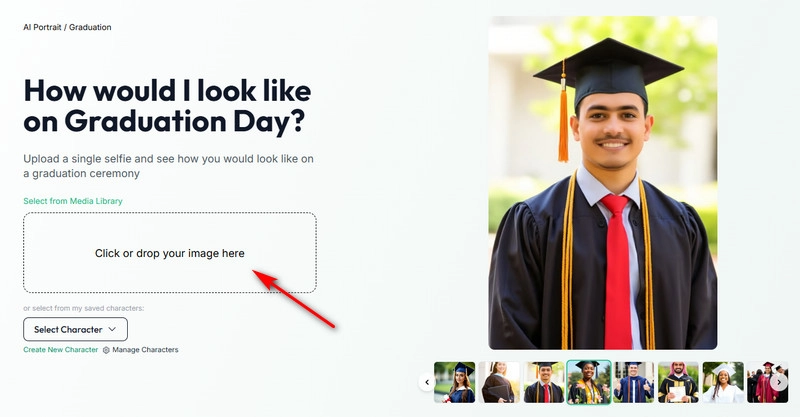
Step 3. Adjust gender, style, and add any extra prompts in the text box. Then click Generate.
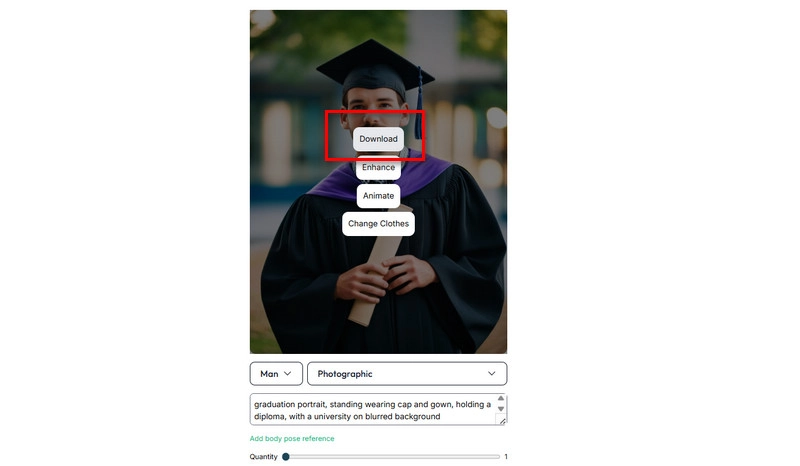
Once the results are ready, click Download to save your photo.
New users can try this AI graduation photo online free with 20 credits. After the trial, you'll need to pay $19/month for 1,000 credits.
4. FaceHub AI Graduation Portrait Template
FaceHub is a simple tool that supports AI generated graduation photos free. Just upload your face, pick a template, and click generate—results appear within seconds. It offers speed and convenience but little customization, as only the face can be changed.
Features of FaceHub:
- Batch Generation: Create 4 graduation portraits at once, with endless retries.
- Face Options: Upload your own or pick preset models of different ethnicities.
- One-Click Save: Download multiple selected photos in a single click.
How to Make Your Own Graduation Photos with Templates
Step 1. Go to FaceHub's homepage, and from the left menu choose the AI Portrait section. You'll see the Graduation template at the top. Click Try Now to begin.
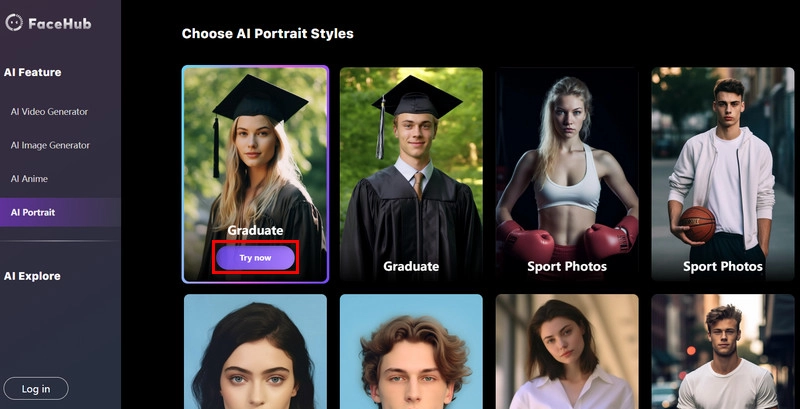
Step 2. On the new page, head to the right panel and select My Face. Then click Add Face to upload your photo. Once uploaded, hit Generate.
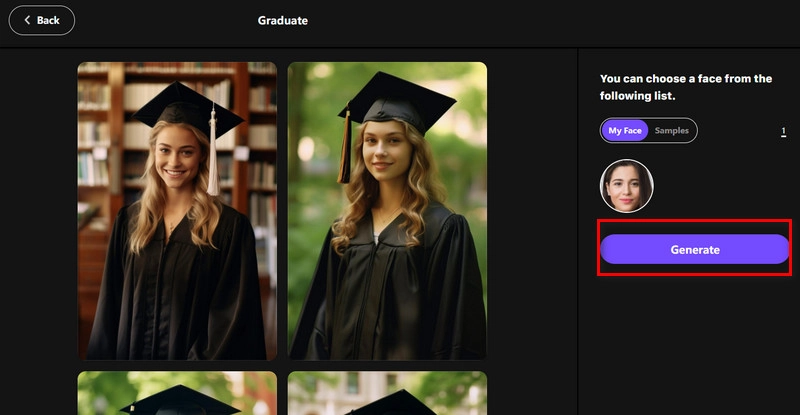
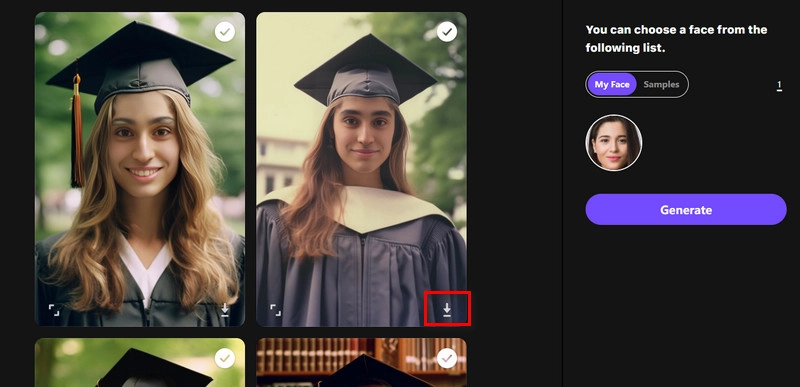
Step 3. You'll receive 4 generated graduation photos. Pick your favorite and click the download icon to save it.
AI Graduation Photos vs Traditional Photos: Pros & Cons
AI Graduation Photos and Traditional Photos each have their unique advantages and unavoidable limitations:
AI Graduation Photos
Pros:
- Can be generated anytime, without time or location limits.
- Freely change outfits; AI can add suit to photo online free, and adjust background, style, angle, and lighting.
- Simple to create—no need for a studio or photographer; one click is enough.
Cons:
- Cannot fully replace the experience of a real graduation ceremony.
- Some details may still show slight artificial traces despite high accuracy.
Traditional Photos
Pros:
- Capture real graduation moments and campus atmosphere.
- Show authentic emotions and smiles.
- Photos are naturally clear and realistic.
Cons:
- Hard to reshoot if you miss the ceremony.
- Backgrounds and outfits cannot be changed.
Make Sincere Wishes: Create Blessing AI Graduation Video in One Go
After the graduation ceremony, with farewells to classmates and teachers approaching, have you thought about leaving a video or sharing your feelings with them? Here's a new surprise: you don't need to appear on camera or speak lines yourself. Let Vidnoz AI free video generator handle everything. It offers a variety of templates; all you need to do is choose a virtual avatar and prepare your script, and you can create a graduation video with one click.
How to make an AI graduation video easily:
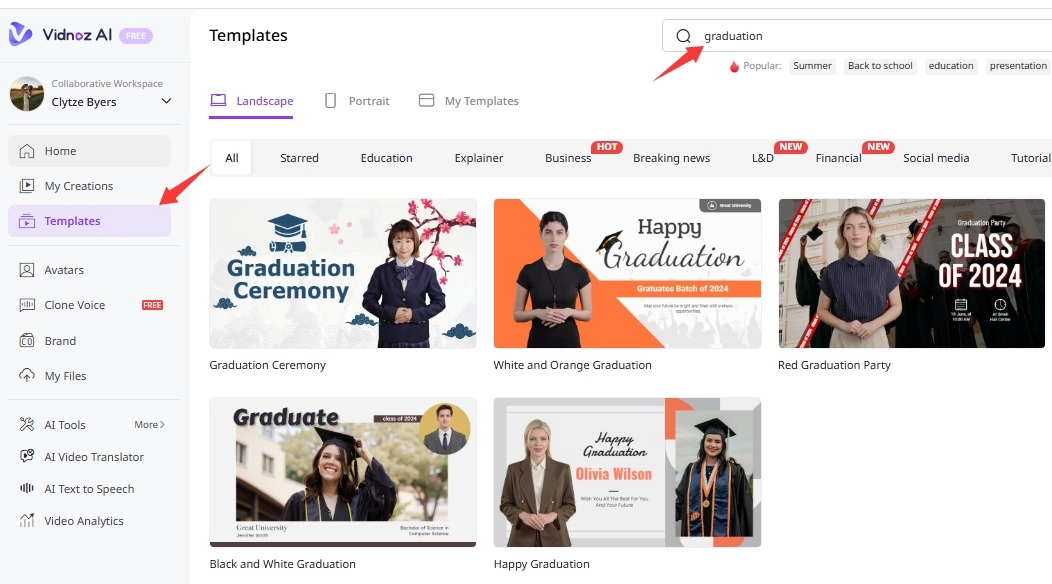
Step 1: Go to the free AI video generator from Vidnoz. Enter the homepage with your free account, search graduation video templates and choose one.
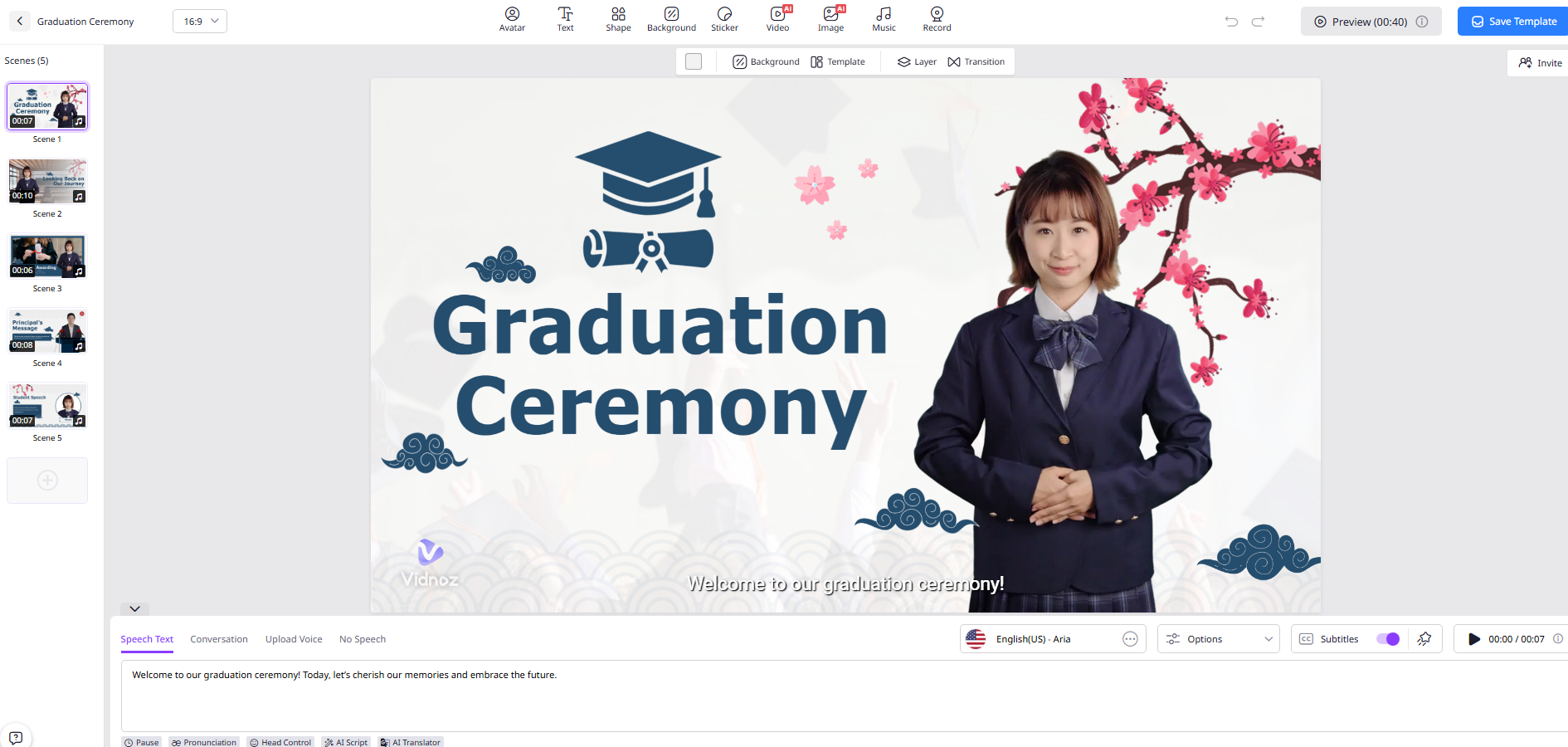
Step 2: Customize your AI avatar, including language, tone, and voice. Enter the lines you want it to speak in the box. Add other elements you wish to appear in your video.
Step 3: Finally, click Generate video to get your finished graduation video with talking photo online free.
Final Words
The four tools introduced here for creating AI graduation photos each bring unique advantages. You can choose one according to your real needs. Make up for the regrets of graduation photos and bring back precious memories!

Vidnoz AI - Create Free Engaging AI Video with Talking Avatar
- Easily create professional AI videos with realistic avatars.
- Text-to-speech lip sync voices of different languages.
- 2800+ video templates for multiple scenarios.