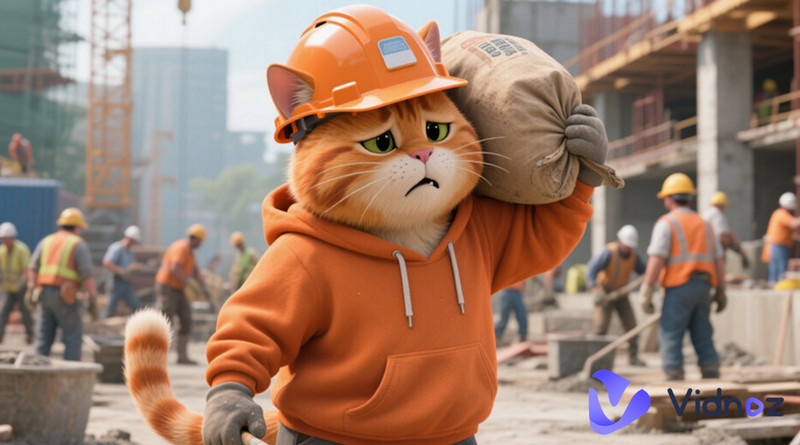
From sharing real, adorable moments of cats at home to today's tech-powered AI cat story trend, people treat their cats like true family members and adore everything they do.
As a result, accounts that create cat story video content consistently attract massive traffic on social media and gain huge numbers of followers. More and more creators are joining in—whether for monetization or simply to enjoy watching their own pets do fun things. These videos are funny, creative, and short, which makes them perfect for going viral.
Want to join in and make a cat perform the actions you imagine? Check out these inspiring examples and five top AI cat story generator tools, complete with detailed step-by-step guides!
- On This Page
-
What Is AI Cat Story?
-
5 Trendy AI Cat Story Videos in 2025 & 2026
4. Hilarious Cat Fighting
-
Create Viral Cat Story AI Online Free with ToMoviee AI
How to Make AI Cat Story Video with ToMoviee
-
Make Cat Animations with Media.io AI Cat Story Video Generator
How to Make AI Cat Story Video with Media.io AI
-
Convert Image to Funny AI Cat Story Videos Free Online
How to Make AI Cat Story from Image with Vidnoz
-
Visualize Unique Cat Story Imaginations from Text with AI
How to Create AI Cat Story Online Free
-
Animate Cute Cat Photos with Captivating Dancing AI Cat Story
How to Make AI Dancing Cat Story Video
-
Make Vivid AI Cat Speech Video with Vidnoz AI Talking Photo
How to Make Talking AI Cat Story Video Online
What Is AI Cat Story?
A real or 3D-animated cat combined with anthropomorphic actions—such as talking, walking, waving, dancing, or cooking—plus a simple storyline is what makes a perfect AI cat story video.
Its core is not about filming real-life events, but about pairing a cat's adorable appearance with human-like gestures, expressions, and added movements.
AI cat story videos are usually under one minute. This makes them easy to create and perfect for fast sharing on platforms like TikTok and Instagram—after all, who could resist a clumsy yet expressive little cat?
5 Trendy AI Cat Story Videos in 2025 & 2026
Since it's so easy to make, it's tempting to jump right in—but don't rush just yet. With so many viral hits out there, it's worth watching a few trending AI cat story videos first and picking up some creation tips.
1. AI Cat Cooking
Have you ever imagined switching roles—letting it walk into the kitchen, wear a cute chef's hat, and cook for you with its chubby little paws?
2. Cute Cat Working
What if the cat stood up, raised its short, fluffy paws, and picked up tools to work? Clumsy? Maybe. Adorable? Absolutely.
3. AI Cat Love Story
When cats are anthropomorphized into handsome and elegant cats falling in love—or even raising kittens together—people can't get enough of these AI cat story videos.
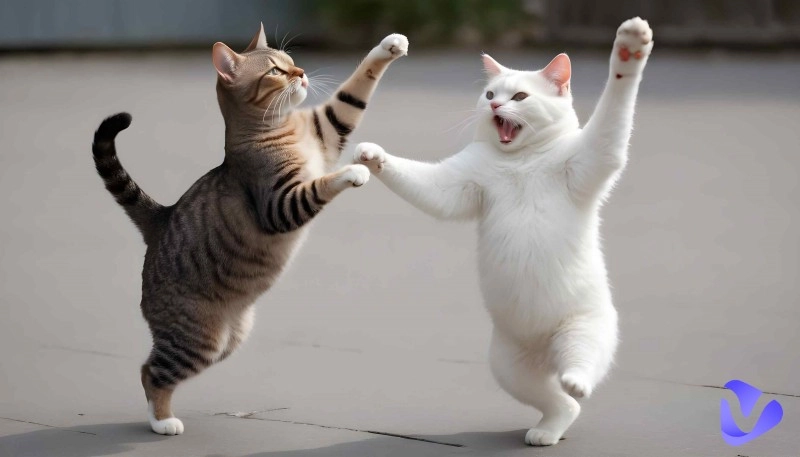
4. Hilarious Cat Fighting
When cats fight, flying fur shows just how angry they are—but most of the time. Add a bit of backstory, and suddenly a cat fighting video makes perfect sense.
5. Funny AI Cat & Baby
One fact that makes adults jealous: cats seem especially gentle with children. Now imagine a cat sitting with a baby, drinking formula and playing together.
Create Viral Cat Story AI Online Free with ToMoviee AI
Did any of the examples above help you decide which theme to create?
Once the materials are ready, it's time to choose the right tool. Starting with ToMoviee AI cat story generator, let's see how to use a real tool to bring ideas to life.
ToMoviee AI, from Wondershare, combines text-to-video and image-to-video in one platform. It delivers cinematic-level visual quality and can automatically match background music, voice-over, and style to the video's mood. Uploading custom audio is also fully supported.
On its homepage, sample AI cat story projects and their prompts are available for reference and customization.
Highlights of ToMoviee AI
- Supports voice-over and background music
- Automatically adds dynamic visual effects
- High-definition output comparable to animated films
Drawbacks of ToMoviee AI
- Free users have credit limits
- Frequent prompts to upgrade for more features
How to Make AI Cat Story Video with ToMoviee
Step 1. After launching ToMoviee, click Recreate under Image to Video on the homepage to enter the creation page. Follow the on-screen prompts to choose keywords related to the video.
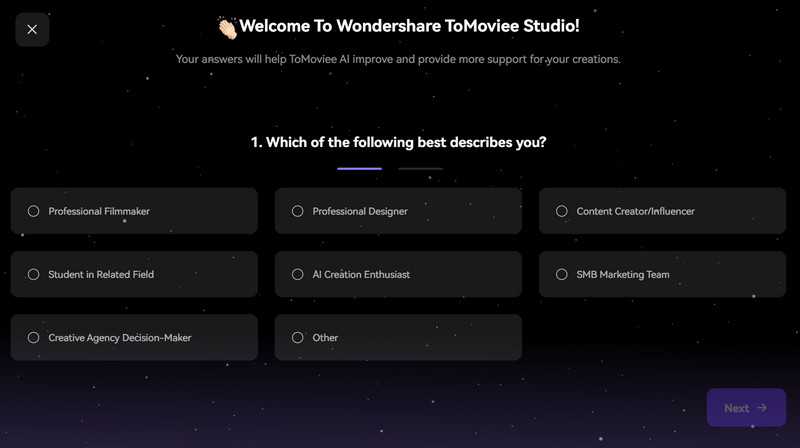
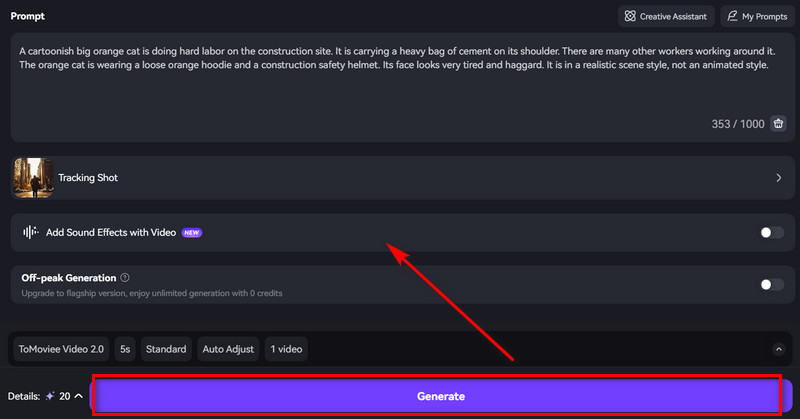
Step 2. Click Replace to swap the preset image with the prepared cat photo. Then enter the new prompt in the text box below.
Step 3. Choose a template and decide whether to add sound effects.
Once everything is ready, click Generate.
Make Cat Animations with Media.io AI Cat Story Video Generator
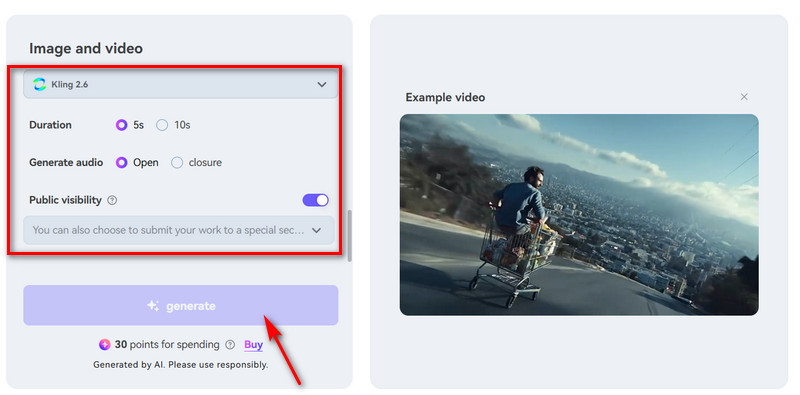
Another major audio and video creation platform, Media.io, has also launched its own cat story AI. Two advanced options are available here: video duration settings and public visibility settings. It also keeps the built-in audio generation feature.
The workflow is similar: select a model (note that different models support different video lengths), upload an image, write a prompt, complete the settings, and finally generate an AI cat story.
See the Present button on the side? Click it when inspiration runs low—there are many ready-made scenes, actions, and effects to try.
Highlights of Media.io AI
- Supports content visibility settings (and allows submissions to fixed platform categories)
- Multiple models designed for different styles and video lengths
- AI helps inspire creative ideas
Drawbacks of Media.io AI
- Video generation requires payment
- Uploaded images have format, aspect ratio, and size limits
How to Make AI Cat Story Video with Media.io AI
Step 1. Open the homepage and select a model. Then click the blank area prompting you to drag and drop a photo to upload the cat image.
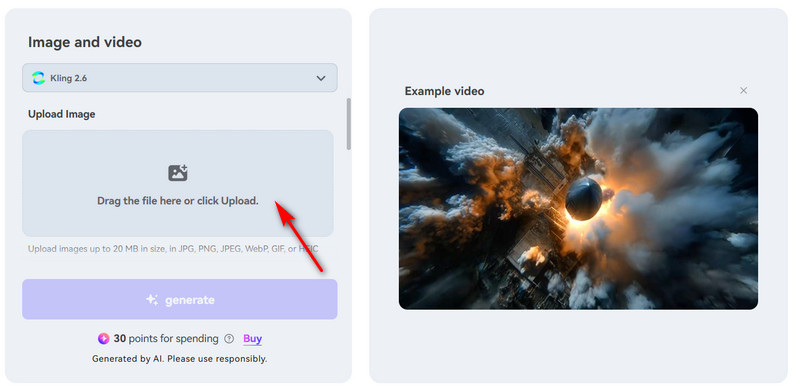
Step 2. Choose the video length, whether to include audio, and the visibility options.
Step 3. Click Generate to run the cat story AI.
Convert Image to Funny AI Cat Story Videos Free Online
If paying to generate an AI cat story has always been a concern, take a look at Vidnoz Image to Video. Unlimited and completely free generation makes it easy to stay immersed on this platform.
Does a Vidnoz free AI video generator come with compromises? Not at all. Multiple AI models, built-in prompt tips, and video length options are all ready to use. It is especially perfect for creators who want to publish content publicly, as the platform clearly states that generated works can be used for commercial purposes for free.
Another standout feature is its collection of popular action presets (including ones designed specifically for kittens).
Convert Image to Video AI Online - Free
- Create a video from an image quickly for free.
- Use various AI models to turn photos into videos.
- Download and share the AI-generated video at no cost.
Convert Image to Video
Highlights of Vidnoz Image to Video AI
- Still Image to Lifelike Cat Story AI: From a still photo to lifelike motion, Vidnoz handles every detail, including facial expressions and even individual strands of fur.
- Free & Fast Generation No Sign up: Vidnoz is ready to use instantly, with no payment required. Upload materials as instructed and generate unlimited times.
- 30+ AI Cat Video Viral Genres & Filters: Whether realistic, animated, or dreamy, Vidnoz offers over 30 styles to choose from. (Use an image describer to explore your best filter.)
- Specialized AI Models: Whether prioritizing quality, generation speed, motion detail, or voice matching, Vidnoz offers various models, each designed with its own strengths.
Drawbacks of Vidnoz Image to Video AI
- Premium upgrades are required for the highest output quality.
- Some models are not available for free.
How to Make AI Cat Story from Image with Vidnoz
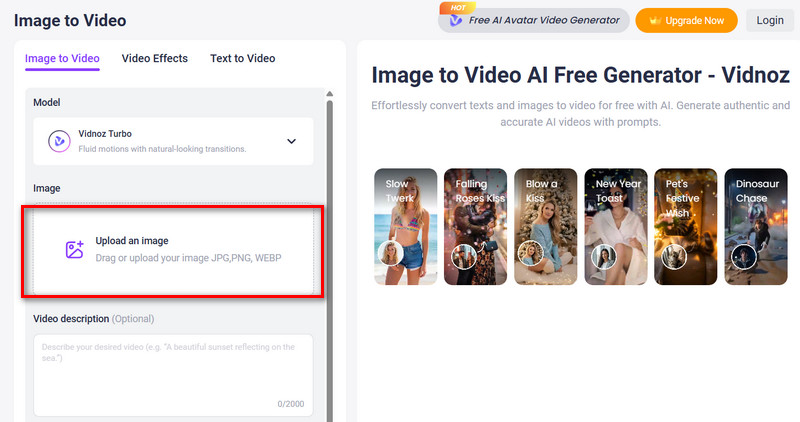
Step 1. Launch Vidnoz and click Upload an image to add the source photo.
Step 2. Enter a prompt describing the desired cat actions, then set the video length.
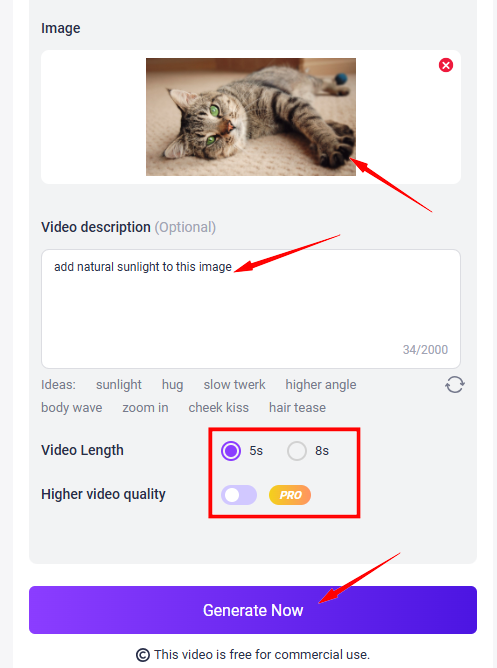
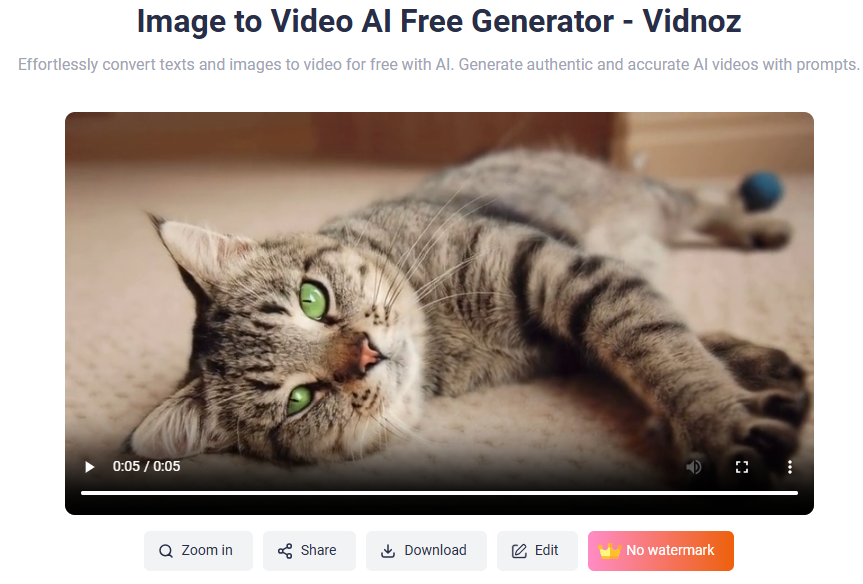
Step 3. Click Generate to create the video.
Visualize Unique Cat Story Imaginations from Text with AI
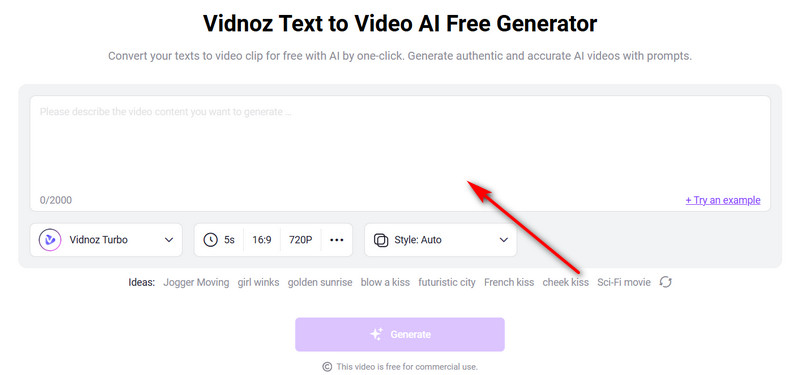
Even without any source images, Vidnoz Text to Video AI Free Generator can create a cat story video using only text prompts. Even if there is no inspiration for writing prompts, this AI is always ready to provide an example.
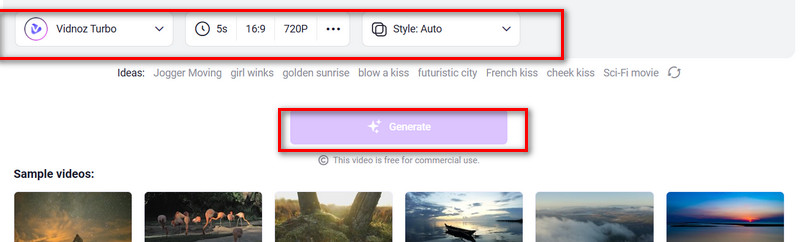
In addition, this platform also offers multiple models and more detailed customization options, including duration, aspect ratio, and resolution.
Highlights of Vidnoz Text to Video AI
- Turn Any Text Prompts to AI Cat Videos: Vidnoz can turn any written description into reality. This AI cartoon generator even provides helpful inspiration prompts when needed.
- Emotion-Matched Background Music: Vidnoz supports adding background music that matches the emotional tone of the video, making the result feel more complete.
- Personalized Voiceovers: Any language and accent can be selected for the cat's voice. It is even possible to choose the voice's age and gender.
Drawbacks of Vidnoz Text to Video AI
- Upgrading is required to export videos in 1080p.
How to Create AI Cat Story Online Free
Step 1. After opening the platform, enter the text prompt in the highlighted text box.
Step 2. Select the generation model, video duration, aspect ratio, and resolution below the text box.
Step 3. Click Generate.
Animate Cute Cat Photos with Captivating Dancing AI Cat Story
If you've seen enough works, you'll notice that one of the hottest categories in AI cat meme is dancing cat animations. If plain video generation software can't produce the dance moves you want, try Vidnoz Photo Dance.
This animal dancing video generator not only includes a variety of preset dance moves but also lets you pick music that matches the rhythm. Best of all—it's free!

Vidnoz Photo Dance - AI Make a Photo Dance FREE
- Create a smooth AI dance video from a photo.
- Animate a photo with diverse dance moves.
- Generate and download the video for free in seconds.
Make a Photo Dance Now
Highlights of Vidnoz Photo Dance
- Realistic Dancing AI Cat Story Online Free: Everything is done online, no subscription prompts.
- Professional Dance Moves: Trained on a large library of dance footage, Vidnoz masters popular styles like Wave, Shake, Fun, Hip Lift, and more.
- Full-Style Music: What's a dance without music? Preview the presets provided by Vidnoz and choose the one you like.
Drawbacks of Vidnoz Photo Dance
- Without upgrading, you won't enjoy lightning-fast generation speed.
How to Make AI Dancing Cat Story Video
Step 1. Visit Vidnoz Photo Dance, click Upload next to the sample avatar to upload your cat image.
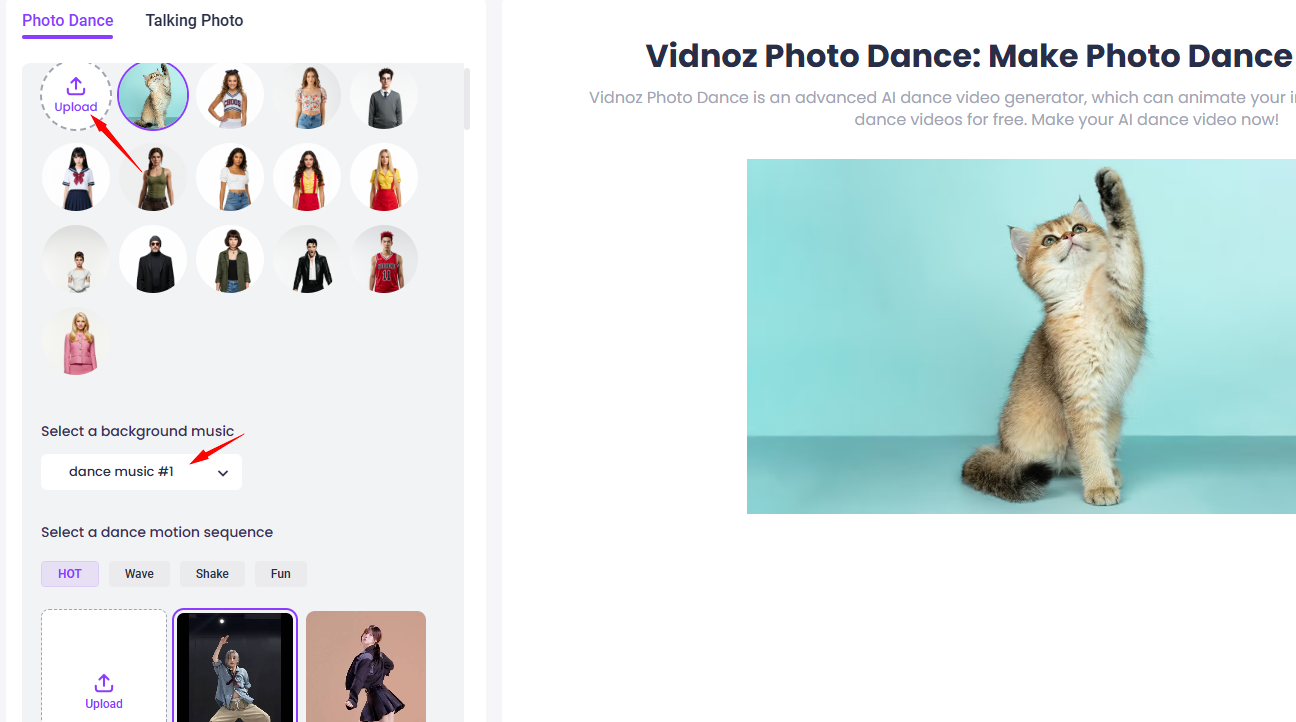
Step 2. Select a dance move and match it with the appropriate music.
Step 3. Click Generate to let the AI Dance start working.
If you’d like to make a singing cat story for free, Vidnoz AI music video generator is the best option for you!
Make Vivid AI Cat Speech Video with Vidnoz AI Talking Photo
Arguably even more captivating than making a kitten move is making them talk. Yes, still Vidnoz, and it's incredibly comprehensive: you can decide what your pet says, in which language, the tone, and even clone your own voice for the dubbing. Worried it might look stiff? Vidnoz ensures perfection, including lip sync AI online free.
Highlights of Vidnoz AI Talking Photo
- Vivid Talking Cat Story AI Free: Lip movements, sounds, tone, and pauses are all perfectly generated—no distortion.
- Voice Cloning: Provide a voice sample, and Vidnoz can clone anyone's voice for dubbing—celebrities, yourself, anyone. Start paper animator with AI talking.
- Supports Various Ages & Emotions: Even in the same language, different ages, genders, and emotions create unique accents. Vidnoz lets you mix and match freely to perfectly fit your kitten's persona.
Drawbacks of Vidnoz AI Talking Photo
- Free version includes a watermark.
- Additional voices require payment to unlock.
How to Make Talking AI Cat Story Video Online
Step 1. Click Upload to add a clear front-facing photo of your cat to this , making sure the mouth is visible.
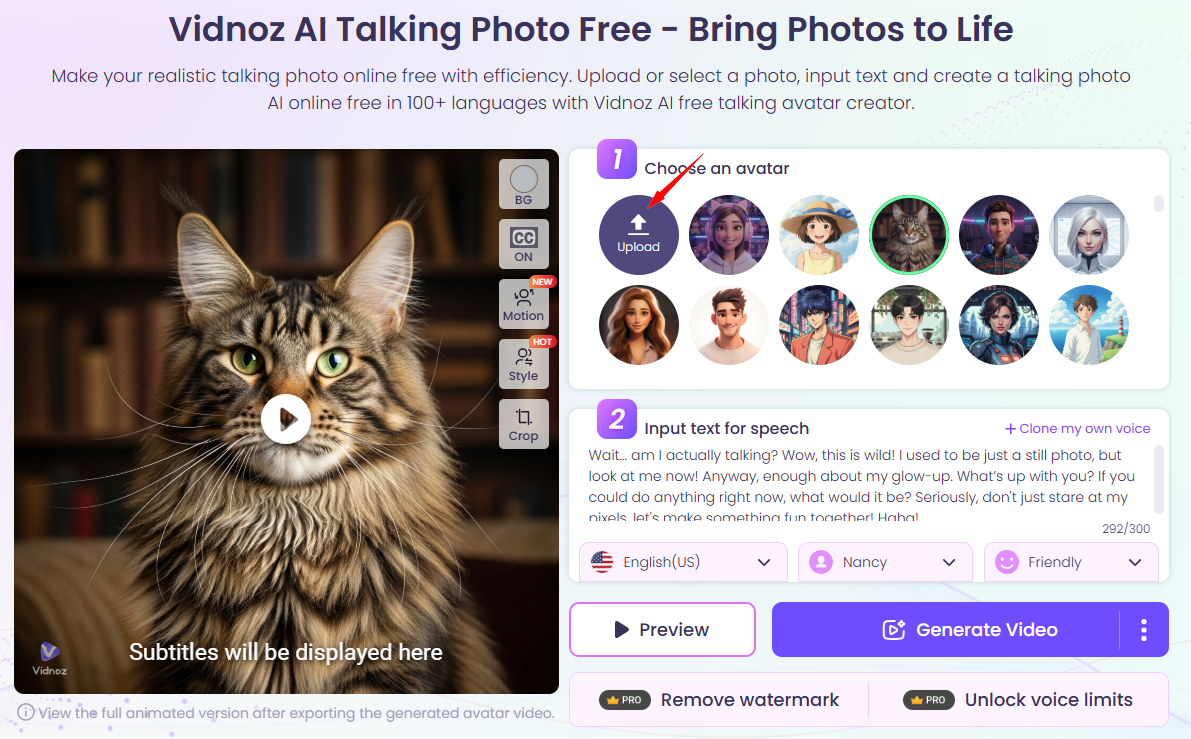
Step 2. Enter what you want it to say in the text box, then select the language, voice, and emotion.
Step 3. Click Generate Video.

Once you decide what you want the cat to say, Vidnoz can even function as a video translator, since you can switch to another language when outputting.
The Bottom Line
How to create a customized AI cat story for your own pet? Everything you need to know is right here: the definition of this multimedia format, links to inspiring example videos, and of course 6 AI generators that can help you—complete with detailed steps and image guides.
What are you waiting for? Start bringing your cat to life right now!