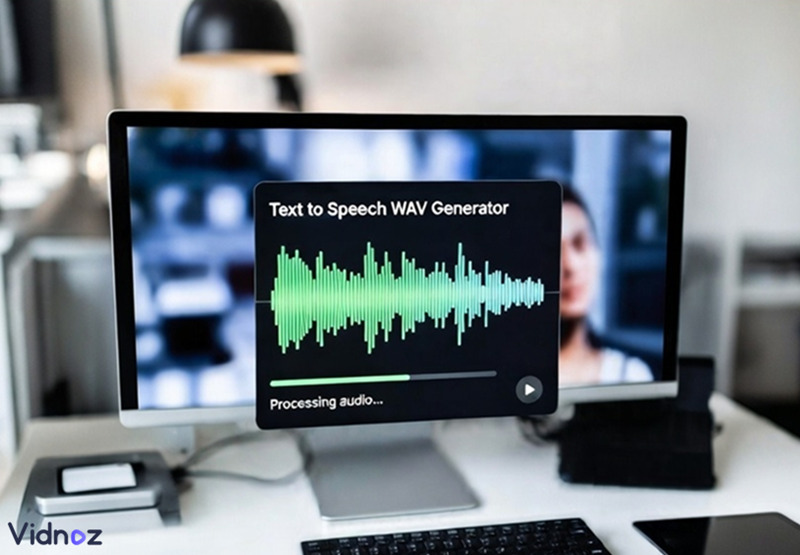
Text to speech services are now in a new era. With the help of AI, users can now generate pretty authentic audio clips. Lots of handy options are offered for making both funny, serious, or professional text to speeches in scenarios including AI audiobooks, podcasts, and audio captions. Yet the output audio formats include some unknown facts, saying the choices between the WAV format and the MP3 format.
WAV format delivers higher quality, but the file size is very large. MP3 tend to be lighter in file size, but the audio quality is compressed. This blog will show you 3 text to speech WAV AI generators. Let’s dive in.
- On This Page
-
Text to Speech Wav Versus Text to Speech MP3
-
AI Text to Speech Wav Online Generator with Emotion: Vidnoz
How to use Vidnoz Text to Speech to generate high-quality audio files?
-
AI Text to Speech Wav Online Elevenlabs
How to generate text to speech WAV audio online?
-
Online Text to Speech Wav Converter
How to convert MP3 to WAV online free?
Text to Speech Wav Versus Text to Speech MP3
Before entering the recommendation parts, here are some facts on WAV and MP3, the two mainstream audio formats that most people adopt. Here is a brief comparison between WAV and MP3.
Text to Speech Wav Pros and Cons:
Pros
- Non-compressed audio quality
- Safe for second-hand audio editing
- Store raw audio data
Cons
- Very large file size
- Not very friendly for streaming or sharing
Text to Speech MP3 Pros and Cons:
Pros
- Smaller in file size
- Convenient for streaming, downloading, and sharing
- More user scenarios
Cons
- Compressed audio quality
- Loss of quality details
For the readers of this blog who need crystal-clear text to speech Wav clips, the next parts include some market-leading AI text to speech online websites. Let’s read on.
AI Text to Speech Wav Online Generator with Emotion: Vidnoz
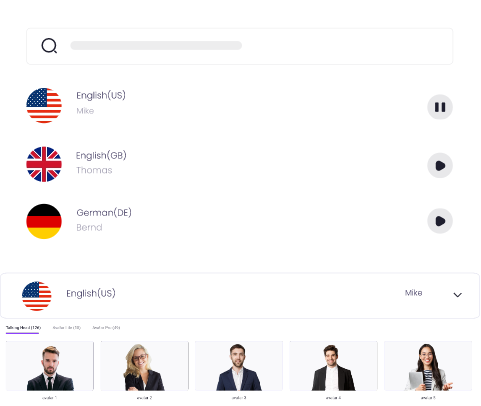
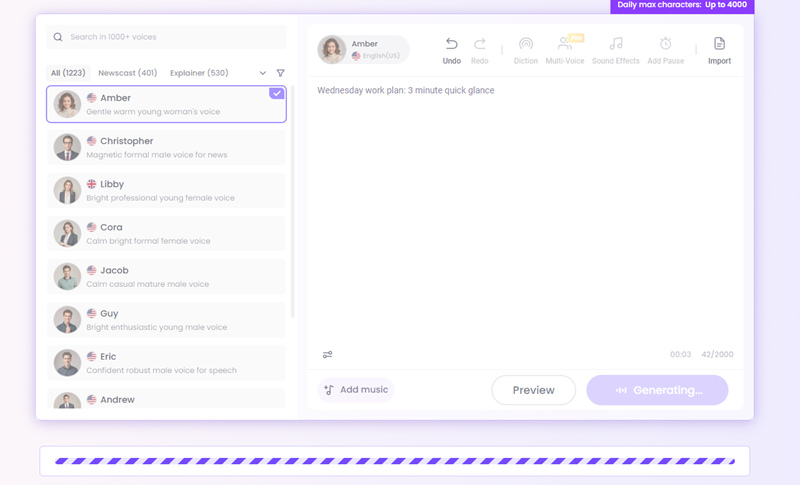
Vidnoz AI Text to Speech is a free online text to speech generator with emotion. It generates the highest quality TTS files in WAV format and allows users to download the results without login or registration. Vidnoz offers different tones and pitches for you to customize your text to speech audio files. You can switch from ‘Newscast’, ‘Explainer’, ‘Ads’, and ‘E-learning’ to find the most suitable voice for your AI creation.
The customization does not stop here. You can also adjust the volume, velocity, and pitch to fine-tune your voice until it meets your standards.
Create Text-to-Speech AI Voices - FREE
Make natural voice text to speech in various languages, accents, and ethnicities. Try it free now!
If you want to generate neural text to speech Wav documents for audiobooks and podcasts but hate the audio editing parts, you can use Vidnoz’s ‘Add Music’ feature to merge a background soundtrack to your TTS documents to save a lot of time and energy. Now let’s see how to use this free TTS AI tool without hassle.
How to use Vidnoz Text to Speech to generate high-quality audio files?
Step 1. Visit Vidnoz Text to Speech.
Step 2. Select a voice from Vidnoz TTS’s 1000+ voice pool.
Step 3. Adjust the parameters of your chosen voice and input content in the blank field.
Step 4. Generate the Text to Speech document, and it is automatically in WAV format.
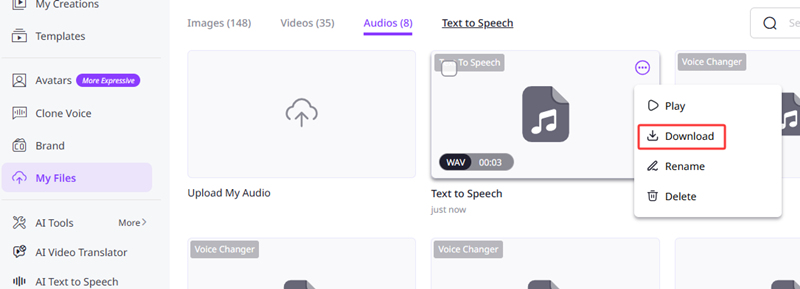
The unique features that other TTS tools don’t have
- Over 1000+ voices for users to choose from
- Smooth and realistic text-to-speech with proper pauses and breaks
- Add background music to your audio files for free
- Flexible language conversion
AI Text to Speech Wav Online Elevenlabs
Elevenlabs is another well-known AI audio expert in the market. This natural text to speech tool specializes in user scenario division, which means you can create your text-to-speech audio files in a pinpoint way, effortlessly create speeches for audiobooks, podcasts, newscasts, and Vlogs.
The best part that distinguishes this AI TTS tool from other competitors is the real-time script editor. You can preview the AI speeches line by line to see if any details go wrong and fine-tune the vocabulary or breaks in your preferred way.
And the last thing that is worth mentioning is that Elevenlabs accepts all types of documents, from ordinary txt, docx files to epub, html files. Just drop your scripts to Elevenlabs, and it can be auto-converted to WAV formats.
Check the link of this website: https://elevenlabs.io/app/home
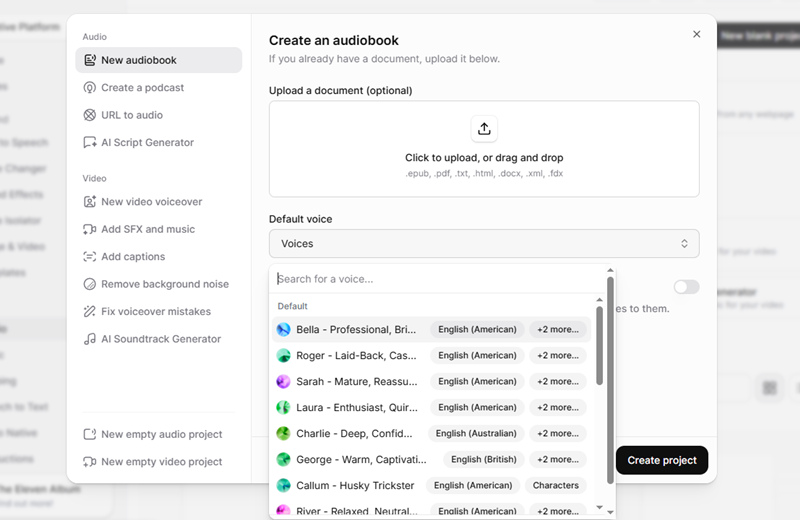
How to generate text to speech WAV audio online?
Step 1. Navigate to this website.
Step 2. Choose what type of TTS file you want to generate, switch to the tab accordingly.
Step 3. Copy and paste your content to the blank field and set up all the configurations.
Step 4. Output the results.
Online Text to Speech Wav Converter
If you already have a decent MP3 text-to-speech audio file and want to escalate the audio quality, then you can consider using an MP3 to WAV converter to achieve this goal. Here is a convenient online MP3 to WAV converter that does smooth format transformations. Text-to-speech wav converter free download. The converted files, what you’ve been seeking is in Cloudconvert.
Check the link of this website: https://cloudconvert.com/mp3-to-wav
This tool requires a little basic knowledge of codecs, bitrate, channels, and volumes. And this tool offers ultra freedom for its users to customize these options. If you are a greenhand, the suggestions are you just follow the default settings of this site, and change nothing.
Another good thing about this tool is that you are offered an option to trim your audio file. Manually type in the specific time point, and this converter will only process this fragment.
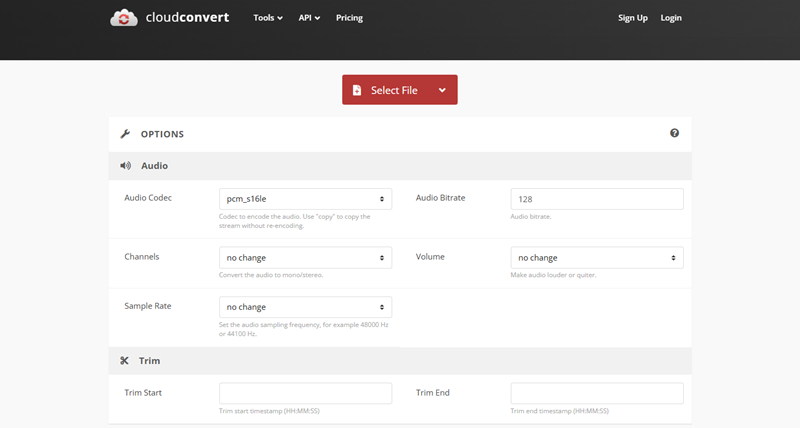
How to convert MP3 to WAV online free?
Step 1. Upload your MP3 audio file to this website.
Step 2. Set up all the parameters accordingly. (Or leave all the options unchanged).
Step 3. Trim your audio files.
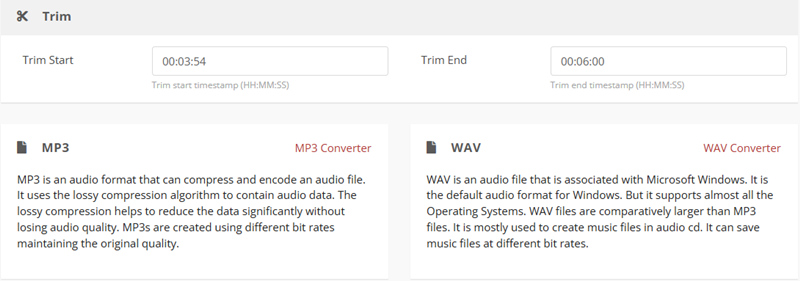
Step 4. Convert your documents to WAV format.
Conclusion
This blog covers 3 free online tools to create Text to Speech WAV audio files. Powered by AI. For advanced PC users, it is recommended to use an MP3 to WAV converter to escalate the audio quality in one click. But for those who don’t have related experience over codec, bitrates, and format types, it is recommended to use AI tools to generate, transform and download text-to-speech WAV files. Among the tools, Vidnoz AI Text to Speech is a worth-trying tool, for its free and intuitive services are open to all types of users. Please feel free to try it.
Clone Anyone’s Voice with AI - Free
Make realistic voices of famous people and characters.
Clone anyone's voice to create personalized voiceovers.
Support 2000+ languages and accents.
Change Voice Now






![[How-to] 4 Best Whisper Text to Speech Online Tools Powered by AI](https://www.vidnoz.com/bimg/whispering-text-to-speech-cover.webp)