Driven by energetic rhythms, looping beats, and lively anime-style character performances, Sprunki music has quickly gone viral online. Many users are creating their own catchy dance tracks and memes—content that frequently appears on platforms like TikTok. Its popularity is also closely tied to its simplicity. Today, a wide range of fun Sprunki music maker tools powered by AI are available, allowing even complete beginners to get started with ease.
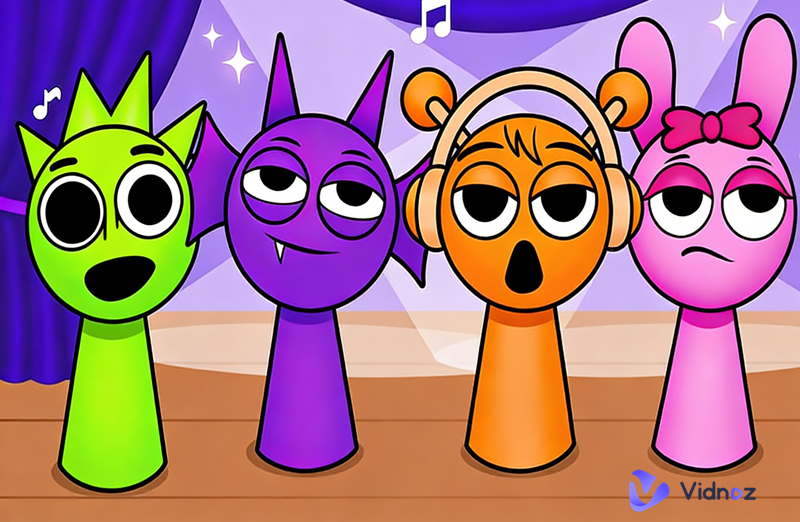
This guide highlights three of the best Sprunki music creators, helping users effortlessly produce their own dynamic and engaging music tracks.
- On This Page
-
A Simple Introduction to Sprunki Music
-
Top Sprunki Music Maker Tools for Creating Unique Beats
1. Vidnoz AI Music Generator - Free AI Sprunki Music Maker with Custom Beats
2. Soundation: A Flexible Mixing Tool for Creating Fun Sprunki-Style Sounds
3. Incredibox Sprunki MOD: Recreating the Classic Sprunki Music Gameplay
-
How to Create Sprunki Music Online with AI
Step 1: Launch Vidnoz AI Music Generator in your browser
Step 2: Enter your song details
Step 3: Customize music settings
Step 4: Generate your music
-
Vidnoz AI Music Video Generator: Make a Singing Sprunki Music Video
How to Make a Music Movie for Your Song
A Simple Introduction to Sprunki Music
To create Sprunki music, it is important to first gain a clear understanding of this artistic style. Here is a detailed introduction:
Sprunki music originates from Incredibox and other similar music games. It is characterized by combining elements such as melodies, vocals, sound effects, and drum beats to create highly rhythmic compositions.
In addition, Sprunki music often incorporates animated characters or other visual elements, making it both engaging and interactive. These features have contributed to its popularity on short-video platforms, where creators use it to produce background tracks, remixes, and meme music.
In short, Sprunki music can be defined as a blend of visual character performance and rhythm-based music creation.
Top Sprunki Music Maker Tools for Creating Unique Beats
This section highlights 3 of the best Sprunki music makers available, helping you quickly find the one that fits your needs and start creating unique, engaging tracks.
1. Vidnoz AI Music Generator - Free AI Sprunki Music Maker with Custom Beats
Let's start with one of the easiest and most versatile Sprunki music makers—Vidnoz AI Music Generator. This tool features a clean interface and a straightforward workflow. With just a simple text prompt, it can generate a unique piece of music or a full song within seconds. To improve accuracy, it also allows users to customize elements such as genre, mood, and instruments.
Vidnoz Free AI Music Generator
Free to generate & download for commercial use!
- 100+ combinations of musical styles, moods and themes
- Turn your texts into songs and music videos
- AI to create an original song with your lyrics
Create Music with AI
Additionally, you can upload a reference track—such as a typical Sprunki-style song—to guide the AI's output. Based on these capabilities, it's clear that Vidnoz AI Music Generator is well-suited for this use case.
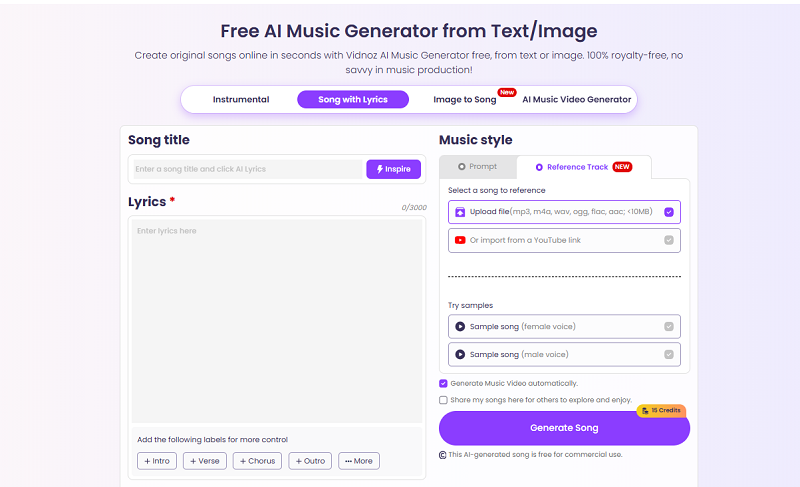
For a deeper evaluation, take a look at its key features below:
- AI Sprunki Music Generator with Lyrics
As long as you have a basic idea of your song's theme or tone, Vidnoz can generate a complete, high-energy track in just seconds. A built-in text box also lets you get creative with Sprunki song lyrics, supported by preset labels to help you write.
- Text to Sprunki-Style Music
Vidnoz carefully interprets every detail in your text prompt, turning your ideas into music with impressive accuracy. Not sure what to write? Simply click Randomize to let the AI generate high-quality prompt suggestions for you.
- Customizable Music Styles and Sounds
Instead of producing repetitive results, Vidnoz gives you precise control over your music. You can select different Sprunki musical instruments, genres, and mood tags, with a wide range of presets available to apply instantly.
- Generate Music from Reference Audio
Want to create a track similar to one you like but not sure how to describe it? Vidnoz's Reference Track feature allows you to upload a specific audio file, which the AI will use as inspiration to guide the style, rhythm, and overall direction of your new creation.
2. Soundation: A Flexible Mixing Tool for Creating Fun Sprunki-Style Sounds
If you're aiming for professional-level sound design, then Soundation is a great choice. Similar to Vidnoz mentioned earlier, it is an AI-powered, browser-based Sprunki music maker. However, it offers a more advanced interface. During the editing and preview stage, users can fine-tune their tracks with the help of waveform and beat visualizations for greater precision.
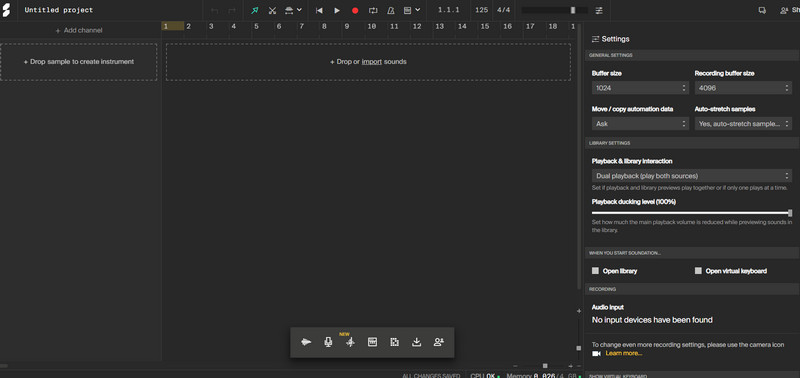
For a closer look at Soundation's professional capabilities and extended features, see the breakdown below:
- Real-Time Collaboration for Music Creation
For users working in teams, Soundation's real-time collaboration feature is highly practical. By sharing a link, others can join your project, view your work, and contribute ideas or edits together.
- AI-Powered Music Generation
Soundation includes the Gennie AI sample generator. With just a simple text prompt and a bit of creative adjustment, users can quickly generate unique Sprunki-style music samples.
- Extensive Sound Library for Beat Creation
The built-in Beatmaker section is perfect for creating Sprunki music. Users can either craft their own rhythms or choose from over 20,000 royalty-free loops, sound effects, and sample packs to build dynamic tracks from scratch.
Drawbacks:
- The interface is relatively complex and may not be beginner-friendly for users without music production experience.
- The free version has limitations on usage and access to sound resources.
Price:
Soundation currently offers three subscription plans:
- Starter (Yearly): $4.99/month
- Creator (Yearly): $9.99/month
- Pro (Yearly): $29.99/month
Subscribing to any plan unlocks unlimited project creation.
3. Incredibox Sprunki MOD: Recreating the Classic Sprunki Music Gameplay
If you prefer a tool that recreates classic gameplay while emphasizing interactivity and creative fun, then Incredibox Sprunki Mod is a great option. It is essentially a fan-made Sprunki music remix version based on the classic music game Incredibox. While retaining the original drag-and-drop music creation mechanics, it introduces brand-new Sprunki characters, sound effects, and visual elements. By simply dragging different Beatbox characters onto the stage, users can instantly create rhythmic and layered music tracks in real time.
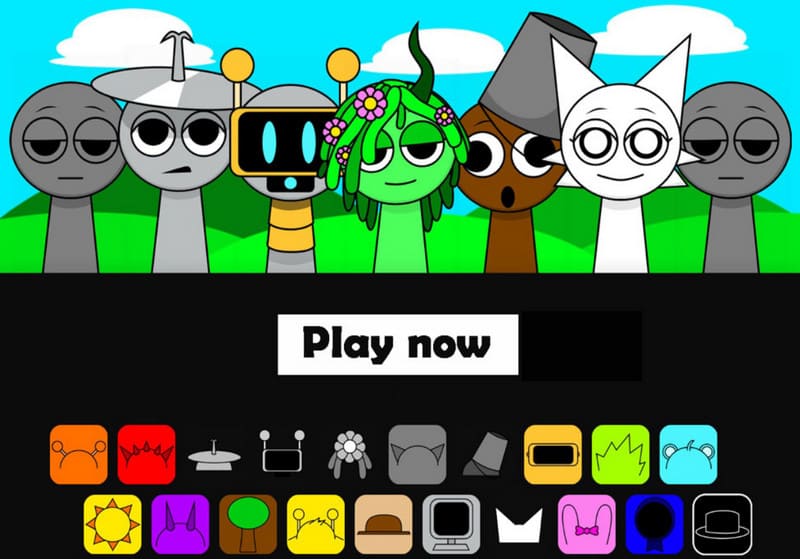
Key Features:
- Drag-and-Drop Character Mixing
This game follows the classic Incredibox mechanics, allowing users to create music through simple drag-and-drop actions. Each character represents a sound element, making the process intuitive and highly enjoyable.
- Sprunki-Themed Voice and Sound Effect Packs
This Sprunki music maker includes a wide range of unique, exclusive sound effects and vocal samples. These distinctive elements are rarely found in other tools, giving your creations a strong identity.
- Real-Time Music and Animation Sync
Character animations move in sync with the rhythm, creating a “what you see is what you hear” experience that enhances immersion and makes the performance more engaging.
- Built-in Short Mix Recording and Sharing
Users can record and share short music loops directly, making it perfect for creating meme music or short-form video content.
Drawbacks:
- The sound library relies on built-in assets, offering limited flexibility for importing custom sounds.
- Not suitable for full-length songs or complex music production.
- Export options are relatively basic.
Price:
Free for use.
How to Create Sprunki Music Online with AI
After the detailed explanations and summaries above, you should now have a solid understanding of Sprunki music makers. Next, it's time to move on to the practical part and see how to actually use these tools. This section will use the most simple and intuitive tool, Vidnoz AI Music Generator, as an example to show you how to make Sprunki music.
Vidnoz Free AI Music Generator
Free to generate & download for commercial use!
- 100+ combinations of musical styles, moods and themes
- Turn your texts into songs and music videos
- AI to create an original song with your lyrics
Create Music with AI
Step 1: Launch Vidnoz AI Music Generator in your browser
After entering the workspace, you'll see three options: generate instrumental music, create a song with lyrics, or let AI create music based on an image. This guide will use Song with Lyrics as an example.
Step 2: Enter your song details
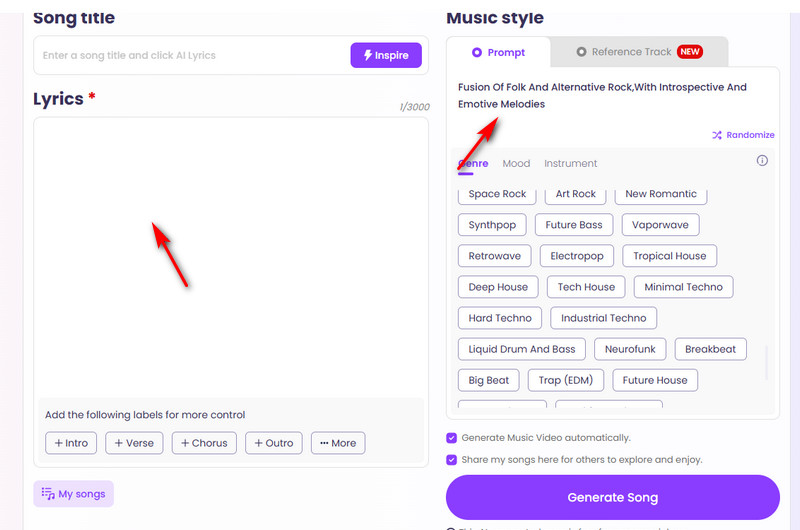
First, give your song a title. Then, enter your Sprunki song lyrics in the text box under Lyrics. Next, move to the right panel and input your detailed prompt in the Prompt box.
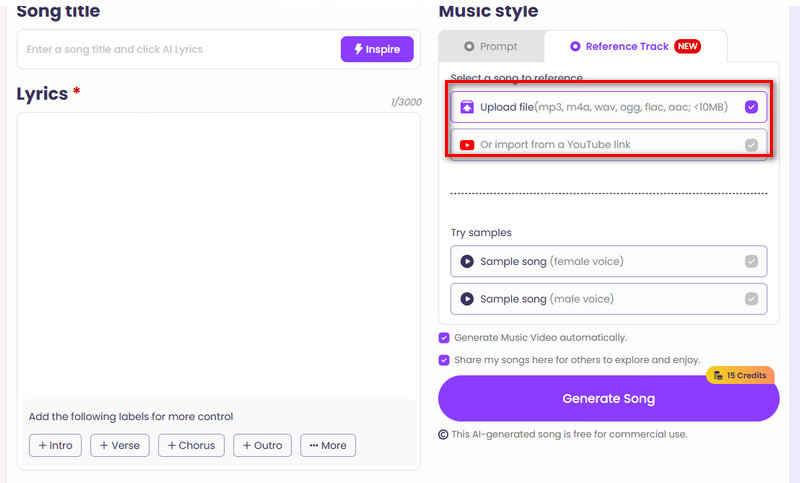
If you want to upload a reference track, switch to the Reference Track option and click Upload file to add your audio.
Step 3: Customize music settings
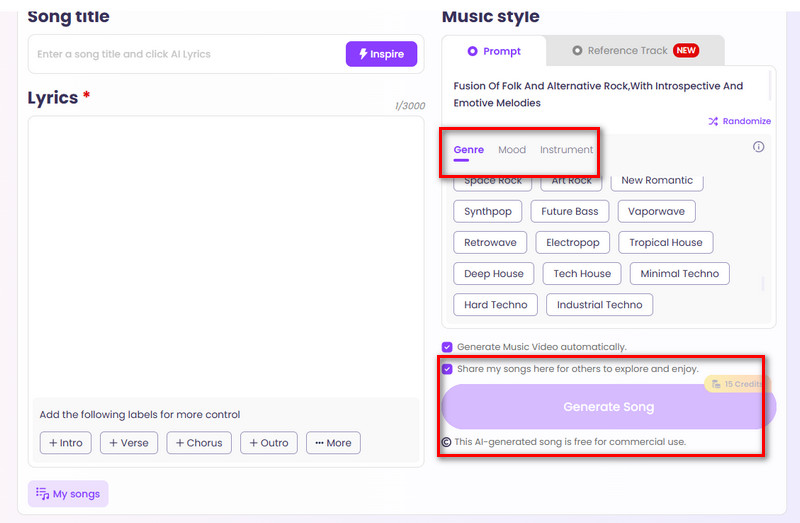
Choose your preferred genre, mood, and instruments to shape the final sound of your track.
Step 4: Generate your music
Once everything is set, click the Generate Song button to create your Sprunki music.
Vidnoz AI Music Video Generator: Make a Singing Sprunki Music Video
After creating your song with Vidnoz, especially one with lyric, you might want to try another feature on the same platform: AI Music Video Generator. It helps you produce a professional-quality music video, including generating a virtual singer using preset options or your own uploaded photo. You can also fully control the final style and aspect ratio to match your creative vision.
Key Features
- AI Sprunki Music Video Online Free
This tool is completely free and web-based, with no installation required. You can easily create and download Sprunki-style music videos in just a few clicks.
- Lip Sync Characters to Perform Your Sprunki Tracks
With advanced lip-sync technology, characters can accurately match their mouth movements to any Sprunki music or vocal track. This creates realistic and engaging performance animations that bring your audio to life.
- Design & Customize Your Sprunki Music Video
Users can fully customize both characters and visual styles, from uploading selfies to generating cartoon or Sprunki-inspired avatars.
How to Make a Music Movie for Your Song
Step 1. First, open Vidnoz AI Music Video Generator in your browser. Then click Upload Music to upload your original song file.
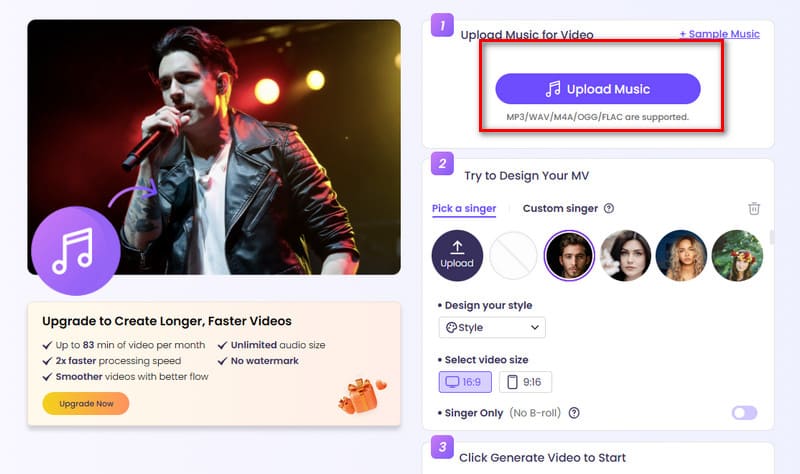
Step 2. Next, choose your virtual singer. Vidnoz provides several preset options, or you can click the circular Upload button to add your own portrait. You can also select Custom singer for more flexibility.
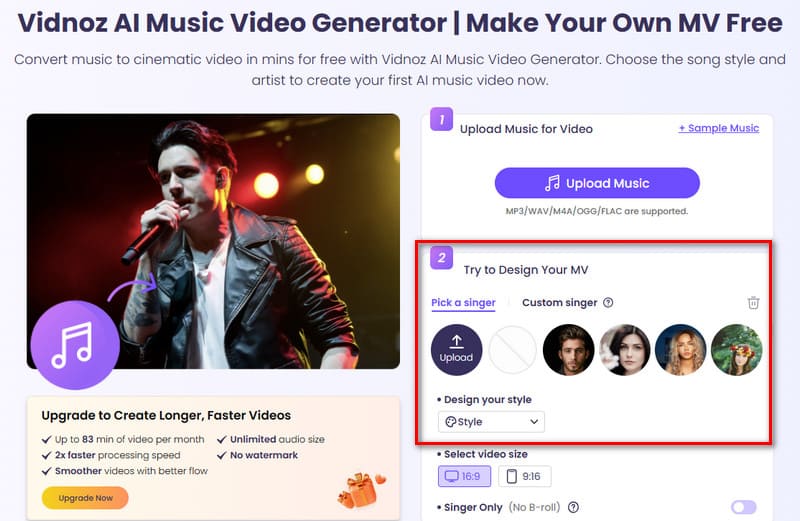
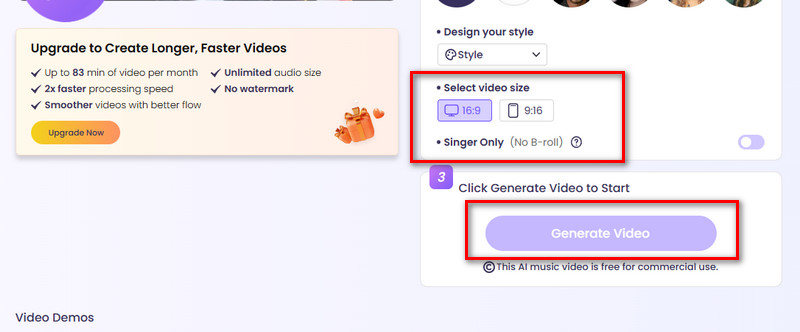
Step 3. Finally, select the MV style and aspect ratio based on your preferences. Once everything is set, click Generate Video.
The Bottom Line
Here are four Sprunki music makers for you to explore. Vidnoz AI Music Generator is the easiest option to use with the most intuitive interface; Soundation, reaches a more professional-level standard; and Incredibox Sprunki MOD stays closest to the original game style. You can choose the one that best fits your needs.
Overall, however, Vidnoz AI Music Generator stands out as the most user-friendly and versatile option for all types of users. With it, you can turn text or images into highly rhythmic music, and even take things further by creating a dedicated music video for your Sprunki tracks.
Vidnoz Free AI Music Generator
Free to generate & download for commercial use!
- 100+ combinations of musical styles, moods and themes
- Turn your texts into songs and music videos
- AI to create an original song with your lyrics
Create Music with AI