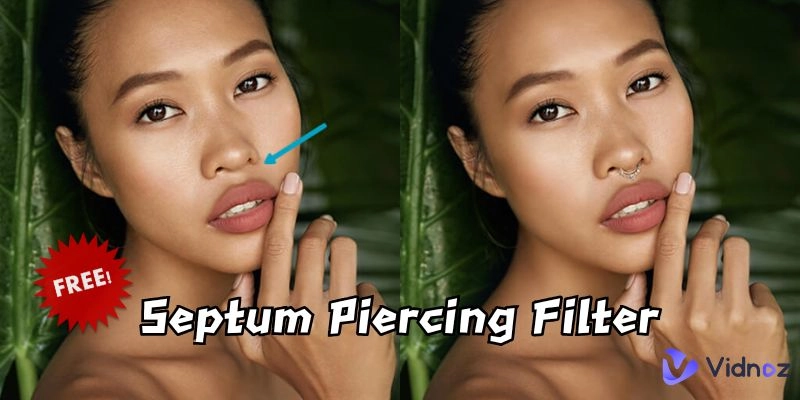
Someone considering a septum piercing but unsure how it will suit their face no longer has to guess. With the rise of septum piercing filters, they can try on rings, hoops, and studs virtually, testing placement and style without pain or commitment. These septum piercing filter platforms allow users try different types of looks for free, so anyone can explore bold or subtle options before taking the plunge.
In this guide, we’ll explain how septum piercing filters work, what to expect when using them, and which platforms are worth trying. Keep reading to see if this is suitable for you.
- On This Page
-
-
What is Septum Piercing & Septum Piercing Filters
-
Would I Look Good with a Septum Piercing?
-
Try Virtual Piercing Online with the Best 3 Septum Piercing Filters
YouCam Online Editor: Piercing Filters Online for Virtual Piercing Try-on
OpenArt Free Nose Piercing Filter: Different Piercing Types to Choose From
TikTok Septum Piercing Filter: View Trendy Septum Piercing Filter
-
Make Your Septum Piercing Photo Talk with AI Talking Photo Free
-
FAQ – Septum Piercing Filter
Q: Are there any apps or filters to try on piercings?
Q: How can I virtually try on piercings before getting one?
Q: How to see what piercings would look on you?
What is Septum Piercing & Septum Piercing Filters
A septum piercing is a body modification in which a small item of jewelry, a ring or horseshoe barbell, is placed through the cartilage wall between your nostrils. It is grounded on different cultural customs and has transformed into an in-thing in the contemporary fashion. Although most people love the daring look, there are those who miss it because of aversion to pain, healing duration, or even the fear of doubt as to whether it can fit their faces or not.
This is where a septum piercing filter is used. A fake septum piercing filter enables you to see what the piercing will look like without making the real commitment. Such filters are available in different apps such as TikTok and Instagram or on online websites that provide virtual make-ups. With a nose piercing filter online, you can immediately switch piercing styles, test jewelry sizes and share the outcomes with friends before deciding.
Would I Look Good with a Septum Piercing?
Asking questions like; “Would I look good with a septum piercing filter?” is one of the most commonly asked questions. This happens to be dependent on your face shape and style. Delicate hoops tend to work best with round faces, and bold jewelry tends to look good with angular faces. Oval faces, however, are able to carry almost any style.
See how it works out with an Instagram septum piercing filter or one of the septum piercing filter online tools. Some sites even allow you to do a what is my nose shape picture test in order to match your face shape to the jewelry; hence the process is enjoyable and participating.
Try Virtual Piercing Online with the Best 3 Septum Piercing Filters
Are you willing to know how a septum piercing will appear on you? There is a simple way to do it with the help of a septum piercing filter online. Here are 3 of the finest tools you can use today, each having its own features.
-
YouCam Online Editor: Piercing Filters Online for Virtual Piercing Try-on

One of the most popular apps to try on virtual piercings is YouCam Piercing Filter. It is free, convenient, and extremely realistic. This septum piercing filter allows you to experiment with a variety of styles via your browser without downloading an app.
How to use it:
Step 1. Visit the website and upload a photo of yourself.
Step 2. Select the septum piercing filter from the ‘Makeup’ options.
Step 3. Adjust the placement and size to match your face perfectly.
Pros
- Free and accessible.
- Highly realistic jewelry placement.
- Works with multiple piercing types.
Cons
- Requires a clear front-facing photo.
- Limited jewelry customization.

Vidnoz AI - Create Free Engaging AI Video with Talking Avatar
- Easily create professional AI videos with realistic avatars.
- Text-to-speech lip sync voices of different languages.
- 2800+ video templates for multiple scenarios.
-
OpenArt Free Nose Piercing Filter: Different Piercing Types to Choose From

If you like variety, then OpenArt Nose Piercing Filter is best. In contrast to other tools depicting only a single-jewel variant, OpenArt offers a comprehensive array of piercing shapes rings, studs, and barbells. And in case you would want to know what a fake septum piercing filter looks like, the tool enables you to find out in a few seconds and compare.
How to use it:
Step 1. Upload a selfie or use their camera feature.
Step 2. Choose from different nose and septum piercing styles.
Step 3. Save and download your look.
Pros
- Wide selection of piercing types.
- Easy sharing to social media.
- Great for comparing multiple looks.
Cons
- Some advanced styles may look less realistic.
- Works best with high-resolution photos.
-
TikTok Septum Piercing Filter: View Trendy Septum Piercing Filter

TikTok has many funny and fashionable filters, and Septum Piercing AI TikTok filter is not an exception. This filter allows applying a fake septum piercing filter to your video instantly and viewing the effect in real-time. The bonus is that you can swipe through endless videos of other people applying the same filter so that you can learn, “Would I look good with a septum piercing filter?”
How to use it:
Step 1. Open TikTok and search for septum piercing filter.
Step 2. Tap “Try This Effect.”
Step 3. Record yourself and preview the look.
Pros
- Real-time preview with motion.
- See how others styled it.
- Easy to share with followers.
Cons
- Limited jewelry options.
- Requires TikTok app installation.
Make Your Septum Piercing Photo Talk with AI Talking Photo Free

The thought of bringing your septum piercing filter online photo to life will shock you. Using AI talking photo platforms, a static selfie could be made to talk, move, and even move like a real-life self-portrait. This gives an imaginative touch in case you are trying your piercing on with friends.
Vidnoz AI Talking Photo is one of the finest tools in this regard. It allows you to upload your fake septum piercing filter photo and turn it into a short talking video. What’s more, it’s 100% free tool to use.
How to Make a Septum Piercing Image to Video:
Step 1. Visit the free AI video generator Vidnoz and navigate to AI Talking Photo, and upload your pierced photo.
Step 2. Select a voice and animation style.
Step 3. Export your talking video.
FAQ – Septum Piercing Filter
Q: Are there any apps or filters to try on piercings?
Indeed, such apps as YouCam, OpenArt, TikTok, and Instagram provide these options as septum piercing filters online.
Q: How can I virtually try on piercings before getting one?
You may input a photo onto free platforms such as YouCam, or opt to use real-time applications such as the Instagram septum piercing filter.
Q: How to see what piercings would look on you?
Just give a shot to a fake septum piercing filter. To learn how to do the septum piercing filter on Instagram by searching the filters and tapping on the option “Try It.”
The Bottom Line
Always wondered, “Would I look good with a septum piercing filter?”, the answer is just a single click away. Whether you are using a free app, such as YouCam or OpenArt or a fun social app, such as TikTok or Instagram, there are numerous options to test a septum piercing filter online without having to take the plunge. Is it your wish to experiment with a fake septum piercing filter or learn how to do the septum piercing filter on Instagram, apply these tools and have no hesitations in making a choice. And to make it even more real, with Vidnoz AI, make your pierced photos talk and share them creatively.






![How to Make a Figg AI? [Figgs AI Review & Free Alternative]](https://www.vidnoz.com/bimg/cover-of-how-to-use-figgs-ai.webp)
![Make a Video for Your Girlfriend: Free & Fast [2026]](https://www.vidnoz.com/bimg/video-for-my-girlfriend.webp)