There are so many noises in the world that can easily make you feel agitated and distracted. In such a noisy environment, finding moments of calm is rather difficult. This is where a reliable noise generator can truly help. By producing consistent background sounds, a noise generator helps mask disruptive noise, creating a more peaceful atmosphere for sleep and work. Want to learn more? Check out the top 5 AI noise generators options and create ambient soundscapes that effectively drown out disturbances and boost focus in this blog!
- On This Page
-
5 Top-Rated Noise Generators
1. Online Background Noises
3. Use Vidnoz AI Music Generator
-
White Noise Generation Ideas
-
Bonus: Add White Noise to Videos
5 Top-Rated Noise Generators
Struggling with unwanted background sounds? AI Noise generators provide an effective way to mask distractions. We have collected the 5 best options for easy background noise audio creation.
1. Online Background Noises
Online Background Noises is a user-friendly web-based tool designed to mask distracting sounds with relaxing audio. What sets it apart is its high-quality recordings captured from real sampling, delivering an authentic and immersive sound experience online.
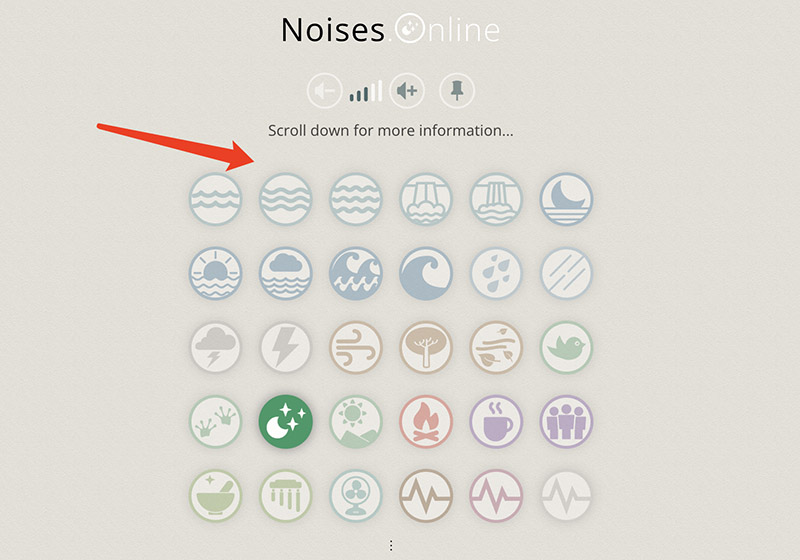
Unlike more complex platforms, the generator noise cover focuses on simplicity. Just click on the pictogram to play its associated sound. With instant access to sounds like rain, creek, waterfall, ocean waves, white noise, and more, the app is surely the best free noise machine for sleeping and work.
How to use it:
Step 1. Visit the noises.online. No need to sign up.
Step 2. Pick an icon to play the noise. Adjust the volume as you see fit.
Step 3. Choose the tone and liveness. Name the combination as your background noise setup.

2. Noise Generator
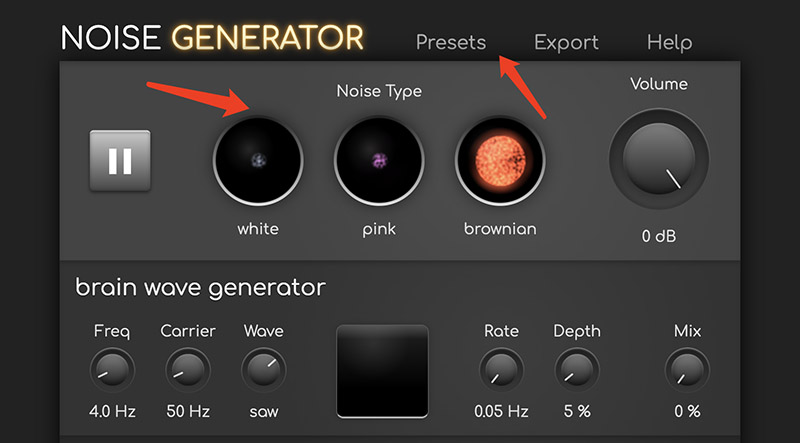
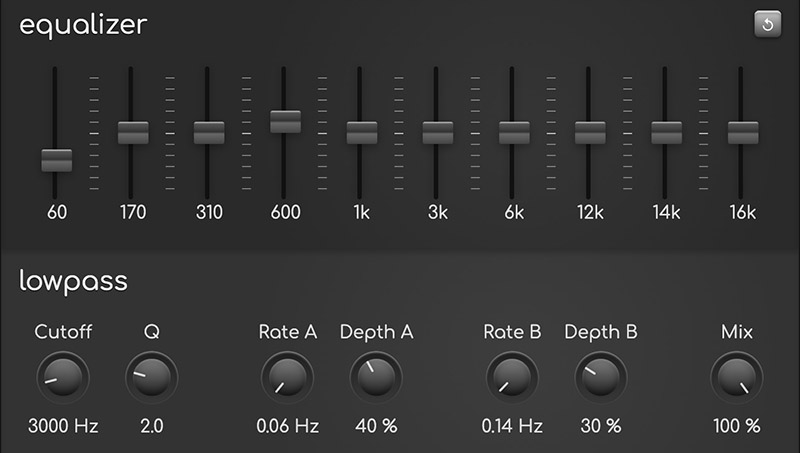
The Noise Generator is an innovative online tool that can play white, pink, and brownian noise with advanced adjustments. It comes with multiple preset sounds, a brain wave generator for binaural beats, a 10-band equalizer, and low-pass filters for dynamic effects.
Whether you want to mask distracting noise, boost concentration, or simply want to experience audio fun, the AI noise generator offers the options you need. For those who are looking for a customizable AI noise machine for sleeping, its precise control can create a soothing sound environment.
How to use it:
Step 1. Navigate to 29a.ch/noise-generator and select a base noise type on top.
Step 2. Choose a preset like Focus. Adjust the brain wave frequency, carrier wave, waveform, and rate/depth to shape the sound.
Step 3. Fine-tune the equalizer for gain across frequencies and apply a low-pass filter. Then play to hear your creation.
3. Use Vidnoz AI Music Generator
While previous AI noise generators excel at real-time masking, they rely on constant internet connections. For offline noise machine sleep use, Vidnoz AI Music Generator is an ideal choice. This versatile noise generator lets you create custom white noises for offline playback through text prompts or images.
This versatile noise generator supports various functions. For instance, text to song for instrumental ambient tracks, Song with lyrics for melodic relaxation, image to song for turning visuals into audio, and even an AI music video generator with synchronized visuals. For hip-hop enthusiasts, you can even use it as an AI rapper voice generator by uploading reference rap tracks. Best of all, all creations are fully royalty-free and customizable!
Vidnoz Free AI Music Generator
Free to generate & download for commercial use!
- 100+ combinations of musical styles, moods and themes
- Turn your texts into songs and music videos
- AI to create an original song with your lyrics
Create Music with AI
How to use it:
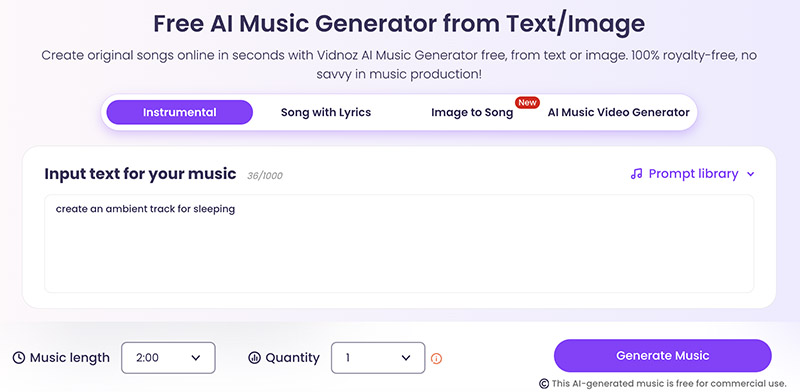
Step 1. Head to Vidnoz AI Music Generator. Choose the Instrumental tab as your AI noise generator.
Step 2. Input text prompts to describe the background track, for instance, ambient music for sleeping. Select the length and quantity.
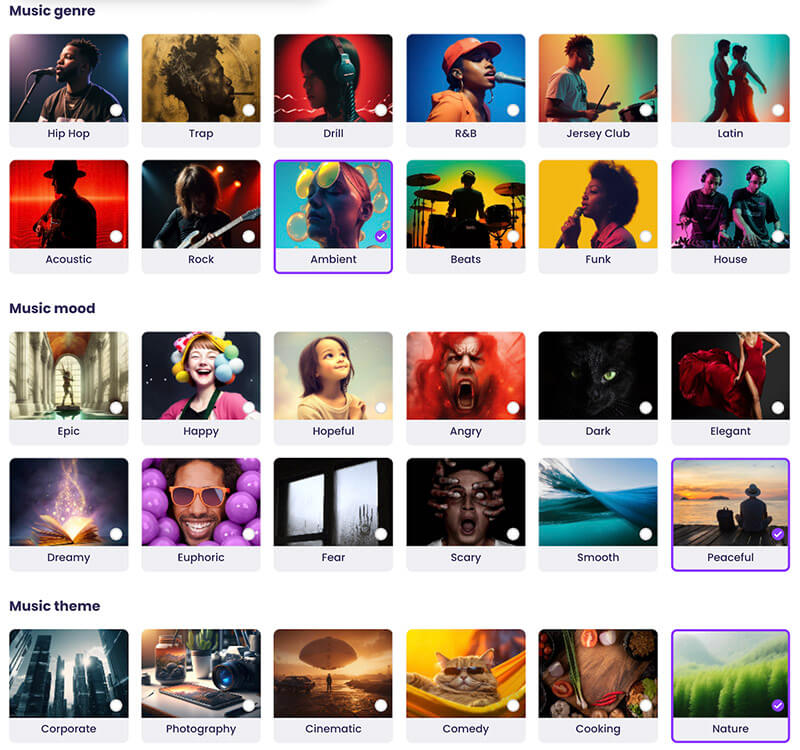
Step 3. Or you can choose the genre, mood, and theme as you see fit. Generate and download the audio for free.
Tip: After you create white noise audio, you can use AI music mashup tools to combine multiple tracks for longer sleep sessions or more immersive relaxation experiences.
4. myNoise
myNoise is a comprehensive platform that offers a vast library of sounds that can enhance focus, relaxation, and sleep. You can find your audio haven via the purposes outlined, for instance, Meditation & Relaxation, Sleep Aid, Brain Hacking, Stress & Anxiety Relief, and many more.
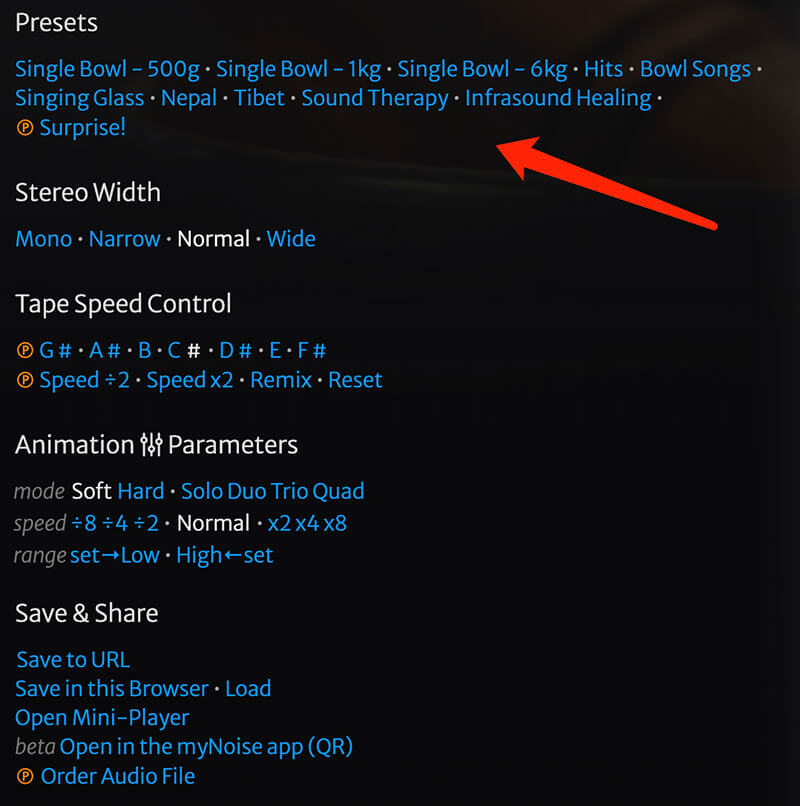
Each myNoise generator includes customizable sliders for adjusting sound elements and levels. Users can also personalize the noise generator with options like presets, stereo width, tape speed, etc. Combining a simple UI for quick navigation, the app is an excellent noise generator for therapeutic or daily use.
How to use it:
Step 1. Head to myNoise generator. Pick a section such as Meditation & Relaxation.
Step 2. For instance, in the “Singing bowl” tool, adjust the slider to increase/decrease levels.
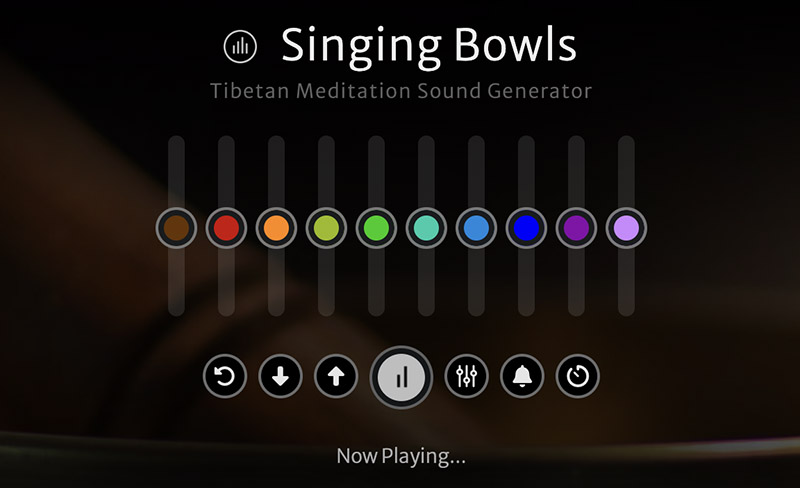
Step 3. You can also pick a preset to load new sliders. Adjust stereo width, tape speed, etc., based on your preference.
5. Muted.io
Muted.io is a platform dedicated to music theory and audio tools, offering various utilities that can enhance music learning and creativity in sound design. Its creative interface stands out with a playful yet minimalist style, featuring friendly emojis that make navigation intuitive and engaging.
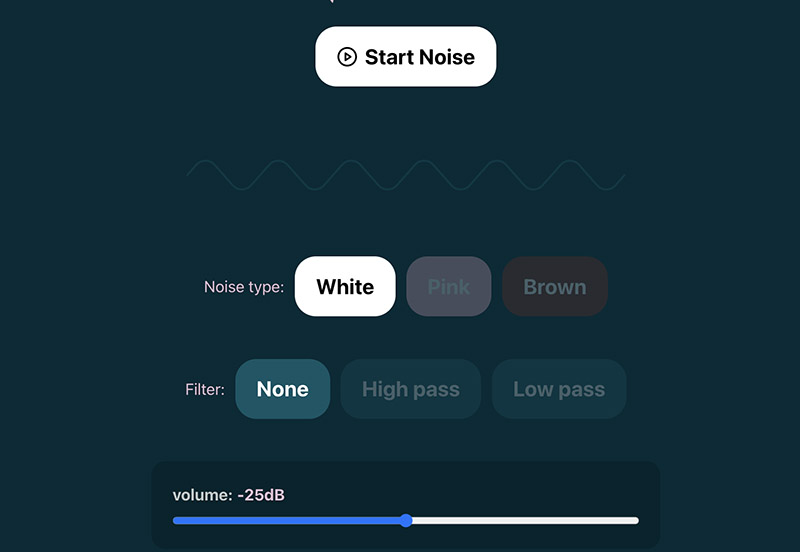
Its AI noise generator is a free online tool focused on producing white, pink, or brown noise. It comes with optional high-pass and low-pass filters for precise frequency customization. These adjustable random audio make Muted.io ideal for improving focus, sleep, or effectively drowning out distractions. Best of all, no sign-up or subscriptions!
How to use it:
Step 1. Navigate to the Muted.io noise generator.
Step 2. Choose the noise you want to listen to. Adjust the filter and volume as you see fit.
Step 3. Click on the Start noise to begin your sound journey.
White Noise Generation Ideas
With the top 5 noise generators detailed above, you can easily create custom white noise. Below are some good ideas to try with a noise generator.
Ocean Waves: Continuous rolling wave sounds that calm the mind, reduce stress, and support deeper sleep.
Rain Drops: Soft rainfall patterns that mask background noise, enhance focus, and promote relaxation during rest.
Bonfire Crackling: Gentle fire crackles, creating warmth and comfort, ideal for relaxation, reading, or nighttime calm.
Forest Night Ambience: Subtle nighttime forest sounds that feel immersive and soothing for mental clarity.
Gentle Wind Noise: Light, steady wind sounds that block sudden disturbances and maintain a peaceful environment.
Bonus: Add White Noise to Videos
After creating your custom sound with a noise generator, one good idea is to add it to videos using Vidnoz. By combining visuals and soothing audio, you can deliver a more immersive and relaxing experience. It’s quite useful for making sleep videos, meditation content, or calming backgrounds.
How to add white noise as background music
Step 1. Open Vidnoz AI and make sure to log in with your account.
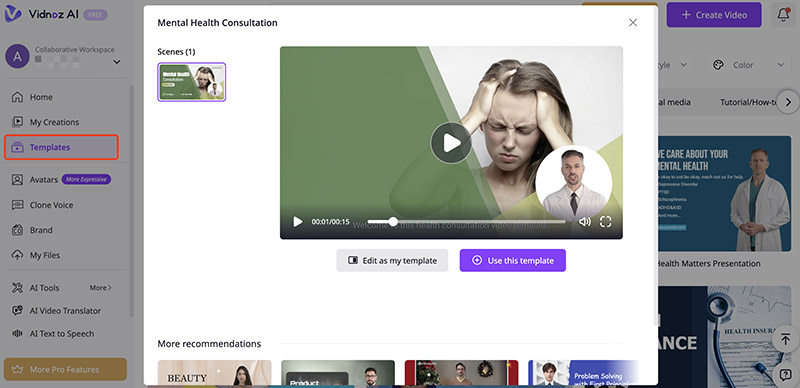
Step 2. Choose a template to begin with. You can also create a video from scratch.
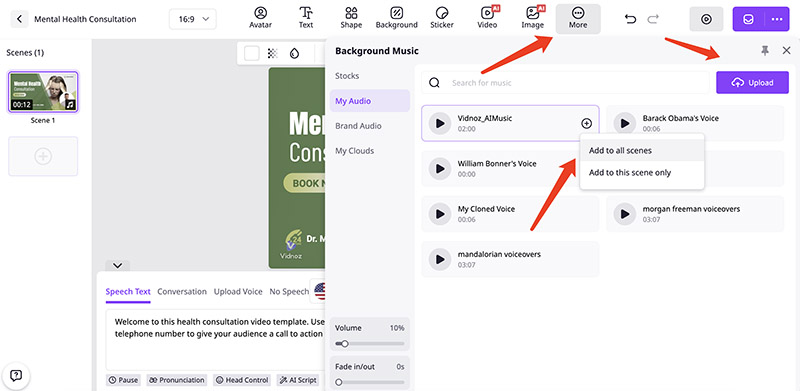
Step 3. Go to the More menu on top and upload your noise audio. Choose to apply to one or all scenes.
Step 4. Edit the video using the tools on the template. Adjust the language, AI voice, replace the avatar, and other elements. Click on the Generate button, and that’s it.

Vidnoz AI - Create Free Engaging AI Video with Talking Avatar
- Easily create professional AI videos with realistic avatars.
- Text-to-speech lip sync voices of different languages.
- 2800+ video templates for multiple scenarios.
The Bottom Line
A noise generator is an essential tool for sleep, focus, and relaxation. As you can see, Vidnoz AI stands out as a powerful solution. You can create customizable audio and easily add it to videos for different scenarios. Beyond white noise, it offers a variety of AI tools, including text-to-speech, kid voice changer, talking avatar, and more. For anyone looking to generate high-quality white noise with versatile features, Vidnoz AI is a reliable choice. Try it and experience the results yourself!