A book trailer is one of the most creative ways to bring any story to life for the reader without even opening the first page. Ever wondered how to make a book trailer that instantly grabs readers' attention? With the rise of AI technology, making professional-looking trailers has never been easier or more affordable. You no longer need fancy equipment or a big budget.
This blog will make it possible for you to create an engaging and exciting book trailer that you can share with others with our step-by-step guide. You will learn about the powerful AI tools and editable templates that will assist you in the process. So, without any further wait, let's begin the adventure and turn your book into a cinematic experience!
- On This Page
-
What is a Book Trailer?
-
What Should an Eye-Catching Book Trailer Include?
-
Preparation Before Making a Book Trailer
#2. Great Book Trailer Maker
-
How to Make a Book Trailer? An Easy-to-Follow Gradual Guide
What is a Book Trailer?
A book trailer is basically a short video for the readers that tells all about the book in a concise, exciting, and visual manner. It is about one to four minutes long. Think of it like a movie trailer—but for books! By watching this trailer, readers can get a quick taste of the story, characters, and emotions they can expect from the book.
A well-made book trailer builds curiosity and excitement, which helps the authors and publishers in marketing and grabs more attention online. Whether it's a fantasy novel, a heartfelt memoir, or a gripping thriller, a good trailer invites readers to dive deeper into the pages.
What Should an Eye-Catching Book Trailer Include?
When learning how to make a book trailer, it’s important to know what makes it stand out. A great book trailer is short but full of energy. Here’s what you must include:
- Book Title and Author Name: This is the most important thing. Always introduce the basics upfront.
- Plot Teaser: Show just enough drama or emotion to hook viewers, without revealing major spoilers to develop curiosity in the readers.
- Eye-catching Visuals: You may add dynamic images, short video clips, or even animated scenes - anything that serves the purpose.
- Emotional Voiceover: A powerful voiceover makes viewers feel connected to the story.
- Background Music: It is another important feature of a book trailer. A suitable soundtrack sets the mood and enhances the emotional pull.
- Call to Action: The end of the trailer should include a call to action that encourages viewers to buy the book, visit the website, or learn more.

The key to remember here is: less is more. The goal is to excite, not explain every detail.
Preparation Before Making a Book Trailer
Before diving into the technical steps, a little preparation goes a long way when learning how to make a book trailer. Then what do you need?
#1. Book Trailer Content
First, gather your materials:
- Basic Info: Book title, author name, and a short description.
- Story Highlights: Choose dramatic, emotional, or funny scenes that will grab attention.
- Visual Assets: Collect or create images, short clips, or animations that reflect your book’s mood.
- Voiceover Script: Write a few lines that summarize the spirit of your book in an emotional way.
Good planning makes the trailer much easier to build later.
#2. Great Book Trailer Maker
Once you have all the required content, it is time to look at the technical aspect of making the tailor. It doesn't matter if you are a beginner because a powerful tool can make all the difference. Vidnoz AI is one of the best options for making book trailers. So, if the question ever arises “How do I make a book trailer easily”, you know the answer.

Vidnoz AI - Create Free Engaging AI Video with Talking Avatar
- Easily create professional AI videos with realistic avatars.
- Text-to-speech lip sync voices of different languages.
- 2800+ video templates for multiple scenarios.
Key Features
- Editable Templates: Vidnoz provides a huge range of free, customizable templates specially designed for book trailers.
- AI Professional Voiceovers: Pick from hundreds of AI voices with different emotions, tones, and languages.
- AI Avatars: Bring characters or narrators to life with vivid AI-created avatars.
- Free Stock Media: Access a large library of free stock images, videos, and background music to enrich your trailer.
- AI Image Generator: Create custom images that perfectly match your book’s theme using AI.
- AI Video Translator: Translate your trailer into over 140 languages to reach a global audience easily.
If you want a book trailer maker free, Vidnoz AI is an amazing choice that does not require any complicated editing. Unlike other tools, it offers not just drag-and-drop editing but also smart AI features that save time while improving quality.
How to Make a Book Trailer? An Easy-to-Follow Gradual Guide
Now that you're prepared, let’s explore step-by-step how to make a book trailer using Vidnoz. Follow these simple steps and create a stunning trailer even if you're a beginner!
Step 1 Create a Free Vidnoz Account
It’s quick—just your email and a password, no complex setups and no costs.
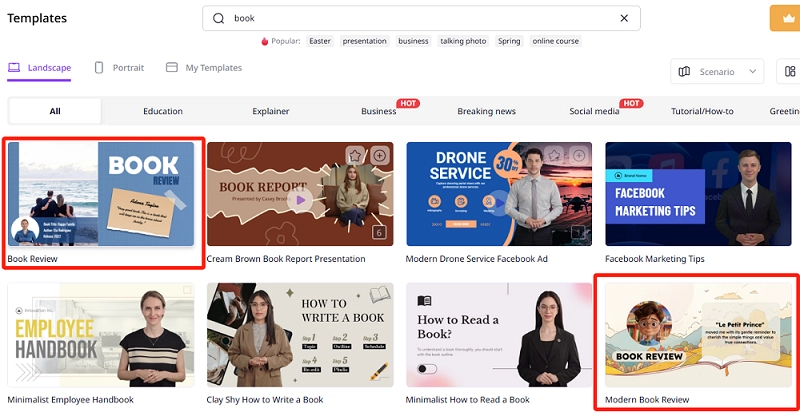
Step 2 Choose a Template
Vidnoz offers dozens of beautiful templates, each suited for different book genres. Whether your book is a romantic novel or an action-packed thriller, you’ll find a theme that matches. You may try searching keywords related to your book to find the best fit.
Step 3 Edit the Text Content
Personalize the on-screen text that shows on the front:
- Insert your book title.
- Add the author's name.
- Briefly hint at the book’s mood or theme with short punchlines.
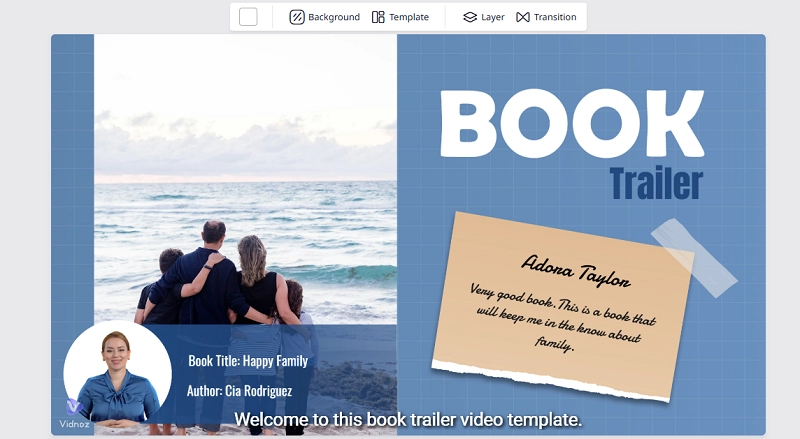
You need to make sure every word counts.
Step 4 Upload Your Assets
You have three options:
- Upload your images and videos from your computer.
- Pick free resources from Vidnoz’s built-in stock.
- Or, use the AI image generator to create custom illustrations that align with your book's world.
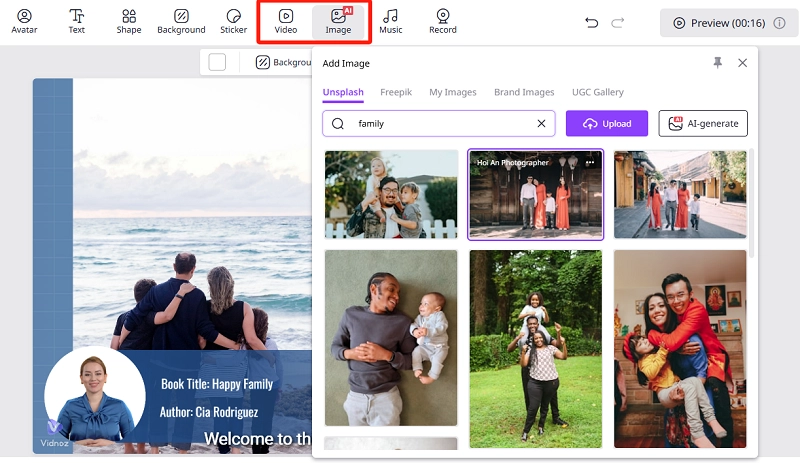
This flexibility makes Vidnoz not just a book trailer maker, but an all-in-one creative studio.
Step 5 Add AI Avatars and Voiceovers
Now, it is time for the voice. You may choose an AI avatar to act as a narrator or character.
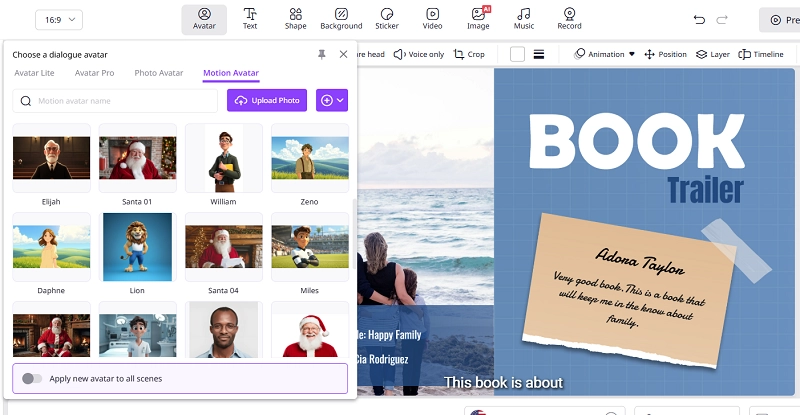
Moreover, you can also add a voiceover: There is a wide range of AI voices to select from, or you may upload your own recording. Vidnoz automatically generates subtitles from your audio for better engagement. This makes it feel more professional and lively, which is a key element for standing out.

Step 6 Preview and Generate the Book Trailer
Finally, watch a full preview. Check for timing, transitions, and whether the emotional beats land. When happy, click generate and download your final trailer for free. You can also share it instantly on YouTube, TikTok, Instagram, or your author website. No advanced video skills needed—just creativity and a few clicks!
Vidnoz AI - Create Free Engaging AI Video with Talking Avatar
- Easily create professional AI videos with realistic avatars.
- Text-to-speech lip sync voices of different languages.
- 2800+ video templates for multiple scenarios.
Conclusion
Learning how to make a book trailer doesn’t have to be complicated. With the right preparation and a powerful book trailer maker free like Vidnoz, even beginners can create professional and emotional book trailers quickly and easily. Remember to focus on short, powerful visuals and strong storytelling. If you're searching for a reliable online book trailer maker, try Vidnoz now to feel the magic!