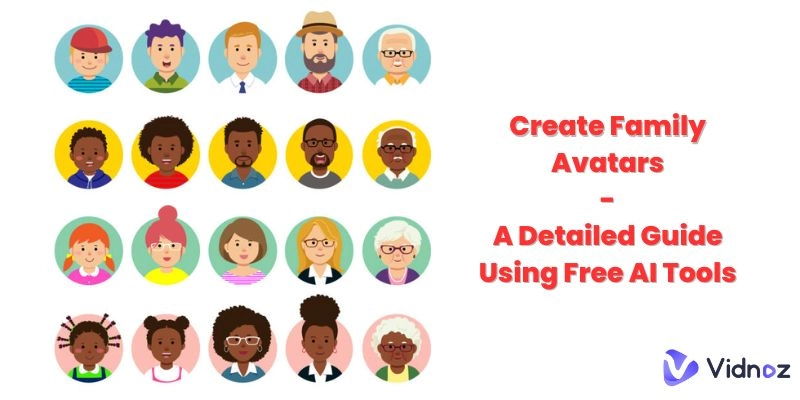
A family avatar is the next big leap in the AI avatar business. As a pretty unique way of representing your loved ones in a digital format, you can use a family avatar maker to capture their essence and personalize their digital reflection.
So why not pop a little fun into your life and make family avatar with family photos You can try out vectors, cartoons, or even Studio Ghibli styles to be extra whimsical!
- On This Page
-
-
Different Types of Family Avatars
#1: Family Avatar Vectors
#2: Cartoon Family Avatar
#3: Studio Ghibli Family Photo Avatar
-
How to Make Family Avatar Vectors
Step 1: Decide what kind of family avatar you want to make and visit Canva.
Step 2: Search family avatar and find your favorite.
Step 3: Customize the family avatar.
Step 4: Download the family avatar and share it with your friends.
-
How to Create Cartoon Family Avatar from Photo
-
How to Create Studio Ghibli Family Photo Avatar
-
Fun Try: Text to Family Avatar Photo to Customize Unique AI Family Portrait
How Can You Make Prompt to Family Avatar with Vidnoz AI?
Different Types of Family Avatars
Speaking of which, there are a lot of styles you think about when you’re designing your family avatar. Each of them, after all, offers a distinct aesthetic that you can choose depending on your family’s personality.
#1: Family Avatar Vectors
There’s a lot more to vectors, but simply put, they’re scalable images that maintain their quality at any size — miniature or blown up. That makes them perfect for use in digital formats, be they social media profiles or printed materials.
They also offer that polished look that comes with clean lines, making it a great choice for creating AI family portraits from the image.

Image from vecteezy.com
#2: Cartoon Family Avatar
On the other hand, you could also go for the cartoon style, which adds playfulness to your image, transforming your pictures into an animated version of a family photo avatar that highlights fun and exaggerated features that are bound to make you laugh.
In fact, this style is basically perfect for creating lighthearted and memorable images!

Image from freepik.com
#3: Studio Ghibli Family Photo Avatar
And finally, you might be inspired by the famous Japanese animation studio, Studio Ghibli. Animate family photo avatars with that dreamy and artistic flair and capture the enchanting and detailed artistry characteristic of Ghibli films.

Image from artstation.com
How to Make Family Avatar Vectors
If you’re worried about how to create family avatar vectors, don’t worry, we’ve got Canva! It’s a popular online photo editing tool that enables you to create family avatars easily. It’s a fairly straightforward process:
Step 1: Decide what kind of family avatar you want to make and visit Canva.
Once you’ve logged in or created an account on Canva, decide whether you’re going to make all your family avatars separately or together. Since you want the final version to be together, you should think about the latter option.

Step 2: Search family avatar and find your favorite.
Now that you have an idea of what you want, you can browse or search from the many options available on Canva and try to figure out which style best represents your family.

Click the ‘Graphics’ tab in the elements section, because that’ll narrow down your options for you!

Step 3: Customize the family avatar.
Once the basic image is selected, you can move on to customizing your avatar. Choose different colors and add other elements or embellishments to change up the basic look of the avatar. This has the added effect of personalizing your image to be more personalized.

If you want to really ‘personalize,’ make it from scratch and pick each element for your family to build the avatar.
Step 4: Download the family avatar and share it with your friends.
What’s the use of an avatar you can’t show off? Click on the “Share” option in the top right corner, where you’ll find an option to “Download.” Once you’re satisfied with the rest of the options, then simply click download and share where you wish!

How to Create Cartoon Family Avatar from Photo
Alternatively, it's a fun and imaginative way of creating family memories and turning them into cartoon style. It typically involves tools specifically for people who want to upload a picture of a family and then create the resulting cartoon family avatars. In that case, Vidnoz AI is a great family cartoon photo generator, and you have to follow these steps to do it:
Step 1. Go to the Vidnoz AI Free Cartoon Generator and upload the picture of your family.

Step 2. Click ‘Generate’ to check the cartoon family avatar photo.
Step 3. Check the final cartoon family photo avatar result, download it, and share with your family and friends!
How to Create Studio Ghibli Family Photo Avatar
Creating a Studio Ghibli family photo avatar is a great way to introduce the fantasy and enchantment of Ghibli films into cherished family photos. If you want to give your family photo a Studio Ghibli-inspired look, then you’ve got to use the Vidnoz AI Ghibli Filter:
Step 1. Visit Vidnoz AI Ghibli Filter and upload a picture of your family.

Step 2. Press “Change Now” so the tool can start processing.
Step 3. Check your final Studio Ghibli avatar, download, and enjoy the result!
Fun Try: Text to Family Avatar Photo to Customize Unique AI Family Portrait
Of course, you don’t have to limit yourself to these images or avatars made from pictures you can provide. AI has basically changed the landscape—now, you can use text-to-image to do what you want without any effort!
Prompt family avatar photo generation means you get to achieve unparalleled customization, especially as all you need to do is input descriptive text in the AI system and then let it know what’s good and what’s not. You can try out many different artistic styles or even scenarios that might not be possible in real time.

Of course, the real question is which generator to use to bring this text to life. Our suggestion? Vidnoz AI stands out with its user-friendly interfaces to produce high-quality, customized family portraits.
Key Feature
- Free online tool to use.
- High-quality outputs.
- Easy-to-use interfaces.
- Versatility in style, be it for cartoonish looks or realistic depictions.
How Can You Make Prompt to Family Avatar with Vidnoz AI?
Step 1. Sign up on Vidnoz AI website and navigate to ‘Photo Avatar’.

Step 2. Input your desired family avatar prompt into the box. Be as specific as you want. The more detailed your prompt, the better the AI can visualize your family photo avatar.

Step 3. Confirm the result and download your family avatar!
This method is especially fun. It lets your creativity lead the way instead of forcing you to rely on existing photos. From cozy holiday scenes to a sci-fi version of your family, you get the tools to use it effortlessly. If you’ve never tried it, now’s your chance! Give it a go — it’s free, fun, and very, very powerful.
The Bottom Line
Creating a family avatar has never been easier or more accessible, especially with so many tools. From vector-based images and cartoon styles to enchanting Ghibli filters and AI-powered prompts, you’ve got all sorts of options for every need (and aesthetic)!
With Canva, you can make family avatar vectors from scratch or with pre-existent photos, while with Vidnoz, you can change your photos to fit your cartoon aesthetic or the whimsical Studio Ghibli filters. You can also create family avatar scenes from scratch with AI prompts if you don’t have photos to spare.